Page 1308 of 4449
WARNING CHIME
DI-65
C
D
E
F
G
H
I
J
L
MA
B
DI
Revision: 2004 November 2004 FX35/FX45
Preliminary CheckAKS005NS
CHECK POWER SUPPLY AND GROUND CIRCUIT
1. CHECK FUSE AND FUSIBLE LINK
Check BCM fuses and fusible link for blown-out.
Refer to DI-59, "Wiring Diagram — CHIME —" .
OK or NG
OK >> GO TO 2.
NG >> If fuse or fusible link is blown, be sure to eliminate cause of malfunction before installing new fuse
or fusible link. Refer to PG-3, "
POWER SUPPLY ROUTING CIRCUIT" .
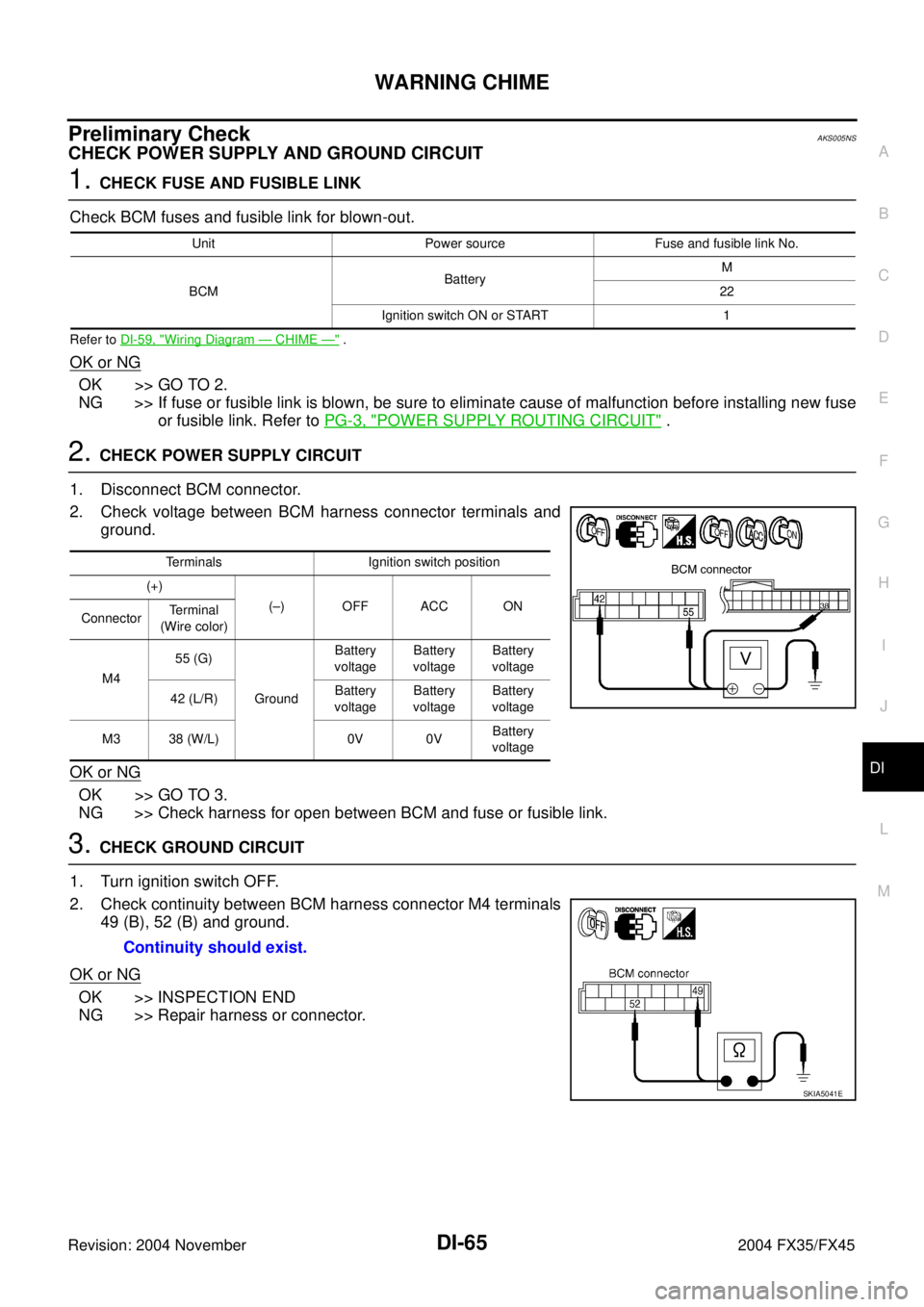
2. CHECK POWER SUPPLY CIRCUIT
1. Disconnect BCM connector.
2. Check voltage between BCM harness connector terminals and
ground.
OK or NG
OK >> GO TO 3.
NG >> Check harness for open between BCM and fuse or fusible link.
3. CHECK GROUND CIRCUIT
1. Turn ignition switch OFF.
2. Check continuity between BCM harness connector M4 terminals
49 (B), 52 (B) and ground.
OK or NG
OK >> INSPECTION END
NG >> Repair harness or connector.
Unit Power source Fuse and fusible link No.
BCMBatteryM
22
Ignition switch ON or START 1
Terminals Ignition switch position
(+)
(–) OFF ACC ON
ConnectorTerminal
(Wire color)
M455 (G)
GroundBattery
voltageBattery
voltageBattery
voltage
42 (L/R)Battery
voltageBattery
voltageBattery
voltage
M3 38 (W/L) 0V 0VBattery
voltage
Continuity should exist.
SKIA5041E
Page 1309 of 4449
DI-66
WARNING CHIME
Revision: 2004 November 2004 FX35/FX45
CONSULT-II FunctionAKS005NT
CONSULT-II performs the following functions communicating with the BCM.
DIAGNOSTIC ITEMS DESCRIPTION
CONSULT-II BASIC OPERATION PROCEDURE
CAUTION:
If CONSULT-II is used with no connection of CONSULT-II CONVERTER, malfunctions might be
detected in self-diagnosis depending on control unit which carry out CAN communication.
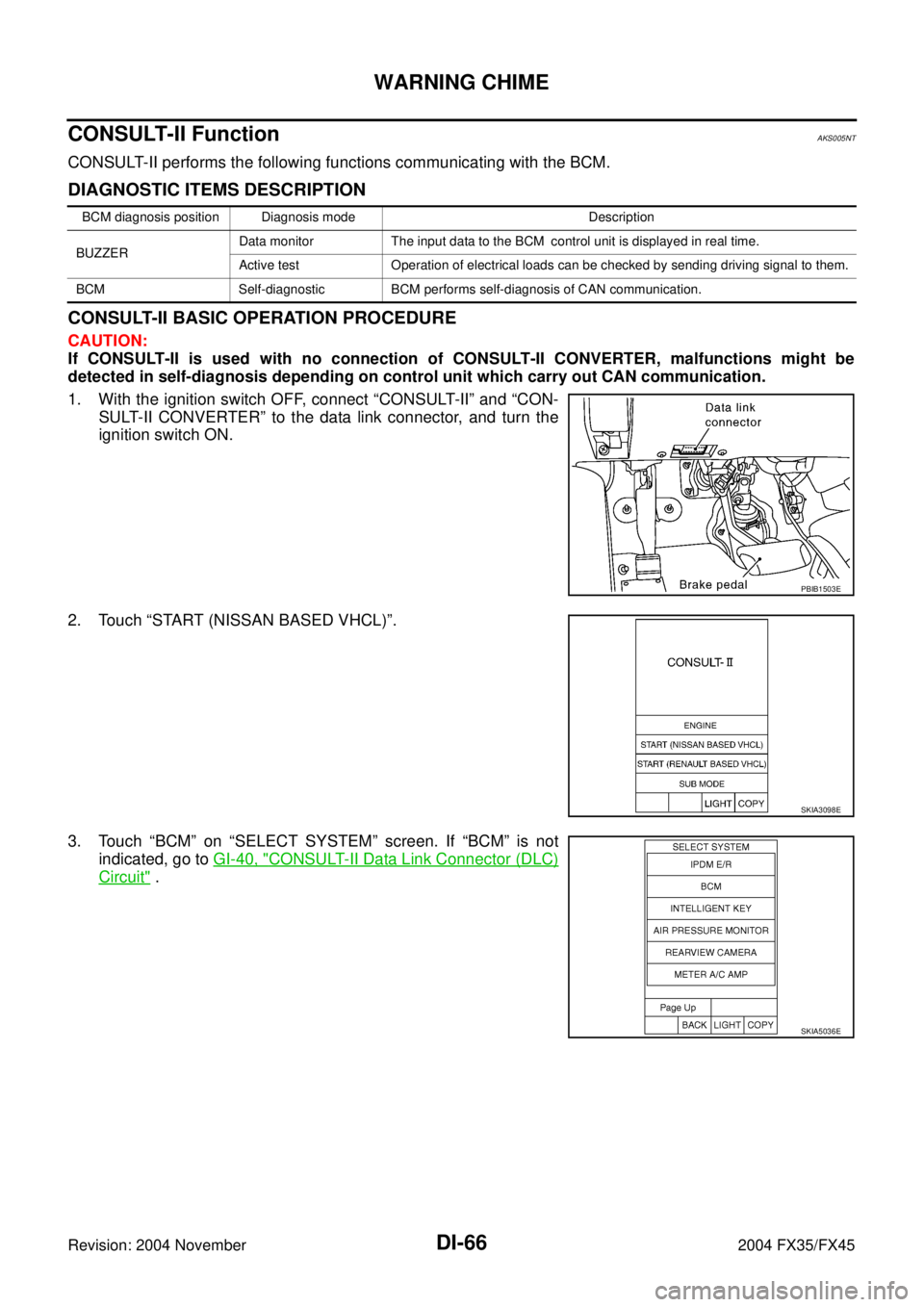
1. With the ignition switch OFF, connect “CONSULT-II” and “CON-
SULT-II CONVERTER” to the data link connector, and turn the
ignition switch ON.
2. Touch “START (NISSAN BASED VHCL)”.
3. Touch “BCM” on “SELECT SYSTEM” screen. If “BCM” is not
indicated, go to GI-40, "
CONSULT-II Data Link Connector (DLC)
Circuit" .
BCM diagnosis position Diagnosis mode Description
BUZZERData monitor The input data to the BCM control unit is displayed in real time.
Active test Operation of electrical loads can be checked by sending driving signal to them.
BCM Self-diagnostic BCM performs self-diagnosis of CAN communication.
PBIB1503E
SKIA3098E
SKIA5036E
Page 1310 of 4449
WARNING CHIME
DI-67
C
D
E
F
G
H
I
J
L
MA
B
DI
Revision: 2004 November 2004 FX35/FX45
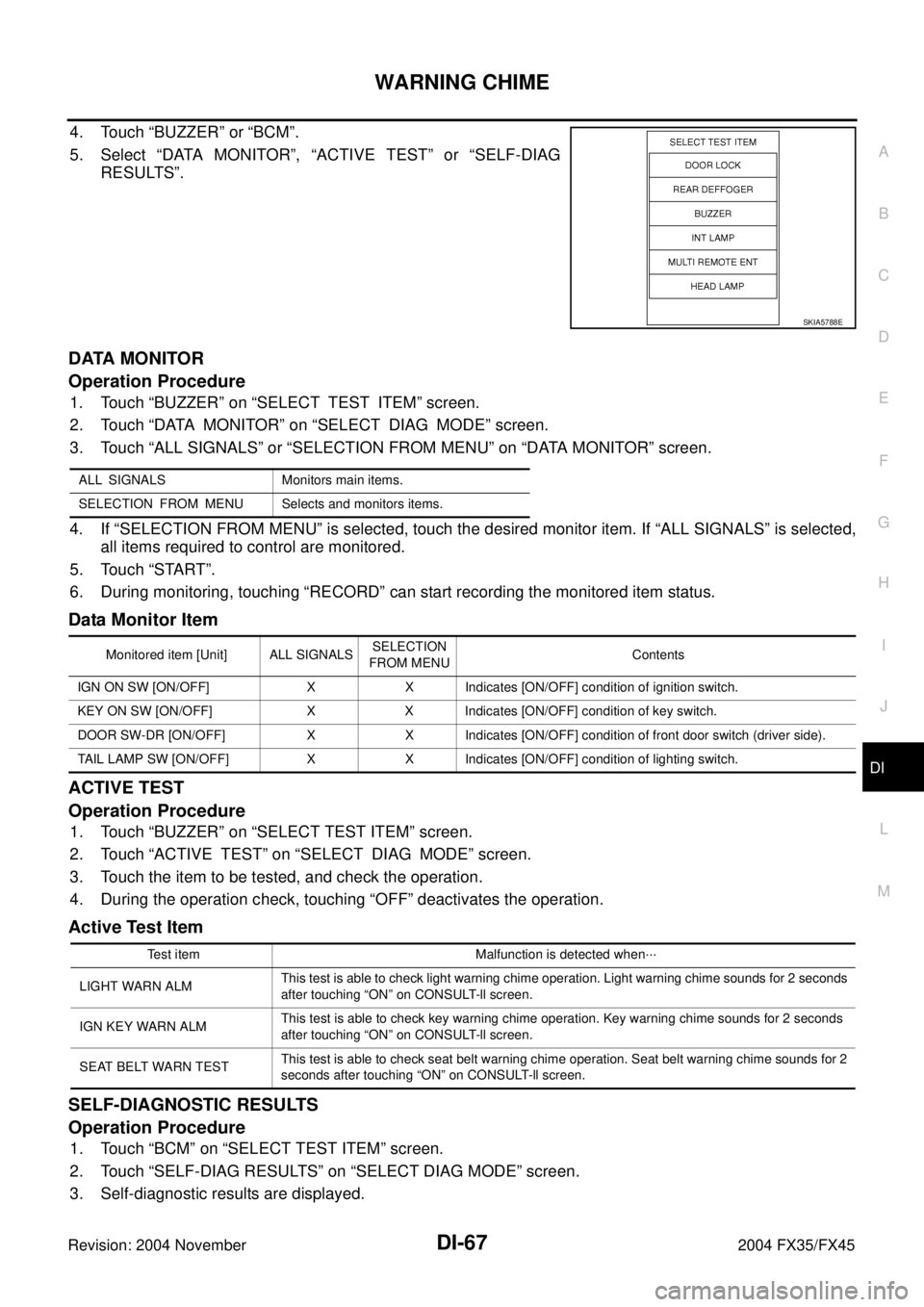
4. Touch “BUZZER” or “BCM”.
5. Select “DATA MONITOR”, “ACTIVE TEST” or “SELF-DIAG
RESULTS”.
DATA MONITOR
Operation Procedure
1. Touch “BUZZER” on “SELECT TEST ITEM” screen.
2. Touch “DATA MONITOR” on “SELECT DIAG MODE” screen.
3. Touch “ALL SIGNALS” or “SELECTION FROM MENU” on “DATA MONITOR” screen.
4. If “SELECTION FROM MENU” is selected, touch the desired monitor item. If “ALL SIGNALS” is selected,
all items required to control are monitored.
5. Touch “START”.
6. During monitoring, touching “RECORD” can start recording the monitored item status.
Data Monitor Item
ACTIVE TEST
Operation Procedure
1. Touch “BUZZER” on “SELECT TEST ITEM” screen.
2. Touch “ACTIVE TEST” on “SELECT DIAG MODE” screen.
3. Touch the item to be tested, and check the operation.
4. During the operation check, touching “OFF” deactivates the operation.
Active Test Item
SELF-DIAGNOSTIC RESULTS
Operation Procedure
1. Touch “BCM” on “SELECT TEST ITEM” screen.
2. Touch “SELF-DIAG RESULTS” on “SELECT DIAG MODE” screen.
3. Self-diagnostic results are displayed.
SKIA5788E
ALL SIGNALS Monitors main items.
SELECTION FROM MENU Selects and monitors items.
Monitored item [Unit] ALL SIGNALSSELECTION
FROM MENUContents
IGN ON SW [ON/OFF] X X Indicates [ON/OFF] condition of ignition switch.
KEY ON SW [ON/OFF] X X Indicates [ON/OFF] condition of key switch.
DOOR SW-DR [ON/OFF] X X Indicates [ON/OFF] condition of front door switch (driver side).
TAIL LAMP SW [ON/OFF] X X Indicates [ON/OFF] condition of lighting switch.
Test item Malfunction is detected when···
LIGHT WARN ALMThis test is able to check light warning chime operation. Light warning chime sounds for 2 seconds
after touching “ON” on CONSULT-ll screen.
IGN KEY WARN ALMThis test is able to check key warning chime operation. Key warning chime sounds for 2 seconds
after touching “ON” on CONSULT-ll screen.
SEAT BELT WARN TESTThis test is able to check seat belt warning chime operation. Seat belt warning chime sounds for 2
seconds after touching “ON” on CONSULT-ll screen.
Page 1311 of 4449
![INFINITI FX35 2004 Service Manual DI-68
WARNING CHIME
Revision: 2004 November 2004 FX35/FX45
Display Item List
NOTE:
If “CAN communication [U1000]” is indicated, after printing the monitor item, go to “CAN system”. Refer to
LA](/manual-img/42/57021/w960_57021-1310.png "INFINITI FX35 2004 Service Manual DI-68
WARNING CHIME
Revision: 2004 November 2004 FX35/FX45
Display Item List
NOTE:
If “CAN communication [U1000]” is indicated, after printing the monitor item, go to “CAN system”. Refer to
LA")
DI-68
WARNING CHIME
Revision: 2004 November 2004 FX35/FX45
Display Item List
NOTE:
If “CAN communication [U1000]” is indicated, after printing the monitor item, go to “CAN system”. Refer to
LAN-4, "
Precautions When Using CONSULT-II" .
All Warnings Are Not OperatedAKS005NU
1. CHECK CHIME OPERATION
Select “BUZZER” on CONSULT-ll, and perform “LIGHT WARN
ALM”, “IGN KEY WARN ALM” or “SEAT BELT WARN” of “ACTIVE
TEST”.
Does chime sound?
YES >> Replace BCM. Refer to BCS-15, "Removal and Installa-
tion of BCM" .
NO >> GO TO 2.
2. CHECK UNIFIED METER AND A/C AMP. INPUT SIGNAL
Select “METER A/C AMP” on CONSULT-II. Operate switches meet
the requirements to sounds warning chime with “BUZZER” of “DATA
MONITOR” and check operation status.
OK or NG
OK >> Replace combination meter.
NG >> Replace BCM. Refer to BCS-15, "
Removal and Installa-
tion of BCM" .
Monitored Item CONSULT-ll display Description
CAN communication CAN communication [U1000] Malfunction is detected in CAN communication.
SKIA6331E
When meet the requirements to
sounds warning chime: BUZZER ON
Except above : BUZZER OFF
PKIA2063E
Page 1312 of 4449
WARNING CHIME
DI-69
C
D
E
F
G
H
I
J
L
MA
B
DI
Revision: 2004 November 2004 FX35/FX45
Key Warning Chime and Light Warning Chime Does Not Operate (Seat Belt
Warning Chime Does Operate)
AKS005NV
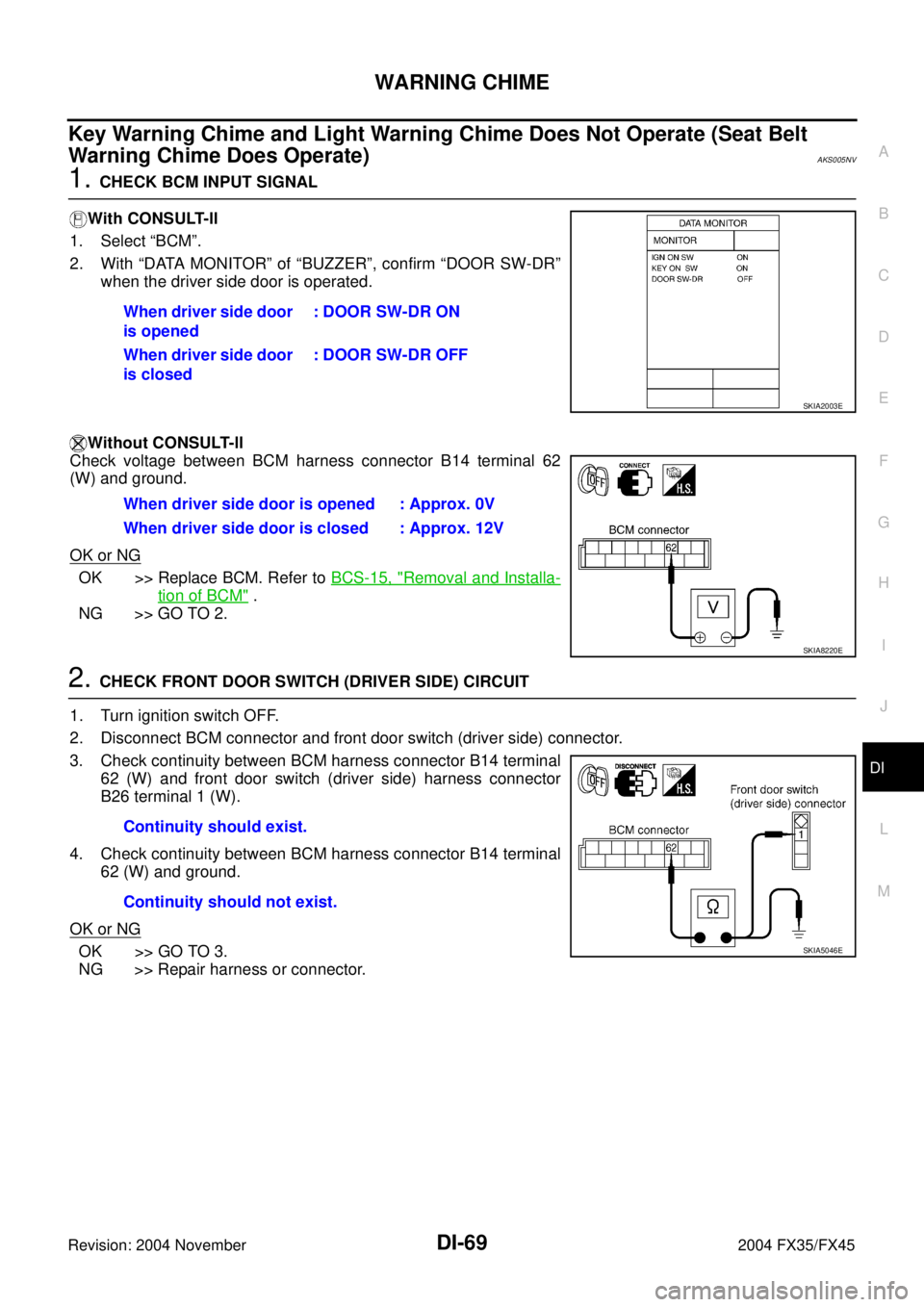
1. CHECK BCM INPUT SIGNAL
With CONSULT-ll
1. Select “BCM”.
2. With “DATA MONITOR” of “BUZZER”, confirm “DOOR SW-DR”
when the driver side door is operated.
Without CONSULT-ll
Check voltage between BCM harness connector B14 terminal 62
(W) and ground.
OK or NG
OK >> Replace BCM. Refer to BCS-15, "Removal and Installa-
tion of BCM" .
NG >> GO TO 2.
2. CHECK FRONT DOOR SWITCH (DRIVER SIDE) CIRCUIT
1. Turn ignition switch OFF.
2. Disconnect BCM connector and front door switch (driver side) connector.
3. Check continuity between BCM harness connector B14 terminal
62 (W) and front door switch (driver side) harness connector
B26 terminal 1 (W).
4. Check continuity between BCM harness connector B14 terminal
62 (W) and ground.
OK or NG
OK >> GO TO 3.
NG >> Repair harness or connector.When driver side door
is opened: DOOR SW-DR ON
When driver side door
is closed: DOOR SW-DR OFF
SKIA2003E
When driver side door is opened : Approx. 0V
When driver side door is closed : Approx. 12V
SKIA8220E
Continuity should exist.
Continuity should not exist.
SKIA5046E
Page 1313 of 4449
DI-70
WARNING CHIME
Revision: 2004 November 2004 FX35/FX45
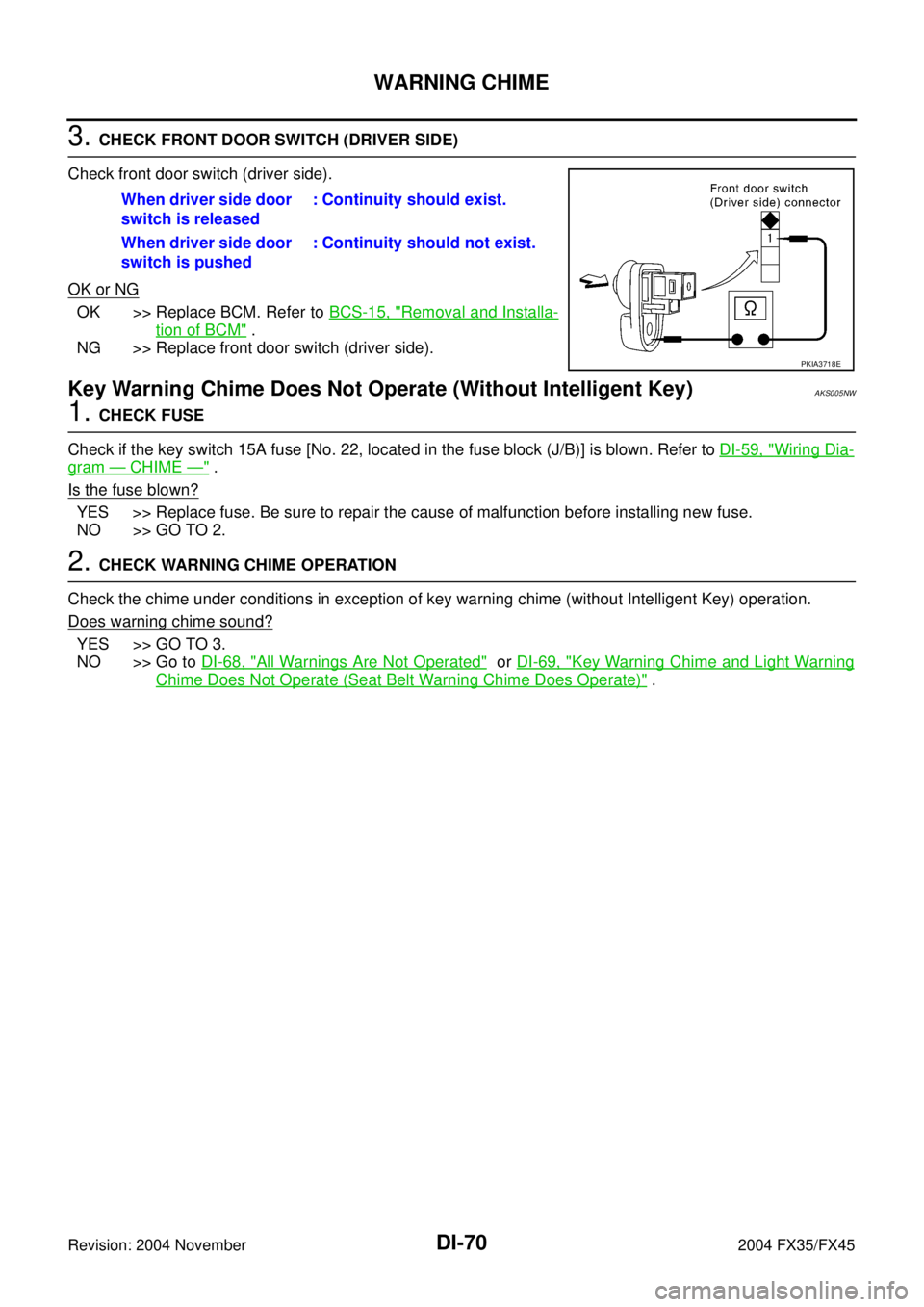
3. CHECK FRONT DOOR SWITCH (DRIVER SIDE)
Check front door switch (driver side).
OK or NG
OK >> Replace BCM. Refer to BCS-15, "Removal and Installa-
tion of BCM" .
NG >> Replace front door switch (driver side).
Key Warning Chime Does Not Operate (Without Intelligent Key)AKS005NW
1. CHECK FUSE
Check if the key switch 15A fuse [No. 22, located in the fuse block (J/B)] is blown. Refer to DI-59, "
Wiring Dia-
gram — CHIME —" .
Is the fuse blown?
YES >> Replace fuse. Be sure to repair the cause of malfunction before installing new fuse.
NO >> GO TO 2.
2. CHECK WARNING CHIME OPERATION
Check the chime under conditions in exception of key warning chime (without Intelligent Key) operation.
Does warning chime sound?
YES >> GO TO 3.
NO >> Go to DI-68, "
All Warnings Are Not Operated" or DI-69, "Key Warning Chime and Light Warning
Chime Does Not Operate (Seat Belt Warning Chime Does Operate)" . When driver side door
switch is released: Continuity should exist.
When driver side door
switch is pushed: Continuity should not exist.
PKIA3718E
Page 1314 of 4449
WARNING CHIME
DI-71
C
D
E
F
G
H
I
J
L
MA
B
DI
Revision: 2004 November 2004 FX35/FX45
3. CHECK BCM INPUT SIGNAL
With CONSULT-ll
1. Select “BCM”.
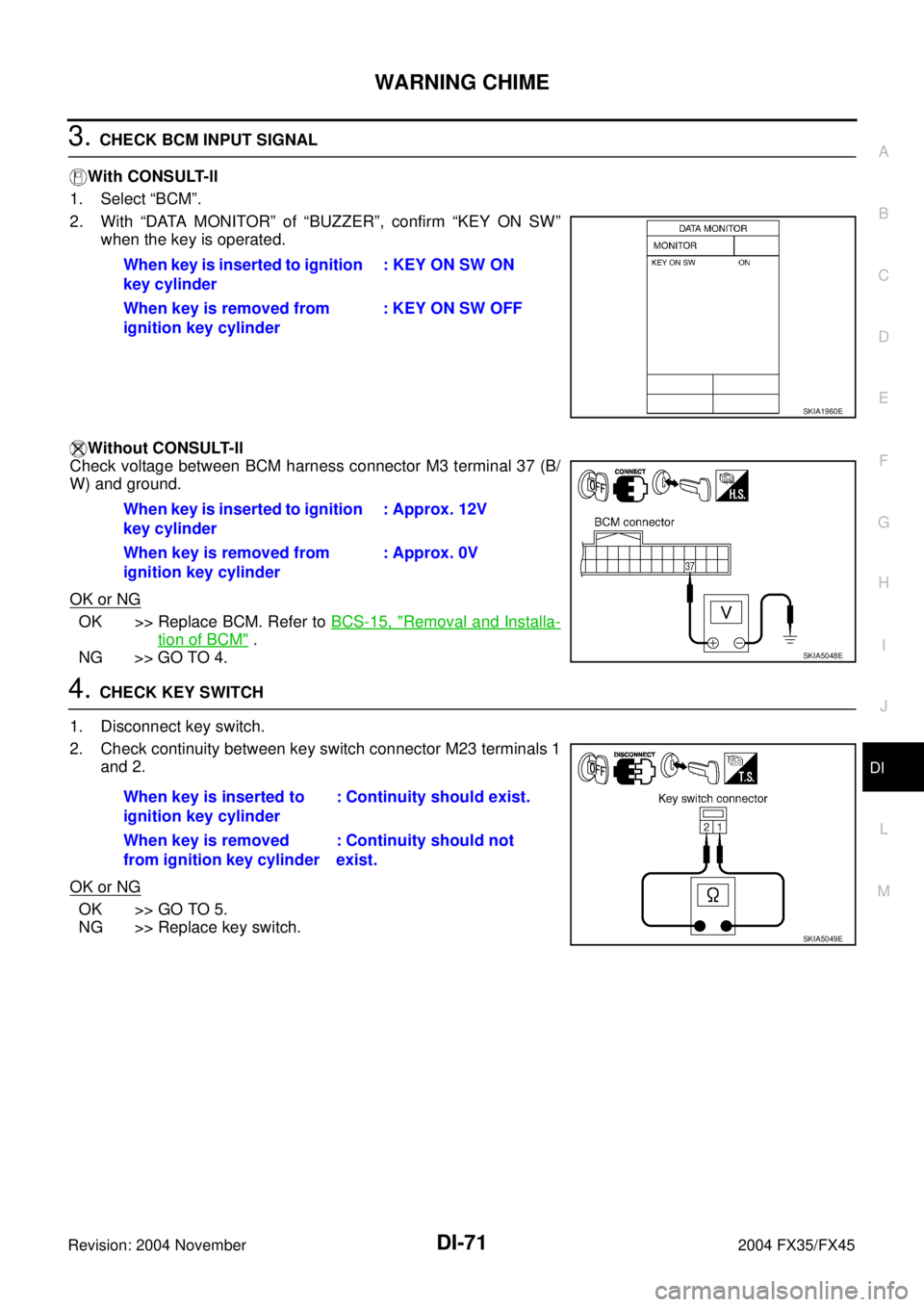
2. With “DATA MONITOR” of “BUZZER”, confirm “KEY ON SW”
when the key is operated.
Without CONSULT-ll
Check voltage between BCM harness connector M3 terminal 37 (B/
W) and ground.
OK or NG
OK >> Replace BCM. Refer to BCS-15, "Removal and Installa-
tion of BCM" .
NG >> GO TO 4.
4. CHECK KEY SWITCH
1. Disconnect key switch.
2. Check continuity between key switch connector M23 terminals 1
and 2.
OK or NG
OK >> GO TO 5.
NG >> Replace key switch.When key is inserted to ignition
key cylinder: KEY ON SW ON
When key is removed from
ignition key cylinder: KEY ON SW OFF
SKIA1960E
When key is inserted to ignition
key cylinder: Approx. 12V
When key is removed from
ignition key cylinder: Approx. 0V
SKIA5048E
When key is inserted to
ignition key cylinder: Continuity should exist.
When key is removed
from ignition key cylinder: Continuity should not
exist.
SKIA5049E
Page 1315 of 4449
DI-72
WARNING CHIME
Revision: 2004 November 2004 FX35/FX45
5. CHECK KEY SWITCH CIRCUIT
1. Disconnect BCM connector.
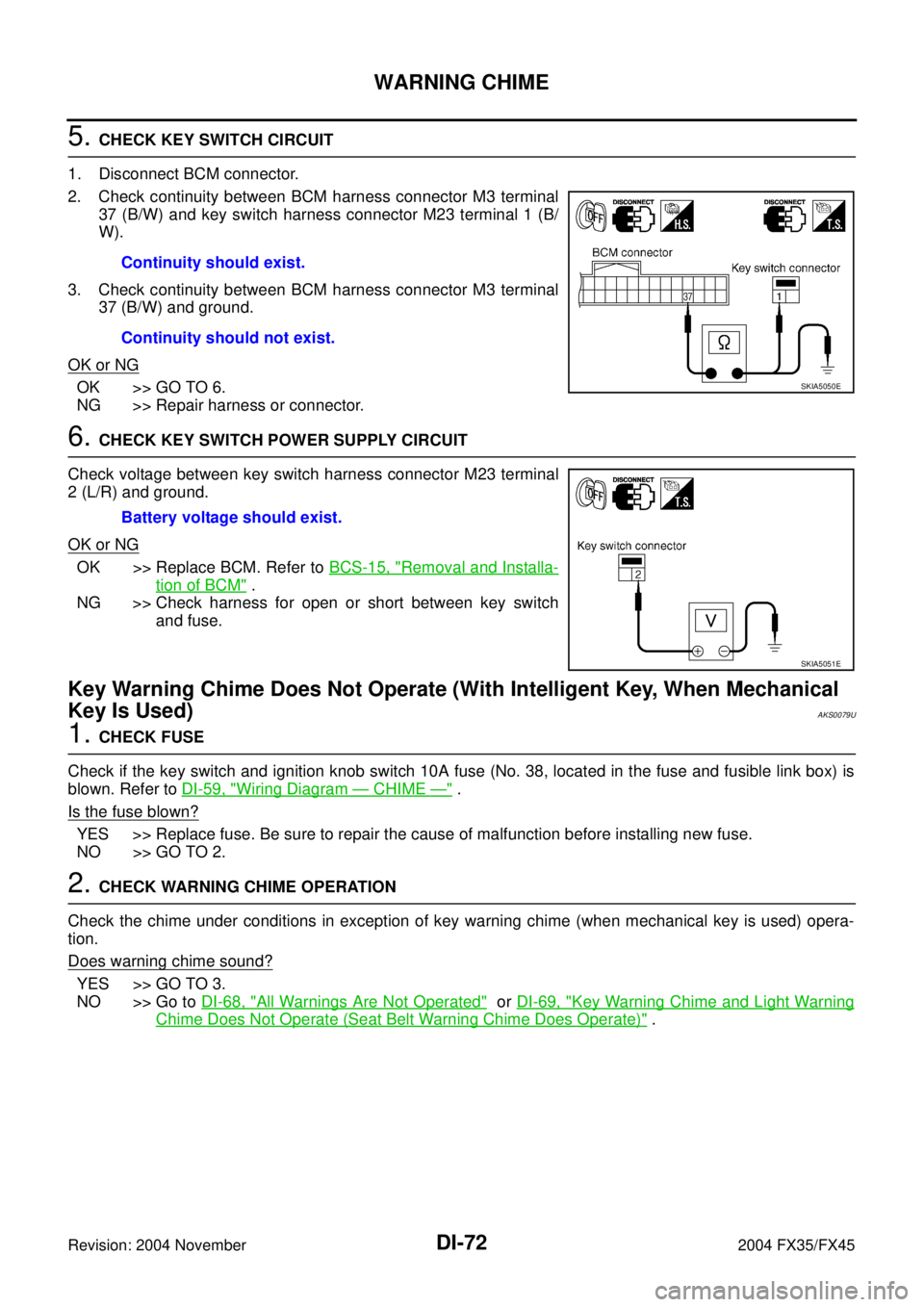
2. Check continuity between BCM harness connector M3 terminal
37 (B/W) and key switch harness connector M23 terminal 1 (B/
W).
3. Check continuity between BCM harness connector M3 terminal
37 (B/W) and ground.
OK or NG
OK >> GO TO 6.
NG >> Repair harness or connector.
6. CHECK KEY SWITCH POWER SUPPLY CIRCUIT
Check voltage between key switch harness connector M23 terminal
2 (L/R) and ground.
OK or NG
OK >> Replace BCM. Refer to BCS-15, "Removal and Installa-
tion of BCM" .
NG >> Check harness for open or short between key switch
and fuse.
Key Warning Chime Does Not Operate (With Intelligent Key, When Mechanical
Key Is Used)
AKS0079U
1. CHECK FUSE
Check if the key switch and ignition knob switch 10A fuse (No. 38, located in the fuse and fusible link box) is
blown. Refer to DI-59, "
Wiring Diagram — CHIME —" .
Is the fuse blown?
YES >> Replace fuse. Be sure to repair the cause of malfunction before installing new fuse.
NO >> GO TO 2.
2. CHECK WARNING CHIME OPERATION
Check the chime under conditions in exception of key warning chime (when mechanical key is used) opera-
tion.
Does warning chime sound?
YES >> GO TO 3.
NO >> Go to DI-68, "
All Warnings Are Not Operated" or DI-69, "Key Warning Chime and Light Warning
Chime Does Not Operate (Seat Belt Warning Chime Does Operate)" . Continuity should exist.
Continuity should not exist.
SKIA5050E
Battery voltage should exist.
SKIA5051E