Page 871 of 4449

BL-64
REMOTE KEYLESS ENTRY SYSTEM
Revision: 2004 November 2004 FX35/FX45
Terminals and Reference Value for BCMAIS004MF
*1 : In the state that hazard reminder operates.
*2 : In the state that room lamp switch is in “DOOR” position.TERMI-
NALWIRE
COLORITEM CONDITIONVOLTAGE (V)
Approx.
1PUKey ring illumination output sig-
nal Key ring illumination is lighting. Battery voltage
Key ring illumination is being turned off. 0
11 LG/R Ignition switch Ignition switch is in ACC or ON position Battery voltage
12 P/BFront door switch (Passenger
side)ON (door open) → OFF (door closed) 0 → Battery voltage
13 P/L Rear door switch RH ON (door open) → OFF (door closed) 0 → Battery voltage
37 B/W Key switchON (Key is inserted in IGN key cylinder)
→ OFF (Key is removed from IGN key
cylinder)Battery voltage → 0
38 W/L Ignition switchIgnition switch is in ON or START posi-
tionBattery voltage
39 L CAN H — —
40 R CAN L — —
41 R/B Battery saver output signal30 minutes after ignition switch is turned
to OFF0
Ignition switch is in ON position Battery voltage
42 L/R Battery power supply (fuse) — Battery voltage
44 YDriver door lock actuator
(Unlock)Door lock / unlock switch
(Free → Unlock)0 → Battery voltage
45 G/W Left turn signal lampWhen door lock or unlock is operated
using key fob.*
1
(ON → OFF)Battery voltage → 0
46 BR/W Right turn signal lampWhen door lock or unlock is operated
using key fob.*
1
(ON → OFF)Battery voltage → 0
47 Y/R Step lamp output signalStep lamp is lighting. 0
Step lamp is being turned off. Battery voltage
48 PU/W Room lamp output signalRoom lamp is lighting.*
20
Room lamp is being turned off.*
2Battery voltage
49, 52 B Ground — 0
50 PU Door lock actuator (Lock)Door lock / unlock switch
(Free → Lock)0 → Battery voltage
51 W/BPassenger and rear doors lock
actuator (Unlock)Door lock / unlock switch
(Free → Unlock)0 → Battery voltage
54 WBattery power supply
(power window)—Battery voltage
55 GBattery power supply (Fusible
link)—Battery voltage
58 L Back door switch OFF (Door close) → ON (Door open) 9 → 0
62 W Front door switch (Driver side) OFF (Door close) → ON (Door open) Battery voltage → 0
63 P Rear door switch LH OFF (Door close) → ON (Door open) Battery voltage → 0
Page 872 of 4449

REMOTE KEYLESS ENTRY SYSTEM
BL-65
C
D
E
F
G
H
J
K
L
MA
B
BL
Revision: 2004 November 2004 FX35/FX45
Terminals and Reference Value for IPDM E/RAIS004MG
* : In the state that horn reminder operates.
CONSULT-II FunctionAIS004MH
The following functions are performed by combining data received and command transmitted via the commu-
nication line from the BCM.
*:Refer to BCS-14, "CAN Communication Inspection Using CONSULT-II (Self-Diagnosis)" .
CONSULT-II INSPECTION PROCEDURE
CAUTION:
If CONSULT-II is used with no connection of CONSULT-II CONVERTER, malfunctions might be
detected in self-diagnosis depending on control unit which carry out CAN communication.
1. Turn ignition switch “OFF”.
2. Connect “CONSULT-II” and “CONSULT-II CONVERTER” to the
data link connector.
3. Turn ignition switch “ON”.
4. Touch “START (NISSAN BASED VHCL)”.
TERMINAL WIRE
COLORITEM CONDITIONVOLTAGE (V)
Approx.
38 B Ground — 0
48 L CAN H — —
49 R CAN L — —
51 SB Horn relayWhen door lock is operated using key
fob* (OFF → ON)Battery voltage → 0
60 B Ground — 0
BCM diagnosis
positionInspection items and diagnosis mode Description
BCM C/U*Self-diagnosis results Carries out the self-diagnosis.
DATA MONI-
TORCAN diagnosis support
monitorDisplays CAN communication system diagnosis, disabled
transmission status, and communication status of each unit
communicated with BCM.
Selection from menu Displays the input data to BCM on real-time basis.
MULTI REMOTE
ENTDATA MONITORDisplays the input remote keyless entry system data to BCM
on real–time basis.
ACTIVE TEST Gives a drive to a load to check the operation.
WORK SUPPORT Changes the setting for each function.
PBIB1503E
MBIB0233E
Page 879 of 4449
BL-72
REMOTE KEYLESS ENTRY SYSTEM
Revision: 2004 November 2004 FX35/FX45
Check ACC SwitchAIS004ML
1. CHECK ACC SWITCH
With CONSULT-II
Check ACC switch (“ACC ON SW”) in “DATA MONITOR” mode with
CONSULT-II.
Without CONSULT-II
Check voltage between BCM connector and ground.
OK or NG
OK >> ACC switch is OK.
NG >> Check the following.
�10A fuse [No. 6, located in fuse block (J/B)]
�Harness for open or short between BCM and fuse.
Monitor item Condition
ACC SWIgnition switch position is ACC or ON : ON
Ignition switch position is OFF : OFF
PIIA3367E
Item(+)
(–) ConditionVoltage (V)
Approx. Con-
nectorTerminal
(Wire color)
BCM M3 11 (LG/R) GroundACC or ON Battery voltage
OFF 0
PIIA7002E
Page 880 of 4449
REMOTE KEYLESS ENTRY SYSTEM
BL-73
C
D
E
F
G
H
J
K
L
MA
B
BL
Revision: 2004 November 2004 FX35/FX45
Check Door SwitchAIS004MM
CHECK DOOR SWITCH (EXCEPT BACK DOOR SWITCH)
1. CHECK DOOR SWITCH INPUT SIGNAL
With CONSULT-II
Check door switches (“DOOR SW-DR”, “DOOR SW-AS”, “DOOR
SW-RL” and “DOOR SW-RR”) in “DATA MONITOR” mode with
CONSULT-II.
Without CONSULT-II
Check voltage between BCM connector and ground.
OK or NG
OK >> Door switch circuit is OK.
NG >> GO TO 2.
Monitor item Condition
DOOR SW-DR
CLOSE → OPEN: OFF → ON DOOR SW-AS
DOOR SW-RL
DOOR SW-RR
Item ConnectorTerminals
(Wire color)Door
conditionVoltage (V)
(Approx.)
(+) (-)
Driver side
B1462 (W)
GroundCLOSE
↓
OPENBattery voltage
↓
0 Rear LH 63 (P)
Passenger side
M312 (P/B)
Rear RH 13 (P/L)
PIIA6469E
PIIA7003E
Page 881 of 4449
BL-74
REMOTE KEYLESS ENTRY SYSTEM
Revision: 2004 November 2004 FX35/FX45
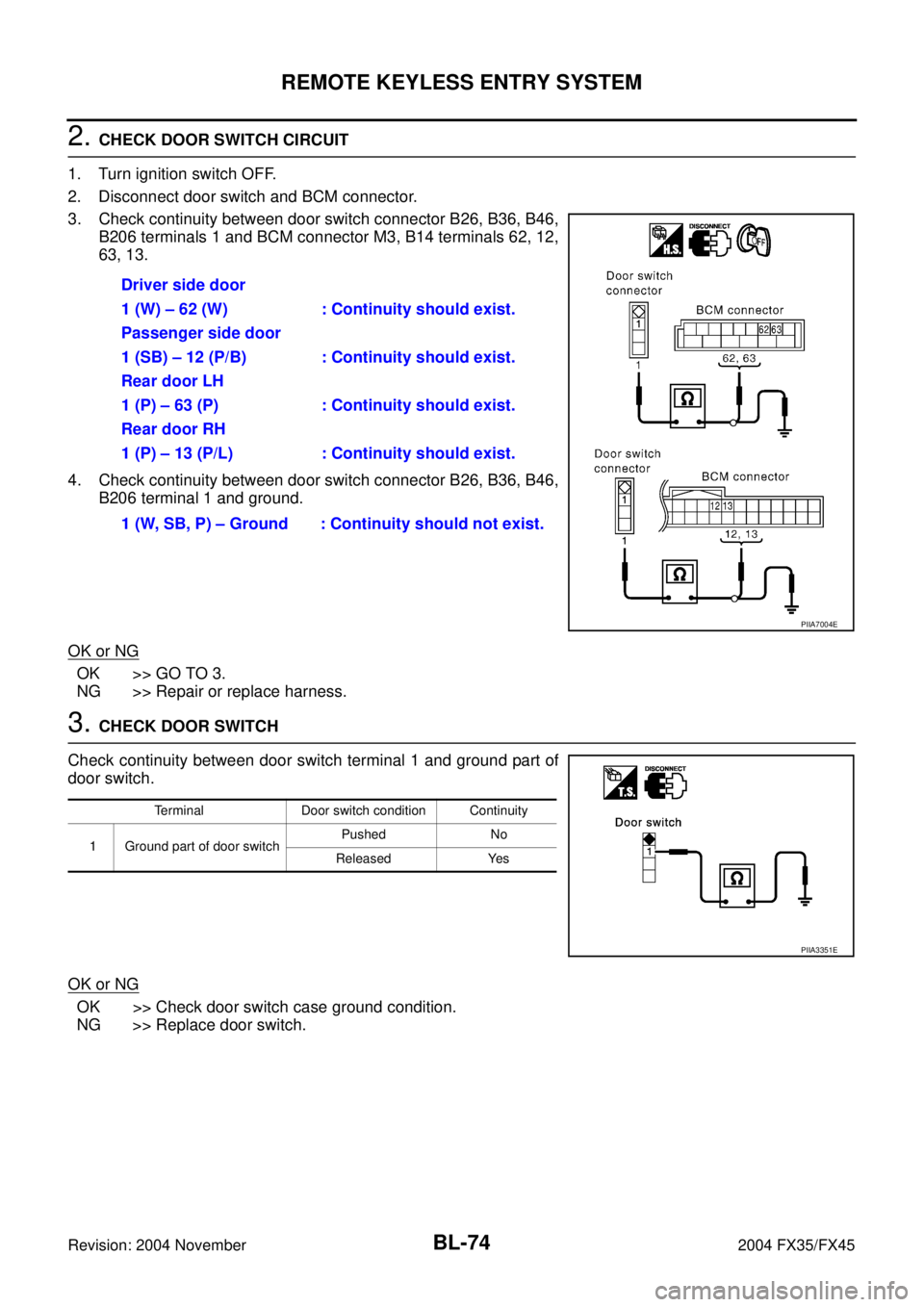
2. CHECK DOOR SWITCH CIRCUIT
1. Turn ignition switch OFF.
2. Disconnect door switch and BCM connector.
3. Check continuity between door switch connector B26, B36, B46,
B206 terminals 1 and BCM connector M3, B14 terminals 62, 12,
63, 13.
4. Check continuity between door switch connector B26, B36, B46,
B206 terminal 1 and ground.
OK or NG
OK >> GO TO 3.
NG >> Repair or replace harness.
3. CHECK DOOR SWITCH
Check continuity between door switch terminal 1 and ground part of
door switch.
OK or NG
OK >> Check door switch case ground condition.
NG >> Replace door switch.Driver side door
1 (W) – 62 (W) : Continuity should exist.
Passenger side door
1 (SB) – 12 (P/B) : Continuity should exist.
Rear door LH
1 (P) – 63 (P) : Continuity should exist.
Rear door RH
1 (P) – 13 (P/L) : Continuity should exist.
1 (W, SB, P) – Ground : Continuity should not exist.
PIIA7004E
Terminal Door switch condition Continuity
1 Ground part of door switchPushed No
Released Yes
PIIA3351E
Page 882 of 4449
REMOTE KEYLESS ENTRY SYSTEM
BL-75
C
D
E
F
G
H
J
K
L
MA
B
BL
Revision: 2004 November 2004 FX35/FX45
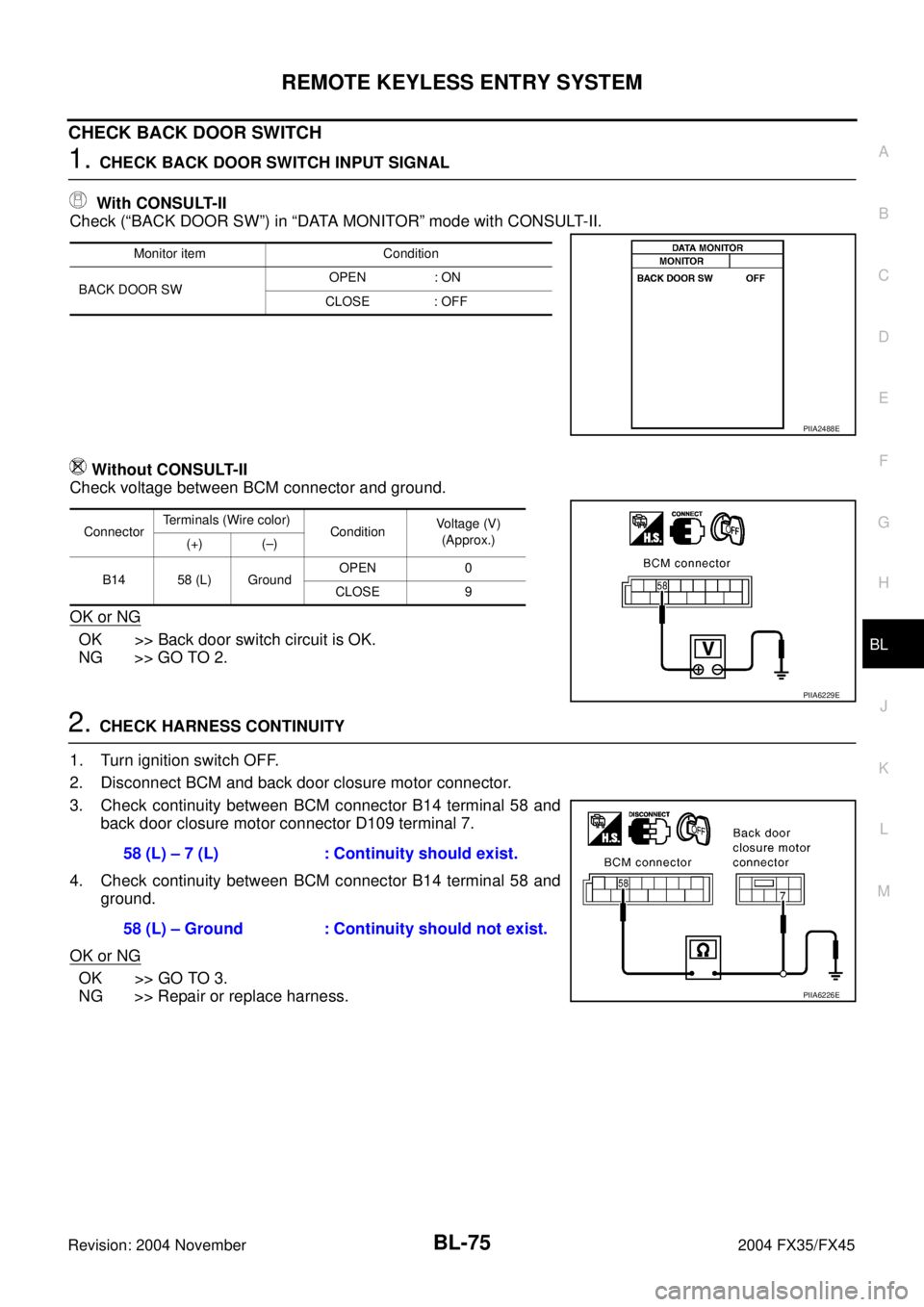
CHECK BACK DOOR SWITCH
1. CHECK BACK DOOR SWITCH INPUT SIGNAL
With CONSULT-II
Check (“BACK DOOR SW”) in “DATA MONITOR” mode with CONSULT-II.
Without CONSULT-II
Check voltage between BCM connector and ground.
OK or NG
OK >> Back door switch circuit is OK.
NG >> GO TO 2.
2. CHECK HARNESS CONTINUITY
1. Turn ignition switch OFF.
2. Disconnect BCM and back door closure motor connector.
3. Check continuity between BCM connector B14 terminal 58 and
back door closure motor connector D109 terminal 7.
4. Check continuity between BCM connector B14 terminal 58 and
ground.
OK or NG
OK >> GO TO 3.
NG >> Repair or replace harness.
Monitor item Condition
BACK DOOR SWOPEN : ON
CLOSE : OFF
PIIA2488E
ConnectorTerminals (Wire color)
ConditionVoltage (V)
(Approx.)
(+) (–)
B14 58 (L) GroundOPEN 0
CLOSE 9
PIIA6229E
58 (L) – 7 (L) : Continuity should exist.
58 (L) – Ground : Continuity should not exist.
PIIA6226E
Page 883 of 4449
BL-76
REMOTE KEYLESS ENTRY SYSTEM
Revision: 2004 November 2004 FX35/FX45
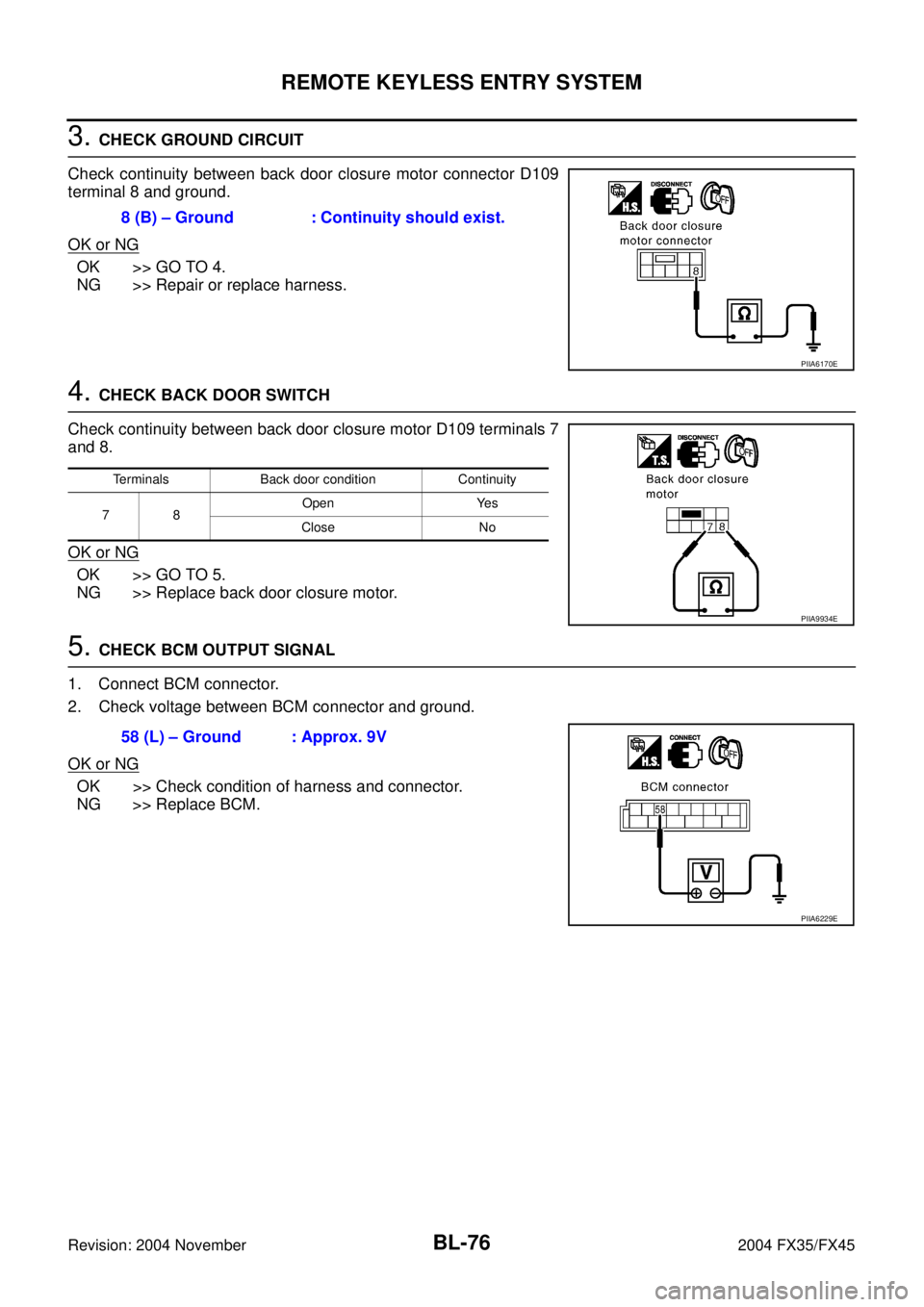
3. CHECK GROUND CIRCUIT
Check continuity between back door closure motor connector D109
terminal 8 and ground.
OK or NG
OK >> GO TO 4.
NG >> Repair or replace harness.
4. CHECK BACK DOOR SWITCH
Check continuity between back door closure motor D109 terminals 7
and 8.
OK or NG
OK >> GO TO 5.
NG >> Replace back door closure motor.
5. CHECK BCM OUTPUT SIGNAL
1. Connect BCM connector.
2. Check voltage between BCM connector and ground.
OK or NG
OK >> Check condition of harness and connector.
NG >> Replace BCM.8 (B) – Ground : Continuity should exist.
PIIA6170E
Terminals Back door condition Continuity
78Open Yes
Close No
PIIA9934E
58 (L) – Ground : Approx. 9V
PIIA6229E
Page 884 of 4449
REMOTE KEYLESS ENTRY SYSTEM
BL-77
C
D
E
F
G
H
J
K
L
MA
B
BL
Revision: 2004 November 2004 FX35/FX45
Check Key SwitchAIS004MN
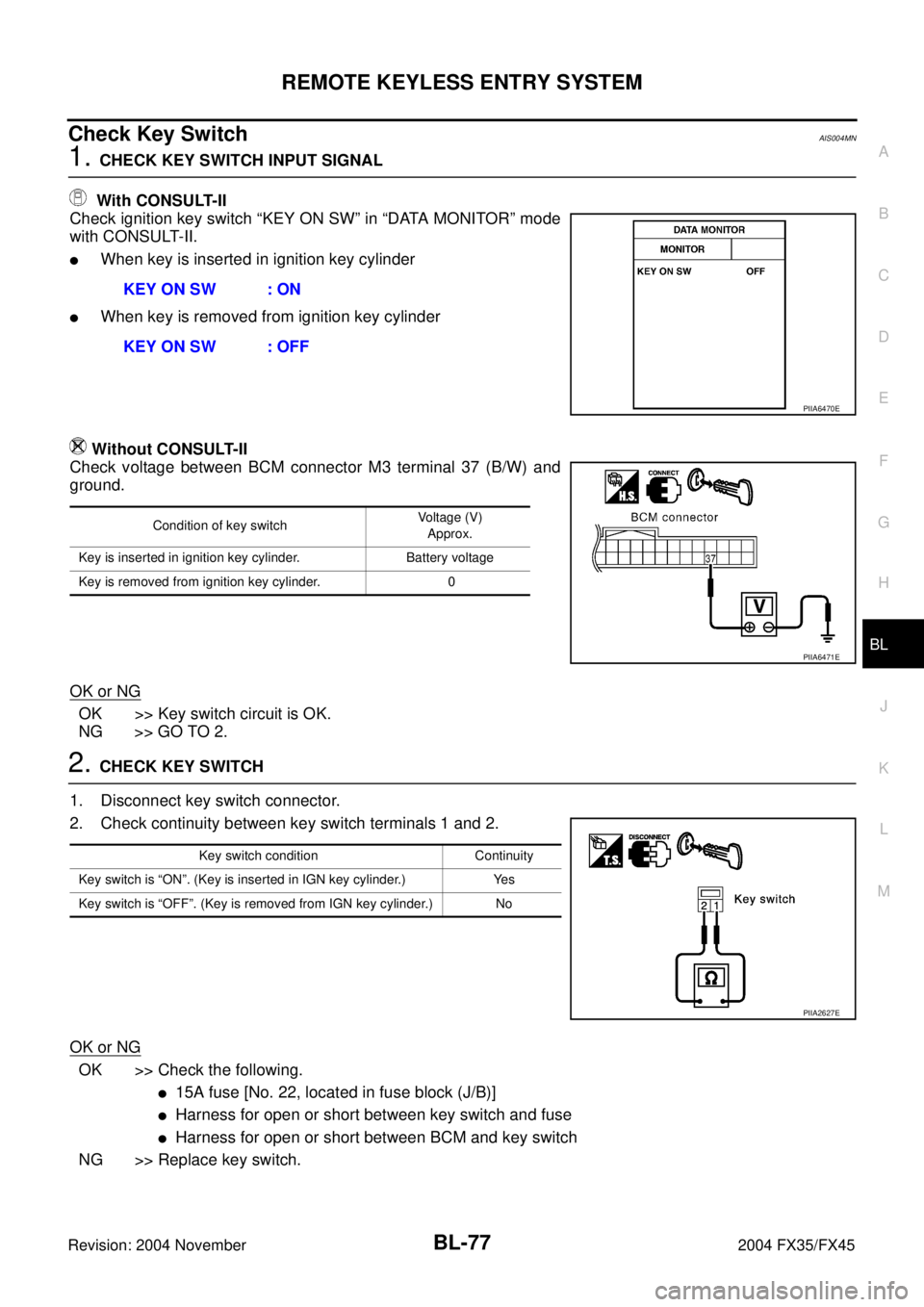
1. CHECK KEY SWITCH INPUT SIGNAL
With CONSULT-II
Check ignition key switch “KEY ON SW” in “DATA MONITOR” mode
with CONSULT-II.
�When key is inserted in ignition key cylinder
�When key is removed from ignition key cylinder
Without CONSULT-II
Check voltage between BCM connector M3 terminal 37 (B/W) and
ground.
OK or NG
OK >> Key switch circuit is OK.
NG >> GO TO 2.
2. CHECK KEY SWITCH
1. Disconnect key switch connector.
2. Check continuity between key switch terminals 1 and 2.
OK or NG
OK >> Check the following.
�15A fuse [No. 22, located in fuse block (J/B)]
�Harness for open or short between key switch and fuse
�Harness for open or short between BCM and key switch
NG >> Replace key switch.KEY ON SW : ON
KEY ON SW : OFF
PIIA6470E
Condition of key switchVoltage (V)
Approx.
Key is inserted in ignition key cylinder. Battery voltage
Key is removed from ignition key cylinder. 0
PIIA6471E
Key switch condition Continuity
Key switch is “ON”. (Key is inserted in IGN key cylinder.) Yes
Key switch is “OFF”. (Key is removed from IGN key cylinder.) No
PIIA2627E