Page 3594 of 4449
DAYTIME LIGHT SYSTEM
LT-39
C
D
E
F
G
H
I
J
L
MA
B
LT
Revision: 2004 November 2004 FX35/FX45
�through grounds M35, M45 and M85
�to BCM (body control module) terminals 49 and 52
�through grounds M35, M45 and M85.
DAYTIME LIGHT OPERATION
With the engine running, the lighting switch in the OFF or 1ST position and parking brake released, power is
supplied
�through daytime light relay terminal 1
�to combination meter terminal 10
�through daytime light relay terminal 3
�to clearance lamp RH and LH terminal 1.
Ground is supplied
�to combination meter terminals 5, 6 and 15
�through grounds M35, M45 and M85
�to clearance lamp RH and LH terminal 3
�through grounds E21, E50 and E51.
With power and grounds supplied, the front fog lamps illuminate.
COMBINATION SWITCH READING FUNCTION
Refer to BCS-3, "COMBINATION SWITCH READING FUNCTION" .
AUTO LIGHT OPERATION
For auto light operation, refer to LT- 5 4 , "System Description" in “AUTO LIGHT SYSTEM”.
CAN Communication System DescriptionAKS007N1
CAN (Controller Area Network) is a serial communication line for real time application. It is an on-vehicle mul-
tiplex communication line with high data communication speed and excellent error detection ability. Many elec-
tronic control units are equipped onto a vehicle, and each control unit shares information and links with other
control units during operation (not independent). In CAN communication, control units are connected with 2
communication lines (CAN H line, CAN L line) allowing a high rate of information transmission with less wiring.
Each control unit transmits/receives data but selectively reads required data only.
CAN Communication UnitAKS0080T
Refer to LAN-6, "CAN Communication Unit" .
Page 3601 of 4449
LT-46
DAYTIME LIGHT SYSTEM
Revision: 2004 November 2004 FX35/FX45
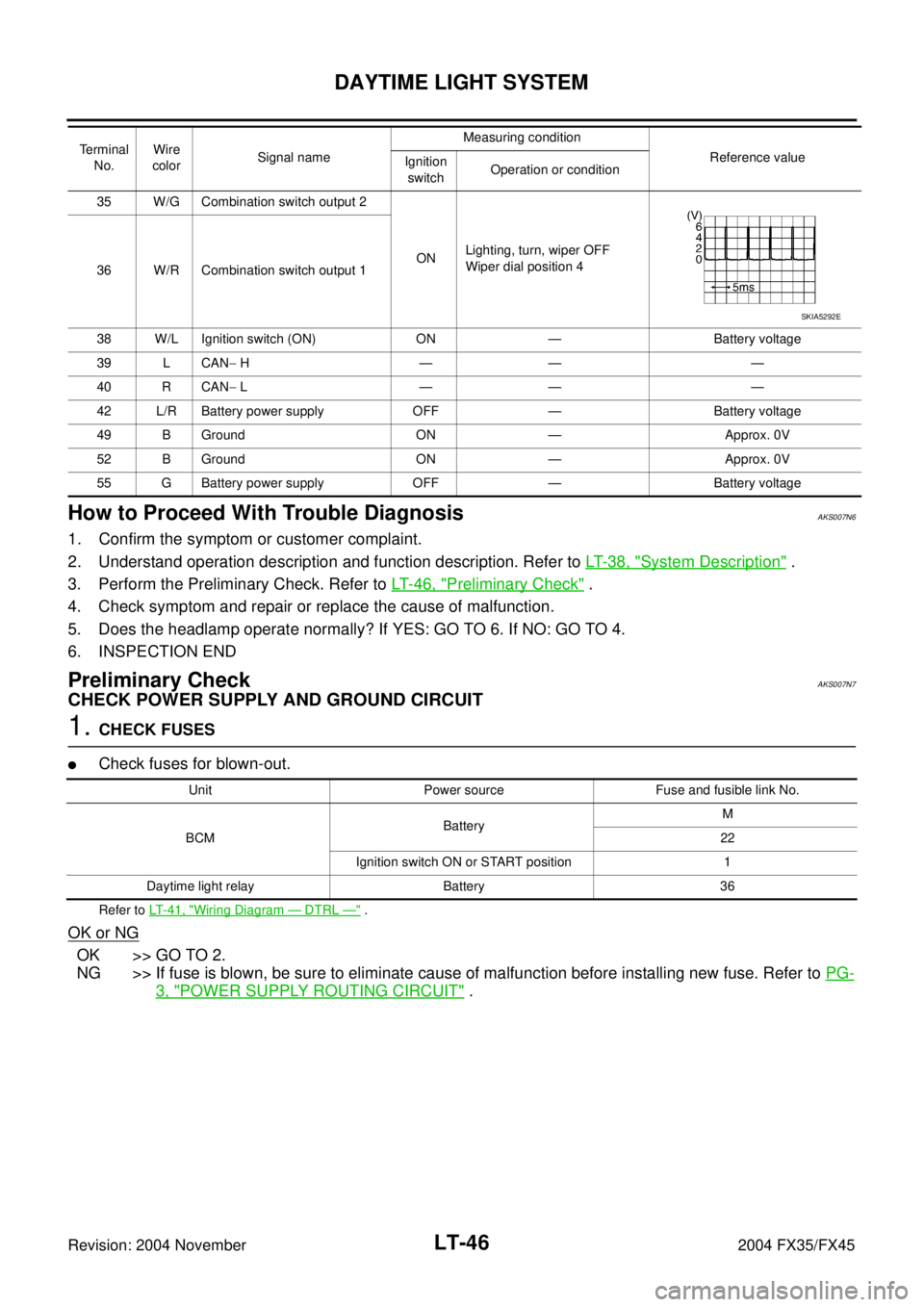
How to Proceed With Trouble DiagnosisAKS007N6
1. Confirm the symptom or customer complaint.
2. Understand operation description and function description. Refer to LT- 3 8 , "
System Description" .
3. Perform the Preliminary Check. Refer to LT- 4 6 , "
Preliminary Check" .
4. Check symptom and repair or replace the cause of malfunction.
5. Does the headlamp operate normally? If YES: GO TO 6. If NO: GO TO 4.
6. INSPECTION END
Preliminary CheckAKS007N7
CHECK POWER SUPPLY AND GROUND CIRCUIT
1. CHECK FUSES
�Check fuses for blown-out.
Refer to LT- 4 1 , "Wiring Diagram — DTRL —" .
OK or NG
OK >> GO TO 2.
NG >> If fuse is blown, be sure to eliminate cause of malfunction before installing new fuse. Refer to PG-
3, "POWER SUPPLY ROUTING CIRCUIT" .
35 W/G Combination switch output 2
ONLighting, turn, wiper OFF
Wiper dial position 4
36 W/R Combination switch output 1
38 W/L Ignition switch (ON) ON — Battery voltage
39 L CAN− H—— —
40 R CAN− L—— —
42 L/R Battery power supply OFF — Battery voltage
49 B Ground ON — Approx. 0V
52 B Ground ON — Approx. 0V
55 G Battery power supply OFF — Battery voltage Terminal
No.Wire
colorSignal nameMeasuring condition
Reference value
Ignition
switchOperation or condition
SKIA5292E
Unit Power source Fuse and fusible link No.
BCMBatteryM
22
Ignition switch ON or START position 1
Daytime light relay Battery 36
Page 3602 of 4449
DAYTIME LIGHT SYSTEM
LT-47
C
D
E
F
G
H
I
J
L
MA
B
LT
Revision: 2004 November 2004 FX35/FX45
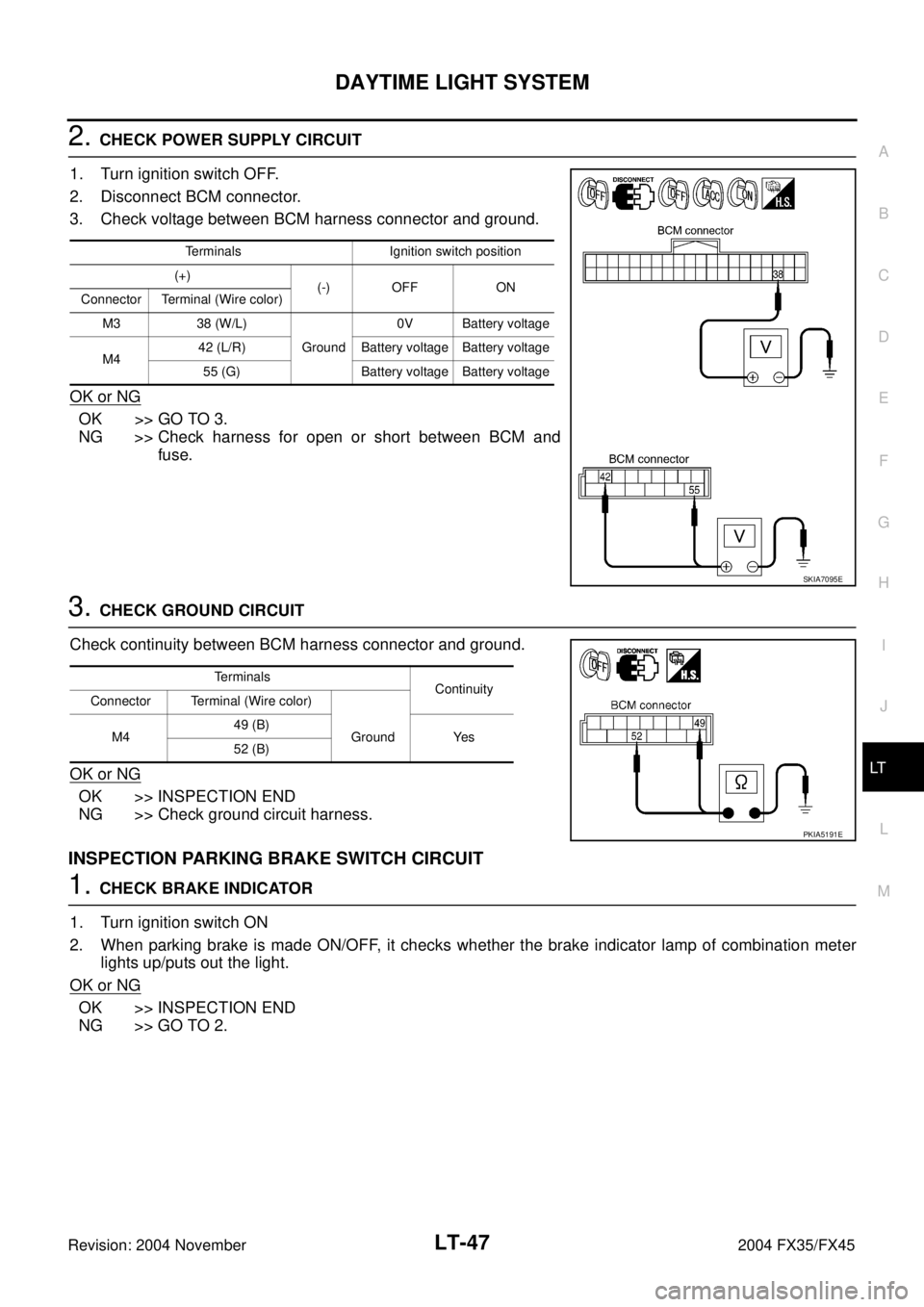
2. CHECK POWER SUPPLY CIRCUIT
1. Turn ignition switch OFF.
2. Disconnect BCM connector.
3. Check voltage between BCM harness connector and ground.
OK or NG
OK >> GO TO 3.
NG >> Check harness for open or short between BCM and
fuse.
3. CHECK GROUND CIRCUIT
Check continuity between BCM harness connector and ground.
OK or NG
OK >> INSPECTION END
NG >> Check ground circuit harness.
INSPECTION PARKING BRAKE SWITCH CIRCUIT
1. CHECK BRAKE INDICATOR
1. Turn ignition switch ON
2. When parking brake is made ON/OFF, it checks whether the brake indicator lamp of combination meter
lights up/puts out the light.
OK or NG
OK >> INSPECTION END
NG >> GO TO 2.
Terminals Ignition switch position
(+)
(-) OFF ON
Connector Terminal (Wire color)
M3 38 (W/L)
Ground0V Battery voltage
M442 (L/R) Battery voltage Battery voltage
55 (G) Battery voltage Battery voltage
SKIA7095E
Terminals
Continuity
Connector Terminal (Wire color)
M449 (B)
Ground Yes
52 (B)
PKIA5191E
Page 3603 of 4449
LT-48
DAYTIME LIGHT SYSTEM
Revision: 2004 November 2004 FX35/FX45
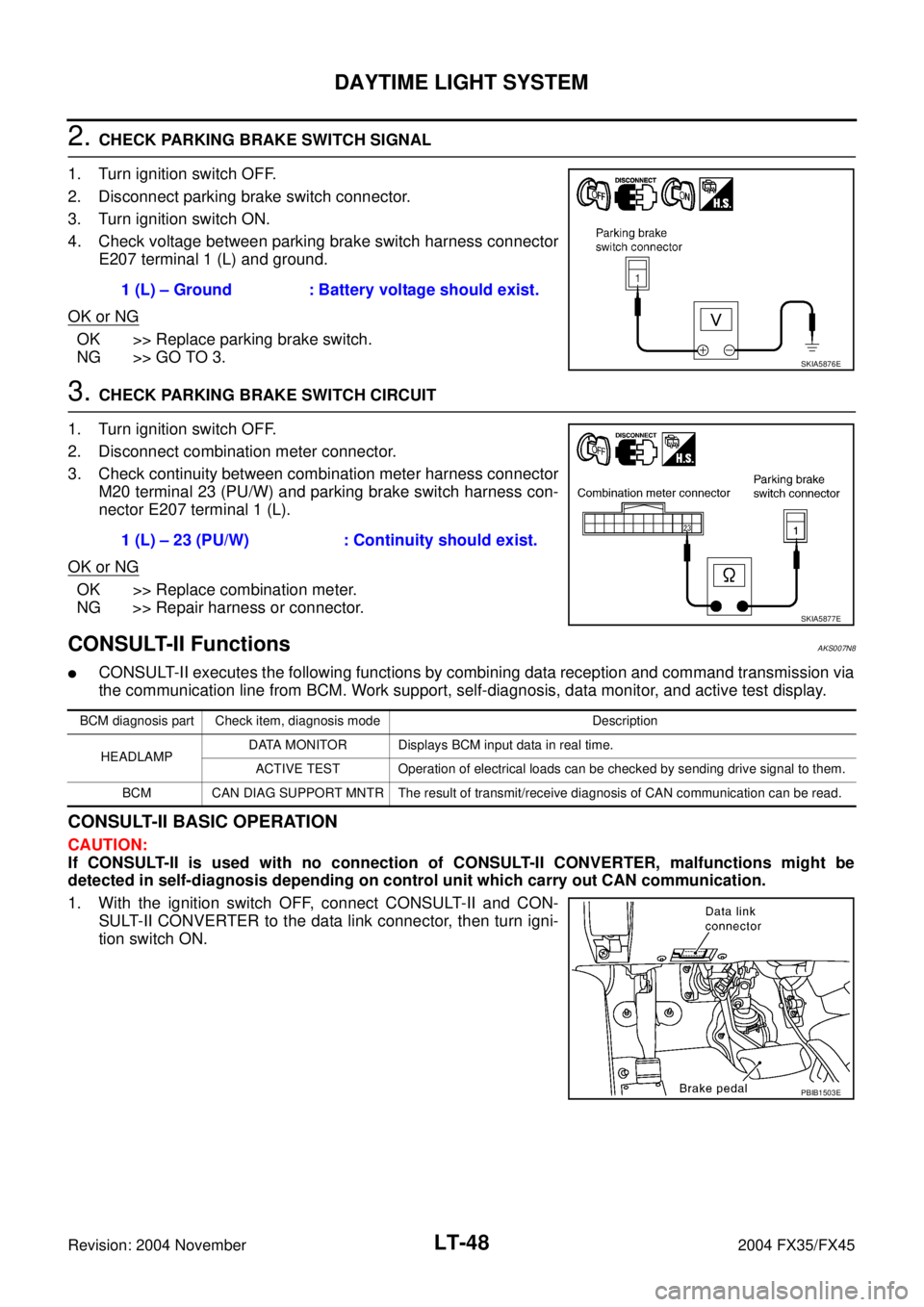
2. CHECK PARKING BRAKE SWITCH SIGNAL
1. Turn ignition switch OFF.
2. Disconnect parking brake switch connector.
3. Turn ignition switch ON.
4. Check voltage between parking brake switch harness connector
E207 terminal 1 (L) and ground.
OK or NG
OK >> Replace parking brake switch.
NG >> GO TO 3.
3. CHECK PARKING BRAKE SWITCH CIRCUIT
1. Turn ignition switch OFF.
2. Disconnect combination meter connector.
3. Check continuity between combination meter harness connector
M20 terminal 23 (PU/W) and parking brake switch harness con-
nector E207 terminal 1 (L).
OK or NG
OK >> Replace combination meter.
NG >> Repair harness or connector.
CONSULT-II Functions AKS007N8
�CONSULT-II executes the following functions by combining data reception and command transmission via
the communication line from BCM. Work support, self-diagnosis, data monitor, and active test display.
CONSULT-II BASIC OPERATION
CAUTION:
If CONSULT-II is used with no connection of CONSULT-II CONVERTER, malfunctions might be
detected in self-diagnosis depending on control unit which carry out CAN communication.
1. With the ignition switch OFF, connect CONSULT-II and CON-
SULT-II CONVERTER to the data link connector, then turn igni-
tion switch ON.1 (L) – Ground : Battery voltage should exist.
SKIA5876E
1 (L) – 23 (PU/W) : Continuity should exist.
SKIA5877E
BCM diagnosis part Check item, diagnosis mode Description
HEADLAMPDATA MONITOR Displays BCM input data in real time.
ACTIVE TEST Operation of electrical loads can be checked by sending drive signal to them.
BCM CAN DIAG SUPPORT MNTR The result of transmit/receive diagnosis of CAN communication can be read.
PBIB1503E
Page 3606 of 4449
DAYTIME LIGHT SYSTEM
LT-51
C
D
E
F
G
H
I
J
L
MA
B
LT
Revision: 2004 November 2004 FX35/FX45
Daytime Light Control Does Not Operate ProperlyAKS007N9
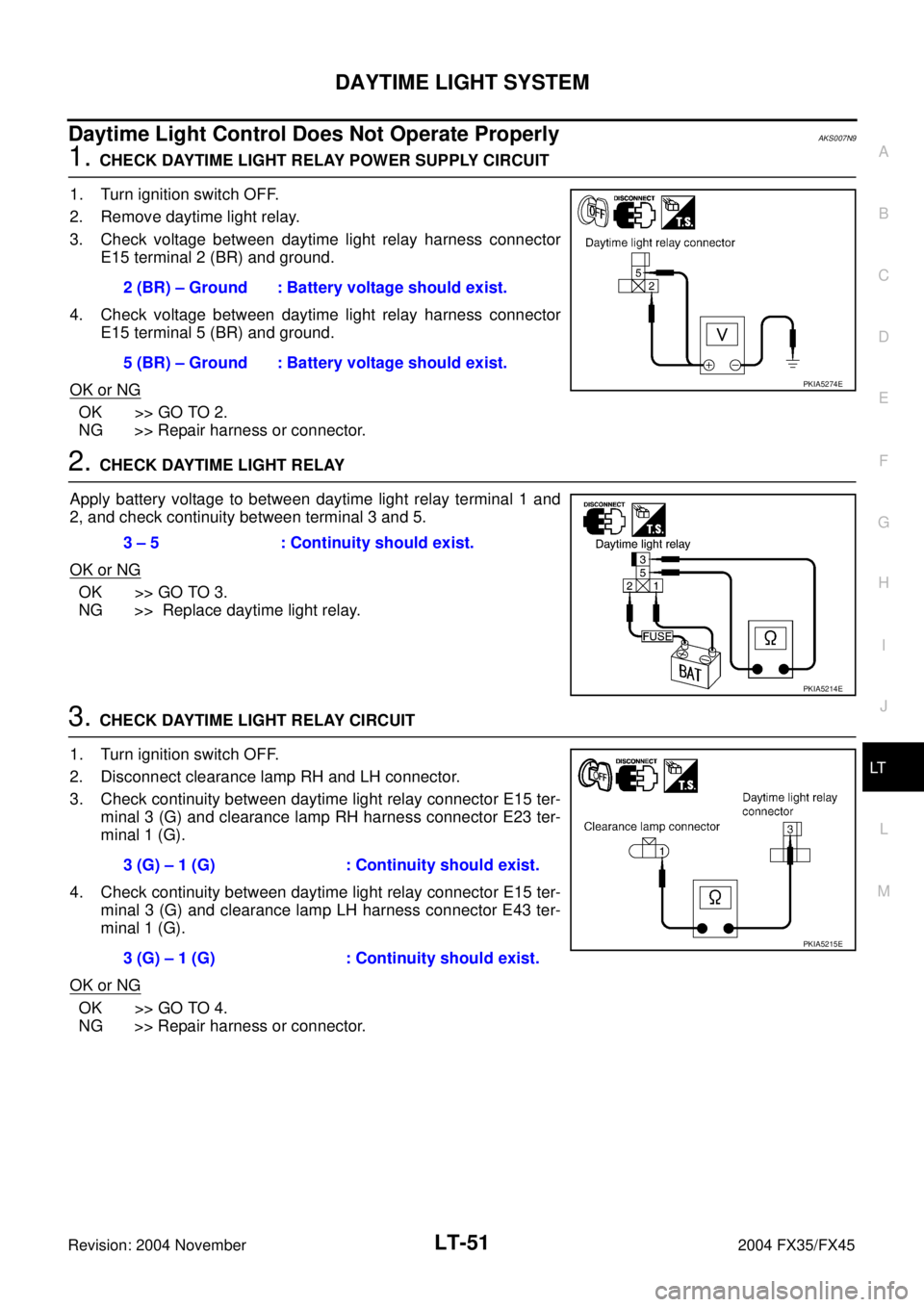
1. CHECK DAYTIME LIGHT RELAY POWER SUPPLY CIRCUIT
1. Turn ignition switch OFF.
2. Remove daytime light relay.
3. Check voltage between daytime light relay harness connector
E15 terminal 2 (BR) and ground.
4. Check voltage between daytime light relay harness connector
E15 terminal 5 (BR) and ground.
OK or NG
OK >> GO TO 2.
NG >> Repair harness or connector.
2. CHECK DAYTIME LIGHT RELAY
Apply battery voltage to between daytime light relay terminal 1 and
2, and check continuity between terminal 3 and 5.
OK or NG
OK >> GO TO 3.
NG >> Replace daytime light relay.
3. CHECK DAYTIME LIGHT RELAY CIRCUIT
1. Turn ignition switch OFF.
2. Disconnect clearance lamp RH and LH connector.
3. Check continuity between daytime light relay connector E15 ter-
minal 3 (G) and clearance lamp RH harness connector E23 ter-
minal 1 (G).
4. Check continuity between daytime light relay connector E15 ter-
minal 3 (G) and clearance lamp LH harness connector E43 ter-
minal 1 (G).
OK or NG
OK >> GO TO 4.
NG >> Repair harness or connector.2 (BR) – Ground : Battery voltage should exist.
5 (BR) – Ground : Battery voltage should exist.
PKIA5274E
3 – 5 : Continuity should exist.
PKIA5214E
3 (G) – 1 (G) : Continuity should exist.
3 (G) – 1 (G) : Continuity should exist.
PKIA5215E
Page 3607 of 4449
LT-52
DAYTIME LIGHT SYSTEM
Revision: 2004 November 2004 FX35/FX45
4. CHECK GROUND
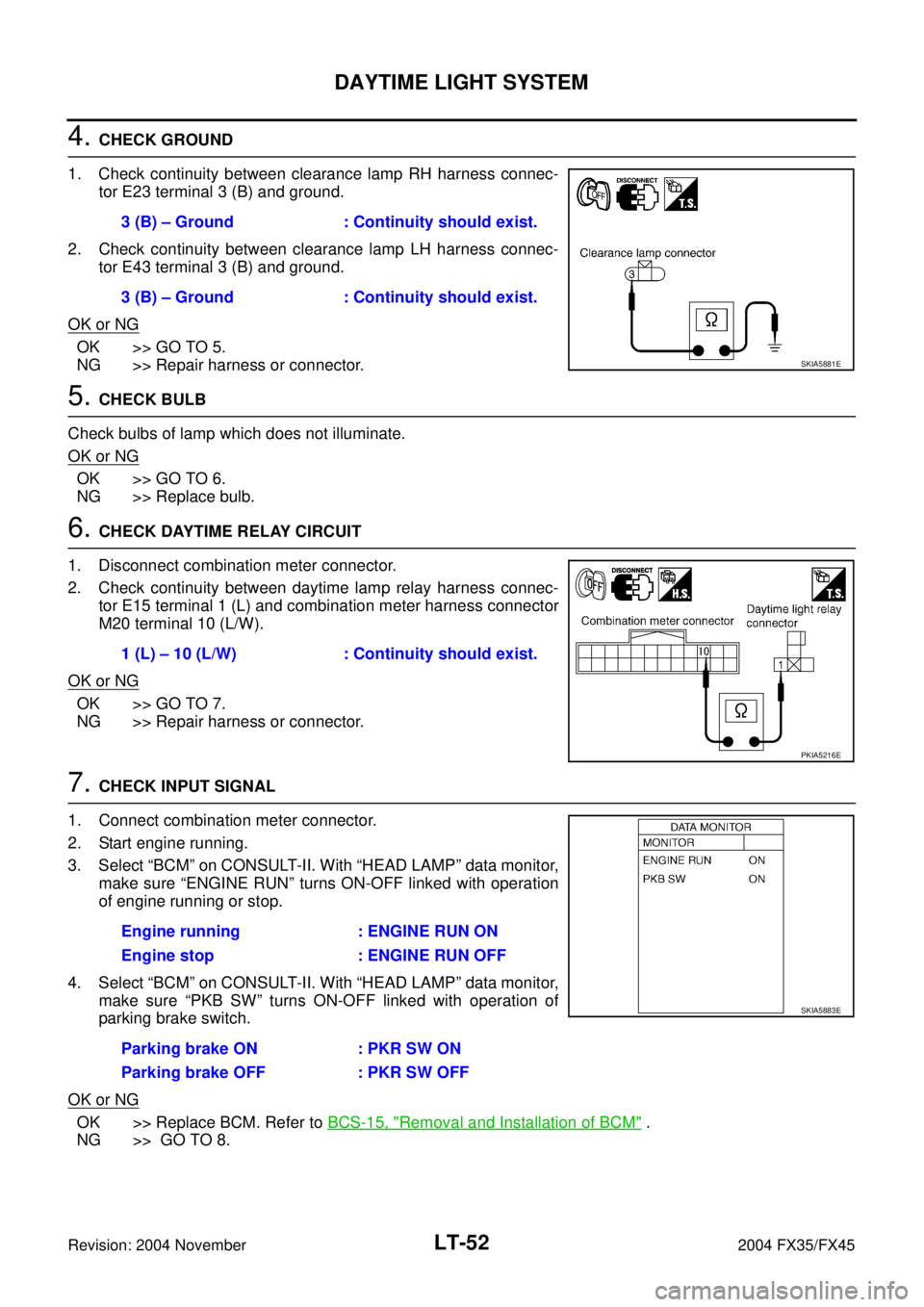
1. Check continuity between clearance lamp RH harness connec-
tor E23 terminal 3 (B) and ground.
2. Check continuity between clearance lamp LH harness connec-
tor E43 terminal 3 (B) and ground.
OK or NG
OK >> GO TO 5.
NG >> Repair harness or connector.
5. CHECK BULB
Check bulbs of lamp which does not illuminate.
OK or NG
OK >> GO TO 6.
NG >> Replace bulb.
6. CHECK DAYTIME RELAY CIRCUIT
1. Disconnect combination meter connector.
2. Check continuity between daytime lamp relay harness connec-
tor E15 terminal 1 (L) and combination meter harness connector
M20 terminal 10 (L/W).
OK or NG
OK >> GO TO 7.
NG >> Repair harness or connector.
7. CHECK INPUT SIGNAL
1. Connect combination meter connector.
2. Start engine running.
3. Select “BCM” on CONSULT-II. With “HEAD LAMP” data monitor,
make sure “ENGINE RUN” turns ON-OFF linked with operation
of engine running or stop.
4. Select “BCM” on CONSULT-II. With “HEAD LAMP” data monitor,
make sure “PKB SW” turns ON-OFF linked with operation of
parking brake switch.
OK or NG
OK >> Replace BCM. Refer to BCS-15, "Removal and Installation of BCM" .
NG >> GO TO 8.3 (B) – Ground : Continuity should exist.
3 (B) – Ground : Continuity should exist.
SKIA5881E
1 (L) – 10 (L/W) : Continuity should exist.
PKIA5216E
Engine running : ENGINE RUN ON
Engine stop : ENGINE RUN OFF
Parking brake ON : PKR SW ON
Parking brake OFF : PKR SW OFF
SKIA5883E
Page 3609 of 4449
LT-54
AUTO LIGHT SYSTEM
Revision: 2004 November 2004 FX35/FX45
AUTO LIGHT SYSTEMPFP:28491
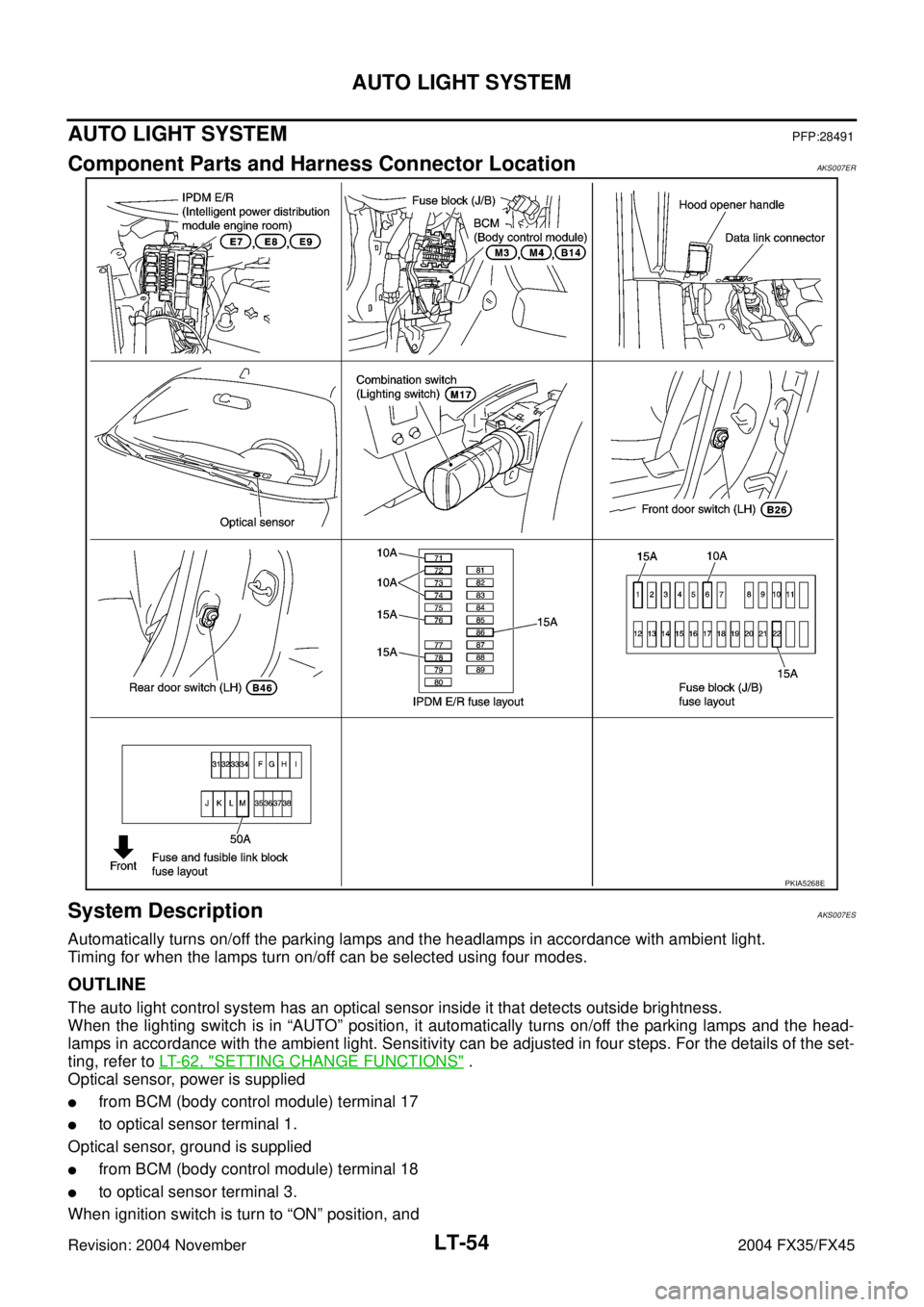
Component Parts and Harness Connector LocationAKS007ER
System DescriptionAKS007ES
Automatically turns on/off the parking lamps and the headlamps in accordance with ambient light.
Timing for when the lamps turn on/off can be selected using four modes.
OUTLINE
The auto light control system has an optical sensor inside it that detects outside brightness.
When the lighting switch is in “AUTO” position, it automatically turns on/off the parking lamps and the head-
lamps in accordance with the ambient light. Sensitivity can be adjusted in four steps. For the details of the set-
ting, refer to LT- 6 2 , "
SETTING CHANGE FUNCTIONS" .
Optical sensor, power is supplied
�from BCM (body control module) terminal 17
�to optical sensor terminal 1.
Optical sensor, ground is supplied
�from BCM (body control module) terminal 18
�to optical sensor terminal 3.
When ignition switch is turn to “ON” position, and
PKIA5268E
Page 3615 of 4449
LT-60
AUTO LIGHT SYSTEM
Revision: 2004 November 2004 FX35/FX45
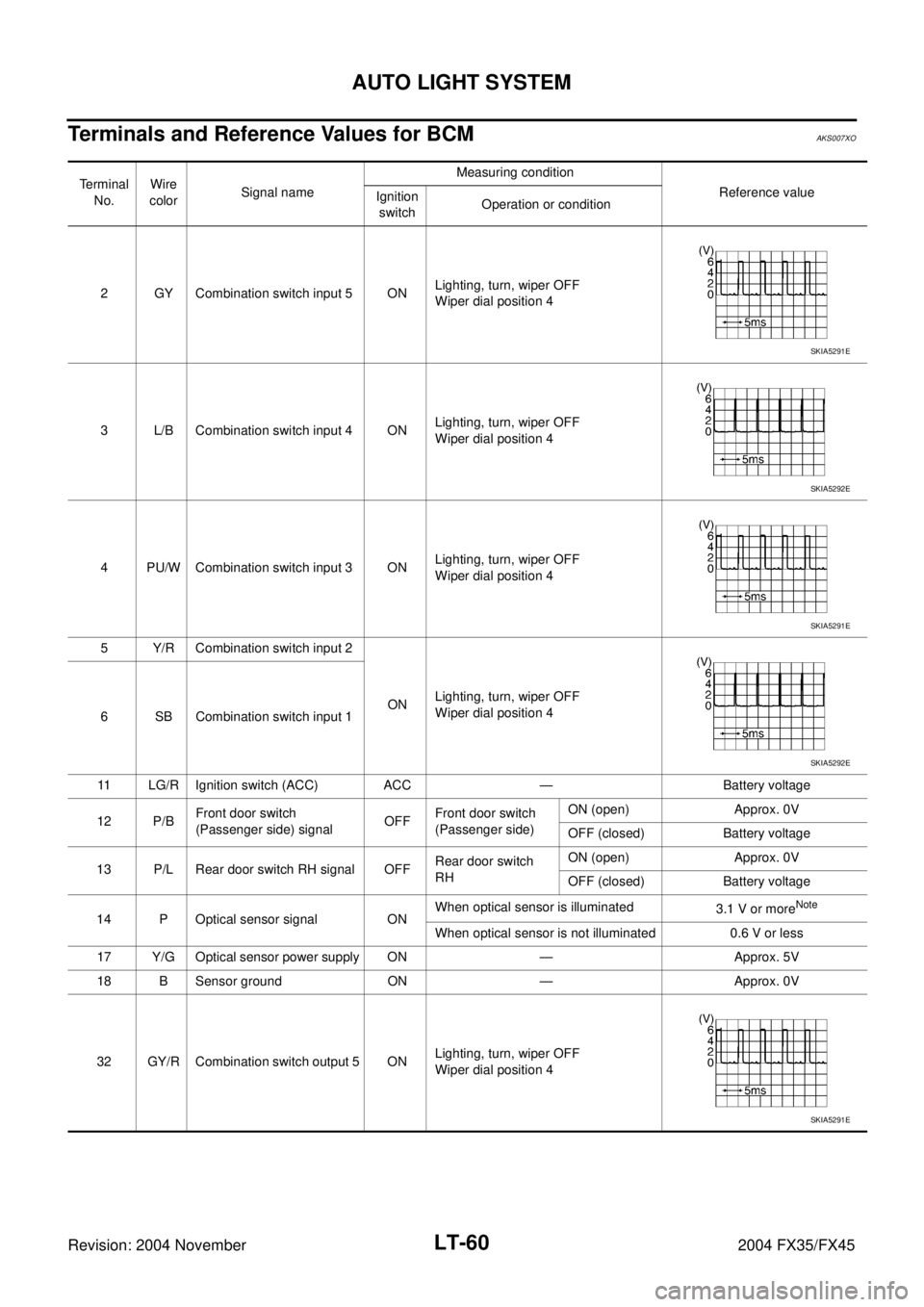
Terminals and Reference Values for BCMAKS007XO
Terminal
No.Wire
colorSignal nameMeasuring condition
Reference value
Ignition
switchOperation or condition
2 GY Combination switch input 5 ONLighting, turn, wiper OFF
Wiper dial position 4
3 L/B Combination switch input 4 ONLighting, turn, wiper OFF
Wiper dial position 4
4 PU/W Combination switch input 3 ONLighting, turn, wiper OFF
Wiper dial position 4
5 Y/R Combination switch input 2
ONLighting, turn, wiper OFF
Wiper dial position 4
6 SB Combination switch input 1
11 LG/R Ignition switch (ACC) ACC — Battery voltage
12 P/BFront door switch
(Passenger side) signalOFFFront door switch
(Passenger side) ON (open) Approx. 0V
OFF (closed) Battery voltage
13 P/L Rear door switch RH signal OFFRear door switch
RH ON (open) Approx. 0V
OFF (closed) Battery voltage
14 P Optical sensor signal ONWhen optical sensor is illuminated
3.1 V or more
Note
When optical sensor is not illuminated 0.6 V or less
17 Y/G Optical sensor power supply ON — Approx. 5V
18 B Sensor ground ON — Approx. 0V
32 GY/R Combination switch output 5 ONLighting, turn, wiper OFF
Wiper dial position 4
SKIA5291E
SKIA5292E
SKIA5291E
SKIA5292E
SKIA5291E