Page 68 of 296

This indicator reminds you that it is
time to take your vehicle in for
scheduled maintenance.
Ref er to the Maintenance Schedules
f or Normal and Severe Driving
Conditions on pages and .Between 6,000 miles (9,600 km) and
7,500 miles (12,000 km), it will light
f or 2 seconds when you f irst turn the
ignition switch to ON (II), and then
f lash f or 10 seconds.
If you exceed 7,500 miles (12,000
km) without having the scheduled
maintenance perf ormed, this
indicator will remain on as a constant
reminder.
Your dealer will reset this indicator
af ter completing the scheduled
maintenance. If this maintenance is
done by someone other than your
Honda dealer, reset the indicator as
f ollows.
Turn of f the engine. Hold the button for about 10
seconds until the indicator goes
of f .
For the f irst 6,000 miles (9,600 km)
af ter the Maintenance Required
Indicator is reset, it will come on f or
2 seconds when you turn the ignition
switch to ON (II).
Press and hold the Select/Reset
buttonintheinstrumentpanel,
then turn the ignition switch to
ON (II).
1. 2.
3.
205 206
Maintenance Required Indicator
Inst rument s and Cont rols
Maintenance Required
Indicator
65
SELECT/RESET BUTTON
Page 69 of 296
This shows how much f uel you have.
It may show slightly more or less
than the actual amount. The needle
returns to the bottom after you turn
of f the ignition. This shows the total distance your
vehicle has been driven. It measures
miles in U.S. models and kilometers
in Canadian models.
It is illegal under U.S. f ederal law and
Canadian provincial regulations to
disconnect, reset, or alter the
odometer with the intent to change
the number of miles or kilometers
indicated.
Gauges
Inst rument s and Cont rols
Odometer
Fuel Gauge
66
NOTICE:
TACHOMETER SPEEDOMETERTEMPERATURE
GAUGE
TRIP METER FUEL GAUGE
TRIP METER SELECT/RESET BUTTON
MAINTENANCE
REQUIRED INDICATOR ODOMETER
Avoid driving with an
extremely low f uel level. Running out
of f uel could cause the engine to
misf ire, damaging the catalytic
converter.
Page 70 of 296
The trip meter shows the number of
miles (U.S.) or kilometers (Canada)
driven since you last reset it.
There are two trip meters: Trip A
and Trip B. Switch between these
displays by pressing the Select/
Reset button repeatedly. Each trip
meter works independently, so you
can keep track of two dif f erent
distances.
To reset a trip meter, display it, and
then press and hold the Select/Reset
button until the number resets to
‘‘0.0’’.This shows the temperature of the
engine’s coolant. During normal
operation, the pointer should rise to
about the middle of the gauge. In
severe driving conditions, the pointer
mayrisetoneartheupperwhite
mark. If it reaches the red (Hot)
mark, pull saf ely to the side of the
road. Turn to page for
instructions and precautions on
checking the engine’s cooling
system.
250
Gauges
Inst rument s and Cont rols
Trip Meter
Temperature Gauge
67
Page 72 of 296
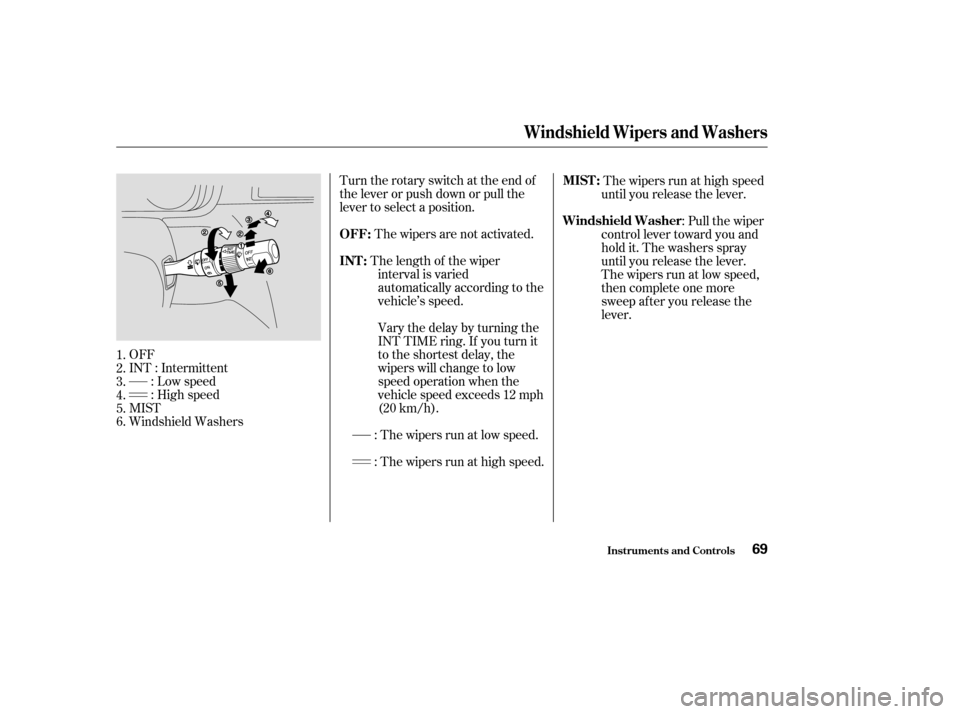
Turntherotaryswitchattheendof
the lever or push down or pull the
lever to select a position.: The wipers run at high speed.
OFF
INT : Intermittent
: Low speed
: High speed
MIST
Windshield Washers The wipers are not activated.
The wipers run at high speed
until you release the lever.
The length of the wiper interval is varied
automatically according to the
vehicle’s speed.
Vary the delay by turning the
INT TIME ring. If you turn it
to the shortest delay, the
wipers will change to low
speed operation when the
vehicle speed exceeds 12 mph
(20 km/h). :Pullthewiper
control lever toward you and
hold it. The washers spray
until you release the lever.
The wipers run at low speed,
then complete one more
sweep after you release the
lever.
: The wipers run at low speed.
1.
2.
3.
4.
5.
6.
Windshield Wipers and Washers
Inst rument s and Cont rols
OFF:
MIST :
INT : Windshield Washer
69
Page 78 of 296
The master key fits all the locks on
your vehicle. The valet key works
only in the ignition, the door locks,
and the tailgate. You can keep the
glove box locked when you leave
your vehicle and the valet key at a
parking f acility.Youshouldhavereceivedakey
number tag with your keys. You will
need this key number if you ever
have to get a lost key replaced. Use
only Honda-approved key blanks.
These keys contain electronic
circuits that are activated by the
Immobilizer System. They will not
work to start the engine if the
circuits are damaged.
Protect the keys f rom direct
sunlight, high temperature, and
high humidity.
Donotdropthekeysorsetheavy
objects on them.
Keep the keys away f rom liquids.
If they get wet, dry them
immediately with a sof t cloth.
The keys do not contain batteries.
Do not try to take them apart.
Keys and Locks
Inst rument s and Cont rols75
MASTER
KEYS
(BLACK) VALET KEY
(GRAY)
KEY
NUMBER
TAG
Page 79 of 296

The Immobilizer System protects
your vehicle f rom thef t. If an
improperly-coded key (or other
device) is used, the engine’s f uel
system is disabled.
When you turn the ignition switch to
ON (II), the Immobilizer System
indicator should come on f or a f ew
seconds, then go out. If the indicator
starts to blink, it means the system
does not recognize the coding of the
key. Turn the ignition switch to
LOCK (0), remove the key, reinsert
it, and turn the switch to ON (II)
again.The system may not recognize your
key’s coding if another immobilizer
key or other metal object (i.e. key
f ob) is near the ignition switch when
you insert the key.
If the system repeatedly does not
recognize the coding of your key,
contact your Honda dealer.
Do not attempt to alter this system
or add other devices to it. Electrical
problems could result that may make
your vehicle undriveable.
If you have lost your key and you
cannot start the engine, contact a
Honda dealer.As required by the FCC:
This device complies with Part 15 of theFCC rules. Operation is subject to thef ollowing two conditions: (1) This devicemay not cause harmf ul interf erence, and(2) this device must accept anyinterf erence received, includinginterf erence that may cause undesiredoperation.
Changes or modif ications not expresslyapproved by the party responsible f orcompliance could void the user’sauthority to operate the equipment.
This device complies with IndustryCanada Standard RSS-210.Operation is subject to the f ollowing twoconditions: (1) this device may not causeinterf erence, and (2) this device mustaccept any interf erence that may causeundesired operation of the device.
Immobilizer Syst em
Inst rument s and Cont rols76
Page 85 of 296
Youcanopenorcloseeachrear
sliding door with the remote
transmitter. The right button
controls the passenger’s side door
and the left button controls the
driver’s side door.If the power sliding door MAIN
switch on the dashboard is in the
OFF position, you cannot open or
close the sliding doors with the
remote transmitter. Avoid dropping or throwing the
transmitter.
Protect the transmitter from
extreme temperatures.
Do not immerse the transmitter in
any liquid.
If you lose a transmitter, the
replacement needs to be
reprogrammed by a Honda dealer.
Remote Transmitter
Inst rument s and Cont rols
Opening or Closing t he Power Sliding
Doors Remote Transmitter Care
82
DRIVER’S
SIDE
SLIDING
DOOR
BUTTONLED
PASSENGER’S
SIDE
SLIDING
DOOR
BUTTON POWER SLIDING DOOR MAIN SWITCH
Page 86 of 296

�´
�Ü �Õ
If it takes several pushes on the
button to lock or unlock the doors
and the tailgate, replace the battery
as soon as possible.
To replace the battery, move the
round cover on the back of the
transmitter by turning it
counterclockwise with a coin. Insert
a new battery with the side facing
up. Reinstall the cushion ring. Align
the mark on the cover with
the mark on the transmitter.
Setthecoverinplaceandturnit
clockwise.
Battery type: CR2025
As required by the FCC:
This device complies with Part 15 of theFCC rules. Operation is subject to thef ollowing two conditions: (1) This devicemay not cause harmf ul interf erence, and(2) this device must accept anyinterf erence received, includinginterf erence that may cause undesiredoperation.
Changes or modif ications not expresslyapproved by the party responsible f orcompliance could void the user’sauthority to operate the equipment.
This device complies with IndustryCanada Standard RSS-210.Operation is subject to the f ollowing twoconditions: (1) this device may not causeinterf erence, and (2) this device mustaccept any interf erence that may causeundesired operation of the device.
Remote Transmitter
Inst rument s and Cont rols
Replacing the Transmitter Battery
83
Open
Close ROUND
COVER
CUSHION
RING
BATTERY