Page 60 of 296

This section gives inf ormation about
the controls and displays that
contribute to the daily operation of
your Honda. All the essential
controls are within easy reach............................
Control Locations .58
............................
Instrument Panel .59
..........
Instrument Panel Indicators . 60
..
Maintenance Required Indicator . 65
.............................................
Gauges .66
Controls Near the Steering ...........................................
Wheel .68
.
Windshield Wipers and Washers . 69
......................................
Turn Signal .71
........................................
Headlights .71
........
Instrument Panel Brightness . 72
..............................
Hazard Warning .73
.................
Rear Window Def ogger . 73
..........
Steering Wheel Adjustment . 74
...............................
Keys and Locks .75
........................
Immobilizer System .76
................................
Ignition Switch .77
......................................
Door Locks .78
......................
Power Door Locks .78
..............
Childproof Door Locks . 79
........................................
Tailgate .79
.......................
Remote Transmitter .81
...................................
Sliding Doors .84
.................................................
Seats .88
....................................
Seat Heaters .98
..............................
Power Windows .99 ...........................................
Mirrors .102
...............................
Parking Brake .103
.........
Interior Convenience Items . 104
..........................................
Clock .105
.............................
Center Table .105
.....................
Beverage Holders .106
....................
Sunglasses Holder .107
...................................
Sun Visor .108
............................
Vanity Mirror .108
...................
Rear Compartment . 108
..................................
Glove Box .109
........
Accessory Power Sockets . 109
...........................
Center Pocket .110
...............................
Coin Holder .110
...............................
Storage Box .111
..................................
Coat Hook .111
...............................
Interior Lights .112
Instruments and Controls
Inst rument s and Cont rols57
Page 71 of 296
�Î
�Î
To use the horn, press the pad around the ‘‘H’’ logo.
Controls Near the Steering Wheel
Inst rument s and Cont rols68
REAR WINDOW
DEFOGGER
LIGHT CONTROL
SWITCH
HORN
TILT
ADJUSTMENT
HEADLIGHTS/
TURN SIGNALS
CRUISE
CONTROL WINDSHIELD
WIPERS/WASHERS
POWER SLIDING DOOR
(EX and EX-L models)
MIRROR CONTROL SHIFT LEVER
TRACTION CONTROL
SYSTEM HAZARD WARNING
BUTTON
PASSENGER AIRBAG
OFF INDICATOR
Page 77 of 296
Thedefoggerwiresontheinsideof
the rear window can be accidentally
damaged. When cleaning the glass,
always wipe side-to-side.Make any steering wheel adjustment
bef ore you start driving.
Push the lever under the steering
column all the way down. Push the lever up to lock the
steering wheel in position.
Make sure you have securely
locked the steering wheel in place
by trying to move it up and down. Move the steering wheel so it
points toward your chest, not
towardyourface.Makesureyou
can see the instrument panel
gauges and indicators.
3.
4.
1. 2.
See page f or important saf ety
inf ormation about how to properlyposition the steering wheel. 17
Rear Window Def ogger, Steering Wheel A djustment
Inst rument s and Cont rols
Steering Wheel A djustment
74
LX model
Adjusting the steering wheel
position while driving may
cause you to lose control of the
vehicle and be seriously injured
inacrash.
Adjust the steering wheel only
when the vehicle is stopped.
Page 80 of 296

�µ
�µ
�µ
�µ Use this position
only to start the engine. The switch
returns to ON (II) when you let go of
the key.
You will hear a reminder beeper if
you leave the key in the ignition
switch in the LOCK (0) or
ACCESSORY (I) position and open
the driver’s door. Remove the key to
turn of f the beeper.
TheshiftlevermustbeinPark
bef ore you can remove the key f rom
the ignition switch.
The ignition switch has f our
positions: LOCK (0), ACCESSORY
(I), ON (II), and START (III). You can insert or
remove the key only in this position.
To turn the key, the shift lever must
be in Park, and you must push the
key in slightly.
If the f ront wheels are turned, the
anti-thef t lock may make it dif f icult
to turn the key. Firmly turn the
steering wheel to the lef t or right as
you turn the key.
You can
operate the audio system and the
accessory power sockets in this
position.
This is the normal key
position when driving. Several of the
indicators on the instrument panel
come on as a test when you turn the
ignition switch f rom ACCESSORY
(I) to ON (II).
Ignition Switch
Inst rument s and Cont rols
ST A RT (III)
LOCK (0)
A CCESSORY (I)
ON (II)
77
Page 88 of 296
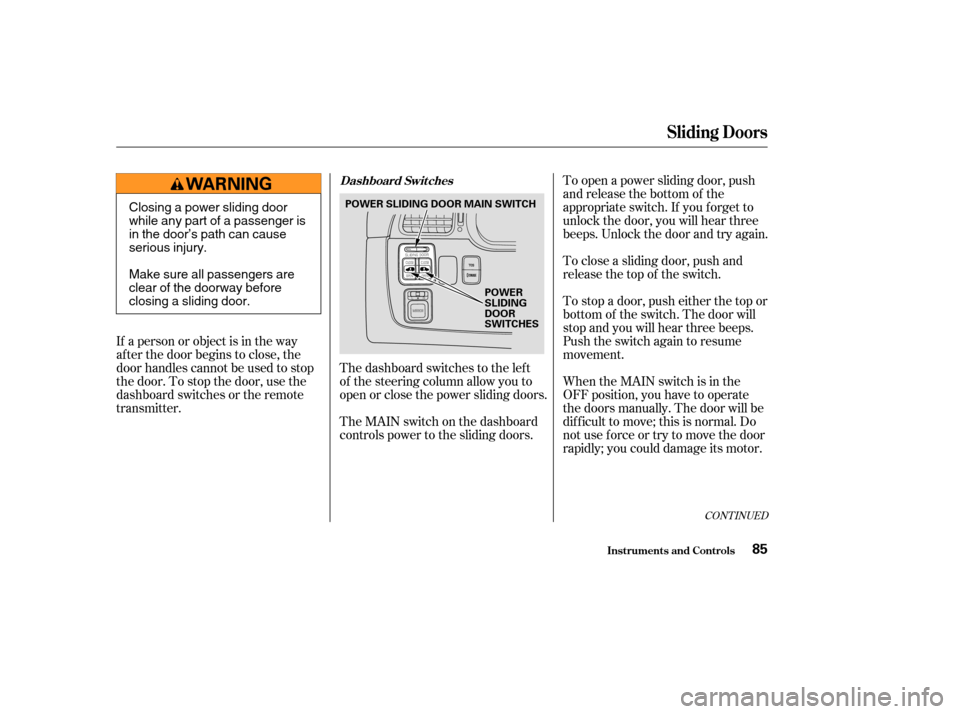
The dashboard switches to the lef t
of the steering column allow you to
open or close the power sliding doors.
The MAIN switch on the dashboard
controls power to the sliding doors.To open a power sliding door, push
and release the bottom of the
appropriate switch. If you f orget to
unlock the door, you will hear three
beeps. Unlock the door and try again.
To close a sliding door, push and
release the top of the switch.
To stop a door, push either the top or
bottom of the switch. The door will
stop and you will hear three beeps.
Push the switch again to resume
movement.
When the MAIN switch is in the
OFF position, you have to operate
the doors manually. The door will be
dif f icult to move; this is normal. Do
not use f orce or try to move the door
rapidly; you could damage its motor.
If a person or object is in the way
af ter the door begins to close, the
door handles cannot be used to stop
the door. To stop the door, use the
dashboard switches or the remote
transmitter.
CONT INUED
Sliding Doors
Inst rument s and Cont rols
Dashboard Switches
85
POWER
SLIDING
DOOR
SWITCHES
POWER SLIDING DOOR MAIN SWITCH
Closing a power sliding door
while any part of a passenger is
in the door’s path can cause
serious injury.
Make sure all passengers are
clear of the doorway before
closing a sliding door.
Page 118 of 296

The heating and air conditioning
systems in your Honda provide a
comf ortable driving environment in
all weather conditions.
The standard audio system has
many f eatures. This section de-
scribes those f eatures and how to
use them. (If you selected an
optional audio system, ref er to the
operating instructions that came
with it.)
The security system helps to dis-
courage vandalism and thef t of your
Honda. Your Honda has an anti-thef t audio
system that requires a code number
to enable it..............
Vents, Heating, and A/C . 116
.........................
Airflow Buttons .117
Using Automatic Climate ...................................
Control .121
...................
Rear Climate Control . 124
..............
Climate Control Sensors . 125
..........................
Playing the Radio .126
............................
Radio Reception .130
..................................
Playing a CD .132
Operating the Optional CD .....................................
Changer .134
....................
Protecting Your CDs .135
.........
CD Player Error Messages . 136
.....
CD Changer Error Messages . 137
...............................
Playing a Tape .139
.............
Steering Wheel Controls . 143
.................
Radio Thef t Protection . 144
........
Rear Entertainment System . 145
..............................
Playable DVDs .154
............................
Security System .159
...............................
Cruise Control .160
HomeLink Universal ................................
Transceiver .163
On EX and EX-L models
Comf ort and Convenience Features
Comf ort and Convenience Feat ures115
Page 128 of 296
Theclimatecontrolsystemhastwo
sensors. A sunlight sensor is in the
top of the dashboard, and a
temperature sensor is next to the
steering column. Do not cover the
sensors or spill any liquid on them.
The direction and quantity of airf low
f rom each rear ceiling vent is
adjustable.
To adjust the direction of the air
coming f rom a rear ceiling vent,
move the tab in the center of each
vent back-and-f orth, and rotate the
vent with the tab. The lever next to
each vent can be opened and closed
to regulate the amount of airf low.
Rear Climate Control, Climate Control Sensors
Comf ort and Convenience Feat ures
Sunlight and T emperature
Sensors
Rear Ceiling Vents
125
SUNLIGHT SENSOR TEMPERATURE SENSOR
TAB
LEVER
Page 146 of 296
�Û�Ý
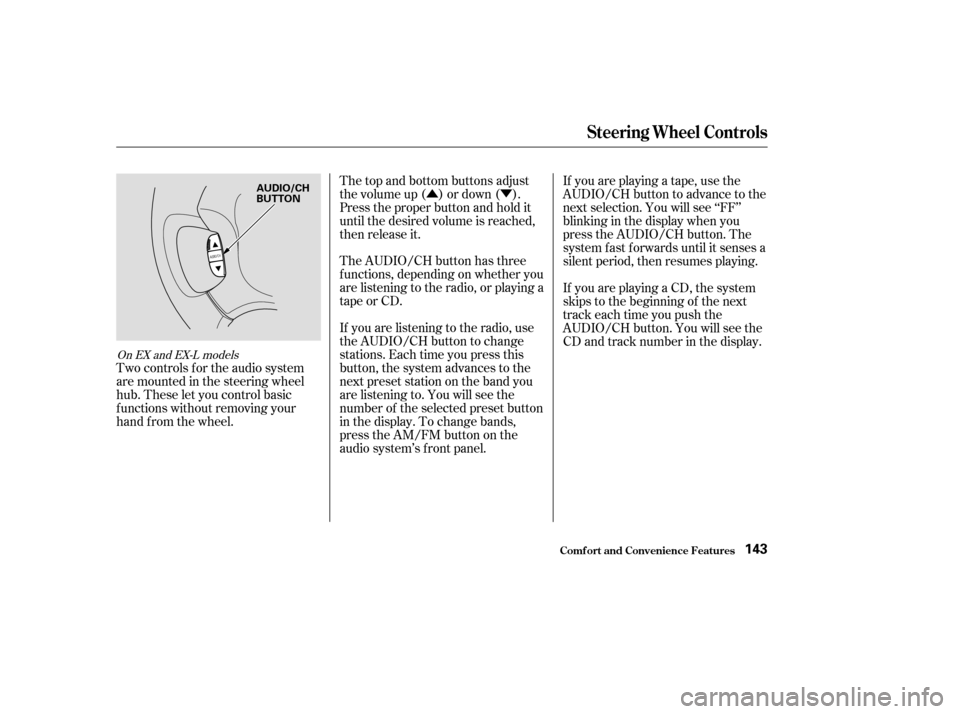
Two controls f or the audio system
are mounted in the steering wheel
hub. These let you control basic
f unctions without removing your
hand f rom the wheel. The top and bottom buttons adjust
thevolumeup( )ordown( ).
Press the proper button and hold it
until the desired volume is reached,
then release it.
The AUDIO/CH button has three
f unctions, depending on whether you
are listening to the radio, or playing a
tape or CD.
If you are listening to the radio, use
the AUDIO/CH button to change
stations. Each time you press this
button, the system advances to the
next preset station on the band you
are listening to. You will see the
number of the selected preset button
in the display. To change bands,
press the AM/FM button on the
audio system’s f ront panel.If youareplayingatape,usethe
AUDIO/CH button to advance to the
next selection. You will see ‘‘FF’’
blinking in the display when you
press the AUDIO/CH button. The
system f ast f orwards until it senses a
silent period, then resumes playing.
If youareplayingaCD,thesystem
skips to the beginning of the next
track each time you push the
AUDIO/CH button. You will see the
CD and track number in the display.
On EX and EX-L models
Steering Wheel Controls
Comf ort and Convenience Feat ures143
AUDIO/CH
BUTTON


