Page 82 of 227

To apply the parking brake, pull the
lever up f ully. To release it, pull up
slightly, push the button, and lower
the lever. The parking brake light on
the instrument panel should go out
when the parking brake is f ully
released (see page ).
To open a rear window, pull the lever
towards you, then push it out until it
locks. To close the rear window pull
the lever towards you, then push it
back. Make sure the window is f ully
closed and locked.
Toliftuptherearoftheskylightfor
ventilation, pull down the lever to
unlock the skylight, then push it up
until the skylight is locked in the tilt-
up position.
To close the skylight, pull down the
lever to unlock the skylight, then
push it back in place. Make sure the
skylight is f ully closed and locked.
54
CONT INUED
On 4WD models only
Inst rument s and Cont rols
Rear Windows, Parking Brake, Skylight
Parking Brake
Rear Windows Skylight
83
PARKING BRAKE LEVER
Driving the vehicle with the parking
brake applied can damage the rear
brakes and axles.
�����—�
���—�����y�
�������������y���
�(���+���
���y���������y
Page 83 of 227
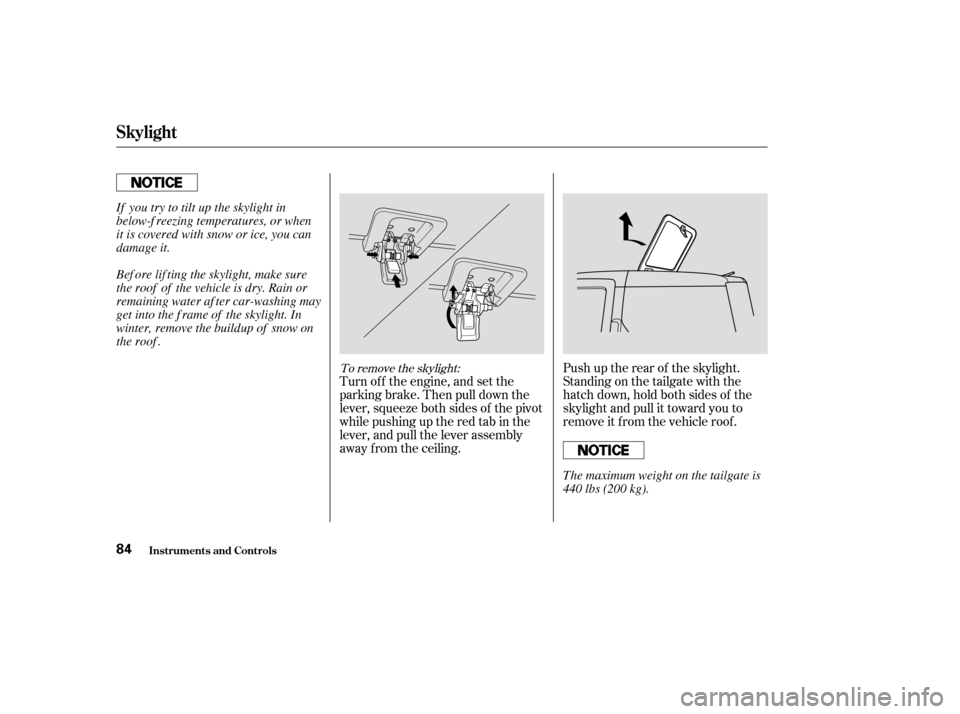
Turn of f the engine, and set the
parkingbrake.Thenpulldownthe
lever, squeeze both sides of the pivot
while pushing up the red tab in the
lever, and pull the lever assembly
away from the ceiling.Push up the rear of the skylight.
Standing on the tailgate with the
hatch down, hold both sides of the
skylight and pull it toward you to
remove it f rom the vehicle roof .
To remove the skylight:
Skylight
Inst rument s and Cont rols84
Bef ore lif ting the skylight, make sure
the roof of the vehicle is dry. Rain or
remaining water af ter car-washing may
get into the f rame of the skylight. In
winter, remove the buildup of snow on
the roof .
If you try to tilt up the skylight in
below-f reezing temperatures, or when
it is covered with snow or ice, you can
damage it.
The maximum weight on the tailgate is
440 lbs (200 kg).
�����—�
���—�����y�
�������������y���
�(���+���
���y���������y
Page 84 of 227
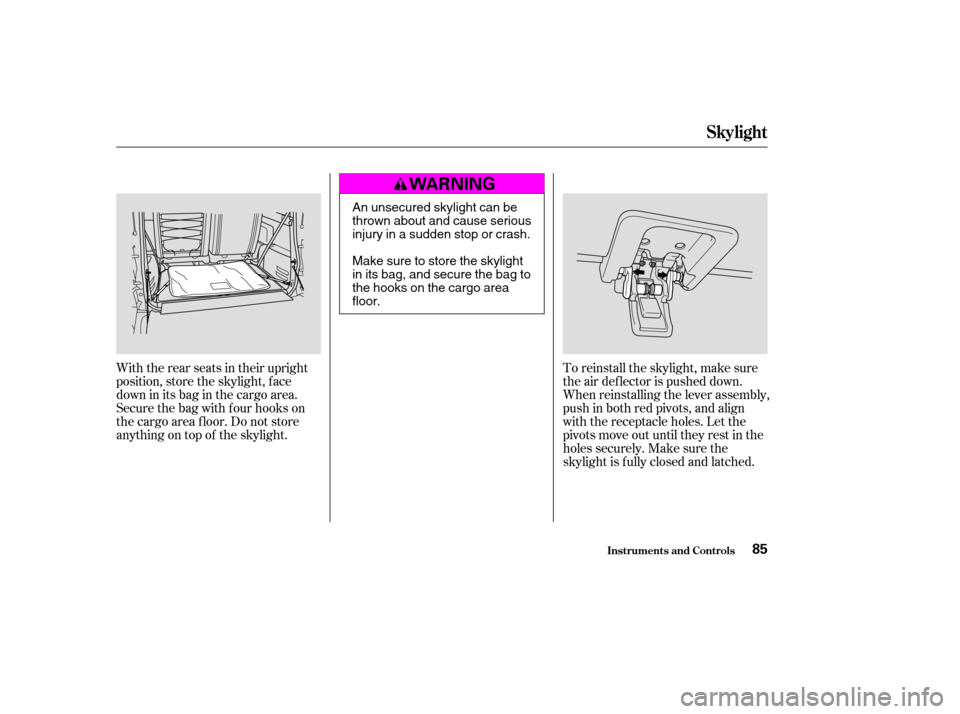
With the rear seats in their upright
position, store the skylight, f ace
down in its bag in the cargo area.
Secure the bag with four hooks on
the cargo area f loor. Do not store
anything on top of the skylight.To reinstall the skylight, make sure
the air deflector is pushed down.
When reinstalling the lever assembly,
push in both red pivots, and align
with the receptacle holes. Let the
pivots move out until they rest in the
holes securely. Make sure the
skylight is f ully closed and latched.
Inst rument s and Cont rols
Skylight
85
An unsecured skylight can be
thrown about and cause serious
injury in a sudden stop or crash.
Make sure to store the skylight
in its bag, and secure the bag to
the hooks on the cargo areafloor.
�����—�
���—�����y�
�������������y���
�(���+���
���y���������y
Page 86 of 227

These sockets are intended to supply
power f or 12 volt DC accessories
that are rated 120 watts or less (10
amps).
To power an accessory, the ignition
switch must be in the ACCESSORY
(I) or ON (II) position.
When both sockets are begin used,
the combined power rating of each
accessory should be 120 watts or less
(10 amps).
These sockets will not power an
automotive type cigarette lighter
element.Open the glove box by pulling the
bottom of the handle. Close it with a
f irm push. Lock or unlock the glove
box with the master key.
Be caref ul when you are using the
beverage holders. A spilled liquid
that is very hot can scald you or your
passengers. Spilled liquids can also
damage the upholstery, and
electrical components in the interior.
Your vehicle has one or two
accessory power sockets, depending
on the model. All models have a
f ront accessory power socket on the
dashboard above the glove box.
The EX model has another
accessory power socket in the cargo
area on the passenger’s side.
On EX models
Interior Convenience Items
Inst rument s and Cont rols
Beverage Holders
Glove Box
A ccessory Power Sockets
87
An open glove box can cause
serious injury to your passenger
inacrash,evenifthe
passenger is wearing the seatbelt.
Always keep the glove box
closed while driving.
�����—�
���—�����y�
���������
�
�y���
�(���+���
���y���������y
Page 87 of 227
The ceiling light has a three-position
switch: ON, Door Activated, and
OFF.
In the Door Activated (center)
position, the light comes on when
you:Open any door.
Remove the key from the ignition.
If you do not open a door, the light
f ades out in about 30 seconds.
Unlock the doors with the key or
remote transmitter. The cargo area light has a three-
position switch. In the center
position, the light comes on when
you open the hatch.
Turn on the spotlight by pushing the
lens. Push the lens again to turn it
of f . You can use the spotlights at all
times.
The ignition switch light comes on
when you unlock the driver’s door,
and f ades out about 30 seconds af ter
you close the door.
On EX models
Interior Lights
Ceiling L ight
Spotlights
Cargo Area Light
Ignition Switch L ight
Inst rument s and Cont rols88
ON
OFF DOOR ACTIVATED
�����—�
���—�����y�
�������������y���
�(���+���
���y���������y
Page 90 of 227

Turn this dial clockwise to increase
fan speed and increase the airflow.
Turning this dial clockwise increases
the temperature of the airflow.The outside air intakes f or the
heating and cooling system are at
the base of the windshield. Keep this
area clear of leaves and other debris.
ThesystemshouldbeleftinFresh
Air mode under almost all conditions.
Keeping the system in Recirculation
mode, particularly with the A/C of f ,
can cause the windows to fog up.
Switch to Recirculation mode when
driving through dusty or smoky
conditions, then return to Fresh Air
mode.
This button turns the rear window
def ogger of f and on (see page ).
Use the mode control dial to select
the vents the air flows from. Some
air will f low f rom the dashboard
vents in all modes.
This button turns the air
conditioning on and of f . The light in
thebuttonisonwhentheA/Cison.
When the light in the button is on,
air f rom the vehicle’s interior is sent
throughout the system again. When
the light is of f , air is brought in f rom
the outside of the vehicle (Fresh Air
mode). The system automatically
turns on the A/C and switches to
Recirculation mode. Air f lows f rom
the center and side vents in the
dashboard.
Air flows from the center
and corner vents in the dashboard.
Air f low is divided between
the vents in the dashboard and the
f loor vents.
Air f lows f rom the f loor
vents. When you select , the
system automatically switches to
Fresh Air mode.
Air f low is divided between
the f loor vents and the def roster
vents at the base of the windshield.
63
If equipped If equipped
Fan Control Dial
T emperature Control Dial
Air Conditioning (A/C) Button
Rear Window Def ogger Button
Mode Control Dial
Recirculation Button
Comf ort and Convenience Feat ures
Air Flow Buttons
91
�����—�
���—�����y�
�������������y���
�(���+���
���y���������y
Page 91 of 227

Air f lows f rom the def roster
vents at the base of the windshield.
When you select or ,
the system automatically switches to
Fresh Air mode and turns on the
A/C. The A/C indicator does not
come on. Select and Fresh Air mode. Set the f an to the desired speed.
Adjust the warmth of the air with
the temperature control dial.
The heater uses engine coolant to
warm the air. If the engine is cold, it
will be several minutes bef ore you
f eel warm air coming f rom the
system.
Air conditioning places an extra load
on the engine. Watch the engine
coolant temperature gauge (see page
). If it moves near the red zone,
turn of f the A/C until the gauge
reads normally. Set the mode control dial to MAX
A/C.
The system automatically turns on
the A/C, selects and
switches to Recirculation mode.
Make sure the temperature
control dial is all the way to the left.
Set the f an to the desired speed.
The f low-through ventilation system
draws in outside air, circulates it
through the interior, then exhausts it
through vents near the tailgate.
Turn the temperature control dial
all the way to the lef t.
Make sure the A/C is of f .
Select and Fresh Air mode.
Set the f an to the desired speed. Turn on the A/C by pressing the
button. The light in the button
comesonwhenafanspeedis
selected.Make sure the temperature
control dial is all the way to the left.
Select .
If the outside air is humid, select
Recirculation mode. If the outside
air is dry, select Fresh Air mode.
Set the f an to the desired speed.
1. 2. 3.4. 1.2.3.
1. 2. 3.
59
1. 2.3. 4. 5.
To cool the interior with MAX A/C:
If equipped
Vents, Heating, and A/C
Comf ort and Convenience Feat ures
Using the A /C
Using the Heater
(Fresh A ir mode)
Ventilation
92
�����—�
���—�����y�
����
����
���y���
�(���+���
���y���������y
Page 100 of 227

When using CD-R discs, use only
high quality CDs labeled f or audio
use.
When recording a CD-R, the
recording must be closed f or it to
be used by the CD players.
CD-RW discs will not work in this
unit.
Play only standard round CDs.
Odd-shaped CDs may jam in the
driveorcauseotherproblems.When a CD is not being played, store
it in its case to protect it f rom dust
and other contamination. To prevent
warpage, keep CDs out of direct
sunlight and extreme heat.
To clean a CD, use a clean sof t cloth.
Wipe across the CD f rom the center
to the outside edge.
AnewCDmayberoughonthe
inner and outer edges. The small
plastic pieces causing this roughness
can f lake of f and f all on the re-
cording surf ace of the CD, causing
skipping or other problems. Remove
these pieces by rubbing the inner
and outer edges with the side of a
pencil or pen.
Never try to insert f oreign objects in
the CD player or the magazine.
Handle a CD by its edges; never
touch either surf ace. Do not place
stabilizer rings or labels on the CD.
These, along with contamination
f rom f ingerprints, liquids, and f elt-tip
pens, can cause the CD to not play
properly, or possibly jam in the drive.
Handle your CDs properly to
prevent damage and skipping.
General Inf ormation Protecting CDs
Protecting Your CDs
Comf ort and Convenience Feat ures101
�����—�
���—�����y�
����
�
������y���
�(���+���
���y���
�����y