Page 21 of 256

If a seat belt does not seem to work
as it should, it may not protect the
occupant in a crash.Using a seat
belt that is not working properly can
result in serious injury or death.
Have your Honda dealer check the
belt as soon as possible.
See page f or additional
inf ormation about your seat belts
and how to take care of them. Adjust the steering wheel, if needed,
so that the wheel points toward your
chest, not toward your f ace. This
provides optimal protection f rom the
f ront airbag.
See page f or how to adjust the
steering wheel.After all occupants have adjusted
their seats and put on seat belts, it is
very important that they continue to
sit upright, well back in their seats,
with their feet on the floor, until the
vehicle is parked and the engine is
of f .
Sitting improperly can increase the
chance of injury during a crash. For
example, if an occupant slouches,
lies down, turns sideways, sits
forward, leans forward or sideways,
or puts one or both f eet up, the
chance of injury during a crash is
greatly increased.
20
68
CONT INUED
Protecting A dults and Teens
Driver and Passenger Saf ety
No one should sit in a seat wit h aninoperat ive seat belt .
Adjust the Steering Wheel Maintain a Proper Sitting
Position
6.
7.
17
Page 27 of 256

Your airbag system includes:one f or the driver and one f or a
f ront passenger. The airbags are
stored in the outer edges of the
seat-backs. Both are marked
‘‘SIDE AIRBAG’’ (see page ). Two SRS (Supplemental Restraint
System) f ront airbags. The driver’s
airbag is stored in the center of
the steering wheel; the f ront
passenger’sairbagisstoredinthe
dashboard. Both are marked ‘‘SRS
AIRBAG.’’
Automatic seat belt tensioners
(see page ).
Sensors that can detect a
moderate to severe frontal impact
or side impact in models equipped
with side airbags. A sophisticated electronic system
that continually monitors and
records inf ormation about the
sensors, the control unit, the
airbag activators, and driver and
frontpassengerseatbeltusewhen
the ignition is in the ON (II)
position.
If you ever have a moderate to
severe f rontal collision, sensors will
detect the vehicle’s rapid
deceleration. If the rate of
deceleration is high enough, the
control unit will instantly inf late the
driver’s and f ront passenger’s f ront
airbags, at the time and with the
f orce needed.
An indicator light on the
instrument panel that alerts you to
a possible problem with your
airbags (see page ).
an indicator light on the
dashboard that alerts you that the
passenger’s side airbag has been
turned of f (see page ).
Emergency backup power in case
your vehicle’s electrical system is
disconnected in a crash.
26
21 28
27
On models equipped with side airbags,
On models equipped with side airbags,
CONT INUED
Airbag System Components How Your Front Airbags Work
Additional Inf ormation About Your Airbags
Driver and Passenger Saf ety23
Page 57 of 256

This section gives inf ormation about
the controls and displays that
contribute to the daily operation of
your Honda. All the essential
controls are within easy reach............................
Control Locations .54
............................
Instrument Panel .55
.............................................
Gauges .61
...................................
Trip Meter .61
.....................................
Odometer .61
..................................
Fuel Gauge .61
...................
Temperature Gauge . 62
Outside Temperature ..................................
Indicator .62
Controls Near the Steering .......................................
Wheel .63
......................
Wipers and Washers .64
.........
Turn Signals and Headlights . 65
........
Instrument Panel Brightness . 66
.................
Hazard Warning Button . 66
.................
Rear Window Def ogger . 66
.................................
Parking Brake .67
..........
Steering Wheel Adjustment . 68
...............................
Keys and Locks .69
........................
Immobilizer System .70
................................
Ignition Switch .71
......................................
Door Locks .72
......................
Power Door Locks .72
..............
Childproof Door Locks . 72
...........
Tailgate and Hatch Glass . 73
.......................
Remote Transmitter .74 ....................................
Seat Heaters .76
.................................................
Seats .77
........................
Seat Adjustments .77
Driver’s Seat Height ..............................
Adjustment .78
......................................
Armrests .78
..........................
Head Restraints .79
..........
Reclining the Front Seats . 80
...
Folding the Rear Seats Down . 81
..........
Folding the Rear Seat Up . 82
.....................
Detachable Anchor .84
..............................
Power Windows .86
........................................
Grove Box .87
.........................................
Moonroof .88
.............................................
Mirrors .89
....
Adjusting the Power Mirrors . 89
................
Power Mirror Heaters . 90
...........
Interior Convenience Items . 91
.............................
Beverage Holder .92
...................................
Built-in Table .92
.....................................
Storage Box .94
..........................
Sunglasses Holder .94
....................................
Center Table .94
..............
Accessory Power Sockets . 95
Instruments and Controls
Inst rument s and Cont rols53
Page 67 of 256
�Î
�Î
To use the horn, press the center pad of the steering wheel.
:
Controls Near the Steering Wheel
Inst rument s and Cont rols63
HEADLIGHTS/TURN SIGNALS
SHIFT LEVER (A/T)
CRUISE CONTROL MOONROOF
PARKING BRAKE
HORN
WINDSHIELD WIPERS/
WASHERS
A/T model is shown. REAR WINDOW DEFOGGER
(P.88)
(P.119) STEERING WHEEL ADJUSTMENT (P.67)(P.66)
(P.66) HAZARD WARNING BUTTON
(P.64) (P.141)
(P.65)
(P.68)
Page 72 of 256
See page f or important saf etyinf ormation about how to properlyposition the steering wheel. 17
Make any steering wheel adjustment
bef ore you start driving.
Push the lever under the steering
column all the way down.
Move the steering wheel so it
points to your chest, not toward
your f ace. Make sure you can see
the instrument panel gauges and
lights.Push the lever up to lock the
steering wheel in that position.
Make sure you have securely
locked the steering wheel in place
by trying to move it up and down.
4. 3.
1.
2.
Steering Wheel A djustment
Inst rument s and Cont rols68
Adjusting the steering wheel
position while driving may
cause you to lose control of the
vehicle and be seriously injured
inacrash.
Adjust the steering wheel only
when the vehicle is stopped.
Page 75 of 256

�µ�µ�µ
�µ You can insert or
remove the key only in this position.
To turn the key, the shift lever must
be in Park, and you must push the
key in slightly. Use this position
only to start the engine. The switch
returns to ON (II) when you let go of
the key.
You will hear a reminder beeper if
you leave the key in the ignition
switch in the LOCK (0) or
ACCESSORY (I) position and open
the driver’s door. Remove the key to
turn of f the beeper. The shif t lever
must be in Park bef ore you can
remove the key from the ignition
switch.
If the f ront wheels are turned, the
anti-thef t lock may make it dif f icult
to turn the key. Firmly turn the
steering wheel to the lef t or right as
you turn the key.
You can
operate the audio system and the
accessory power sockets in this
position.
This is the normal key
position when driving. Several of the
lights on the instrument panel come
on as a test when you turn the
ignition switch f rom ACCESSORY
(I) to ON (II).
The ignition switch has f our
positions: LOCK (0), ACCESSORY
(I), ON (II), and START (III). L OCK (0)
ST A RT (III)
A CCESSORY (I)
ON (II)
Ignition Switch
Inst rument s and Cont rols71
Removing the key from the
ignition switch while driving
locks the steering. This can
cause you to lose control.
Remove the key from the
ignition switch only when
parked.
Page 123 of 256
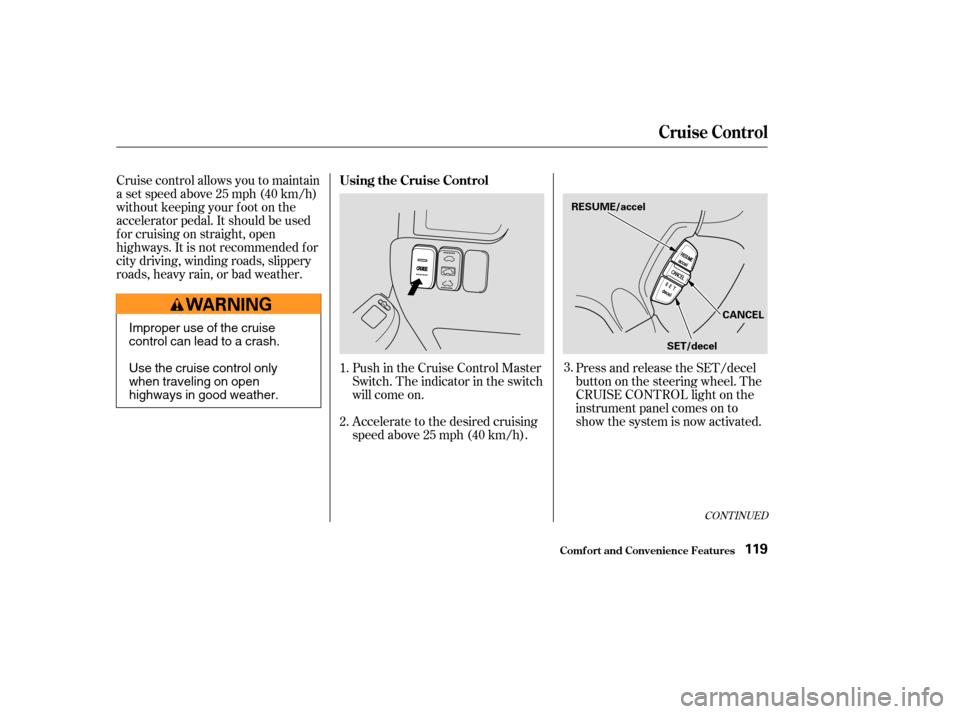
Cruise control allows you to maintain
asetspeedabove25mph(40km/h)
without keeping your f oot on the
accelerator pedal. It should be used
f or cruising on straight, open
highways. It is not recommended f or
city driving, winding roads, slippery
roads, heavy rain, or bad weather.Push in the Cruise Control Master
Switch. The indicator in the switch
will come on.
Accelerate to the desired cruising
speedabove25mph(40km/h).Press and release the SET/decel
buttononthesteeringwheel.The
CRUISE CONTROL light on the
instrument panel comes on to
show the system is now activated.
1.
2. 3.
CONT INUED
Using the Cruise Control
Cruise Control
Comf ort and Convenience Feat ures119
SET/decel
RESUME/accel
CANCEL
Improper use of the cruise
control can lead to a crash.
Use the cruise control only
when traveling on open
highways in good weather.
Page 125 of 256

Even with the cruise control turned
on, you can still use the accelerator
pedal to speed up f or passing. Af ter
completing the pass, take your foot
of f the accelerator pedal. The vehicle
will return to the set cruising speed.
Resting your f oot on the brake or
clutch pedal will cause the cruise
control to cancel.Youcancancelthecruisecontrolin
any of these ways:
Tap the brake or clutch pedal.
Push the CANCEL button on the
steering wheel.
Press the Cruise Control Master
Switch. When you push the CANCEL button,
or tap the brake or clutch pedal, the
system remembers the previously-
set cruising speed. To return to that
speed, accelerate to above 25 mph
(40 km/h) and then press and
release the RESUME/accel button.
The CRUISE CONTROL light comes
on. The vehicle will accelerate to the
same cruising speed as bef ore.
Pressing the Cruise Control Master
Switch turns the system of f and
erases the previous cruising speed.
Cancelling the Cruise Control Resuming the Set Speed
Cruise Control
Comf ort and Convenience Feat ures121