Page 78 of 256
�µ
�µ �µ
�µ
See page for information on
cargo loading. Keep the tailgate and
the hatch glass closed at all times
while driving to avoid damaging the
tailgate and the hatch glass, and to
prevent exhaust gas f rom getting
into the interior. See
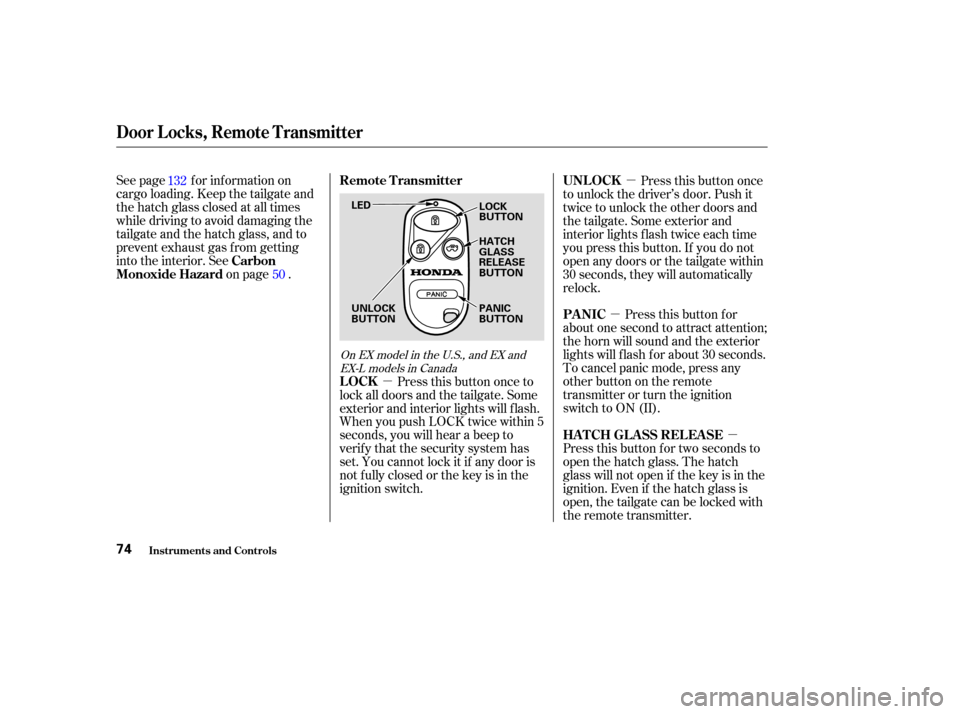
on page . Pressthisbuttononce
to unlock the driver’s door. Push it
twice to unlock the other doors and
the tailgate. Some exterior and
interior lights f lash twice each time
you press this button. If you do not
open any doors or the tailgate within
30 seconds, they will automatically
relock.
Pressthisbuttonfor
about one second to attract attention;
thehornwillsoundandtheexterior
lights will f lash f or about 30 seconds.
To cancel panic mode, press any
other button on the remote
transmitter or turn the ignition
switch to ON (II).
Press this button for two seconds to
open the hatch glass. The hatch
glass will not open if the key is in the
ignition. Even if the hatch glass is
open, the tailgate can be locked with
the remote transmitter.
Press this button once to
lock all doors and the tailgate. Some
exterior and interior lights will f lash.
When you push LOCK twice within 5
seconds, you will hear a beep to
verify that the security system has
set. You cannot lock it if any door is
not f ully closed or the key is in the
ignition switch.
132
50
On EX model in the U.S., and EX andEX-L models in Canada
Carbon
Monoxide Hazard UNL OCK
PA NIC
HATCH GLASS RELEASE
LOCK Remote Transmitter
Door Locks, Remote Transmitter
Inst rument s and Cont rols74
LED
UNLOCK
BUTTON LOCK
BUTTON
HATCH
GLASS
RELEASE
BUTTON
PANIC
BUTTON
Page 108 of 256

�µ�µ
�µ
If you are
traveling far from home and can no
longer receive your preset stations,
you can use the Auto Select f eature
to find stations in the local area.
Press the A. SEL Button. ‘‘A.SEL’’
f lashes in the display, and the system
goes into scan mode f or several
seconds. It stores the f requencies of
six AM, and twelve FM stations in
the preset buttons.
You will see a ‘‘0’’ displayed af ter
pressing a preset button if Auto
Select cannot f ind a strong station
f or every preset button.
If you do not like the stations Auto
Select has stored, you can store
other f requencies on the preset
buttons. Use the TUNE, SEEK, or
SCAN functions to find stations, then
store them in the preset buttons as
described. press the
A. SEL button. This restores the
presets you originally set.
Press the knob to get it
to pop out. Turn it to adjust the Bass
level. Pull it out slightly f arther to
adjust the Fade, or front-to-back
strength. Push the knob back in
when you are done adjusting the
sound. Use the TRE/BAS
modes or controls to adjust the tone
to your liking.
These two
modes adjusts the strength of the
sound coming f rom each speaker.
BAL adjusts the side-to-side strength,
while FAD adjusts the f ront-to-back
strength.To turn of f Auto Select,
On LX model in the U.S. and CanadaAUTO SELECT Adjusting the Sound
BAS/FAD: Treble/Bass
Balance/Fader
Playing the Radio
Comf ort and Convenience Feat ures104
Page 109 of 256

You can use the instrument panel
brightness control knob to adjust the
illumination of the audio system (see
page ). The audio system
illuminates when the parking lights
are on, even if the radio is of f .
Press the knob to get it
to pop out. Turn it to adjust the
Treble level. Pull it out slightly
f arther to adjust the Balance, or side-
to-side strength. Push the knob back
in when you are done adjusting the
sound.
Press the MODE (TUNE) knob
repeatedly to display the Bass (BAS),
Treble (TRE), Fader (FAD), and
Balance (BAL) settings.
Eachmodeisshowninthedisplayas
it changes. Turn the MODE (TUNE)
knob to adjust the setting to your
liking. When the level reaches the
center, you will see ‘‘C’’ in the display.
The system will automatically return
the display to the selected audio
mode about 5 seconds af ter you stop
adjusting a mode. 66
On EX model in the U.S., and EX and
EX-L models in Canada
Playing the Radio
A udio System L ighting
TRE/BAL:
Comf ort and Convenience Feat ures105
Page 114 of 256

�µ
Press the eject button ( ) to
remove the CD. If you eject the CD,
but do not remove it f rom the slot,
the system will automatically reload
the CD af ter 15 seconds and put it in
pause mode. To begin playing, press
the CD button.
Press the AM/FM button to switch
to the radio while a CD is playing.
Press the CD button to play the CD.
If you turn the system of f while a CD
is playing, either with the PWR/VOL
knob or by turning off the ignition,
the CD will stay in the drive. When
youturnthesystembackon,theCD
will begin playing where it lef t of f .
A CD changer is available f or your
vehicle. It holds up to six CDs. You
operate the CD changer with the
same controls used f or the in-dash
CD player.
To select the CD changer, press the
CD button. The CD and track
numbers will be displayed. To select
a different CD, use the preset button
(1 6). If you select an empty slot in
the magazine, the changer will, af ter
f inding that slot empty, try to load
the CD in the next slot. Load the desired CDs in the
magazine, and load the magazine in
the changer according to the
instructions that came with it.
OnLXModelintheU.S.andCanada
Playing a CD, CD Changer
Comf ort and Convenience Feat ures
T o Stop Playing a CD
Operating Optional CD Changer
110
Page 120 of 256

�µPress the RPT button
to continuously play a song or
passage. You will see RPT or
REPEAT displayed. The track will
repeat until you press the RPT
button again.
The SKIP and REPEAT
f unctions use silent periods on the
tape to find the end of a song or
passage. These f eatures may not
work if there is almost no gap
between selections, a high noise
level, or a silent period in the middle
of a selection. Thetapeplayerpicksupdirtand
oxides f rom the tape. This
contamination builds up over time
and cause the sound quality to
degrade. To prevent this, you should
clean the player af ter every 30 hours
of use.
If you do not clean the tape player
regularly, it may eventually become
impossible to remove the
contamination with a normal
cleaning kit. Your Honda dealer has
a cleaning kit available.
Use 100-minute or shorter tapes.
Tapes longer than that may break or
jam the drive.
If the tape is loose, tighten it by
turning the hub with a pencil or your
f inger. If the label is peeling of f ,
remove it or it could cause the
cassette to jam in the player. Never
try to insert a warped or damagedcassette in the player.
Store tapes in their cases to protect
them f rom dust and moisture. Never
place tapes where they will be
exposed to direct sunlight, high heat,
or high humidity. If a tape is exposed
to extreme heat or cold, let it reach a
moderate temperature bef ore
inserting it into the player.
Never try to insert f oreign objects
into the cassette player.
Playing a T ape
Comf ort and Convenience Feat ures
REPEAT
Caring f or the Tape and Player
116
NOTE:
Page 133 of 256
Always maintain your vehicle
according to the maintenance
schedule. See(see page
).
an underinf lated tire
causes more ‘‘rolling resistance,’’
which uses f uel.
The build-up of snow or mud on
your vehicle’s underside adds
weight and rolling resistance.
Frequent cleaning helps your f uel
mileage and reduces the chance of
corrosion.
Drive moderately. Rapid
acceleration, abrupt cornering and
hard braking use more f uel.
Always drive in the highest gear
possible. The air conditioning puts an extra
load on the engine which makes it
usemorefuel.Usethefresh-air
ventilation when possible. Combine several short trips into
one. Try to maintain a constant speed.
Everytimeyouslowdownand
speed up, your vehicle uses extra
fuel.Usethecruisecontrolwhen
appropriate.
167
For example,
Fuel Economy
Bef ore Driving
Improving Fuel Economy
Owner’s
Maintenance Checks
129
Page 209 of 256
CONT INUED
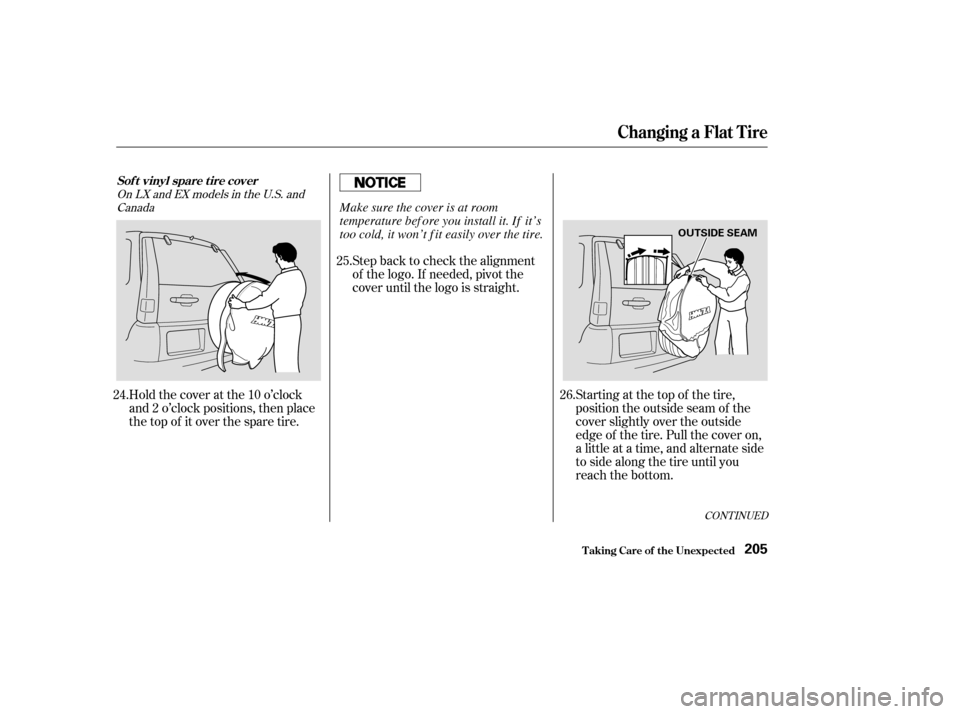
Holdthecoveratthe10o’clock
and 2 o’clock positions, then place
the top of it over the spare tire.Step back to check the alignment
of the logo. If needed, pivot the
cover until the logo is straight.
Starting at the top of the tire,
position the outside seam of the
cover slightly over the outside
edge of the tire. Pull the cover on,
a little at a time, and alternate side
to side along the tire until you
reach the bottom.
24. 25.
26.
OnLXandEXmodelsintheU.S.andCanada
Changing a Flat T ire
T aking Care of t he Unexpect ed
Sof t vinyl spare t ire cover
205
OUTSIDE SEAM
Make sure the cover is at room
temperature bef ore you install it. If it’s
too cold, it won’t f it easily over the tire.