Page 158 of 256
When preparing to tow, and bef ore
driving away, be sure to check the
f ollowing:The vehicle has been properly
serviced, and the tires, brakes,
suspension, and cooling system
are in good operating condition.
If you tow f requently, f ollow the
Severe Conditions maintenance
schedule.
The trailer has been properly
serviced and is in good condition.
Thehitch,safetychains,andany
other attachments are secure.
Allitemsonandinthetrailerare
properly secured and cannot shif t
while you drive. The lights and brakes on your
vehicle and the trailer are working
properly.
Your vehicle tires and spare are
properly inf lated (see page ),
and the trailer tires and spare are
inflated as recommended by the
trailer maker.
All weights and loads are within
limits (see page ). 151 190
Towing a Trailer
Driving
Pre-T ow Checklist
154
Page 195 of 256

CONT INUED
Use a gauge to measure the air
pressure at least once a month. Even
tires that are in good condition may
lose one to two psi (10 to 20 kPa, 0.1
to 0.2 kgf /cm ) per month.
Remember to check the spare tire at
thesametime.
Check the pressure in the tires when
they are cold. This means the vehicle
has been parked f or at least three
hours, or driven less than 1 mile (1.6
km).If you check the pressure when the
tires are hot [the vehicle has been
driven several miles (kilometers)],
you will see readings 4 to 6 psi (30 to
40 kPa, 0.3 to 0.4 kgf /cm ) higher
than the cold reading. This is
normal; do not release air to match
the cold pressure.
Youshouldgetyourowntire
pressure gauge and use it whenever
you check your tire pressures. This
will make it easier f or you to tell if a
pressure loss is due to a tire problem
and not due to a variation between
gauges.
For convenience, the recommended
tire sizes and cold air pressures are
on a label on the driver’s doorjamb.
For additional technical information
about your tires, see page .
Tubeless tires have some ability to
self -seal if they are punctured. You
should look closely f or punctures if a
tire starts losing pressure.
Add or release air, if needed, to
match the recommended cold tire
pressuresonthethirdcolumn.
230
Cold Tire Pressure
for Normal Driving
Tire Size
Front/Rear:
Tires
Maint enance
Recommended T ire Pressures f orNormal Driving
191
26 psi (180 kPa ,
1.8 kgf/cm
)
P205/70R15 95S
Page 204 of 256
If you have a f lat tire while driving,
stop in a saf e place to change it.
Drive slowly along the shoulder until
you get to an exit or an area to stop
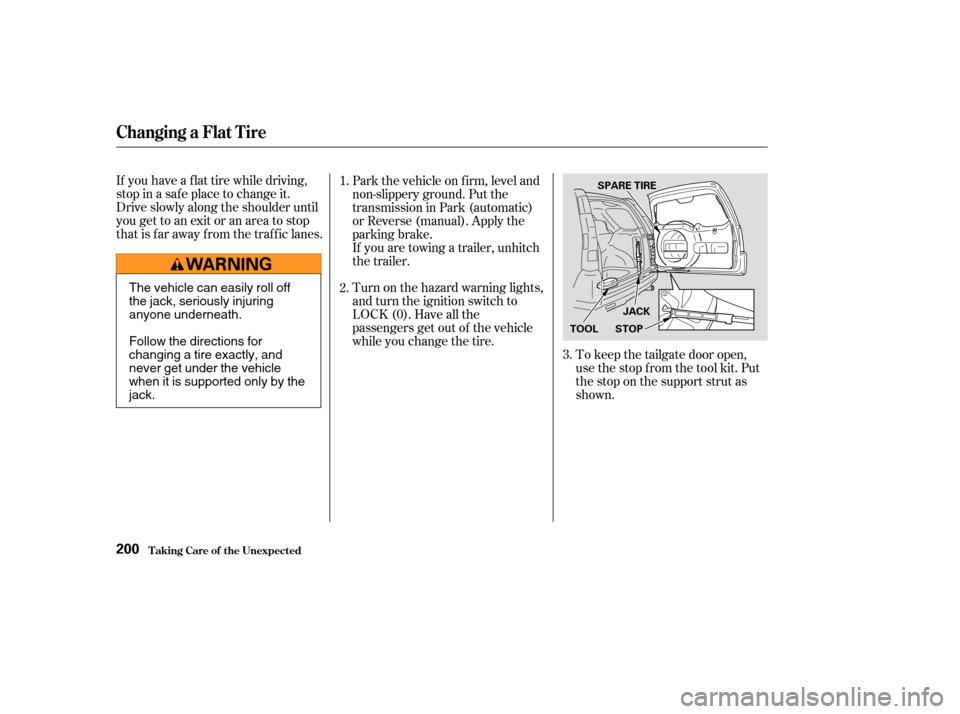
that is far away from the traffic lanes.To keep the tailgate door open,
use the stop f rom the tool kit. Put
the stop on the support strut as
shown.
Park the vehicle on f irm, level and
non-slippery ground. Put the
transmission in Park (automatic)
or Reverse (manual). Apply the
parking brake.
If you are towing a trailer, unhitch
the trailer.
Turn on the hazard warning lights,
and turn the ignition switch to
LOCK (0). Have all the
passengers get out of the vehicle
while you change the tire.
1.
2.
3.
Changing a Flat T ire
T aking Care of t he Unexpect ed200
JACK
STOP
SPARE TIRE
TOOL
The vehicle can easily roll off
the jack, seriously injuring
anyone underneath.
Follow the directions for
changing a tire exactly, and
never get under the vehicle
when it is supported only by the
jack.
Page 205 of 256
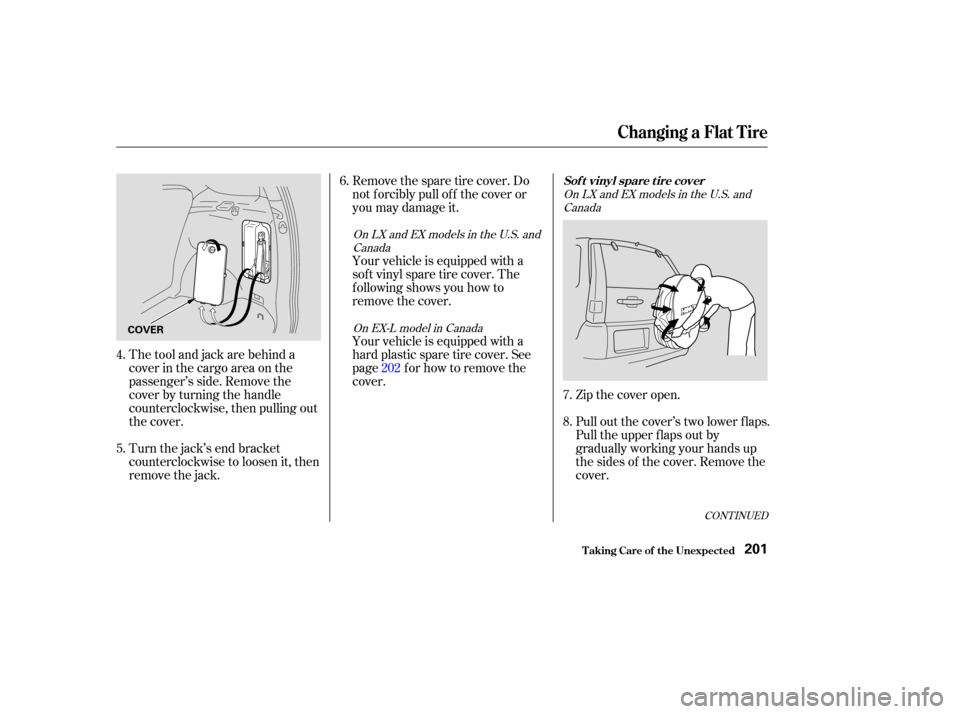
The tool and jack are behind a
cover in the cargo area on the
passenger’s side. Remove the
cover by turning the handle
counterclockwise, then pulling out
the cover.
Turn the jack’s end bracket
counterclockwise to loosen it, then
remove the jack.Remove the spare tire cover. Do
not f orcibly pull of f the cover or
you may damage it.
Your vehicle is equipped with a
sof t vinyl spare tire cover. The
f ollowing shows you how to
remove the cover.
Your vehicle is equipped with a
hard plastic spare tire cover. See
page f or how to remove the
cover.
Zip the cover open.
Pull out the cover’s two lower f laps.
Pull the upper f laps out by
gradually working your hands up
the sides of the cover. Remove the
cover.
6.
5. 4. 202
7.
8.
CONT INUED
OnLXandEXmodelsintheU.S.andCanada
On EX-L model in Canada OnLXandEXmodelsintheU.S.and
Canada
Changing a Flat T ire
T aking Care of t he Unexpect ed
Sof t vinyl spare t ire cover
201
COVER
Page 206 of 256
Locate the jacking point nearest
thetireyouneedtochange.Itis
pointed to by an arrow molded into
the underside of the body. Place
the jack under the jacking point.
Turn the end bracket clockwise
until the top of the jack contacts
the jacking point. Make sure the
center of the jacking point tab is
restinginthejacknotch.
Pull of f the center spacer. Using
the wheel wrench, loosen the
three wheel nuts and remove them.
Remove the spare tire from the
holder.
Loosen the f ive wheel nuts 1/2
turn with the wheel wrench.
Unzip the flap around the lower
edge of the cover.
Pull out the bottom of the cover,
then gradually pull it of f .
9.
11.
10.
7.
8.
On EX-L model in Canada
Changing a Flat T ire
T aking Care of t he Unexpect ed
Hard plastic spare tire cover
202
CENTER SPACER
JACKING POINT
NUTS
Page 207 of 256
CONT INUED
Bef ore mounting the spare tire,
wipeanydirtoff themounting
surface of the wheel and hub with
a clean cloth. Wipe the hub
carefully;itmaybehotfrom
driving.
Use the extension and wheel
wrench as shown to raise the
vehicle until the f lat tire is of f the
ground.
Remove the wheel nuts, then
remove the f lat tire. The wheel
nuts will be very hot if you were
recently driving. Place the f lat tire
on the ground with the outside
surface facing up. Put on the spare tire. Put the
wheel nuts back on f inger-tight,
then tighten them in a crisscross
pattern with the wheel wrench
until the wheel is f irmly against
the hub. Do not try to tighten
them f ully.
Lower the vehicle to the ground
and remove the jack.
14.
12.
13. 15.
16.
Changing a Flat T ire
T aking Care of t he Unexpect ed203
BRAKE HUB
WHEEL WRENCH EXTENSION
Page 208 of 256
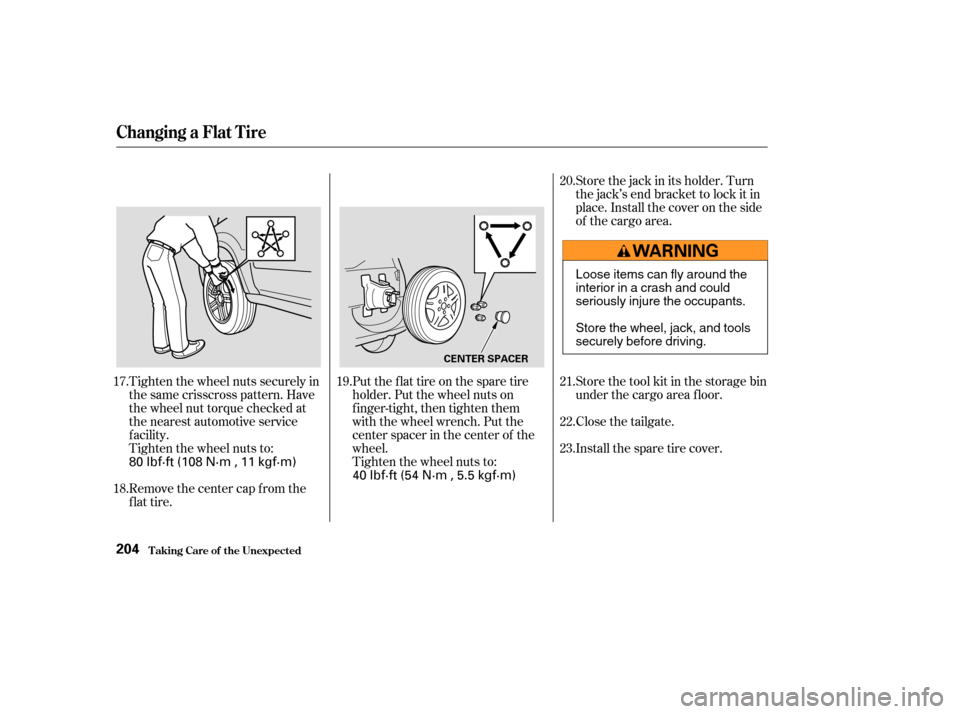
Tighten the wheel nuts securely in
the same crisscross pattern. Have
the wheel nut torque checked at
the nearest automotive service
f acility.
Tighten the wheel nuts to:
Remove the center cap from the
flat tire.Put the flat tire on the spare tire
holder. Put the wheel nuts on
finger-tight, then tighten them
with the wheel wrench. Put the
center spacer in the center of the
wheel.
Tighten the wheel nuts to:Store the jack in its holder. Turn
the jack’s end bracket to lock it in
place. Install the cover on the side
of the cargo area.
Install the spare tire cover. Close the tailgate. Store the tool kit in the storage bin
under the cargo area f loor.
17.
18. 19.20.
21.
22.
23.
Changing a Flat T ire
T aking Care of t he Unexpect ed204
CENTER SPACER
80 lbf·ft (108 N·m , 11 kgf·m)
40 lbf·ft (54 N·m , 5.5 kgf·m)Loose items can fly around the
interiorinacrashandcould
seriously injure the occupants.
Store the wheel, jack, and tools
securely before driving.
Page 209 of 256
CONT INUED
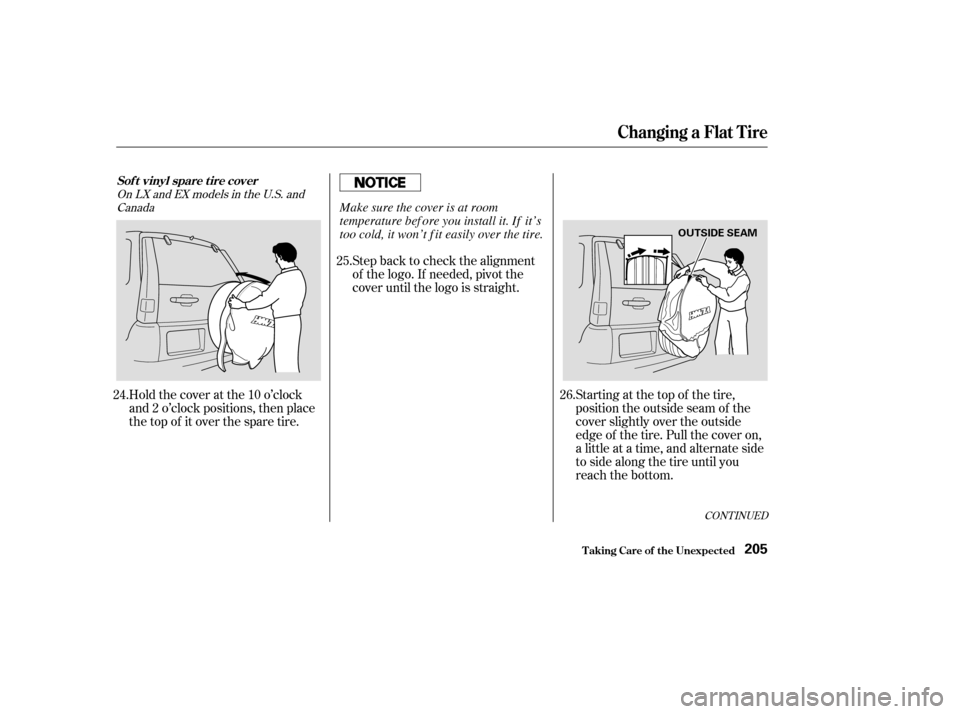
Holdthecoveratthe10o’clock
and 2 o’clock positions, then place
the top of it over the spare tire.Step back to check the alignment
of the logo. If needed, pivot the
cover until the logo is straight.
Starting at the top of the tire,
position the outside seam of the
cover slightly over the outside
edge of the tire. Pull the cover on,
a little at a time, and alternate side
to side along the tire until you
reach the bottom.
24. 25.
26.
OnLXandEXmodelsintheU.S.andCanada
Changing a Flat T ire
T aking Care of t he Unexpect ed
Sof t vinyl spare t ire cover
205
OUTSIDE SEAM
Make sure the cover is at room
temperature bef ore you install it. If it’s
too cold, it won’t f it easily over the tire.