2004 GMC ENVOY XL wheel
[x] Cancel search: wheelPage 136 of 466

Exterior Lamps
Your exterior lamps
knob is located on your
instrument panel to the
left of the steering wheel.
c(Off):Turn the knob to this symbol and release it
to turn off the Daytime Running Lamps (DRL) and
the automatic headlamps. An indicator will illuminate
when the position is selected. This position is not
available for vehicles rst sold in Canada.
i(Automatic DRL/AHS):Turning the knob to this
symbol puts the system into automatic headlamp mode.
An indicator will illuminate when the position is selected.
;(Parking Lamps):Turn the knob to this symbol to
manually turn on the following:
Parking Lamps
Sidemarker Lamps
Taillamps
License Plate Lamps
Instrument Panel Lights
2(Headlamps):Turn the knob to this symbol to turn
on all the lamps listed as well as the headlamps.
Automatic Headlamp System
When it is dark enough outside, your Automatic
Headlamp System will turn on your headlamps at the
normal brightness along with other lamps such as
the taillamps, sidemarker, parking lamps and the
instrument panel lights. The radio lights will also be on.
Your vehicle is equipped with a light sensor on the
top of the instrument panel. Be sure it is not covered or
the system will be on whenever the ignition is on.
The system may also turn on your lights when driving
through a parking garage, heavy overcast weather
or a tunnel. This is normal.
There is a delay in the transition between the daytime
and nighttime operation of the Daytime Running Lamps
(DRL) and the automatic headlamp systems, so that
driving under bridges or bright overhead street lights does
not affect the system. The DRL and automatic headlamp
system will only be affected when the light sensor sees a
change in lighting lasting longer than the delay.
3-16
Page 140 of 466

Reading Lamps
Press the lens on the lamp located above the doors to
turn the reading lamps on and off.
Dome Lamps
The dome lamps will come on when you open a door
unless the dome lamp override is pressed in.
You can also turn the dome lamps on by turning the
thumbwheel, located next to the exterior lamps knob, all
the way up to the top detent position. In this position,
the dome lamps will remain on until they are turned off.
Battery Run-Down Protection
This feature shuts off the dome, courtesy, vanity,
and reading lamps if they are left on for more than
20 minutes when the ignition is off. This will keep your
battery from running down.
If the battery run-down protection shuts off the interior
lamps, it may be necessary to do one of the following
to return to normal operation:
Shut off all lamps and close all doors, or
turn the ignition key to RUN.
This feature will also turn off the parking lamps and
headlamps under most circumstances, if they are left on.
If you would like to turn them back on, turn the exterior
lamps knob.
3-20
Page 168 of 466

Cruise Control Light
Your vehicle may have this feature. The CRUISE light
appears whenever you set your cruise control.
Reduced Engine Power Light
This light is displayed when a noticeable reduction in the
vehicle’s performance may occur. The vehicle may be
driven at a reduced speed when the reduced engine
power light is on but acceleration and speed may be
reduced. The performance may be reduced until the next
time you drive your vehicle. If this light stays on, see your
dealer as soon as possible for diagnosis and repair.
This light may also come on if there is a problem with the
Electronic Throttle Control (ETC) system. If this happens,
take the vehicle in for service as soon as possible.
Service Four-Wheel Drive
Warning Light
This light should come on briey when you turn on the
ignition, as a check to show you it is working. United States
Canada
United StatesCanada
United StatesCanada
3-48
Page 171 of 466
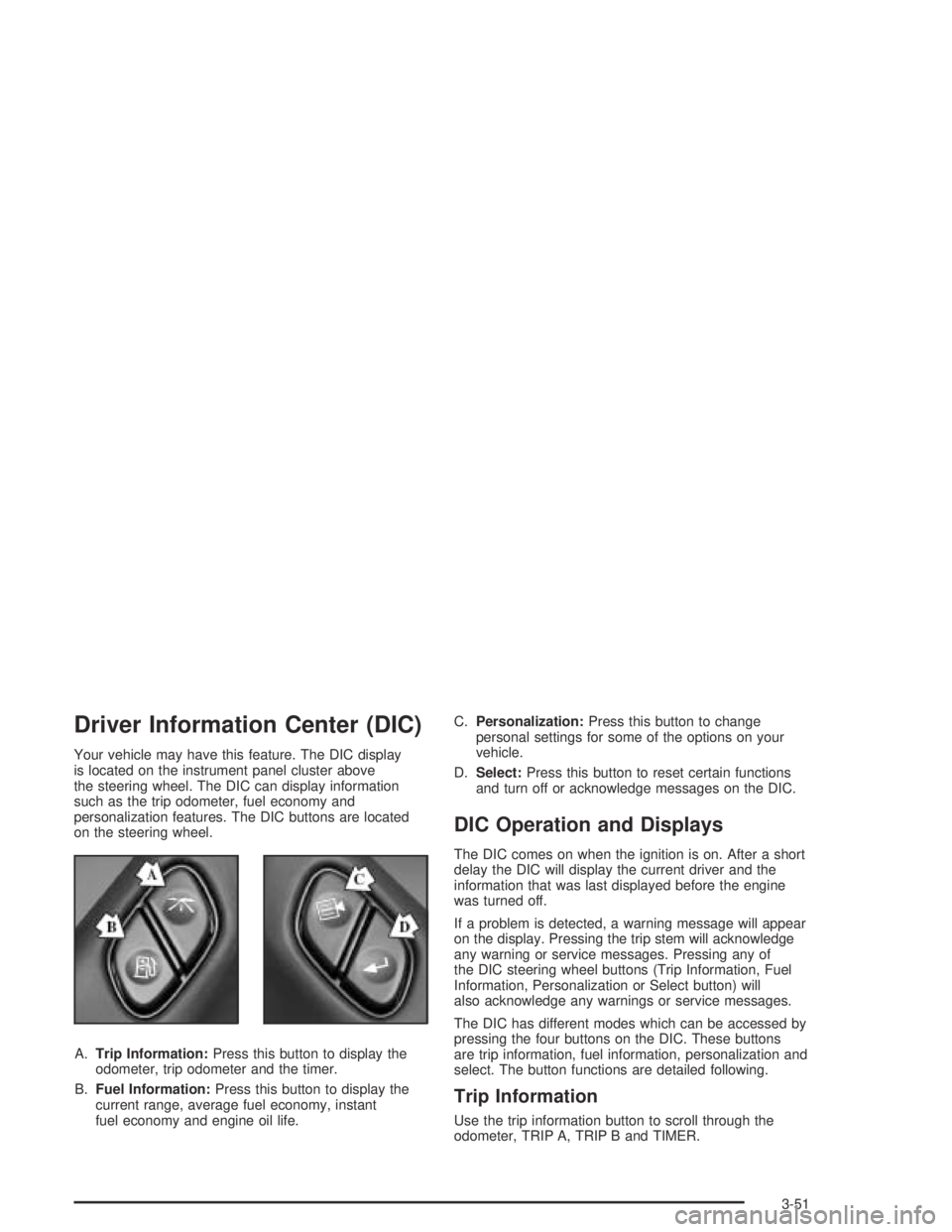
Driver Information Center (DIC)
Your vehicle may have this feature. The DIC display
is located on the instrument panel cluster above
the steering wheel. The DIC can display information
such as the trip odometer, fuel economy and
personalization features. The DIC buttons are located
on the steering wheel.
A.Trip Information:Press this button to display the
odometer, trip odometer and the timer.
B.Fuel Information:Press this button to display the
current range, average fuel economy, instant
fuel economy and engine oil life.C.Personalization:Press this button to change
personal settings for some of the options on your
vehicle.
D.Select:Press this button to reset certain functions
and turn off or acknowledge messages on the DIC.
DIC Operation and Displays
The DIC comes on when the ignition is on. After a short
delay the DIC will display the current driver and the
information that was last displayed before the engine
was turned off.
If a problem is detected, a warning message will appear
on the display. Pressing the trip stem will acknowledge
any warning or service messages. Pressing any of
the DIC steering wheel buttons (Trip Information, Fuel
Information, Personalization or Select button) will
also acknowledge any warnings or service messages.
The DIC has different modes which can be accessed by
pressing the four buttons on the DIC. These buttons
are trip information, fuel information, personalization and
select. The button functions are detailed following.
Trip Information
Use the trip information button to scroll through the
odometer, TRIP A, TRIP B and TIMER.
3-51
Page 180 of 466

Display Language
To select your personalization for display language,
press the select button while DISPLAY LANGUAGE is
displayed on the DIC. Pressing the select button
will scroll through the available languages:
Choosing a language will display all of the information
on the DIC in the desired language.
If your vehicle is equipped with an Information Center,
press and hold the trip stem while the odometer is
displayed. While holding down the trip stem button, the
Information Center will begin to list the available
languages. The name of each language will be
displayed in its native language (ENGLISH for English,
FRANCAIS for French and ESPANOL for Spanish).
When you see the language that you would like, release
the trip stem. The Information Center will then display
the information in the language you chose.
If you accidentally choose a language you do not want
or understand, press and hold the trip information
button and the personalization button at the same time.
After a short time, the display will begin cycling
through the available languages. Release the buttons
when you see a language you would like. This will also
reset all of the current driver’s personalization features
to their factory default settings.
For vehicles with redundant steering wheel controls,
see “Personalization” under the DIC.
Select
The select button is used to reset certain functions and
turn off or acknowledge messages on the DIC display.
The select button also toggles through the options
available in each personalization menu. For example,
this button will reset the trip odometers, turn off the FUEL
LEVEL LOW message, and toggle through the languages
you can select the DIC to display information in.
DIC Warnings and Messages
Messages are displayed on the DIC to notify the driver
that the status of the vehicle has changed and that
some action may be needed by the driver to correct the
condition. More than one message may appear at
one time. They will appear one behind the other. Some
messages may not require immediate action but you
should press the trip stem to acknowledge that you
received the message and clear it from the display.
Pressing any of the DIC steering wheel buttons
(Trip Information, Fuel Information, Personalization or
Select button) will also acknowledge any warnings
or service messages. Some messages cannot be
cleared from the display because they are more urgent.
These messages require action before they can be
removed from the DIC display. The following are
the possible messages that can be displayed and some
information about them.
3-60
Page 183 of 466

LEFT REAR DOOR AJAR
If the driver’s side rear door is not fully closed this
message will appear on the display and you will hear
a chime. Stop and turn off the vehicle, check the door
for obstacles, and close the door again. Check to see
if the message still appears on the DIC. Press the select
button to acknowledge this message and clear it from
the DIC display.
RIGHT REAR DOOR AJAR
If the passenger’s side rear door is not fully closed
this message will appear on the display and you
will hear a chime. Stop and turn off the vehicle, check
the door for obstacles, and close the door again.
Check to see if the message still appears on the DIC.
Press the select button to acknowledge this message
and clear it from the DIC display.
RFA # BATTERY LOW
If a remote keyless entry transmitter battery is low,
this message will appear on the DIC. The battery
needs to be replaced in the transmitter. Press the
select button to acknowledge this message and clear
it from the DIC display.
CURB VIEW ACTIVATED
The CURB VIEW ACTIVATED message is displayed
when one of the outside rear view mirrors move into the
curb view position. Refer to “Outside Curb View Assist
Mirrors” for more information.
TIGHTEN FUEL CAP
If the vehicle’s fuel cap is not tightened properly, this
message may appear on the DIC and a chime will
sound. Fully reinstall the fuel cap. The diagnostic system
can determine if the fuel cap has been left off or
improperly installed. A loose or missing fuel cap will
allow fuel to evaporate into the atmosphere. The
DIC message will remain on until the message is
cancelled with the return button on the steering wheel.
The DIC message will also be cancelled if the ignition
is turned off.
The DIC message and the Service Engine Soon light
may come on again during a second trip if the fuel cap
is still not tightened properly. SeeMalfunction Indicator
Lamp on page 3-43for more information.
3-63
Page 239 of 466

Radio Personalization
If your vehicle has this feature, it allows the driver to
return to the last used source: radio, cassette, or
CD using the remote keyless entry transmitter. This
feature can also store and recall AM and FM presets,
volume, tone, and the last selected radio station.
The number on the back of each transmitter, 1 or 2,
corresponds to driver 1 or 2. If transmitter 1 is used to
enter the vehicle, the last used audio source and/or
settings set by driver 1 will be recalled. If transmitter 2
is used to enter the vehicle, the last used audio
source and/or settings set by driver 2 will be recalled.
Theft-Deterrent Feature
THEFTLOCK®is designed to discourage theft of your
vehicle’s radio. The feature works automatically by
learning a portion of the Vehicle Identication Number
(VIN). If the radio is moved to a different vehicle, it
will not operate and LOCKED will appear on the display.
When the radio and vehicle are turned off, the blinking
red light indicates that THEFTLOCK
®is armed.
With THEFTLOCK
®activated, the radio will not operate
if stolen.
Audio Steering Wheel Controls
Some audio controls can be adjusted at the steering
wheel. They include the following:
g(OnStar/Voice Recognition):If your vehicle has
OnStar®, press this button to interact with the OnStar®
system. See the OnStar®manual provided with your
vehicle for more information.
If your vehicle does not have OnStar
®, press this button
to silence the system. Press it again, or any other
radio button, to turn on the sound.
3-119
Page 243 of 466

Your Driving, the Road, and Your Vehicle..........4-2
Defensive Driving...........................................4-2
Drunken Driving.............................................4-2
Control of a Vehicle........................................4-6
Braking.........................................................4-6
Traction Assist System (TAS)...........................4-9
Locking Rear Axle........................................4-11
Steering......................................................4-11
Off-Road Recovery.......................................4-13
Passing.......................................................4-13
Loss of Control.............................................4-14
Off-Road Driving with Your Four-Wheel-Drive
Vehicle....................................................4-16
Driving at Night............................................4-30
Driving in Rain and on Wet Roads..................4-31City Driving..................................................4-34
Freeway Driving...........................................4-35
Before Leaving on a Long Trip.......................4-36
Highway Hypnosis........................................4-37
Hill and Mountain Roads................................4-38
Winter Driving..............................................4-40
If You Are Stuck: In Sand, Mud,
Ice or Snow..............................................4-44
Towing..........................................................4-45
Towing Your Vehicle.....................................4-45
Recreational Vehicle Towing...........................4-45
Loading Your Vehicle....................................4-49
Adding a Snow Plow or Similar Equipment.......4-55
Towing a Trailer...........................................4-55
Section 4 Driving Your Vehicle
4-1