2004 GMC CANYON lock
[x] Cancel search: lockPage 144 of 420
#(Air Conditioning):Your vehicle may have air
conditioning. Press this button to turn the air-conditioning
system on or off. An indicator light on the button will
come on to let you know the air conditioning is activated.
When the system is on, this setting cools and
dehumidies the air entering your vehicle.
The air conditioning will not function if the fan is
turned off.
You may notice a slight change in engine performance
when the air conditioning compressor shuts off and
turns on again. This is normal. The system is designed
to make adjustments to help with fuel economy while
still maintaining the selected temperature.
The air conditioning system removes moisture from the
air, so you may sometimes notice a small amount of
water dripping underneath your vehicle while idling
or after turning off the engine. This is normal.Defogging and Defrosting
Fog on the inside of windows is a result of high humidity
(moisture) condensing on the cool window glass.
This can be minimized if the climate control system is
used properly. There are two modes to clear fog or frost
from your windshield and side windows. Use the defog
mode to clear the windows of fog or moisture and warm
the passengers. Use the defrost mode to remove fog or
frost from the windshield more quickly. For best results,
clear all snow and ice from the windshield before
defrosting.
Turn the mode knob on the climate control panel
clockwise to select the defog or defrost modes.
/(Floor/Defog):This mode directs the air to the
windshield, the side window outlets, and to the
oor outlets. When you select this mode, the system
runs the air conditioning compressor unless the outside
temperature is near freezing or below. Recirculation
is not available in this mode.
0(Defrost):This mode directs most of the air to the
windshield, and the side window outlets. When you
select this mode, the system runs the air conditioning
compressor unless the outside temperature is near, or
below freezing. Recirculation is not available in this
mode.
Do not drive the vehicle until all the windows are clear.
3-20
Page 145 of 420
Outlet Adjustment
The ow-through outlets on your vehicle allow outside
air to enter your vehicle while it is moving. Outside
air will also enter your vehicle while the air conditioning
compressor is running.
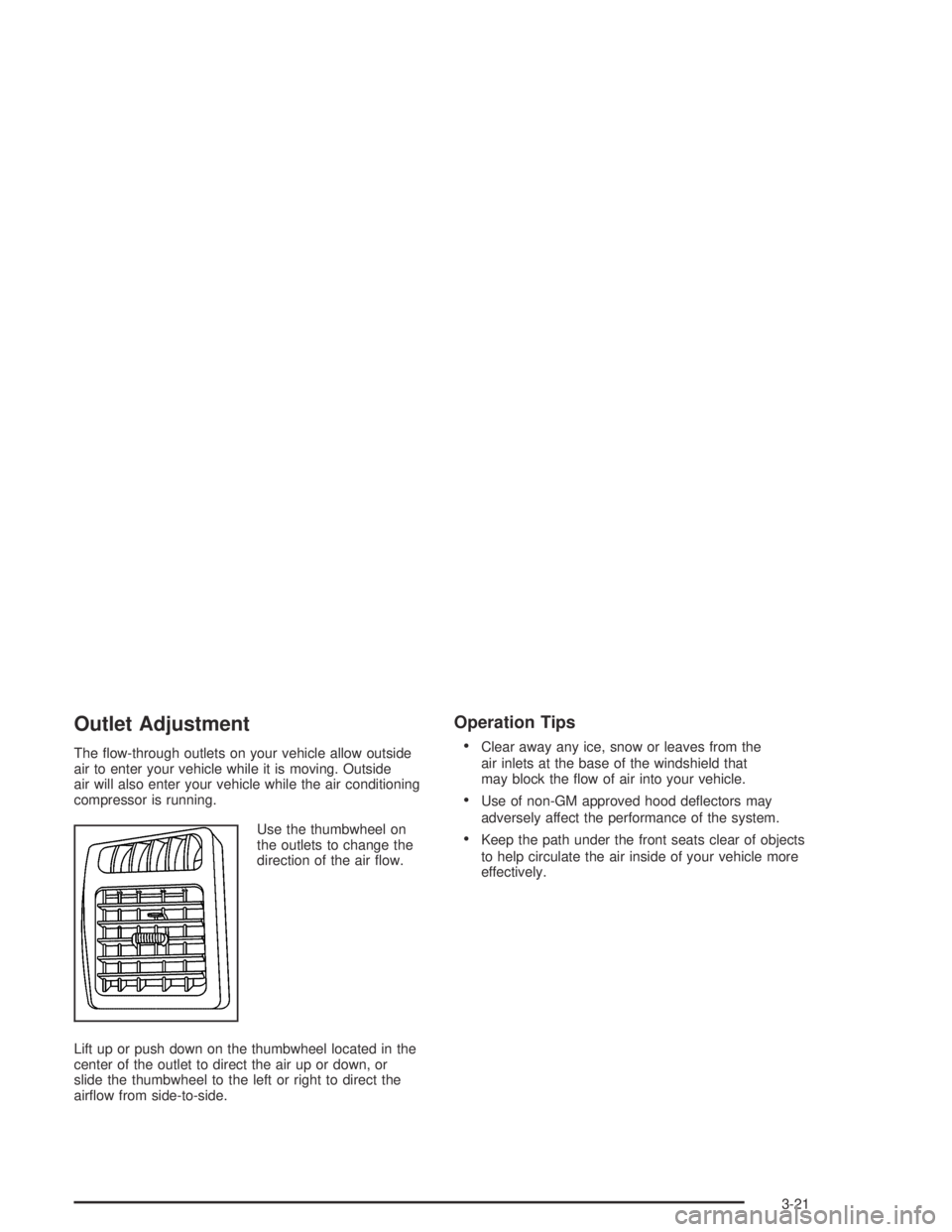
Use the thumbwheel on
the outlets to change the
direction of the air ow.
Lift up or push down on the thumbwheel located in the
center of the outlet to direct the air up or down, or
slide the thumbwheel to the left or right to direct the
airow from side-to-side.
Operation Tips
Clear away any ice, snow or leaves from the
air inlets at the base of the windshield that
may block the ow of air into your vehicle.
Use of non-GM approved hood deectors may
adversely affect the performance of the system.
Keep the path under the front seats clear of objects
to help circulate the air inside of your vehicle more
effectively.
3-21
Page 153 of 420
When the ignition is on, the brake system warning light
will also come on when you set your parking brake.
SeeParking Brake on page 2-29for more information.
The light will stay on if your parking brake does not
release fully. If it stays on after your parking brake is
fully released, it means you have a brake problem.
If the light comes on while you are driving, pull off the
road and stop carefully. You may notice that the pedal
is harder to push, or the pedal may go closer to the
oor. It may take longer to stop. If the light is still
on, have the vehicle towed for service. SeeTowing
Your Vehicle on page 4-47.
{CAUTION:
Your brake system may not be working properly
if the brake system warning light is on. Driving
with the brake system warning light on can lead
to an accident. If the light is still on after you
have pulled off the road and stopped carefully,
have the vehicle towed for service.
Anti-Lock Brake System
Warning Light
With the anti-lock brake
system, this light will
come on briey when
you start your engine to
show it is working.
Then it will turn off.
This is normal.
If the light stays on, or comes on when you’re driving,
your vehicle needs service. If the regular brake
system warning light isn’t on, you still have brakes,
but you don’t have anti-lock brakes. If the regular brake
system warning light is also on, you don’t have
anti-lock brakes and there’s a problem with your regular
brakes. SeeBrake System Warning Light on page 3-28.
The anti-lock brake system warning light should
come on briey when you turn the ignition key to ON.
If the light doesn’t come on then, have it xed so it
will be ready to warn you if there is a problem.
3-29
Page 159 of 420

Security Light
This light will come on
briey when you turn the
key to START. The light
will stay on until the
engine starts.
If the ignition is turned on, and the light ashes, the
Passlock
®system has entered a tamper mode. If the
vehicle fails to start, seePasslock®on page 2-16.
If the light comes on continuously while driving and stays
on, there may be a problem with the Passlock
®
system. Your vehicle will not be protected by Passlock®,
and you should see your dealer.
Also, seeContent Theft-Deterrent on page 2-14for
additional information regarding the security light.
Cruise Control Light
This symbol appears on
your instrument panel
whenever you set
your cruise control. See
“Cruise Control” under
Turn Signal/Multifunction
Lever on page 3-5.
Highbeam On Light
This light comes on
whenever the high-beam
headlamps are on.
3-35
Page 162 of 420

GM Oil Life System™
Press the reset stem until OIL LIFE appears (ashing)
on the display. The GM Oil Life System™ shows
an estimate of the oil’s remaining useful life. It will show
100% when the system is reset after an oil change.
It will alert you to change your oil on a schedule
consistent with your driving conditions.
Always reset the engine oil life after an oil change.
To reset the oil life system press and hold the reset
stem while OIL LIFE is displayed. The system will
reset and a beep will sound.
The DIC does not replace the need to maintain your
vehicle as recommended in the Maintenance Schedule
in this manual. The oil change reminder will not
detect dusty conditions or engine malfunctions that may
affect the oil. Also, the oil change reminder does not
measure how much oil you have in your engine. So, be
sure to check your oil level often. SeeEngine Oil on
page 5-13for more information.
Automatic Door Locks
With the vehicle’s engine off, and the ignition in the
LOCK position, press and hold the power door
lock button for approximately 3 seconds until the DIC
displays the current door lock mode. Then press
the reset stem for approximately two seconds to switch
modes. The following are the mode choices:
Mode 1 (default):Lock all doors when the vehicle is
shifted out of PARK (P) with an automatic transmission,
or when vehicle speed is greater than 15 mph
(24km/h) with a manual transmission. Doors will unlock
when the vehicle is shifted into PARK (P) with an
automatic transmission, or when the ignition key is
removed on a manual transmission.
Mode 2:Turns off the automatic door locks.
Mode 3:Lock all doors when the vehicle is shifted out
of PARK (P) with an automatic transmission, or
when vehicle speed is greater than 15 mph (24km/h)
with a manual transmission. Driver’s door will unlock
when the vehicle is shifted into PARK (P) with an
automatic transmission, or when the ignition key is
removed on a manual transmission.
Mode 4:Lock all doors when the vehicle is shifted out
of PARK (P) with an automatic transmission, or
when the vehicle speed is greater than 15 mph (24km/h)
with a manual transmission. No doors will unlock.
3-38
Page 163 of 420

Language
You can choose the language in which the DIC
information is displayed. Press the reset stem until
LANGUAGE is displayed. While LANGUAGE is on
the display, press and hold the reset stem until
the language changes from ENGLISH to the language
you desire. You can choose from English, Spanish,
or French.
DIC Warnings and Messages
Warning messages are displayed on the DIC to notify
the driver that the status of the vehicle has changed and
that some action may be needed by the driver to
correct the condition. More than one message may
appear at one time. They will appear one after the other.
The messages are displayed for three seconds each.
Some messages may not require immediate action
but you should press and release the trip odometer reset
stem to acknowledge that you received the message
and clear it from the display. Each message must
be acknowledged individually. Some messages cannot
be cleared from the display because they are more
urgent. These messages require action before they can
be removed from the DIC display. The following are
the possible messages that can be displayed and some
information about them.
AC (Air Conditioning) OFF
This message will be displayed when the engine coolant
temperature is too high and the air conditioning in
your vehicle needs to be turned off. See andEngine
Overheating on page 5-28andClimate Control System
on page 3-18for more information. It will be displayed
along with the ENG HOT message.
ABS (Anti-Lock Brake System)
This message will be displayed on the DIC if there is a
problem with your antilock brake system. Check your
antilock brake system as soon as possible and have
your vehicle serviced. SeeBrakes on page 5-38
andAnti-Lock Brake System Warning Light on
page 3-29for more information. Pressing the reset
stem to acknowledge this message and clear it from
the DIC display.
BATTERY
This message will be displayed when there is a problem
with your vehicle’s battery. SeeBattery on page 5-41
andBattery Warning Light on page 3-27for more
information.
3-39
Page 167 of 420

Setting the Time for Radios without
Radio Data Systems (RDS)
Press and hold HR until the correct hour appears on the
display. Press and hold MIN until the correct minute
appears on the display. To display the time with
the ignition off, press RCL, HR, or MIN and the time will
appear on the display for a few seconds. There is an
initial two-second delay before the clock goes into
time-set mode.
Setting the Time for Radios with
Radio Data Systems (RDS)
Your radio may have a button marked with an H or
HR to represent hours and an M or MN to represent
minutes.
Press and hold the hour button until the correct hour
appears on the display. Press and hold the minute
button until the correct minute appears on the display.
The time may be set with the ignition on or off.
To synchronize the time with an FM station broadcasting
Radio Data System (RDS) information, press and hold
the hour and minute buttons at the same time until
RDS TIME appears on the display. To accept this time,
press and hold the hour and minute buttons, at the
same time, for another 2 seconds. If the time is
not available from the station, NO UPDAT will appear
on the display.
RDS time is broadcast once a minute. Once you have
tuned to an RDS broadcast station, it may take a
few minutes for your time to update.
3-43
Page 170 of 420
Adjusting the Speakers (Balance/Fade)
AUDIO:To adjust the balance between the right
and the left speakers, press and release AUDIO until
BAL appears on the display. Then press and hold the up
or the down arrow to move the sound toward the right
or the left speakers.
To adjust the fade between the front and the rear
speakers, press and release AUDIO until FAD appears
on the display. Then press and hold the up or the
down arrow to move the sound toward the front or the
rear speakers.
To adjust balance or fade to the middle position, select
BAL or FAD. Then press and hold AUDIO for more
than two seconds until you hear a beep. L and a zero
or F and a zero will appear on the display.
To adjust both tone controls and both speaker controls
to the middle position, end out of audio by waiting for
the display to change to the time display. Then press
and hold AUDIO for more than two seconds until
you hear a beep. CEN will appear on the display.
Fade may not be available if you have a regular cab model.
Radio Messages
CAL (Calibrated):Your audio system has been
calibrated for your vehicle from the factory. If CAL
appears on the display it means that your radio has not
been congured properly for your vehicle and must
be returned to the dealer for service.
LOC (Locked):This message is displayed when the
Theftlock
®system has locked up. Your vehicle must be
returned to the dealer for service.
3-46