Page 21 of 240
3.Scan:Press to hear
a brief sampling of all
listenable radio
stations, CD or MP3 tracks. Press again to stop.
4.CLK:To set the
clock press and hold
the CLK control for the
following functions:
•To set the hour, press SEEK
/control to
decrease or increase to the hours.
•To set the minutes, press TUNE DIR
/to
decrease or increase the minutes.
Release CLK to save the clock settings. Press CLK
again to return the display to radio mode.
5.EJ (Eject):Press to
stop and eject a disc. If
a disc is ejected and
not removed, the player will automatically reload the
disc and return to radio mode.
6.COMP
(Compression):In CD
and MP3 mode, press
to adjust the soft and loud sounds together for a
more consistent listening level. The compression
icon (c) will illuminate in the display.
7.Shuffle:Press to
engage random play on
the CD or MP3 disc.
SHF then ON will briefly appear in the display. Press
SEEK to select another random track on the disc.
Press shuffle again to disable.
8.Repeat:Press to
repeat the current
track.
9.CD
(Fast
forward): Press and
hold until the desired
selection point is reached. This function is not
enabled in MP3 mode.
2004 Mustang(mus)
Owners Guide (post-2002-fmt)
USA English(fus)
Entertainment Systems
21
Page 28 of 240
9.Menu:Press MENU
and SEL to access
clock mode, RDS
on/off, Traffic, Program type, Show type and
Compression modes.
Traffic:Allows you to hear traffic broadcasts. With
the feature ON, press SEEK or SCAN to find a
station broadcasting a traffic report (if it is
broadcasting RDS data).Traffic information is not
available in most U.S. markets.
FIND Program type:Allows you to search
RDS-equipped stations for a certain category of
music format: Classic, Country, Info, Jazz, Oldies,
R&B, Religious, Rock, Soft, Top 40.
Show TYPE:Displays the station’s call letters and
format.
Compression:Brings soft and loud CD passages
together for a more consistent listening level.
Setting the clock:Press MENU until SELECT
HOUR or SELECT MINUTE is displayed. Use SEL to
manually increase (
) or decrease () the
hours/minutes. Press MENU again to disengage clock
mode.
10.Memory presets:
To set a station: Select
frequency band
AM/FM; tune to a station, press and hold a preset
button until sound returns. In CD mode, press to
access the desired disc.
11.SAT (if
equipped):Your
Audiophile radio comes
equipped with Satellite Ready capability. The kit to
enable the Satellite reception is available through
your Ford dealer. Detailed satellite instructions are
included with the dealer installed kit.
12.AM/FM:Press to
select AM/FM
frequency band.
2004 Mustang(mus)
Owners Guide (post-2002-fmt)
USA English(fus)
Entertainment Systems
28
Page 36 of 240
Always remember to turn on your
headlamps at dusk or during inclement
weather. The Daytime Running Light (DRL)
System does not activate your tail lamps and
generally may not provide adequate lighting during
these conditions. Failure to activate your
headlamps under these conditions may result in a
collision.
High beams
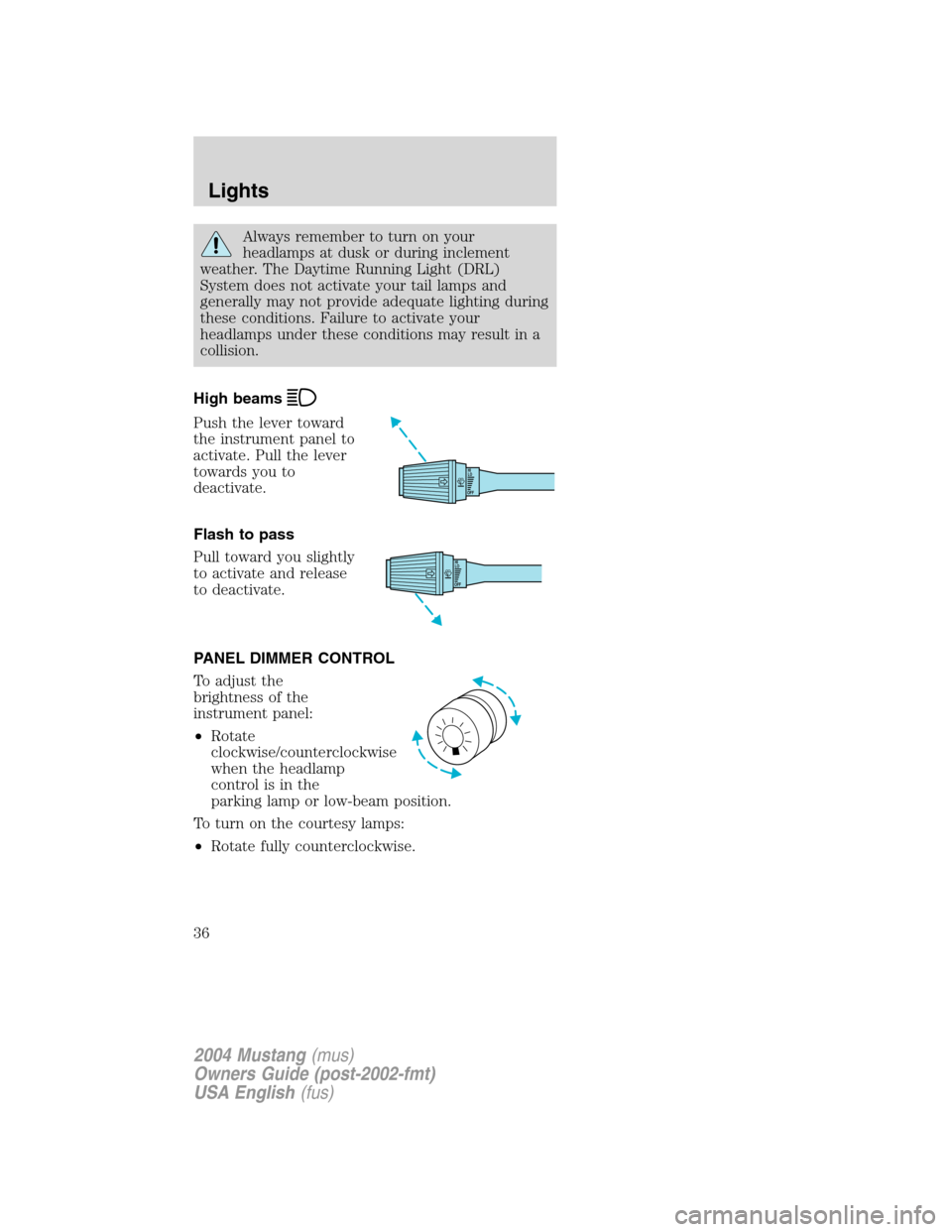
Push the lever toward
the instrument panel to
activate. Pull the lever
towards you to
deactivate.
Flash to pass
Pull toward you slightly
to activate and release
to deactivate.
PANEL DIMMER CONTROL
To adjust the
brightness of the
instrument panel:
•Rotate
clockwise/counterclockwise
when the headlamp
control is in the
parking lamp or low-beam position.
To turn on the courtesy lamps:
•Rotate fully counterclockwise.
OFFHI
LO
OFFHI
LO
2004 Mustang(mus)
Owners Guide (post-2002-fmt)
USA English(fus)
Lights
36
Page 40 of 240
Replacing headlamp bulbs
To remove the headlamp bulb:
1. Make sure headlamp switch is in the OFF
position, then open the hood.
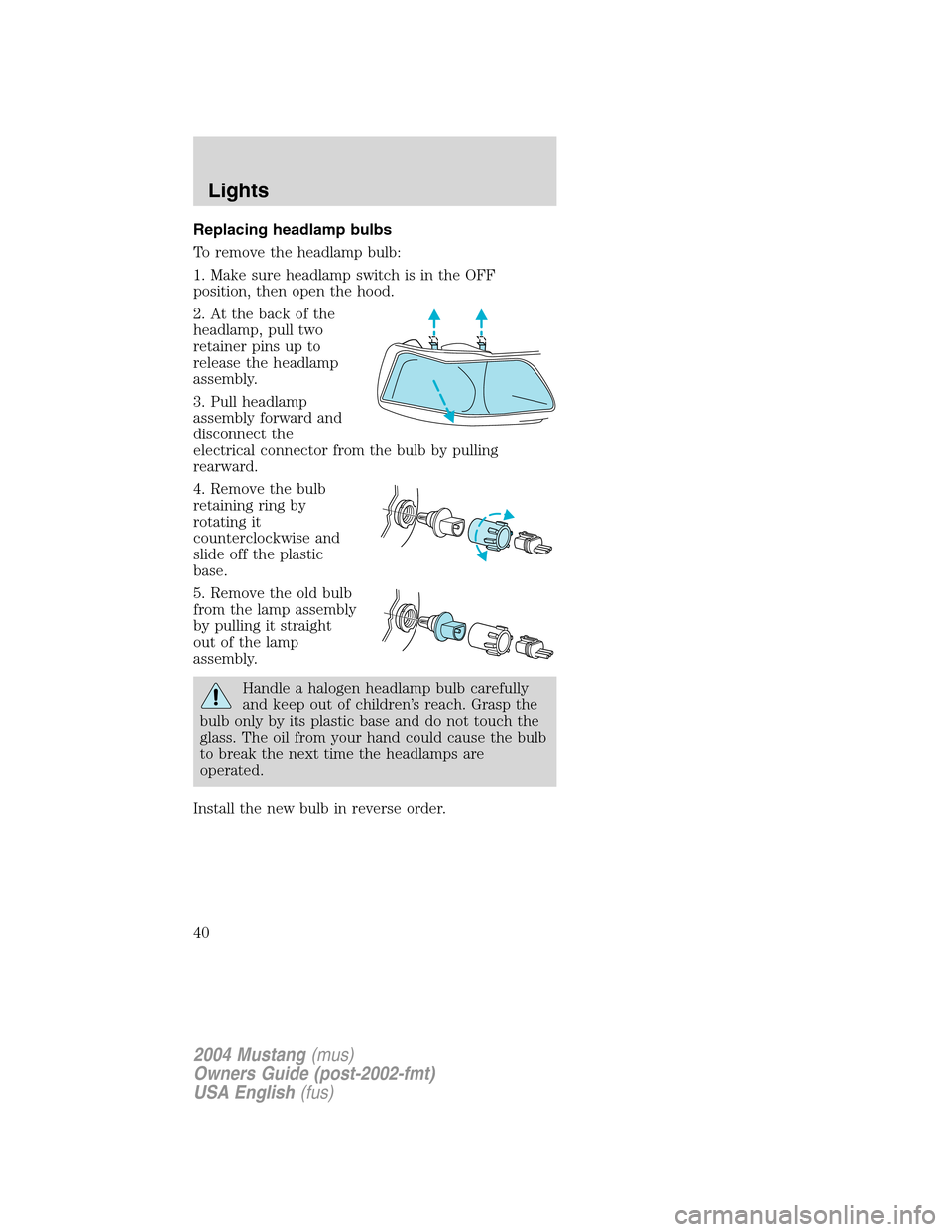
2. At the back of the
headlamp, pull two
retainer pins up to
release the headlamp
assembly.
3. Pull headlamp
assembly forward and
disconnect the
electrical connector from the bulb by pulling
rearward.
4. Remove the bulb
retaining ring by
rotating it
counterclockwise and
slide off the plastic
base.
5. Remove the old bulb
from the lamp assembly
by pulling it straight
out of the lamp
assembly.
Handle a halogen headlamp bulb carefully
and keep out of children’s reach. Grasp the
bulb only by its plastic base and do not touch the
glass. The oil from your hand could cause the bulb
to break the next time the headlamps are
operated.
Install the new bulb in reverse order.
2004 Mustang(mus)
Owners Guide (post-2002-fmt)
USA English(fus)
Lights
40
Page 41 of 240
Replacing front parking lamp/turn signal bulbs
1. Make sure the headlamp control is in the OFF
position and open the hood.
2. At the back of the
headlamp, pull two
retainer pins up to
release the headlamp
assembly.
3. Pull headlamp
assembly forward and
rotate the bulb socket
counterclockwise and remove from lamp assembly.
4. Pull the bulb straight
out from the socket
and push in the new
bulb.
Install the new bulb in reverse order.
Replacing high-mount brakelamp bulbs
1. Make sure the
headlamp switch is in
the OFF position and
then open the trunk.
2. Inside trunk, locate
access hole under the
rear decklid.
3. Rotate the bulb
socket
counterclockwise and
pull it out of the lamp assembly.
4. Carefully pull the bulb straight out of socket.
Install the new bulb in reverse order.
2004 Mustang(mus)
Owners Guide (post-2002-fmt)
USA English(fus)
Lights
41
Page 42 of 240
Replacing foglamp bulbs
1. Make sure the
headlamp switch is in
the OFF position.
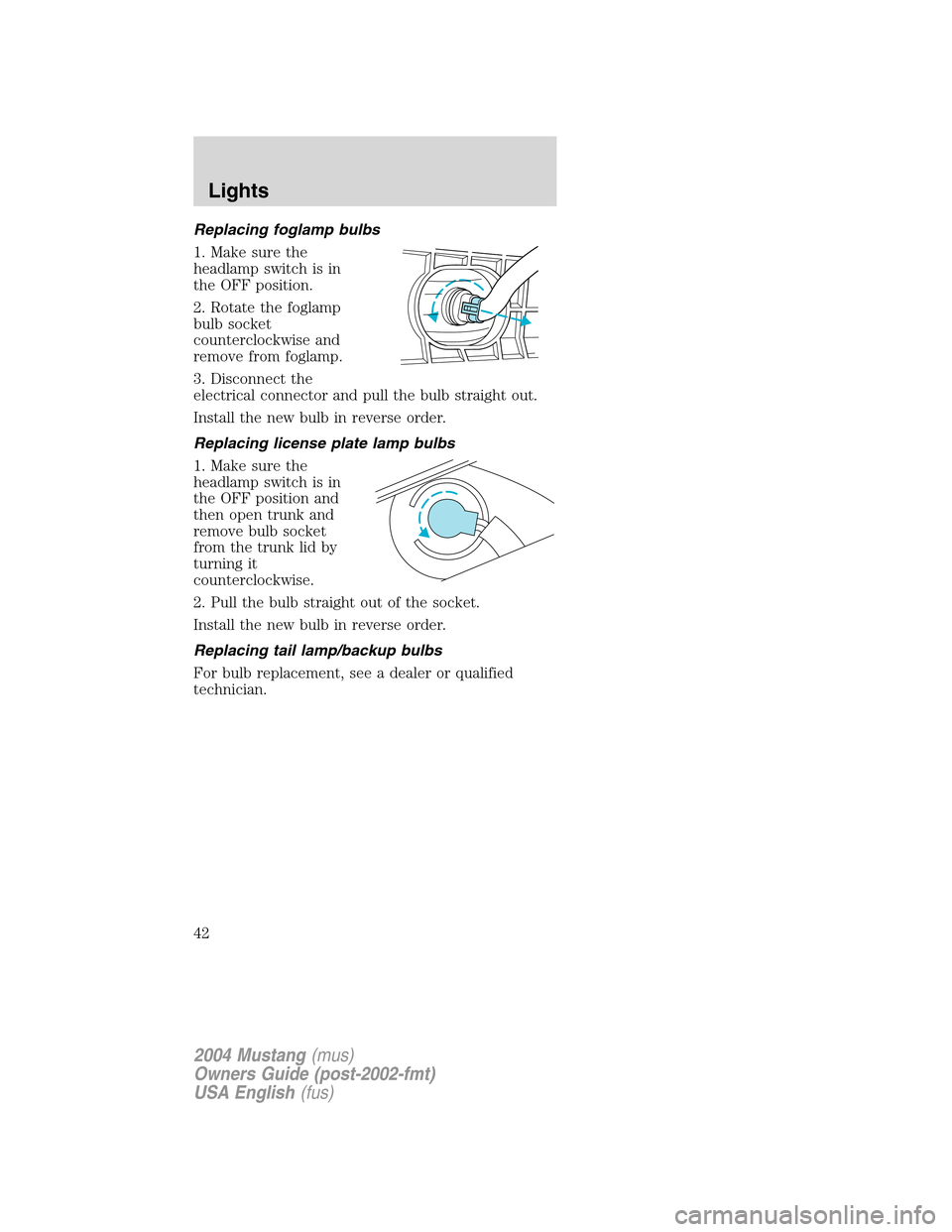
2. Rotate the foglamp
bulb socket
counterclockwise and
remove from foglamp.
3. Disconnect the
electrical connector and pull the bulb straight out.
Install the new bulb in reverse order.
Replacing license plate lamp bulbs
1. Make sure the
headlamp switch is in
the OFF position and
then open trunk and
remove bulb socket
from the trunk lid by
turning it
counterclockwise.
2. Pull the bulb straight out of the socket.
Install the new bulb in reverse order.
Replacing tail lamp/backup bulbs
For bulb replacement, see a dealer or qualified
technician.
2004 Mustang(mus)
Owners Guide (post-2002-fmt)
USA English(fus)
Lights
42
Page 133 of 240
To change the tire:
Note:Passengers should not remain in the vehicle
when the vehicle is being jacked.
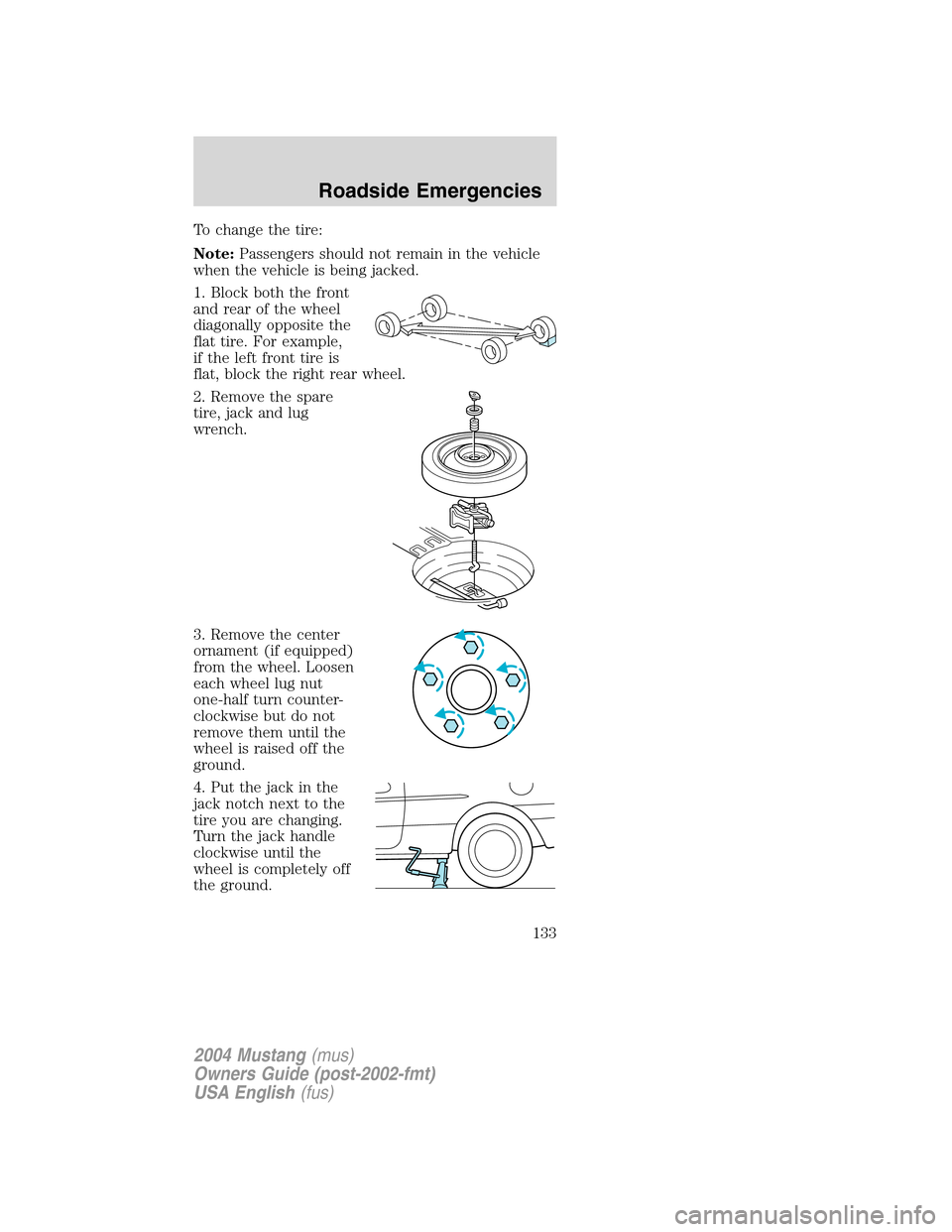
1. Block both the front
and rear of the wheel
diagonally opposite the
flat tire. For example,
if the left front tire is
flat, block the right rear wheel.
2. Remove the spare
tire, jack and lug
wrench.
3. Remove the center
ornament (if equipped)
from the wheel. Loosen
each wheel lug nut
one-half turn counter-
clockwise but do not
remove them until the
wheel is raised off the
ground.
4. Put the jack in the
jack notch next to the
tire you are changing.
Turn the jack handle
clockwise until the
wheel is completely off
the ground.
2004 Mustang (mus)
Owners Guide (post-2002-fmt)
USA English (fus)
Roadside Emergencies
133
Page 134 of 240
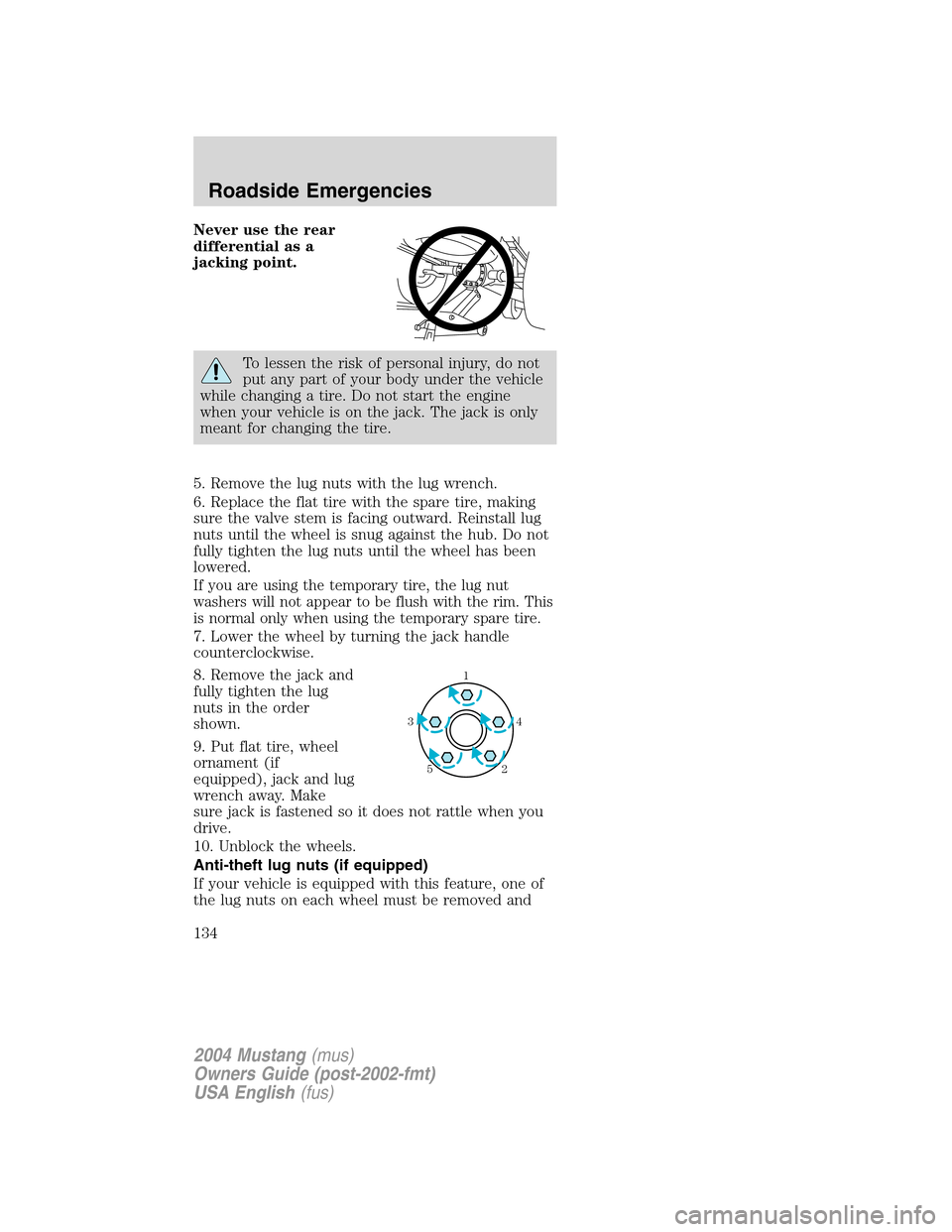
Never use the rear
differential as a
jacking point.
To lessen the risk of personal injury, do not
put any part of your body under the vehicle
while changing a tire. Do not start the engine
when your vehicle is on the jack. The jack is only
meant for changing the tire.
5. Remove the lug nuts with the lug wrench.
6. Replace the flat tire with the spare tire, making
sure the valve stem is facing outward. Reinstall lug
nuts until the wheel is snug against the hub. Do not
fully tighten the lug nuts until the wheel has been
lowered.
If you are using the temporary tire, the lug nut
washers will not appear to be flush with the rim. This
is normal only when using the temporary spare tire.
7. Lower the wheel by turning the jack handle
counterclockwise.
8. Remove the jack and
fully tighten the lug
nuts in the order
shown.
9. Put flat tire, wheel
ornament (if
equipped), jack and lug
wrench away. Make
sure jack is fastened so it does not rattle when you
drive.
10. Unblock the wheels.
Anti-theft lug nuts (if equipped)
If your vehicle is equipped with this feature, one of
the lug nuts on each wheel must be removed and
1
4
3
2
5
2004 Mustang (mus)
Owners Guide (post-2002-fmt)
USA English (fus)
Roadside Emergencies
134