2004 FORD F150 audio
[x] Cancel search: audioPage 21 of 248
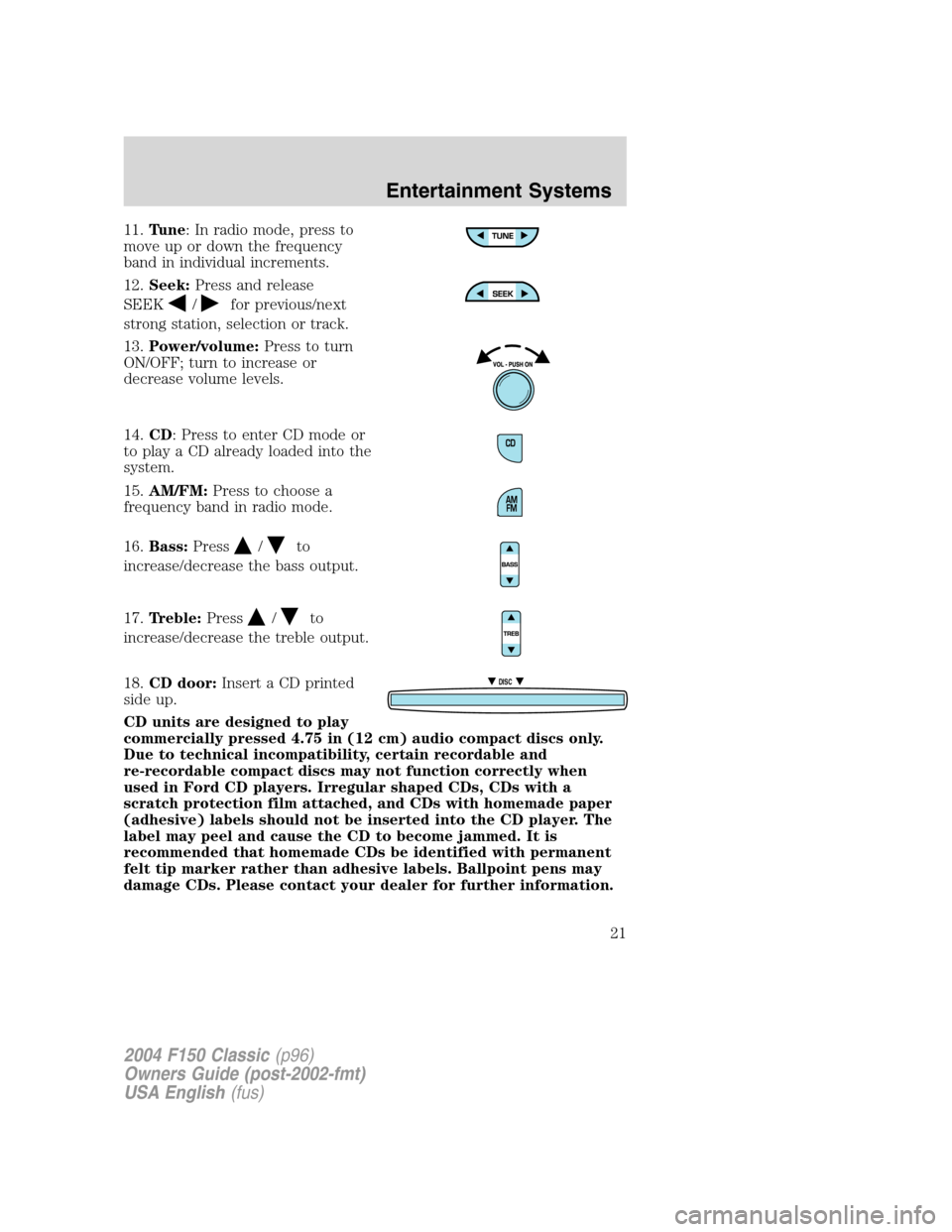
11.Tune: In radio mode, press to
move up or down the frequency
band in individual increments.
12.Seek:Press and release
SEEK
/for previous/next
strong station, selection or track.
13.Power/volume:Press to turn
ON/OFF; turn to increase or
decrease volume levels.
14.CD: Press to enter CD mode or
to play a CD already loaded into the
system.
15.AM/FM:Press to choose a
frequency band in radio mode.
16.Bass:Press
/to
increase/decrease the bass output.
17.Treble:Press
/to
increase/decrease the treble output.
18.CD door:Insert a CD printed
side up.
CD units are designed to play
commercially pressed 4.75 in (12 cm) audio compact discs only.
Due to technical incompatibility, certain recordable and
re-recordable compact discs may not function correctly when
used in Ford CD players. Irregular shaped CDs, CDs with a
scratch protection film attached, and CDs with homemade paper
(adhesive) labels should not be inserted into the CD player. The
label may peel and cause the CD to become jammed. It is
recommended that homemade CDs be identified with permanent
felt tip marker rather than adhesive labels. Ballpoint pens may
damage CDs. Please contact your dealer for further information.
DISC
2004 F150 Classic(p96)
Owners Guide (post-2002-fmt)
USA English(fus)
Entertainment Systems
21
Page 26 of 248
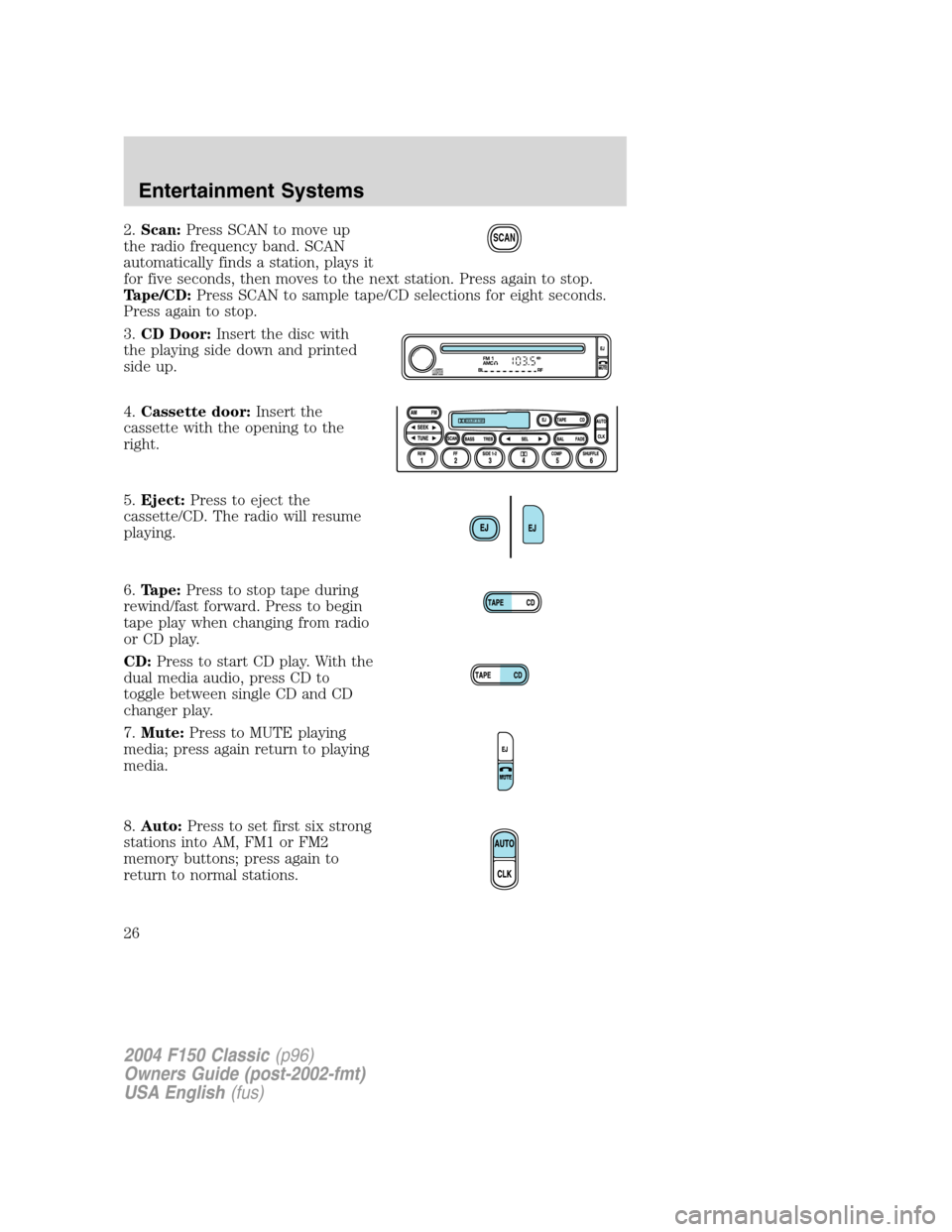
2.Scan:Press SCAN to move up
the radio frequency band. SCAN
automatically finds a station, plays it
for five seconds, then moves to the next station. Press again to stop.
Tape/CD:Press SCAN to sample tape/CD selections for eight seconds.
Press again to stop.
3.CD Door:Insert the disc with
the playing side down and printed
side up.
4.Cassette door:Insert the
cassette with the opening to the
right.
5.Eject:Press to eject the
cassette/CD. The radio will resume
playing.
6.Tape:Press to stop tape during
rewind/fast forward. Press to begin
tape play when changing from radio
or CD play.
CD:Press to start CD play. With the
dual media audio, press CD to
toggle between single CD and CD
changer play.
7.Mute:Press to MUTE playing
media; press again return to playing
media.
8.Auto:Press to set first six strong
stations into AM, FM1 or FM2
memory buttons; press again to
return to normal stations.SCAN
2004 F150 Classic(p96)
Owners Guide (post-2002-fmt)
USA English(fus)
Entertainment Systems
26
Page 30 of 248
CD/CD PLAYER CARE
Do:
•Handle discs by their edges only. Never touch the playing surface.
•Inspect discs before playing. Clean only with an approved CD cleaner
and wipe from the center out.
Don’t:
•Expose discs to direct sunlight or heat sources for extended periods
of time.
•Insert more than one disc into each slot of the CD changers.
•Clean using a circular motion.
CD units are designed to play commercially pressed 4.75 in (12
cm) audio compact discs only. Due to technical incompatibility,
certain recordable and re-recordable compact discs may not
function correctly when used in Ford CD players. Irregular
shaped CDs, CDs with a scratch protection film attached, and CDs
with homemade paper (adhesive) labels should not be inserted
into the CD player. The label may peel and cause the CD to
become jammed. It is recommended that homemade CDs be
identified with permanent felt tip marker rather than adhesive
labels. Ball point pens may damage CDs. Please contact your
dealer for further information.
AUDIO SYSTEM WARRANTY AND SERVICE
Refer to theWarranty Guidefor audio system warranty information. If
service is necessary, see your dealer or qualified technician.
2004 F150 Classic(p96)
Owners Guide (post-2002-fmt)
USA English(fus)
Entertainment Systems
30
Page 145 of 248
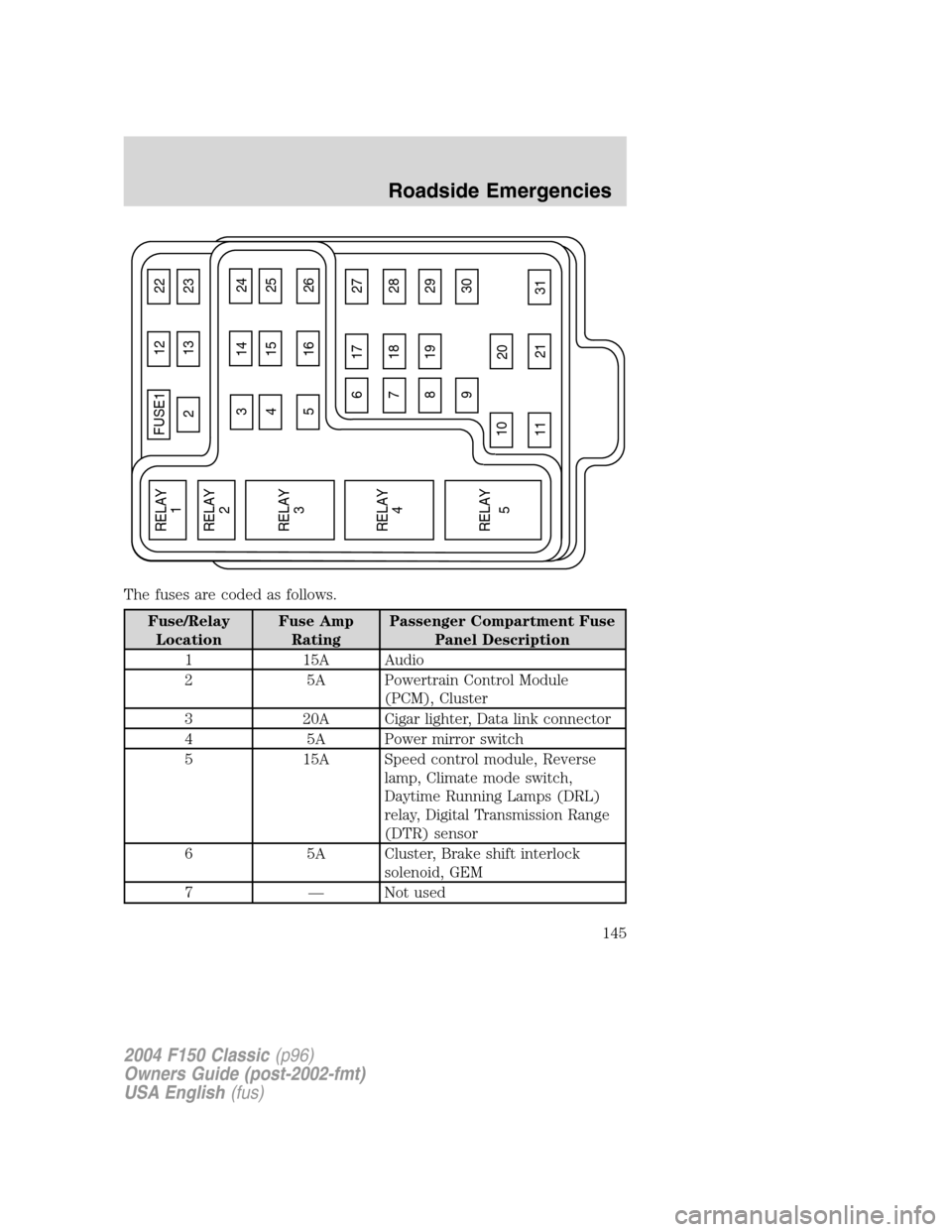
The fuses are coded as follows.
Fuse/Relay
LocationFuse Amp
RatingPassenger Compartment Fuse
Panel Description
1 15A Audio
2 5A Powertrain Control Module
(PCM), Cluster
3 20A Cigar lighter, Data link connector
4 5A Power mirror switch
5 15A Speed control module, Reverse
lamp, Climate mode switch,
Daytime Running Lamps (DRL)
relay, Digital Transmission Range
(DTR) sensor
6 5A Cluster, Brake shift interlock
solenoid, GEM
7—Not used
FUSE1 12 22
21323
617 27
718 28
819 29
930
20
31 21 11 10
RELAY
5 RELAY
4 RELAY
3 RELAY
2 RELAY
1
31424
41525
51626
2004 F150 Classic(p96)
Owners Guide (post-2002-fmt)
USA English(fus)
Roadside Emergencies
145
Page 146 of 248
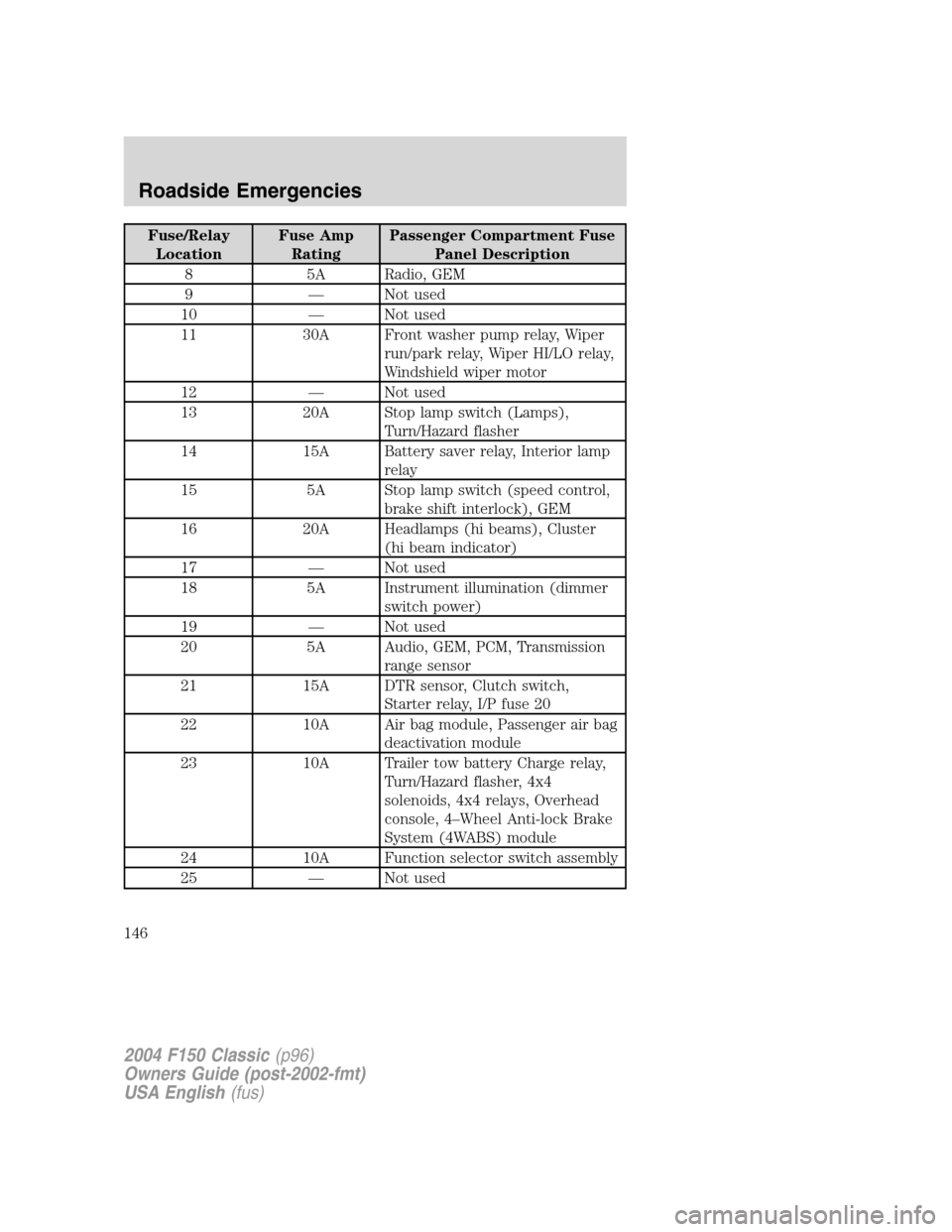
Fuse/Relay
LocationFuse Amp
RatingPassenger Compartment Fuse
Panel Description
8 5A Radio, GEM
9—Not used
10—Not used
11 30A Front washer pump relay, Wiper
run/park relay, Wiper HI/LO relay,
Windshield wiper motor
12—Not used
13 20A Stop lamp switch (Lamps),
Turn/Hazard flasher
14 15A Battery saver relay, Interior lamp
relay
15 5A Stop lamp switch (speed control,
brake shift interlock), GEM
16 20A Headlamps (hi beams), Cluster
(hi beam indicator)
17—Not used
18 5A Instrument illumination (dimmer
switch power)
19—Not used
20 5A Audio, GEM, PCM, Transmission
range sensor
21 15A DTR sensor, Clutch switch,
Starter relay, I/P fuse 20
22 10A Air bag module, Passenger air bag
deactivation module
23 10A Trailer tow battery Charge relay,
Turn/Hazard flasher, 4x4
solenoids, 4x4 relays, Overhead
console, 4–Wheel Anti-lock Brake
System (4WABS) module
24 10A Function selector switch assembly
25—Not used
2004 F150 Classic(p96)
Owners Guide (post-2002-fmt)
USA English(fus)
Roadside Emergencies
146
Page 243 of 248
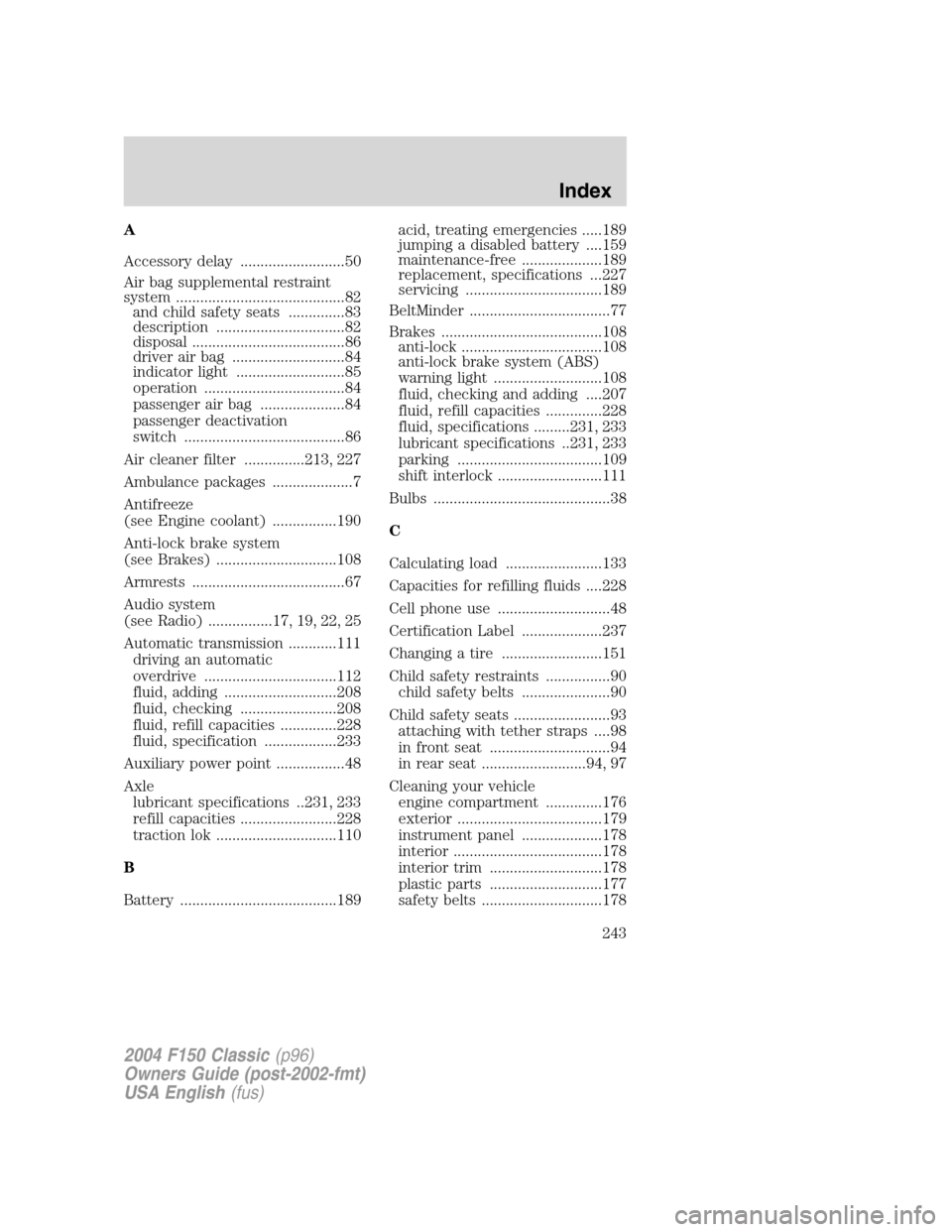
A
Accessory delay ..........................50
Air bag supplemental restraint
system ..........................................82
and child safety seats ..............83
description ................................82
disposal ......................................86
driver air bag ............................84
indicator light ...........................85
operation ...................................84
passenger air bag .....................84
passenger deactivation
switch ........................................86
Air cleaner filter ...............213, 227
Ambulance packages ....................7
Antifreeze
(see Engine coolant) ................190
Anti-lock brake system
(see Brakes) ..............................108
Armrests ......................................67
Audio system
(see Radio) ................17, 19, 22, 25
Automatic transmission ............111
driving an automatic
overdrive .................................112
fluid, adding ............................208
fluid, checking ........................208
fluid, refill capacities ..............228
fluid, specification ..................233
Auxiliary power point .................48
Axle
lubricant specifications ..231, 233
refill capacities ........................228
traction lok ..............................110
B
Battery .......................................189acid, treating emergencies .....189
jumping a disabled battery ....159
maintenance-free ....................189
replacement, specifications ...227
servicing ..................................189
BeltMinder ...................................77
Brakes ........................................108
anti-lock ...................................108
anti-lock brake system (ABS)
warning light ...........................108
fluid, checking and adding ....207
fluid, refill capacities ..............228
fluid, specifications .........231, 233
lubricant specifications ..231, 233
parking ....................................109
shift interlock ..........................111
Bulbs ............................................38
C
Calculating load ........................133
Capacities for refilling fluids ....228
Cell phone use ............................48
Certification Label ....................237
Changing a tire .........................151
Child safety restraints ................90
child safety belts ......................90
Child safety seats ........................93
attaching with tether straps ....98
in front seat ..............................94
in rear seat ..........................94, 97
Cleaning your vehicle
engine compartment ..............176
exterior ....................................179
instrument panel ....................178
interior .....................................178
interior trim ............................178
plastic parts ............................177
safety belts ..............................178
2004 F150 Classic(p96)
Owners Guide (post-2002-fmt)
USA English(fus)
Index
Index
243