Page 42 of 296
Function Number of bulbs Trade number
Rear license plate
lamps2
168
Backup lamp 2 3156K
High-mount stop
lamps5
W5W
Fog lamp 2 9145
Cargo lamp 1 211-2
Interior overhead lamp 1 912 (906)
Front door courtesy
lamp1
168
Map lamps 2 168 (T10)
Ashtray lamp 1 161
All replacement bulbs are clear in color except where noted.
To replace all instrument panel lights - see your dealer.
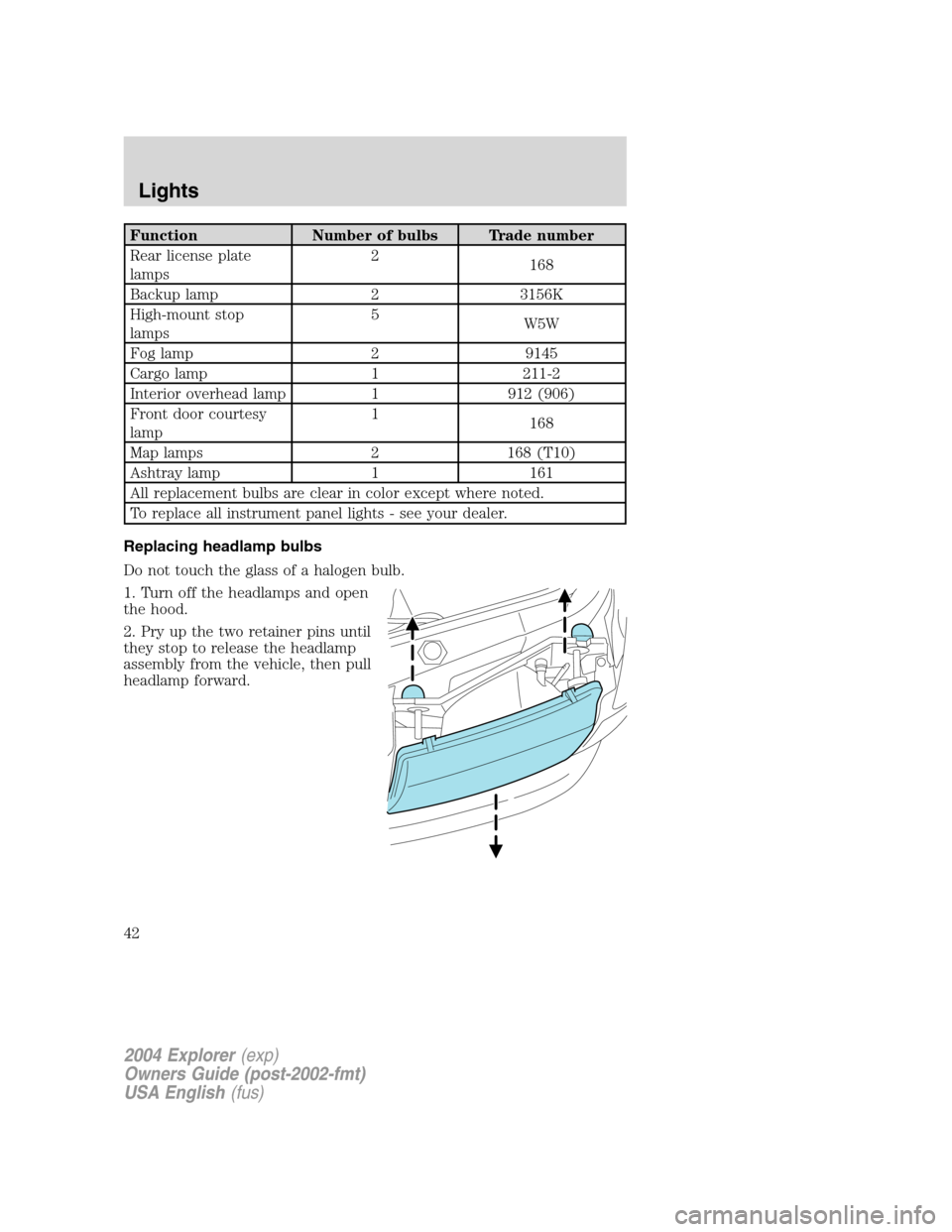
Replacing headlamp bulbs
Do not touch the glass of a halogen bulb.
1. Turn off the headlamps and open
the hood.
2. Pry up the two retainer pins until
they stop to release the headlamp
assembly from the vehicle, then pull
headlamp forward.
2004 Explorer(exp)
Owners Guide (post-2002-fmt)
USA English(fus)
Lights
42
Page 91 of 296
Theft indicator
The theft indicator is located on top of the instrument panel.
•When the ignition is in the OFF position, the indicator will flash once
every 2 seconds to indicate the SecuriLock�system is functioning as
a theft deterrent.
•When the ignition is in the ON position, the indicator will glow for 3
seconds to indicate normal system functionality.
If a problem occurs with the SecuriLock�system, the indicator will flash
rapidly or glow steadily when the ignition is in the ON position. If this
occurs, the vehicle should be taken to an authorized dealer for service.
Automatic arming
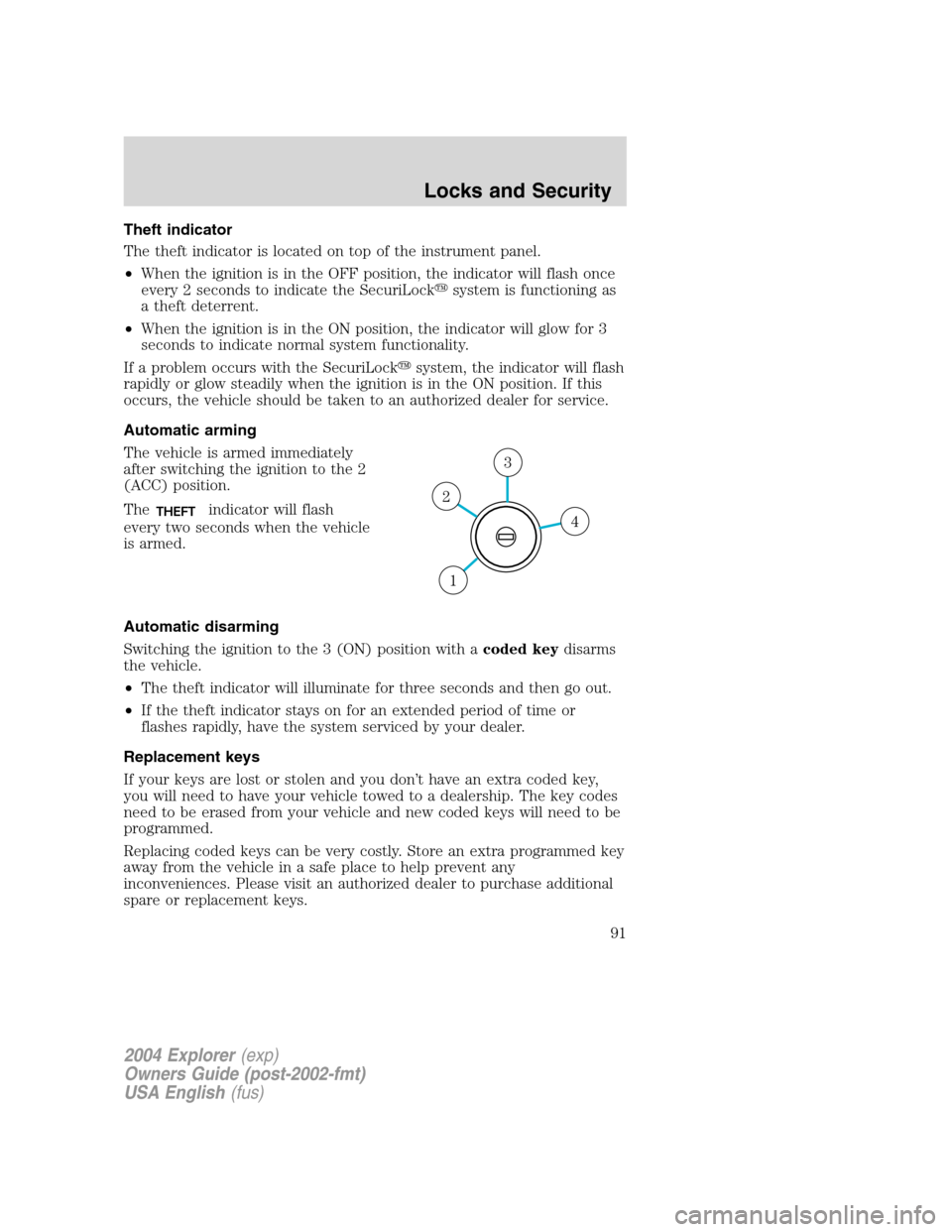
The vehicle is armed immediately
after switching the ignition to the 2
(ACC) position.
The
THEFTindicator will flash
every two seconds when the vehicle
is armed.
Automatic disarming
Switching the ignition to the 3 (ON) position with acoded keydisarms
the vehicle.
•The theft indicator will illuminate for three seconds and then go out.
•If the theft indicator stays on for an extended period of time or
flashes rapidly, have the system serviced by your dealer.
Replacement keys
If your keys are lost or stolen and you don’t have an extra coded key,
you will need to have your vehicle towed to a dealership. The key codes
need to be erased from your vehicle and new coded keys will need to be
programmed.
Replacing coded keys can be very costly. Store an extra programmed key
away from the vehicle in a safe place to help prevent any
inconveniences. Please visit an authorized dealer to purchase additional
spare or replacement keys.4
3
2
1
2004 Explorer(exp)
Owners Guide (post-2002-fmt)
USA English(fus)
Locks and Security
91
Page 145 of 296
spin. If your vehicle seems to lose engine power while driving in deep
sand or very deep snow, switching off the AdvanceTrac�stability
enhancement feature will restore full engine power and will enhance
momentum through the obstacle.
Some drivers may notice a slight movement of the brake pedal when the
AdvanceTrac�performs a system self-check. During AdvanceTrac�
operation you may experience the following:
•A rumble or grinding noise
•A slight deceleration of the vehicle
•The AdvanceTrac�indicator light will flash
•If your foot is on the brake pedal, you will feel a vibration in the
pedal.
•If the driving condition is severe and your foot is not on the brake, the
brake pedal will move to apply higher brake forces. You may also hear
a whoosh of air from under the instrument panel during this severe
condition.
All these conditions are normal during AdvanceTrac�operation.
Do not alter or modify your vehicle’s suspension or steering; the
resulting changes to the vehicle’s handling can adversely affect
the AdvanceTrac�system. Also, do not install a stereo
loudspeaker near the rear console or either rear seat. The
speaker vibrations can adversely affect the AdvanceTrac�
sensors located in this area.
Aggressive driving in any road conditions can cause you to lose
control of your vehicle increasing the risk of severe personal
injury or property damage. The occurrence of an AdvanceTrac�event
is an indication that at least some of the tires have exceeded their
ability to grip the road; this may lead to an increased risk of loss of
vehicle control, vehicle rollover, personal injury and death. If you
experience a severe road event, SLOW DOWN.
STEERING
To prevent damage to the power steering system:
•Never hold the steering wheel at its furthest turning points (until it
stops) for more than a few seconds when the engine is running.
•Do not operate the vehicle with a low power steering pump fluid level
(below the MIN mark on the reservoir).
2004 Explorer(exp)
Owners Guide (post-2002-fmt)
USA English(fus)
Driving
145
Page 153 of 296
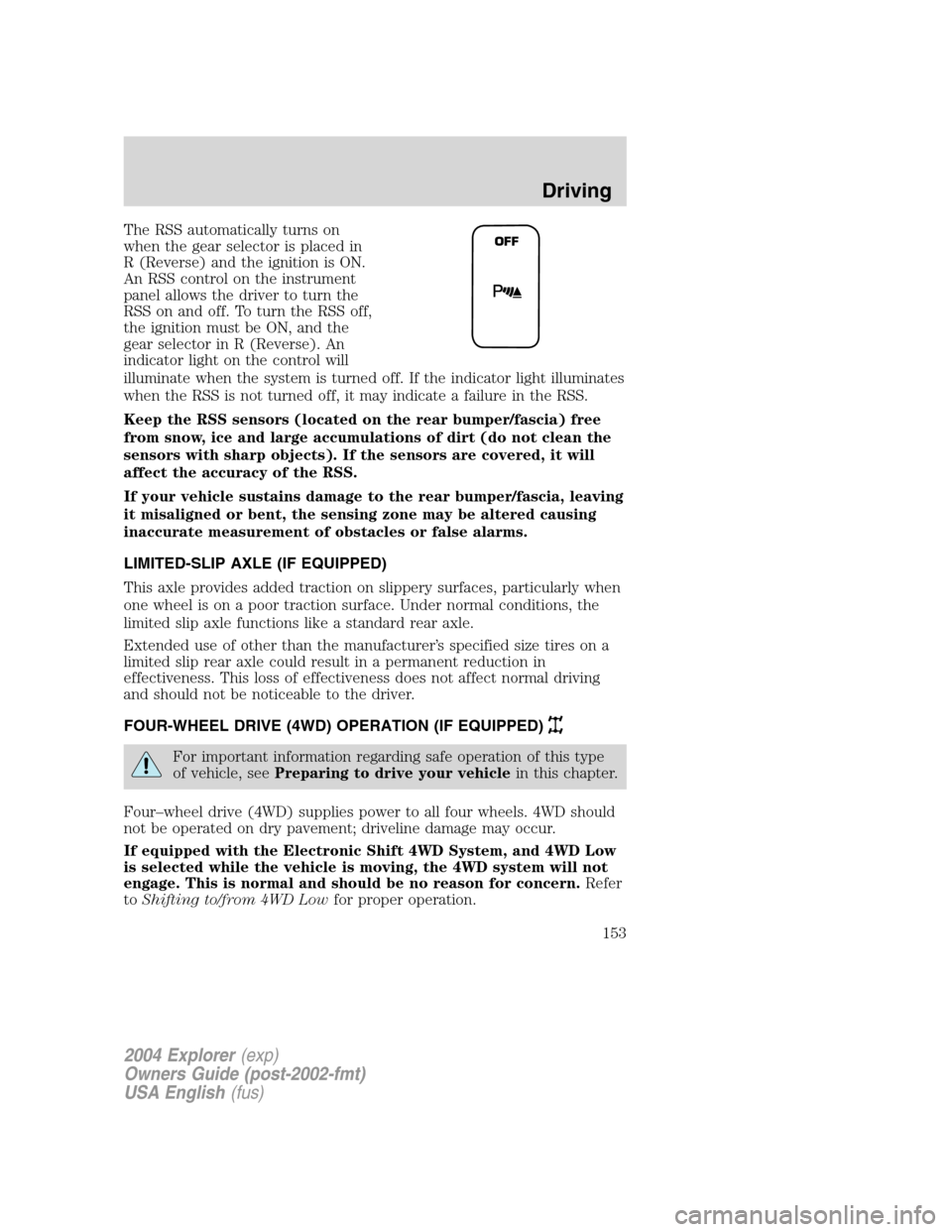
The RSS automatically turns on
when the gear selector is placed in
R (Reverse) and the ignition is ON.
An RSS control on the instrument
panel allows the driver to turn the
RSS on and off. To turn the RSS off,
the ignition must be ON, and the
gear selector in R (Reverse). An
indicator light on the control will
illuminate when the system is turned off. If the indicator light illuminates
when the RSS is not turned off, it may indicate a failure in the RSS.
Keep the RSS sensors (located on the rear bumper/fascia) free
from snow, ice and large accumulations of dirt (do not clean the
sensors with sharp objects). If the sensors are covered, it will
affect the accuracy of the RSS.
If your vehicle sustains damage to the rear bumper/fascia, leaving
it misaligned or bent, the sensing zone may be altered causing
inaccurate measurement of obstacles or false alarms.
LIMITED-SLIP AXLE (IF EQUIPPED)
This axle provides added traction on slippery surfaces, particularly when
one wheel is on a poor traction surface. Under normal conditions, the
limited slip axle functions like a standard rear axle.
Extended use of other than the manufacturer’s specified size tires on a
limited slip rear axle could result in a permanent reduction in
effectiveness. This loss of effectiveness does not affect normal driving
and should not be noticeable to the driver.
FOUR-WHEEL DRIVE (4WD) OPERATION (IF EQUIPPED)
For important information regarding safe operation of this type
of vehicle, seePreparing to drive your vehiclein this chapter.
Four–wheel drive (4WD) supplies power to all four wheels. 4WD should
not be operated on dry pavement; driveline damage may occur.
If equipped with the Electronic Shift 4WD System, and 4WD Low
is selected while the vehicle is moving, the 4WD system will not
engage. This is normal and should be no reason for concern.Refer
toShifting to/from 4WD Lowfor proper operation.
OFF
2004 Explorer(exp)
Owners Guide (post-2002-fmt)
USA English(fus)
Driving
153
Page 185 of 296
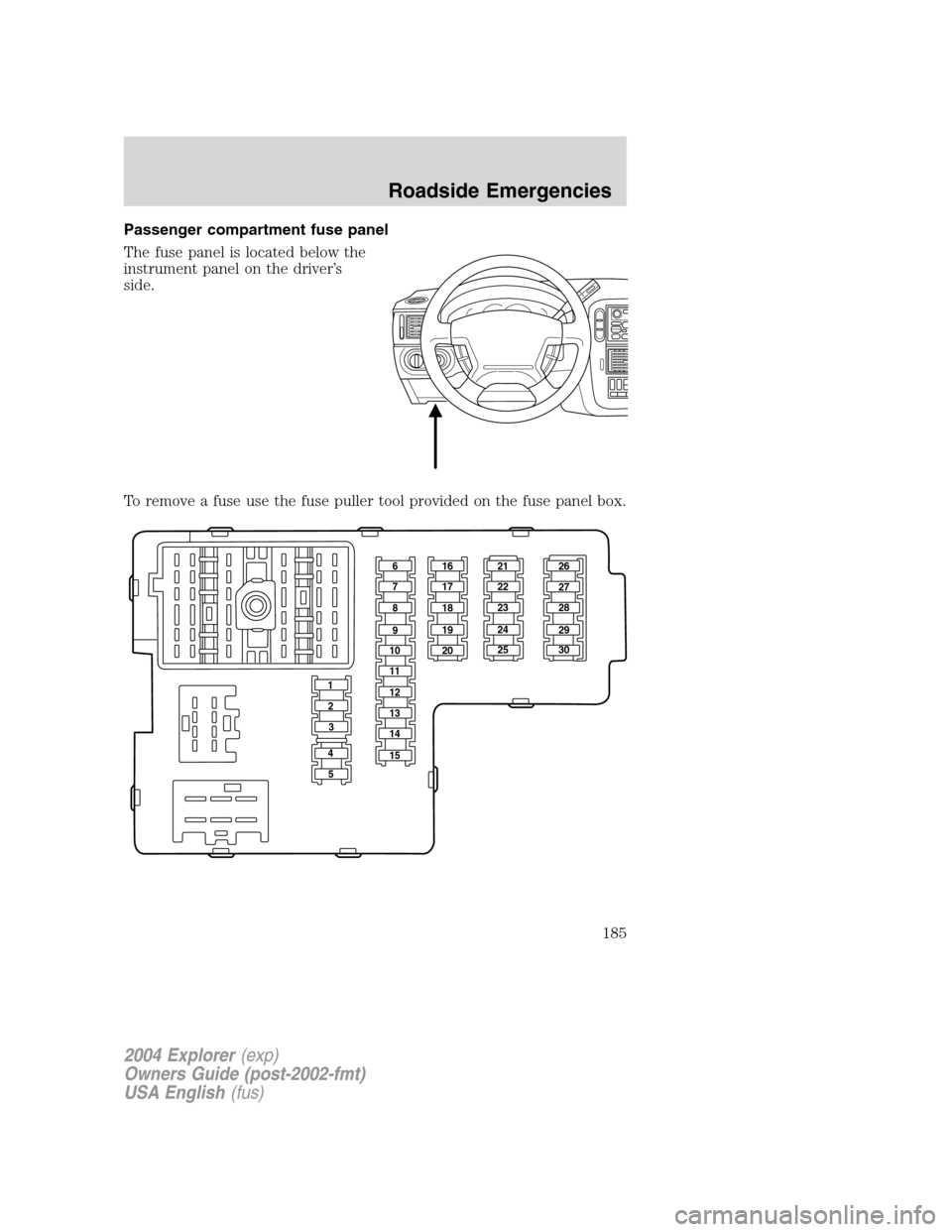
Passenger compartment fuse panel
The fuse panel is located below the
instrument panel on the driver’s
side.
To remove a fuse use the fuse puller tool provided on the fuse panel box.
161621 26
27
28
29
30 22
23
24
25 17
18
19
20 7
8
9
10
11
12
13
14
15 2
3
4
5
2004 Explorer(exp)
Owners Guide (post-2002-fmt)
USA English(fus)
Roadside Emergencies
185
Page 186 of 296
The fuses are coded as follows:
Fuse/Relay
LocationFuse Amp
RatingPassenger Compartment Fuse
Panel Description
1 30A Memory seat module, Driver
power seat
2 20A Moonroof
3 20A Radio, Amplifier, DVD
4 5A Front wiper module
5 15A Flasher relay (Turn, hazards)
6 10A Key-in-chime
7 15A Heated mirrors
8 5A Heated PCV (4.0L engine only)
9 15A Not used
10 10A Heated backlight relay coil, A/C
clutch contact
11 20A Heated seats
12 5A 4x4 (switch)
13 5A Overdrive cancel switch
14 5A PATS
15 5A Rear wiper module, Cluster
16 5A Power mirror, Manual climate
control, TPMS
17 15A Delayed accessory relay
coil/Battery saver coil and
contact/Reading and glove box
lamps
18 10A Flexible fuel pump
19 10A Restraint Control Module (RCM)
20 5A Memory driver seat switch, Driver
seat module, Body Security
Module (BSM), PATS LED
21 5A Instrument cluster, Compass,
Flasher coil
22 10A ABS, IVD Controller
2004 Explorer(exp)
Owners Guide (post-2002-fmt)
USA English(fus)
Roadside Emergencies
186
Page 222 of 296
PLASTIC (NON-PAINTED) EXTERIOR PARTS
Use only approved products to clean plastic parts. These products are
available from your dealer.
•For routine cleaning, use Motorcraft Detail Wash (ZC-3–A).
•If tar or grease spots are present, use Motorcraft Bug and Tar
Remover (ZC-42).
WINDOWS AND WIPER BLADES
The windshield, rear and side windows and the wiper blades should be
cleaned regularly. If the wipers do not wipe properly, substances on the
vehicle’s glass or the wiper blades may be the cause. These may include
hot wax treatments used by commercial car washes, tree sap, or other
organic contamination. To clean these items, please follow these tips:
•The windshield, rear windows and side windows may be cleaned with
a non-abrasive cleaner such as Motorcraft Ultra Clear Spray Glass
Cleaner (ZC-23), available from your dealer.
•Do not use abrasives, as they may cause scratches.
•Do not use fuel, kerosene, or paint thinner to clean any parts.
•Wiper blades can be cleaned with isopropyl (rubbing) alcohol or
windshield washer solution. Be sure to replace wiper blades when they
appear worn or do not function properly.
INSTRUMENT PANEL AND CLUSTER LENS
Clean the instrument panel with a damp cloth, then dry with a dry cloth.
•Avoid cleaners or polish that increase the gloss of the upper portion of
the instrument panel. The dull finish in this area helps protect the
driver from undesirable windshield reflection.
Do not use chemical solvents or strong detergents when cleaning
the steering wheel or instrument panel to avoid contamination of
the air bag system.
•Be certain to wash or wipe your hands clean if you have been in
contact with certain products such as insect repellent and suntan
lotion in order to avoid possible damage to the interior painted
surfaces.
INTERIOR TRIM
•Clean the interior trim areas with a damp cloth, then dry by wiping
with a dry, soft, clean cloth.
2004 Explorer(exp)
Owners Guide (post-2002-fmt)
USA English(fus)
Cleaning
222
Page 226 of 296
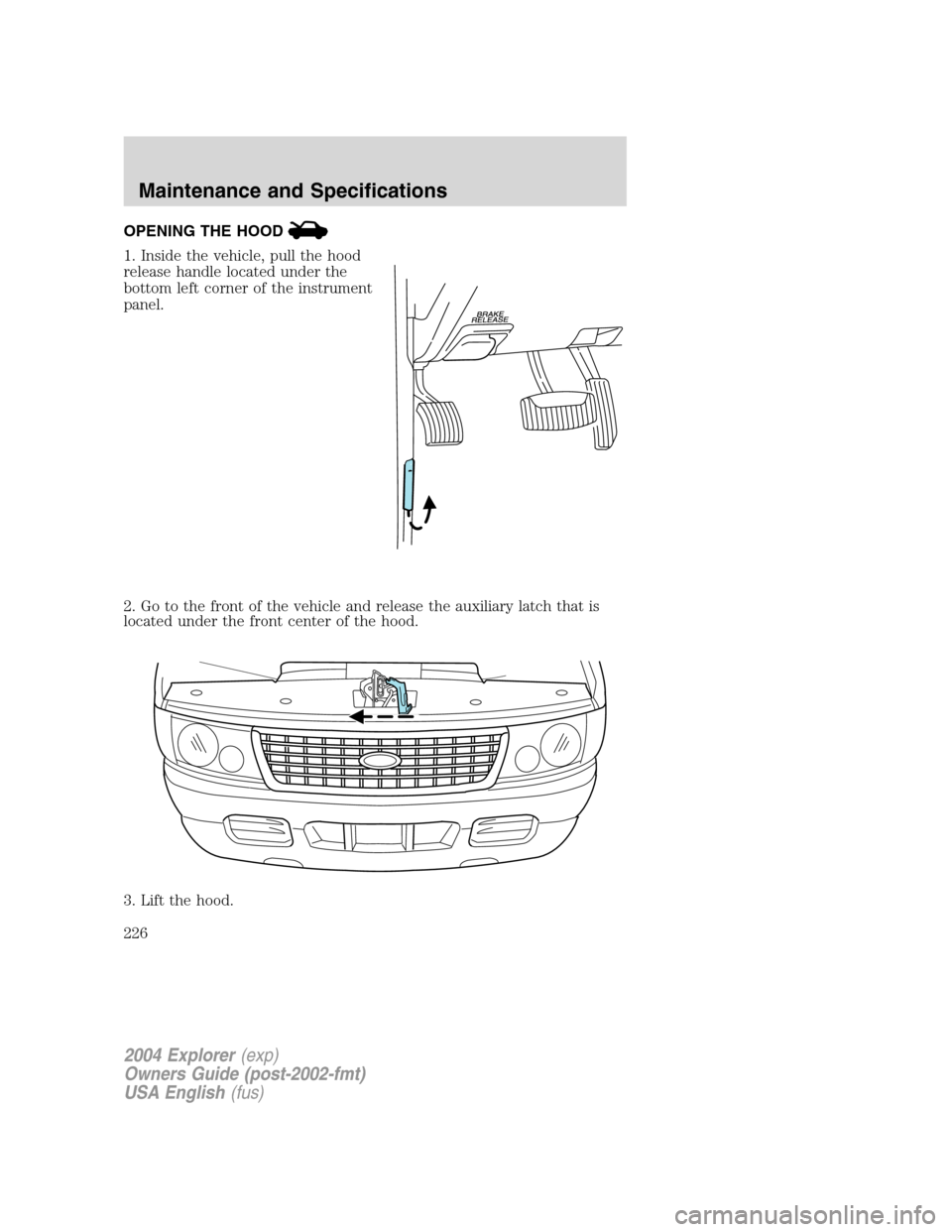
OPENING THE HOOD
1. Inside the vehicle, pull the hood
release handle located under the
bottom left corner of the instrument
panel.
2. Go to the front of the vehicle and release the auxiliary latch that is
located under the front center of the hood.
3. Lift the hood.
2004 Explorer(exp)
Owners Guide (post-2002-fmt)
USA English(fus)
Maintenance and Specifications
226