2004 FORD EXPEDITION navigation system
[x] Cancel search: navigation systemPage 75 of 344
Detours, route interruptions and changes
If need be, your navigation system
can easily and quickly find the most
efficient detour around road
construction, unexpected traffic or
undesirable roads.
Detour options
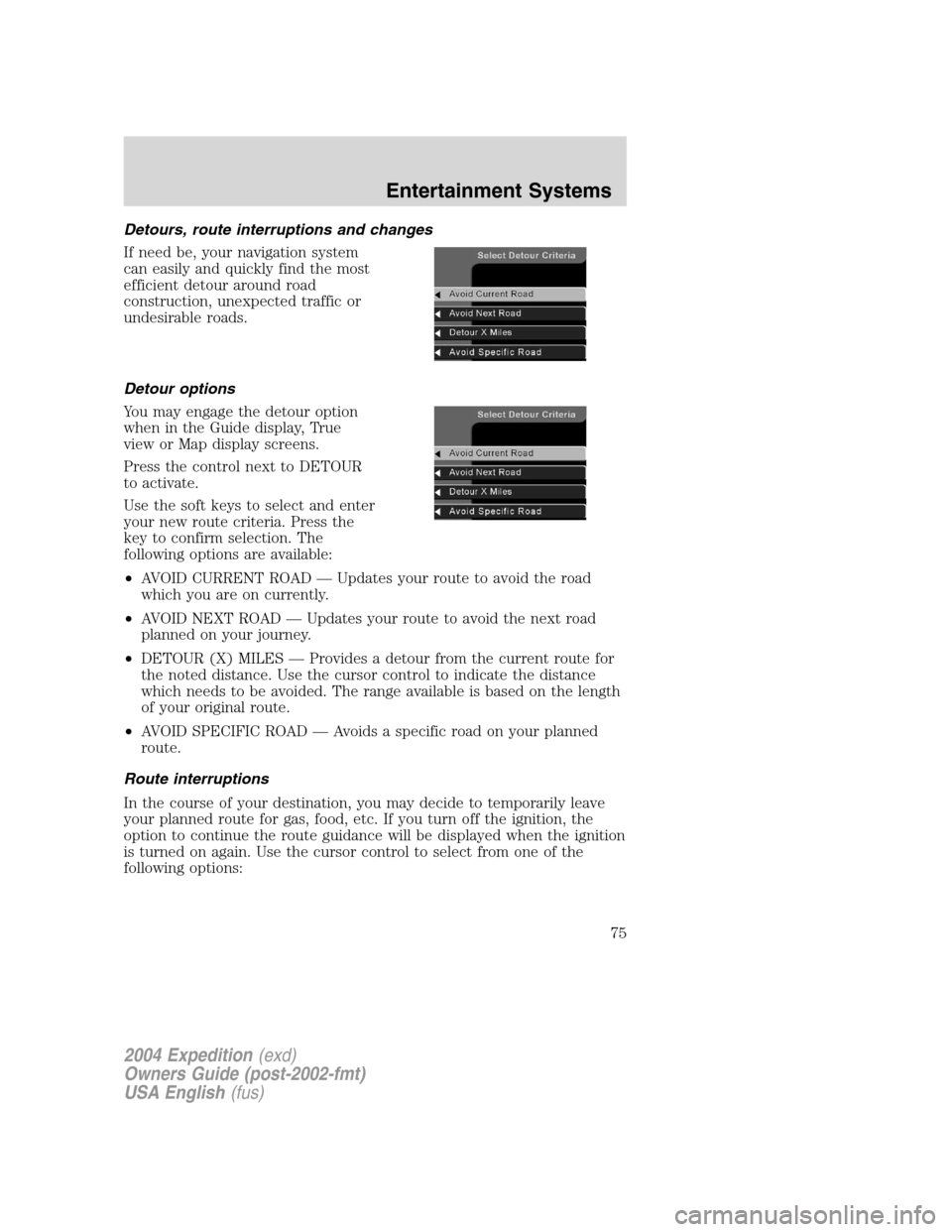
You may engage the detour option
when in the Guide display, True
view or Map display screens.
Press the control next to DETOUR
to activate.
Use the soft keys to select and enter
your new route criteria. Press the
key to confirm selection. The
following options are available:
•AVOID CURRENT ROAD—Updates your route to avoid the road
which you are on currently.
•AVOID NEXT ROAD—Updates your route to avoid the next road
planned on your journey.
•DETOUR (X) MILES—Provides a detour from the current route for
the noted distance. Use the cursor control to indicate the distance
which needs to be avoided. The range available is based on the length
of your original route.
•AVOID SPECIFIC ROAD—Avoids a specific road on your planned
route.
Route interruptions
In the course of your destination, you may decide to temporarily leave
your planned route for gas, food, etc. If you turn off the ignition, the
option to continue the route guidance will be displayed when the ignition
is turned on again. Use the cursor control to select from one of the
following options:
2004 Expedition(exd)
Owners Guide (post-2002-fmt)
USA English(fus)
Entertainment Systems
75
Page 76 of 344
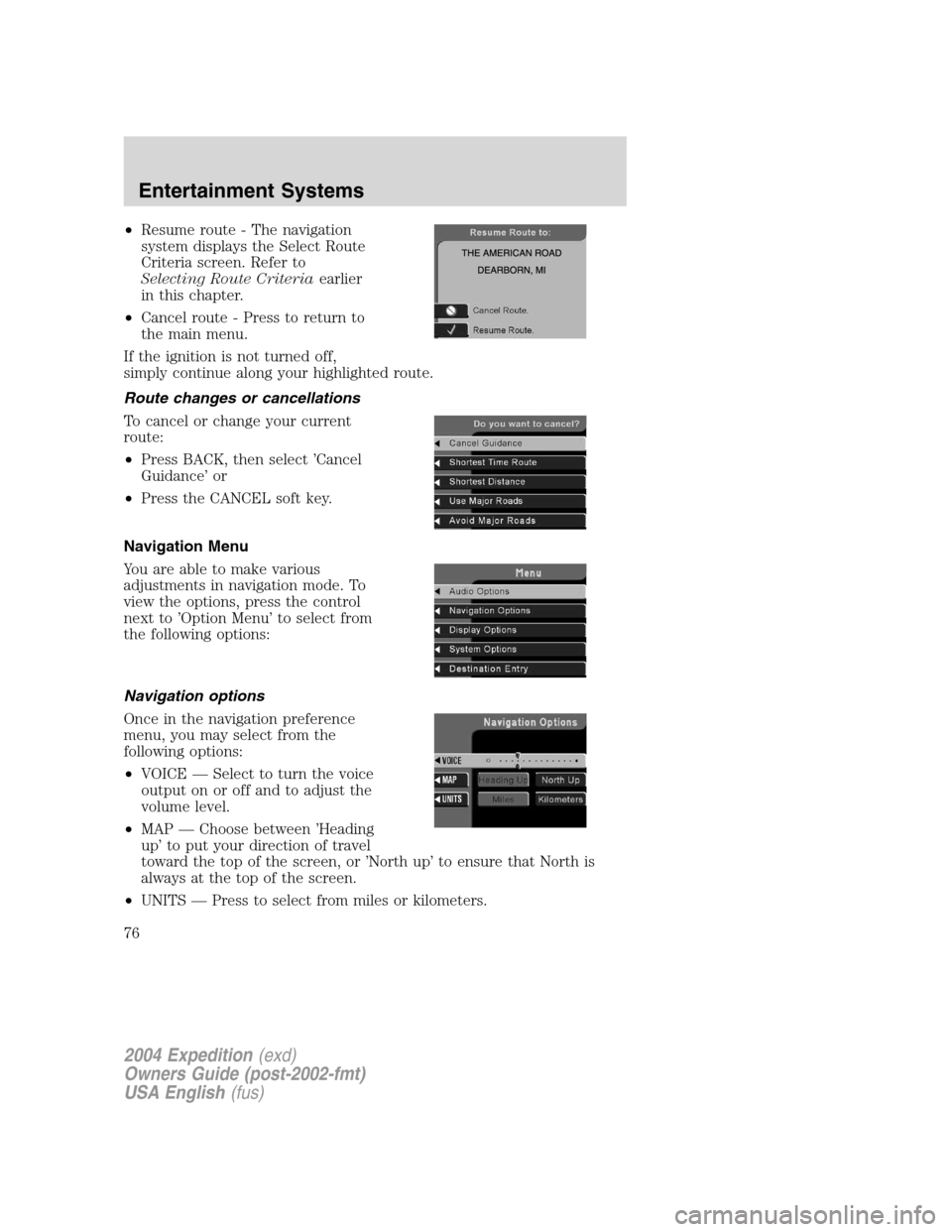
•Resume route - The navigation
system displays the Select Route
Criteria screen. Refer to
Selecting Route Criteriaearlier
in this chapter.
•Cancel route - Press to return to
the main menu.
If the ignition is not turned off,
simply continue along your highlighted route.
Route changes or cancellations
To cancel or change your current
route:
•Press BACK, then select’Cancel
Guidance’or
•Press the CANCEL soft key.
Navigation Menu
You are able to make various
adjustments in navigation mode. To
view the options, press the control
next to’Option Menu’to select from
the following options:
Navigation options
Once in the navigation preference
menu, you may select from the
following options:
•VOICE—Select to turn the voice
output on or off and to adjust the
volume level.
•MAP—Choose between’Heading
up’to put your direction of travel
toward the top of the screen, or’North up’to ensure that North is
always at the top of the screen.
•UNITS—Press to select from miles or kilometers.
2004 Expedition(exd)
Owners Guide (post-2002-fmt)
USA English(fus)
Entertainment Systems
76
Page 78 of 344
5. Select the SET soft key to synchronize/set the minutes and seconds to
GPS time. The hours will remain at the user set value.
You may choose to set the clock to a 12 or 24 hour display.
General information
Federal Communication Commission (FCC) Compliance
Changes or modifications not approved by Ford or Lincoln Mercury could
void user’s authority to operate the equipment. This equipment has been
tested and found to comply with the limits for a Class B digital device,
pursuant to Part 15 of the FCC Rules. These limits are designed to
provide reasonable protection against harmful interference in a
residential installation. This equipment generates, uses and can radiate
radio frequency energy and, if not installed and used in accordance with
the instructions, may cause harmful interference to radio
communications.
However, there is no guarantee that interference will not occur in a
particular installation. If this equipment does cause harmful interference
to radio or television reception, which can be determined by turning the
equipment off and on, the user is encouraged to consult the dealer or an
experienced radio/TV technician for help.
Cleaning the display
Do not spray cleaning fluid directly onto the unit. Instead, spray onto a
soft cloth and gently wipe the unit. Only recommended products should
be used.
Do not clean any part of the system with benzene, paint thinner or any
other solvent.
Do not spill liquids of any kind onto the unit.
The navigation system utilizes a database stored in a special format on a
CD. It is recommended always to use the latest update of this map CD.
•The navigation system will only work with CDs specifically intended
for your navigation system.
•Always store the map CDs in their protective cases when not in use.
2004 Expedition(exd)
Owners Guide (post-2002-fmt)
USA English(fus)
Entertainment Systems
78
Page 79 of 344
Ordering additional map CDs
If you wish to order additional maps, or report possible problems with
your current map CD, please callNavigation Technologies at (888)
NAV-MAPS, (888–628–6277) toll-free or write
Navigation Technologies
P.O. Box 543442
Chicago, IL 60654–0442
Website—www.navtech.com
Latest map CDs
The traffic network is constantly changing due to new roads, traffic
restrictions, etc. Therefore, it is not always possible to exactly match the
digital CD map with the current roadways. To help with accuracy, always
use the latest version of the map CD for navigation.
2004 Expedition(exd)
Owners Guide (post-2002-fmt)
USA English(fus)
Entertainment Systems
79
Page 248 of 344
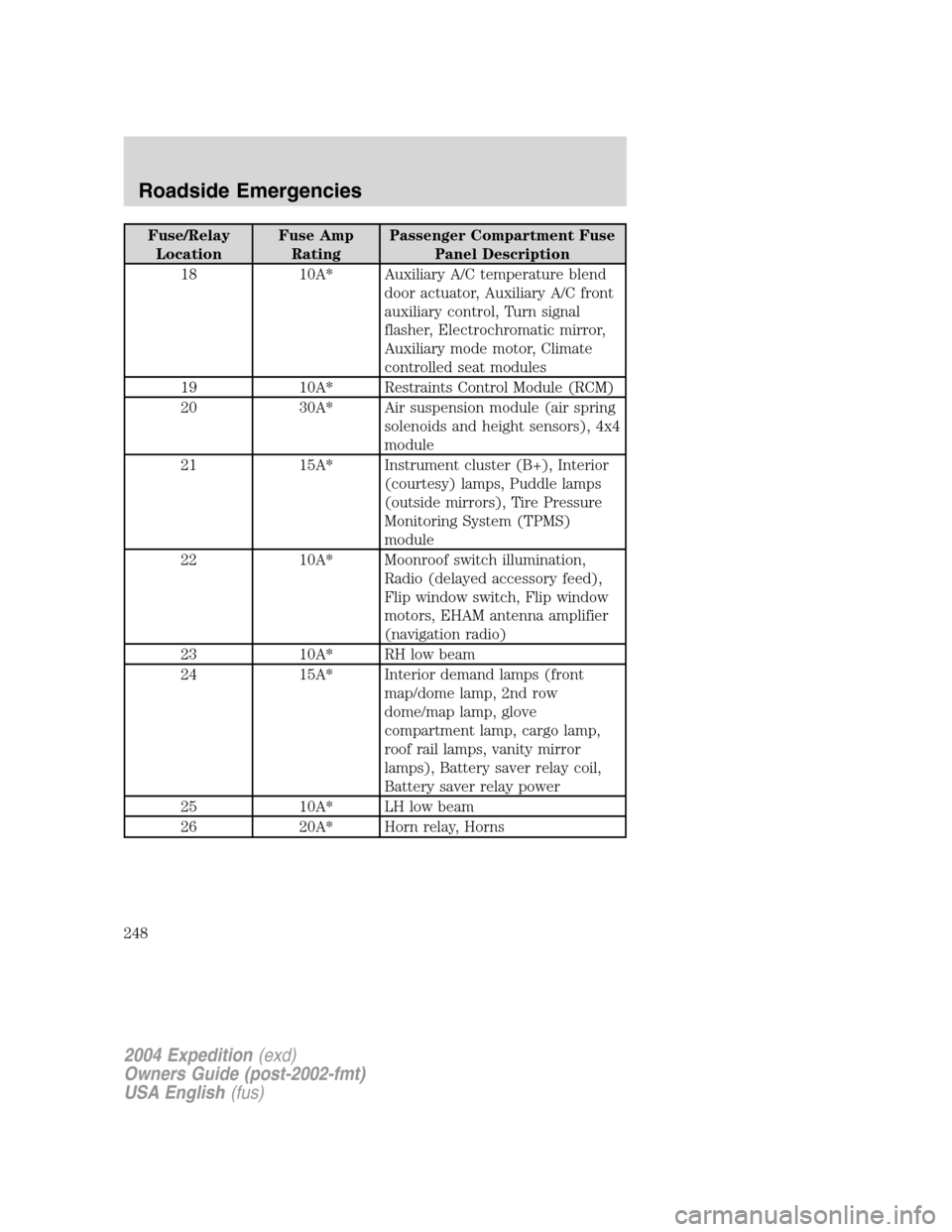
Fuse/Relay
LocationFuse Amp
RatingPassenger Compartment Fuse
Panel Description
18 10A* Auxiliary A/C temperature blend
door actuator, Auxiliary A/C front
auxiliary control, Turn signal
flasher, Electrochromatic mirror,
Auxiliary mode motor, Climate
controlled seat modules
19 10A* Restraints Control Module (RCM)
20 30A* Air suspension module (air spring
solenoids and height sensors), 4x4
module
21 15A* Instrument cluster (B+), Interior
(courtesy) lamps, Puddle lamps
(outside mirrors), Tire Pressure
Monitoring System (TPMS)
module
22 10A* Moonroof switch illumination,
Radio (delayed accessory feed),
Flip window switch, Flip window
motors, EHAM antenna amplifier
(navigation radio)
23 10A* RH low beam
24 15A* Interior demand lamps (front
map/dome lamp, 2nd row
dome/map lamp, glove
compartment lamp, cargo lamp,
roof rail lamps, vanity mirror
lamps), Battery saver relay coil,
Battery saver relay power
25 10A* LH low beam
26 20A* Horn relay, Horns
2004 Expedition(exd)
Owners Guide (post-2002-fmt)
USA English(fus)
Roadside Emergencies
248
Page 337 of 344
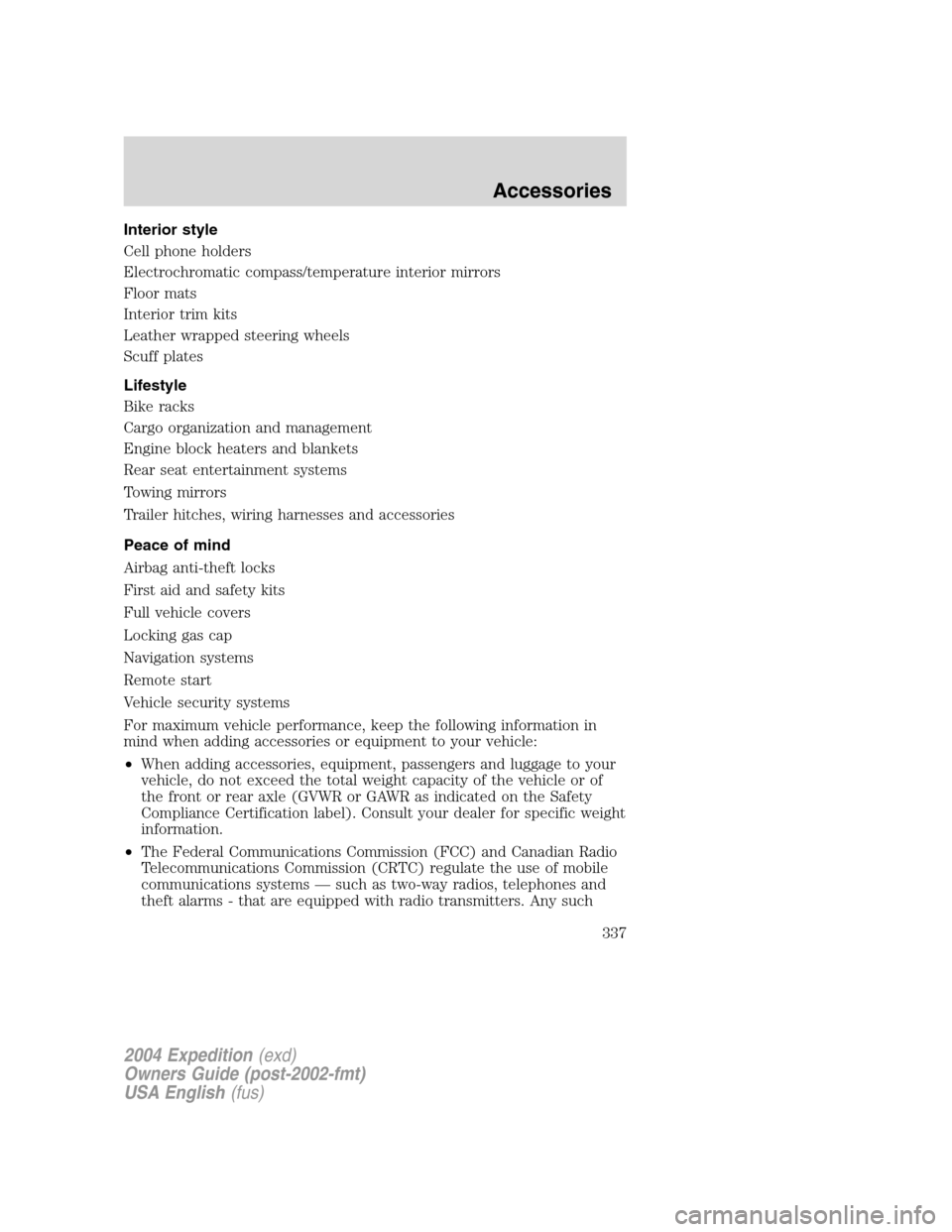
Interior style
Cell phone holders
Electrochromatic compass/temperature interior mirrors
Floor mats
Interior trim kits
Leather wrapped steering wheels
Scuff plates
Lifestyle
Bike racks
Cargo organization and management
Engine block heaters and blankets
Rear seat entertainment systems
Towing mirrors
Trailer hitches, wiring harnesses and accessories
Peace of mind
Airbag anti-theft locks
First aid and safety kits
Full vehicle covers
Locking gas cap
Navigation systems
Remote start
Vehicle security systems
For maximum vehicle performance, keep the following information in
mind when adding accessories or equipment to your vehicle:
•When adding accessories, equipment, passengers and luggage to your
vehicle, do not exceed the total weight capacity of the vehicle or of
the front or rear axle (GVWR or GAWR as indicated on the Safety
Compliance Certification label). Consult your dealer for specific weight
information.
•The Federal Communications Commission (FCC) and Canadian Radio
Telecommunications Commission (CRTC) regulate the use of mobile
communications systems—such as two-way radios, telephones and
theft alarms - that are equipped with radio transmitters. Any such
2004 Expedition(exd)
Owners Guide (post-2002-fmt)
USA English(fus)
Accessories
337
Page 342 of 344

Infant seats
(see Safety seats) .....................186
Inspection/maintenance
(I/M) testing ..............................305
Instrument panel
cleaning ...................................278
cluster ........................................10
lighting up panel and interior...89
J
Jack ............................................253
positioning ...............................253
storage .....................................253
Jump-starting your vehicle ......258
K
Keyless entry system
programming entry code .......140
Keys ...................................141–143
positions of the ignition .........197
L
Lamps
autolamp system .......................87
bulb replacement
specifications chart ..................92
daytime running light ...............88
fog lamps ...................................87
headlamps .................................87
headlamps, flash to pass ..........88
instrument panel, dimming .....89
interior lamps .....................90–93
replacing bulbs .............91, 93–96
Lane change indicator
(see Turn signal) ........................90
Liftgate ..............................130, 134
Lights, warning and indicator ....10anti-lock brakes (ABS) ..........202
Limited-slip axle .......................207
Load limits .................................229
GAWR ......................................229
GVWR ......................................229
trailer towing ..........................229
Loading instructions .................230
Locks
childproof ................................132
doors ........................................132
Lubricant specifications ...328, 331
Lumbar support, seats .............147
M
Message center .........................119
english/metric button .............124
system check button ..............125
warning messages ...................125
Mirrors ...............................101, 106
automatic dimming
rearview mirror .......................106
fold away .................................108
heated ......................................107
programmable memory ..135, 148
side view mirrors (power) .....107
Moon roof ..................................102
Motorcraft parts ................300, 325
N
Navigation system .......................44
quick start .................................48
radio functions ..........................50
setting the clock .......................77
O
Octane rating ............................299
2004 Expedition(exd)
Owners Guide (post-2002-fmt)
USA English(fus)
Index
342