Page 26 of 256
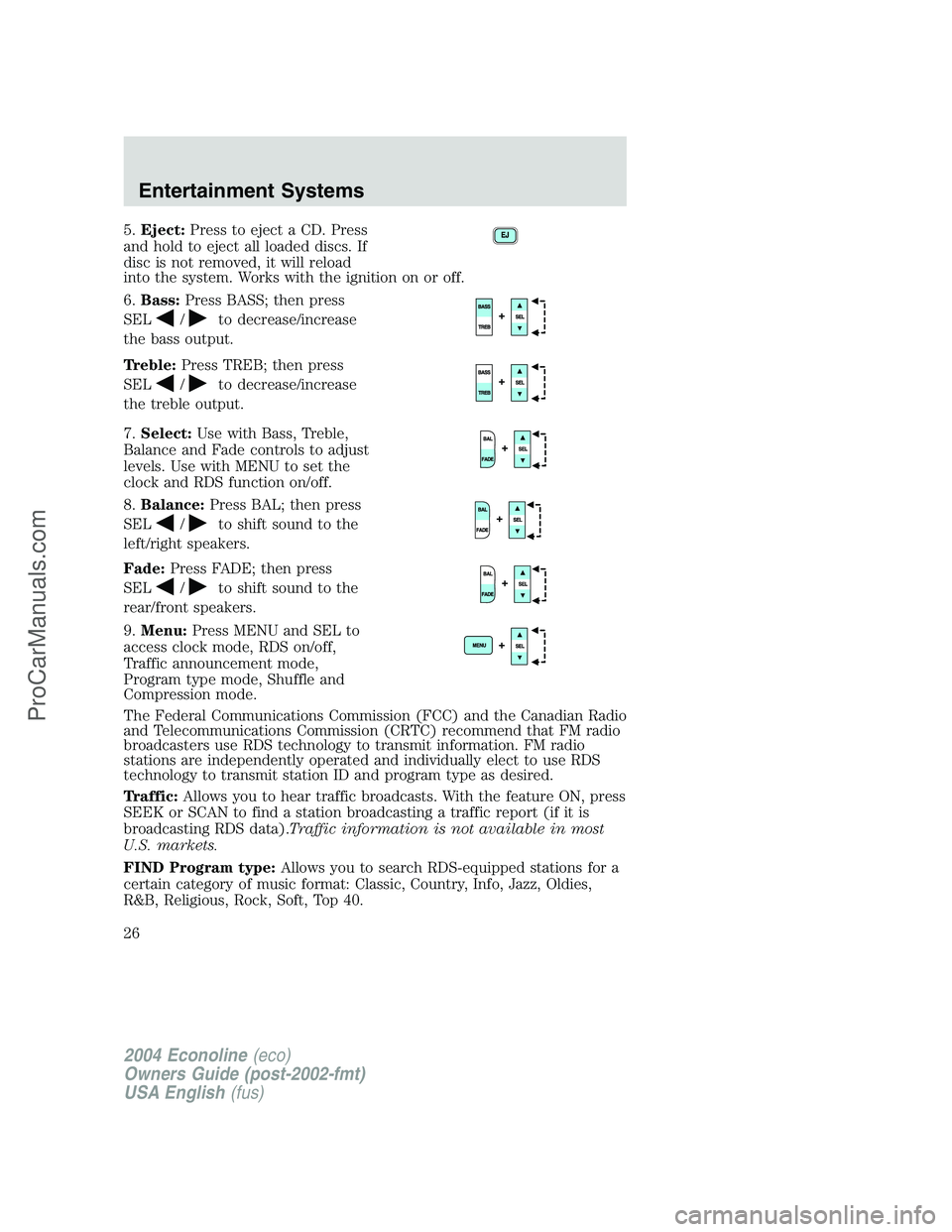
5.Eject:Press to eject a CD. Press
and hold to eject all loaded discs. If
disc is not removed, it will reload
into the system. Works with the ignition on or off.
6.Bass:Press BASS; then press
SEL
/to decrease/increase
the bass output.
Treble:Press TREB; then press
SEL
/to decrease/increase
the treble output.
7.Select:Use with Bass, Treble,
Balance and Fade controls to adjust
levels. Use with MENU to set the
clock and RDS function on/off.
8.Balance:Press BAL; then press
SEL
/to shift sound to the
left/right speakers.
Fade:Press FADE; then press
SEL
/to shift sound to the
rear/front speakers.
9.Menu:Press MENU and SEL to
access clock mode, RDS on/off,
Traffic announcement mode,
Program type mode, Shuffle and
Compression mode.
The Federal Communications Commission (FCC) and the Canadian Radio
and Telecommunications Commission (CRTC) recommend that FM radio
broadcasters use RDS technology to transmit information. FM radio
stations are independently operated and individually elect to use RDS
technology to transmit station ID and program type as desired.
Traffic:Allows you to hear traffic broadcasts. With the feature ON, press
SEEK or SCAN to find a station broadcasting a traffic report (if it is
broadcasting RDS data).Traffic information is not available in most
U.S. markets.
FIND Program type:Allows you to search RDS-equipped stations for a
certain category of music format: Classic, Country, Info, Jazz, Oldies,
R&B, Religious, Rock, Soft, Top 40.
2004 Econoline(eco)
Owners Guide (post-2002-fmt)
USA English(fus)
Entertainment Systems
26
ProCarManuals.com
Page 27 of 256
Show TYPE:Displays the station’s call letters format.
Shuffle:With a CD playing, press to play tracks in a random order.
Press MENU until SHUF appears in the display. Use SEL to select SHUF
DISC, SHUF TRAC or SHUF OFF.
Compression:With a CD playing, this feature brings soft and loud CD
passages together for a more consistent listening level. Press MENU until
compression status is displayed. Press the SEL control to enable the
compression feature when COMPRESS OFF is displayed. Press the SEL
control again to disable the feature when COMPRESS ON is displayed.
Setting the clock:Press MENU until SELECT HOUR or SELECT MINS
is displayed. Use SEL to manually increase (
) or decrease () the
hours/minutes. Press MENU again to disengage clock mode.
10.Memory presets:To set a
station: Select frequency band
AM/FM; tune to a station, press and
hold a preset button until sound
returns.
11.CD:Press to select CD mode.
12.AM/FM:Press to select
AM/FM1/FM2 frequency band. In CD
mode, press to begin radio play.
Autostet:Stores the six strongest stations without erasing your current
presets. To activate, press and momentarily hold AM/FM. AUTOSET will
flash in the display. The six strongest stations will fill the memory preset
buttons for AM/FM1/FM2 if enough stations are available. If not, stations
will be repeated.
Press again to deactivate.
13.Power/volume:Press to turn
ON/OFF; turn to increase or
decrease volume levels.
14.Load:Press LOAD to load a CD
in the system. The display will read
SELECT SLOT. Select the desired
memory preset slot (1–6). The display will then read LOAD CD. Partially
2004 Econoline(eco)
Owners Guide (post-2002-fmt)
USA English(fus)
Entertainment Systems
27
ProCarManuals.com
Page 29 of 256
•Remove loose labels before inserting tapes.
•Allow tapes which have been subjected to extreme heat, humidity or
cold to reach a moderate temperature before playing.
•Clean the cassette player head with a cassette cleaning cartridge after
10–12 hours of play to maintain good sound/operation.
Don’t:
•Expose tapes to direct sunlight, extreme humidity, heat or cold.
•Leave tapes in the cassette player for a long time when not being
played.
CD/CD PLAYER CARE
Do:
•Handle discs by their edges only. Never touch the playing surface.
•Inspect discs before playing. Clean only with an approved CD cleaner
and wipe from the center out.
Don’t:
•Expose discs to direct sunlight or heat sources for extended periods
of time.
•Insert more than one disc into each slot of the CD changer magazine.
•Clean using a circular motion.
CD units are designed to play commercially pressed 4.75 in (12 cm)
audio compact discs only. Due to technical incompatibility, certain
recordable and re-recordable compact discs may not function
correctly when used in Ford CD players. Irregular shaped CDs,
CDs with a scratch protection film attached, and CDs with
homemade paper (adhesive) labels should not be inserted into
the CD player. The label may peel and cause the CD to become
jammed. It is recommended that homemade CDs be identified
with permanent felt tip marker rather than adhesive labels. Ball
point pens may damage CDs. Please contact your dealer for
further information.
AUDIO SYSTEM WARRANTY AND SERVICE
Refer to theWarranty Guidefor audio system warranty information. If
service is necessary, see your dealer or qualified technician.
2004 Econoline(eco)
Owners Guide (post-2002-fmt)
USA English(fus)
Entertainment Systems
29
ProCarManuals.com
Page 31 of 256
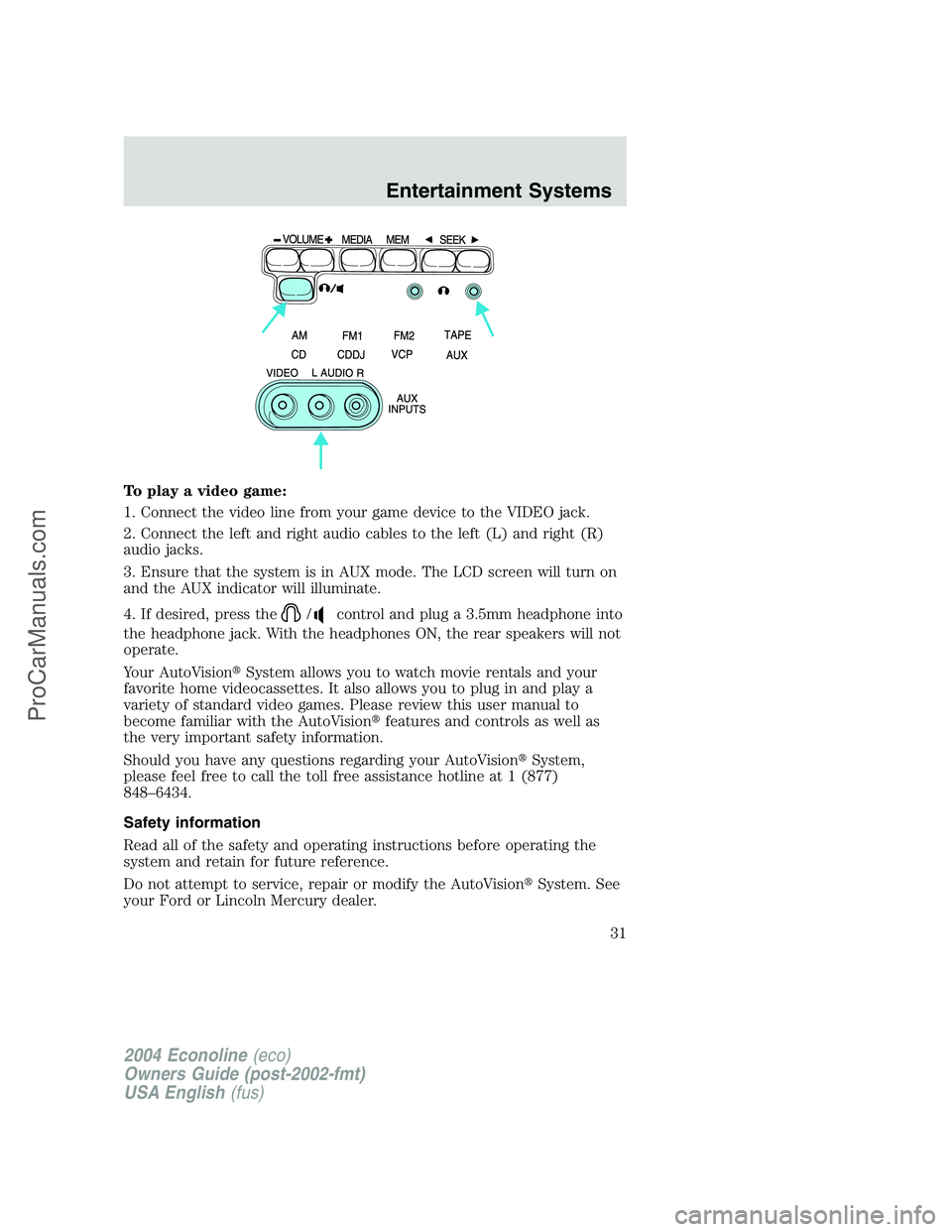
To play a video game:
1. Connect the video line from your game device to the VIDEO jack.
2. Connect the left and right audio cables to the left (L) and right (R)
audio jacks.
3. Ensure that the system is in AUX mode. The LCD screen will turn on
and the AUX indicator will illuminate.
4. If desired, press the
/control and plug a 3.5mm headphone into
the headphone jack. With the headphones ON, the rear speakers will not
operate.
Your AutoVision�System allows you to watch movie rentals and your
favorite home videocassettes. It also allows you to plug in and play a
variety of standard video games. Please review this user manual to
become familiar with the AutoVision�features and controls as well as
the very important safety information.
Should you have any questions regarding your AutoVision�System,
please feel free to call the toll free assistance hotline at 1 (877)
848–6434.
Safety information
Read all of the safety and operating instructions before operating the
system and retain for future reference.
Do not attempt to service, repair or modify the AutoVision�System. See
your Ford or Lincoln Mercury dealer.
2004 Econoline(eco)
Owners Guide (post-2002-fmt)
USA English(fus)
Entertainment Systems
31
ProCarManuals.com
Page 35 of 256
•On screen display
•Protection circuits
Playback and format
•The videocassette player of your AutoVision�system can only be used
in the“playback”mode. You are not able to record with your system.
•The system plays standard videocassettes marked“VHS”(or“S-VHS).
VCP protection circuits
Tape protection circuit
•When the system is in PAUSE mode, the tape mechanism will
continue to create tension on the tape.
•When the VCP is in still playback, FFWD (fast forward) or REW
(reverse) mode for more than five minutes, the tape protection circuit
automatically returns the system to PLAY mode to avoid damage to
the tape.
Your AutoVision System is also equipped with a Dew sensor circuit and a
High/low temperature sensor circuit. For more information on these
circuits, please refer toHumidity and moisture condensationand
Temperature extremesin this chapter.
2004 Econoline(eco)
Owners Guide (post-2002-fmt)
USA English(fus)
Entertainment Systems
35
ProCarManuals.com
Page 36 of 256
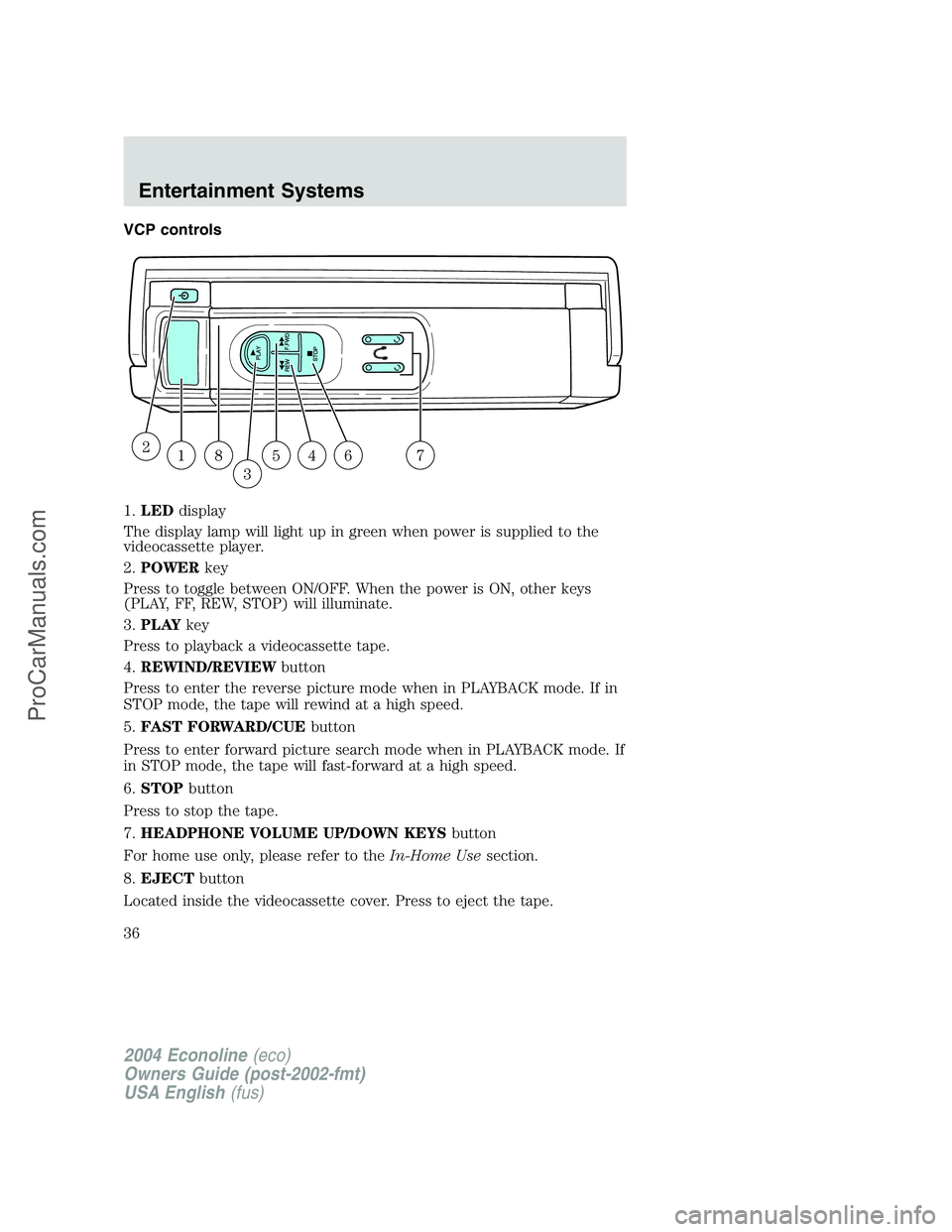
VCP controls
1.LEDdisplay
The display lamp will light up in green when power is supplied to the
videocassette player.
2.POWERkey
Press to toggle between ON/OFF. When the power is ON, other keys
(PLAY, FF, REW, STOP) will illuminate.
3.PLAYkey
Press to playback a videocassette tape.
4.REWIND/REVIEWbutton
Press to enter the reverse picture mode when in PLAYBACK mode. If in
STOP mode, the tape will rewind at a high speed.
5.FAST FORWARD/CUEbutton
Press to enter forward picture search mode when in PLAYBACK mode. If
in STOP mode, the tape will fast-forward at a high speed.
6.STOPbutton
Press to stop the tape.
7.HEADPHONE VOLUME UP/DOWN KEYSbutton
For home use only, please refer to theIn-Home Usesection.
8.EJECTbutton
Located inside the videocassette cover. Press to eject the tape.
18
3
54672
2004 Econoline(eco)
Owners Guide (post-2002-fmt)
USA English(fus)
Entertainment Systems
36
ProCarManuals.com
Page 37 of 256
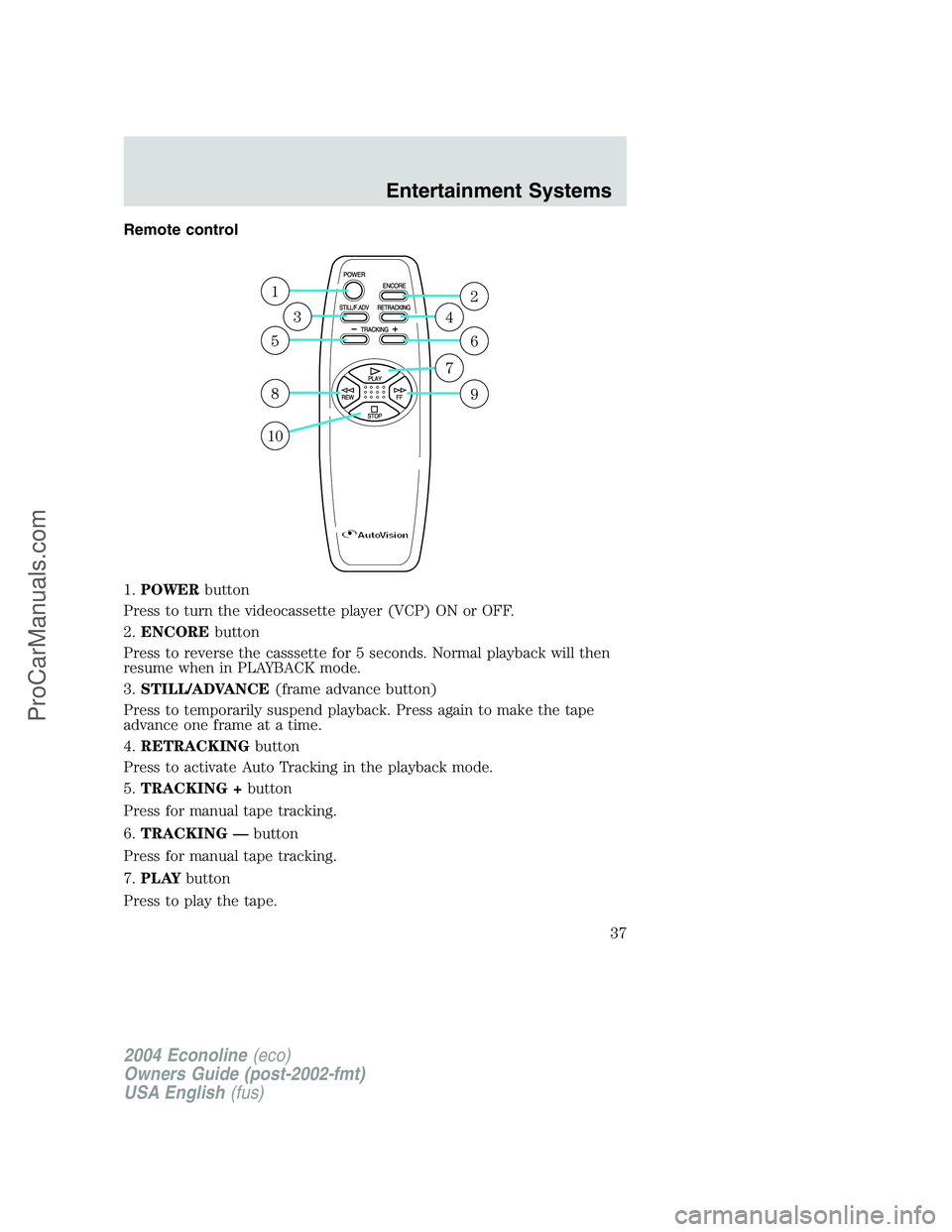
Remote control
1.POWERbutton
Press to turn the videocassette player (VCP) ON or OFF.
2.ENCOREbutton
Press to reverse the casssette for 5 seconds. Normal playback will then
resume when in PLAYBACK mode.
3.STILL/ADVANCE(frame advance button)
Press to temporarily suspend playback. Press again to make the tape
advance one frame at a time.
4.RETRACKINGbutton
Press to activate Auto Tracking in the playback mode.
5.TRACKING +button
Press for manual tape tracking.
6.TRACKING—button
Press for manual tape tracking.
7.PLAYbutton
Press to play the tape.
1
5
8
10
3
2
6
9
4
7
2004 Econoline(eco)
Owners Guide (post-2002-fmt)
USA English(fus)
Entertainment Systems
37
ProCarManuals.com
Page 39 of 256
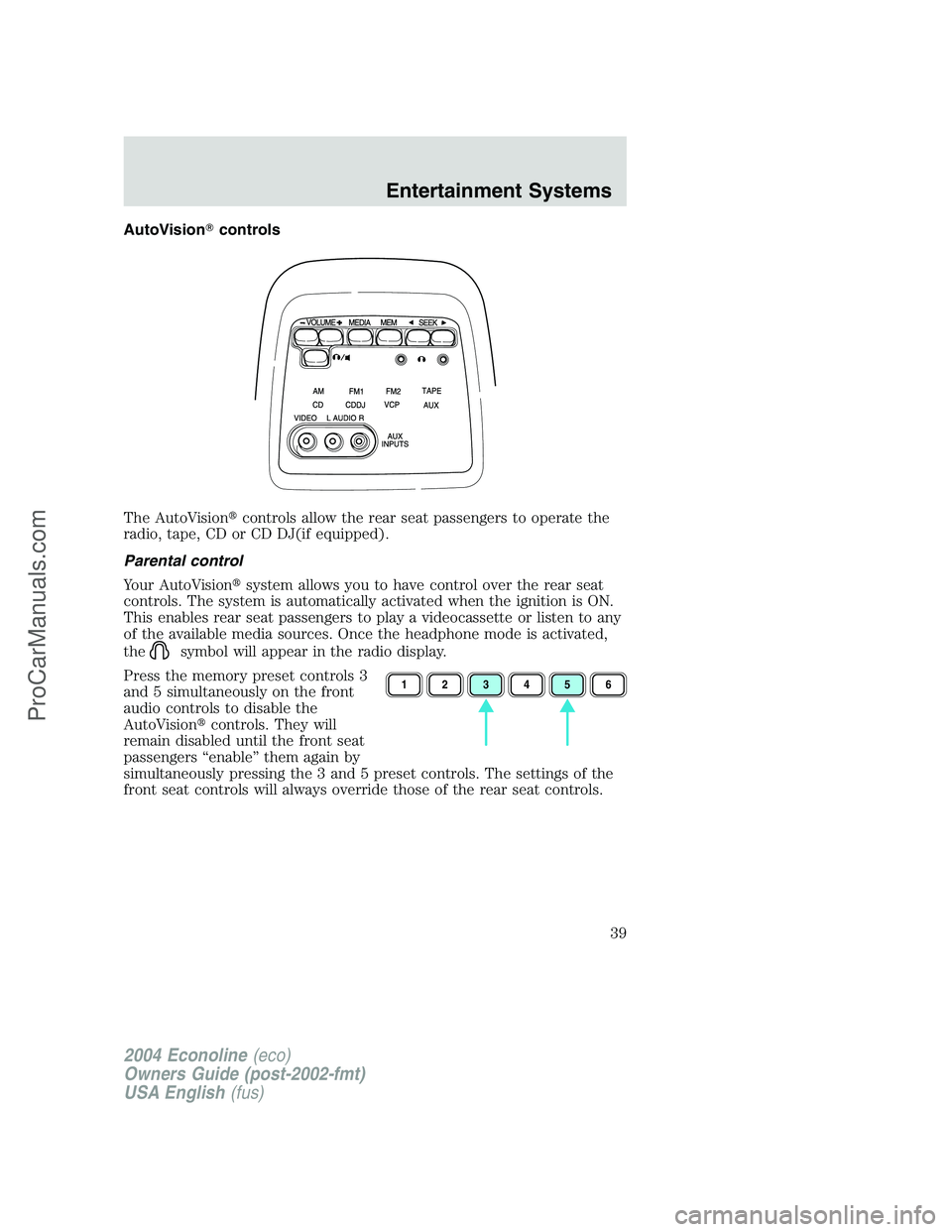
AutoVision�controls
The AutoVision�controls allow the rear seat passengers to operate the
radio, tape, CD or CD DJ(if equipped).
Parental control
Your AutoVision�system allows you to have control over the rear seat
controls. The system is automatically activated when the ignition is ON.
This enables rear seat passengers to play a videocassette or listen to any
of the available media sources. Once the headphone mode is activated,
the
symbol will appear in the radio display.
Press the memory preset controls 3
and 5 simultaneously on the front
audio controls to disable the
AutoVision�controls. They will
remain disabled until the front seat
passengers“enable”them again by
simultaneously pressing the 3 and 5 preset controls. The settings of the
front seat controls will always override those of the rear seat controls.
123456
2004 Econoline(eco)
Owners Guide (post-2002-fmt)
USA English(fus)
Entertainment Systems
39
ProCarManuals.com