Page 2 of 202
The car can be fitted satellite NAVIGATOR built into the sound system or with infotelematic
CONNECT system designed in accordance with the specific features of the passenger compartment and
with a personalised design that blends with the styling of the dashboard.
Both systems are installed in a user-friendly position for the driver and passenger, and the graphics on
the front panel makes it easy to quickly locate the controls which facilitates the use of them.
To increase safety against theft, the set is fitted with a protection system that allows the use of it only
on the car on which it was fitted originally.
The pages that follow contain the instructions for use, which we advise you to read carefully and
always keep within reach (e.g. in the glove compartment).
So, enjoy your reading and have a good journey.
IMPORTANT For the navigation system only use the original CD provided with the car or in any case
other CDs of the same brand.
Page 4 of 202

3
CONNECT NAV
NAVIGATOR
BASIC SETTINGS (SETUP).................................. 63
OPENING THE SETUP MENU ................................ 63
ADJUSTING THE DISPLAY ...................................... 63
ADJUSTING POWER-ON, TA
ANNOUNCEMENT, MESSAGE ................................ 65
SETTING THE CLOCK .............................................. 67
SELECTING THE LANGUAGE ................................ 69
GPS STATUS .................................................................. 70
SECURITY ...................................................................... 71
RESETTING DEFAULT SETTINGS .......................... 72 DYNAMIC TRAVEL GUIDE ...................................... 49
TOURIST GUIDE INFORMATION ........................ 50
ROUTE LIST .................................................................. 51
DESTINATION MEMORY ........................................ 51
STORING STORED DESTINATIONS .................... 52
DELETING STORED DATA ...................................... 53
ENTERING AND EDITING
DESTINATION SHORT NAMES ............................ 54
GPS STATUS AND POSITION
INFORMATION ............................................................ 55
AVOIDING TAILBACKS DURING
NAVIGATION .............................................................. 55
LOCKING A ROUTE SECTION
WITHIN A ROUTE LIST ............................................ 56
CUSTOMISING THE ROUTE .................................. 57
DEFINING THE CAR’S POSITION ........................ 58
RECEIVING TRAFFIC ANNOUNCEMENTS
DURING NAVIGATION ............................................ 60
SWITCHING VOICE MESSAGES
ON AND OFF .............................................................. 60
SWITCHING THE LAST 10
DESTINATIONS MEMORY ON AND OFF .......... 60
SWITCHING ROUTE TIME
INFORMATION ON AND OFF .............................. 61
MANUAL POSITION INDICATION ...................... 61
NAVIGATION SIMULATION .................................. 62
Page 5 of 202
4
CONNECT NAV
NAVIGATOR
IMPORTANT WARNINGS
FOR USE AND FOR DRIVING
SAFETY
The Satellite Navigator is an inte-
grated system which allows to easily
operate the major functions of your
car.
To avoid hazardous situations for
yourself and other road users when
using the Satellite Navigator you
should take the following advice:
– the navigation system must be used
keeping full control of the car. If in
doubt, stop the car to carry out the
various operations;
– serious accidents can be caused by
distractions or by not following the
flow of traffic;
– get to know the sound/navigation
system and its controls before
starting off;– enter the destination only when
the car is stationary;
– close the front panel when travel-
ling.
The navigation system will guide you
to your destination and indicate vari-
ations to the route stored on the nav-
igation CD. This is because the system
takes traffic information into account
when calculating to recommend the
best route possible. The system, how-
ever, cannot consider traffic condi-
tions, sudden interruptions or other
problems.
The navigation system assists the dri-
ver during the trip and recommends
the best route to be followed to reach
the preset destination by means of
voice and graphic instructions.IMPORTANTThe suggestions
provided by the navigation system do
not lessen the driver’s responsibility
when driving the car to observe the
highway code and the traffic signs.
Road safety is always and only the sole
responsibility of the driver.
All manoeuvres must be made re-
specting the highway code regardless
of the advice provided by the naviga-
tion system. The navigation system will
compute a new route and provide in-
structions should you detour from the
recommended route.
U U
S S
E E
F F
U U
L L
A A
D D
V V
I I
C C
E E
Page 8 of 202
7
CONNECT NAV
NAVIGATOR
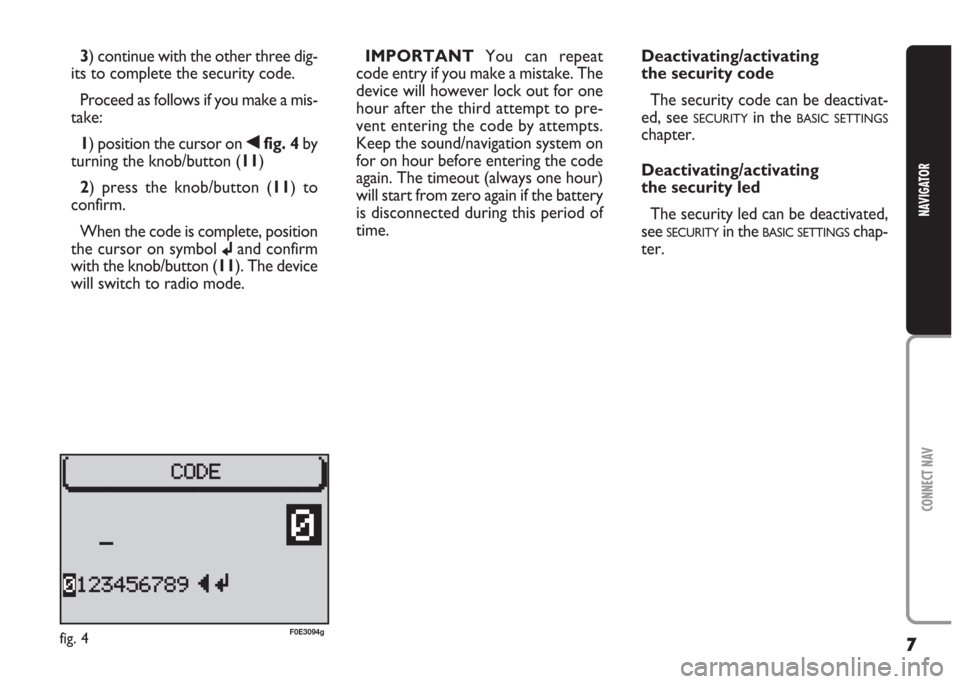
3) continue with the other three dig-
its to complete the security code.
Proceed as follows if you make a mis-
take:
1) position the cursor on
¯fig. 4 by
turning the knob/button (11)
2) press the knob/button (11) to
confirm.
When the code is complete, position
the cursor on symbol
jand confirm
with the knob/button (11). The device
will switch to radio mode.IMPORTANTYou can repeat
code entry if you make a mistake. The
device will however lock out for one
hour after the third attempt to pre-
vent entering the code by attempts.
Keep the sound/navigation system on
for on hour before entering the code
again. The timeout (always one hour)
will start from zero again if the battery
is disconnected during this period of
time.
fig. 4F0E3094g
Deactivating/activating
the security code
The security code can be deactivat-
ed, see
SECURITYin the BASIC SETTINGS
chapter.
Deactivating/activating
the security led
The security led can be deactivated,
see
SECURITYin the BASIC SETTINGSchap-
ter.
Page 10 of 202
9
CONNECT NAV
NAVIGATOR
AUDIO SECTION
– Separate bass/treble settings.
– Right/left and front/rear channel
balance.
– Automatic LOUDNESS function.SATELLITE NAVIGATION
SECTION
– Voice messages for the route to
be followed.
– Driving advice, distance and
probable time required to reach the
destination on the display.
– Possibility of entering special or
different destinations.
– Possibility of storing destinations.Fuses
The Satellite/Navigation system is
protected by a 10A fuse fig. 5.
fig. 5F0E0309m
Multimedia CDs contain
sound and data tracks.
Playing these CDs can cause noise
loud enough to jeopardise road
safety and damage final stages and
speakers.
WARNING
Page 12 of 202
11
CONNECT NAV
NAVIGATOR
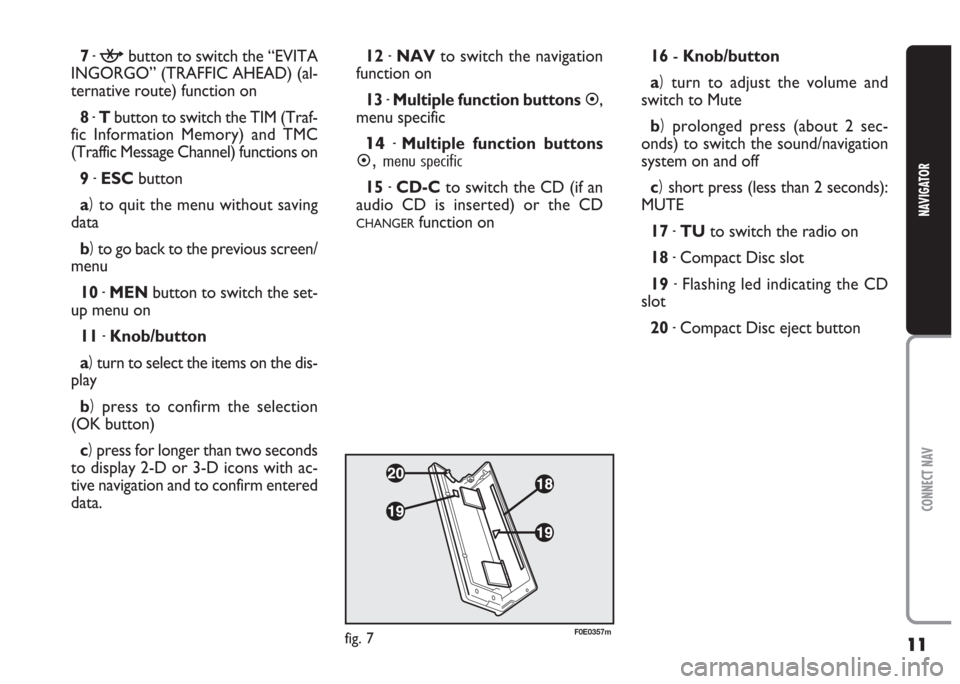
7-kbutton to switch the “EVITA
INGORGO” (TRAFFIC AHEAD) (al-
ternative route) function on
8 -Tbutton to switch the TIM (Traf-
fic Information Memory) and TMC
(Traffic Message Channel) functions on
9 -ESCbutton
a)to quit the menu without saving
data
b)to go back to the previous screen/
menu
10 -MENbutton to switch the set-
up menu on
11 -Knob/button
a)turn to select the items on the dis-
play
b)press to confirm the selection
(OK button)
c)press for longer than two seconds
to display 2-D or 3-D icons with ac-
tive navigation and to confirm entered
data.12 -NAVto switch the navigation
function on
13 -Multiple function buttons
�,
menu specific
14-Multiple function buttons
�,menu specific
15 -CD-Cto switch the CD (if an
audio CD is inserted) or the CD
CHANGERfunction on16- Knob/button
a)turn to adjust the volume and
switch to Mute
b)prolonged press (about 2 sec-
onds) to switch the sound/navigation
system on and off
c)short press (less than 2 seconds):
MUTE
17 -TUto switch the radio on
18 -Compact Disc slot
19 -Flashing led indicating the CD
slot
20 -Compact Disc eject button
fig. 7F0E0357m
Page 13 of 202
12
CONNECT NAV
NAVIGATOR
O O
P P
E E
R R
A A
T T
I I
O O
N N
SWITCHING THE
NAVIGATOR SYSTEM
ON AND OFF
Press the knob/button (16) for ap-
proximately one second to switch the
sound/navigation system on. The
sound system will automatically switch
to the last active sound source at the
previously selected volume.
IMPORTANTThe sound source is
usually played at the last selected vol-
ume when the system is switched off
and back on. However, if the volume
was higher than the preset volume, the
sound source will be played at the pre-
set volume.
To set the power-on volume, see
“Adjusting power-on, TA announce-
ment, message” in the “Basic set-
tings”chapter.Switching on and off when
the engine is not running
The sound/navigation system can al-
so be operated when the engine is not
running (ignition key at STOP).
Press the knob/button (16) for ap-
proximately one second.
IMPORTANTThe device will au-
tomatically be switched off when the
ignition key is at STOPafter approx-
imately one hour to safeguard the car
battery. Start the engine to reset the
timeout.SELECTING THE FUNCTION
Proceed as follows to select the re-
quired function:
– press TU (17) for Radio;
– press CD-C (15) for CD or CD
CHANGER(where fitted);
– press NAV (12) to switch on the
navigation function.
The specific main menu/screen will
appear for each selected source.
Page 15 of 202
14
CONNECT NAV
NAVIGATOR
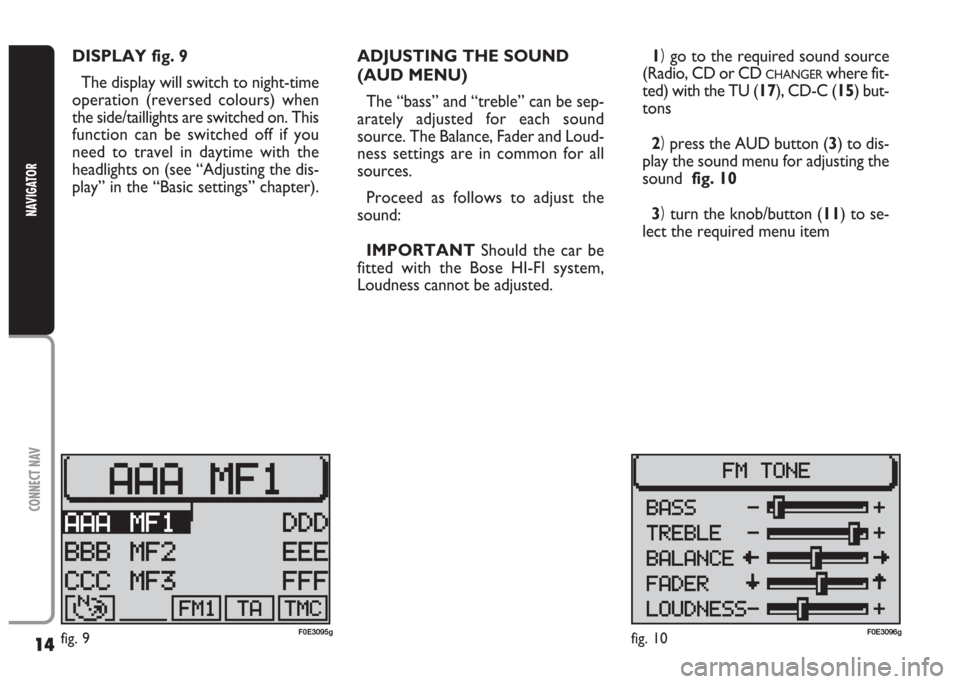
DISPLAY fig. 9
The display will switch to night-time
operation (reversed colours) when
the side/taillights are switched on. This
function can be switched off if you
need to travel in daytime with the
headlights on (see “Adjusting the dis-
play” in the “Basic settings” chapter).ADJUSTING THE SOUND
(AUD MENU)
The “bass” and “treble” can be sep-
arately adjusted for each sound
source. The Balance, Fader and Loud-
ness settings are in common for all
sources.
Proceed as follows to adjust the
sound:
IMPORTANTShould the car be
fitted with the Bose HI-FI system,
Loudness cannot be adjusted.1)go to the required sound source
(Radio, CD or CD
CHANGERwhere fit-
ted) with the TU (17), CD-C (15) but-
tons
2)press the AUD button (3) to dis-
play the sound menu for adjusting the
sound fig. 10
3)turn the knob/button (11) to se-
lect the required menu item
fig. 9F0E3095gfig. 10F0E3096g