Page 37 of 300

WARNING!
Deployed airbags can't protect you in another colli-
sion. Have the airbags replaced by an authorized
dealer as soon as possible.
Enhanced Accident Response System
If the airbags deploy after an impact and the electrical
system remains functional, vehicles equipped with
power door locks will unlock automatically. In addition,
approximately 10 seconds after the vehicle has stopped
moving, the interior lights will light until the ignition
switch is turned off.
Maintaining Your Airbag Systems
WARNING!
²Modifications to any part of the airbag system
could cause it to fail when you need it. You could
be injured because the airbags are not there to
protect you. Do not modify the components or
wiring, including adding any kind of badges or
stickers to the steering wheel hub trim cover or
the upper right side of the instrument panel. Do
not modify the front bumper, vehicle body struc-
ture, or frame.
²You need proper knee impact protection in a
collision. Do not mount or locate any aftermarket
equipment on or behind the knee bolster.
²It is dangerous to try to repair any part of the
airbag system yourself. Be sure to tell anyone who
works on your vehicle that it has airbags.
THINGS TO KNOW BEFORE STARTING YOUR VEHICLE 37
2
Page 38 of 300

Airbag Light
You will want to have the airbags ready to inflate for your
protection in an impact. While the airbag system is
designed to be maintenance free, if any of the following
occurs, have an authorized dealer service the system
promptly:
²The airbag light does not come on or flickers during
the 6 to 8 seconds when the ignition switch is first
turned on.
²The light remains on or flickers after the 6 to 8 second
interval.
²The light flickers or comes on and remains on while
driving.
NOTE:If the speedometer, tachometer or any engine
related gauges are not working, the airbag control mod-
ule may also be disabled. The airbags may not be ready
to inflate for your protection. Promptly check fuse num-
bers 18 and 19 in the fuse block. See your dealer if the
fuse is good.
Child Restraint
Everyone in your vehicle needs to be buckled up all the
time Ð babies and children, too. Every state in the United
States and all Canadian provinces require that small
children ride in proper restraint systems. This is the law,
and you can be prosecuted for ignoring it.
Children 12 years and under should ride properly buck-
led up in a rear seat, if available. According to crash
statistics, children are safer when properly restrained in
the rear seats rather than in the front.
WARNING!
In a collision, an unrestrained child, even a tiny
baby, can become a missile inside the vehicle. The
force required to hold even an infant on your lap can
become so great that you could not hold the child, no
matter how strong you are. The child and others
could be badly injured. Any child riding in your
vehicle should be in a proper restraint for the child's
size.
38 THINGS TO KNOW BEFORE STARTING YOUR VEHICLE
Page 61 of 300
WARNING!
Vehicles and other objects seen in the right side
convex mirror will look smaller and farther away
than they really are. Relying too much on your right
side mirror could cause you to collide with another
vehicle or other object. Use your inside mirror when
judging the size or distance of a vehicle seen in the
right side mirror.
Heated Mirrors Ð If Equipped
Heated mirrors are automatically activated when you
depress the rear window defroster switch located on the
instrument panel. The light will illuminate to indicate
that the heating elements are ON. Turning OFF the
ignition will deactivate the heated mirrors.
SEATS
Seat Adjustment
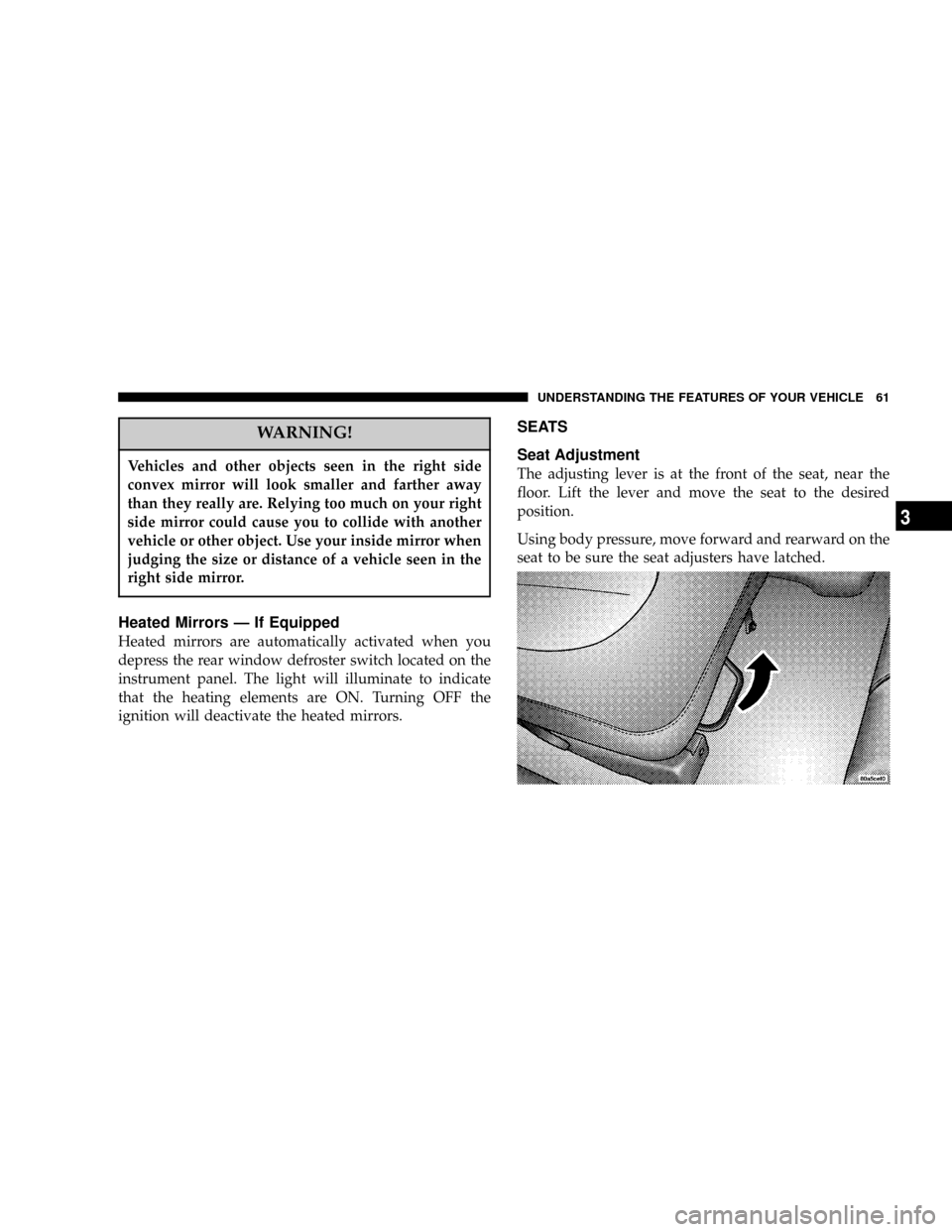
The adjusting lever is at the front of the seat, near the
floor. Lift the lever and move the seat to the desired
position.
Using body pressure, move forward and rearward on the
seat to be sure the seat adjusters have latched.
UNDERSTANDING THE FEATURES OF YOUR VEHICLE 61
3
Page 68 of 300

also known as the9Party9mode because it allows the
doors to stay open for extended periods of time without
discharging the vehicle's battery.
The brightness of the instrument panel lighting can be
regulated by rotating the dimmer control up (brighter) or
down (dimmer). When the headlights are ON you can
supplement the brightness of the odometer, trip odom-
eter, radio and overhead console by rotating the control
up until you hear a click. This feature is termed the
ªParadeº mode and is useful when headlights are re-
quired during the day.
Club Cab/Quad Cab models may have an optional
switched dome lamp that may be operated by pressing
the lens.
Battery Saver
To protect the life of your vehicle's battery, Load Shed-
ding is provided for both the interior and exterior lights.
If the ignition is off and any door is left ajar for 15
minutes or the dimmer control is rotated upwards for 15
minutes, the interior lights will automatically turn off.If the headlamps remain on while the ignition is cycled
off, the exterior lights will automatically turn off after 5
minutes. If the headlamps are turned on and left on for 15
minutes while the ignition is off, the exterior lights will
automatically turn off.
NOTE:Battery Saver mode is cancelled if the ignition is
ON.
Headlamp Delay
To aid in your exit, your vehicle is equipped with a
headlamp delay that will leave the headlamps on for 60
seconds. This delay is initiated when the ignition is
turned OFF while the headlamp switch is on, and then
the headlamp switch is cycled off. The headlamps will
remain on for 60 seconds. Headlamp delay can be
cancelled by either turning the headlamp switch ON then
OFF or by turning the ignition ON.
Headlights, Parking Lights, Panel Lights
When the headlight switch is rotated to the first
position, the parking lights, taillights, side marker
lights, license plate light and instrument panel
lights are all turned on. The headlights will turn ON
when the switch is rotated to the second position.
68 UNDERSTANDING THE FEATURES OF YOUR VEHICLE
Page 69 of 300

Your vehicle is equipped with plastic headlight lenses
that are lighter and less susceptible to stone breakage
than glass headlights.
Plastic is not as scratch resistant as glass and therefore
different lens cleaning procedures must be followed.
To minimize the possibility of scratching the lenses and
reducing light output, avoid wiping with a dry cloth. To
remove road dirt, wash with a mild soap solution fol-
lowed by rinsing.Do not use abrasive cleaning components, solvents, steel
wool or other abrasive materials to clean the lenses.
Daytime Running Lights (Canada Only)
The headlights on your vehicle will illuminate when the
engine is started. This provides a constant9Lights ON9
condition until the ignition is turned OFF. The lights
illuminate at less than 50% of normal intensity. If the
parking brake is applied the Daytime Running Lights
will turn off.
Lights-on Reminder
If the headlights, parking lights, courtesy lights or cargo
lights are left on, after the ignition is turned off, a chime
will sound when the driver's door is opened.
Fog Lights Ð If Equipped
The foglights are turned ON by placing the headlight
rotary control in the parking light or headlight position
and pulling out the headlight rotary control. The fog
lights will operate only when the parking lights are ON
or when the vehicle headlights are ON low beam. An
indicator light located left of the switch will illuminate
when the fog lights are on. The fog lights will turn off
UNDERSTANDING THE FEATURES OF YOUR VEHICLE 69
3
Page 74 of 300

ELECTRONIC SPEED CONTROL Ð IF EQUIPPED
When engaged, this device takes over accelerator opera-
tion at speeds greater than 35 mph (56 km/h). The
controls are mounted on the steering wheel.
To Activate
Push the ON/OFF button to the ON position. An indi-
cator light in the instrument cluster illuminates when the
system is on.
To Set At A Desired Speed
When the vehicle has reached the desired speed, press
and release the SET button. Release the accelerator and
the vehicle will operate at the selected speed.
To Deactivate
A soft tap on the brake pedal, normal braking, clutch
pressure while slowing the vehicle, or pressing the CAN-
CEL button will deactivate speed control without erasing
the memory. Pushing the ON/OFF button to the OFF
position or turning off the ignition erases the memory.
WARNING!
Leaving the Speed Control ON when not in use is
dangerous. You could accidentally set the system to
cause it to go faster than you want. You could lose
control and have an accident. Always leave the
system OFF when you aren't using it.
74 UNDERSTANDING THE FEATURES OF YOUR VEHICLE
Page 78 of 300
Step Button
Use this button to choose or cycle through the four trip
conditions.
Average Fuel Economy (AVG ECO)
This display shows the average fuel economy since the
last reset.
Distance To Empty (DTE)
This display shows the estimated distance that can be
traveled with the fuel remaining in the tank. The distance
is calculated by multiplying the amount of fuel remain-
ing by the projected fuel economy. The distance predicted
will change every few seconds to a higher or lower
number as these factors change. The DTE will read zero
when the fuel gauge reads ªE.º
This display cannot be reset.
Trip Odometer (ODO)
This display shows the distance traveled since the last
reset.
Elapsed Time (ET)
This display shows the accumulated ignition ON time
since the last reset.
78 UNDERSTANDING THE FEATURES OF YOUR VEHICLE
Page 80 of 300

Manual Compass Calibration
If the compass appears erratic and the CAL light does not
appear, you must calibrate the compass. Find an open
area away from large metal objects. With the ignition ON
and the compass/temperature displayed, press and hold
the RESET button until the CAL symbol appears (about
10 seconds). Drive slowly, about 5 mph (8 km/h), in 3
complete 360É circles. The CAL light will turn off and the
compass will be calibrated.
Variance is the difference between magnetic North and
geographic North. For proper compass function, the
correct variance zone must be set. Refer to the variance
map for the correct variance zone. To check the variance
zone, the ignition must be on and the compass/
temperature displayed. Press and hold the RESET button
for about 5 seconds until VAR appears in the display. The
number displayed is the variance zone used by the
compass. To change the zone, press the STEP button to
scroll through numbers 1 through 15. Press the RESET
button after selecting the proper zone to return to the
normal compass/temperature display.
80 UNDERSTANDING THE FEATURES OF YOUR VEHICLE