2004 DAEWOO LACETTI Automatic
[x] Cancel search: AutomaticPage 2023 of 2643

MANUAL CONTROL HEATING, VENTILATION AND AIR CONDITIONING SYSTEM 7B – 21
DAEWOO V–121 BL4
Refrigerant Recovery
Important : Use only a refrigerant tank that is designed for
the charging station in use. The unit’s overfill limitation
mechanism is calibrated specifically for use with this tank.
The tank’s valves are also manufactured specifically for
this unit.
1. Attach the high–side hose with the quick disconnect
coupler to the high–side fitting of the vehicle’s A/C
system.
2. Open the coupler valve.
3. Attach the low–side hose with the quick disconnect
coupler to the low–side fitting of the vehicle’s A/C
system.
4. Open the coupler valve.
5. Check the high–side and the low–side gauges on
the unit’s control panel in order to ensure that the
A/C system has pressure. If there is no pressure,
there is no refrigerant in the system to recover.
Important : If there is no refrigerant in the system, do not
continue with the recovery operation which would, under
this condition, draw air into the recovery tank.
6. Open both the high–side and the low–side valves.
7. Open the gas and the liquid valves on the tank.
8. Drain any oil that may be in the oil separator.
9. Close the oil drain valve.
10. Plug the unit into the proper voltage outlet.
11. Turn on the main power switch.
Notice : Never reuse refrigerant oil. Damage to the A/C
system may result from such reuse. Dispose of the refrig-
erant oil properly.
12. Begin the recovery process. Refer to the manufac-
turer ’s instructions for the charging station in use.
Important : Some A/C system polyalkaline glycol (PAG)
lubricating oil may be removed with the refrigerant during
recovery. The amount of oil removed varies. A charging
station separates the oil from the refrigerant and provides
a means of determining how much oil was removed. Re-
place the same amount of oil when recharging the system.
Refer to the manufacturer’s instructions for the charging
station in use.
13. Wait 5 minutes, then check the control panel low–
side gauge. If the A/C has maintained vacuum, the
recovery is complete.
14. If the low–side gauge pressure rises above zero,
there is more refrigerant in the system. Recover the
additional refrigerant. Repeat this step until the sys-
tem maintains vacuum for 2 minutes.
Important : If the control indicator shows that the refriger-
ant tank is full during the recovery process and the unit
shuts off, install an empty unit tank to store the refrigerant
needed for steps later in the procedure. Do not use any
other type of tank.
Evacuation
The unit tank must contain a sufficient amount of R–134a
refrigerant for charging. Check the amount of refrigerant
in the tank. If there is less than 3.6 kg (8 pounds) of refrig-
erant, add new refrigerant to the tank. Refer to the
manufacturer ’s instructions for adding refrigerant.
1. Verify that the high–side and the low–side hoses
are connected to the A/C system. Open both the
high–side and the low–side valves on the unit’s
control panel.
2. Open both the gas and the liquid valves on the
tank.
Important : Refer to the manufacturer’s instructions for
the charging station in use. It is necessary to evacuate the
system before recharging it with new or recycled refriger-
ant.
3. Start the vacuum pump and begin the evacuation
process. Non–condensable gases (mostly air) are
vented from the tank automatically during the re-
cycling process. You may hear the pressure being
released.
4. Check for leaks in the system. Refer to the
manufacturer ’s instructions for the charging station
in use.
Important : Change the vacuum pump oil frequently. Re-
fer to the manufacturer’s instructions for the charging sta-
tion in use.
A/C System Oil Charge Replenishing
Any oil removed from the A/C system during the recovery
process must be replenished at this time.
1. Use the correct graduated bottle of PAG oil for the
R–134a system.
Important:
S Keep the oil bottles tightly capped at all times to
protect the oil from moisture and contamination.
S You must have an A/C system vacuum for this op-
eration. Never open the oil injection valve while
there is positive pressure in the A/C system. This
will result in oil blowback through the bottle vent.
S Never let the oil level drop below the pickup tube
while charging or replenishing the system, as this
will allow air into the A/C system.
2. Refer to the manufacturer’s instructions for the
charging station in use. Add the proper amount of
PAG oil to the system.
3. Close the valve when the required oil charge has
been pulled into the system.
Charging
Important : Evacuate the A/C system before charging.
1. Close the low–side valve on the control panel.
2. Open the high–side valve on the control panel.
3. Refer to the manufacturer’s instructions for the
charging station in use.
4. Enter the amount of refrigerant needed to charge
the A/C, making sure to use the correct system of
measurement, i.e. kilogram (kg) or pound (lb).
5. Begin the charging process.
Page 2056 of 2643

SECTION : 7D
AUTOMATIC TEMPERATURE CONTROL
HEATING, VENTILATION, AND AIR
CONDITIONING SYSTEM
CAUTION : Disconnect the negative battery cable before removing or installing any electrical unit or when a tool
or equipment could easily come in contact with exposed electrical terminals. Disconnecting this cable will help
prevent personal injury and damage to the vehicle. The ignition must also be in LOCK unless otherwise noted.
TABLE OF CONTENTS
SPECIFICATIONS7D–2 . . . . . . . . . . . . . . . . . . . . . . . . . .
Fastener Tightening Specifications 7D–2. . . . . . . . . . .
SCHEMATIC AND ROUTING DIAGRAMS7D–3 . . . . .
A/C Sensors/Defoggers and A/C Compressor
Controls Diagram 7D–3. . . . . . . . . . . . . . . . . . . . . . . .
A/C Blower and Motor Controls Diagram 7D–4. . . . . .
DIAGNOSIS7D–5 . . . . . . . . . . . . . . . . . . . . . . . . . . . . . . . .
GENERAL A/C DIAGNOSTICS 7D–5. . . . . . . . . . . . . . .
V5 SYSTEM AIR CONDITIONING AND AUTOMATIC
TEMPERATURE CONTROL (ATC) 7D–5. . . . . . . . . .
Self–Diagnostic Circuit Check 7D–5. . . . . . . . . . . . . . .
Automatic Temperature Controller Does Not
Operate When Ignition Is ON 7D–6. . . . . . . . . . . . . .
Controller Does Not Illuminate When Light Switch
Is ON 7D–7. . . . . . . . . . . . . . . . . . . . . . . . . . . . . . . . . .
No Hot Air From Blower 7D–8. . . . . . . . . . . . . . . . . . . .
No Cool Air From Blower 7D–10. . . . . . . . . . . . . . . . . .
Blower Motor Does Not Run At All 7D–12. . . . . . . . . .
Mode Control Do Not Work 7D–14. . . . . . . . . . . . . . . .
Air Source Selection Not Controlled 7D–16. . . . . . . . .
Compressor Magnetic Clutch Does Not
Engage 7D–17. . . . . . . . . . . . . . . . . . . . . . . . . . . . . . . .
DIAGNOSTIC TROUBLE CODES 7D–18. . . . . . . . . . . .
Code 1 – In–Car Sensor Error 7D–18. . . . . . . . . . . . .
Code 2 – Ambient Air Temperature Sensor
Error 7D–20. . . . . . . . . . . . . . . . . . . . . . . . . . . . . . . . . .
Code 3 – Water Sensor Error 7D–22. . . . . . . . . . . . . . .
Code 4 – Air Mix Door Error 7D–24. . . . . . . . . . . . . . . . Code 5 – Sun Sensor Error 7D–27. . . . . . . . . . . . . . . .
Code 6 – Power Transistor Error 7D–29. . . . . . . . . . . .
Code 7 – Max–Hi Relay Error 7D–31. . . . . . . . . . . . . .
MAINTENANCE AND REPAIR7D–32 . . . . . . . . . . . . . .
ON–VEHICLE SERVICE 7D–32. . . . . . . . . . . . . . . . . . . .
GENERAL A/C SYSTEM SERVICE
PROCEURES 7D–32. . . . . . . . . . . . . . . . . . . . . . . . . . . .
General Service Procedures 7D–32. . . . . . . . . . . . . . .
SERVICEABLE COMPONENTS 7D–33. . . . . . . . . . . . .
Common HVAC Components 7D–33. . . . . . . . . . . . . . .
Automatic Temperature Control Assembly 7D–33. . . .
Inlet Air Door Motor 7D–34. . . . . . . . . . . . . . . . . . . . . . .
Mode Door Motor 7D–35. . . . . . . . . . . . . . . . . . . . . . . . .
Air Mix Door Motor 7D–35. . . . . . . . . . . . . . . . . . . . . . . .
Water Sensor 7D–36. . . . . . . . . . . . . . . . . . . . . . . . . . . .
Ambient Air Temperature Sensor 7D–36. . . . . . . . . . .
In–Car Temperature Sensor 7D–37. . . . . . . . . . . . . . . .
Sun Sensor 7D–37. . . . . . . . . . . . . . . . . . . . . . . . . . . . . .
UNIT REPAIR 7D–39. . . . . . . . . . . . . . . . . . . . . . . . . . . . .
V5 AIR CONDITIONING COMPRESSOR
OVERHAUL 7D–39. . . . . . . . . . . . . . . . . . . . . . . . . . . . .
Compressor Overhaul 7D–39. . . . . . . . . . . . . . . . . . . . .
GENERAL DESCRIPTION AND SYSTEM
OPERATION7D–40 . . . . . . . . . . . . . . . . . . . . . . . . . . . . .
GENERAL INFORMATION 7D–40. . . . . . . . . . . . . . . . . .
The V5 System 7D–40. . . . . . . . . . . . . . . . . . . . . . . . . . .
System Components – Control 7D–40. . . . . . . . . . . . .
Page 2057 of 2643

7D – 2IAUTOMATIC TEMPERATURE CONTROL HEATING, VENTILATION, AND AIR CONDITIONING SYSTEM
DAEWOO V–121 BL4
SPECIFICATIONS
FASTENER TIGHTENING SPECIFICATIONS
ApplicationNSmLb–FtLb–In
Blower Motor Resistor Screws1.2–11
Control Assembly Retaining Screws2–18
Page 2058 of 2643
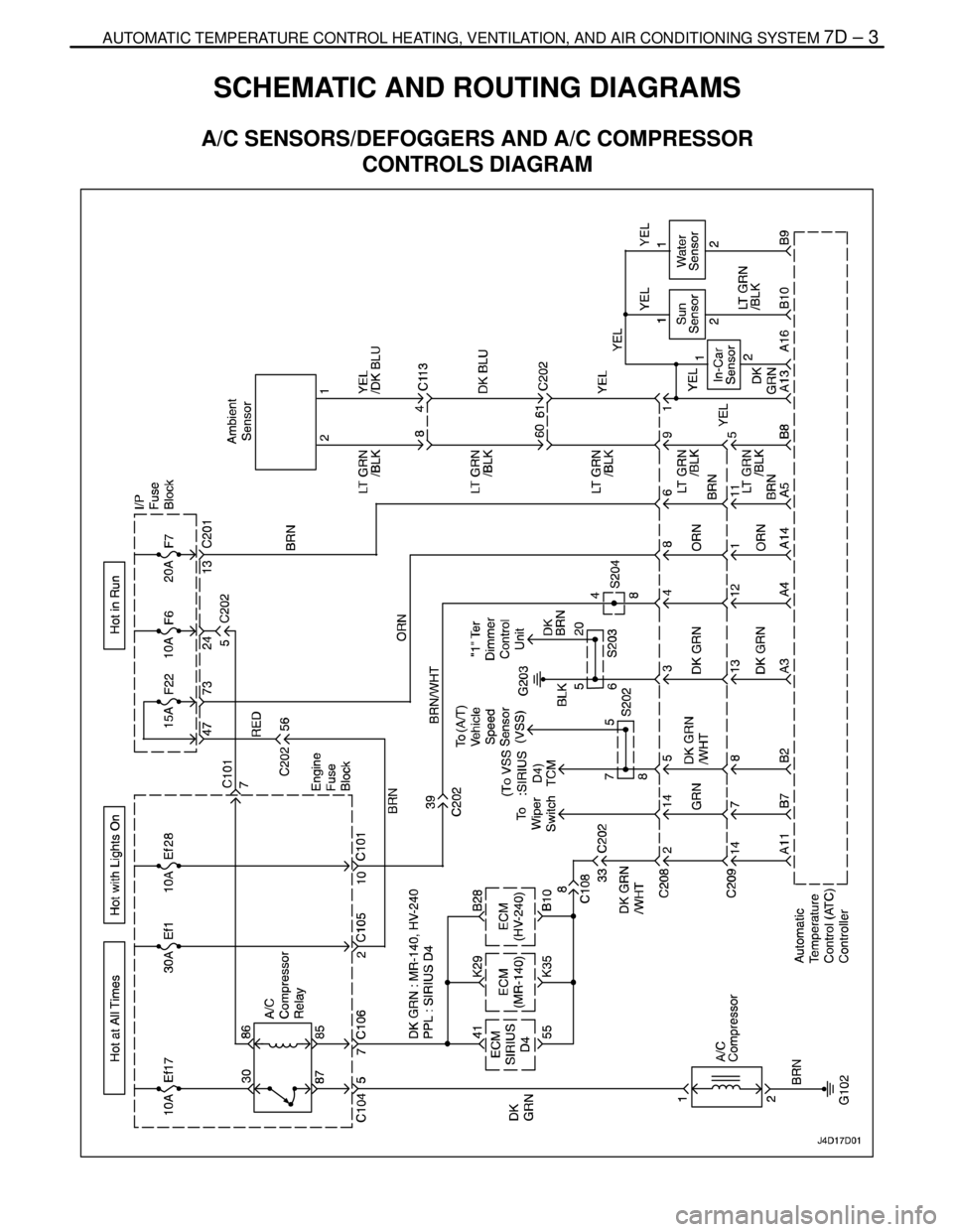
AUTOMATIC TEMPERATURE CONTROL HEATING, VENTILATION, AND AIR CONDITIONING SYSTEM 7D – 3
DAEWOO V–121 BL4
SCHEMATIC AND ROUTING DIAGRAMS
A/C SENSORS/DEFOGGERS AND A/C COMPRESSOR
CONTROLS DIAGRAM
Page 2059 of 2643
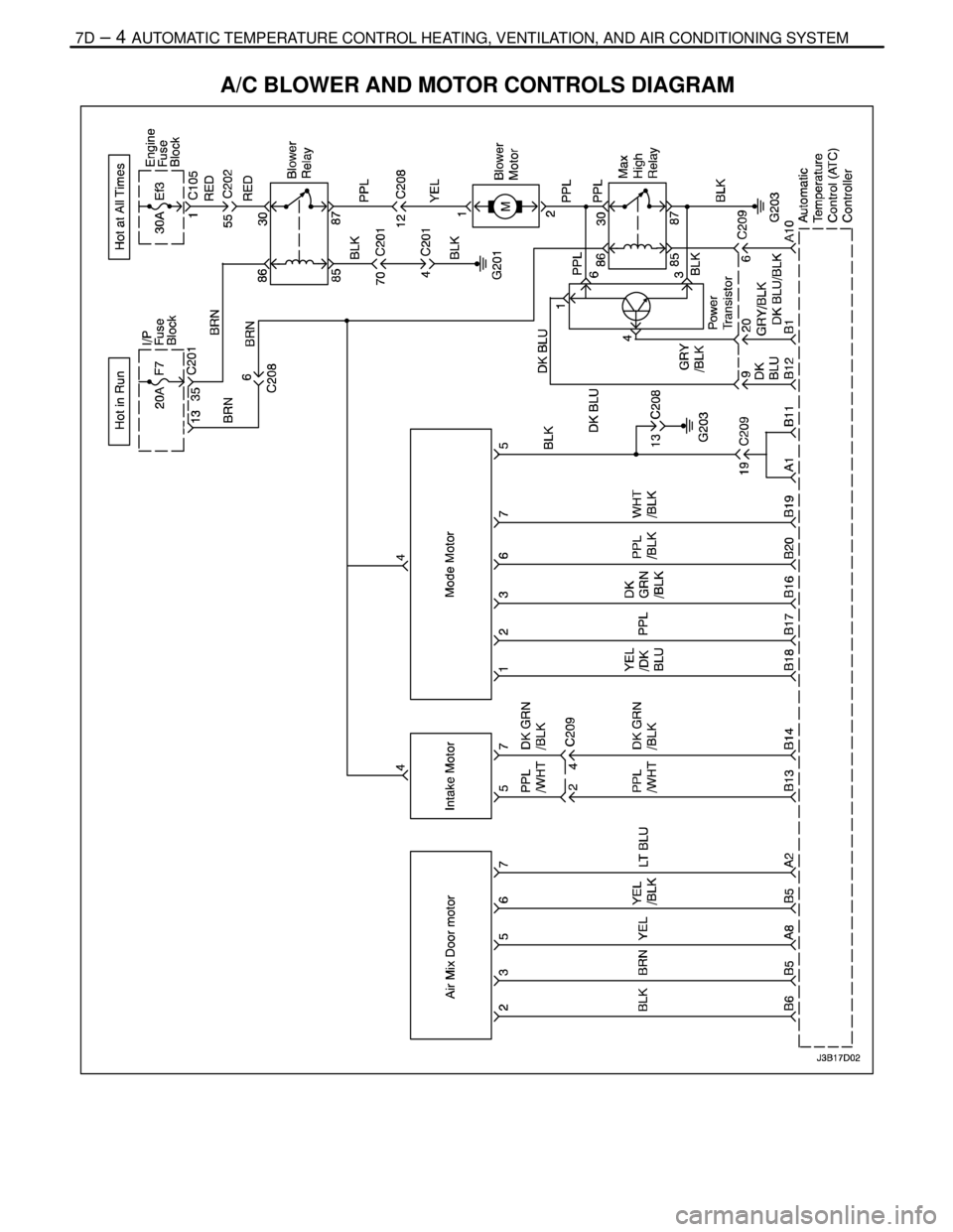
7D – 4IAUTOMATIC TEMPERATURE CONTROL HEATING, VENTILATION, AND AIR CONDITIONING SYSTEM
DAEWOO V–121 BL4
A/C BLOWER AND MOTOR CONTROLS DIAGRAM
Page 2060 of 2643

AUTOMATIC TEMPERATURE CONTROL HEATING, VENTILATION, AND AIR CONDITIONING SYSTEM 7D – 5
DAEWOO V–121 BL4
DIAGNOSIS
GENERAL A/C DIAGNOSTICS
Refer to Section 7B, Manual Control Heating, Ventilation,
and Air Conditioning System for details of the following
procedures:
S A/C Performance Test.
S Insufficient Cooling ”Quick Check” Procedure.
S Insufficient Cooling Diagnosis.S Leak Testing the Refrigerant System.
S Low– and High–Side Pressure Relationship Chart.
S Pressure Test Chart (R–134a System).
S Pressure–Temperature Relationship of R–134a.
S Testing the Refrigerant System.
V5 SYSTEM AIR CONDITIONING AND AUTOMATIC
TEMPERATURE CONTROL (ATC)
SELF–DIAGNOSTIC CIRCUIT CHECK
The Daewoo fully automatic temperature controller
(FATC) contains a self–diagnosis function to aid in finding
any problem with the system. To enter the diagnostic
mode, perform the following procedure:
1. Turn the ignition to ON.
2. Set the temperature control to 26°C (79°F).3. Within 3 seconds, push the AUTO and the OFF
switches simultaneously, more than three times.
4. Count the number of times the temperature indica-
tor screen blinks.
5. If there are no error codes set, the screen will not
blink. When the controller indicates an error code,
proceed to the table for that code.
6. Push the OFF switch to return the controller to its
normal functions.
Page 2061 of 2643

7D – 6IAUTOMATIC TEMPERATURE CONTROL HEATING, VENTILATION, AND AIR CONDITIONING SYSTEM
DAEWOO V–121 BL4
AUTOMATIC TEMPERATURE CONTROLLER DOES NOT
OPERATE WHEN IGNITION IS ON
StepActionValue(s)YesNo
1Check the fuse F7.
Is fuse F7 blown?–Go to Step 2Go to Step 3
2Replace fuse F7.
Is the repair complete?–System OK–
31. Remove the controller.
2. Measure the voltage between connectors A5
and A14.
Is the voltage within the specified value?11–14 vGo to Step 4Go to Step 5
41. Check the controller for damage.
2. Replace the controller if it is damaged.
Is the repair complete?–System OK–
5Check the voltage between terminal A1 and ground.
Is this voltage as specified?0 vGo to Step 6Go to Step 7
61. Check the wiring harness between fuse F7 and
the terminal A5 for damage.
2. Replace the wiring harness if it is damaged.
Is the repair complete?–System OK–
71. Check the wiring harness between terminal
A14 and ground G203 for damage.
2. Repair the wiring harness, or ground connec-
tion as required.
Is the repair complete?–System OK–
Page 2062 of 2643

AUTOMATIC TEMPERATURE CONTROL HEATING, VENTILATION, AND AIR CONDITIONING SYSTEM 7D – 7
DAEWOO V–121 BL4
CONTROLLER DOES NOT ILLUMINATE WHEN LIGHT
SWITCH IS ON
StepActionValue(s)YesNo
1Check other instrumentation lights.
Are those lights also off?–Go to Section
9E, Instrumen-
tation/Driver In-
formationGo to Step 2
21. Remove the controller.
2. Check the voltage between terminals A3 and
A4 of the controller connector.
Is the voltage within the specified value?11–14 vGo to Step 4Go to Step 3
3Repair the wiring harness between splice S204 and
controller connector terminal A4 or between splice
S203 and controller connector terminal A3.
Is the repair complete?–System OK–
4Check the illumination lamps.
Is one burned out?–Go to Step 5Go to Step 6
5Replace the burned out illumination lamp.
Is the repair complete?–System OK–