Page 137 of 277
SATELLITE RADIO — IF EQUIPPED
Satellite radio uses direct satellite to receiver broadcast-
ing technology to provide clear digital sound, coast to
coast. The subscription service provider is Sirius™ Satel-
lite Radio. This service offers up to 100 channels of music,
sports, news, entertainment, and programming for chil-
dren, directly from its satellites and broadcasting studios.
System Activation
To activate your Sirius Satellite Radio service, call the
toll-free number 888-539-7474, or visit the Sirius web site
at www.sirius.com. Please have the following informa-
tion available when activating your system:
1. The Electronic Serial Number/Sirius Identification
Number (ESN/SID).
2. Credit card information.
3. Your Vehicle Identification Number.
Electronic Serial Number/Sirius Identification
Number (ENS/SID)
The Electronic Serial Number/Sirius Identification Num-
ber is needed to activate your Sirius Satellite Radio
system. To access the ESN/SID, refer to the following
steps:
ESN/SID Access With RBB and RBK Radios
With the ignition switch in the ACCESSORY position and
the radio OFF, press the Tape Eject or CD Eject (depend-
ing on the radio type) and Time buttons simultaneously
for 3 seconds. The first four digits of the twelve-digit
ESN/SID number will be displayed. Press the SEEK UP
button to display the next four digits. Continue to press
the SEEK UP button until all twelve ESN/SID digits have
been displayed. The SEEK DOWN will page down until
the first four digits are displayed. The radio will exit the
ESN/SID mode when any other button is pushed, the
ignition is turned OFF, or 5 minutes has passed since any
button was pushed.
ESN/SID Access With RBP, RBU, RAZ, and RBQ
Radios
With the ignition switch in the ACCESSORY position and
the radio OFF, press the CD Eject and TIME buttons
simultaneously for 3 seconds. All twelve ESN/SID num-
bers will be displayed. The radio will exit the ESN/SID
mode when any other button is pushed, the ignition is
turned OFF, or 5 minutes has passed since any button
was pushed.
UNDERSTANDING YOUR INSTRUMENT PANEL 137
4
Page 142 of 277
•Pressing the AM/FM button while in the tape or CD
mode will select the radio mode.
•If in the CD mode and the last CD is ejected, the radio
will tune to the last station selected.
Removing Discs from the CD Changer
If there is a single CD in the changer, press the EJT button
and the CD will eject. If the CD is not removed within 15
seconds, it will automatically reload into the CD changer.
To eject additional CDs from the changer, first select the
numbered button where the CD is located and then press
the EJT button.
CD Changer Operation with the Changer Off
The CD changer is able to load and eject discs with the
ignition power off. However, while the ignition is off, one
of the six numbered buttons must be pressed first.
REMOTE SOUND SYSTEM CONTROLS — IF
EQUIPPED
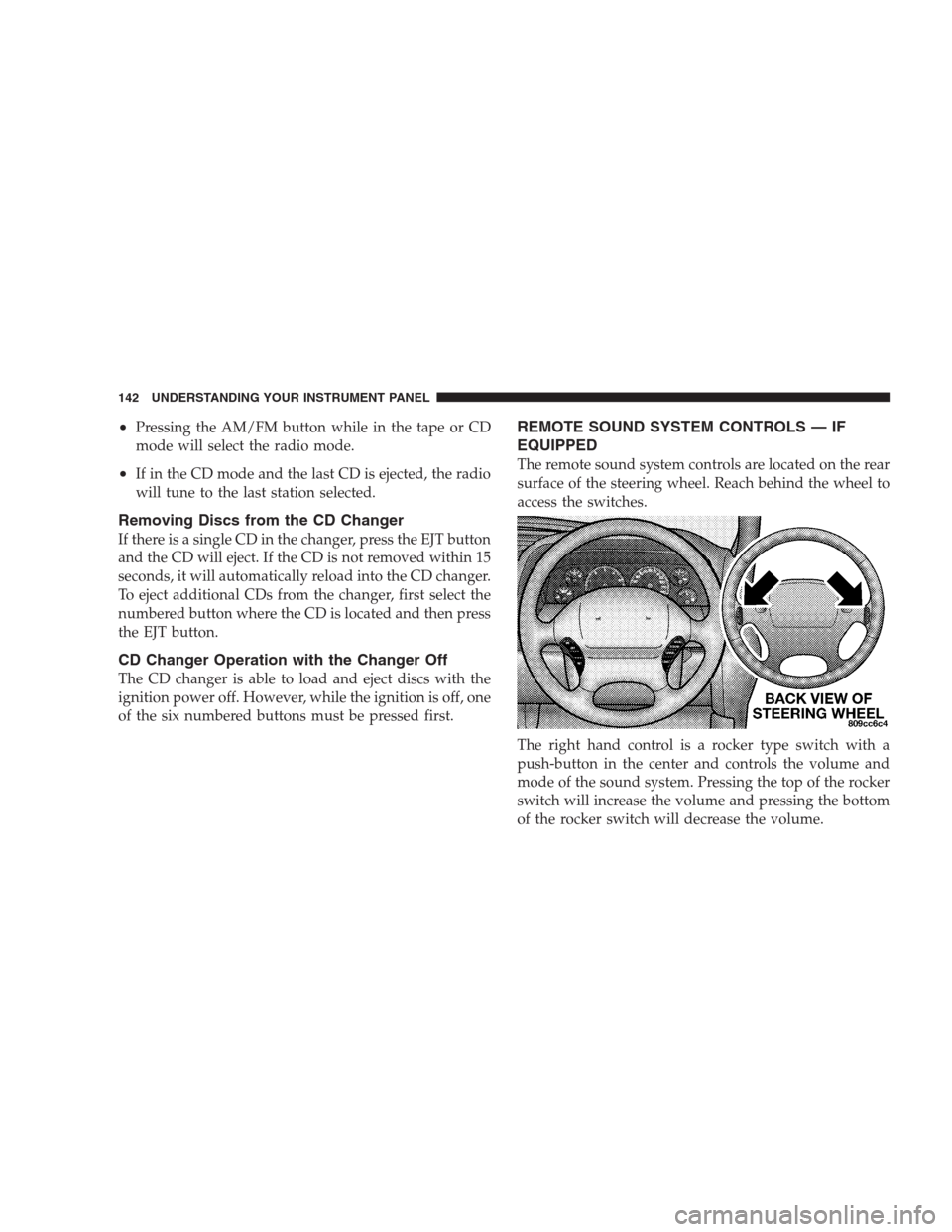
The remote sound system controls are located on the rear
surface of the steering wheel. Reach behind the wheel to
access the switches.
The right hand control is a rocker type switch with a
push-button in the center and controls the volume and
mode of the sound system. Pressing the top of the rocker
switch will increase the volume and pressing the bottom
of the rocker switch will decrease the volume.
142 UNDERSTANDING YOUR INSTRUMENT PANEL
Page 161 of 277
PARKING BRAKE
When the parking brake is applied with the ignition on,
the red Brake light in the instrument cluster will come on.
NOTE:This light only shows that the parking brake is
applied. It does not show the degree of brake application.
Before leaving the vehicle, make sure that the parking
brake is fully applied and place the gear selector in the
Park position.
To release the parking brake, pull the release lever
located on the lower edge of the instrument panel.When parking on a hill, you must set the parking brake
beforeplacing the gear selector in Park. If you don’t, the
load on the transmission locking mechanism may make it
difficult to move the selector out of Park. As an added
precaution, turn the front wheels toward the curb on a
downhill grade and away from the curb on an uphill
grade.
The parking brake should always be applied when the
driver is not in the vehicle.
STARTING AND OPERATING 161
5
Page 162 of 277

WARNING!
•Leaving children in a vehicle unattended is dan-
gerous for several reasons. A child or others could
be injured. Children should be warned not to
touch the parking brake or the gear selector. Don’t
leave the keys in the ignition. A child could
operate power windows, other controls, or move
the vehicle.
•Be sure the parking brake is fully disengaged
before driving; failure to do so can lead to brake
failure and an accident.
BRAKE SYSTEM
Your vehicle is equipped with power brakes as standard
equipment. In the event you lose power assist for any
reason (for example, repeated brake applications with the
engine off), the brakes will still function. The effort
required to brake the vehicle will be substantially in-
creased over that required with the power system oper-
ating.
If either of the two hydraulic systems lose normal capa-
bility, the remaining system will still function with some
loss of overall braking effectiveness. This will be evident
by increased pedal travel during application, greater
pedal force required to slow or stop, and activation of the
Brake Warning Lamp during brake use.
162 STARTING AND OPERATING
Page 167 of 277

CAUTION!
The TPM system has been optimized for the original
equipment tires and wheels. TPM system pressures
have been established for the tire size equipped on
your vehicle. Undesirable operation or sensor dam-
age may result when using replacement equipment
that is not of the same size, type, and/or style.
After-market wheels can cause sensor damage. Do
not use tire sealant or balance beads if your vehicle
is equipped with TPM system as damage to the
sensors may result.
Tire Pressure Monitor System Tire/Wheel Rotation
and Sensor Replacement — If Equipped
If a road tire and wheel is replaced by the spare, the TPM
system will detect the swap automatically (after the
ignition has been cycled) and display SPARE SWAP
DETECTED along with a chime. This could take up to 10
minutes with vehicle speed above 25 mph (40 km/h).The tire pressure sensorsmustbe retrained following a
wheel rotation or sensor replacement. Refer to “Under-
standing The Features of Your Vehicle, Electronic Vehicle
Information Center (EVIC), Customer Programmable
Features, Retrain Tire Sensors” for more information. It is
necessary to program the EVIC with the new sensor(s) or
the new position of each sensor as it is rotated to a
different corner of the vehicle.
If a wheel rotation is not followed by the retrain proce-
dure, the system will not properly inform you of the
correct vehicle location of a low or high tire pressure.
The retraining procedure requires the use of a training
magnet which is located in the left, rear corner of the
spare tire well under the spare tire cover in the trunk.
STARTING AND OPERATING 167
5
Page 182 of 277
HAZARD WARNING FLASHER
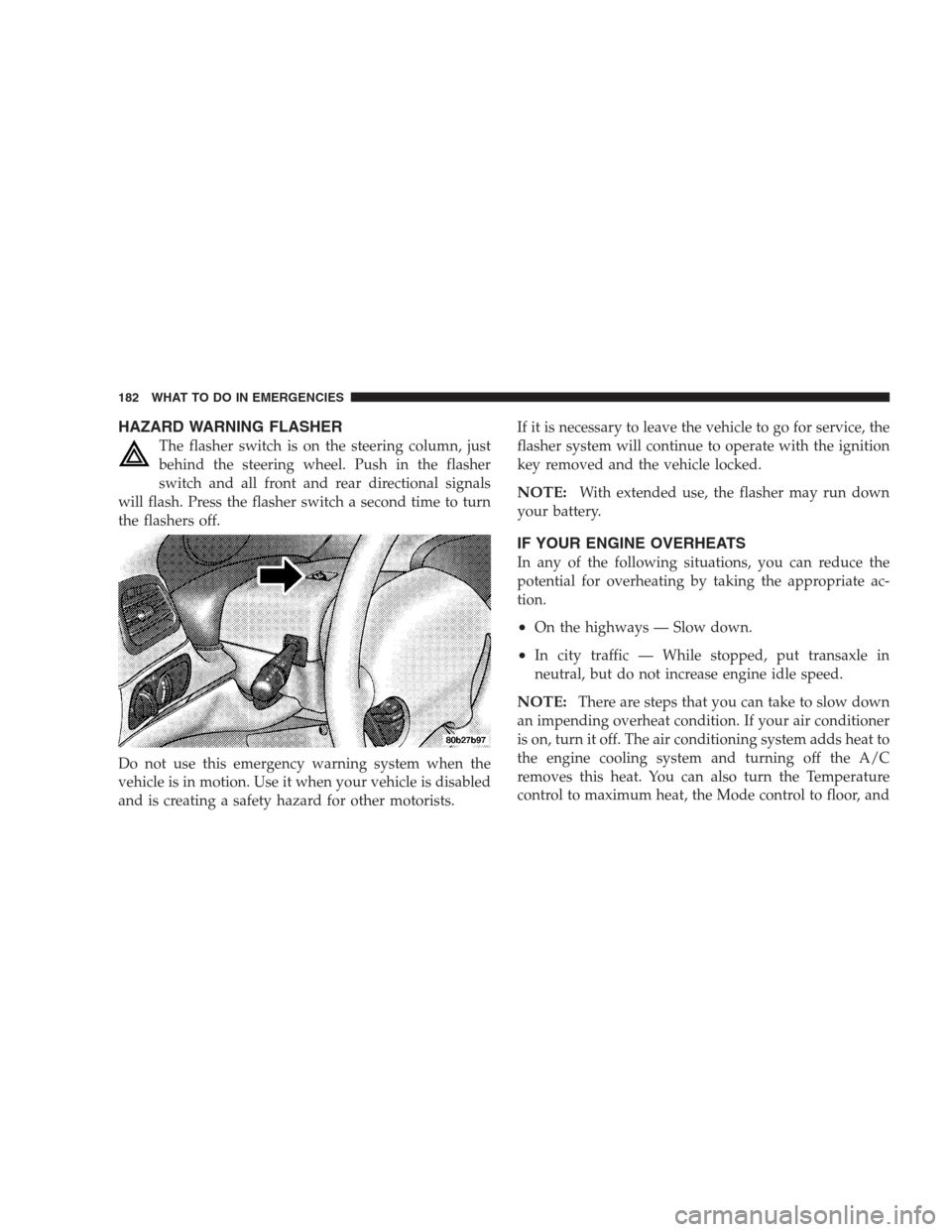
The flasher switch is on the steering column, just
behind the steering wheel. Push in the flasher
switch and all front and rear directional signals
will flash. Press the flasher switch a second time to turn
the flashers off.
Do not use this emergency warning system when the
vehicle is in motion. Use it when your vehicle is disabled
and is creating a safety hazard for other motorists.If it is necessary to leave the vehicle to go for service, the
flasher system will continue to operate with the ignition
key removed and the vehicle locked.
NOTE:With extended use, the flasher may run down
your battery.
IF YOUR ENGINE OVERHEATS
In any of the following situations, you can reduce the
potential for overheating by taking the appropriate ac-
tion.
•On the highways — Slow down.
•In city traffic — While stopped, put transaxle in
neutral, but do not increase engine idle speed.
NOTE:There are steps that you can take to slow down
an impending overheat condition. If your air conditioner
is on, turn it off. The air conditioning system adds heat to
the engine cooling system and turning off the A/C
removes this heat. You can also turn the Temperature
control to maximum heat, the Mode control to floor, and
182 WHAT TO DO IN EMERGENCIES
Page 189 of 277
JUMP-STARTING THE BATTERY
WARNING!
Take care to avoid the radiator cooling fan whenever
the hood is raised. It can start anytime the ignition
switch is on. You can be hurt by the fan.
CAUTION!
Do not try to push or tow your vehicle to get it
started. Your vehicle cannot be started this way.
Pushing with another vehicle may damage the trans-
axle or the rear of your vehicle. If your vehicle has a
discharged (dead) battery, booster cables may be
used to obtain a start from another vehicle. This type
of start can be dangerous if done improperly, so
follow the procedure carefully.
WARNING!
Battery fluid is a corrosive acid solution; do not
allow battery fluid to contact eyes, skin or clothing.
Don’t lean over battery when attaching clamps or
allow the clamps to touch each other. If acid splashes
in eyes or on skin, flush the contaminated area
immediately with large quantities of water.
A battery generates hydrogen gas which is flam-
mable and explosive. Keep flame or spark away
from the vent holes. Do not use a booster battery or
any other booster source with an output that exceeds
12 volts.
NOTE:The battery is stored in a compartment in front
of the tire in the right front fender and is accessible
through the engine compartment. The tire and wheel
need not be removed to gain access to the battery.
WHAT TO DO IN EMERGENCIES 189
6
Page 190 of 277
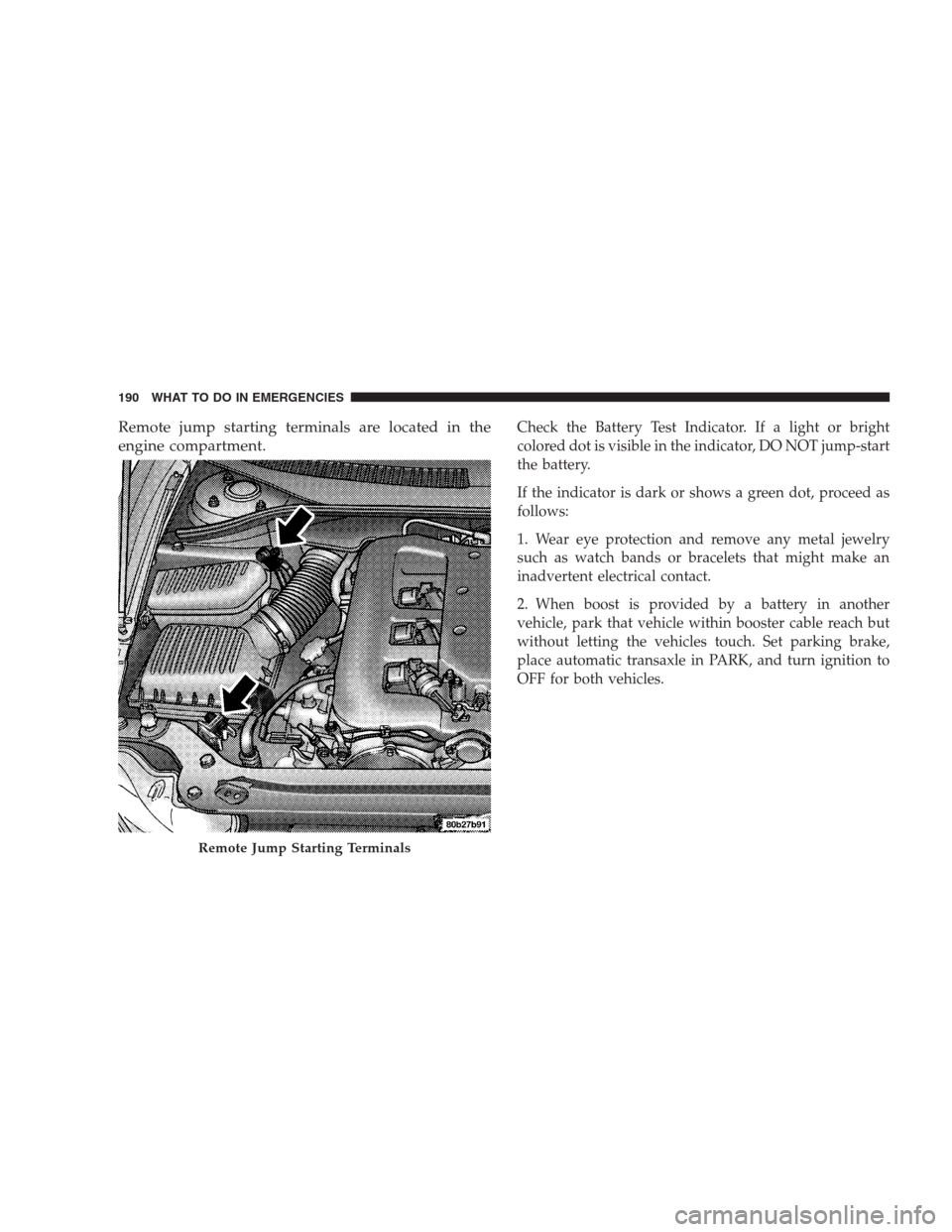
Remote jump starting terminals are located in the
engine compartment.Check the Battery Test Indicator. If a light or bright
colored dot is visible in the indicator, DO NOT jump-start
the battery.
If the indicator is dark or shows a green dot, proceed as
follows:
1. Wear eye protection and remove any metal jewelry
such as watch bands or bracelets that might make an
inadvertent electrical contact.
2. When boost is provided by a battery in another
vehicle, park that vehicle within booster cable reach but
without letting the vehicles touch. Set parking brake,
place automatic transaxle in PARK, and turn ignition to
OFF for both vehicles.
Remote Jump Starting Terminals
190 WHAT TO DO IN EMERGENCIES