Page 80 of 277

Security
If you sell your vehicle, be sure to erase the frequencies.
To erase all of the previously trained frequencies, hold
down both outside buttons until the green light begins to
flash.
This device complies with part 15 of FCC rules and with
RS-210 of Industry Canada. Operation is subject to the
following conditions:
1. This device may not cause harmful interference.
2. This device must accept any interference that may be
received including interference that may cause undesired
operation.
NOTE:Changes or modifications not expressly ap-
proved by the party responsible for compliance could
void the user’s authority to operate the equipment.
HomeLink�is a trademark owned by Johnson Controls,
Inc.
GARAGE DOOR OPENER — IF EQUIPPED
Equipped in vehicles that have the optional Electronic
Vehicle Information Center (EVIC)
The HomeLink�Universal Transceiver replaces up to
three remote controls (hand-held transmitters) that oper-
ate devices such as garage door openers, motorized
gates, or home lighting. It triggers these devices at the
push of a button, located on the overhead console. The
universal transceiver operates off your vehicle’s battery
and charging system; no batteries are needed.
80 UNDERSTANDING THE FEATURES OF YOUR VEHICLE
Page 83 of 277

5. To program the other buttons, repeat steps 3 and 4. Be
sure to keep your hand-held transmitters in case you
need to reprogram the universal transceiver.
NOTE:If you do not successfully program the
HomeLink�Universal Transceiver to learn the signal of
the hand-held transmitter, refer to�Programming Mul-
tiple Security Code Systems (Rolling Code)�later in
this text or call toll-free for customer assistance at
1-800-355-3515 or on the internet at
www.homelink.com.
NOTE:In Canada, D.O.C. regulations require many
hand-held transmitters to stop transmitting after two
seconds. On these hand-held transmitters, transmission
will stop even though the light on the hand-held trans-
mitter stays lit.
If you have one of these hand-held transmitters, you
should press and release the hand-held transmitter
button every two seconds without releasing the uni-
versal transceiver button.
Release both buttons when the display indicates
TRAINED.
Reprogramming a Single Universal Transceiver
Button
1. Press and hold the desired universal transceiver but-
ton for about 20 seconds.
2. When the display indicates TRAINING, position the
hand-held transmitter one to three inches away from the
universal transceiver surface.
3. Press and hold the hand-held transmitter button.
UNDERSTANDING THE FEATURES OF YOUR VEHICLE 83
3
Page 85 of 277

3. Press the programming button on the garage door
opener motor head unit (which activates the program-
ming light).
4. Firmly press and release the programmed universal
transceiver button. Press and release the universal trans-
ceiver button a second time to complete the program-
ming process. (Some garage door openers may require
you to do this procedure a third time to complete the
programming.)
Your garage door opener should now recognize your
universal transceiver. You may use either your universal
transceiver or your original hand-held transmitter to
open your garage door.
For Your Security
If you sell your vehicle, be sure to erase the frequencies.
To erase all of the previously programmed frequencies,
hold down channel one and three buttons until
CLEARED CHANNELS is displayed.
NOTE:Individual channels can not be erased. You
must erase all three channels.
What May Cause The Universal Transceiver Not
To Work
•
The universal transceiver may not have been pro-
grammed correctly. Try reprogramming.
•The batteries in the hand-held transmitter may be
weak. New batteries may be required in your hand-
held transmitter.
•Place the hand-held transmitter at a different distance
from the universal transceiver (approximately 1 to 3
inches) (approximately 3 to 8 centimeters) and repro-
gram.
•The frequency of the programmed device’s hand-held
transmitter must be between 286MHz and 399MHz,
set by FCC part 15.205. (The back side of the hand-held
transmitter may indicate its frequency.)
•If you are unable to program the universal transceiver
after repeated attempts, you may contact HomeLink�
at1–800–355–3515or on the internet at
www.homelink.com.
UNDERSTANDING THE FEATURES OF YOUR VEHICLE 85
3
Page 93 of 277

Remote Unlock Driver’s Door 1st
When this feature is selected only the driver’s door will
unlock on the first press of the remote keyless entry
unlock button and require a second press to unlock the
remaining locked doors. WhenREMOTE UNLOCK ALL
DOORSis selected all of the doors will unlock at the first
press of the remote keyless entry unlock button. Pressing
the STEP button when in this display will select DRIV-
ER’S DOOR 1ST or ALL DOORS.
Remote Linked To Memory (Available with
Memory Seat Only)
When this feature is selected the memory seat, mirror,
and radio settings will return to the memory set position
when the remote keyless entry “Unlock” button is
pressed. If this feature is not selected then the memory
seat, mirror, and radio settings can only return to the
memory set position using the door mounted switch.
Pressing the STEP button when in this display will select
“Yes” or “No.”
Sound Horn with Lock
When this feature is selected a short horn sound will
occur when the remote keyless entry “Lock” button is
pressed. This feature may be selected with or without the
flash lights on lock/unlock feature. Pressing the STEP
button when in this display will select “Yes” or “No.”
Flash Lights with Lock/Unlock
When this feature is selected, the front and rear turn
signals will flash when the doors are locked or unlocked
using the remote keyless entry transmitter. This feature
may be selected with or without the sound horn on lock
feature selected. Pressing the STEP button when in this
display will select “Yes” or “No.”
Headlamp Delay
When this feature is selected the driver can choose, when
exiting the vehicle, to have the headlamps remain on for
30, 60, or 90 seconds, or not remain on. Pressing the STEP
button when in this display will select 30, 60, 90, or OFF.
UNDERSTANDING THE FEATURES OF YOUR VEHICLE 93
3
Page 94 of 277

Headlamp On With Wipers (Available with Auto
Headlights Only)
When this feature is selected and the headlight switch
has at least once been moved to the AUTO position, the
headlights will turn on when the wipers are turned on.
The headlights will also turn off when the wipers are
turned off if they were turned on in this way. Pressing the
STEP button when in this display will select “Yes” or
“No.”
NOTE:Turning the headlights on during the daytime
causes the instrument panel lights to dim. To increase the
brightness, refer to “Lights” in this section.
Service Interval
When this feature is selected a service interval between
2,000 (3 200 km) and 6,000 miles (9 600 km) in 500 mile
(800 km) increments may be selected. Pressing the STEP
button when in this display will select distances between
2,000 (3 200 km) and 6,000 miles (9 600 km) in 500 mile
(800 km) increments.
Reset Service Distance (Displays Only if Service
Interval was Changed)
When this feature is selected the current accumulated
service distance can be reset to the newly selected service
interval. Pressing the STEP button when in this display
will select “Yes” or “No.”
Easy Exit Seat
When this feature is selected the driver’s seat moves
rearward two inches (55 mm) or to the farthest rearward
position if this distance is less than two inches (55 mm)
when the key is removed from the ignition switch so that
the driver can more easily exit the vehicle. The seat will
return to the memorized seat location (if REMOTE LINK
TO MEMORY is set to YES) when the remote keyless
entry transmitter is used to unlock the door. Pressing the
STEP button when in this display will select “Yes” or
“No.”
94 UNDERSTANDING THE FEATURES OF YOUR VEHICLE
Page 104 of 277

Automatic Compass Calibration
The self calibrating feature of the compass eliminates the
need to calibrate the compass for normal conditions.
During a short initial period, the compass may appear
erratic and the CAL symbol will appear on the display.
The CAL symbol may also appear after the vehicle is
subjected to a high level of magnetism. After completing
three 360 turns at about 5 mph (8 km/h) in an area free
from large metal or metallic objects, the CAL symbol will
turn off and the compass will function normally.
Manual Compass Calibration
If the compass appears erratic and the CAL light does not
appear, you must calibrate the compass. Find an open
area away from large metal objects. With the ignition ON
and the compass/temperature displayed, press and hold
the RESET button until the CAL symbol appears (about
10 seconds). Drive slowly (about 5 mph) (8 km/h) in 3
complete 360 circles. The CAL light will turn off and the
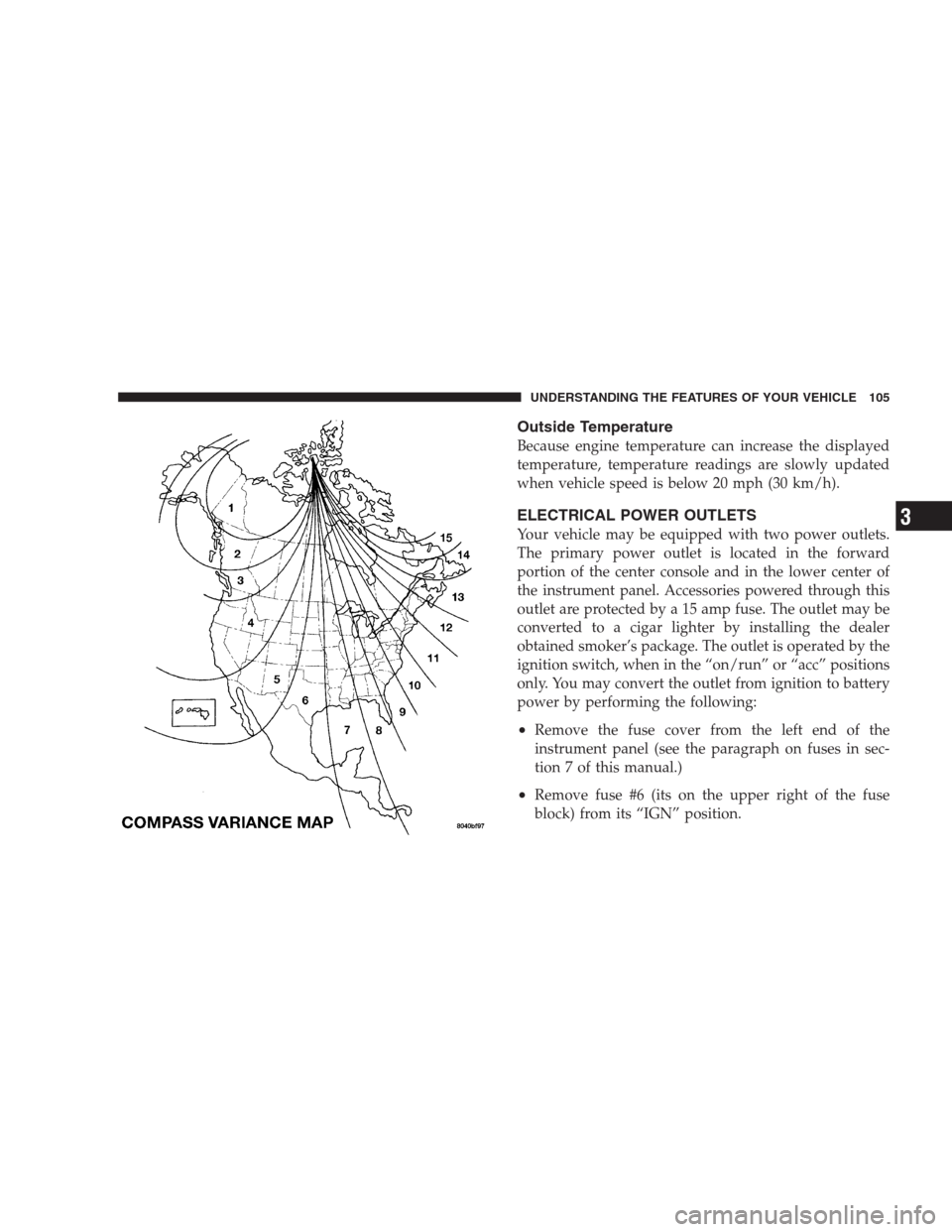
compass will be calibrated.Variance is the difference between magnetic North and
geographic North. For proper compass function, the
correct variance zone must be set. Refer to the variance
map for the correct variance zone. To check the variance
zone, the ignition must be on and the compass/
temperature displayed. Press and hold the RESET button
for about 5 seconds until VAR appears in the display. The
number displayed is the variance zone used by the
compass. To change the zone, press the STEP button to
scroll through numbers 1 through 15. Press the RESET
button after selecting the proper zone to return to the
normal compass/temperature display.
NOTE:To ensure proper compass calibration, make
sure the compass variance is properly set before manu-
ally calibrating the compass (see variance map).
104 UNDERSTANDING THE FEATURES OF YOUR VEHICLE
Page 105 of 277
Outside Temperature
Because engine temperature can increase the displayed
temperature, temperature readings are slowly updated
when vehicle speed is below 20 mph (30 km/h).
ELECTRICAL POWER OUTLETS
Your vehicle may be equipped with two power outlets.
The primary power outlet is located in the forward
portion of the center console and in the lower center of
the instrument panel. Accessories powered through this
outlet are protected by a 15 amp fuse. The outlet may be
converted to a cigar lighter by installing the dealer
obtained smoker’s package. The outlet is operated by the
ignition switch, when in the “on/run” or “acc” positions
only. You may convert the outlet from ignition to battery
power by performing the following:
•Remove the fuse cover from the left end of the
instrument panel (see the paragraph on fuses in sec-
tion 7 of this manual.)
•Remove fuse #6 (its on the upper right of the fuse
block) from its “IGN” position.
UNDERSTANDING THE FEATURES OF YOUR VEHICLE 105
3
Page 106 of 277
•Move the fuse slightly right and insert it in the fuse #6
“BAT” location in the fuse block.
•Reinstall the fuse cover.
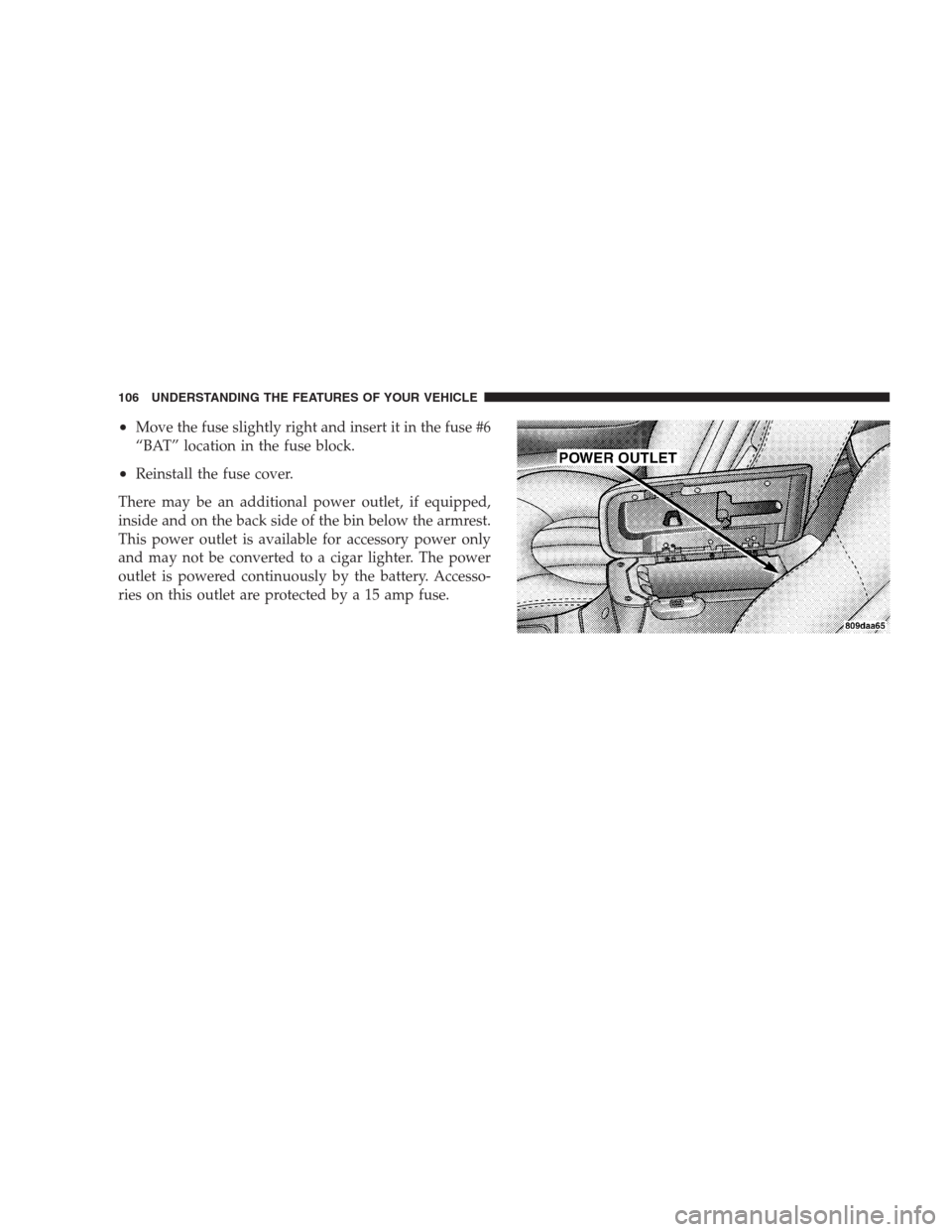
There may be an additional power outlet, if equipped,
inside and on the back side of the bin below the armrest.
This power outlet is available for accessory power only
and may not be converted to a cigar lighter. The power
outlet is powered continuously by the battery. Accesso-
ries on this outlet are protected by a 15 amp fuse.
106 UNDERSTANDING THE FEATURES OF YOUR VEHICLE