2004 CHRYSLER 300 M lights
[x] Cancel search: lightsPage 79 of 277

Canadian Programming/Gate Programming
Canadian frequency laws, and the technology of some
entry gates, require you to press and release the hand
held transmitter button every two seconds during pro-
gramming
Continue to press and hold the Universal Transceiver
button while you press and release the hand held trans-
mitter button until the frequency signal has been learned.
The Universal Transceiver light will flash slowly and
then rapidly when the programming is successful.
NOTE:When programming such a garage door opener
or gate, unplug the device to prevent possible damage to
the garage door or gate motor.
Operation
Press and hold the desired button on the Universal
Transceiver until the garage door or other device begins
to operate. The light in the display shows that the signal
is being transmitted. The hand held transmitter may also
be used at any time.
Reprogramming A Single Button
1. Press and hold the Universal Transceiver button to be
reprogrammed. Do not release until step 4 has been
completed.
2. When the indicator light begins to flash slowly (after
20 seconds) position the hand held transmitter 1 to 3
inches (3 to 8 cm) away from the button to be trained.
3. Press and hold the hand held transmitter button.
4. The Universal Transceiver indicator light will begin to
flash, first slowly, then rapidly. When the indicator lights
begin to flash rapidly, release both buttons.
UNDERSTANDING THE FEATURES OF YOUR VEHICLE 79
3
Page 93 of 277

Remote Unlock Driver’s Door 1st
When this feature is selected only the driver’s door will
unlock on the first press of the remote keyless entry
unlock button and require a second press to unlock the
remaining locked doors. WhenREMOTE UNLOCK ALL
DOORSis selected all of the doors will unlock at the first
press of the remote keyless entry unlock button. Pressing
the STEP button when in this display will select DRIV-
ER’S DOOR 1ST or ALL DOORS.
Remote Linked To Memory (Available with
Memory Seat Only)
When this feature is selected the memory seat, mirror,
and radio settings will return to the memory set position
when the remote keyless entry “Unlock” button is
pressed. If this feature is not selected then the memory
seat, mirror, and radio settings can only return to the
memory set position using the door mounted switch.
Pressing the STEP button when in this display will select
“Yes” or “No.”
Sound Horn with Lock
When this feature is selected a short horn sound will
occur when the remote keyless entry “Lock” button is
pressed. This feature may be selected with or without the
flash lights on lock/unlock feature. Pressing the STEP
button when in this display will select “Yes” or “No.”
Flash Lights with Lock/Unlock
When this feature is selected, the front and rear turn
signals will flash when the doors are locked or unlocked
using the remote keyless entry transmitter. This feature
may be selected with or without the sound horn on lock
feature selected. Pressing the STEP button when in this
display will select “Yes” or “No.”
Headlamp Delay
When this feature is selected the driver can choose, when
exiting the vehicle, to have the headlamps remain on for
30, 60, or 90 seconds, or not remain on. Pressing the STEP
button when in this display will select 30, 60, 90, or OFF.
UNDERSTANDING THE FEATURES OF YOUR VEHICLE 93
3
Page 94 of 277

Headlamp On With Wipers (Available with Auto
Headlights Only)
When this feature is selected and the headlight switch
has at least once been moved to the AUTO position, the
headlights will turn on when the wipers are turned on.
The headlights will also turn off when the wipers are
turned off if they were turned on in this way. Pressing the
STEP button when in this display will select “Yes” or
“No.”
NOTE:Turning the headlights on during the daytime
causes the instrument panel lights to dim. To increase the
brightness, refer to “Lights” in this section.
Service Interval
When this feature is selected a service interval between
2,000 (3 200 km) and 6,000 miles (9 600 km) in 500 mile
(800 km) increments may be selected. Pressing the STEP
button when in this display will select distances between
2,000 (3 200 km) and 6,000 miles (9 600 km) in 500 mile
(800 km) increments.
Reset Service Distance (Displays Only if Service
Interval was Changed)
When this feature is selected the current accumulated
service distance can be reset to the newly selected service
interval. Pressing the STEP button when in this display
will select “Yes” or “No.”
Easy Exit Seat
When this feature is selected the driver’s seat moves
rearward two inches (55 mm) or to the farthest rearward
position if this distance is less than two inches (55 mm)
when the key is removed from the ignition switch so that
the driver can more easily exit the vehicle. The seat will
return to the memorized seat location (if REMOTE LINK
TO MEMORY is set to YES) when the remote keyless
entry transmitter is used to unlock the door. Pressing the
STEP button when in this display will select “Yes” or
“No.”
94 UNDERSTANDING THE FEATURES OF YOUR VEHICLE
Page 113 of 277

INSTRUMENT CLUSTER DESCRIPTION
1. Fuel Gauge
When the ignition is in the ON position, the
pointer will show the level of fuel remaining in
the tank.
2. Low Fuel Warning Light
When the fuel level drops to about 2 gallons (8
liters), the Low Fuel symbol will light and re-
main lit until fuel is added. A warning chime will
sound when the light comes on.
3. Low Oil Pressure Light
This light indicates low engine oil pressure. The
light should come on briefly as a bulb check
when the engine is first started. If the light stays on or
comes on while driving, stop the vehicle and shut off
the engine. DO NOT operate the vehicle until the
cause is corrected.This light does not show how
much oil is in the engine.The engine oil level must be
checked under the hood.4. TRAC ON/OFF Lights
The Traction Control On light (TRAC ON) will come on
momentarily as a bulb check when the ignition switch is
first turned ON. If the light does not come on, have the
bulb replaced.
The TRAC ON light will also come on when the system
is controlling traction.
The Traction Control Off light (TRAC OFF) will come on
momentarily as a bulb check when the ignition switch is
first turned ON. If the light does not come on, have the
bulb checked.
The TRAC OFF light will come on when the Traction
Control switch has been used to turn the system off.
5. Trunk Ajar Light
This light indicates that the trunk is not latched
6. Tachometer
Measures engine revolutions-per-minute (R.P.M.). The
red numbers at the end on the scale show the maximum
permissible R.P.M. Ease off on the accelerator before
reaching the red area.
UNDERSTANDING YOUR INSTRUMENT PANEL 113
4
Page 114 of 277

7. Turn Signal Indicators
The arrow will flash in unison with the exterior
turn signal, when using the turn signal lever.
8. High Beam Indicator
This light shows that the headlights are on high
beam. Pull the turn signal lever towards the
steering wheel to switch the headlights from high or
low beam.
9. Seat Belt Reminder Light
The light will come on after the ignition is
turned on. The light will remain lit until the seat
belt is fastened.
10. Door Ajar Light
This light shows that a door is not completely
closed. A warning chime will sound if the vehicle
is moving with a door partially closed.
11. Speedometer
Shows vehicle speed in miles-per-hour or kilometers-per-
hour.
12. Low Washer Fluid Light
This symbol will light whenever the fluid reser-
voir is less than 1/4 filled. Adding washer fluid
will cause the light to go out the next time the
ignition is cycled. A warning chime will sound when
the light comes on.
13. Cruise (Speed Control) Light
This light shows that the Speed Control System is ON.
14. Temperature Light
This light warns of an overheated engine cool-
ant condition. A warning chime will sound
when the light comes on.
15. Engine Coolant Temperature Gauge
The temperature gauge shows engine coolant
temperature. Any reading within the 5 gauge
marks between Hot and Cold shows that the
engine cooling system is operating properly. The
gauge pointer may show a higher than normal tem-
perature when driving in hot weather, up mountain
grades, in heavy stop and go traffic, or when towing a
trailer.
114 UNDERSTANDING YOUR INSTRUMENT PANEL
Page 116 of 277

have it replaced. If the light stays on, or comes on
while driving, have the system checked by an autho-
rized dealer.
19. Odometer/Trip Odometer
Shows the total distance the vehicle has been driven.
U.S. Federal regulations require that upon transfer of
vehicle ownership, the seller certify to the purchaser the
correct mileage that the vehicle has been driven. There-
fore, if the odometer reading is changed during repair or
replacement, be sure to keep a record of the reading
before and after the service so that the correct mileage can
be determined.
The Trip Odometer shows individual trip mileage and is
accessed by pressing the reset button.
20. Charging System Light
This light shows the status of the electrical
charging system. The light should come on
briefly when the ignition is first turned on and remain
on briefly as a bulb check. If the light stays on or
comes on while driving, turn off some of the vehicle’s
electrical devices, such as the Fog Lights or RearDefroster. If the Charging System Light remains on, it
means that the vehicle is experiencing a problem with
the charging system and should be serviced immedi-
ately. See your local authorized dealer.
21. Transmission Range Indicator
This indicator illuminates to show the automatic trans-
mission gear selection.
22. ABS Light
This light monitors the Anti-Lock Brake system
described elsewhere in this manual. The yellow
ABS light will come on when the ignition key is turned
to the ON position and may stay on for several
seconds. If the ABS light does not come on have the
system checked by an authorized dealer. The warning
light should be checked frequently to assure that it is
operating properly.
If the ABS light remains on or comes on while driving, it
indicates that the Anti-Lock portion of the brake system
is not functioning and that service is required, however,
the conventional brake system will continue to operate
normally if the red BRAKE warning light is not on.
116 UNDERSTANDING YOUR INSTRUMENT PANEL
Page 140 of 277
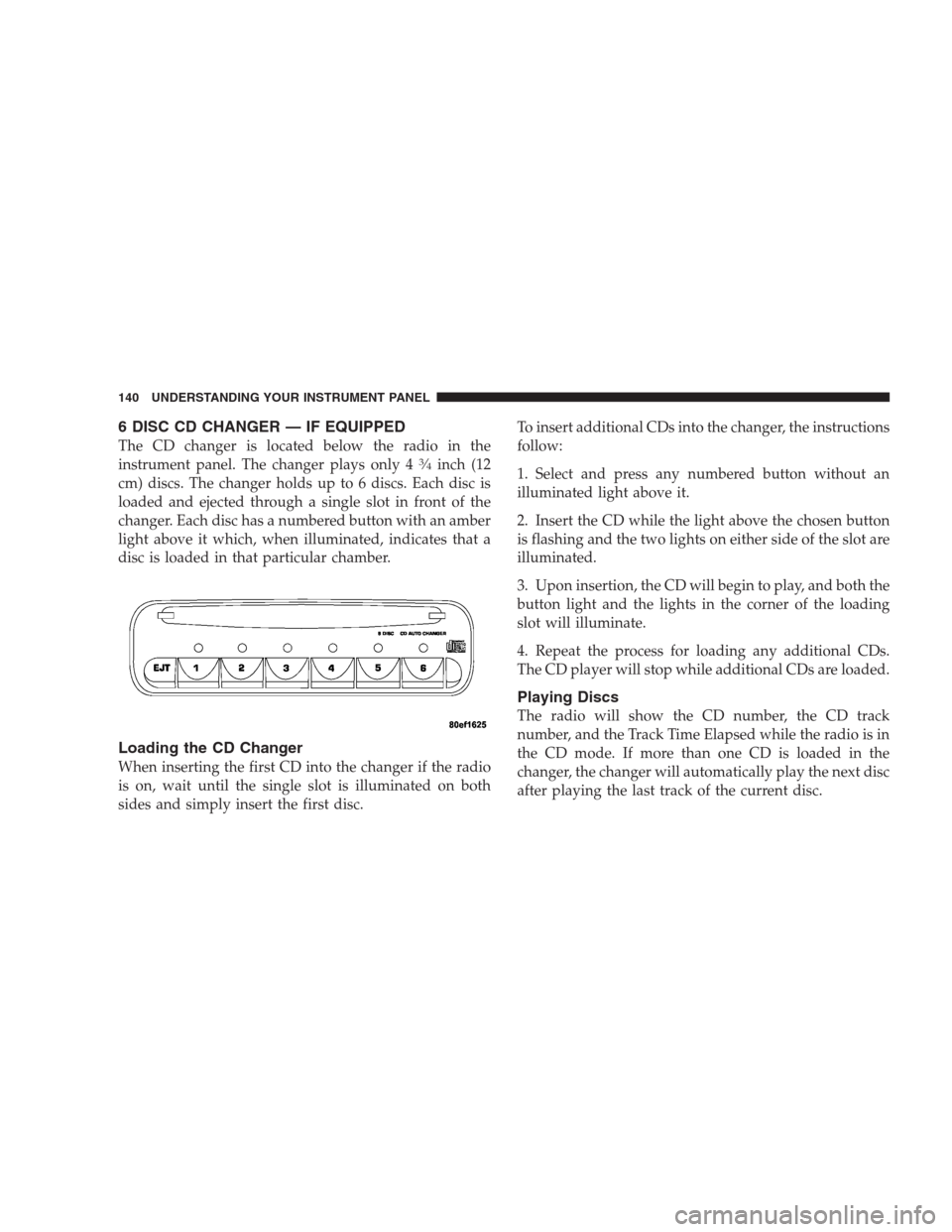
6 DISC CD CHANGER — IF EQUIPPED
The CD changer is located below the radio in the
instrument panel. The changer plays only 434inch (12
cm) discs. The changer holds up to 6 discs. Each disc is
loaded and ejected through a single slot in front of the
changer. Each disc has a numbered button with an amber
light above it which, when illuminated, indicates that a
disc is loaded in that particular chamber.
Loading the CD Changer
When inserting the first CD into the changer if the radio
is on, wait until the single slot is illuminated on both
sides and simply insert the first disc.To insert additional CDs into the changer, the instructions
follow:
1. Select and press any numbered button without an
illuminated light above it.
2. Insert the CD while the light above the chosen button
is flashing and the two lights on either side of the slot are
illuminated.
3. Upon insertion, the CD will begin to play, and both the
button light and the lights in the corner of the loading
slot will illuminate.
4. Repeat the process for loading any additional CDs.
The CD player will stop while additional CDs are loaded.
Playing Discs
The radio will show the CD number, the CD track
number, and the Track Time Elapsed while the radio is in
the CD mode. If more than one CD is loaded in the
changer, the changer will automatically play the next disc
after playing the last track of the current disc.
140 UNDERSTANDING YOUR INSTRUMENT PANEL
Page 180 of 277
adequate performance. For Example, choose “4” if the
desired speed can be maintained. Choose “3” or “2” if
needed to maintain the desired speed.
Extended driving at high RPM’s should be avoided to
prevent excess heat generation. A reduction in vehicle
speed may be necessary to avoid extended driving at
high RPMs. Return to a higher gear range or vehicle
speed when road conditions and RPM level allow.
•
The trailer tongue load must be considered as part of
the tow vehicle load capacity when loading the ve-
hicle.
•If the trailer weighs more than 1,000 lbs. (450 kg), it
should have its own brakes.
WARNING!
Connecting trailer brakes to your vehicle’s hydraulic
brake lines can overload your brake system and
cause it to fail. You might not have brakes when you
need them and could have an accident.
•Whenever you pull a trailer, regardless of the trailer
size, stop lights and turn signals on the trailer are
recommended for motoring safety.
•The automatic transmission fluid, filter, and hypoid
differential fluid should be changed per Maintenance
Schedule “B” if you tow a trailer.
•If your Engine Coolant Light comes on, see the para-
graph on Overheating in Section 6 of this manual.
NOTE:Check the automatic transmission fluid level
before all towing. Fluid discoloration, or a burnt odor,
shows the need for a transmission fluid and filter change.
180 STARTING AND OPERATING