2004 CHEVROLET VENTURE CD player
[x] Cancel search: CD playerPage 294 of 516
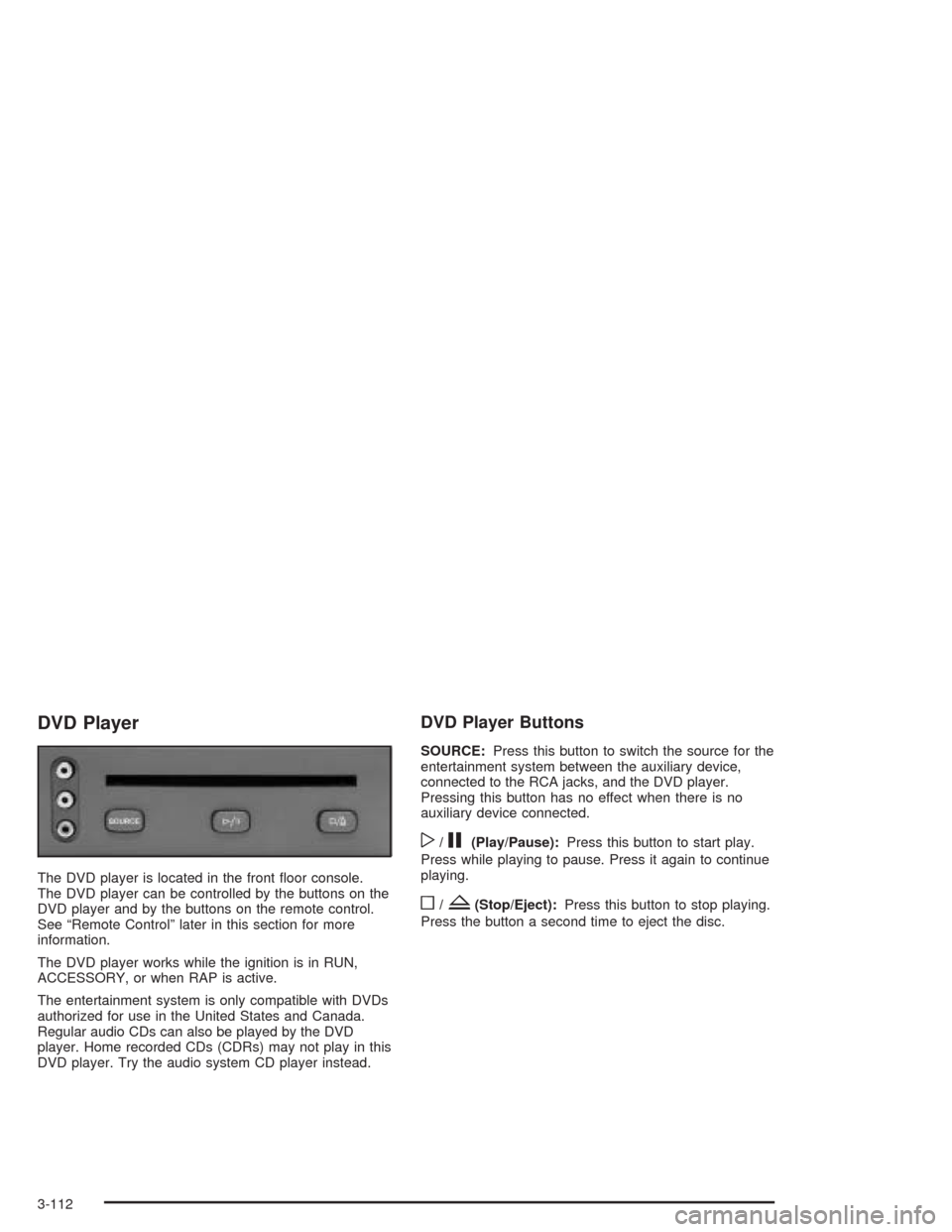
DVD Player
The DVD player is located in the front oor console.
The DVD player can be controlled by the buttons on the
DVD player and by the buttons on the remote control.
See “Remote Control” later in this section for more
information.
The DVD player works while the ignition is in RUN,
ACCESSORY, or when RAP is active.
The entertainment system is only compatible with DVDs
authorized for use in the United States and Canada.
Regular audio CDs can also be played by the DVD
player. Home recorded CDs (CDRs) may not play in this
DVD player. Try the audio system CD player instead.
DVD Player Buttons
SOURCE:Press this button to switch the source for the
entertainment system between the auxiliary device,
connected to the RCA jacks, and the DVD player.
Pressing this button has no effect when there is no
auxiliary device connected.
w/j(Play/Pause):Press this button to start play.
Press while playing to pause. Press it again to continue
playing.
o/Z(Stop/Eject):Press this button to stop playing.
Press the button a second time to eject the disc.
3-112
Page 295 of 516
Playing a Disc
To play a disc, gently insert the disc with the label side
up into the loading slot until it stops. The DVD player
will continue loading the disc and the player will
automatically start.
If a disc is already in the player, press the play/pause
button on the DVD player faceplate or on the remote
control.
Some DVDs will not allow fast forwarding or skipping of
the copyright information or the previews. Some
DVDs will begin playing the movie automatically after
the previews have nished, there may be a delay of up
to 30 seconds. If the DVD does not begin playing
the movie automatically, press the play/pause button on
the DVD player faceplate or the remote control. If the
DVD still does not play, refer to the on-screen
instructions.
Stopping and Resuming Playback
To stop playing a disc, press the stop/eject button on
the DVD player.
To resume playback, press the play/pause button. The
movie will start playing from where it was last stopped
if the disc has not been ejected. If the disc has
been ejected, the player will start playing at the
beginning.
Ejecting a Disc
Press the stop/eject button on the DVD player once to
stop and a second time to eject the disc.
If a disc is ejected from the player, but not removed,
the DVD player will reload the disc after a short period
of time.
Remote Control
To use the remote control, aim it at the display above
the video screen and press the desired button.
Direct sunlight or very bright light may affect the ability
of the entertainment system to receive signals from
the remote control. Be sure the remote’s batteries are
not discharged, as this will also affect the function of the
remote control. Objects blocking the line of sight may
also affect the function of the remote control.
Notice:Storing the remote control in a hot area or
in direct sunlight may damage it, and the repairs
would not be covered by your warranty. Keep
the remote control stored in a cool, dry place.
3-113
Page 296 of 516
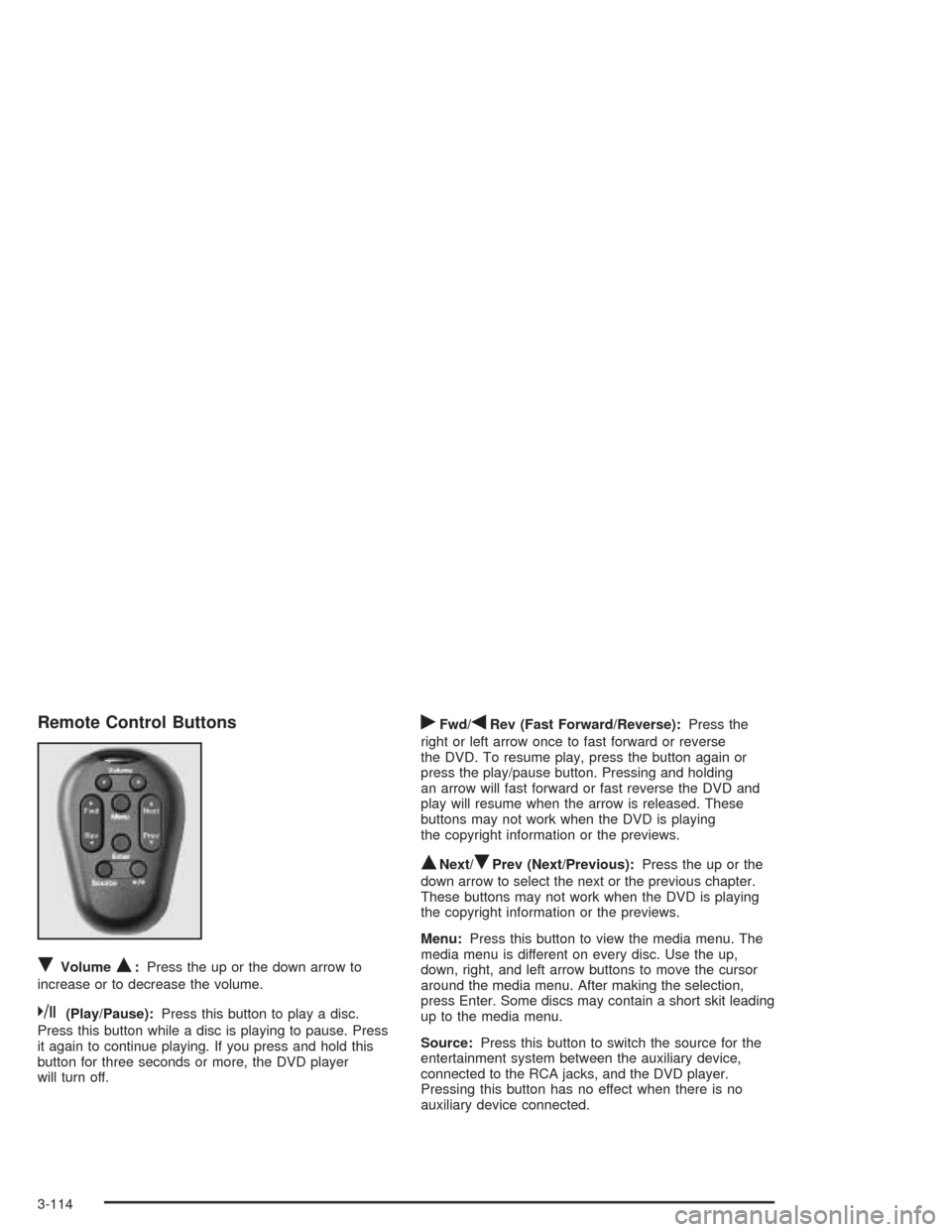
Remote Control Buttons
RVolumeQ:Press the up or the down arrow to
increase or to decrease the volume.
k(Play/Pause):Press this button to play a disc.
Press this button while a disc is playing to pause. Press
it again to continue playing. If you press and hold this
button for three seconds or more, the DVD player
will turn off.
rFwd/qRev (Fast Forward/Reverse):Press the
right or left arrow once to fast forward or reverse
the DVD. To resume play, press the button again or
press the play/pause button. Pressing and holding
an arrow will fast forward or fast reverse the DVD and
play will resume when the arrow is released. These
buttons may not work when the DVD is playing
the copyright information or the previews.
QNext/RPrev (Next/Previous):Press the up or the
down arrow to select the next or the previous chapter.
These buttons may not work when the DVD is playing
the copyright information or the previews.
Menu:Press this button to view the media menu. The
media menu is different on every disc. Use the up,
down, right, and left arrow buttons to move the cursor
around the media menu. After making the selection,
press Enter. Some discs may contain a short skit leading
up to the media menu.
Source:Press this button to switch the source for the
entertainment system between the auxiliary device,
connected to the RCA jacks, and the DVD player.
Pressing this button has no effect when there is no
auxiliary device connected.
3-114
Page 297 of 516
Battery Replacement
To change the batteries, do the following:
1. Remove the screw and open the battery door
located on the back of the remote control.
2. Replace the two AAA batteries in the compartment.
Make sure that they are installed correctly.
3. Replace the battery door and screw.
If the remote control is to be stored for a long period of
time, remove the batteries and keep them in a cool,
dry place.
DVD Distortion
There may be an experience with video distortion when
operating cellular phones, scanners, CB radios,
Global Position Systems (GPS)*, two-way radios, mobile
fax, or walkie talkies.
It may be necessary to turn off the DVD player when
operating one of these devices in or near the vehicle.
*Excludes the OnStar
®System.
Cleaning the DVD Player
When cleaning the outside DVD faceplate and buttons,
use only a clean cloth dampened with clean water.
Cleaning the Video Screen
When cleaning the video screen, use only a clean cloth
dampened with clean water. Use care when directly
touching or cleaning the screen, as damage may result.
3-115
Page 304 of 516
Care of Your CD and DVD Player
The use of CD lens cleaners for CDs is not advised, due
to the risk of contaminating the lens of the CD optics
with lubricants internal to the CD mechanism.
Fixed Mast Antenna
The xed mast antenna can withstand most car washes
without being damaged. If the mast should ever
become slightly bent, straighten it out by hand. If the
mast is badly bent, replace it.
Check occasionally to make sure the mast is still
tightened to the fender. If tightening is required, tighten
by hand, then with a wrench one quarter turn.
XM™ Satellite Radio Antenna
System
The XM™ Satellite Radio antenna is located on the roof
of your vehicle. Keep this antenna clear of snow and
ice build up for clear radio reception.
Loading items onto the roof of your vehicle can interfere
with the performance of the XM™ system. Make sure
that the XM™ satellite antenna is not obstructed.
3-122
Page 499 of 516
A
Accessory Inator...........................................5-76
Accessory Power Outlets.................................3-25
Adding Washer Fluid.......................................5-38
Additional Program Information.........................7-10
Additives, Fuel................................................. 5-6
Add-On Electrical Equipment...........................5-105
Adjusting the Bucket Seats...............................1-14
Adjusting the Captain’s Chairs (Second Row)......1-20
Adjusting the Speakers
(Balance/Fade)....................3-64, 3-68, 3-80, 3-96
Adjusting the Split Bench Seats (Second Row)..... 1-8
Air Bag
Readiness Light..........................................3-41
Air Bag Systems.............................................1-92
How Does an Air Bag Restrain?....................1-99
Servicing Your Air Bag-Equipped Vehicle.......1-102
What Makes an Air Bag Inate?....................1-99
What Will You See After an Air Bag Inates?.....1-100
When Should an Air Bag Inate?...................1-98
Where Are the Air Bags?..............................1-95
Air Cleaner/Filter, Engine.................................5-18
Airbag Sensing and Diagnostic Module (SDM)....7-10
All-Wheel Drive......................................5-48, 5-96
All-Wheel Drive Disable Warning Message..........3-57
All-Wheel-Drive (AWD) System.........................4-11
AM .............................................................3-121AM-FM Radio.................................................3-62
Antenna, Fixed Mast......................................3-122
Antenna, XM™ Satellite Radio Antenna System . . . 3-122
Anti-lock Brake System (ABS)............................ 4-7
Anti-Lock Brake, System Warning Light..............3-43
Appearance Care............................................5-97
Care of Safety Belts and Built-in Child
Restraint Harness...................................5-100
Chemical Paint Spotting..............................5-103
Cleaning the Inside of Your Vehicle................5-97
Cleaning the Outside of Your Vehicle............5-100
Finish Damage..........................................5-102
Sheet Metal Damage..................................5-102
Underbody Maintenance.............................5-103
Vehicle Care/Appearance Materials...............5-103
Weatherstrips............................................5-100
Arming and Disarming the Content
Theft-Deterrent System.................................2-69
Arming Conrmation........................................2-28
Arming with the Power Lock Switch...................2-27
Arming with the Remote Keyless Entry
Transmitter.................................................2-28
Arming with Your Key......................................2-28
Audio Speakers............................................3-110
Audio System(s).............................................3-61
AM-FM Radio.............................................3-62
Audio Steering Wheel Controls....................3-120
Care of Your CD and DVD Player................3-122
1
Page 501 of 516
C
California Fuel.................................................. 5-5
Canada – Customer Assistance.......................... 7-5
Canadian Owners................................................ ii
Canadian Roadside Assistance........................... 7-8
Canceling the Sliding Door Security Lock...........2-16
Capacities and Specications..........................5-113
Captain Chairs, Rear.......................................1-20
Carbon Monoxide...................2-22, 2-43, 4-28, 4-41
Care of
Safety Belts and Built-in Child
Restraint Harness...................................5-100
Your CD and DVD Player...........................3-122
Your CDs and DVDs..................................3-121
Cargo Lamp...................................................3-20
Carrier Assembly-Differential
(Rear Drive Module)....................................5-49
CD Messages...............................3-76, 3-92, 3-108
Center Passenger Position, Safety Belts.....1-43, 1-44
Chains, Tires..................................................5-75
Change Engine Oil Message............................3-54
Charging System Indicator Message..................3-52
Check
Engine Light...............................................3-45
Checking Coolant............................................5-24
Checking Engine Oil........................................5-13
Checking Things Under the Hood......................5-10Chemical Paint Spotting.................................5-103
Child Restraints
Built-In Child Restraint..................................1-81
Child Restraint Systems...............................1-60
Infants and Young Children...........................1-56
Lower Anchorages and Top Tethers for Children
(LATCH System).......................................1-67
Older Children.............................................1-53
Securing a Child Restraint Designed for the
LATCH System........................................1-69
Securing a Child Restraint in a Center
Seat Position...................................1-73, 1-75
Securing a Child Restraint in a Rear
Outside Seat Position...............................1-69
Securing a Child Restraint in the Right Front
Seat Position...........................................1-78
Top Strap...................................................1-64
Top Strap Anchor Location............................1-65
Where to Put the Restraint...........................1-63
Cleaning
Inside of Your Vehicle..................................5-97
Outside of Your Vehicle..............................5-100
Underbody Maintenance.............................5-103
Weatherstrips............................................5-100
Cleaning Aluminum Wheels............................5-102
Cleaning Built-In Child Restraint Pad................5-100
Cleaning Exterior Lamps/Lenses......................5-101
3
Page 502 of 516
Cleaning Fabric/Carpet....................................5-97
Cleaning Glass Surfaces..................................5-99
Cleaning Interior Plastic Components.................5-99
Cleaning Leather............................................5-99
Cleaning the DVD Player...............................3-115
Cleaning the Top of the Instrument Panel...........5-99
Cleaning the Video Screen.............................3-115
Cleaning Tires..............................................5-102
Cleaning Vinyl................................................5-99
Cleaning Windshield, Backglass and Wiper
Blades.....................................................5-101
Climate Control System...................................3-26
Air Filter, Passenger Compartment.................3-34
Outlet Adjustment........................................3-29
Rear..................................................3-29, 3-32
Compact Overhead Console.............................2-53
Compact Spare Tire........................................5-96
Compass Variance..........................................3-59
Content Theft-Deferrent....................................2-27
Content Theft-Deterrent System........................2-68
Content Theft-Deterrent System, Arming and
Disarming...................................................2-69
Control of a Vehicle.......................................... 4-6
Convenience Center........................................2-59
Convenience Net............................................2-58Coolant
Engine Temperature Gage............................3-44
Engine Temperature Warning Message...........3-52
Heater, Engine............................................2-34
Cooling System..............................................5-28
Cruise Control................................................3-12
Cupholder(s)..................................................2-53
Current and Past Model Order Forms................7-14
Customer Assistance Information
Courtesy Transportation.................................. 7-8
Customer Assistance for Text Telephone (TTY)
Users....................................................... 7-4
Customer Assistance Offices........................... 7-5
Customer Satisfaction Procedure..................... 7-2
GM Mobility Program for Persons with
Disabilities................................................ 7-6
Reporting Safety Defects to General Motors....7-12
Reporting Safety Defects to the Canadian
Government............................................7-12
Reporting Safety Defects to the United States
Government............................................7-12
Roadside Assistance Program......................... 7-6
Service Publications Ordering Information........7-13
4