2004 CHEVROLET VENTURE turn signal
[x] Cancel search: turn signalPage 199 of 516

Lamps on Reminder
If the driver’s door is opened and you turn the ignition to
OFF or LOCK while leaving the lamps on, you will
hear a warning chime.
Daytime Running Lamps/Automatic
Headlamp System
Daytime Running Lamps (DRL) can make it easier for
others to see the front of your vehicle during the
day. DRL can be helpful in many different driving
conditions, but they can be especially helpful in the short
periods after dawn and before sunset. Fully functional
daytime running lamps are required on all vehicles
rst sold in Canada.
A light sensor on top of the instrument panel makes the
DRL work, so be sure it is not covered. The DRL
system will make front parking and turn signal lamps
come on in daylight when the following conditions
are met:
The ignition is on
The exterior lamps control is off
The parking brake is released
When the DRL are on, only your front parking and turn
signal lamps will be on. Your instrument panel will
not be lit up.When it is dark enough outside, the exterior lamps will
come on automatically. When it is bright enough
outside, the exterior lamps will turn off and the DRL will
turn on. Of course, you may still turn on the headlamps
any time you need to.
If you start your vehicle in a dark garage, the automatic
headlamp system will come on immediately. Once
you leave the garage, it will take approximately
one minute for the automatic headlamp system to
change to DRL if it is light outside. During that delay,
your instrument panel cluster may not be as bright
as usual. Make sure your instrument panel brightness
control is in the full bright position. See “Instrument
Panel Brightness Control” underInterior Lamps
on page 3-18.
To idle your vehicle with the DRL and automatic
headlamps off, set the parking brake while the ignition is
in OFF or LOCK. Then start the vehicle. The DRL
and automatic headlamps will stay off until you release
the parking brake.
As with any vehicle, you should turn on the regular
headlamp system when you need it.
3-17
Page 203 of 516
Battery Run-Down Protection
Your vehicle has a feature to help prevent you from
draining the battery, in case you accidentally leave the
interior lamps on. If you leave any interior lamps on while
the ignition is in LOCK or OFF, they will automatically turn
off after 10 minutes. The lamps will not come back on
again until you do one of the following:
Turn the ignition to RUN or ACCESSORY.
Turn the interior lamps thumbwheel all the way to the
right, then slightly back to the left.
Open a closed door, or close and reopen a door.
If your vehicle has less than 15 miles (25 km) on the
odometer, the battery saver will turn off the lamps after
only three minutes.
Switchbanks
There are two sets of switchbanks located in the front of
the vehicle. The switches will vary with the options
that are on your vehicle.
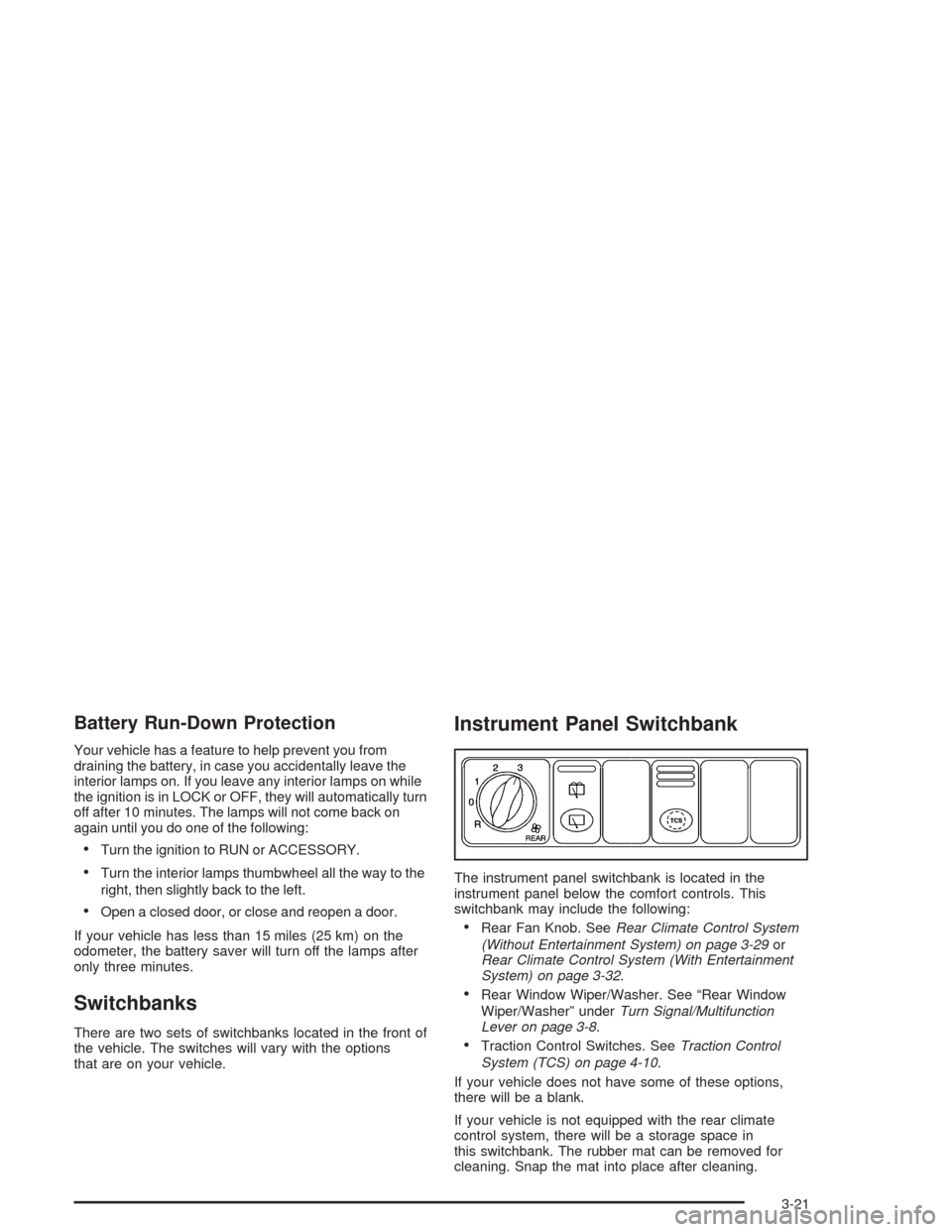
Instrument Panel Switchbank
The instrument panel switchbank is located in the
instrument panel below the comfort controls. This
switchbank may include the following:
Rear Fan Knob. SeeRear Climate Control System
(Without Entertainment System) on page 3-29or
Rear Climate Control System (With Entertainment
System) on page 3-32.
Rear Window Wiper/Washer. See “Rear Window
Wiper/Washer” underTurn Signal/Multifunction
Lever on page 3-8.
Traction Control Switches. SeeTraction Control
System (TCS) on page 4-10.
If your vehicle does not have some of these options,
there will be a blank.
If your vehicle is not equipped with the rear climate
control system, there will be a storage space in
this switchbank. The rubber mat can be removed for
cleaning. Snap the mat into place after cleaning.
3-21
Page 244 of 516
AM-FM Radio
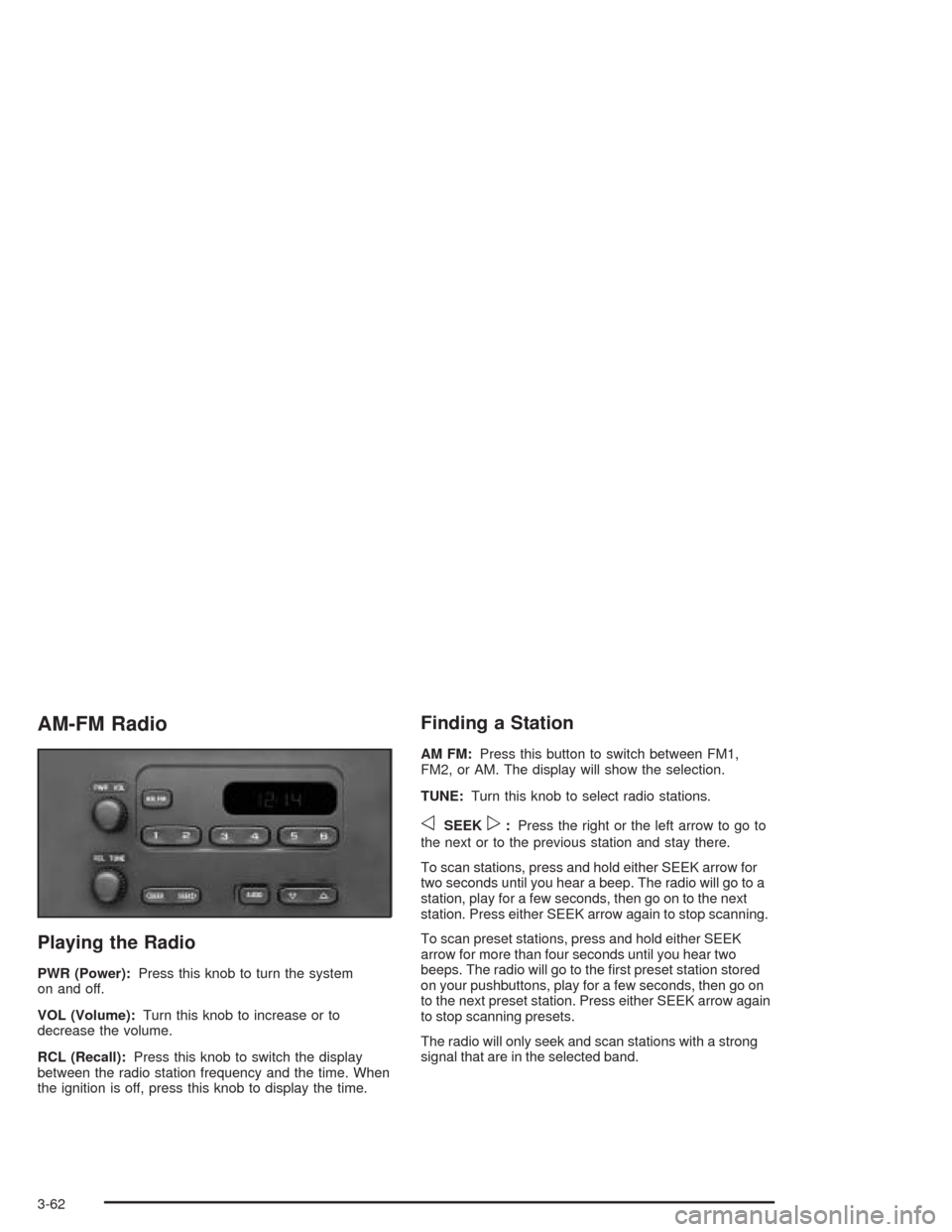
Playing the Radio
PWR (Power):Press this knob to turn the system
on and off.
VOL (Volume):Turn this knob to increase or to
decrease the volume.
RCL (Recall):Press this knob to switch the display
between the radio station frequency and the time. When
the ignition is off, press this knob to display the time.
Finding a Station
AM FM:Press this button to switch between FM1,
FM2, or AM. The display will show the selection.
TUNE:Turn this knob to select radio stations.
oSEEKp:Press the right or the left arrow to go to
the next or to the previous station and stay there.
To scan stations, press and hold either SEEK arrow for
two seconds until you hear a beep. The radio will go to a
station, play for a few seconds, then go on to the next
station. Press either SEEK arrow again to stop scanning.
To scan preset stations, press and hold either SEEK
arrow for more than four seconds until you hear two
beeps. The radio will go to the rst preset station stored
on your pushbuttons, play for a few seconds, then go on
to the next preset station. Press either SEEK arrow again
to stop scanning presets.
The radio will only seek and scan stations with a strong
signal that are in the selected band.
3-62
Page 249 of 516
Finding a Station
BAND:Press this button to switch between FM1, FM2,
AM, or XM1 or XM2 (48 contiguous US states, if
equipped). The display will show your selection.
TUNE:Turn this knob to select radio stations.
qSEEKr:Press the right or the left arrow to go to
the next or to the previous station and stay there.
The radio will seek only to stations that are in the
selected band and only to those with a strong signal.
qPSCANr(Preset Scan):Press and hold
either arrow for more than two seconds. SCAN will
appear on the display and the radio will produce one
beep. The radio will go to the rst preset station stored
on the pushbuttons, play for a few seconds, then go
on to the next preset station. Press either arrow again or
one of the pushbuttons to stop scanning presets.
The radio will scan only to the preset stations that are in
the selected band and only to those with a strong signal.
Setting Preset Stations
The six numbered pushbuttons let you return to your
favorite stations. You can set up to 30 stations
(six FM1, six FM2, and six AM, six XM1 and six XM2
(48 contiguous US states, if equipped), by performing the
following steps:
1. Turn the radio on.
2. Press BAND to select FM1, FM2, AM or XM1
or XM2.
3. Tune in the desired station.
4. Press AUTO TONE to select the equalization.
5. Press and hold one of the six numbered
pushbuttons until you hear a beep. Whenever you
press that numbered pushbutton, the station
you set will return and the equalization that you
selected will be automatically stored for that
pushbutton.
6. Repeat the steps for each pushbutton.
3-67
Page 253 of 516
Radio Messages
CAL ERR (Calibration Error):Your audio system has been calibrated for your vehicle from the factory. If CAL ERR
appears on the display it means that your radio has not been congured properly for your vehicle and must be
returned to the dealer for service.
LOCKED:This message is displayed when the THEFTLOCK
®system has locked up. You must return to the dealer
for service.
If any error occurs repeatedly or if an error cannot be corrected, contact your dealer.
XM™ Radio Messages
Radio Display
MessageCondition Action Required
XL (Explicit Language
Channels)XL on the radio display,
after the channel name,
indicates content with
explicit language.These channels, or any others, can be blocked at a
customer’s request, by calling 1-800-852-XMXM (9696).
Updating Updating
encryption codeThe encryption code in your receiver is being updated, and
no action is required. This process should take no longer
than 30 seconds.
No Signal Loss of signal Your system is functioning correctly, but you are in a
location that is blocking the XM signal. When you move
into an open area, the signal should return.
Loading Acquiring channel audio
(after 4 second delay)Your radio system is acquiring and processing audio and
text data. No action is needed. This message should
disappear shortly.
3-71
Page 261 of 516
Finding a Station
BAND:Press this button to switch between FM1, FM2,
AM, or XM1 or XM2 (48 contiguous US states, if
equipped). The display will show your selection.
TUNE:Turn this knob to select radio stations.
oSEEKp:Press the right or the left arrow to go to
the next or to the previous station and stay there.
The radio will seek only to stations that are in the
selected band and only to those with a strong signal.
oPSCANp(Preset Scan):Press and hold
either arrow for more than two seconds. SCAN will
appear on the display and the radio will produce one
beep. The radio will scan to the rst preset station stored
on the pushbuttons, play for a few seconds, then go
on to the next preset station. Press either arrow again or
one of the pushbuttons to stop scanning presets.
The radio will scan only to the preset stations that are in
the selected band and only to those with a strong signal.
Setting Preset Stations
The six numbered pushbuttons let you return to your
favorite stations. You can set up to 30 stations
(six FM1, six FM2, and six AM, six XM1 and six XM2
(48 contiguous US states, if equipped), by performing
the following steps:
1. Turn the radio on.
2. Press BAND to select FM1, FM2, AM, or XM1
or XM2.
3. Tune in the desired station.
4. Press AUTO TONE to select the equalization.
5. Press and hold one of the six numbered
pushbuttons until you hear a beep. Whenever you
press that numbered pushbutton, the station
you set will return and the equalization that you
selected will be automatically stored for that
pushbutton.
6. Repeat the steps for each pushbutton.
3-79
Page 265 of 516
Radio Messages
CAL ERR (Calibration Error):Your audio system has been calibrated for your vehicle from the factory. If CAL ERR
appears on the display it means that your radio has not been congured properly for your vehicle and it must be
returned to the dealer for service.
LOCKED:This message is displayed when the THEFTLOCK
®system has locked up. You must return to the dealer
for service.
If any error occurs repeatedly or if an error cannot be corrected, contact your dealer.
XM™ Radio Messages
Radio Display
MessageCondition Action Required
XL (Explicit Language
Channels)XL on the radio display,
after the channel name,
indicates content with
explicit language.These channels, or any others, can be blocked at a
customer’s request, by calling 1-800-852-XMXM (9696).
Updating Updating
encryption codeThe encryption code in your receiver is being updated, and
no action is required. This process should take no longer
than 30 seconds.
No Signal Loss of signal Your system is functioning correctly, but you are in a
location that is blocking the XM signal. When you move
into an open area, the signal should return.
Loading Acquiring channel audio
(after 4 second delay)Your radio system is acquiring and processing audio and
text data. No action is needed. This message should
disappear shortly.
3-83
Page 277 of 516
Finding a Station
BAND:Press this button to switch between FM1, FM2,
AM, or XM1 or XM2 (48 contiguous US states, if
equipped). The display will show your selection.
TUNE:Turn this knob to select radio stations.
sSEEKt:Press the right or the left arrow to go to
the next or to the previous station and stay there.
The radio will seek only to stations that are in the
selected band and only to those with a strong signal.
sSCANt:Press and hold either SCAN arrow
for two seconds until SC appears on the display and
you hear a beep. The radio will go to a station, play for
a few seconds, then go on to the next station. Press
either SCAN arrow again to stop scanning.
To scan preset stations, press and hold either SCAN
arrow for more than four seconds. PRESET SCAN will
appear on the display. You will hear a double beep.
The radio will go to the rst preset station stored on your
pushbuttons, play for a few seconds, then go on to
the next preset station. Press either SCAN arrow again
to stop scanning presets.
The radio will scan only to stations that are in the
selected band and only to those with a strong signal.
Setting Preset Stations
The six numbered pushbuttons let you return to your
favorite stations. You can set up to 30 stations (six FM1,
six FM2, and six AM, six XM1 and six XM2
(48 contiguous US states, if equipped), by performing
the following steps:
1. Turn the radio on.
2. Press BAND to select FM1, FM2, AM, or XM1
or XM2.
3. Tune in the desired station.
4. Press AUTO EQ to select the equalization.
5. Press and hold one of the six numbered
pushbuttons until you hear a beep. Whenever you
press that numbered pushbutton, the station
you set will return and the equalization that you
selected will be automatically stored for that
pushbutton.
6. Repeat the steps for each pushbutton.
3-95