Page 206 of 346
The tethered fuel cap is located behind a hinged door
on the passenger’s side of your vehicle.
To remove the fuel cap, turn it slowly to the left
(counterclockwise). The fuel cap has a spring in it. If
you let go of the cap too soon, it will spring back to
the right.
{CAUTION:
If you spill fuel and then something ignites it,
you could be badly burned. Fuel can spray out
on you if you open the fuel cap too quickly. This
spray can happen if your tank is nearly full, and
is more likely in hot weather. Open the fuel cap
slowly and wait for any “hiss” noise to stop.
Then unscrew the cap all the way.
Be careful not to spill fuel. Do not top off or overfill your
tank, and wait a few seconds after you have finished
pumping before you remove the nozzle. Clean fuel from
painted surfaces as soon as possible. SeeCleaning
the Outside of Your Vehicle on page 5-76.
5-8
Page 207 of 346

When you put the fuel cap back on, turn it to the right
(clockwise) until you hear a clicking sound. Make
sure you fully install the cap. The diagnostic system can
determine if the fuel cap has been left off or improperly
installed. This would allow fuel to evaporate into the
atmosphere. SeeMalfunction Indicator Lamp on
page 3-33.
{CAUTION:
If a re starts while you are refueling, do not
remove the nozzle. Shut off the ow of fuel by
shutting off the pump or by notifying the
station attendant. Leave the area immediately.
Notice:If you need a new fuel cap, be sure to get
the right type. Your dealer can get one for you.
If you get the wrong type, it may not t properly.
This may cause your malfunction indicator lamp to
light and may damage your fuel tank and emissions
system. SeeMalfunction Indicator Lamp on
page 3-33.
Filling a Portable Fuel Container
{CAUTION:
Never ll a portable fuel container while it is in
your vehicle. Static electricity discharge from
the container can ignite the gasoline vapor.
You can be badly burned and your vehicle
damaged if this occurs. To help avoid injury to
you and others:
Dispense gasoline only into approved
containers.
Do not ll a container while it is inside a
vehicle, in a vehicle’s trunk, pickup bed or
on any surface other than the ground.
Bring the ll nozzle in contact with the
inside of the ll opening before operating
the nozzle. Contact should be maintained
until the lling is complete.
Do not smoke while pumping gasoline.
5-9
Page 229 of 346
1. Park the vehicle on a level surface.
You can remove the coolant surge tank pressure
cap when the cooling system, including the coolant
surge tank pressure cap and upper radiator
hose, is no longer hot. Turn the pressure cap slowly
counterclockwise (left) about two or two and
one-half turns. If you hear a hiss, wait for that to
stop. This will allow any pressure still left to be
vented out the discharge hose.
2. Then keep turning the pressure cap slowly, and
remove it.
5-31
Page 243 of 346
4. Remove the headlamp cap by turning it
counterclockwise.
5. Release the spring that retains the bulb.
6. Remove the old bulb.
7. Install the new bulb.
8. Install the bulb retaining spring.
9. Install the wiring harness connector to the bulb and
replace the headlamp cap by turning it clockwise.
10. Reverse Steps 1 through 2 to install the headlamp
assembly. Then, check the lamps.
Front Turn Signal and Parking
Lamps
1. Open the hood.
2. Remove the two bolts and the one nut and remove
the headlamp assembly.
3. Turn the bulb socket counterclockwise.
4. Pull the bulb socket out of the lamp housing.
5. Press the bulb inward and turn it counterclockwise
to remove it from the bulb socket.
5-45
Page 244 of 346
6. Install the new bulb into the holder by pressing it in
and turning it clockwise.
7. Install the socket into the lamp housing by turning it
clockwise.
8. Reverse Steps 1 through 2 to install the assembly.
Then, check the lamps.
Turn Signal Lamps (Side)
Your vehicle may have this side turn signal lamp.
1. Remove the side turn signal lamp assembly by
pulling it forward.
2. Turn the bulb holder counterclockwise.3. Remove the bulb from the lamp housing by pulling
the bulb straight out of the holder.
4. Install the new bulb into the bulb holder by pushing
in and turning the bulb holder clockwise.
5. Push the side turn signal lamp assembly back into
its original position.
Fog Lamps
1. Disconnect the wiring
harness connector
from the front fog
lamp bulb.
2. Turn the front fog lamp bulb counterclockwise and
remove it.
3. Install the new bulb.
4. Connect the wiring harness connector to the front
fog lamp bulb.
5-46
Page 245 of 346
Sidemarker Lamps (Front)
1. Open the hood.
2. Remove the headlamp assembly.
3. Turn the front sidemarker bulb socket
counterclockwise.
4. Pull the front sidemarker bulb socket out of the front
bumper.
5. Pull the old bulb straight out of the bulb socket
6. Push the new bulb straight into the socket.
7. Reverse Steps 1 through 4 to install the assembly.
Sidemarker Lamps (Rear)
1. Reach inside of the rear bumper and locate the
socket.
2. Turn the rear sidemarker bulb socket
counterclockwise.
3. Pull the rear sidemaker bulb socket out of the rear
bumper.
4. Pull the old bulb straight out from the bulb socket.
5. Push the new bulb straight into the socket.
6. Reverse Steps 1 through 3 to install the bulb socket.
5-47
Page 247 of 346
3. Remove the bulb socket by turning it
counterclockwise.
4. Remove the bulb from the socket by pressing the
bulb and turning it counterclockwise.
5. Install the appropriate bulb into the socket.
6. Replace the bulb socket into the lamp housing.
Turn the bulb socket clockwise to secure.
7. Replace the trim cover.
8. Close the trunk or liftgate.Replacement Bulbs
Lamps Bulb Number
Back-Up 94535571
Center High-Mounted
Stoplamp/Sidemarker - Front
and Rear94535587
Headlamps - High-Beam 94535541
Headlamps - Low-Beam 94535546
Tail/Stoplamp 94535574
Turn Signal - Front and Parking
Lamp94535578
Turn Signal - Rear 94535572
For any bulb not listed here, contact your dealer.
5-49
Page 264 of 346
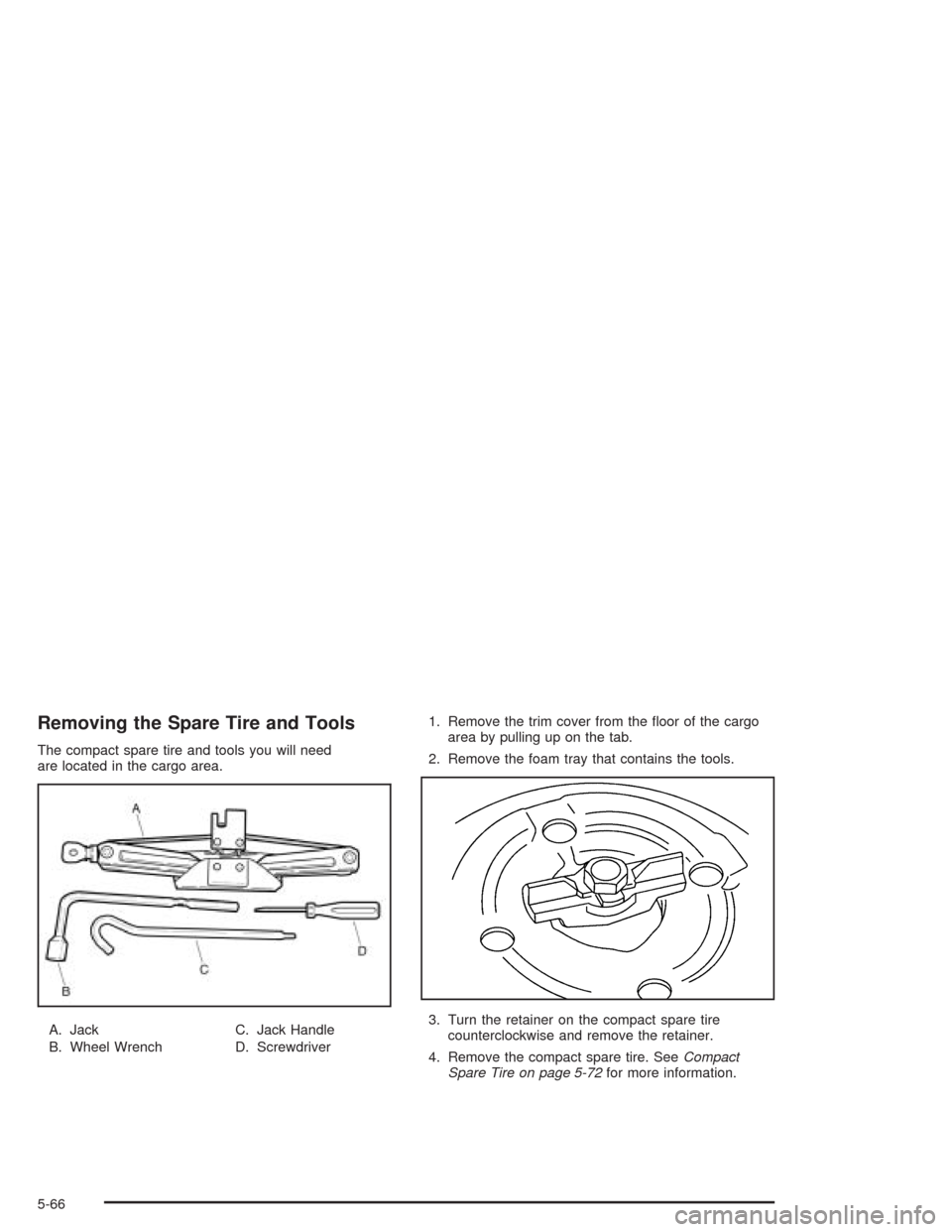
Removing the Spare Tire and Tools
The compact spare tire and tools you will need
are located in the cargo area.
A. Jack
B. Wheel WrenchC. Jack Handle
D. Screwdriver1. Remove the trim cover from the floor of the cargo
area by pulling up on the tab.
2. Remove the foam tray that contains the tools.
3. Turn the retainer on the compact spare tire
counterclockwise and remove the retainer.
4. Remove the compact spare tire. SeeCompact
Spare Tire on page 5-72for more information.
5-66