Page 163 of 426
AV SPEED:Press the INFO button until AV SPEED
appears in the display. This is the vehicle’s average
speed in miles per hour or kilometers per hour.
Press and hold the ENTER button while AV SPEED
is displayed to reset the average vehicle speed.
OIL LIFE:Press the button until OIL LIFE appears in
the display. The Oil Life Monitor system shows an
estimate of the oil’s remaining useful life. It will show
100% when the system is reset after an oil change.
It will alert you to change your oil on a schedule
consistent with your driving conditions.
Always reset the engine oil life after an oil change.
The oil change reminder does not measure how much
oil you have in your engine. So, be sure to check your
oil level often.
Personalization
The following options can be accessed in order by
pressing the MENU button anytime while the vehicle is
in ON. Press this button to scroll through each option.
All of the personalization options may not be available
on your vehicle. Only the options available will be
displayed on your DIC.
Oil Life Monitor Reset
Units Selection (English/Metric)
Remote Start Capability
Horn Chirp During Remote Keyless Entry Locking
Horn Chirp During Remote Keyless Entry Unlocking
Exterior Light Flash During Remote Keyless
Entry Locking or Unlocking
Delayed Locking
Automatic Vehicle Unlocking: Specic Doors
Automatic Vehicle Unlocking: When Key is Off or
When Shift To Park
Exterior Perimeter Lighting During Remote Keyless
Entry Unlock
Security System Passive or Remote Keyless
Entry Arming
Select Language: (English, French, Spanish or
German)
When the desired option is reached, use the ENTER
button to toggle between the modes of that option.
To make a selection, press the MENU button again.
If no selection is made within 10 seconds, the display
will revert back to the previous information displayed.
The MENU mode is exited when the INFO button is
pressed, a ten second time period has elapsed, the
ignition is turned to OFF or the end of the MENU list
is reached.
3-47
Page 165 of 426
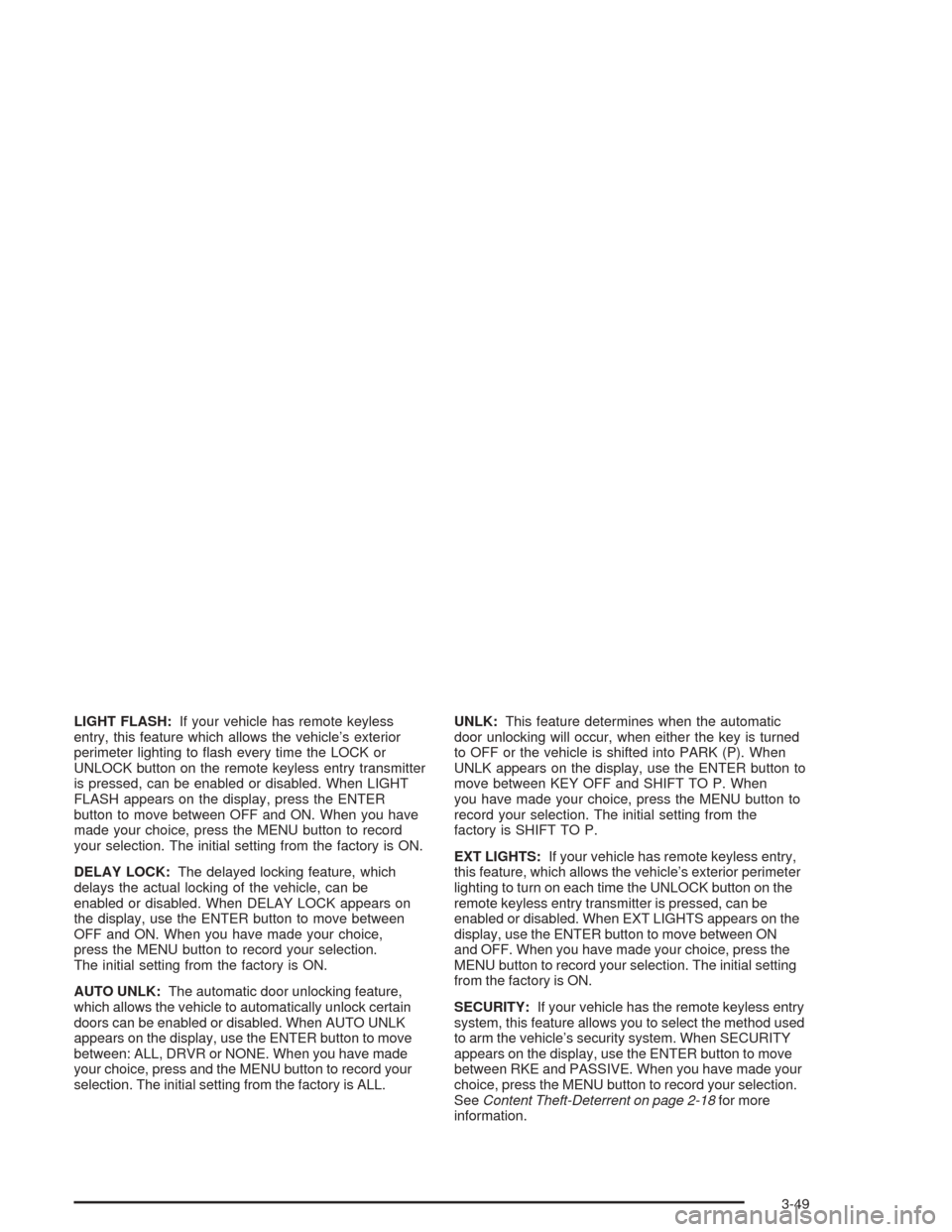
LIGHT FLASH:If your vehicle has remote keyless
entry, this feature which allows the vehicle’s exterior
perimeter lighting to ash every time the LOCK or
UNLOCK button on the remote keyless entry transmitter
is pressed, can be enabled or disabled. When LIGHT
FLASH appears on the display, press the ENTER
button to move between OFF and ON. When you have
made your choice, press the MENU button to record
your selection. The initial setting from the factory is ON.
DELAY LOCK:The delayed locking feature, which
delays the actual locking of the vehicle, can be
enabled or disabled. When DELAY LOCK appears on
the display, use the ENTER button to move between
OFF and ON. When you have made your choice,
press the MENU button to record your selection.
The initial setting from the factory is ON.
AUTO UNLK:The automatic door unlocking feature,
which allows the vehicle to automatically unlock certain
doors can be enabled or disabled. When AUTO UNLK
appears on the display, use the ENTER button to move
between: ALL, DRVR or NONE. When you have made
your choice, press and the MENU button to record your
selection. The initial setting from the factory is ALL.UNLK:This feature determines when the automatic
door unlocking will occur, when either the key is turned
to OFF or the vehicle is shifted into PARK (P). When
UNLK appears on the display, use the ENTER button to
move between KEY OFF and SHIFT TO P. When
you have made your choice, press the MENU button to
record your selection. The initial setting from the
factory is SHIFT TO P.
EXT LIGHTS:If your vehicle has remote keyless entry,
this feature, which allows the vehicle’s exterior perimeter
lighting to turn on each time the UNLOCK button on the
remote keyless entry transmitter is pressed, can be
enabled or disabled. When EXT LIGHTS appears on the
display, use the ENTER button to move between ON
and OFF. When you have made your choice, press the
MENU button to record your selection. The initial setting
from the factory is ON.
SECURITY:If your vehicle has the remote keyless entry
system, this feature allows you to select the method used
to arm the vehicle’s security system. When SECURITY
appears on the display, use the ENTER button to move
between RKE and PASSIVE. When you have made your
choice, press the MENU button to record your selection.
SeeContent Theft-Deterrent on page 2-18for more
information.
3-49
Page 182 of 426
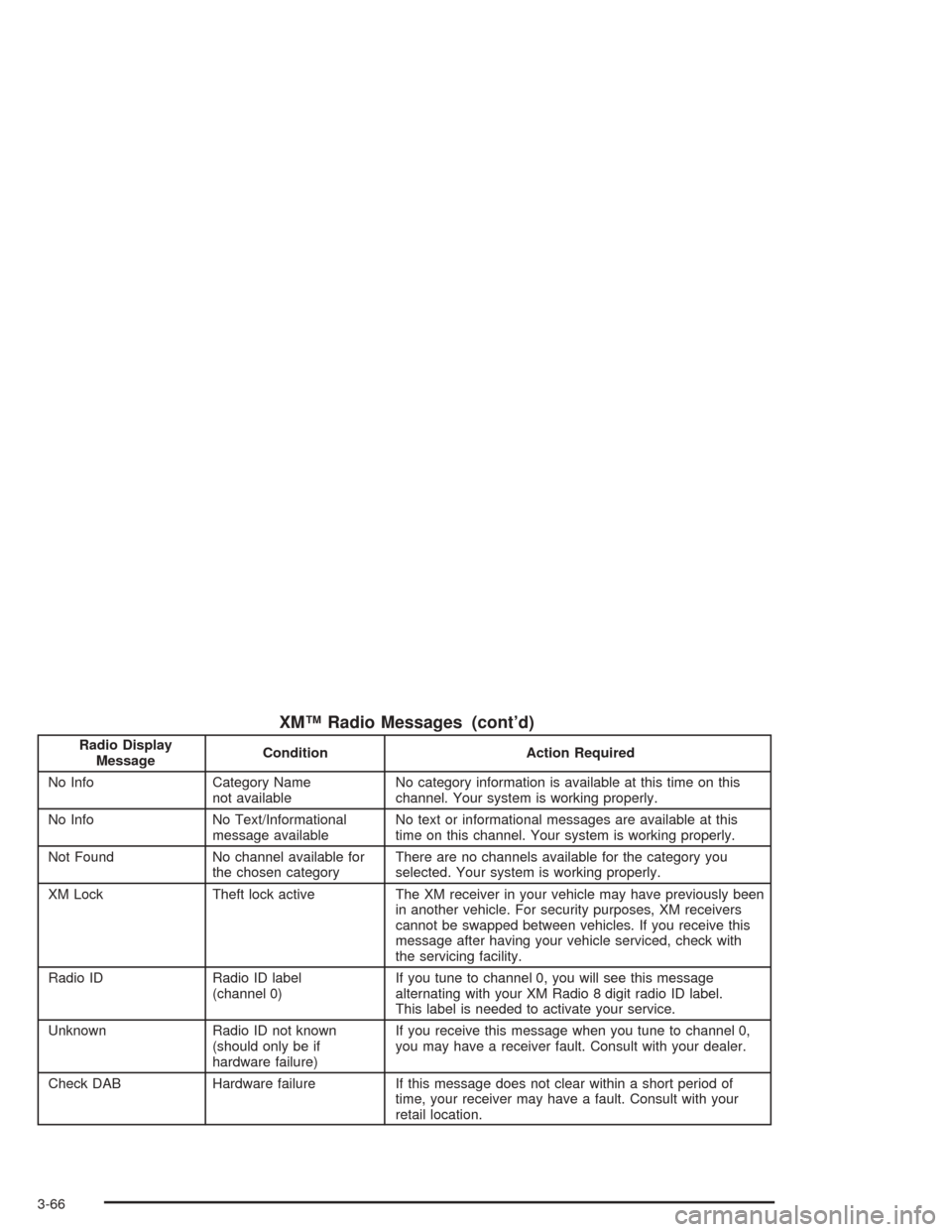
XM™ Radio Messages (cont’d)
Radio Display
MessageCondition Action Required
No Info Category Name
not availableNo category information is available at this time on this
channel. Your system is working properly.
No Info No Text/Informational
message availableNo text or informational messages are available at this
time on this channel. Your system is working properly.
Not Found No channel available for
the chosen categoryThere are no channels available for the category you
selected. Your system is working properly.
XM Lock Theft lock active The XM receiver in your vehicle may have previously been
in another vehicle. For security purposes, XM receivers
cannot be swapped between vehicles. If you receive this
message after having your vehicle serviced, check with
the servicing facility.
Radio ID Radio ID label
(channel 0)If you tune to channel 0, you will see this message
alternating with your XM Radio 8 digit radio ID label.
This label is needed to activate your service.
Unknown Radio ID not known
(should only be if
hardware failure)If you receive this message when you tune to channel 0,
you may have a receiver fault. Consult with your dealer.
Check DAB Hardware failure If this message does not clear within a short period of
time, your receiver may have a fault. Consult with your
retail location.
3-66
Page 193 of 426
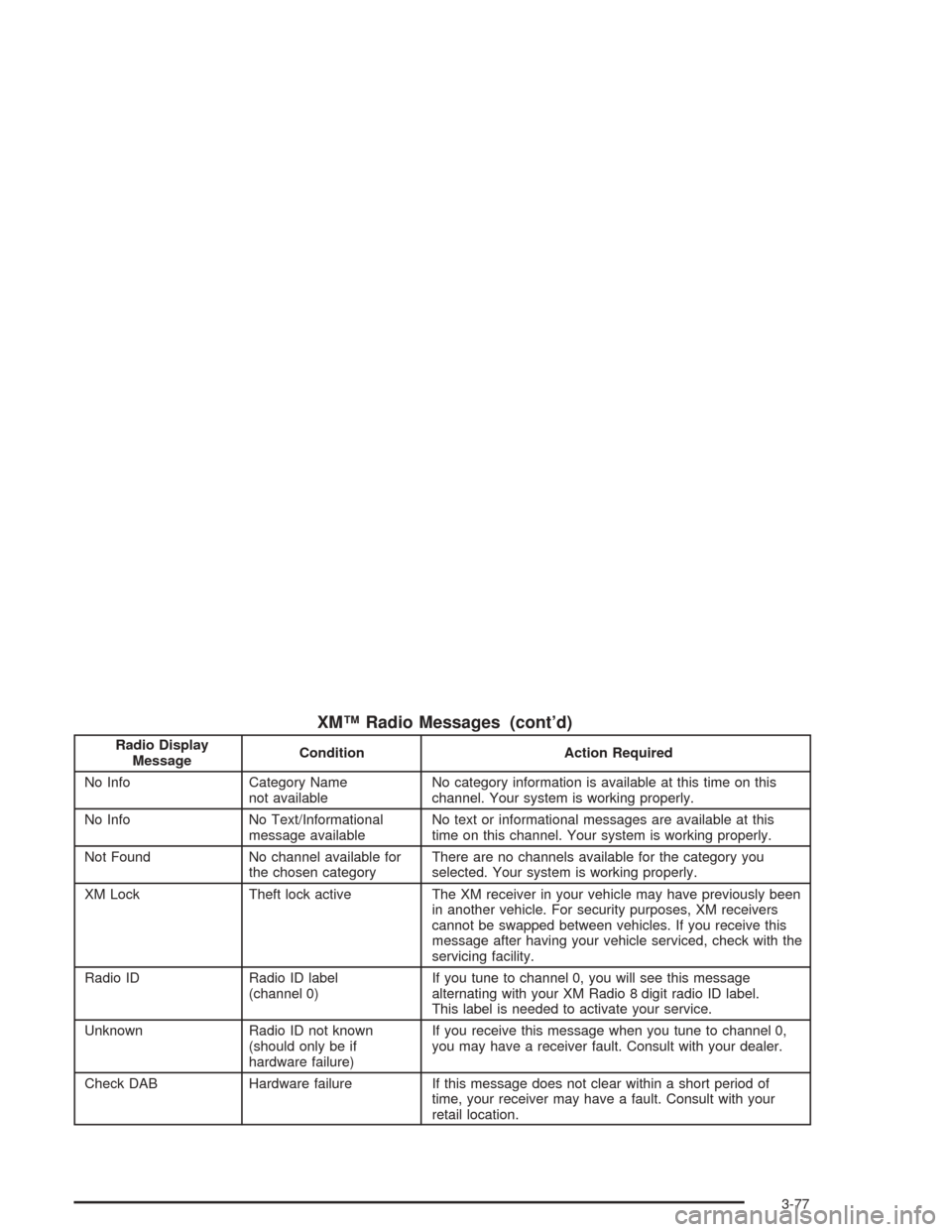
XM™ Radio Messages (cont’d)
Radio Display
MessageCondition Action Required
No Info Category Name
not availableNo category information is available at this time on this
channel. Your system is working properly.
No Info No Text/Informational
message availableNo text or informational messages are available at this
time on this channel. Your system is working properly.
Not Found No channel available for
the chosen categoryThere are no channels available for the category you
selected. Your system is working properly.
XM Lock Theft lock active The XM receiver in your vehicle may have previously been
in another vehicle. For security purposes, XM receivers
cannot be swapped between vehicles. If you receive this
message after having your vehicle serviced, check with the
servicing facility.
Radio ID Radio ID label
(channel 0)If you tune to channel 0, you will see this message
alternating with your XM Radio 8 digit radio ID label.
This label is needed to activate your service.
Unknown Radio ID not known
(should only be if
hardware failure)If you receive this message when you tune to channel 0,
you may have a receiver fault. Consult with your dealer.
Check DAB Hardware failure If this message does not clear within a short period of
time, your receiver may have a fault. Consult with your
retail location.
3-77
Page 206 of 426
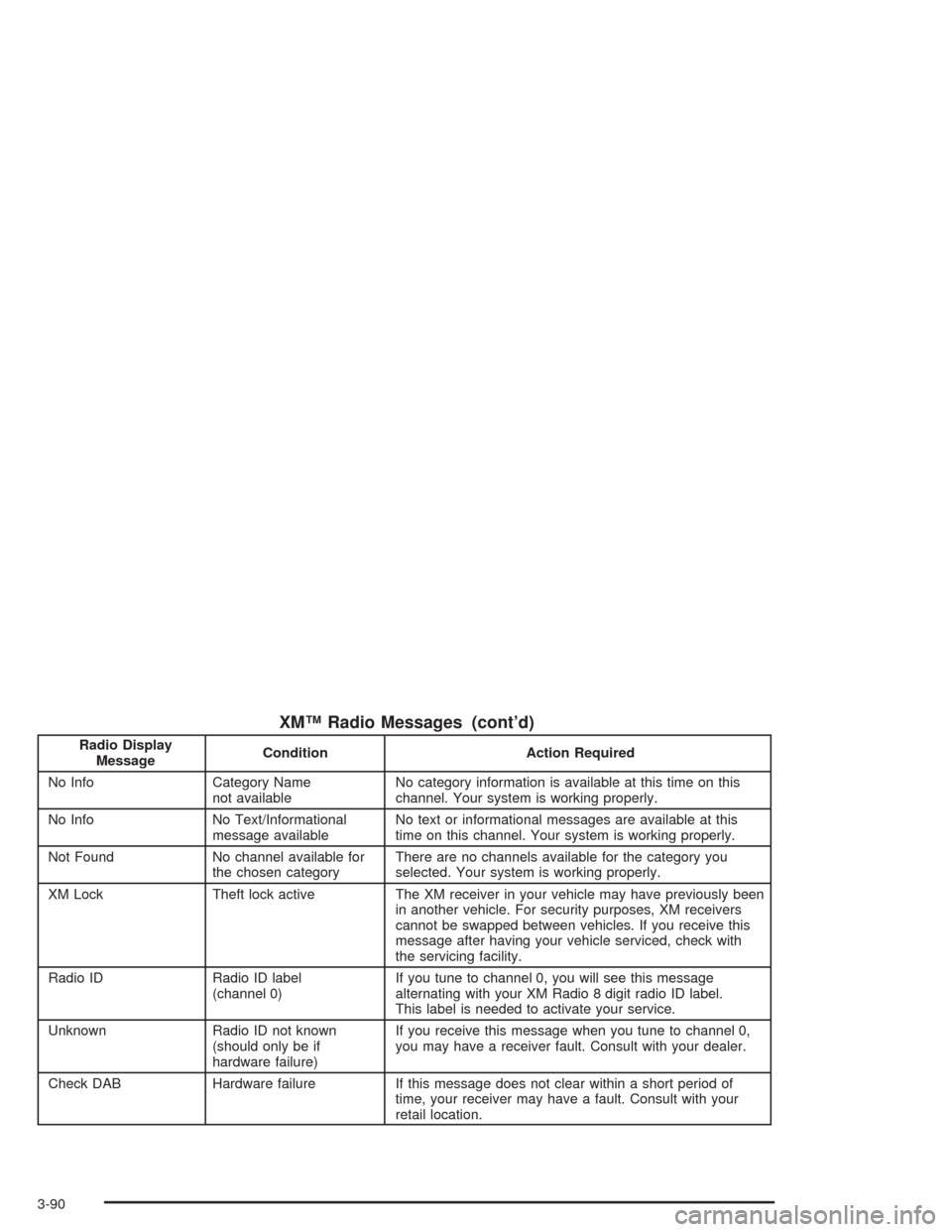
XM™ Radio Messages (cont’d)
Radio Display
MessageCondition Action Required
No Info Category Name
not availableNo category information is available at this time on this
channel. Your system is working properly.
No Info No Text/Informational
message availableNo text or informational messages are available at this
time on this channel. Your system is working properly.
Not Found No channel available for
the chosen categoryThere are no channels available for the category you
selected. Your system is working properly.
XM Lock Theft lock active The XM receiver in your vehicle may have previously been
in another vehicle. For security purposes, XM receivers
cannot be swapped between vehicles. If you receive this
message after having your vehicle serviced, check with
the servicing facility.
Radio ID Radio ID label
(channel 0)If you tune to channel 0, you will see this message
alternating with your XM Radio 8 digit radio ID label.
This label is needed to activate your service.
Unknown Radio ID not known
(should only be if
hardware failure)If you receive this message when you tune to channel 0,
you may have a receiver fault. Consult with your dealer.
Check DAB Hardware failure If this message does not clear within a short period of
time, your receiver may have a fault. Consult with your
retail location.
3-90
Page 262 of 426
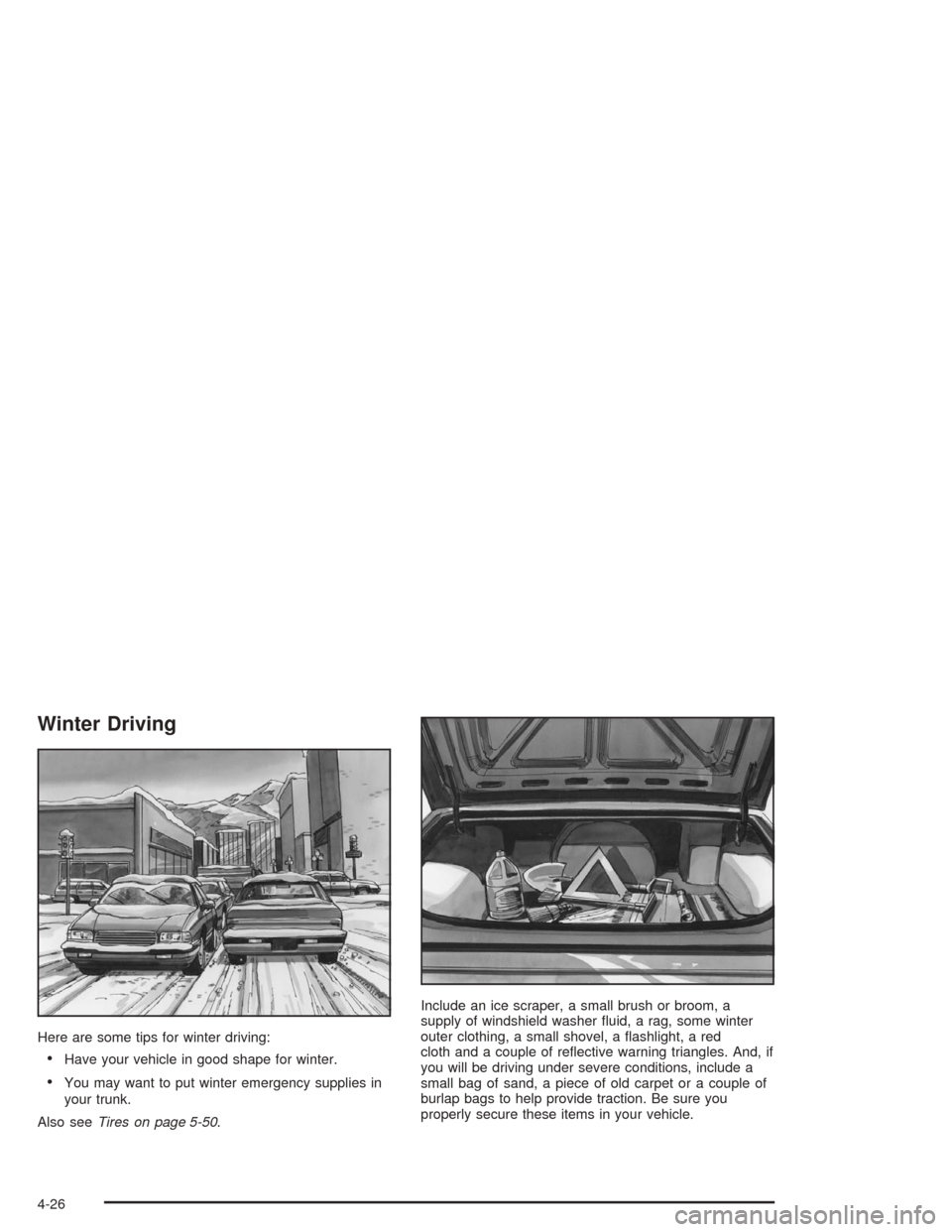
Winter Driving
Here are some tips for winter driving:
Have your vehicle in good shape for winter.
You may want to put winter emergency supplies in
your trunk.
Also seeTires on page 5-50.Include an ice scraper, a small brush or broom, a
supply of windshield washer uid, a rag, some winter
outer clothing, a small shovel, a ashlight, a red
cloth and a couple of reective warning triangles. And, if
you will be driving under severe conditions, include a
small bag of sand, a piece of old carpet or a couple of
burlap bags to help provide traction. Be sure you
properly secure these items in your vehicle.
4-26
Page 268 of 426
With the proper preparation and equipment, many
vehicle can be towed in these ways. See “Dinghy
Towing” and “Dolly Towing”, following.
Here are some important things to consider before you
do recreational vehicle towing:
What’s the towing capacity of the towing vehicle?
Be sure you read the tow vehicle manufacturer’s
recommendations.
How far will you tow? Some vehicles have
restrictions on how far and how long they can tow.
Do you have the proper towing equipment?
See your dealer or trailering professional for
additional advice and equipment recommendations.
Is your vehicle ready to be towed? Just as you
would prepare your vehicle for a long trip, you’ll
want to make sure your vehicle is prepared to be
towed. SeeBefore Leaving on a Long Trip on
page 4-23.
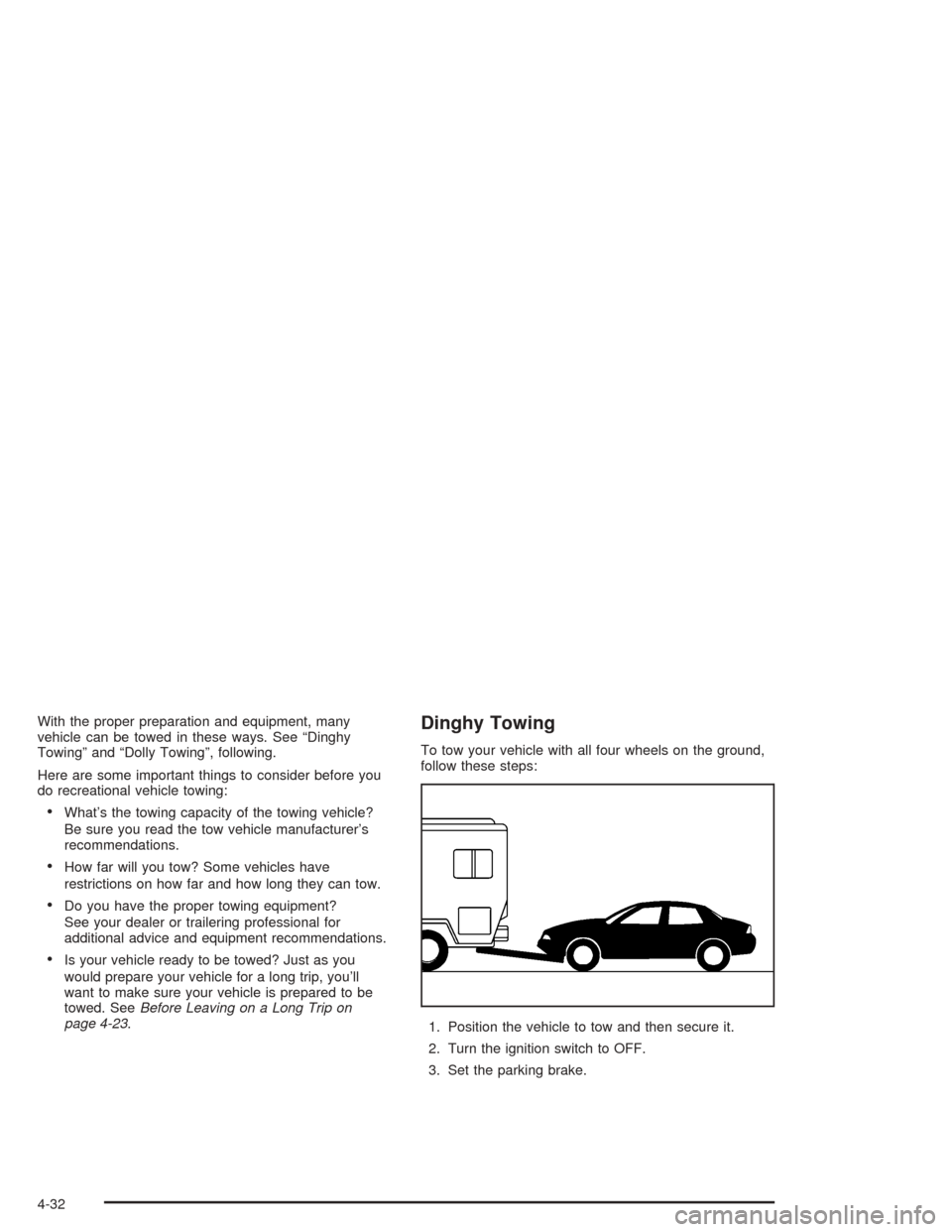
Dinghy Towing
To tow your vehicle with all four wheels on the ground,
follow these steps:
1. Position the vehicle to tow and then secure it.
2. Turn the ignition switch to OFF.
3. Set the parking brake.
4-32
Page 275 of 426
{CAUTION:
Do not load your vehicle any heavier than the
GVWR, or either the maximum front or rear
GAWR. If you do, parts on your vehicle can
break, and it can change the way your vehicle
handles. These could cause you to lose
control and crash. Also, overloading can
shorten the life of your vehicle.
{CAUTION:
Things you put inside your vehicle can strike
and injure people in a sudden stop or turn, or
in a crash.
Put things in the trunk of your vehicle. In a
trunk, put them as far forward as you can.
Try to spread the weight evenly.
Never stack heavier things, like suitcases,
inside the vehicle so that some of them
are above the tops of the seats.
Do not leave an unsecured child restraint
in your vehicle.
When you carry something inside the
vehicle, secure it whenever you can.
Do not leave a seat folded down unless
you need to.
4-39