Page 100 of 384
Roof Panel
Your vehicle may have a removable roof panel.
Removing the Roof Panel
{CAUTION:
Do not try to remove a roof panel while the
vehicle is moving. Trying to remove the roof
panel while the vehicle is moving could cause
an accident. The panel could fall into the
vehicle and cause you to lose control, or it
could y off and strike another vehicle. You or
others could be injured. Remove the roof panel
only when the vehicle is parked.Until you are sure you can remove the panel alone,
have someone help you.
Notice:If you drop or rest a roof panel on its
edges, the roof panel, paint and/or weatherstripping
may be damaged. Always place the roof panel in
the stowage receivers after removing it from
the vehicle.
1. Park on a level surface, set the parking brake firmly
and shift an automatic transmission into PARK (P).
Shift a manual transmission into REVERSE (R).
2. Turn the ignition key to OFF. Lower both sun visors
and turn them toward the door glass.
3. Open the rear hatch and remove any items
that may interfere with proper storage of the
roof panel.
2-44
Page 107 of 384
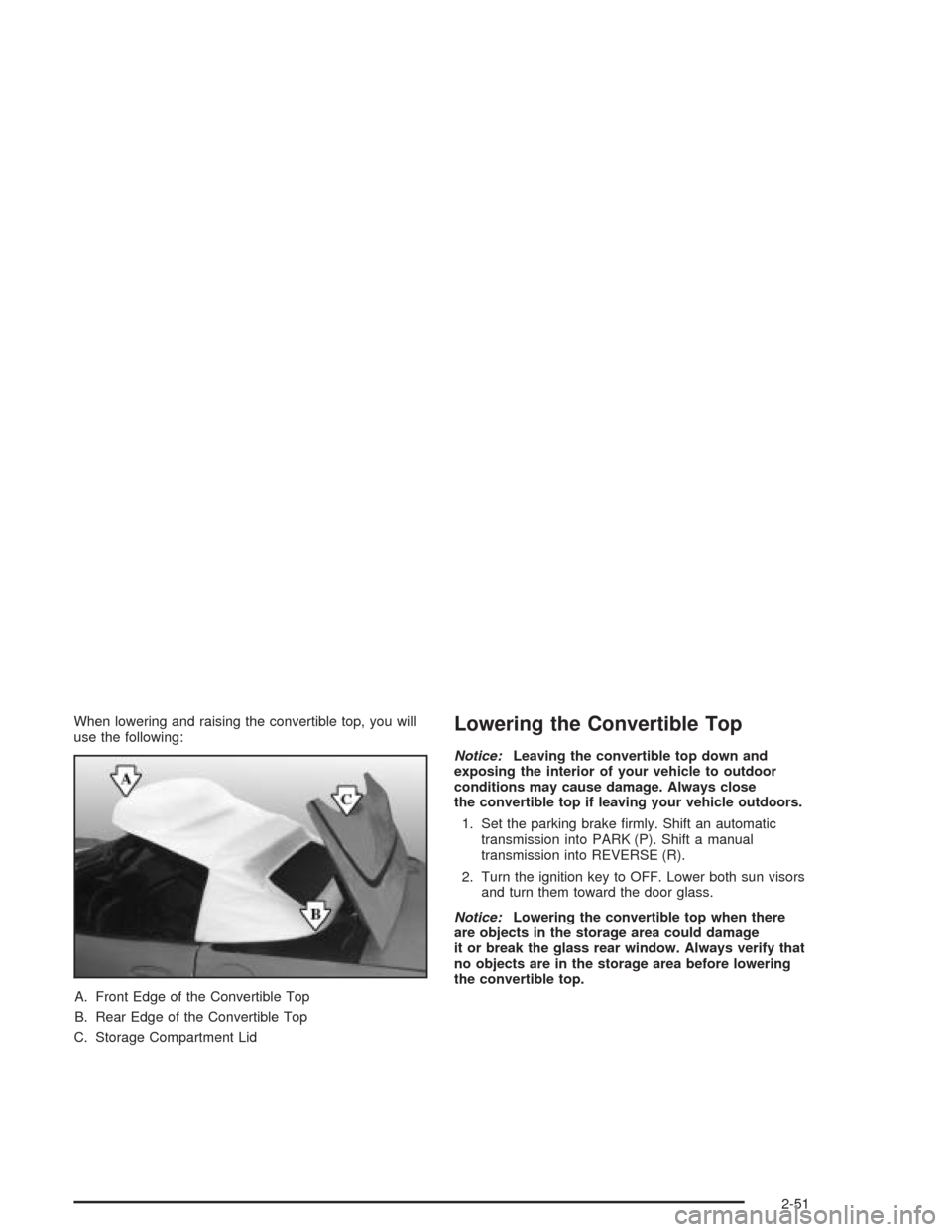
When lowering and raising the convertible top, you will
use the following:
A. Front Edge of the Convertible Top
B. Rear Edge of the Convertible Top
C. Storage Compartment LidLowering the Convertible Top
Notice:Leaving the convertible top down and
exposing the interior of your vehicle to outdoor
conditions may cause damage. Always close
the convertible top if leaving your vehicle outdoors.
1. Set the parking brake firmly. Shift an automatic
transmission into PARK (P). Shift a manual
transmission into REVERSE (R).
2. Turn the ignition key to OFF. Lower both sun visors
and turn them toward the door glass.
Notice:Lowering the convertible top when there
are objects in the storage area could damage
it or break the glass rear window. Always verify that
no objects are in the storage area before lowering
the convertible top.
2-51
Page 111 of 384
Raising the Convertible Top
1. Park on a level surface, set the parking brake firmly
and shift an automatic transmission into PARK (P).
Shift a manual transmission into REVERSE (R).
Lower both windows and sun visors and turn
the ignition key to OFF.
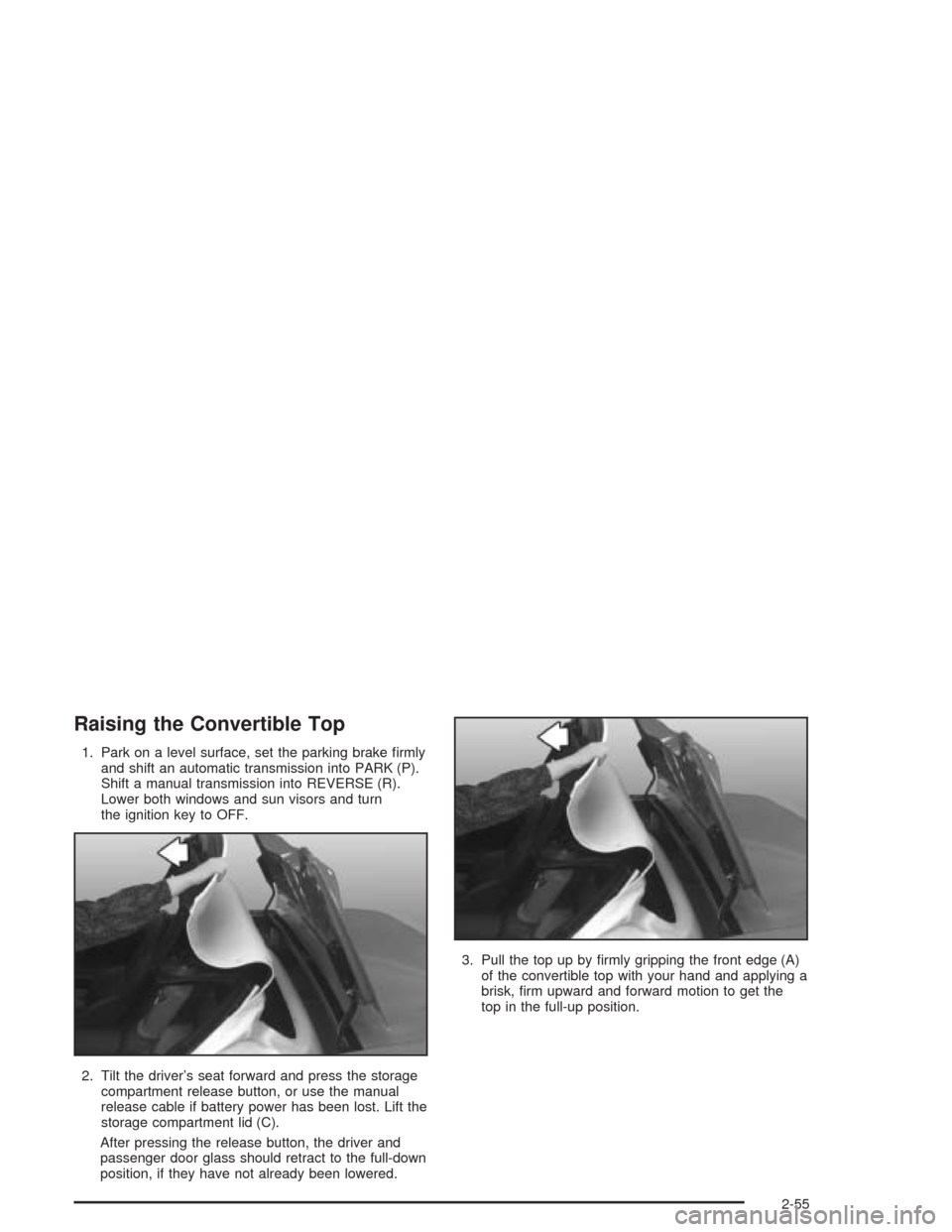
2. Tilt the driver’s seat forward and press the storage
compartment release button, or use the manual
release cable if battery power has been lost. Lift the
storage compartment lid (C).
After pressing the release button, the driver and
passenger door glass should retract to the full-down
position, if they have not already been lowered.3. Pull the top up by firmly gripping the front edge (A)
of the convertible top with your hand and applying a
brisk, firm upward and forward motion to get the
top in the full-up position.
2-55
Page 117 of 384
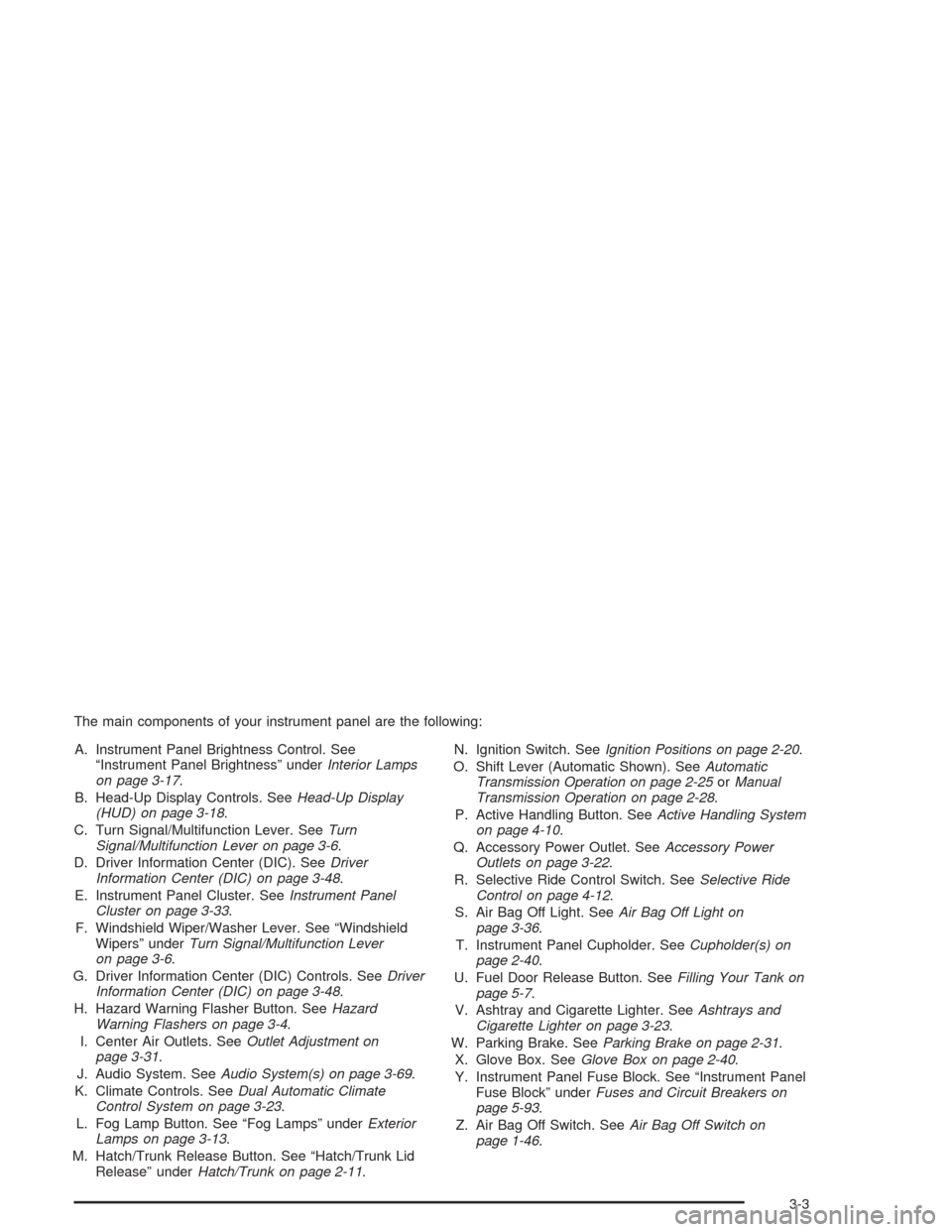
The main components of your instrument panel are the following:
A. Instrument Panel Brightness Control. See
“Instrument Panel Brightness” underInterior Lamps
on page 3-17.
B. Head-Up Display Controls. SeeHead-Up Display
(HUD) on page 3-18.
C. Turn Signal/Multifunction Lever. SeeTurn
Signal/Multifunction Lever on page 3-6.
D. Driver Information Center (DIC). SeeDriver
Information Center (DIC) on page 3-48.
E. Instrument Panel Cluster. SeeInstrument Panel
Cluster on page 3-33.
F. Windshield Wiper/Washer Lever. See “Windshield
Wipers” underTurn Signal/Multifunction Lever
on page 3-6.
G. Driver Information Center (DIC) Controls. SeeDriver
Information Center (DIC) on page 3-48.
H. Hazard Warning Flasher Button. SeeHazard
Warning Flashers on page 3-4.
I. Center Air Outlets. SeeOutlet Adjustment on
page 3-31.
J. Audio System. SeeAudio System(s) on page 3-69.
K. Climate Controls. SeeDual Automatic Climate
Control System on page 3-23.
L. Fog Lamp Button. See “Fog Lamps” underExterior
Lamps on page 3-13.
M. Hatch/Trunk Release Button. See “Hatch/Trunk Lid
Release” underHatch/Trunk on page 2-11.N. Ignition Switch. SeeIgnition Positions on page 2-20.
O. Shift Lever (Automatic Shown). SeeAutomatic
Transmission Operation on page 2-25orManual
Transmission Operation on page 2-28.
P. Active Handling Button. SeeActive Handling System
on page 4-10.
Q. Accessory Power Outlet. SeeAccessory Power
Outlets on page 3-22.
R. Selective Ride Control Switch. SeeSelective Ride
Control on page 4-12.
S. Air Bag Off Light. SeeAir Bag Off Light on
page 3-36.
T. Instrument Panel Cupholder. SeeCupholder(s) on
page 2-40.
U. Fuel Door Release Button. SeeFilling Your Tank on
page 5-7.
V. Ashtray and Cigarette Lighter. SeeAshtrays and
Cigarette Lighter on page 3-23.
W. Parking Brake. SeeParking Brake on page 2-31.
X. Glove Box. SeeGlove Box on page 2-40.
Y. Instrument Panel Fuse Block. See “Instrument Panel
Fuse Block” underFuses and Circuit Breakers on
page 5-93.
Z. Air Bag Off Switch. SeeAir Bag Off Switch on
page 1-46.
3-3
Page 127 of 384
Using Cruise Control on Hills
How well your cruise control will work on hills depends
upon your speed, load and the steepness of the
hills. When going downhill, you may have to brake or
shift to a lower gear to keep your speed down. Of
course, applying the brake takes you out of cruise
control. Many drivers find this to be too much trouble
and do not use cruise control on steep hills.
Ending Cruise Control
There are two ways to turn off the cruise control:
•Step lightly on the brake pedal or push the clutch
pedal, if you have a manual transmission vehicle.
•Move the cruise switch to OFF.
The Driver Information Center (DIC) will display the
message CRUISE DISENGAGED.
Erasing Speed Memory
When you turn off the cruise control or the ignition,
cruise control set speed memory is erased.
Exterior Lamps
The exterior lamp switch on the turn signal/multifunction
lever operates the headlamps.
The exterior lamp switch has three positions:
OFF:Turn the switch to this position to turn off all
lamps, except the Daytime Running Lamps (DRL).
;(Parking Lamps):Turn the switch to this position
to turn on the parking lamps, together with the
following:
•Taillamps
•Parking Lamps
•Sidemarker Lamps
3(Headlamps):Turn the switch to this position to
turn on the headlamps, together with the previously
listed lamps.
3-13
Page 133 of 384
The information may be displayed in English or metric
units and appears as an image focused out toward
the front of your vehicle. The HUD consists of the
following information:
•Speedometer
•Turn Signal Indicators
•High-Beam Indicator Symbol
•Tachometer
•Oil, Temperature and Fuel Gages
•Shift Light (Performance SHIFT Light)
This light is used for performance driving to indicate
that the vehicle’s best performance level has been
reached to shift the transmission into the next higher
gear. The SHIFT light will display at an engine speed
of about 5,750 rpm (6,250 rpm on Z06), just prior to
reaching the engine fuel cut-off mode.
•Check Gages IconThere are five HUD selections that you can choose to
view in the HUD display. By pressing and holding
the PAGE button, you can scroll through these pages in
the following order:
•Speed Only
•Speed and Gage
•Speed, Tachometer and Gage
•Speed and Tachometer
•Tachometer Only
When you have chosen the desired HUD display,
release the PAGE button.
Gages can be scrolled through by tapping the PAGE
button (only when a gage is displayed). The gages
shown are the following:
•Oil Pressure
•Coolant Temperature
•Fuel Level
The selections that you choose will remain in the HUD
display until they are changed.
3-19
Page 156 of 384
Notice:Modications made to the engine,
transmission, exhaust, intake or fuel system of your
vehicle or the replacement of the original tires
with other than those of the same Tire Performance
Criteria (TPC) can affect your vehicle’s emission
controls and may cause this light to come on.
Modications to these systems could lead to costly
repairs not covered by your warranty. This may
also result in a failure to pass a required Emission
Inspection/Maintenance test.
This light should come on, as a check to show you it is
working, when the ignition is on and the engine is
not running. If the light does not come on, have it
repaired. This light will also come on during a
malfunction in one of two ways:
•Light Flashing— A misfire condition has been
detected. A misfire increases vehicle emissions
and may damage the emission control system on
your vehicle. Diagnosis and service may be
required.
•Light On Steady— An emission control system
malfunction has been detected on your vehicle.
Diagnosis and service may be required.
If the Light Is Flashing
The following may prevent more serious damage to
your vehicle:
•Reducing vehicle speed.
•Avoiding hard accelerations.
•Avoiding steep uphill grades.
If the light stops flashing and remains on steady, see “If
the Light Is On Steady” following.
If the light continues to flash, when it is safe to do so,
stop the vehicle.Find a safe place to park your vehicle.
Turn the key off, wait at least 10 seconds and restart
the engine. If the light remains on steady, see “If
the Light Is On Steady” following. If the light is still
flashing, follow the previous steps, and see your dealer
for service as soon as possible.
3-42
Page 162 of 384
Driver Information Center (DIC)
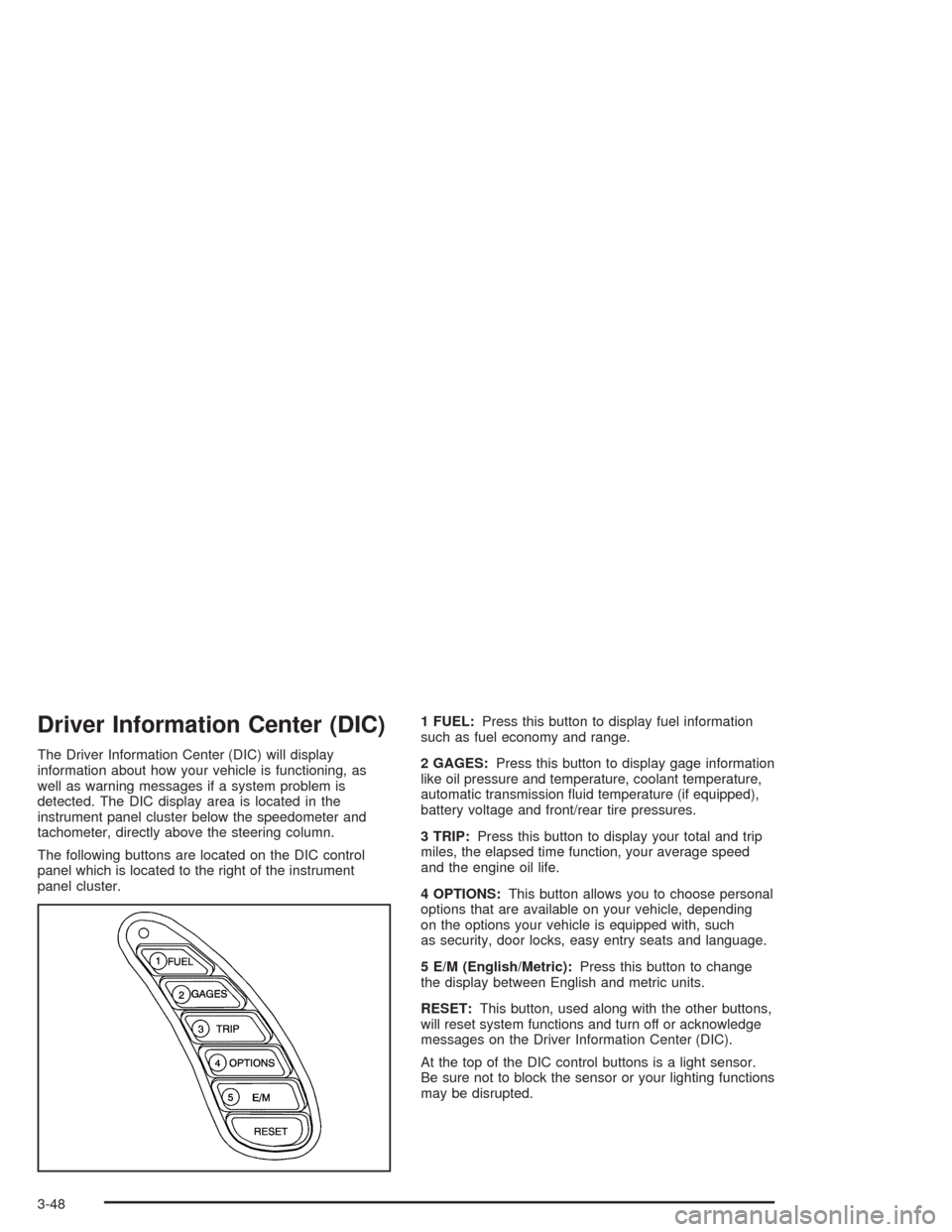
The Driver Information Center (DIC) will display
information about how your vehicle is functioning, as
well as warning messages if a system problem is
detected. The DIC display area is located in the
instrument panel cluster below the speedometer and
tachometer, directly above the steering column.
The following buttons are located on the DIC control
panel which is located to the right of the instrument
panel cluster.1 FUEL:Press this button to display fuel information
such as fuel economy and range.
2 GAGES:Press this button to display gage information
like oil pressure and temperature, coolant temperature,
automatic transmission fluid temperature (if equipped),
battery voltage and front/rear tire pressures.
3 TRIP:Press this button to display your total and trip
miles, the elapsed time function, your average speed
and the engine oil life.
4 OPTIONS:This button allows you to choose personal
options that are available on your vehicle, depending
on the options your vehicle is equipped with, such
as security, door locks, easy entry seats and language.
5 E/M (English/Metric):Press this button to change
the display between English and metric units.
RESET:This button, used along with the other buttons,
will reset system functions and turn off or acknowledge
messages on the Driver Information Center (DIC).
At the top of the DIC control buttons is a light sensor.
Be sure not to block the sensor or your lighting functions
may be disrupted.
3-48