2004 CHEVROLET CLASSIC audio
[x] Cancel search: audioPage 1 of 348

Seats and Restraint Systems........................... 1-1
Front Seats
............................................... 1-2
Rear Seats
............................................... 1-6
Safety Belts
.............................................. 1-8
Child Restraints
.......................................1-32
Supplemental Restraint System (SRS)
..........1-56
Restraint System Check
............................1-62
Features and Controls..................................... 2-1
Keys
........................................................ 2-2
Doors and Locks
....................................... 2-7
Windows
.................................................2-14
Theft-Deterrent Systems
............................2-16
Starting and Operating Your Vehicle
...........2-16
Mirrors
....................................................2-29
Storage Areas
.........................................2-31
Instrument Panel............................................. 3-1
Instrument Panel Overview
.......................... 3-2
Climate Controls
......................................3-18
Warning Lights, Gages and Indicators
.........3-22
Audio System(s)
.......................................3-36Driving Your Vehicle....................................... 4-1
Your Driving, the Road, and Your Vehicle
..... 4-2
Towing
...................................................4-29
Service and Appearance Care.......................... 5-1
Service
..................................................... 5-3
Fuel
......................................................... 5-4
Checking Things Under the Hood
...............5-10
Bulb Replacement
....................................5-45
Windshield Wiper Blade Replacement
.........5-51
Tires
......................................................5-52
Appearance Care
.....................................5-80
Vehicle Identification
.................................5-88
Electrical System
......................................5-89
Capacities and Specifications
.....................5-95
Normal Maintenance Replacement Parts
......5-96
Maintenance Schedule..................................... 6-1
Maintenance Schedule
................................ 6-2
Customer Assistance Information.................... 7-1
Customer Assistance Information
.................. 7-2
Reporting Safety Defects
...........................7-11
Index.................................................................1
2004 Chevrolet Classic Owner ManualM
Page 4 of 348
Vehicle Damage Warnings
Also, in this book you will find these notices:
Notice:These mean there is something that could
damage your vehicle.
A notice will tell you about something that can damage
your vehicle. Many times, this damage would not be
covered by your warranty, and it could be costly. But the
notice will tell you what to do to help avoid the
damage.
When you read other manuals, you might see CAUTION
and NOTICE warnings in different colors or in different
words.
You’ll also see warning labels on your vehicle. They use
the same words, CAUTION or NOTICE.
Vehicle Symbols
Your vehicle has components and labels that use
symbols instead of text. Symbols, used on your vehicle,
are shown along with the text describing the operation
or information relating to a specific component, control,
message, gage or indicator.
If you need help figuring out a specific name of a
component, gage or indicator, reference the following
topics:
•Seats and Restraint Systems in Section 1
•Features and Controls in Section 2
•Instrument Panel Overview in Section 3
•Climate Controls in Section 3
•Warning Lights, Gages and Indicators in Section 3
•Audio System(s) in Section 3
•Engine Compartment Overview in Section 5
iv
Page 103 of 348
Instrument Panel Overview...............................3-2
Hazard Warning Flashers................................3-4
Other Warning Devices...................................3-5
Horn.............................................................3-5
Tilt Wheel.....................................................3-5
Turn Signal/Multifunction Lever.........................3-6
Windshield Wiper Lever...................................3-8
Cruise Control..............................................3-10
Exterior Lamps.............................................3-13
Interior Lamps..............................................3-15
Accessory Power Outlets...............................3-16
Ashtrays and Cigarette Lighter........................3-17
Climate Controls............................................3-18
Climate Control System.................................3-18
Outlet Adjustment.........................................3-21
Warning Lights, Gages and Indicators.............3-22
Instrument Panel Cluster................................3-23
Speedometer and Odometer...........................3-24
Tachometer.................................................3-25
Safety Belt Reminder Light.............................3-25
Air Bag Readiness Light................................3-26
Charging System Light..................................3-27
Brake System Warning Light..........................3-27
Anti-Lock Brake System Warning Light.............3-28Engine Coolant Temperature Gage..................3-29
Low Coolant Warning Light............................3-29
Malfunction Indicator Lamp.............................3-30
Oil Pressure Light.........................................3-33
Passlock
®Warning Light................................3-34
Low Washer Fluid Warning Light.....................3-34
Door Ajar Light.............................................3-34
Service Vehicle Soon Light............................3-35
Fuel Gage...................................................3-35
Audio System(s).............................................3-36
Setting the Time for Radios without Radio
Data Systems (RDS)..................................3-37
Setting the Time for Radios with Radio Data
Systems (RDS).........................................3-37
Radio with CD..............................................3-38
Radio with Cassette and CD..........................3-43
Theft-Deterrent Feature (Non-RDS Radios).......3-54
Theft-Deterrent Feature (RDS Radios).............3-54
Understanding Radio Reception......................3-54
Care of Your Cassette Tape Player.................3-55
Care of Your CDs.........................................3-56
Care of Your CD Player................................3-56
Fixed Mast Antenna......................................3-56
Chime Level Adjustment................................3-56
Section 3 Instrument Panel
3-1
Page 105 of 348
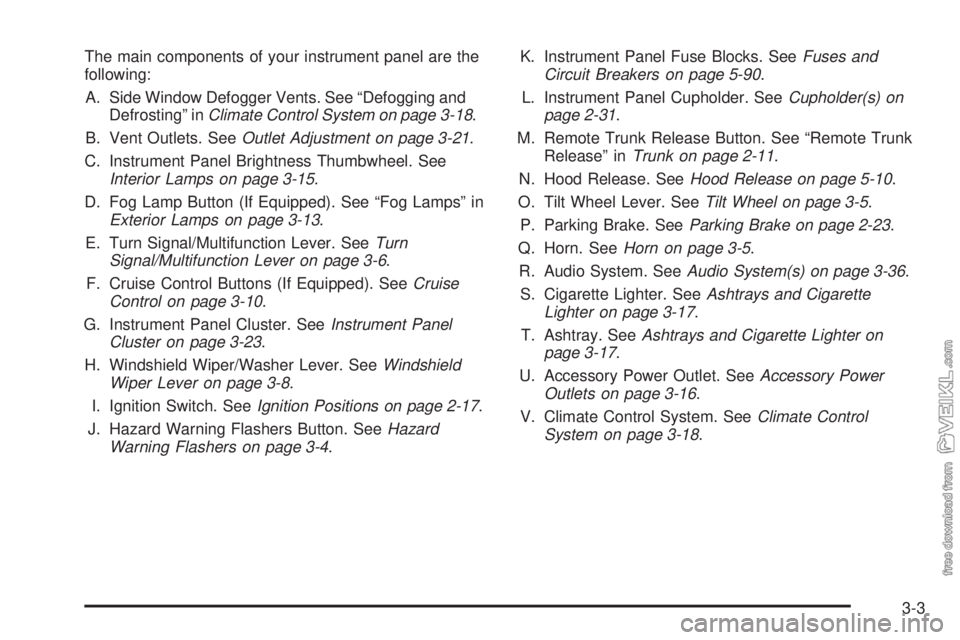
The main components of your instrument panel are the
following:
A. Side Window Defogger Vents. See “Defogging and
Defrosting” inClimate Control System on page 3-18.
B. Vent Outlets. SeeOutlet Adjustment on page 3-21.
C. Instrument Panel Brightness Thumbwheel. See
Interior Lamps on page 3-15.
D. Fog Lamp Button (If Equipped). See “Fog Lamps” in
Exterior Lamps on page 3-13.
E. Turn Signal/Multifunction Lever. SeeTurn
Signal/Multifunction Lever on page 3-6.
F. Cruise Control Buttons (If Equipped). SeeCruise
Control on page 3-10.
G. Instrument Panel Cluster. SeeInstrument Panel
Cluster on page 3-23.
H. Windshield Wiper/Washer Lever. SeeWindshield
Wiper Lever on page 3-8.
I. Ignition Switch. SeeIgnition Positions on page 2-17.
J. Hazard Warning Flashers Button. SeeHazard
Warning Flashers on page 3-4.K. Instrument Panel Fuse Blocks. SeeFuses and
Circuit Breakers on page 5-90.
L. Instrument Panel Cupholder. SeeCupholder(s) on
page 2-31.
M. Remote Trunk Release Button. See “Remote Trunk
Release” inTrunk on page 2-11.
N. Hood Release. SeeHood Release on page 5-10.
O. Tilt Wheel Lever. SeeTilt Wheel on page 3-5.
P. Parking Brake. SeeParking Brake on page 2-23.
Q. Horn. SeeHorn on page 3-5.
R. Audio System. SeeAudio System(s) on page 3-36.
S. Cigarette Lighter. SeeAshtrays and Cigarette
Lighter on page 3-17.
T. Ashtray. SeeAshtrays and Cigarette Lighter on
page 3-17.
U. Accessory Power Outlet. SeeAccessory Power
Outlets on page 3-16.
V. Climate Control System. SeeClimate Control
System on page 3-18.
3-3
Page 138 of 348

Here are four things that some owners ask about. None
of these show a problem with your fuel gage:
•At the service station, the gas pump shuts off
before the gage reads full.
•It takes a little more or less fuel to fill up than the
gage indicated. For example, the gage may have
indicated the tank was half full, but it actually took a
little more or less than half the tank’s capacity to
fill the tank.
•The indicator moves a little when you turn a corner
or speed up.
•The gage goes back to empty when you turn off the
ignition.
Audio System(s)
Notice:Before you add any sound equipment to
your vehicle – like a tape player, CB radio, mobile
telephone or two-way radio – be sure you can
add what you want. If you can, it’s very important to
do it properly. Added sound equipment may
interfere with the operation of your vehicle’s engine,
radio or other systems, and even damage them.
Your vehicle’s systems may interfere with the
operation of sound equipment that has been added
improperly.
So, before adding sound equipment, check with
your dealer and be sure to check federal rules
covering mobile radio and telephone units.
3-36
Page 139 of 348
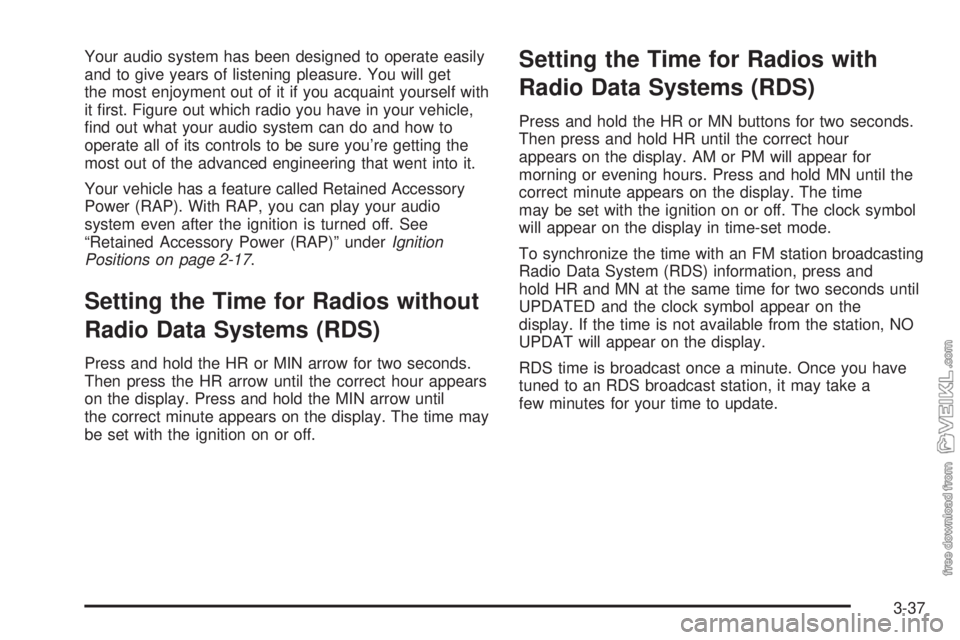
Your audio system has been designed to operate easily
and to give years of listening pleasure. You will get
the most enjoyment out of it if you acquaint yourself with
it first. Figure out which radio you have in your vehicle,
find out what your audio system can do and how to
operate all of its controls to be sure you’re getting the
most out of the advanced engineering that went into it.
Your vehicle has a feature called Retained Accessory
Power (RAP). With RAP, you can play your audio
system even after the ignition is turned off. See
“Retained Accessory Power (RAP)” underIgnition
Positions on page 2-17.
Setting the Time for Radios without
Radio Data Systems (RDS)
Press and hold the HR or MIN arrow for two seconds.
Then press the HR arrow until the correct hour appears
on the display. Press and hold the MIN arrow until
the correct minute appears on the display. The time may
be set with the ignition on or off.
Setting the Time for Radios with
Radio Data Systems (RDS)
Press and hold the HR or MN buttons for two seconds.
Then press and hold HR until the correct hour
appears on the display. AM or PM will appear for
morning or evening hours. Press and hold MN until the
correct minute appears on the display. The time
may be set with the ignition on or off. The clock symbol
will appear on the display in time-set mode.
To synchronize the time with an FM station broadcasting
Radio Data System (RDS) information, press and
hold HR and MN at the same time for two seconds until
UPDATED and the clock symbol appear on the
display. If the time is not available from the station, NO
UPDAT will appear on the display.
RDS time is broadcast once a minute. Once you have
tuned to an RDS broadcast station, it may take a
few minutes for your time to update.
3-37
Page 141 of 348
Setting Preset Stations
The six numbered pushbuttons let you return to your
favorite stations. You can set up to 18 stations (six FM1,
six FM2, and six AM) by performing the following steps:
1. Turn the radio on.
2. Press AM FM to select FM1, FM2, or AM.
3. Tune in the desired station.
4. Press and hold one of the six numbered
pushbuttons until you hear a beep. Whenever you
press that numbered pushbutton, the station
you set will return.
5. Repeat the steps for each pushbutton.
Setting the Tone (Bass/Treble)
AUDIO:To adjust the bass or the treble, press and
release the AUDIO button until BAS or TRE appears on
the display. Then press and hold the up or the down
arrow to increase or to decrease. If a station is weak or
noisy, you may want to decrease the treble.
To adjust bass or treble to the middle position, select
BAS or TRE. Then press and hold the AUDIO button for
more than two seconds until you hear a beep. B and
a zero or T and a zero will appear on the display.
To adjust both tone controls and both speaker controls
to the middle position, first end out of audio mode
by pressing another button, causing the radio to perform
that function, or by waiting five seconds for the display
to return to the time of day. Then press and hold
the AUDIO button for more than two seconds until you
hear a beep. CEN will appear on the display.
3-39
Page 142 of 348
Adjusting the Speakers (Balance/Fade)
AUDIO:To adjust the balance between the right
and the left speakers, press and release the AUDIO
button until BAL appears on the display. Then press and
hold the up or the down arrow to move the sound
toward the right or the left speakers.
To adjust the fade between the front and the rear
speakers, press and release the AUDIO button until
FAD appears on the display. Then press and hold the up
or the down arrow to move the sound toward the front
or the rear speakers.
To adjust balance or fade to the middle position, select
BAL or FAD. Then press and hold AUDIO for more
than two seconds until you hear a beep. L and a zero
or F and a zero will appear on the display.
To adjust both tone controls and both speaker controls
to the middle position, first end out of audio mode
by pressing another button, causing the radio to perform
that function, or by waiting five seconds for the display
to return to the time of day. Then press and hold AUDIO
for more than two seconds until you hear a beep.
CEN will appear on the display.
Radio Messages
CAL (Calibration):Your audio system has been
calibrated for your vehicle from the factory. If CAL
appears on the display it means that your radio has not
been configured properly for your vehicle and must
be returned to the dealer for service.
Playing a CD
With the ignition on, insert a CD partway into the slot,
label side up. The player will pull it in and the CD should
begin playing. CD will appear on the display. If you
want to insert a CD with the ignition off, first press the
eject button or the RCL knob.
If you turn off the ignition or radio with a CD in the
player, it will stay in the player. When you turn on the
ignition or the radio, the CD will start playing where
it stopped, if it was the last selected audio source.
As each new track starts to play, the track number will
appear on the display.
The CD player can play the smaller 8 cm single CDs
with an adapter ring. Full-size CDs and the smaller CDs
are loaded in the same manner.
3-40