2004 CHEVROLET AVALANCHE service
[x] Cancel search: servicePage 216 of 548
Oil Pressure Gage
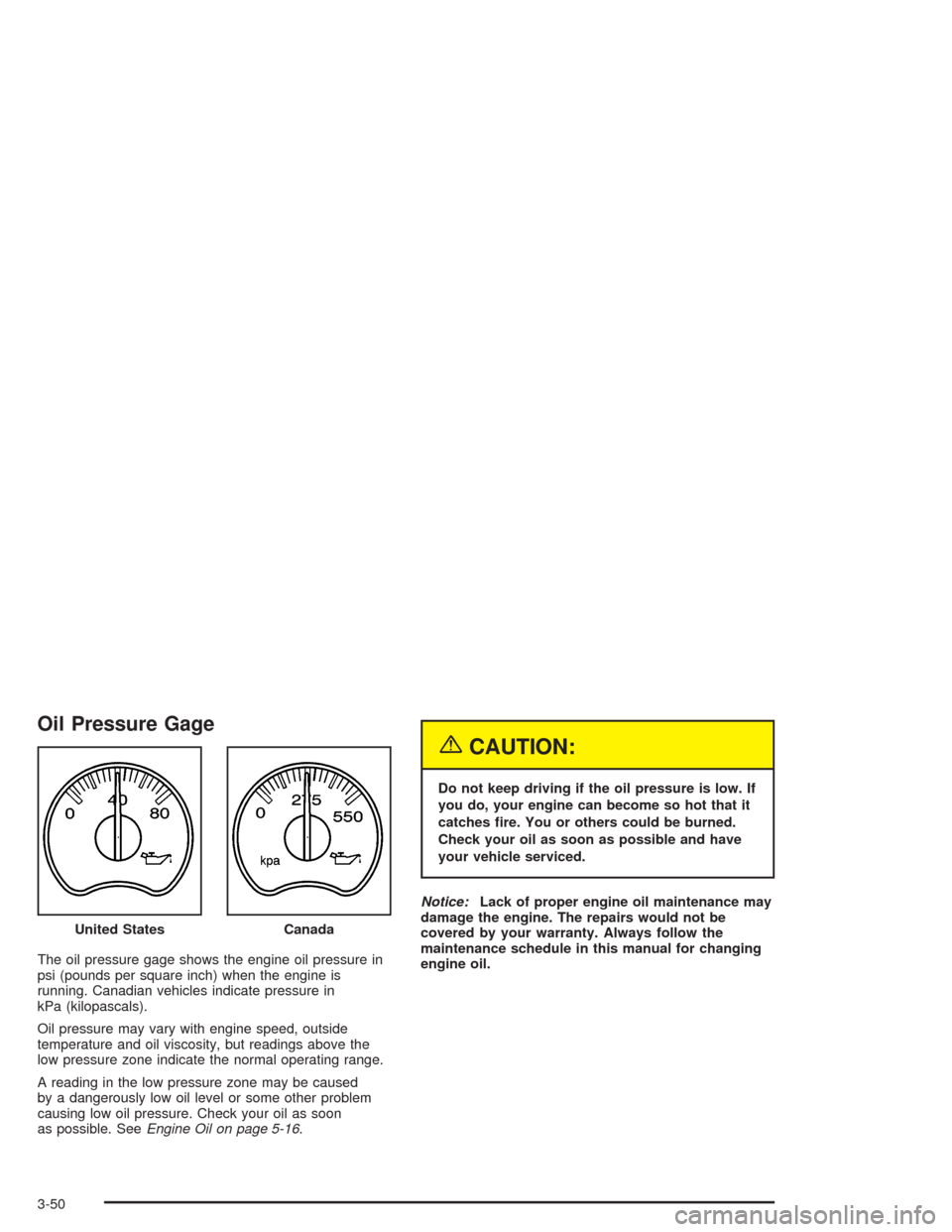
The oil pressure gage shows the engine oil pressure in
psi (pounds per square inch) when the engine is
running. Canadian vehicles indicate pressure in
kPa (kilopascals).
Oil pressure may vary with engine speed, outside
temperature and oil viscosity, but readings above the
low pressure zone indicate the normal operating range.
A reading in the low pressure zone may be caused
by a dangerously low oil level or some other problem
causing low oil pressure. Check your oil as soon
as possible. SeeEngine Oil on page 5-16.
{CAUTION:
Do not keep driving if the oil pressure is low. If
you do, your engine can become so hot that it
catches re. You or others could be burned.
Check your oil as soon as possible and have
your vehicle serviced.
Notice:Lack of proper engine oil maintenance may
damage the engine. The repairs would not be
covered by your warranty. Always follow the
maintenance schedule in this manual for changing
engine oil. United States
Canada
3-50
Page 220 of 548
DIC Operation and Displays
The DIC comes on when the ignition is on. After a short
delay the DIC will display the current driver (1 or 2)
and the information that was last displayed before the
engine was turned off.
If a problem is detected, a warning message will appear
on the display. Pressing any of the four buttons will
acknowledge (clear) most current warnings or service
messages. Some warnings that cannot be
acknowledged (cleared) are: ENGINE OVERHEATED,
OIL PRESSURE LOW, REDUCED ENGINE POWER,
TRANS HOT IDLE ENGINE, STABILITY SYS ACTIVE,
TRACTION SYS LIMITED and TRACTION ACTIVE.
These warnings must be dealt with immediately
and therefore cannot be cleared until the problem has
been corrected.The DIC has different modes which can be accessed by
pressing the four buttons on the DIC. These buttons are
trip information, fuel information, personalization and
select. The button functions are detailed in the following.
Trip Information Button
Press the trip information button to scroll through the
ODOMETER, PERSONAL TRIP ON/OFF, BUSINESS
TRIP ON/OFF, HOURMETER, ANNUAL LOG and
TIMER. If the personal trip and/or the business trip are
set to ON, you will also be able to scroll through
more messages. See “Personal Trip” and “Business
Trip” next for more information.
3-54
Page 231 of 548

Select Button
The select button is used to reset certain functions and
turn off or acknowledge messages on the DIC display.
The select button also toggles through the options
available in each personalization menu. For example, this
button will reset the trip odometers, turn off the FUEL
LEVEL LOW message, and toggle through the languages
you can select the DIC to display information in.
DIC Warnings and Messages
Warning messages are displayed on the DIC to notify the
driver that the status of the vehicle has changed and that
some action may be needed by the driver to correct the
condition. If there is more than one message that needs
to be displayed they will appear one after another. Some
messages may not require immediate action but you
should press the select button (if equipped) to
acknowledge that you received the message and clear it
from the display. Some messages cannot be cleared from
the display because they are more urgent; these
messages require action before they can be removed
from the DIC display. The following are the possible
messages that can be displayed and some information
about them.
CHANGE ENGINE OIL
This message is displayed when the engine oil needs to
be changed and service is required for your vehicle.
SeeScheduled Maintenance on page 6-4andEngine
Oil on page 5-16for more information. Also see “GM Oil
Life System” previously in this section for information
on how to reset the message. This message will
clear itself after 10 seconds until the next ignition cycle.
OIL LIFE RESET
This message will appear on the display for about
10 seconds after resetting the change engine oil
message.
OIL PRESSURE LOW
If low oil pressure levels occur, this message will be
displayed on the DIC and a chime will sound. Stop the
vehicle as soon as safely possible and do not operate
it until the cause of the low oil pressure has been
corrected. Check your oil as soon as possible and have
your vehicle serviced.
3-65
Page 232 of 548
CHECK OIL LEVEL
If the oil level in the vehicle is low, this message will
appear on the DIC. Check the oil level and correct it as
necessary. You may need to let the vehicle cool or
warm up and cycle the ignition to be sure this message
will clear. This message will clear itself after 10 seconds
until the next ignition cycle.
LOW COOLANT LEVEL
If your vehicle has a low coolant sensor and the engine
coolant level is low, this message will appear on the
DIC. Adding coolant will clear the message. This
message will clear itself after 10 seconds until the next
ignition cycle.
ENGINE COOLANT HOT
If the cooling system temperature gets hot, this message
will appear in the DIC. Stop the vehicle and let the engine
idle in PARK (P) to allow the coolant to reach a safe
temperature. This message will clear when the coolant
temperature drops to a safe operating temperature.
Pressing the select button will acknowledge this message
and clear it from the DIC display.
ENGINE OVERHEATED
If the engine cooling system reaches unsafe
temperatures for operation, this message will appear in
the DIC and you will hear a chime. Stop and turn off
the vehicle as soon as it is safe to do so to avoid severe
damage. This message will clear when the engine
has cooled to a safe operating temperature.
REDUCED ENGINE POWER
This message is displayed and a chime will sound when
the cooling system temperature gets too hot and the
engine further enters the engine coolant protection mode.
SeeEngine Overheating on page 5-29for further
information.
You may also see this message when the vehicle
determines a problem with the electronic throttle control.
See your dealer for service.
BATTERY NOT CHARGING
If the battery is not charging during operation, this
message will appear on the DIC. Driving with this
problem could drain your battery. Have the electrical
system checked as soon as possible. Pressing the
select button will acknowledge this message and clear it
from the DIC display.
3-66
Page 233 of 548

SERVICE AIR BAG
If there is a problem with the air bag system, this
message will be displayed on the DIC. Have a qualied
technician inspect the system for problems. Pressing
the select button or the trip stem will acknowledge this
message and clear it from the DIC display.
SERVICE BRAKE SYSTEM
If a problem occurs with the brake system, this message
will appear on the DIC. If this message appears, stop
as soon as possible and turn off the vehicle. Restart the
vehicle and check for the message on the DIC display.
If the message is still displayed, or appears again when
you begin driving, the brake system needs service.
Pressing the select button will acknowledge this
message and clear it from the DIC display.
SERVICE 4WD
If a problem occurs with the four wheel drive system, this
message will appear on the DIC. If this message
appears, stop as soon as possible and turn off the
vehicle. Restart the vehicle and check for the message
on the DIC display. If the message is still displayed, or
appears again when you begin driving, the four wheel
drive system needs service. Pressing the select button
will acknowledge this message and clear it from the DIC
display.
SERVICE RIDE CONTROL
If a problem occurs with the suspension system, this
message will appear on the DIC. If this message
appears, stop and turn off the vehicle. Restart the
vehicle and check for the message on the DIC display.
If the message is still displayed, or appears again
when you begin driving, the suspension system needs
service.
TURN SIGNAL ON
If a turn signal is left on for 3/4 of a mile (1.2 km), this
message will appear on the display and you will hear a
chime. Move the turn signal/multifunction lever to the
off position. Pressing the select button will acknowledge
this message and clear it from the DIC display.
FUEL LEVEL LOW
If the fuel level is low, this message will appear on the
DIC and you will hear a chime. Refuel as soon as
possible. Pressing the select button will acknowledge this
message immediately and clear it from the DIC display. It
will also clear itself after 10 seconds. The low fuel light
near the fuel gage will still remain on in either case.
TIGHTEN FUEL CAP
If the vehicle’s fuel cap is not tightened properly this
message may appear along with the check engine light
on the instrument panel. SeeMalfunction Indicator
3-67
Page 237 of 548

STABILITY SYS ACTIVE
You may see the STABILITY SYS ACTIVE message on
the DIC. It means that an advanced computer-controlled
system has come on to help your vehicle continue to
go in the direction in which you’re steering.
For more information on the Stabilitrak
®system, see
Stabilitrak®System on page 4-11.
SERVICE STABILITY
If you ever see the SERVICE STABILITY message, it
means there may be a problem with your
Stabilitrak
®system. If you see this message try to reset
the system (stop; turn off the engine; then start the
engine again). If the SERVICE STABILITY message still
comes on, it means there is a problem. You should
see your dealer for service. The vehicle is safe to drive,
however, you do not have the benet of Stabilitrak
®,
so reduce your speed and drive accordingly.
For more information on the Stabilitrak
®system, see
Stabilitrak®System on page 4-11.
STABILITY SYS DISABLED
The STABILITY SYS DISABLED message will turn on
when you press the Stabilitrak®button, or when the
stability control has been automatically disabled. There
are four conditions that can cause this message to
appear. One condition is overheating, which could occur
if Stabilitrak
®activates continuously for an extended
period of time. The message will also be displayed if the
brake system warning light is on. SeeBrake System
Warning Light on page 3-42Brake System Warning
Light. The message could be displayed if the stability
system takes longer than usual to complete its
diagnostic checks due to driving conditions. Also, if an
engine or vehicle related problem has been detected,
and the vehicle needs service, the message will appear.
The message will turn off as soon as the conditions
that caused the message to be displayed are no longer
present.
For more information on the Stabilitrak
®system, see
Stabilitrak®System on page 4-11.
3-71
Page 238 of 548
CHECK TIRE PRESSURE
If a low tire pressure is detected in any of the vehicle’s
tires, this message will appear on the DIC. Press
the select button or trip stem to acknowledge the
message and clear it from the DIC display.
SeeTires on page 5-68for more information on tires
and the correct ination pressures.
This message will appear at each ignition cycle until the
tires are inated to the correct ination pressure.
SERVICE TIRE MONITOR
This message will be displayed if any of the tire monitor
sensors have malfunctioned, or if the tire monitor
sensors have not been programmed correctly. For more
information on programming the tire pressure monitor
system seeTire Pressure Monitor System on page 5-77.
Press the select button to acknowledge the message
and clear it from the DIC display.
This message will appear at each ignition cycle until the
tire pressure monitor system has been serviced.
Audio System(s)
Notice:Before adding any sound equipment to your
vehicle, like a tape player, CB radio, mobile
telephone, or two-way radio, make sure that it can be
added by checking with your dealer. Also, check
federal rules covering mobile radio and telephone
units. If sound equipment can be added, it is very
important to do it properly. Added sound equipment
may interfere with the operation of your vehicle’s
engine, radio, or other systems, and even damage
them. Your vehicle’s systems may interfere with the
operation of sound equipment that has been added
improperly.
Figure out which audio system is in your vehicle, nd
out what your audio system can do, and how to operate
all of its controls.
Your vehicle may have a feature called Retained
Accessory Power (RAP). With RAP, the audio system
can be played even after the ignition is turned off.
See “Retained Accessory Power (RAP)” underIgnition
Positions on page 2-31.
3-72
Page 240 of 548
Radio Data System (RDS)
The audio system has a Radio Data System (RDS).
RDS features are available for use only on FM stations
that broadcast RDS information.
With RDS, the radio can do the following:
Seek to stations broadcasting the selected type of
programming
Receive announcements concerning local and
national emergencies
Display messages from radio stations
Seek to stations with traffic announcements
This system relies upon receiving specic information
from these stations and will only work when the
information is available. In rare cases, a radio station
may broadcast incorrect information that will cause
the radio features to work improperly. If this happens,
contact the radio station.
While the radio is tuned to an RDS station, the station
name or call letters will appear on the display instead of
the frequency. RDS stations may also provide the time of
day, a program type (PTY) for current programming, and
the name of the program being broadcast.
XM™ Satellite Radio Service
XM™ is a satellite radio service that is based in the 48
contiguous United States. XM™ offers 100 coast to coast
channels including music, news, sports, talk, and
children’s programming. XM™ provides digital quality
audio and text information that includes song title and
artist name. A service fee is required in order to receive
the XM™ service. For more information, contact XM™ at
www.xmradio.com or call 1-800-852-XMXM (9696).
Playing the Radio
PWR (Power):Press this knob to turn the system on
and off.
VOL (Volume):Turn this knob to increase or to
decrease the volume.
AUTO VOL (Automatic Volume):With automatic
volume, the audio system will adjust automatically to
make up for road and wind noise as you drive by
increasing the volume as vehicle speed increases.
Set the volume at the desired level. Press this button to
select LOW, MEDIUM, or HIGH. AVOL will appear
on the display. Each higher setting will provide more
volume compensation at faster vehicle speeds. To turn
automatic volume off, press this button until AVOL
OFF appears on the display.
3-74