2004 CADILLAC SEVILLE mirror
[x] Cancel search: mirrorPage 1 of 410
Seats and Restraint Systems........................... 1-1
Front Seats
............................................... 1-2
Safety Belts
.............................................. 1-5
Child Restraints
.......................................1-22
Supplemental Inflatable Restraint (SIR)
........1-41
Restraint System Check
............................1-50
Features and Controls..................................... 2-1
Keys
........................................................ 2-3
Doors and Locks
....................................... 2-9
Windows
.................................................2-16
Theft-Deterrent Systems
............................2-20
Starting and Operating Your Vehicle
...........2-24
Mirrors
....................................................2-37
OnStar
®System
......................................2-42
HomeLink®Transmitter
.............................2-44
Storage Areas
.........................................2-49
Sunroof
..................................................2-50
Vehicle Personalization
.............................2-52
Instrument Panel............................................. 3-1
Instrument Panel Overview
.......................... 3-4
Climate Controls
......................................3-28
Warning Lights, Gages and Indicators
.........3-37
Driver Information Center (DIC)
..................3-52Trip Computer
.........................................3-74
Audio System(s)
.......................................3-75
Driving Your Vehicle....................................... 4-1
Your Driving, the Road, and Your Vehicle
..... 4-2
Towing
...................................................4-29
Service and Appearance Care.......................... 5-1
Service
..................................................... 5-3
Fuel
......................................................... 5-4
Checking Things Under the Hood
...............5-10
Headlamp Aiming
.....................................5-49
Bulb Replacement
....................................5-53
Windshield Wiper Blade Replacement
.........5-60
Tires
......................................................5-61
Appearance Care
.....................................5-87
Vehicle Identification
.................................5-95
Electrical System
......................................5-96
Capacities and Specifications
...................5-104
Maintenance Schedule..................................... 6-1
Maintenance Schedule
................................ 6-2
Customer Assistance and Information.............. 7-1
Customer Assistance and Information
........... 7-2
Reporting Safety Defects
...........................7-11
Index................................................................ 1
2004 Cadillac Seville Owner ManualM
Page 59 of 410
Keys...............................................................2-3
Remote Keyless Entry System.........................2-5
Remote Keyless Entry System Operation...........2-6
Doors and Locks.............................................2-9
Door Locks....................................................2-9
Central Door Unlocking System......................2-10
Power Door Locks........................................2-10
Programmable Automatic Door Locks..............2-11
Rear Door Security Locks..............................2-11
Lockout Protection........................................2-12
Leaving Your Vehicle....................................2-12
Trunk..........................................................2-13
Windows........................................................2-16
Power Windows............................................2-17
Sun Visors...................................................2-19
Theft-Deterrent Systems..................................2-20
PASS-Key
®III ..............................................2-22
PASS-Key®III Operation...............................2-22
Starting and Operating Your Vehicle................2-24
New Vehicle Break-In....................................2-24
Ignition Positions..........................................2-25
Starting Your Engine.....................................2-26Engine Coolant Heater..................................2-27
Automatic Transaxle Operation.......................2-28
Parking Brake..............................................2-31
Shifting Into Park (P).....................................2-32
Shifting Out of Park (P).................................2-34
Parking Over Things That Burn.......................2-34
Engine Exhaust............................................2-35
Running Your Engine While You Are Parked. . . .2-36
Mirrors...........................................................2-37
Automatic Dimming Rearview Mirror with
OnStar
®...................................................2-37
Automatic Dimming Rearview Mirror with
OnStar
®and Compass...............................2-38
Outside Power Mirrors...................................2-40
Outside Automatic Dimming Mirror..................2-40
Outside Curb View Assist Mirror.....................2-41
Outside Convex Mirror...................................2-41
Outside Heated Mirrors..................................2-41
OnStar
®System.............................................2-42
HomeLink®Transmitter...................................2-44
Programming the HomeLink®Transmitter.........2-45
Section 2 Features and Controls
2-1
Page 60 of 410
Storage Areas................................................2-49
Glove Box...................................................2-49
Cellular Telephone........................................2-49
Center Console Storage Area.........................2-49
Map Pocket.................................................2-49
Assist Handles.............................................2-49
Garment Hooks............................................2-49Umbrella Holder...........................................2-50
Floor Mats...................................................2-50
Convenience Net..........................................2-50
Sunroof.........................................................2-50
Vehicle Personalization...................................2-52
Memory Seat, Mirrors and Steering Wheel.......2-52
Section 2 Features and Controls
2-2
Page 65 of 410
.(Fuel Door):Press this button to open the fuel
door. The valet lockout switch must be in the OFF
position for this feature to work. SeeValet Lockout
SwitchunderTheft-Deterrent Systems on page 2-20for
more information.
V(Trunk):Press this button to open the trunk. The
valet lockout switch must be in the OFF position for
this feature to work. SeeValet Lockout Switchunder
Theft-Deterrent Systems on page 2-20for more
information.
The remote keyless entry transmitter can be used to
recall the memory settings for up to two drivers.
For more information, seeDIC Vehicle Personalization
on page 3-63andMemory Seat, Mirrors and Steering
Wheel on page 2-52.
Matching Transmitter(s) to Your
Vehicle
Each remote keyless entry transmitter is coded to
prevent another transmitter from unlocking your vehicle.
If a transmitter is lost or stolen, a replacement can
be purchased through your dealer. Remember to bring
any remaining transmitters with you when you go to
your dealer. When the dealer matches the replacement
transmitter to your vehicle, any remaining transmitters
must also be matched. Once your dealer has coded the
new transmitter, the lost transmitter will not unlock
your vehicle. Each vehicle can have a maximum of four
transmitters matched to it.
Vehicles are delivered with two transmitters. See your
dealer for information on how to obtain additional
transmitters.
2-7
Page 77 of 410
Window Lockout
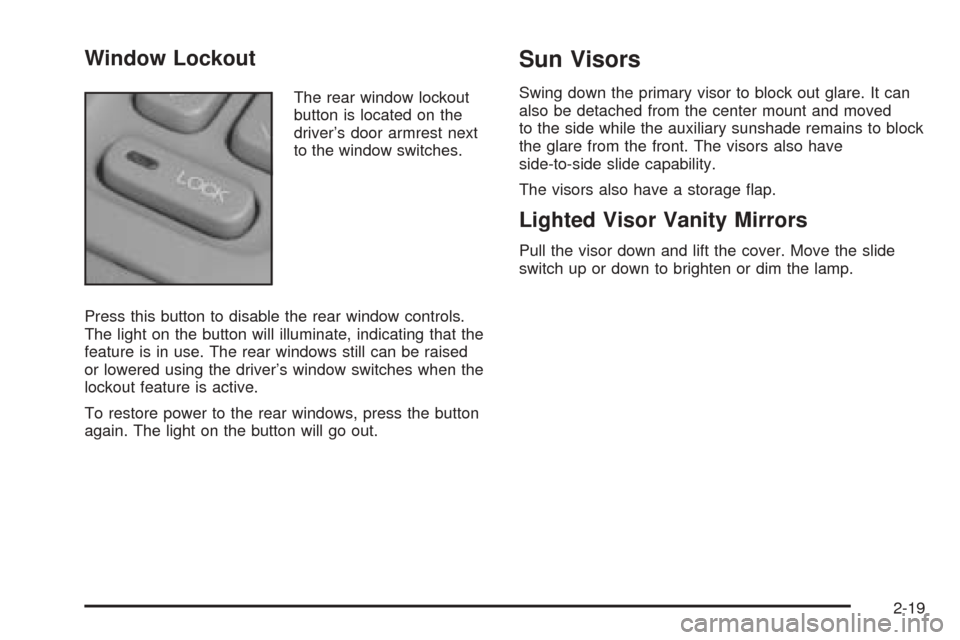
The rear window lockout
button is located on the
driver’s door armrest next
to the window switches.
Press this button to disable the rear window controls.
The light on the button will illuminate, indicating that the
feature is in use. The rear windows still can be raised
or lowered using the driver’s window switches when the
lockout feature is active.
To restore power to the rear windows, press the button
again. The light on the button will go out.
Sun Visors
Swing down the primary visor to block out glare. It can
also be detached from the center mount and moved
to the side while the auxiliary sunshade remains to block
the glare from the front. The visors also have
side-to-side slide capability.
The visors also have a storage flap.
Lighted Visor Vanity Mirrors
Pull the visor down and lift the cover. Move the slide
switch up or down to brighten or dim the lamp.
2-19
Page 95 of 410
Mirrors
Automatic Dimming Rearview Mirror
with OnStar
®
Your vehicle may have an automatic dimming rearview
mirror with OnStar®system controls. For more
information about OnStar®, seeOnStar®System on
page 2-42.
When the automatic dimming feature is turned on, the
mirror automatically changes to reduce glare from
headlamps behind you. A photocell on the mirror senses
when it is becoming dark outside. Another photocell
built into the mirror face senses when headlamps
are behind you.
At night, when the glare is too bright, the mirror will
gradually darken to reduce glare. This change may take
a few seconds. The mirror will return to its clear,
daytime state when the glare is reduced.
Mirror Operation
O
(On/Off):Press the on/off button, located on the
lower left side of the mirror face, to turn the automatic
dimming feature on or off. The indicator light will be
illuminated when the automatic dimming feature is on.
Cleaning the Mirror
When cleaning the mirror, use a paper towel or similar
material dampened with glass cleaner. Do not spray
glass cleaner directly on the mirror as that may cause
the liquid cleaner to enter the mirror housing.
2-37
Page 96 of 410
Automatic Dimming Rearview Mirror
with OnStar
®and Compass
Your vehicle may have an automatic dimming rearview
mirror with a compass display. The mirror also
contains OnStar
®controls. For more information see
OnStar®System on page 2-42.
The automatic dimming feature functions the same as
that of the automatic dimming rearview mirror without a
compass. SeeAutomatic Dimming Rearview Mirror
with OnStar
®on page 2-37.
The mirror also includes an eight-point compass display
in the upper right corner of the mirror face. When on,
the compass automatically calibrates as the vehicle
is driven.
Mirror Operation
O
(On/Off):Press and hold the button, located on the
lower left side of the mirror face, for about three
seconds to turn the automatic dimming feature on or off.
The indicator light will illuminate when this feature is
active. The automatic dimming feature is active
each time the vehicle is started.
Compass Operation
Press the on/off button once to turn the compass on
or off.
When the ignition and the compass feature are on, the
compass will show two character boxes for about
two seconds. After two seconds, the mirror will display
the compass heading.
Compass Calibration
If after two seconds, the display does not show a
compass heading (for example, N for North), there may
be a strong magnetic field interfering with the compass.
Such interference may be caused by a magnetic antenna
mount, magnetic note pad holder or a similar magnetic
item. If the letter C should ever appear in the compass
window, the compass may need calibration.
The mirror can be calibrated by driving the vehicle in
circles at 5 mph (8 km/h) or less until the display reads a
direction.
The compass can be placed in calibration mode
manually by pressing and holding the on/off button until
a C is shown in the compass display.
2-38
Page 97 of 410
Compass Variance
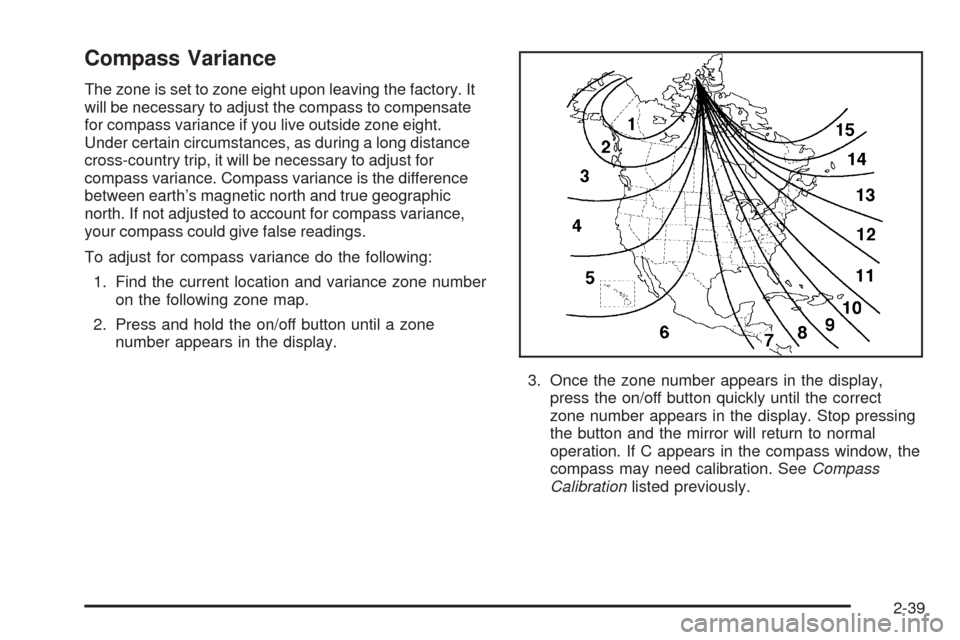
The zone is set to zone eight upon leaving the factory. It
will be necessary to adjust the compass to compensate
for compass variance if you live outside zone eight.
Under certain circumstances, as during a long distance
cross-country trip, it will be necessary to adjust for
compass variance. Compass variance is the difference
between earth’s magnetic north and true geographic
north. If not adjusted to account for compass variance,
your compass could give false readings.
To adjust for compass variance do the following:
1. Find the current location and variance zone number
on the following zone map.
2. Press and hold the on/off button until a zone
number appears in the display.
3. Once the zone number appears in the display,
press the on/off button quickly until the correct
zone number appears in the display. Stop pressing
the button and the mirror will return to normal
operation. If C appears in the compass window, the
compass may need calibration. SeeCompass
Calibrationlisted previously.
2-39