2004 CADILLAC DEVILLE brake
[x] Cancel search: brakePage 144 of 460

Reducing Speed While Using Cruise
Control
There are two ways to reduce your speed while using
cruise control:
Press the SET/CST button until you reach the lower
speed you want, then release it.
To slow down in very small amounts, push the
SET/CST button briey. Each time you do this,
the vehicle will slow down approximately
1 mph (1.6 km/h).
Passing Another Vehicle While Using
Cruise Control
Use the accelerator pedal to increase your speed.
When you take your foot off the pedal, your vehicle will
slow down to the cruise control speed you set earlier.
Using Cruise Control on Hills
How well your cruise control will work on hills depends
upon your speed, load and the steepness of the hills.
When going up steep hills, you may have to step on the
accelerator pedal to maintain your speed. When going
downhill, you may have to brake or shift to a lower gear to
keep your speed down. Applying the brake or shifting into
a lower gear will take you out of cruise control. If you
need to apply the brake or shift to a lower gear due to the
grade of the downhill slope, you may not want to attempt
to use your cruise control feature.
Ending Cruise Control
To turn off the cruise control, step lightly on the brake
pedal, or press the CRUISE ON/OFF button on the
steering wheel.
Erasing Speed Memory
When you turn off the cruise control or the ignition, your
cruise control set speed memory is erased.
3-16
Page 145 of 460
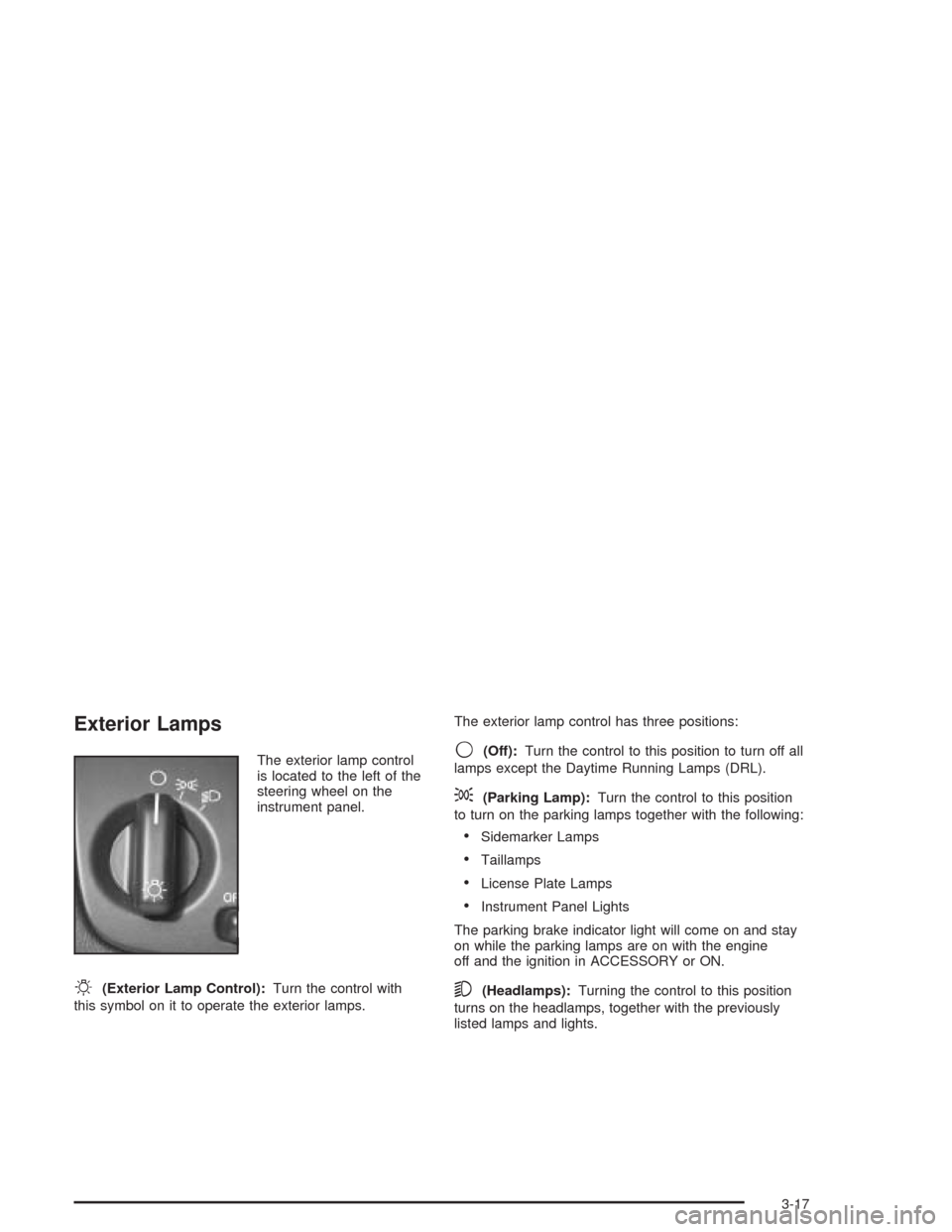
Exterior Lamps
The exterior lamp control
is located to the left of the
steering wheel on the
instrument panel.
O(Exterior Lamp Control):Turn the control with
this symbol on it to operate the exterior lamps.The exterior lamp control has three positions:
9(Off):Turn the control to this position to turn off all
lamps except the Daytime Running Lamps (DRL).
;(Parking Lamp):Turn the control to this position
to turn on the parking lamps together with the following:
Sidemarker Lamps
Taillamps
License Plate Lamps
Instrument Panel Lights
The parking brake indicator light will come on and stay
on while the parking lamps are on with the engine
off and the ignition in ACCESSORY or ON.
5(Headlamps):Turning the control to this position
turns on the headlamps, together with the previously
listed lamps and lights.
3-17
Page 155 of 460

Remember that the Night Vision System can only help
you see objects that are warmer or colder than the
surroundings. It can not sense things like brake lights,
turn signals or emergency ashers, traffic lights or signs.
In dry, clear weather, the system can see pedestrians,
animals and the direction of the road ahead. In light
rain, light snow or light fog the image may not be
as clear and you may not be able to see the direction of
the road ahead. In more severe weather conditions,
the image may be unclear and not usable.
{CAUTION:
Do not use the Night Vision System to replace
your normal view of the road ahead. It can not
tell you how far away things are. It senses only
warmer or colder objects, not all objects.
Driving by staring at the image might cause
you not to see important objects in the road
ahead. If you do not see something in time,
you could have a crash in which you and
others could be injured. Use the Night Vision
System only as a driving aid.It is also important to keep your windshield, the HUD
(Head-Up Display for the Night Vision System) lens and
the camera lens clean. If you do not keep everything
clean, system performance may be affected.
The HUD system is located on the driver’s side of the
instrument panel, next to the windshield and the camera
is located behind the center of the front grille.
Use only household glass cleaner and a soft cloth to
clean the HUD or camera lens. Wipe gently and
dry thoroughly.
Notice:When cleaning, be careful not to scratch
the HUD or camera lenses. Do not spray glass
cleaner directly on the HUD lens because the
cleaner could leak inside the unit and cause
damage.
The camera must also be aligned to work correctly. If
the camera needs adjustment, see your dealer. Do
not attempt to adjust the camera yourself.
3-27
Page 158 of 460

It may also ash red if the ultrasonic sensors are not
kept clean. So be sure to keep your rear bumper free of
mud, dirt, snow, ice and slush or materials such as
paint or the system may not work properly. If after
cleaning the rear bumper and driving forward at least
15 mph (25 km/h), the display continues to ash red, see
your dealer. For cleaning instructions, seeCleaning
the Outside of Your Vehicle on page 5-101.
It may also ash red if your vehicle is moving in
REVERSE (R) at a speed greater than 3 mph (5 km/h).
Other conditions that may affect system performance
include things like the vibrations from a jackhammer or
the compression of air brakes on a very large truck.
As always, drivers should use care when backing up a
vehicle. Always look behind you, being sure to check
for other vehicles, obstructions and blind spots.Accessory Power Outlets
Your vehicle is equipped with accessory power outlets.
The outlets can be used to plug in electrical equipment
such as a cellular telephone, CB radio, etc.
If you have a vehicle with a center storage compartment
located on the instrument panel, you may have an
accessory power outlet in the storage drawer. There is
also an outlet on the front passenger’s seat near
the umbrella tray.
There are two accessory power outlets in the rear seat
area located on the door armrests next to the
ashtrays.
Your vehicle may have a small cap that must be
removed to access the accessory power outlet. If it
does, when not using the outlet be sure to cover it with
the protective cap.
The accessory power outlet will only operate when the
ignition is in ACCESSORY or ON and for 10 minutes
after turning the ignition OFF. If you would like the
accessory power outlet to operate regardless of ignition
position, and for extended periods of time, see your
dealer for more information.
3-30
Page 179 of 460

Charging System Light
When you turn the key to
ON or START, this light will
come on briey to show
that the generator and
battery charging systems
are working properly.
If this light stays on, you need service and you should
take your vehicle to the dealer at once. To save
your battery until you get there, turn off all accessories.
Brake System Warning and Parking
Brake Indicator Light
Your vehicle’s hydraulic brake system is divided into two
parts. If one part is not working, the other part can
still work and stop you. For good braking, though, you
need both parts working well.
If the warning light comes on, there is a brake problem.
Have your brake system inspected right away.
This light should come on
briey when you turn the
ignition key to ON. If it
does not come on
then, have it xed so it will
be ready to warn you if
there is a problem.
When the ignition is on, the brake system warning light
will also come on when you set your parking brake.
3-51
Page 180 of 460

The light will stay on if your parking brake does not fully
release. If it stays on after your parking brake is fully
released, it means you have a brake problem.
{CAUTION:
Your brake system may not be working properly
if the brake system warning light is on. Driving
with the brake system warning light on can lead
to an accident. If the light is still on after you
have pulled off the road and stopped carefully,
have the vehicle towed for service.
If the light comes on while you are driving, pull off the
road and stop carefully. You may notice that the pedal is
harder to push. Or, the pedal may go closer to the
oor. It may take longer to stop. If the light is still on,
have the vehicle towed for service. SeeTowing
Your Vehicle on page 4-33.
Anti-Lock Brake System Warning
Light
With the anti-lock brake
system, the light(s) will
come on when your engine
is started and may stay
on for several seconds.
That is normal.
If the light stays on, turn the ignition to OFF. Or, if the light
comes on when you are driving, stop as soon as possible
and turn the ignition off. Then start the engine again to
reset the system. If the light still stays on, or comes on
again while you are driving, your vehicle needs service. If
the regular brake system warning light is not on, you still
have brakes, but you do not have anti-lock brakes. If the
regular brake system warning light is also on, you do not
have anti-lock brakes and there is a problem with your
regular brakes. SeeBrake System Warning and Parking
Brake Indicator Light on page 3-51.
The anti-lock brake system warning light should come
on briey when you turn the ignition key to ON. If
the light does not come on then, have it xed so it will
be ready to warn you if there is a problem.
3-52
Page 181 of 460

Traction Control System (TCS)
Warning Light
This warning light should come on briey when the
engine is started.If the warning light does not come on then, have it xed
so it will be ready to warn you if there is a problem. If
it stays on, or comes on when you are driving, there may
be a problem with your traction control system and
your vehicle may need service. When this warning light
is on, the system will not limit wheel spin. Adjust
your driving accordingly.
The traction control system warning light may come on
for the following reasons:
If there is a brake system problem that is specically
related to traction control, the traction control system
will turn off and the warning light will come on.
If the traction control system is affected by an
engine-related problem, the system will turn off and
the warning light will come on.
If the traction control system warning light comes on
and stays on for an extended period of time when the
system is turned on, your vehicle needs service. United States
Canada (Analog Only)
3-53
Page 194 of 460

BATTERY VOLTAGE LOW – 6:This message will
appear when the electrical system is charging less than
10 volts or if the battery has been drained. If this
message appears immediately after starting, it is
possible that the generator can still recharge the battery.
The battery should recharge while driving but may
take a few hours to do so. Consider using an auxiliary
charger (be sure to follow the manufacturer’s
instructions) to boost the battery after returning home or
to a nal destination. If this message appears while
driving or after starting your vehicle and stays on, have
it checked immediately to determine the cause of
this problem. To help the generator recharge the battery
quickly, you can reduce the load on the electrical
system by turning off the accessories. You can monitor
battery voltage on the DIC by pressing the INFO
button. The normal range is 11.5 to 15.5 volts.
CHANGE ENGINE OIL – 82:This means that the life
of the engine oil has expired. SeeScheduled
Maintenance on page 6-4. After an oil change, the Oil
Life Indicator must be reset. SeeOil Life Indicator
on page 3-89. SeeEngine Oil on page 5-15.CHANGE TRANS FLUID – 47:This message will
appear when it is time to change the transaxle uid. See
Scheduled Maintenance on page 6-4for the proper
uid and change intervals.
CHECK BRAKE FLUID – 37:This message will display
if the ignition is in ON to inform the driver that the brake
uid level is low. Have the brake system serviced by a
technician as soon as possible. SeeBrake System
Warning and Parking Brake Indicator Light on page 3-51.
CHECK COOLANT LEVEL – 2:This message will
appear when there is a low level of engine coolant. Have
the cooling system serviced by a technician as soon
as possible. SeeEngine Coolant on page 5-27.
CHECK FUEL GAGE – 50:(Analog Cluster) This
message will appear when the fuel supply is less than
5 gallons (18.9 L) and the display is turned off. A
single chime will also sound when this message is
displayed.
CHECK GAS CAP – 61:This message will appear if
the gas cap has not been fully tightened. You should
recheck your gas cap to ensure that it is on properly.
3-66