2004 BUICK RANDEZVOUS tire pressure
[x] Cancel search: tire pressurePage 141 of 486
Instrument Panel Overview...............................3-4
Hazard Warning Flashers................................3-6
Other Warning Devices...................................3-7
Horn.............................................................3-7
Tilt Wheel.....................................................3-7
Turn Signal/Multifunction Lever.........................3-8
Exterior Lamps.............................................3-14
Interior Lamps..............................................3-16
Instrument Panel Switchbank..........................3-21
Head-Up Display (HUD).................................3-21
Ultrasonic Rear Parking Assist (URPA)..............3-24
Accessory Power Outlets...............................3-27
Ashtrays and Cigarette Lighter........................3-28
Climate Controls............................................3-28
Climate Control System.................................3-28
Dual Climate Control System..........................3-32
Dual Automatic Climate Control System...........3-35
Outlet Adjustment.........................................3-38
Warning Lights, Gages and Indicators.............3-39
Instrument Panel Cluster................................3-40
Speedometer and Odometer...........................3-41
Tachometer.................................................3-42
Safety Belt Reminder Light.............................3-43Air Bag Readiness Light................................3-43
Brake System Warning Light..........................3-44
Anti-Lock Brake System Warning Light.............3-45
Traction Control System (TCS) Warning Light . . .3-45
Engine Coolant Temperature Gage..................3-46
Malfunction Indicator Lamp.............................3-46
Fuel Gage...................................................3-49
Message Center.............................................3-50
Service Traction System Warning Message......3-50
Traction Active Message................................3-51
Engine Coolant Temperature Warning
Message..................................................3-51
Charging System Indicator Message................3-52
Low Oil Pressure Message............................3-52
Change Engine Oil Message..........................3-53
Low Tire Message........................................3-54
Door Ajar Warning Message...........................3-54
Rear Hatch Ajar Warning Message..................3-54
PASS-Key
®III Security Message....................3-55
All-Wheel Drive Disable Warning Message.......3-55
Low Washer Fluid Warning Message...............3-56
Low Fuel Warning Message...........................3-56
Low Brake Fluid Warning Message.................3-57
Section 3 Instrument Panel
3-1
Page 194 of 486

Low Tire Message
Your vehicle may have the check tire pressure system
which can alert you to a large change in the pressure
of one tire. After the system has been properly
calibrated, the low tire pressure message will come on
and a chime will sound if a pressure difference, or
low pressure, is detected in one tire.
The message will stay on until you turn off the ignition
or reset (calibrate) the system. SeeCheck Tire Pressure
System on page 5-65.
If the anti-lock brake system warning light comes on,
the check tire pressure system may not be working
properly. See your dealer for service. Also, see
Anti-Lock Brake System Warning Light on page 3-45.
Door Ajar Warning Message
This message will come on when the ignition is turned
to ON or START and the driver’s or passenger’s door
is open.
Rear Hatch Ajar Warning Message
This message will come on when the ignition is turned
to ON or START and the liftgate is open. United States
CanadaUnited StatesCanada
United StatesCanada
3-54
Page 203 of 486
FUEL USED:The fuel used display will show you how
much fuel has been used since the last time it was
reset. To reset the fuel used to zero, press and hold the
SET button while the fuel used is displayed on the
DIC and until the display goes to zero.
AVG SPEED (Average Speed):The average speed
display will show your average speed from when
you rst started your vehicle. To reset the average
speed, press and hold the SET button while the average
speed is displayed on the DIC and until the speed
resets to your current speed.
OIL LIFE LEFT HOLD SET TO RESET:This message
displays the current percentage of the GM Oil Life
System. Be careful not to reset this display other than
when the oil has been changed. See “How to Reset the
System” underEngine Oil on page 5-14for more
information.TIRE PRESSURE:The check tire pressure system can
alert you to a large change in the pressure of one
tire. You must begin driving before the system will detect
a low tire pressure. SeeCheck Tire Pressure System
on page 5-65.
USE SET TO SELECT ENGLISH METRIC:You can
use this display to select English or metric. Press
the SET button to toggle between English or metric. The
DIC, the odometer, the trip odometer and head-up
display will change. A Canadian odometer and
trip odometer will remain in metric units only.
OFF:No driver information will be displayed in this
mode. If the DIC is left in this mode for more than three
seconds, the display will turn off. Press the MODE
button to start the DIC.
3-63
Page 281 of 486
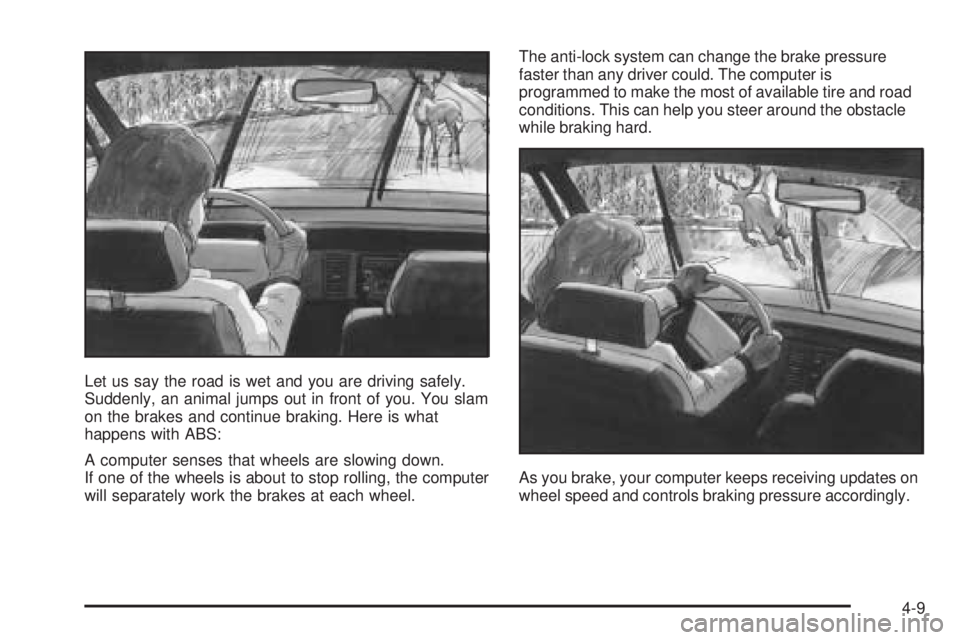
Let us say the road is wet and you are driving safely.
Suddenly, an animal jumps out in front of you. You slam
on the brakes and continue braking. Here is what
happens with ABS:
A computer senses that wheels are slowing down.
If one of the wheels is about to stop rolling, the computer
will separately work the brakes at each wheel.The anti-lock system can change the brake pressure
faster than any driver could. The computer is
programmed to make the most of available tire and road
conditions. This can help you steer around the obstacle
while braking hard.
As you brake, your computer keeps receiving updates on
wheel speed and controls braking pressure accordingly.
4-9
Page 290 of 486

While driving on a surface with reduced traction, try
your best to avoid sudden steering, acceleration
or braking (including engine braking by shifting to a
lower gear). Any sudden changes could cause the tires
to slide. You may not realize the surface is slippery
until your vehicle is skidding. Learn to recognize warning
clues — such as enough water, ice or packed snow
on the road to make a “mirrored surface” — and slow
down when you have any doubt.
If you have the anti-lock braking system, remember:
It helps avoid only the braking skid. If you do not have
anti-lock, then in a braking skid (where the wheels
are no longer rolling), release enough pressure on the
brakes to get the wheels rolling again. This restores
steering control. Push the brake pedal down steadily
when you have to stop suddenly. As long as the wheels
are rolling, you will have steering control.Driving at Night
Night driving is more dangerous than day driving. One
reason is that some drivers are likely to be impaired — by
alcohol or drugs, with night vision problems, or by fatigue.
4-18
Page 293 of 486

Driving too fast through large water puddles or even
going through some car washes can cause problems,
too. The water may affect your brakes. Try to avoid
puddles. But if you can not, try to slow down before you
hit them.
{CAUTION:
Wet brakes can cause accidents. They will not
work as well in a quick stop and may cause
pulling to one side. You could lose control of
the vehicle.
After driving through a large puddle of water
or a car wash, apply your brake pedal lightly
until your brakes work normally.
Hydroplaning
Hydroplaning is dangerous. So much water can build up
under your tires that they can actually ride on the
water. This can happen if the road is wet enough and
you are going fast enough. When your vehicle is
hydroplaning, it has little or no contact with the road.
Hydroplaning does not happen often. But it can if your
tires do not have much tread or it the pressure in
one or more is low. It can happen if a lot of water is
standing on the road. If you can see reections
from trees, telephone poles or other vehicles, and
raindrops “dimple” the water’s surface, there could be
hydroplaning.
Hydroplaning usually happens at higher speeds. There
just is not a hard and fast rule about hydroplaning.
The best advice is to slow down when it is raining.
4-21
Page 297 of 486

Once you are moving on the freeway, make certain you
allow a reasonable following distance. Expect to move
slightly slower at night.
When you want to leave the freeway, move to the
proper lane well in advance. If you miss your exit, do
not, under any circumstances, stop and back up. Drive
on to the next exit.
The exit ramp can be curved, sometimes quite sharply.
The exit speed is usually posted.
Reduce your speed according to your speedometer, not
to your sense of motion. After driving for any distance
at higher speeds, you may tend to think you are
going slower than you actually are.
Before Leaving on a Long Trip
Make sure you are ready. Try to be well rested. If you
must start when you are not fresh — such as after
a day’s work — do not plan to make too many miles that
rst part of the journey. Wear comfortable clothing
and shoes you can easily drive in.Is your vehicle ready for a long trip? If you keep it
serviced and maintained, it is ready to go. If it needs
service, have it done before starting out. Of course, you
will nd experienced and able service experts in GM
dealerships all across North America. They will be ready
and willing to help if you need it.
Here are some things you can check before a trip:
Windshield Washer Fluid:Is the reservoir full? Are
all windows clean inside and outside?
Wiper Blades:Are they in good shape?
Fuel, Engine Oil, Other Fluids:Have you checked
all levels?
Lamps:Are they all working? Are the lenses clean?
Tires:They are vitally important to a safe,
trouble-free trip. Is the tread good enough for
long-distance driving? Are the tires all inated to the
recommended pressure?
Weather Forecasts:What is the weather outlook
along your route? Should you delay your trip a
short time to avoid a major storm system?
Maps:Do you have up-to-date maps?
4-25
Page 308 of 486

Loading Your Vehicle
It is very important to know how much weight your
vehicle can carry. This weight is called the vehicle
capacity weight and includes the weight of all occupants,
cargo, and all nonfactory-installed options. Two labels
on your vehicle show how much weight it may properly
carry, the Tire and Loading Information label and the
Certication/Tire label.
{CAUTION:
Do not load your vehicle any heavier than the
GVWR, or either the maximum front or rear
GAWR. If you do, parts on your vehicle can
break, and it can change the way your vehicle
handles. These could cause you to lose
control and crash. Also, overloading can
shorten the life of your vehicle.
Tire and Loading Information Label
A. Vehicle Capacity Weight
The Tire and Loading Information label is attached to
the center pillar, near the driver’s door latch. Vehicles
without a center pillar will have the Tire and Loading
Information label attached to the driver’s door edge. This
label lists the number of people that can be in your
vehicle and the total weight it can carry. This weight is
called the vehicle capacity weight.
The Tire and Loading Information label also tells you
the size and recommended ination pressure for
the original equipment tires on your vehicle. For more
information on tires and ination, seeTires on page 5-57
andInation - Tire Pressure on page 5-64.
4-36