2004 BMW 645CI COUPE Key button
[x] Cancel search: Key buttonPage 96 of 216

Practical interior accessories
94
Practical interior accessories
Integrated universal remote
control*
The concept
The integrated universal remote control
replaces up to three different hand-held
transmitters for various items of radio-con-
trolled equipment such as door openers
and house alarm systems. The integrated
universal remote control registers and
stores signals from the original hand-held
transmitters.
The signal of an original hand-held trans-
mitter can be programmed on one of the
three memory buttons 1. Then the respec-
tive device can be actuated with the mem-
ory button 1 programmed for its use with
the ignition key in position 2. The indicator
lamp 2 flashes to confirm transmission of
the signal.
If you sell your vehicle one day, delete the
saved programs beforehand for your own
security, refer to page 95.
To prevent possible damage or injury,
before programming or using the inte-
grated universal remote control, always
inspect the immediate area to make certain
that no people, animals or objects are
within the travel range of the device. Also,
comply with the safety precautions of the
original hand-held transmitter.<
Checking compatibility
If you see this symbol on the pack-
aging or in the manual supplied with
the original hand-held transmitter, it
is safe to assume that it is compatible with
the integrated universal remote control.
If you have additional questions, please
consult your BMW Sports Activity Vehicle
Center or call 1-800-355-3515.
You can also visit these websites:
www.bmwusa.com or
www.homelink.com. HomeLink is a registered trademark owned
by Johnson Controls, Inc.
Programming
1Memory buttons
2Indicator lamp
Fixed-code hand-held transmitters
1.Ignition key in position 2
2.When using for the first time: press both
outer buttons 1 for approx. 20 seconds,
maintaining pressure until the indicator
lamp 2 starts to flash. The three mem-
ory buttons 1 are cleared
3.Hold the original hand-held transmitter
at a distance of approx. 2 in/5 cm to
8 in/20 cm to the memory buttons 1
The required distance between
the hand-held transmitter and the
memory buttons 1 depends on the rele-
vant system of the original hand-held
transmitter used.<
4.Simultaneously press the transmit but-
ton on the original hand-held transmit-
ter and the desired memory button 1 on
the integrated universal remote control.
Initially, the indicator lamp 2 flashes
slowly. Release both buttons as soon
as the indicator lamp 2 flashes rapidly.
If the indicator lamp 2 does not flash
rapidly after approx. 15 seconds,
change the distance
5.To program other original hand-held
transmitters, repeat steps 3 and 4.
Page 97 of 216

Controls
95Reference
At a glance
Driving tips
Communications
Navigation
Entertainment
Mobility
The corresponding memory button 1 is
now programmed with the signal of the
original hand-held transmitter.
The equipment can be used in ignition key
position 2.
If the device cannot be operated after
repeated programming, check
whether the original hand-held transmitter
uses an alternating-code system. Here,
either read the instructions for the original
hand-held transmitter or hold down the
programmed memory button 1 of the inte-
grated universal remote control. If the indi-
cator lamp 2 on the integrated universal
remote control flashes rapidly for a short
time then lights up for approx. 2 seconds,
this indicates that the original hand-held
transmitter uses an alternating-code sys-
tem. In the case of an alternating-code sys-
tem, program the memory buttons 1 as
described at Alternating-code hand-held
transmitters.<
Alternating-code hand-held
transmitters
To program the integrated universal remote
control, consult the Operating Instructions
for the equipment to be set. You will find
information there on the possibilities for
synchronization.
When programming hand-held transmitters
that employ an alternating code, please
observe the following supplementary
instructions:
Programming will be easier with the
aid of a second person.<
1.Park your vehicle within the range of the
remote-controlled equipment
2.Program the integrated universal
remote control as described above at
Fixed-code hand-held transmitters
3.Locate the button at the receiver of the
equipment to be set, e.g. on the drive
4.Press the button on the receiver of the
equipment to be set. After step 4, you
have approx. 30 seconds for step 55.Press the programmed memory
button 1 of the integrated universal
remote control three times.
The corresponding memory button 1 is
now programmed with the signal of the
original hand-held transmitter.
If you have any additional questions,
please contact your BMW center.<
Clearing memory buttons
Press both outer buttons 1 of the inte-
grated universal remote control for approx.
20 seconds, maintaining pressure until the
indicator lamp 2 starts to flash. All three
memory buttons are cleared.
The memory of individual memory but-
tons 1 cannot be cleared.
Glove compartment
Opening
Press button. The glove compartment
opens automatically and the lamps come
on.
Closing
Fold the cover up.
To prevent injury in the event of an
accident while the vehicle is being
driven, close the glove compartment
immediately after use.<
Rechargeable flashlight*
The flashlight is located on the left side of
the glove compartment.
The flashlight can remain there continu-
ously.
Page 121 of 216

Navigation
Driving tips
119Reference
At a glance
Controls
Communications
Entertainment
Mobility
2.Select "Start guidance" and press the
controller.
The destination guidance is switched
off.
When you park the vehicle before reaching
the entered destination, upon restarting
you will see the question "Continue guid-
ance to dest.?".
To restart destination guidance:
Select "Yes" and press the controller.
Destination guidance
through voice instructions
Switching voice instructions on/off
Control Center, for principle details, refer to
page 16:
1.Open the start menu
2.Press the controller to open the menu
3.Select "Display settings" and press the
controller
4.Select "Languages" and press the con-
troller
5.Select "Navigation voice instructions
on" and press the controller.
The voice instructions are switched on.Depending on which key you have used to
open the vehicle, the last adjustment is
applied.
Repeating and canceling voice
instructions
With the programmable keys in the steering
wheel, you can also make the following set-
tings, refer to page 49:
>Repeat the voice instruction
>Cancel the voice instruction
>Switching voice instructions on/off.
Adjusting volume
1.Repeat the last voice instruction, if
required
2.Turn the button during the voice
instruction to select the desired vol-
ume.
This volume is independent of the volume
of the audio and video sources.
Depending on which key you have used to
open the vehicle, the last adjustment is
applied.
Displaying route
You have the option of displaying various
views of the route during destination guid-
ance.
Displaying arrow view
1.Select "Navigation" and press the con-
troller
2.Select "Arrow display" and press the
controller.
Page 129 of 216
Navigation
Entertainment
Driving tips
127Reference
At a glance
Controls
Communications
Mobility
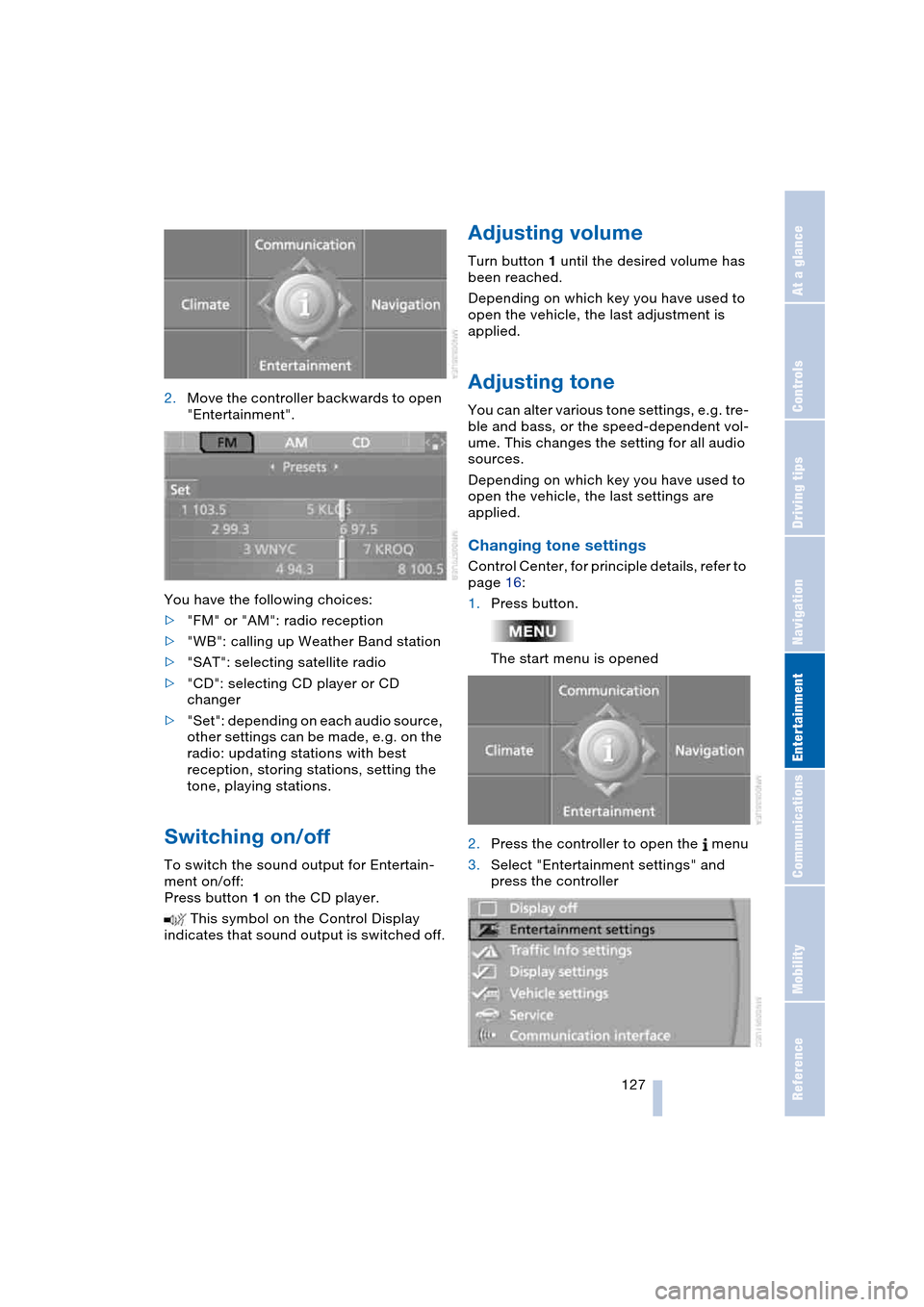
2.Move the controller backwards to open
"Entertainment".
You have the following choices:
>"FM" or "AM": radio reception
>"WB": calling up Weather Band station
>"SAT": selecting satellite radio
>"CD": selecting CD player or CD
changer
>"Set": depending on each audio source,
other settings can be made, e.g. on the
radio: updating stations with best
reception, storing stations, setting the
tone, playing stations.
Switching on/off
To switch the sound output for Entertain-
ment on/off:
Press button 1 on the CD player.
This symbol on the Control Display
indicates that sound output is switched off.
Adjusting volume
Turn button 1 until the desired volume has
been reached.
Depending on which key you have used to
open the vehicle, the last adjustment is
applied.
Adjusting tone
You can alter various tone settings, e.g. tre-
ble and bass, or the speed-dependent vol-
ume. This changes the setting for all audio
sources.
Depending on which key you have used to
open the vehicle, the last settings are
applied.
Changing tone settings
Control Center, for principle details, refer to
page 16:
1.Press button.
The start menu is opened
2.Press the controller to open the menu
3.Select "Entertainment settings" and
press the controller
Page 147 of 216

145
Entertainment
Reference
At a glance
Controls
Driving tips Communications
Navigation
Mobility
Batteries
Never attempt to dismantle your
BMW portable phone or its battery.
Use only approved battery types – the
wrong battery can destroy your portable
phone.
To avoid possible short circuits, after
removing a battery you should never allow
it to come into contact with metallic sur-
faces of any kind.<
Disposing of used batteries
Return used batteries to a recycling
collection point or to your BMW cen-
ter.<
Care instructions
You can find what you need to know about
caring for your portable phone in the Caring
for your vehicle brochure and in the sepa-
rate portable phone Owner's Manual.
Operating options
You can operate the BMW portable phone*
with:
>The steering wheel, refer to page 11
>The Control Center, refer to page 146
>Voice control, refer to page 151.
Telephoning with car phone:
BMW Assist calls
You can use the car phone via the hands-
free system for BMW Assist calls.
When the status information "Car Phone" is
displayed in "Communication", only BMW
Assist calls are possible.
Activating the
BMW portable phone*
Requirements for portable phones with
SIM card:
>Enter a Personal Identification Number,
PIN, if necessary
>Remove all keypad locks, refer to sepa-
rate Owner's Manual.
Before starting off, place the BMW portable
phone in the cradle. If a connection to
BMW Assist has been established, you
cannot use the BMW portable phone until
this connection has been terminated.
Inserting portable phone
1.Press button 1
2.To adjust the cradle to the portable
phone:
Slide the switch 2 toward the front or
rear if necessary
3.If necessary, remove the protective cap
from the antenna connector on the back
of the portable phone
4.Insert the portable phone with the
antenna completely retracted
5.Press the cradle downwards.
When the status information "Portable" is
displayed in "Communication", you can
operate the BMW portable phone via the
vehicle.
Removing portable phone
Press button 1.
For information on operating your
portable phone, please consult the
separate Owner's Manual.<
Page 148 of 216

Telephoning
146
Hands-free system
Coupe:
Convertible:
The hands-free microphone is located near
the interior rearview mirror or on the steer-
ing column.
The hands-free system is activated when-
ever you establish or receive a call using:
>The button on the steering wheel
>The Control Center
>Voice control.
Volume adjustment
Turn the button during a call to select the
desired volume.This volume for the hands-free system is
maintained, even if the other audio sources
are set to minimum volume.
Depending on which key you have used to
open the vehicle, the last adjustment is
applied.
Operation using Control
Center
The following functions can be used via the
Control Center as soon as the BMW porta-
ble phone has been laid in the cradle:
>Entering unlock code
>Dialing a phone number
>Phone book
>Top 8
>Redialing
>Displaying accepted calls
>Displaying missed calls
>Text messages/SMS.
Control Center, for principle details, refer to
page 16:
1.Press button.
The start menu is opened
2.Move the controller forwards to open
"Communication".
Page 153 of 216

151
Entertainment
Reference
At a glance
Controls
Driving tips Communications
Navigation
Mobility
To close the text message:
Move the controller forwards to select
and press the controller.
Calling sender
1.Select the desired text message and
press the controller.
The text message is displayed
2.Select "Options" and press the control-
ler
3.Select "Call sender" and press the con-
troller.
The selected sender is called.
Deleting text messages/SMS
1.Select the desired text message and
press the controller.
The text message is displayed
2.Select "Options" and press the control-
ler
3.Select "Delete" and press the control-
ler.
The text message of the portable phone
is deleted.
Operation by voice control*
The concept
You can operate your portable phone with-
out having to remove your hands from the
steering wheel. The system operates on
the basis of voice commands that you learn
easily after using them a few times. In addi-
tion, you are also supported by instructions
or questions.
Symbols usedVoice commands
In ignition key position 2:
1.Briefly press the button on the steer-
ing wheel.
A sound signal indicates operating
readiness
2.Speak voice commands.
To have the system list the voice com-
mands possible in each case:
Canceling operation via voice
control
Briefly press the button on the steering
wheel
or
In dialogs where text of any kind can be
spoken, e.g. a name, canceling is only pos-
sible using the button. Voice control dia-
log is automatically interrupted when an
incoming call is received.
Voice commands
In addition to the commands described in
this Owner's Manual, alternative com-
mands are often possible for the same
functions, e.g.:
Digits from zero to nine are understood.
You can say each digit individually or group
them into a sequence of three to five digits
to speed up the process.
{...} Identifies voice commands.
{{...}} Identifies instructions generated
by the system.
{Help}.
{Cancel}.
{Dial name} or {Name}.
Page 154 of 216

Telephoning
152
An example: dialing a phone number
Start the dialog:
Briefly press the button on the steering
wheel.
Volume adjustment
You can adjust the volume for the instruc-
tions from the system:
Turn the button during an instruction to
select the desired volume.
This volume for the instructions is main-
tained, even if the other audio sources are
set to minimum volume.
Depending on which key you have used to
open the vehicle, the last adjustment is
applied.
First steps
Entering unlock code
You can protect your BMW portable phone
against misuse with a four-digit unlock
code.
Correcting unlock code
After the sequence of digits has been
repeated by the system, the unlock code
can be corrected.
Deleting unlock code
Canceling operation
Calling
Dialing a phone number
Voice commandResponse
{Dial number}{{Please say the number}}
e.g. {123 456 7890}{{123 456 7890. Continue?}}
{Dial}{{Dialing number}}
1.{Input unlock code}.
The dialog for entering the unlock
code is started
2.Speak unlock code
3.{Send unlock code}.
1.{Correct number}.
The block of digits is deleted
2.Speak the new unlock code on
request
3.{Send unlock code}.
{Delete number}.
{Cancel}.
1.{Dial number}.
The dialog for establishing a tele-
phone connection is called up
2.Say the phone number.
For telephone calls abroad, say
{Plus} and then the country code
3.{Dial}.
The connection to the desired sub-
scriber is established.