2004 BMW 645CI COUPE Key button
[x] Cancel search: Key buttonPage 37 of 216

Controls
35Reference
At a glance
Driving tips
Communications
Navigation
Entertainment
Mobility
Rear window
Ignition key as of position 1:
1.Briefly press button 1:
The LEDs in button 1 and at switch 2
light up
2.Press switch 2:
>Up to the resistance point:
The rear window continues to move
downward as long as you continue
to hold the switch.
You can close the rear window in the
same manner by pulling the switch
>Briefly press the switch beyond the
resistance point:
The rear window moves downwards
automatically. Briefly press the
switch again to stop the opening
movement.
Briefly press button 1 again to deactivate
the function. The LEDs go out.
The rear window opens and closes
automatically when you open or close
the convertible top.<
After switching off ignition
You can still operate the windows:
>Ignition key in position 1 for approx.
15 minutes
>In position 0 or with the ignition key
removed for approx. 1 minute, as long
as a door has not been opened.
To open, press the switch beyond the
resistance point.
When leaving the vehicle, remove the
master key with remote control and
close the doors, as otherwise children
could operate the windows and injure
themselves etc.
remote control, refer to page 27 or 29.
Anti-trapping mechanism
If the closing force rises beyond a pre-
defined threshold during closing, the sys-
tem will immediately stop moving the win-
dow prior to lowering it slightly.
Convertible: the back windows and
rear window are not equipped with an
anti-trapping mechanism.<
Despite the anti-trapping mechanism,
you should always inspect the front
side window's travel path prior to closing it,
as the safety feature might fail to detect
certain kinds of obstructions, such as very
thin objects, and the window would con-
tinue closing.
Pulling the switch beyond the resistance
point and holding it limits the response of
the anti-trapping mechanism. Under these
conditions, the window will respond to
forces beyond a defined threshold by only
opening a few inches/millimeters.
If you again pull the switch past the resis-
tance point and hold it in position within a
period of roughly 4 seconds, the anti-trap-
ping mechanism will be deactivated.<
Accessories in window area
After installing any accessory – such as a
clamp-on antenna for a portable phone –
within the window's travel range, you will
need to have the system reinitialized for
use under the new conditions. Please con-
tact your BMW center for assistance.
Coupe:
Glass roof, electric with
raise function*
To prevent injuries, exercise care
when closing the glass roof and keep
it in your field of vision until it is shut.
When leaving the vehicle, always remove
the key and close the doors, as otherwise
children could operate the roof and injure
themselves etc.<
Page 40 of 216

Opening and closing
38 Partial vacuums that occur at higher
speeds in the passenger compart-
ment can make the convertible top flap.
Use the ventilation controls to increase the
air supply so that no partial vacuum occurs
in the vehicle.<
To close the electrically activated side
windows while the vehicle is being
driven, always close the rear windows or
all four windows simultaneously first, as
otherwise the windows cannot close tightly
at higher speeds.<
Prior to opening and closing
>Read carefully and comply with the
safety precautions that appear above
>Ensure that the convertible top com-
partment floor in the luggage compart-
ment is folded down, refer to page 32,
as otherwise the convertible top cannot
be opened
>Ensure that the luggage compartment
lid is closed.
Opening and closing
As of ignition key position 1, with the vehi-
cle stationary:
So as not to place an excessive load
on the battery, only operate the con-
vertible top with the engine running, if pos-
sible.
Before closing the convertible top, remove
foreign bodies from the windshield frame,
as these might inhibit closing of the con-
vertible top.<
1Closing
2Indicator lamp
3OpeningIf the opening or closing action is not
completed, the luggage compartment
lid cannot be opened.
When the button for top operation is
pressed, the side windows move down-
wards slightly; the rear window is lowered
completely.
If you hold the button pressed for longer
than 2 seconds after completion of the
opening or closing action and the LED has
gone out, the side windows and rear win-
dow move once again.<
Indicator lamp
In the following situations, a message is
displayed on the Control Display and an
acoustic signal sounds in addition to the
indicator lamp:
>During convertible top operation, the
LED lights up green. It goes out as soon
as the opening or closing action is com-
pleted
>If the indicator lamp flashes red when
you release the button, the opening or
closing action is not completed
>If the indicator lamp lights up red with
the button pressed, the convertible top
compartment floor is folded up or a fault
has occurred. The convertible top can-
not be moved.
Interruption
The automatic sequence of movements is
interrupted immediately if the button for top
operation is released. The sequence can
be continued in the desired direction using
the button.
If the opening or closing action is
interrupted for a longer period by
releasing the button, the convertible top
remains in that position for approx. 15 min-
utes before it slowly moves to a stable
position. The sequence can be continued
using the buttons.
Do not interrupt and continue the closing
action several times in succession, as oth-
erwise the fully automatic top mechanism
can be damaged.
Page 46 of 216

Adjustments
44
Seat, mirror and steering
wheel memory
You can store and select three different
adjustment settings for the driver's seat,
exterior mirrors and steering wheel.
The adjustment of the lumbar support is not
stored in the memory.
Storing
Ignition key as of position 1:
1.Adjust the desired seat, exterior mirror
and steering-wheel positions
2.Press
MEMORY button:
The indicator lamp in the button lights
up
3.Press the desired memory button 1, 2
or 3:
The indicator lamp goes out.
Calling up automatically
You have two possibilities:
>Calling up on unlocking the vehicle
>Calling up on opening the driver's door.
If you want to call up the last driver's seat,
exterior mirror and steering wheel position,
proceed as follows:
Control Center, for principle details, refer to
page 16:
1.Open the menu
2.Select "Vehicle settings" and press the
controller
3.Select "Door locks" and press the con-
troller
4.Select "Central locking" and press the
controller5.Select "Last seat pos." and press the
controller
6.Select "After unlocking" or "After open-
ing door"
7.Press the controller.
Depending on which key you have used to
open the vehicle, the last adjustment is
applied.
When using this Key Memory feature,
always make sure that the footwell
behind the driver's seat is empty and unob-
structed. If you fail to do so, any persons or
objects behind the seat could be injured or
damaged by a rearward movement of the
seat.<
Calling up manually
Do not call up a position from the
memory while the vehicle is moving.
There is a risk of accident from unexpected
movement of the seat or steering wheel.<
Convenience mode
1.Open the driver's door after unlocking
or turn the ignition key to position 1
2.Briefly press the desired memory but-
ton 1, 2 or 3.
The system immediately cancels the
adjustment procedure when you press one
of the seat adjustment switches or use one
of the memory buttons.
The adjusting procedure for the steering
wheel is immediately interrupted if you
operate the switch for the steering wheel
adjustment in any direction, refer to
page 48.
Page 47 of 216

Controls
45Reference
At a glance
Driving tips
Communications
Navigation
Entertainment
Mobility
Safety feature
1.Close the driver's door and turn the
ignition key to position 0 or 2
2.Press the desired memory button 1, 2
or 3 and maintain pressure until the
adjustment process has been com-
pleted.
If you press the
MEMORY button acciden-
tally:
Press the button again; the indicator lamp
goes out.
Tilt function, passenger-side mirror
Automatic curb monitor
Activating
1.Select the driver's exterior mirror with
the switch
2.When you engage reverse gear or
selector-lever position R, the exterior
mirror glass on the front passenger side
tilts downward slightly. This allows the
driver to see the area immediately adja-
cent to the vehicle – such as a curb –
when parking, etc.
Deactivating
Slide the mirror selection switch to the pas-
senger's side position.
Front head restraints
Head restraints reduce the risk of spi-
nal injury in the event of an accident.
Adjust the head restraints so that they are
centered roughly at the level of your ears.<
Coupe
Adjusting the height
>To raise: pull
>To lower: press.
To reach the lowest position, press
the button, refer to arrow 1.<
Adjusting tilt angle
Swivel the head restraints.
Removal
1.Pull the head restraint upwards to the
stop
2.Press the button, arrow 1, and remove
the head restraint.
Installation
Push the head restraint into the supports.
Convertible
Adjusting height
>To raise: move the switch upwards
>To lower: move the switch downwards.
Page 51 of 216

Controls
49Reference
At a glance
Driving tips
Communications
Navigation
Entertainment
Mobility
Automatic steering wheel
adjustment
In conjunction with seat, mirror and steer-
ing wheel memory.
The steering wheel automatically moves as
high up and far forward as possible to ease
driver entry and exit before then returning
to the standard position or stored memory
setting.
This automatic feature is governed by the
driver's door and the ignition lock.
Steering wheel heater*
In ignition key position 2, press the button.
The indicator lamp within the button lights
up when the steering wheel heater is in
operation.
Programming button function
Depending on your vehicle's equipment, an
individual function can be assigned to each
of the two programmable function buttons
in the steering wheel.
Control Center, for principle details, refer to
page 16:
1.Open the menu
2.Select "Vehicle settings" and press the
controller
3.Select "Steering wheel buttons" and
press the controller.A list with different functions is dis-
played:
>"Navigation"
Voice instructions for the navigation
system
>"Air recirculation on / off"
In this mode, you can continuously
block the supply of outside air, refer
to AUC Automatic recirculated-air
control on page 89
>"Mute on / off"
Mutes the audio sources
>"Screen on / off"
Switches the Control Display on/off
>"Short cut / Telephone"
Display/hide phone book
>"Next entertainment source"
Changes audio source
4.Select the desired function
5.Press the controller
6.Select button if necessary
.
7.Press the controller.
Depending on which key you have used to
open the vehicle, the last adjustment is
applied.
You can operate the selected function
using the corresponding button.
Page 57 of 216
Controls
55Reference
At a glance
Driving tips
Communications
Navigation
Entertainment
Mobility
SMG Sequential manual
transmission and automatic
transmission
Your BMW is equipped with the conve-
nience starting feature. Here, it is sufficient
to turn the ignition key only briefly to posi-
tion 3 'Start engine' and to let go of it right
away. The system responds by automati-
cally engaging the starter for a certain
period and allowing it to run until the engine
starts, after which it then disengages auto-
matically.
SMG Sequential manual
transmission
1.Press the brake pedal
2.Engage selector-lever position N
3.Start the engine.
If the engine does not start, engage
the last gear selected again, refer to
instrument cluster display, and then
engage selector-lever position N.<
Automatic transmission with
Steptronic
1.Press the brake pedal
2.Engage selector-lever position P or N
3.Start the engine.
Switching off engine
Do not remove the ignition key while
the vehicle is rolling, as otherwise the
steering wheel lock would engage while
steering.
When leaving the vehicle, remove the igni-
tion key and lock the steering.
When parking on a downhill incline, apply
the handbrake, as otherwise the vehicle
could roll away.<
Manual transmission
1.Turn the ignition key to position 1 or 0
2.Engage first or reverse gear.
SMG Sequential manual
transmission
1.Engage a drive position
2.Turn the ignition key to position 1 or 0.
A signal sounds if the idle position N is
engaged on stopping the engine.
Automatic transmission with
Steptronic
1.Engage selector-lever position P
2.Turn the ignition key to position 1 or 0.
Handbrake
The handbrake is primarily intended to pre-
vent the vehicle from rolling while parked;
it brakes the rear wheels.
Indicator lamp
The indicator lamp lights up, and an
acoustic signal also sounds when
starting off. The handbrake is
engaged.
Indicator lamp for Canadian mod-
els.
Engaging
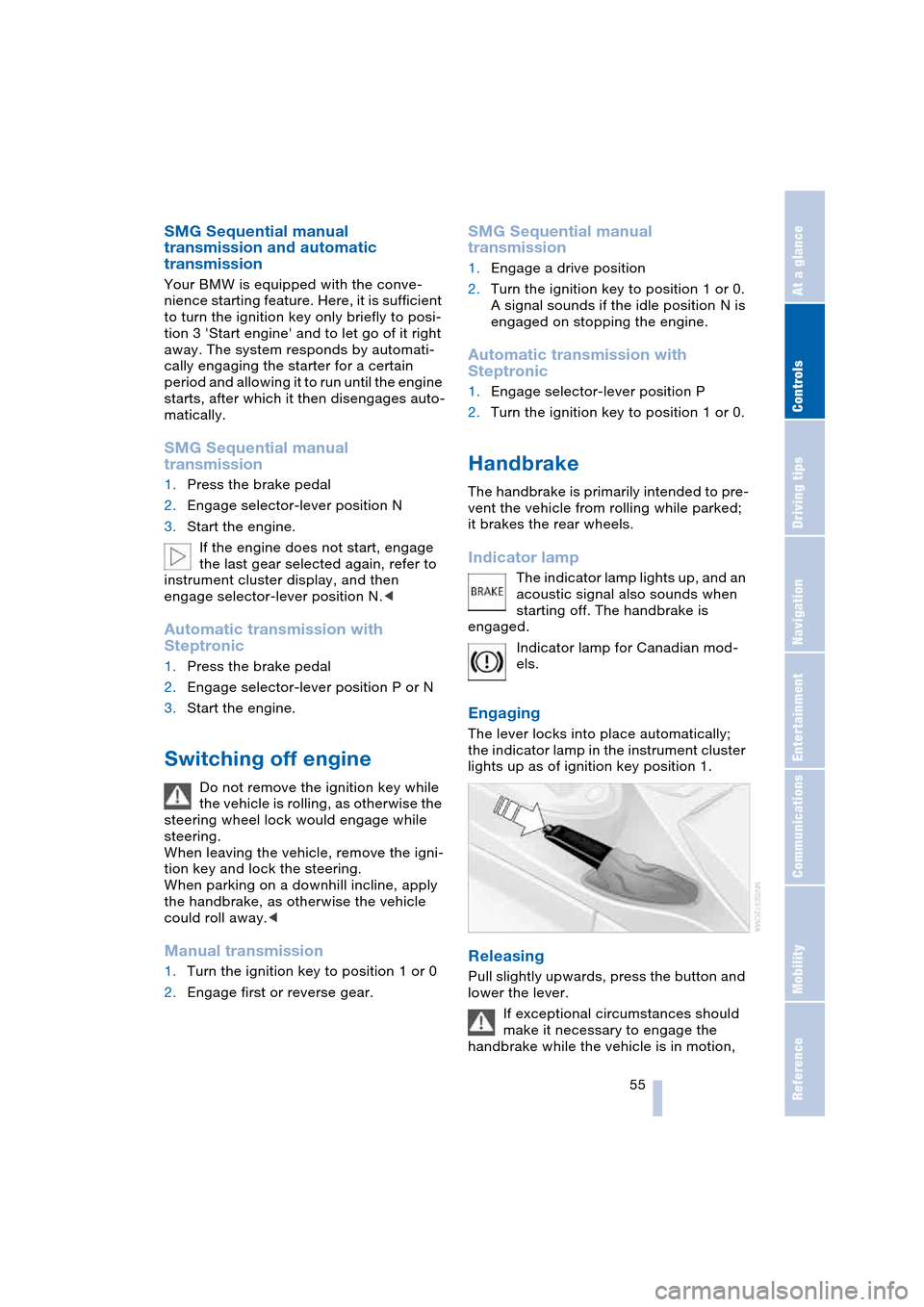
The lever locks into place automatically;
the indicator lamp in the instrument cluster
lights up as of ignition key position 1.
Releasing
Pull slightly upwards, press the button and
lower the lever.
If exceptional circumstances should
make it necessary to engage the
handbrake while the vehicle is in motion,
Page 58 of 216
Driving
56 do not pull it too strongly. In doing so, con-
tinuously press the button of the handbrake
lever.
Strong application of the handbrake can
lead to overbraking of the rear axle and
associated 'fishtailing' of the vehicle rear
end.
The brake lamps do not light up when the
handbrake is engaged.
Vehicles with manual or SMG transmission:
When parking on inclines, engage the
handbrake, as even engaging the first or
reverse gear might not under certain cir-
cumstances secure the vehicle against
moving.
Vehicles with automatic transmission:
Engage selector-lever position P.<
To prevent corrosion and one-sided
braking action, occasionally engage
the handbrake lightly when the vehicle is
slowly coming to a standstill if the traffic
conditions are suitable.<
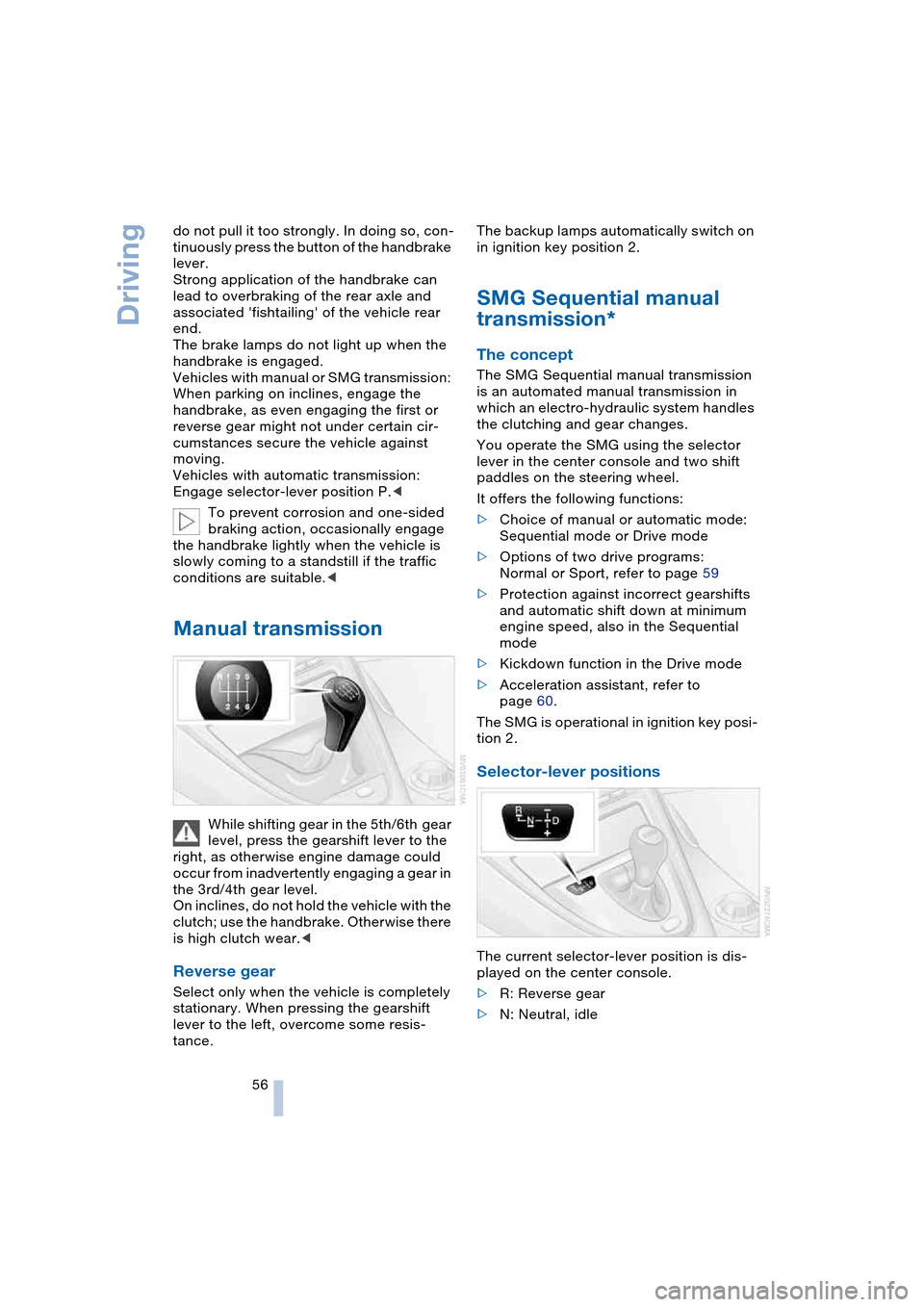
Manual transmission
While shifting gear in the 5th/6th gear
level, press the gearshift lever to the
right, as otherwise engine damage could
occur from inadvertently engaging a gear in
the 3rd/4th gear level.
On inclines, do not hold the vehicle with the
clutch; use the handbrake. Otherwise there
is high clutch wear.<
Reverse gear
Select only when the vehicle is completely
stationary. When pressing the gearshift
lever to the left, overcome some resis-
tance.The backup lamps automatically switch on
in ignition key position 2.
SMG Sequential manual
transmission*
The concept
The SMG Sequential manual transmission
is an automated manual transmission in
which an electro-hydraulic system handles
the clutching and gear changes.
You operate the SMG using the selector
lever in the center console and two shift
paddles on the steering wheel.
It offers the following functions:
>Choice of manual or automatic mode:
Sequential mode or Drive mode
>Options of two drive programs:
Normal or Sport, refer to page 59
>Protection against incorrect gearshifts
and automatic shift down at minimum
engine speed, also in the Sequential
mode
>Kickdown function in the Drive mode
>Acceleration assistant, refer to
page 60.
The SMG is operational in ignition key posi-
tion 2.
Selector-lever positions
The current selector-lever position is dis-
played on the center console.
>R: Reverse gear
>N: Neutral, idle
Page 62 of 216
Driving
60
Activating system
With ignition key in position 2
Press the SPORT button.
The LED in the button lights up and SPORT
is displayed in the instrument cluster.
Deactivating system
>Press the SPORT button again or
>engage reverse gear or
>switch off the engine.
The LED in the button and SPORT in the
instrument cluster go out.
Acceleration assistant with SMG
The acceleration assistant enables opti-
mized vehicle acceleration at racing car
level on road surfaces with good adhesion
when starting off.
Do not use the acceleration assistant
too often, as otherwise components
will wear prematurely.<
1.Activate the Dynamic Driving Control
2.Press the DSC button, refer to page 77,
for longer than three seconds
3.Press the accelerator pedal down fully:
kickdown. The ideal starting-off engine
speed is set.
To maintain driving stability, drive
with the DSC on whenever possible.<
Turn signals/
headlamp flasher
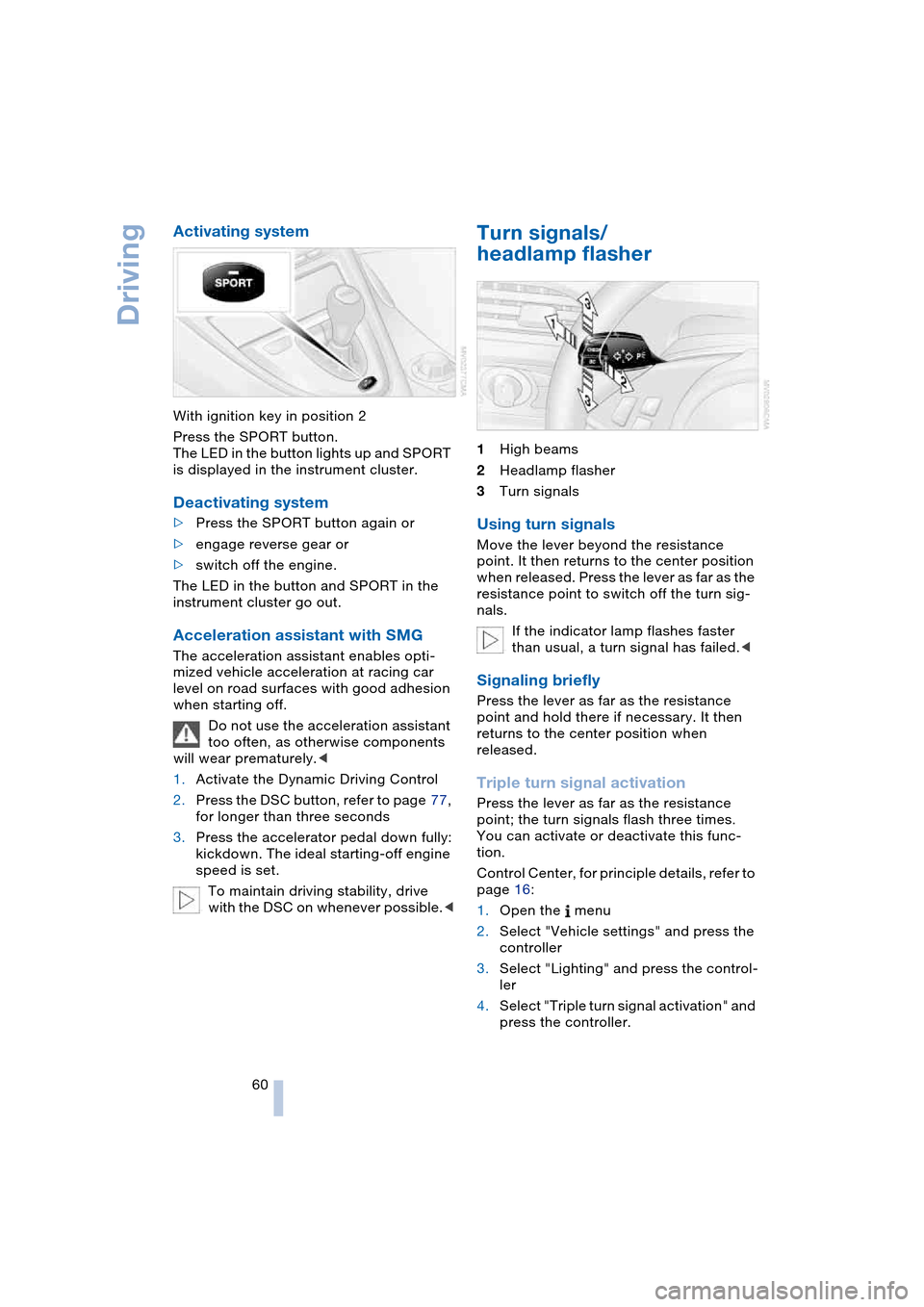
1High beams
2Headlamp flasher
3Turn signals
Using turn signals
Move the lever beyond the resistance
point. It then returns to the center position
when released. Press the lever as far as the
resistance point to switch off the turn sig-
nals.
If the indicator lamp flashes faster
than usual, a turn signal has failed.<
Signaling briefly
Press the lever as far as the resistance
point and hold there if necessary. It then
returns to the center position when
released.
Triple turn signal activation
Press the lever as far as the resistance
point; the turn signals flash three times.
You can activate or deactivate this func-
tion.
Control Center, for principle details, refer to
page 16:
1.Open the menu
2.Select "Vehicle settings" and press the
controller
3.Select "Lighting" and press the control-
ler
4.Select "Triple turn signal activation" and
press the controller.