Page 75 of 283
Controls Near the Steering Wheel
Inst rument s and Cont rols72
WINDSHIELD
WIPERS/WASHERSREAR WINDOW
DEFOGGER
INSTRUMENT PANEL
BRIGHTNESS HAZARD WARNING BUTTON
HEADLIGHTS/TURN SIGNALS/
FOG LIGHTS
STEERING WHEEL
ADJUSTMENT SEAT HEATERS
(P.74)
(P.75)
(P.191) (P.91)(P.78) (P.96)
(P.142)
CRUISE CONTROL
(P.76)
(P.76)
(P.73)
VEHICLE STABILITY
ASSIST SYSTEM
ON/OFF SWITCH HORN
MIRROR
CONTROLS
Page 81 of 283
See page f or important saf etyinf ormation about how to properlyposition the steering wheel. 16
Make any steering wheel adjustment
bef ore you start driving. Push the lever up to lock the
steering wheel in that position.
To adjust the steering wheel: Push the lever under the steering
column all the way down.
Move the steering wheel up or
down, and in or out to the desired
position, making sure the wheel
points toward your chest, not
toward your f ace. Make sure you
can see the instrument panel
gauges and the indicators. Make sure you have securely
locked the steering wheel in place
by trying to move it up, down, in,
and out.
1.
2. 3.
4.
Steering Wheel A djustment
Inst rument s and Cont rols78
Adjusting the steering wheel
position while driving may
cause you to lose control of the
vehicle and be seriously injured
inacrash.
Adjust the steering wheel only
when the vehicle is stopped.
Page 83 of 283

�µ�µ
�µ
�µ
The ignition switch has f our
positions: LOCK (0), ACCESSORY
(I), ON (II), and START (III).
You can insert or
remove the key only in this position.
To turn the key, you must push the
key in slightly. If your vehicle has an
automatic transmission, the shif t
lever must also be in park. If the f ront wheels are turned, the
anti-thef t lock may make it dif f icult
to turn the key. Firmly turn the
steering wheel to the lef t or right as
you turn the key.
You can
operate the audio system and the
accessory power sockets in this
position.
This is the normal key
position when driving. Several of the
indicators on the instrument panel
come on as a test when you turn the
ignition switch f rom ACCESSORY
(I) to ON (II).
Use this position
only to start the engine. The switch
returns to ON (II) when you let go of
the key. You will hear a reminder beeper if
you leave the key in the ignition
switch in the LOCK (0) or
ACCESSORY (I) position and open
the driver’s door. Remove the key to
turn of f the beeper.
If your vehicle has an automatic
transmission, the shif t lever must be
in Park bef ore you can remove the
key f rom the ignition switch.
Inst rument s and Cont rols
LOCK (0)
A CCESSORY (I)
ON (II)
ST A RT (III)
Ignition Switch
80
Removing the key from the
ignition switch while driving
locks the steering. This can
cause you to lose control.
Remove the key from the
ignition switch only when
parked.
Page 117 of 283

Air conditioning, as it cools, removes
moisture from the air. When used in
combination with the heater, it
makes the interior warm and dry.
This setting is suitable f or all driving
conditions whenever the outside
temperature is above 32°F (0°C).Switch the f an on.
Turn on the air conditioning.
Select and Fresh Air mode.
Adjust the temperature to your
pref erence.
To clear the windshield f aster, you
can close the dashboard corner vents
by rotating the wheel below each
vent. This sends more warm air to
the windshield def roster vents. Once
the windshield is clear, select Fresh
Air mode to avoid f ogging the
windows.
Select . When you select
, the system automatically
switches to Fresh Air mode and
turns on the A/C. (The A/C ON
indicator will not come on in U.S.
vehicles.)
Adjust the temperature so the
airf low f eels warm.
Select to help clear the
rear window.
When you switch to another mode
f rom , the A/C stays on.
Press the A/C button to turn it of f . To remove f og f rom inside the
windows: Select . The system
automatically switches to Fresh
Air mode and turns on the A/C.
(The A/C indicator will not come
on in U.S. vehicles.)
Select .
Set the f an and temperature
controls to maximum level.
For your saf ety, make sure you have
a clear view through all the windows
bef ore driving.
1.
2.
3.
4.
1.
2.
3.
1.
2.
3.
Dehumidif y the Interior
T o Def og and Def rostT o Remove Exterior Frost or Ice
From the Windows
Comf ort and Convenience Feat ures
Vents, Heating, and A/C
114
Page 142 of 283

�Û�Ý�´
�µ �´
�µ
�´ �µ
Three controls f or the audio system
are mounted in the steering wheel
hub. These let you control basic
f unctions without removing your
hand f rom the wheel. The VOL button adjusts the volume
up ( ) or down ( ). Press the top
or bottom of the button and hold it
until the desired volume is reached,
then release it.
If you are listening to the radio, use
the CH button to change stations.
Each time you press the top ( ) of
the button, the system goes to the
next preset station on the band you
are listening to. Press the bottom
( ) to go back to the previous
station.If youareplayingaCD,thesystem
skips to the beginning of the next
track each time you press the top
( ) of the CH button. Press the
bottom ( ) to return to the
beginning of the current track. Press
it again to return to the previous
track. You will see the disc and track
numbers in the display.
If youareplayingatape,pressthe
top ( ) of the CH button to advance
to the next selection. Press the
bottom( )togobacktothe
previous selection. The system
senses a silent period, then goes
back to Play mode.
The MODE button changes the
mode. Pressing the button
repeatedly selects FM1, FM2, AM,
XM Satellite Radio (U.S. models),
CD (if a CD is loaded), or a tape (if a
tape is loaded).
Comf ort and Convenience Feat ures
Audio System
Remote Audio Controls
139
MODE BUTTON
VOL BUTTON CH BUTTON
Page 145 of 283

Cruise control allows you to maintain
asetspeedabove25mph(40km/h)
without keeping your f oot on the
accelerator pedal. It should be used
f or cruising on straight, open
highways. It is not recommended f or
city driving, winding roads, slippery
roads, heavy rain, or bad weather.Push in the Cruise Control Master
Buttononthesteeringwheel.The
CRUISE MAIN indicator on the
instrument panel will come on.
Accelerate to the desired cruising
speedabove25mph(40km/h).Press and release the DECEL/
SET button on the steering wheel.
The CRUISE CONTROL indicator
on the instrument panel comes on
to show the system is now
activated.
The cruise control may not hold the
set speed when you are going up and
down hills. If your speed increases
going down a hill, use the brakes to
slow down to the desired speed. This
will cancel the cruise control. To
resume the set speed, press the
RES/ACCEL button. The CRUISE
CONTROL indicator on the
instrument panel comes on.
When climbing a steep hill, the
automatic transmission may
downshifttoholdthesetspeed.
1.
2. 3.
Using the Cruise Control
Cruise Control
Comf ort and Convenience Feat ures142
CRUISE CONTROL MASTER BUTTON
RES/ACCEL
BUTTON
CANCEL
BUTTON DECEL/SET
BUTTON
Improper use of the cruise
control can lead to a crash.
Use the cruise control only
when traveling on open
highways in good weather.
Page 147 of 283
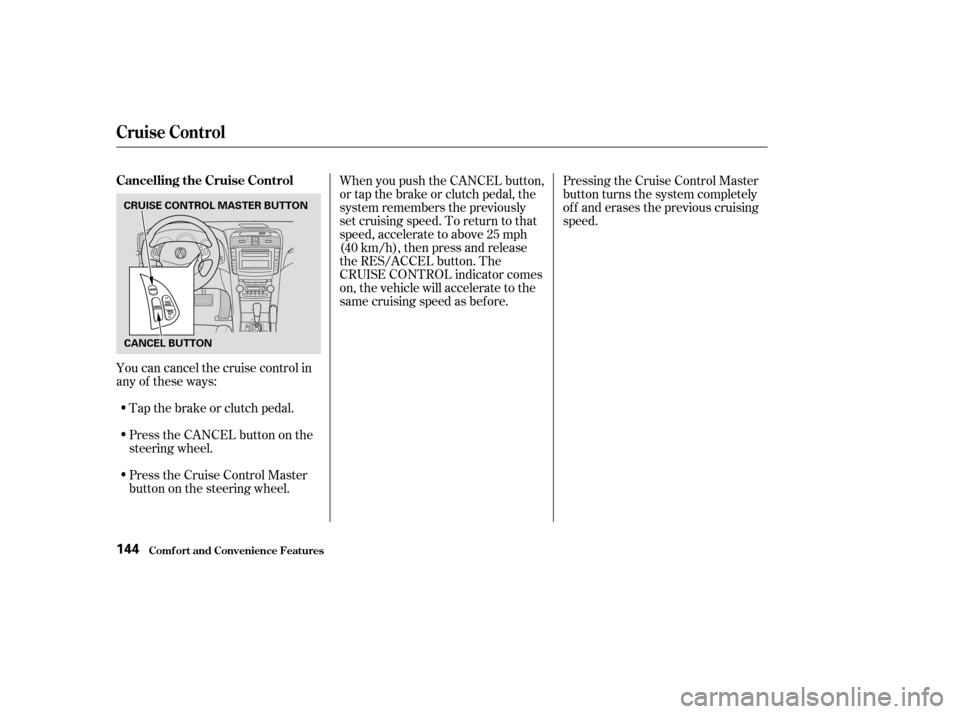
Youcancancelthecruisecontrolin
any of these ways:Tap the brake or clutch pedal.
PresstheCANCELbuttononthe
steering wheel.
Press the Cruise Control Master
button on the steering wheel. Pressing the Cruise Control Master
button turns the system completely
of f and erases the previous cruising
speed.
When you push the CANCEL button,
or tap the brake or clutch pedal, the
system remembers the previously
set cruising speed. To return to that
speed, accelerate to above 25 mph
(40 km/h), then press and release
the RES/ACCEL button. The
CRUISE CONTROL indicator comes
on, the vehicle will accelerate to the
same cruising speed as bef ore.
Cruise Control
Comf ort and Convenience Feat ures
Cancelling the Cruise Control
144
CRUISE CONTROL MASTER BUTTON
CANCEL BUTTON
Page 153 of 283

�Î�µ
�Î
�Î
To operate the HFL, use the HFL
Talk and Back buttons on the left
side of the steering wheel. On
navigation-equipped vehicles, there
are two sets of buttons: one f or the
navigation, climate control, and audio
systems, and the other f or the HFL. When you are operating the HFL, or
when you manually scroll through
the Multi-Information Display and
select HFL, you will see this
inf ormation on the screen:
Signal Strength Indicates the
network signal strength of the
current phone call. Five bars
equals f ull strength.
Here is the function of each HFL
button:
HFLTalk:Thisbuttonisusedbefore
you give a command, to answer
incoming calls, and to conf irm
system inf ormation.
HFLBack:Thisbuttonisusedto
end a call, go back to the previous
voice control command, and to
cancel an operation.
HandsFreeL ink
HFL Buttons
Multi-Inf ormation Display
Comf ort and Convenience Feat ures150
NAVIGATION
SYSTEM
BUTTONSHFL TALK
BUTTON
SIGNAL
STLENGTH
PHONE DIALINGBATTERY LEVEL
STATUS
HFL
MODE
HFL BACK
BUTTON ROAM STATUS
Refer to your navigation system
Manual.
TM