2004 Acura MDX brake
[x] Cancel search: brakePage 92 of 284
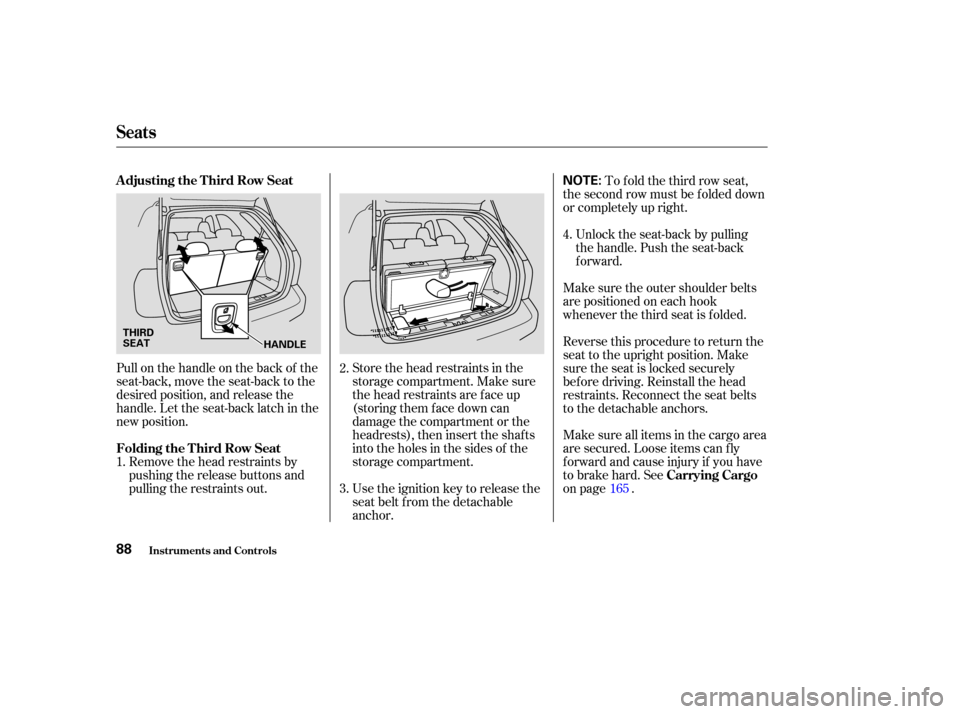
Store the head restraints in the
storage compartment. Make sure
the head restraints are f ace up
(storing them face down can
damage the compartment or the
headrests), then insert the shaf ts
into the holes in the sides of the
storage compartment.
Pull on the handle on the back of the
seat-back, move the seat-back to the
desired position, and release the
handle. Let the seat-back latch in the
new position.
Use the ignition key to release the
seat belt from the detachable
anchor.Unlock the seat-back by pulling
the handle. Push the seat-back
forward.
Make sure the outer shoulder belts
are positioned on each hook
whenever the third seat is f olded.
Remove the head restraints by
pushing the release buttons and
pulling the restraints out. To f old the third row seat,
the second row must be f olded down
or completely up right.
Reverse this procedure to return the
seat to the upright position. Make
sure the seat is locked securely
bef ore driving. Reinstall the head
restraints. Reconnect the seat belts
to the detachable anchors.
Make sure all items in the cargo area
are secured. Loose items can f ly
f orward and cause injury if you have
to brake hard. See
on page .
1. 2.
3.4.
165
Seats
Inst rument s and Cont rols
A djusting the T hird Row Seat
Folding the T hird Row Seat Carrying Cargo
88
NOTE:
HANDLE
THIRD
SEAT
Page 96 of 284

Theinsidemirrorcanautomatically
darken to reduce glare. To turn on
this feature, press the button on the
bottom of the mirror. The AUTO
indicator comes on as a reminder.
When it is on, the mirror darkens
when it senses the headlights of a
vehicle behind you, then returns to
normal visibility when the lights are
gone. Press the button again to turn
of f this sensing.
To apply the parking brake, push the
pedal down with your f oot. To
release it, push on the pedal again.
The parking brake indicator on the
instrument panel should go out when
the parking brake is fully released
with the engine running (see page ). Keeptheinsideandoutsidemirrors
clean and adjusted f or best visibility.
Be sure to adjust the mirrors bef ore
you start driving.
59
Inst rument s and Cont rols
Parking Brake
Mirrors
Parking Brake, Mirrors
92
NOTICE:
PARKING BRAKE PEDAL
AUTO SWITCH
SENSOR
INDICATOR
Driving the vehicle with the
parking brake applied can damage the
rear brakes and axles. A beeper will sound if the vehicle is put into gear
with the parking brake on.
Page 99 of 284

Doing any of the f ollowing af ter
pressing the MEMO button will
cancel the storing procedure.Not pressing a memory button
within 5 seconds.
Readjusting the seat position.
Readjusting the outside mirror
position.
Each memory button stores only one
driving position. Storing a new
position erases the previous setting
stored in that button’s memory. If
you want to add a new position while
retaining the current one, use the
other memory button. To select a memorized position, do
this:
Make sure the parking brake is set
and the shif t lever is in Park.
Press the desired memory button
(1 or 2) until you hear a beep, then
release the button.
The system will move the seat and
outside mirrors to the memorized
positions. The indicator in the
selected memory button will f lash
during movement. When the
adjustments are complete, you will
hear two beeps, and the indicator will
remain on. To stop the system’s automatic
adjustment, do any of these actions:
Press any button on the control
panel: MEMO, 1, or 2.
Push any of the adjustment
switches f or the seat.
Shif t out of Park.
Adjust the outside mirrors.
If desired, you can use the
adjustment switches to change the
positions of the seat or outside
mirrors af ter they are in their
memorized position. If you change
the memorized position, the
indicator in the memory button will
go out. To keep this driving position
f or later use, you must store it in the
driving position memory.
1.
2.Select ing a Memorized Posit ion
Inst rument s and Cont rols
Driving Posit ion Memory Syst em
95
Page 148 of 284

Accelerate to the desired cruising
speedabove25mph(40km/h).
Cruise control allows you to maintain
asetspeedabove25mph(40km/h)
without keeping your f oot on the
accelerator pedal. It should be used
f or cruising on straight, open
highways. It is not recommended f or
city driving, winding roads, slippery
roads, heavy rain, or bad weather.
Press and release the SET/
DECELbuttononthesteering
wheel. Indicator on the instrument
panel comes on to show the
system is now activated. Push in the Cruise Control Master
Switch. The indicator in the switch
will come on.The cruise control may not hold
the set speed when you are going
up and down hills. If your speed
increases going down a hill, use
the brakes to slow down. This will
cancelthecruisecontrol.To
resume the set speed, press the
RESUME/ACCEL button. The
indicator on the instrument panel
will come back on.
1.
2.
3.
Cruise Control
Comf ort and Convenience Feat ures
Using the Cruise Control
144
CRUISE CONTROL MASTER SWITCH
CANCEL
RESUME/ACCEL
SET/DECEL
Improper use of the cruise
control can lead to a crash.
Use the cruise control only
when traveling on open
highways in good weather.
Page 149 of 284

You can increase the set cruising
speed in any of these ways:Press and hold the RESUME/
ACCEL button. When you reach
the desired cruising speed, release
the button.
Push on the accelerator pedal.
Accelerate to the desired cruising
speed and press the SET/DECEL
button.
You can decrease the set cruising
speed in any of these ways: Press and hold the SET/DECEL
button. Release the button when
you reach the desired speed. To slow down in very small
amounts, tap the SET/DECEL
button. Each time you do this,
your vehicle will slow down about
1 mph (1.6 km/h).
Tap the brake pedal lightly with
your f oot. The CRUISE
CONTROL indicator on the
instrument panel will go out.
When the vehicle slows to the
desired speed, press the SET/
DECEL button.
Even with the cruise control turned
on, you can still use the accelerator
pedal to speed up f or passing. Af ter
completing the pass, take your foot
of f the accelerator pedal. The vehicle
will return to the set cruising speed.
Resting your f oot on the brake pedal
will cause the cruise control to
cancel. Youcancancelthecruisecontrolin
any of these ways:
Tap the brake pedal.
Push the CANCEL button on the
steering wheel.
Press the Cruise Control Master
Switch.
When you push the CANCEL button,
or tap the brake pedal, the system
will remembers the previously set
cruising speed. To return to that
speed, accelerate to above 25 mph
(40 km/h) and then press and
release the RESUME/ACCEL
button. The CRUISE CONTROL
indicator comes on. The vehicle will
accelerate to the same cruising
speed as bef ore.
Pressing the Cruise Control Master
Switch turns the system completely
of f and erases the previous cruising
speed.
To increase your speed in very
small amounts, tap the RESUME/
ACCEL button. Each time you do
this, the vehicle will speed up
about 1 mph (1.6 km/h).
Cruise Control
Changing the Set Speed
Cancelling the Cruise Control
Resuming the Set Speed
Comf ort and Convenience Feat ures145
Page 162 of 284

Help assure your vehicle’s f uture
reliability and perf ormance by paying
extra attention to how you drive
during the f irst 600 miles (1,000 km).
During this period:Avoid full-throttle starts and rapid
acceleration.
Do not change the oil until the
scheduled maintenance time. Your Acura is designed to operate on
premium unleaded gasoline with a
pump octane number of 91 or higher.
Useof aloweroctanegasolinecan
cause occasional metallic knocking
noises in the engine and will result in
decreased engine perf ormance.
You should also f ollow these same
recommendations with an
overhauled or exchanged engine, or
when the brakes are replaced. Avoidhardbrakingforthefirst
200 miles (300 km).
We recommended using a gasoline
containing detergent additives that
help prevent f uel system and engine
deposits. Some gasoline today is blended with
oxygenates such as ethanol or
MTBE. Your vehicle is designed to
operate on oxygenated gasoline
containing up to 10 percent ethanol
by volume and up to 15 percent
MTBE by volume. Do not use
gasoline containing methanol.
If you notice any undesirable
operating symptoms, try another
service station or switch to another
brand of gasoline.
In addition, in order to maintain good
perf ormance, f uel economy, and
emissions control, we strongly
recommend, in areas where it is
available, the use of gasoline that
does NOT contain manganese-based
f uel additives such as MMT. Use of
gasoline with these additives may
adversely affect performance, and
cause the Malf unction Indicator
Lamp on your instrument panel to
come on. If this happens, contact your
authorized Acura dealer f or service.
For f urther important f uel-related
inf ormation, please ref er to your
Quick Start Guide.
Break-in Period, Gasoline T ype
Bef ore Driving
Break-in Period
Gasoline Type
158
Page 164 of 284

Screw the fuel fill cap back on
until it clicks at least three times.
If you do not properly tighten the
cap, the Malf unction Indicator
Lampmaycomeon(seepage).
Push the f uel f ill door closed until
it latches.
Park the vehicle, and set the
parking brake. Pull the hood
release handle located under the
lower lef t corner of the dashboard.
The hood will pop up slightly.Put your f ingers under the f ront
edge of the hood to the left of
center. Slide your hand to the lef t
until you f eel the hood latch
handle. Push this handle up until it
releases the hood. Lif t the hood.
If the hood latch handle moves stif f ly,
or if you can open the hood without
lifting the handle, the mechanism
should be cleaned and lubricated
(see page ).
1.
5.
6.
2.
243
214
Service Station Procedure
Bef ore Driving
Opening the Hood
160
HOOD RELEASE HANDLELATCH
Page 167 of 284

Modif ying your vehicle, or installing
some non-Acura accessories, can
make your vehicle unsaf e. Bef ore
you make any modif ications or add
anyaccessories,besuretoreadthe
f ollowing inf ormation.Bef ore installing any accessory:
Make sure the accessory does not
obscure any lights, or interf ere
with proper vehicle operation or
perf ormance.
When properly installed, cellular
phones, alarms, two-way radios, and
low-powered audio systems should
not interf ere with your vehicle’s
computer controlled systems, such
as the SRS, TPMS, and anti-lock
brake system.
Although aftermarket accessories
may f it on your vehicle, they may not
meet f actory specif ications, and
could adversely af f ect your vehicle’s
handling and stability. (See
‘‘Modif ying Your Vehicle’’ on page
f or additional inf ormation.)
Your dealer has Acura accessories
that allow you to personalize your
vehicle. These accessories have
been designed and approved f or your
vehicle.
Be sure electronic accessories do
not overload electrical circuits
(see page ) or interf ere with
proper operation of your vehicle.
Do not install accessories on the
side pillars or across the rear
windows as these may interf ere
with proper operation of the side
curtain airbags.
Have the installer contact your
Acura dealer f or assistance bef ore
installing any electronic accessory.
If possible, have your dealer
inspect the f inal installation.246
164
A ccessories and Modif ications
Bef ore Driving
A ccessories
163
Improper accessories or
modifications can affect your
vehicle’s handling, stability, and
performance, and cause a
crash in which you can be hurt
or killed.
Follow all instructions in this
owner’s manual regarding
accessories and modifications.