Page 175 of 257
2003 VOLVO XC70
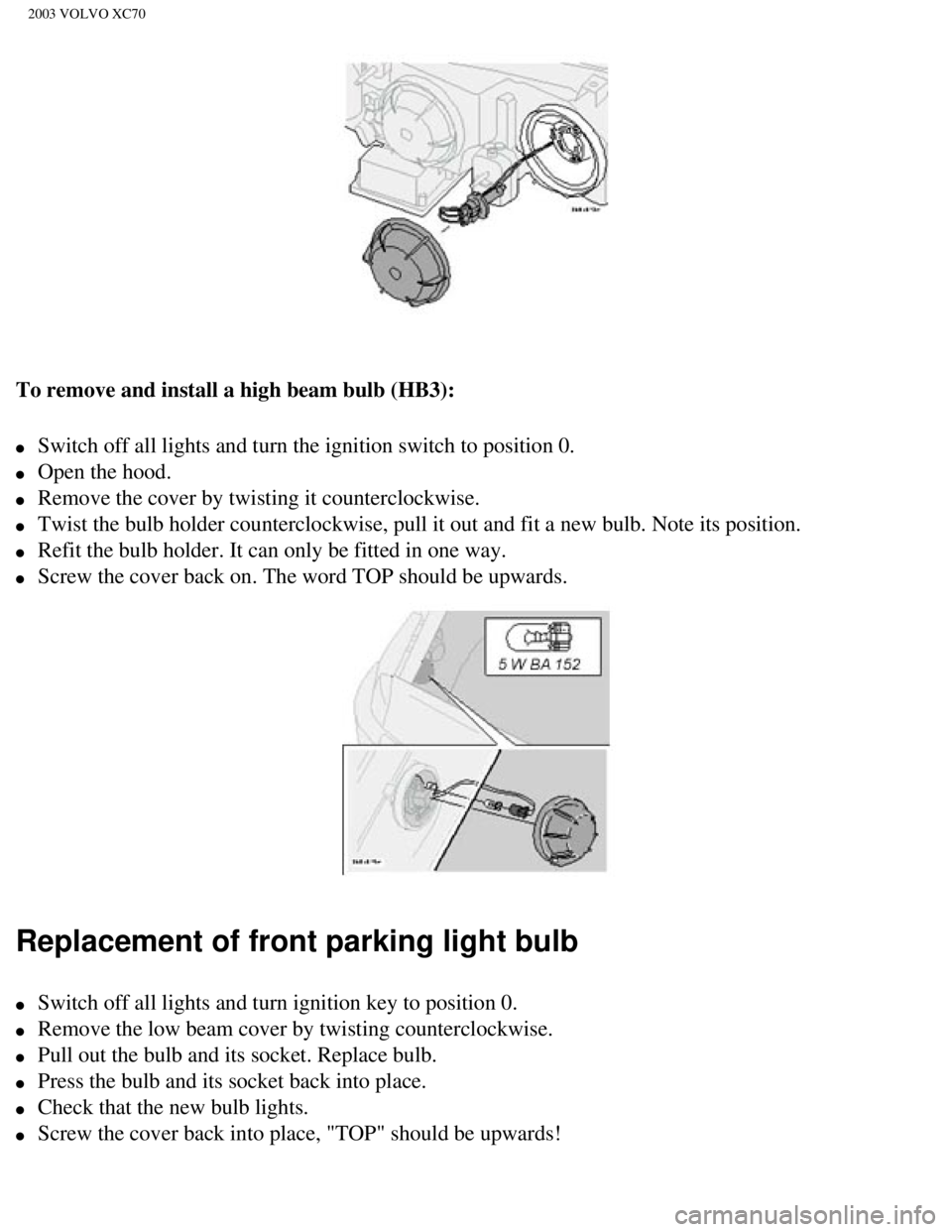
To remove and install a high beam bulb (HB3):
l Switch off all lights and turn the ignition switch to position 0.
l Open the hood.
l Remove the cover by twisting it counterclockwise.
l Twist the bulb holder counterclockwise, pull it out and fit a new bulb. \
Note its position.
l Refit the bulb holder. It can only be fitted in one way.
l Screw the cover back on. The word TOP should be upwards.
Replacement of front parking light bulb
l Switch off all lights and turn ignition key to position 0.
l Remove the low beam cover by twisting counterclockwise.
l Pull out the bulb and its socket. Replace bulb.
l Press the bulb and its socket back into place.
l Check that the new bulb lights.
l Screw the cover back into place, "TOP" should be upwards!
file:///K|/ownersdocs/2003/2003_XC70/03xc70_08a.htm (10 of 21)12/30/20\
06 4:18:03 PM
Page 176 of 257
2003 VOLVO XC70
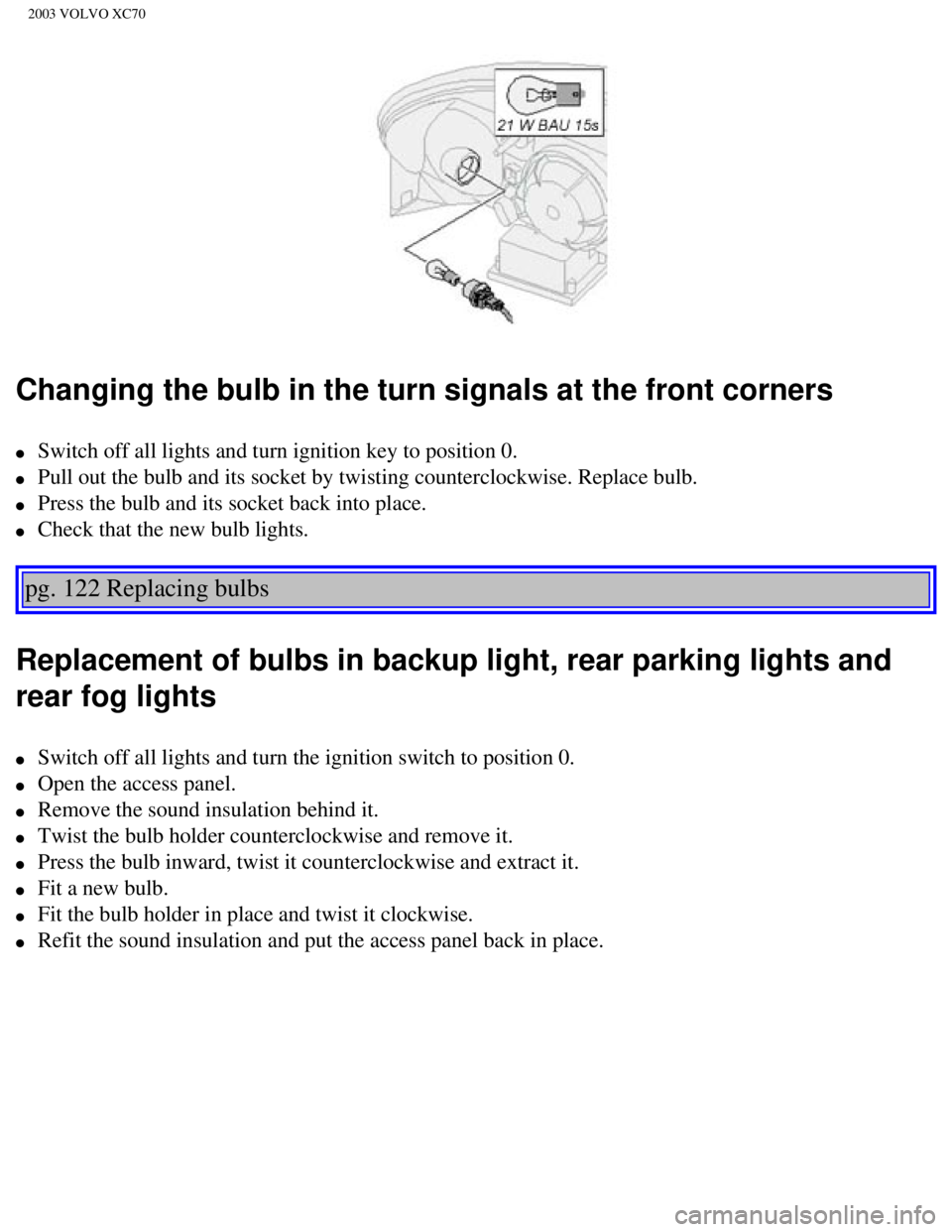
Changing the bulb in the turn signals at the front corners
l Switch off all lights and turn ignition key to position 0.
l Pull out the bulb and its socket by twisting counterclockwise. Replace b\
ulb.
l Press the bulb and its socket back into place.
l Check that the new bulb lights.
pg. 122 Replacing bulbs
Replacement of bulbs in backup light, rear parking lights and
rear fog lights
l Switch off all lights and turn the ignition switch to position 0.
l Open the access panel.
l Remove the sound insulation behind it.
l Twist the bulb holder counterclockwise and remove it.
l Press the bulb inward, twist it counterclockwise and extract it.
l Fit a new bulb.
l Fit the bulb holder in place and twist it clockwise.
l Refit the sound insulation and put the access panel back in place.
file:///K|/ownersdocs/2003/2003_XC70/03xc70_08a.htm (11 of 21)12/30/20\
06 4:18:03 PM
Page 178 of 257
2003 VOLVO XC70
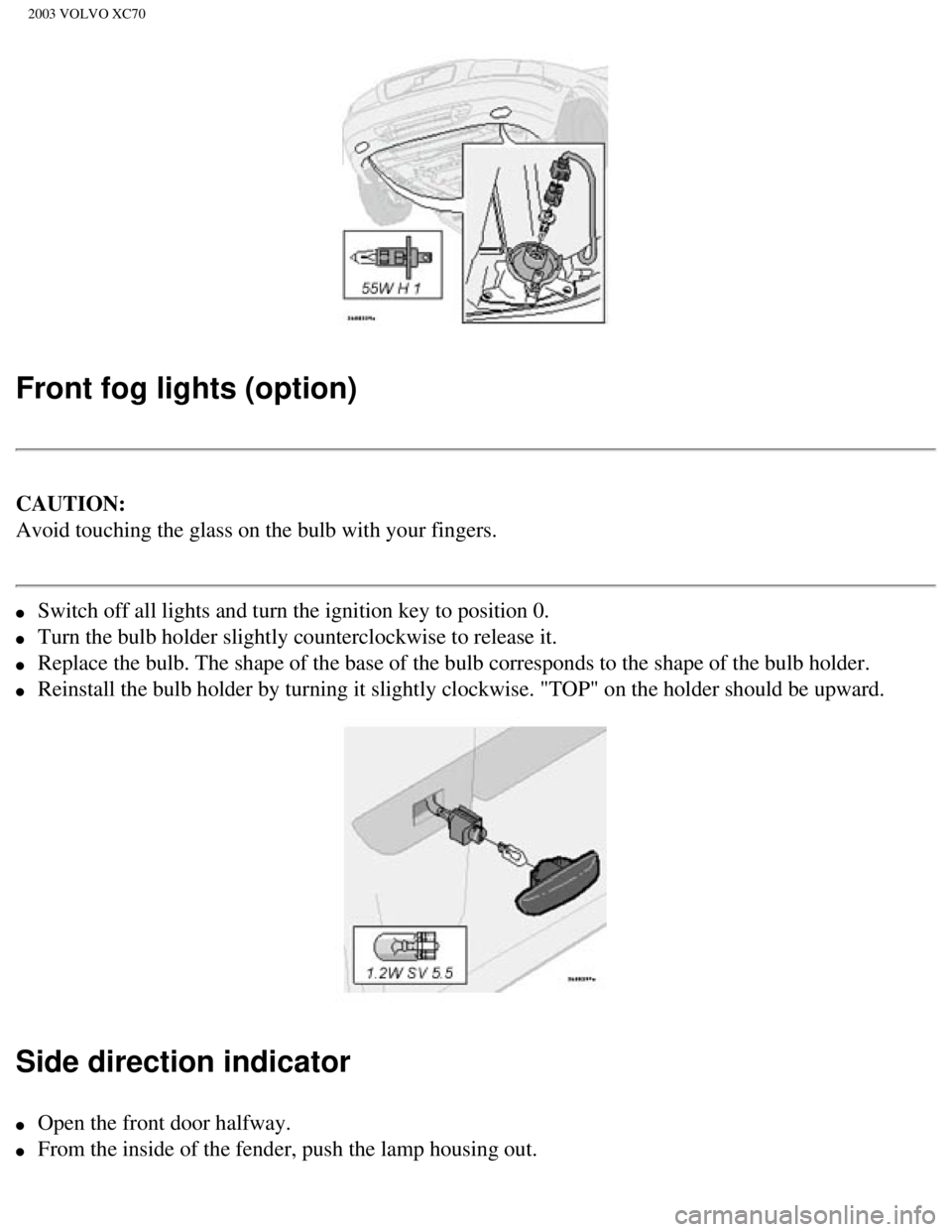
Front fog lights (option)
CAUTION:
Avoid touching the glass on the bulb with your fingers.
l Switch off all lights and turn the ignition key to position 0.
l Turn the bulb holder slightly counterclockwise to release it.
l Replace the bulb. The shape of the base of the bulb corresponds to the s\
hape of the bulb holder.
l Reinstall the bulb holder by turning it slightly clockwise. "TOP" on the\
holder should be upward.
Side direction indicator
l Open the front door halfway.
l From the inside of the fender, push the lamp housing out.
file:///K|/ownersdocs/2003/2003_XC70/03xc70_08a.htm (13 of 21)12/30/20\
06 4:18:03 PM
Page 217 of 257
2003 VOLVO XC70
17. Traffic information
18. Automatic presetting of radio stations
19. Display
pg. 154 Audio systems HU-613/HU-803
Switch on/off
Press the knob to switch on or turn off the radio.
Volume control
Turn the knob clockwise to increase volume. Volume control is electronic\
and does not have an end
stop. If you have a key pad in the steering wheel, increase or decrease \
the volume with the + or -
buttons.
Bass
Adjust the bass by pressing the button to extend the control and turning\
it to the left (less bass) or to the
right (more bass). A "detent" indicates "equalized" bass. Press the bu\
tton back in when you have made
the adjustment.
file:///K|/ownersdocs/2003/2003_XC70/03xc70_10a.htm (4 of 10)12/30/200\
6 4:18:06 PM
Page 220 of 257
 or the SOURCE button (HU-8")
2003 VOLVO XC70
If you have a key pad in the steering wheel press the right or left arro\
w to switch between preset stations.
Scan function
Press the SCAN button (HU-613) or the SOURCE button (HU-803) to star\
t the station scan function.
When a station is found, scanning stops for several seconds, after which\
scanning will continue.
Press the SCAN or SOURCE button when a station has been found if you wou\
ld like to listen to that
station and to discontinue the scan function.
pg. 156 Audio systems HU-613/HU-803 - radio
A - Automatic station preset
This function seeks and stores up to 10 strong AM or FM stations in a se\
parate memory. This function is
especially useful in areas where you are not familiar with the radio sta\
tions.
1. Press in the "AUTO" button for at least 2 seconds. A number of strong\
signal stations (max. 10) from
the currently selected waveband are now stored automatically in the memo\
ry. An "A" and "AUTO" is
displayed. If there is no station with sufficient signal strength "NO ST\
ATION" is displayed.
2. Turn "1-20/DISC" button if you wish to change to another of the auto-\
stored stations.
Another auto-stored station is selected with each turn.
file:///K|/ownersdocs/2003/2003_XC70/03xc70_10a.htm (7 of 10)12/30/200\
6 4:18:06 PM
Page 228 of 257
2003 VOLVO XC70
Turn the "1-20/DISC" knob. The number of the disc and track is displayed\
.
CD eject
HU-613: If you press this button the CD stops playing and the disc is ejected. \
HU-803: The CD currently playing will be ejected. If more than one CD has been i\
nserted, turn the "1-
20/DISC" to display the number of the CD you would like to eject and pre\
ss the CD eject button.
NOTE: For traffic safety reasons, the ejected CD must be removed within 12 sec\
onds or it will be
automatically reinserted into the CD player.
Fast winding
Press " " or " " to seek within a track.
Next/previous track
Press " " to skip to the next track or " " to skip to the previous track. The track number is shown
in the display. If you have the key pad in the steering wheel you can al\
so use these arrows in the same
way.
Random
file:///K|/ownersdocs/2003/2003_XC70/03xc70_10b.htm (5 of 13)12/30/200\
6 4:18:07 PM
Page 230 of 257
2003 VOLVO XC70
Selecting a disc
Turn the "1-20/DISC" knob. The number of the disc and track is displayed\
.
Fast winding
Press " " or " " to seek within a track.
Next/previous track
Press " " to skip to the next track or " " to skip to the previous track. Disc and track number are
displayed. If you have the key pad in the steering wheel you can also us\
e these arrows in the same way.
Random
Press "RND" to connect in the random function. A randomly selected track\
is chosen from a randomly
selected disc. Then a new track is selected in the same way. "RND" (ran\
dom) is displayed as long as the
function is activated.
pg. 162 Audio system HU-613 - cassette deck
Cassette deck (HU-613) -inserting a cassette
file:///K|/ownersdocs/2003/2003_XC70/03xc70_10b.htm (7 of 13)12/30/200\
6 4:18:07 PM
Page 231 of 257
. The ignition key must be in
position I or II before a cassette can be inserted. \"TAPE A\" or \"TAPE B")
2003 VOLVO XC70
Slide a cassette into the slot with the tape to the right (side 1 or A \
upwards). The ignition key must be in
position I or II before a cassette can be inserted. "TAPE A" or "TAPE B"\
is displayed. When one side
has finished playing the unit will automatically begin playing the other\
side. If a cassette is already
inserted in the cassette deck select cassette play by turning the "SOURC\
E" knob.
Changing tape direction
Press the "REV" button if you wish play the other side of the tape. The \
side being played is displayed.
Tape eject
If you press this button the tape stops and the cassette is ejected. To \
select a new mode (radio, CD) turn
the "SOURCE" button. A cassette can be ejected even if the ignition is s\
witched off.
Dolby B Noise reduction
The function is preset. To switch the function off, hold down the " " button until the Dolby symbol
in the display goes out. Press the same button again to reactivate the f\
unction or use the Advanced User
Mode function.
Fast winding
file:///K|/ownersdocs/2003/2003_XC70/03xc70_10b.htm (8 of 13)12/30/200\
6 4:18:07 PM