Page 59 of 257
2003 VOLVO XC70
pg. 38 Warning flashers, Heated mirrors/rear window, Heated front seats
Hazard warning flashers
The four-way flasher should be used to indicate that the vehicle has bec\
ome a traffic hazard. To activate
the flashers, press the triangular button in the center dash. Press the \
button again to turn off the flashers.
NOTE: Regulations regarding the use of the hazard warning flasher may vary, de\
pending on where you
live.
Heated sideview mirrors/rear window
Press the switch to start heating the rear window and sideview mirrors t\
o remove ice or condensation.
An LED in the switch will light up.
file:///K|/ownersdocs/2003/2003_XC70/03xc70_02b.htm (9 of 18)12/30/200\
6 4:17:54 PM
Page 60 of 257

2003 VOLVO XC70
A timer automatically switches off the heating to the sideview mirrors a\
fter approximately 6 minutes and
to the rear window after approximately 12 minutes. The LED will go out c\
orrespondingly.
Heated front seats (option)
The front seat heating can be switched on and off as required.
l Press the switch once for maximum seat heating. Both LEDs in the switch \
will be lit.
l Press the switch a second time for comfort heating. One LED in the switc\
h will be lit.
l Press the switch a third time to turn the heating off completely.
The seat heating for the passenger seat should be switched off when the \
seat is not occupied.
pg. 39 Parking brake, Auxiliary socket, Ashtrays
Parking brake (hand brake)
The lever is situated between the front seats. The brake is applied to t\
he rear wheels. The indicator light
in the instrument panel will light up to indicate when the parking brake\
is applied. Apply the parking
file:///K|/ownersdocs/2003/2003_XC70/03xc70_02b.htm (10 of 18)12/30/20\
06 4:17:54 PM
Page 61 of 257
2003 VOLVO XC70
brake by pulling up firmly on the lever. Release the parking brake by de\
pressing the button at the end of
the lever and lowering the lever completely. WARNING!
l Always use the parking brake (hand brake) when parking. On hills, also\
turn the front wheels
toward the curb.
l The indicator light in the instrument panel will light up even if the pa\
rking brake is applied only
slightly. Be sure to pull the lever up sufficiently.
Front auxiliary socket
Rear auxiliary socket
Auxiliary sockets
file:///K|/ownersdocs/2003/2003_XC70/03xc70_02b.htm (11 of 18)12/30/20\
06 4:17:54 PM
Page 62 of 257
 for the auxiliary socket to function\
.")
2003 VOLVO XC70
These 12 volt sockets can be used to plug in certain accessories such as\
cellular telephones, etc. The key
must be in position I (or higher) for the auxiliary socket to function\
.
The auxiliary sockets can also be used for cigarette lighters, which are\
available at your Volvo retailer.
NOTE: The cover should be kept on when the auxiliary socket is not in use.
Ashtrays
Volvo cars in North America do not have an ashtray in the front seat as \
standard equipment. If you want
to have an ashtray in the front seat, please contact your Volvo retailer\
.
pg. 40 Electrically operated windows
Electrically operated windows
The electrically operated windows are controlled by buttons in the arm r\
ests. The ignition switch must
be ON * (ignition key in position I, II or the engine running) for the\
electrically operated windows to
function.
To lower: Press down the front edge of the button to the first detent ("stop").\
To raise: Lightly pull up the front edge of the button to the first detent ("sto\
p").
* The electrically operated windows will also function after the ignitio\
n has been switched off as long as
neither of the front doors has been opened.
file:///K|/ownersdocs/2003/2003_XC70/03xc70_02b.htm (12 of 18)12/30/20\
06 4:17:54 PM
Page 64 of 257
2003 VOLVO XC70
If the LED in the switch is OFF: The rear door windows can be raised or lowered with the buttons on
the rear door armrests or with the buttons on the driver's door armrest.\
If the LED in the switch is ON: The rear door windows can only be raised or lowered with the buttons
on the driver's door armrest.
pg. 41 Rearview/sideview mirrors
Rearview mirror
A Normal position
B Night position, reduces glare from following headlights
Autodim function (option)
The autodim function reacts to headlights from following traffic and aut\
omatically reduces glare.
NOTE: This function is automatically switched off when the gear selector is pl\
aced in the Reverse
position.
file:///K|/ownersdocs/2003/2003_XC70/03xc70_02b.htm (14 of 18)12/30/20\
06 4:17:54 PM
Page 65 of 257
2003 VOLVO XC70
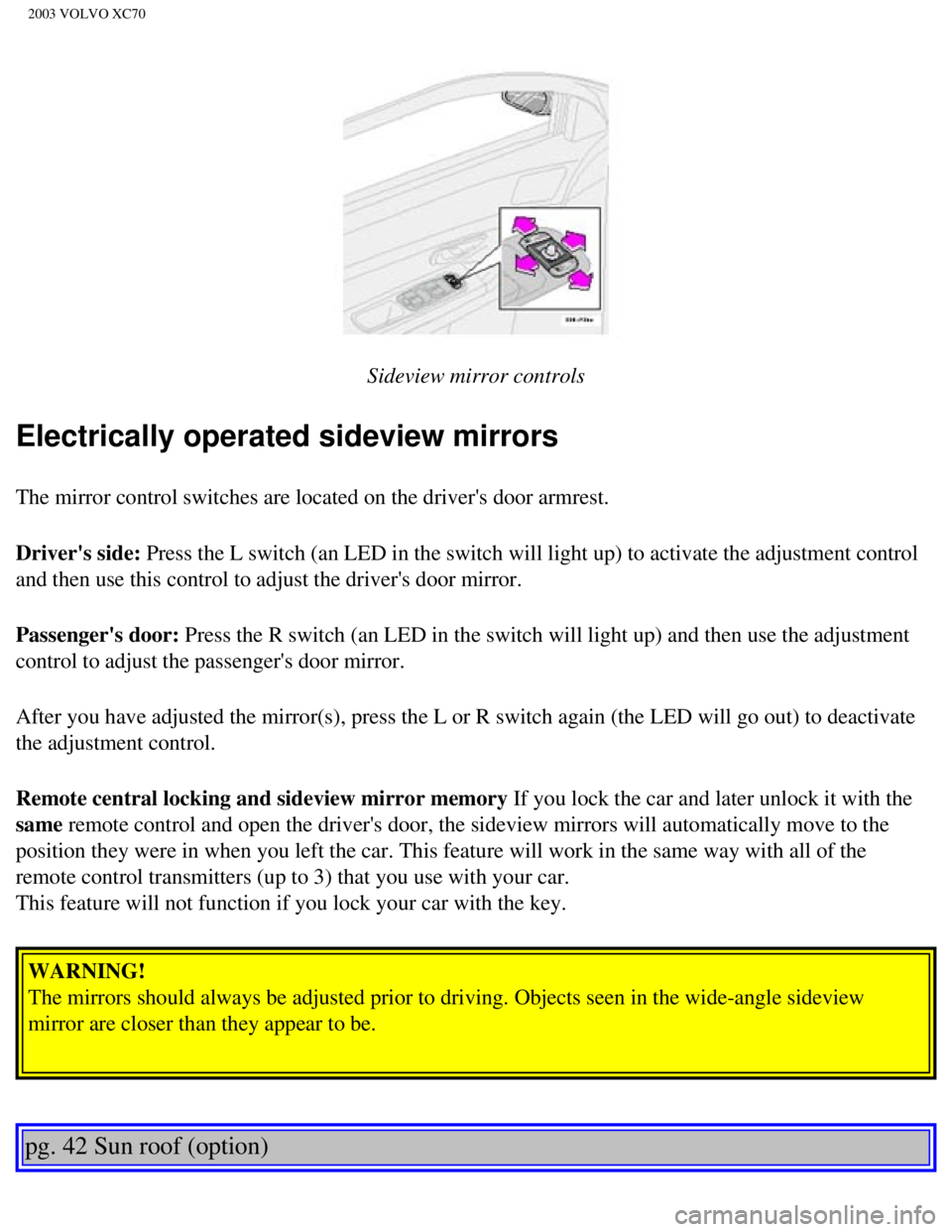
Sideview mirror controls
Electrically operated sideview mirrors
The mirror control switches are located on the driver's door armrest.
Driver's side: Press the L switch (an LED in the switch will light up) to activate th\
e adjustment control
and then use this control to adjust the driver's door mirror.
Passenger's door: Press the R switch (an LED in the switch will light up) and then use t\
he adjustment
control to adjust the passenger's door mirror.
After you have adjusted the mirror(s), press the L or R switch again (\
the LED will go out) to deactivate
the adjustment control.
Remote central locking and sideview mirror memory If you lock the car and later unlock it with the
same remote control and open the driver's door, the sideview mirrors will au\
tomatically move to the
position they were in when you left the car. This feature will work in t\
he same way with all of the
remote control transmitters (up to 3) that you use with your car.
This feature will not function if you lock your car with the key. WARNING!
The mirrors should always be adjusted prior to driving. Objects seen in \
the wide-angle sideview
mirror are closer than they appear to be.
pg. 42 Sun roof (option)
file:///K|/ownersdocs/2003/2003_XC70/03xc70_02b.htm (15 of 18)12/30/20\
06 4:17:54 PM
Page 71 of 257

2003 VOLVO XC70
A Open
B Closed
C Horizontal air flow
D Vertical air flow
Direct the air vents toward the rear side windows to demist.
Direct the air vents toward the rear seat for the best heating/cooling e\
ffect.
pg. 47 Climate control system - general information
Condensation on the inside of the windows
Keeping the insides of the windows clean will help reduce the amount of \
condensation that forms on the
windows. Use a commercial window cleaning agent to clean the windows.
Ice and snow
Always keep the air intake grille at the base of the windshield free of \
snow.
Cabin air filter
Replace the cabin air filter with a new one at the recommended intervals\
. The filter should be replaced
more often when driving under dirty and dusty conditions. The filter can\
not be cleaned and therefore
should always be replaced with a new one.
Sensors
The sunlight sensor on the dashboard and passenger compartment temperatu\
re sensor in the ECC control
panel should not be covered in any way as this could cause incorrect inf\
ormation to be sent to the ECC
system.
Parking the car in warm weather
If your car has been parked in the sun in warm weather, opening the wind\
ows and sun roof (option) for
file:///K|/ownersdocs/2003/2003_XC70/03xc70_03.htm (3 of 12)12/30/2006\
4:17:55 PM
Page 74 of 257

2003 VOLVO XC70
Defroster
This function demists/de-ices the windshield and front side windows. The\
LED in the switch will light
up to indicate that the defrost function is engaged. Blower speed increa\
ses automatically and the air in
the passenger compartment is dehumidified. Recirculation will not functi\
on while defrost is engaged.
Heated rear window/sideview mirrors
This function demists/de-ices the rear window and sideview mirrors. The \
LED in the switch will light up
to indicate that the heating function is engaged. See
page 38 for additional information on this function.
CAUTION:
Never use ice scrapers made of metal as they can easily scratch the mirr\
or surface.
pg. 50 Electronic Climate Control (ECC) - manual settings
Recirculation (see also page 48)
Press this switch to engage the recirculation function (air in the pass\
enger compartment recirculates - no
fresh air enters the compartment). The LED in the switch will light up \
to indicate that the function is
engaged.
l Use this function if the outside air is contaminated with exhaust gases,\
smoke, etc or to heat/cool the
car quickly.
l Recirculation should not be used for more than 15 minutes. If your windows begin to fog or mist,
make sure that the recirculation function is switched off.
l Selecting Defroster automatically switches recirculation off.
l Timer mode activation: (Cars with Interior Air Quality system have no timer mode) Press and \
hold
the recirculation button for at least 3 seconds to activate a recirculat\
ion timer mode. The amber LED in
the recirculation button will flash 5 times to show that the timer mode \
is being activated. In the time
mode, each time the recirculation button is pressed, the climate control\
system will recirculate the air in
file:///K|/ownersdocs/2003/2003_XC70/03xc70_03.htm (6 of 12)12/30/2006\
4:17:55 PM


