Page 93 of 265

842003 MR2 from Aug. ’03 Prod. (OM17511U)
SB16007
“START”—Starter motor on. The key
will return to the “ON” position when
released.
For starting tips, see page 153 in Section
3.
“ON”—Engine on and all accessories
on.
This is the normal driving position.
“ACC”—Accessories such as the radio
operate, but the engine is off.
If you leave the key in the “ACC” or
“LOCK” position and open the driver’s
door, a buzzer will remind you to remove
the key.“LOCK”—Engine is off and the steering
wheel is locked. The key can be re-
moved only at this position.
You must push in the key to turn it from
“ACC” to the “LOCK” position.
Once you remove the key, the engine im-
mobilizer system is automatically set. (See
“Engine immobilizer system” on page 10
in Section 12.)
When starting the engine, the key may
seem stuck at the “LOCK” position. To
free it, first be sure the key is pushed all
the way in, and then rock the steering
wheel slightly while turning the key gently.
CAUTION
Never remove the key when the ve-
hicle is moving, as this will lock the
steering wheel and result in loss of
steering control.
NOTICE
Do not leave the key in the “ON”
position if the engine is not running.
The battery will discharge and the
ignition could be damaged.
03 07.07
Ignition switch with steering
lock
Page 111 of 265
1022003 MR2 from Aug. ’03 Prod. (OM17511U)
Reference
Z17041
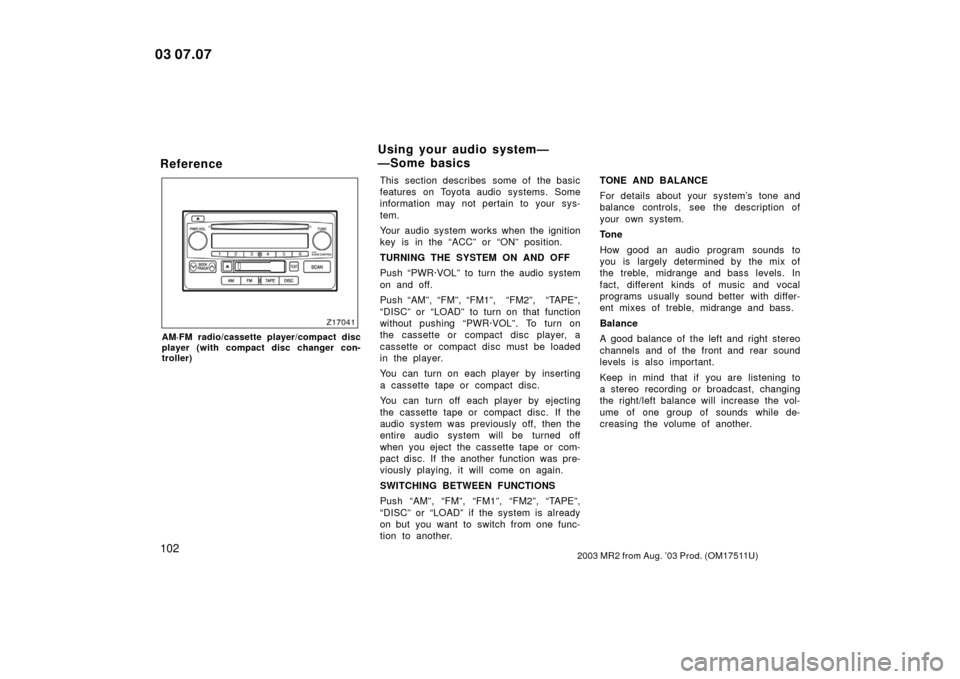
AM·FM radio/cassette player/compact disc
player (with compact disc changer con-
troller)
This section describes some of the basic
features on Toyota audio systems. Some
information may not pertain to your sys-
tem.
Your audio system works when the ignition
key is in the “ACC” or “ON” position.
TURNING THE SYSTEM ON AND OFF
Push “PWR·VOL” to turn the audio system
on and off.
Push “AM”, “FM”, “FM1”, “FM2”, “TAPE”,
“DISC” or “LOAD” to turn on that function
without pushing “PWR·VOL”. To turn on
the cassette or compact disc player, a
cassette or compact disc must be loaded
in the player.
You can turn on each player by inserting
a cassette tape or compact disc.
You can turn off each player by ejecting
the cassette tape or compact disc. If the
audio system was previously off, then the
entire audio system will be turned off
when you eject the cassette tape or com-
pact disc. If the another function was pre-
viously playing, it will come on again.
SWITCHING BETWEEN FUNCTIONS
Push “AM”, “FM”, “FM1”, “FM2”, “TAPE”,
“DISC” or “LOAD” if the system is already
on but you want to switch from one func-
tion to another.TONE AND BALANCE
For details about your system’s tone and
balance controls, see the description of
your own system.
Tone
How good an audio program sounds to
you is largely determined by the mix of
the treble, midrange and bass levels. In
fact, different kinds of music and vocal
programs usually sound better with differ-
ent mixes of treble, midrange and bass.
Balance
A good balance of the left and right stereo
channels and of the front and rear sound
levels is also important.
Keep in mind that if you are listening to
a stereo recording or broadcast, changing
the right/left balance will increase the vol-
ume of one group of sounds while de-
creasing the volume of another.
03 07.07
Using your audio system—
—Some basics
Page 112 of 265
1032003 MR2 from Aug. ’03 Prod. (OM17511U)
YOUR RADIO ANTENNA
To lower the power antenna, turn off the
audio system by pushing “PWR·VOL”, or
turn the ignition key to “LOCK”.
YOUR CASSETTE PLAYER
When you insert a cassette, the exposed
tape should face to the right.
NOTICE
Do not oil any part of the player and
do not insert anything other than cas-
sette tapes into the slot, or the tape
player may be damaged.
YOUR COMPACT DISC PLAYER
When you insert a disc, gently push it in
with the label side up. (The player will
automatically eject a disc if the label side
is down.) The player will play from track
1 through the end of the disc. Then it will
play from track 1 again. On models with
the compact disc changer, next disc will
be played from track 1.
NOTICE
Never try to disassemble or oil any
part of the compact disc player. Do
not insert anything other than com-
pact discs into the slot.
The player is intended for use with 12 cm
(4.7 in.) discs only.
03 07.07
Page 131 of 265

1222003 MR2 from Aug. ’03 Prod. (OM17511U)
Clock
SB19015
The digital clock indicates the time.
The key must be in the “ACC” or “ON”
position.
To reset the hour: Push the “H” button.
To reset the minutes: Push the “M” button.
If quick adjustment to a full hour is de-
sired, push the “:00” button.
For example, if the “:00” button is de-
pressed when the time is between
1:01—1:29, the time will change to 1:00.
If the time is between 1:30—1:59, the
time will change to 2:00.If the electrical power source has been
disconnected from the clock, the time dis-
play will automatically be set to 1:00 (one
o’clock).
When the instrument panel lights are
turned on, the brightness of the time indi-
cation will be reduced.
Cigarette lighter and ashtray
SB19016
CIGARETTE LIGHTER
To use the cigarette lighter, press it in.
After it finishes heating up, it automati-
cally pops out ready for use.
If the engine is not running, the key must
be in the “ACC” position to use the light-
er.
Do not hold the cigarette lighter pressed
in.
Use a Toyota genuine cigarette lighter or
equivalent for replacement.
03 07.07
Page 132 of 265
1232003 MR2 from Aug. ’03 Prod. (OM17511U)
ASHTRAY
To use the ashtray, pull out the lid.
When finished with your cigarette, thor-
oughly extinguish it in the ashtray to pre-
vent other cigarette butts from catching
fire. After using the ashtray, close the lid
completely.
To remove the ashtray, pull the lid and
pull it out.
CAUTION
To reduce the chance of injury in
case of an accident or sudden stop
while driving, always completely close
the ashtray after use.
Glove box
SB19026
To use the glove box, do this.
To open: Compress the lock release but-
tons.
To lock: Insert the master key and turn it
clockwise.
CAUTION
To reduce the chance of injury in
case of an accident or a sudden stop,
always keep the glove box door
closed while driving.
Front box
SB41047
To use the front box in the trunk, do
this.1. Open the trunk lid, and pull the lock release lever.
03 07.07
Page 134 of 265
1252003 MR2 from Aug. ’03 Prod. (OM17511U)
NOTICE
During hot weather, the interior of the
vehicle becomes very hot. Do not
leave anything flammable or deform-
able such as a lighter, glasses, etc.
inside.
Luggage space
SB19027a
Lean the seatback forward to use the
luggage space.
To open: Pull the lever.
To lock: Insert the master key and turn it
clockwise.
SB12059a
Folding boardFlare
CAUTION
To reduce the chance of injury in
case of an accident or a sudden stop,
always keep the luggage space door
closed while driving.
03 07.07
Page 146 of 265

1372003 MR2 from Aug. ’03 Prod. (OM17511U)
If tire grip performance exceeds its
capability, or if hydroplaning occurs
during high speed driving in the rain,
the antilock brake system does not
provide vehicle control.
Antilock brake system is not de-
signed to shorten the stopping dis-
tance: Always drive at a moderate
speed and maintain a safe distance
from the vehicle in front of you.
Compared with vehicles without an
antilock brake system, your vehicle
may require a longer stopping dis-
tance in the following cases:
�Driving on rough, gravel or snow
covered roads.
�Driving with tire chains installed.
�Driving over the steps such as the
joints on the road.
�Driving on roads where the road
surface is pitted or has other differ-
ences in surface height.
Install all 4 tires of specified size at
appropriate pressure: The antilock
brake system detects vehicle speeds
using the speed sensors for respec-
tive wheels’ turning speeds. The use
of tires other than specified may fail
to detect the accurate turning speed
resulting in a longer stopping dis-
tance.
SD02002a
“ABS” warning light
The light comes on when the ignition key
is turned to the “ON” position. If the anti
lock brake system works properly, the
light turns off after a few seconds. There-
after, if the system malfunctions, the light
comes on again.
When the “ABS” warning light is on (and
the brake system warning light is off), the
antilock brake system does not operate,
but the brake system still operates con-
ventionally.
03 07.07
Page 147 of 265

1382003 MR2 from Aug. ’03 Prod. (OM17511U)
When the “ABS” warning light is on (and
the brake system warning light is off), the
antilock brake system does not operate
so that the wheels could lock up during
a sudden braking or braking on slippery
road surfaces.
If either of the following conditions
occur, this indicates a malfunction
somewhere in the components moni-
tored by the warning light system.
Contact your Toyota dealer as soon as
possible to service the vehicle.
�The light does not come on when the
ignition key is turned to the “ON” posi-
tion, or remains on.
�The light comes on while you are driv-
ing.
A warning light fuming on briefly during
operation does not indicate a problem.
Brake pad wear limit indicators
SB21015
The brake pad wear limit indicators on
your disc brakes give a warning noise
when the brake pads are worn to where
replacement is required.
If you hear a squealing or scraping noise
while driving, have the brake pads
checked and replaced by your Toyota
dealer as soon as possible. Expensive ro-
tor damage can result if the pads are not
replaced when necessary. Some Toyotas are equipped with a limit-
edslip differential. If one of the rear
wheels begins to spin, the limitedslip dif-
ferential is designed to aid traction by
automatically transmitting driving force to
the other rear wheel. If you are not sure
whether your vehicle is equipped with one,
you can ask your Toyota dealer.
CAUTION
Do not start or run the engine while
your vehicle is supported by a jack.
The vehicle could be driven off the
jack and could pose a danger or re-
sult in serious injury.
NOTICE
Use only a compact spare tire of the
same size, construction and load ca-
pacity as the original tires on your
Toyota because damage to the limit-
edslip differential could possibly oc-
cur with another tire type.
03 07.07
Limitedslip differential
(on some models)


