Page 59 of 169

51
2003 Land Cruiser 100 Navigation (OM60A00U)
�When driving on a small angled Y −
shaped road.
� When driving on a spiral road.
� When driving on a slippery road such as
in sand, gravel, snow, etc.
� When driving on a long straight road.
� When freeway and surface streets run in
parallel.
� After moving by ferry or vehicle carrier.
� When a long route is searched during high
speed driving.
� When driving without setting the current
position calibration correctly.
� After repeating a change of directions by
going forward and backward, or turning
on a turntable in the parking lot.
� When leaving a covered parking lot or
parking garage.
� When a roof carrier is installed.
� When driving with the tire chains installed.
� When the tires are worn.
� After replacing a tire or tires. �
When using tires that are smaller or larger
than the factory specifications.
� When the tire pressure in any of the four
tires is not correct.
INFORMATION
If your vehicle cannot receive GPS sig-
nals, you can correct the current posi-
tion manually. For the information on
setting the current position calibration,
see page 79.
�When turning at a wrong intersection off
the designated route guidance
� If you set more than one destination, auto
reroute will display a route returning to the
destination on the previous route when
you try to skip any of the destinations.
� When turning at an intersection, there is
no route guidance.
� When passing through the intersection,
there is no route guidance.
� During automatic rerouting, the route
guidance may not be available for the next
turn to the right or left.
� It may take a long time to operate auto re-
route during high speed driving. In auto
reroute, a detour route may be shown.
� After auto reroute, the route may not be
changed.
� An unnecessary U −turn may be shown or
announced.
� A location may have multiple names and
the system will announce one or more.
(a) Accurate current vehicle
position may not be shown in
the following cases:
(b) Inappropriate route guid-
ance may occur in the following
cases:
Page 88 of 169
80
2003 Land Cruiser 100 Navigation (OM60A00U)
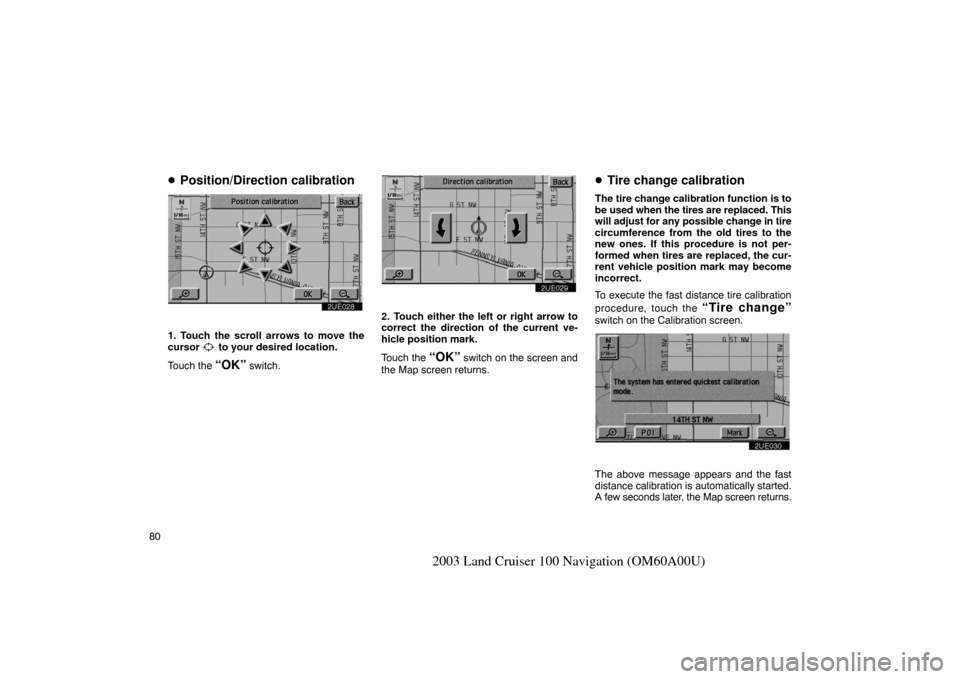
�Position/Direction calibration
2UE028
1. Touch the scroll arrows to move the
cursor to your desired location.
Touch the
“OK” switch.
2UE029
2. Touch either the left or right arrow to
correct the direction of the current ve-
hicle position mark.
Touch the
“OK” switch on the screen and
the Map screen returns.
� Tire change calibration
The tire change calibration function is to
be used when the tires are replaced. This
will adjust for any possible change in tire
circumference from the old tires to the
new ones. If this procedure is not per-
formed when tires are replaced, the cur-
rent vehicle position mark may become
incorrect.
To execute the fast distance tire calibration
procedure, touch the
“Tire change”
switch on the Calibration screen.
2UE030
The above message appears and the fast
distance calibration is automatically started.
A few seconds later, the Map screen returns.
Page 97 of 169

89
2003 Land Cruiser 100 Navigation (OM60A00U)
3UE014
Date of notice: Input the next maintenance
date.
Distance of notice: Input the driving dis-
tance until the next maintenance check. You
can input a five−digit number for the driving
distance.
When you touch the
! switch on the
screen, the screen changes to display the
change name screen. Touch the keys to in-
put your desired name and then input the
conditions. After you input the information, touch the
“OK” switch. The screen then returns to
the Maintenance screen. The icon’s color will
change to green after the date or driving dis-
tance are input. The icon’s color will change
to orange when your vehicle needs to be ser-
viced. The following switches appear on the
Maintenance screen.
Delete all: Cancel all conditions which have
been input.
Reset all: Reset the item which has satisfied
either condition.
Touch the
“Off” switch of the Maintenance
screen, and the Information screen will no
longer be displayed.
INFORMATION
� For scheduled maintenance infor-
mation, please refer to the “Owner’s
Manual Supplement / Scheduled
Maintenance”.
� Depending on your driving or the
road conditions, the system may
have a timelag between the data
which has been input and the actual
date and driving distance.
Information items
Oil change
Replace oil filter
Rotate tires
Replace tires
Replace battery
Replace brake linings
Replace wiper blades
Replace engine coolant