2003 SKODA SUPERB wheel
[x] Cancel search: wheelPage 125 of 259

Automatic gearbox*
124
Selector lever positions
The selector lever position you have engaged is shown in the information
display of the instrument cluster with the corresponding gear symbol high-
lighted ⇒ fig. 112.
P - Parklock
The driven wheels are locked mechanically in this position.
The Parklock must only be engaged when the vehicle is stationary ⇒.
If you wish to move the selector lever into or out of this position, you must
press the Shiftlock button in the handle of the selector lever and at the
same time depress the brake pedal.
R - Reverse
Reverse gear must only be engaged when the vehicle is stationary and
the engine idling ⇒.
The brake pedal must be depressed and at the same time the Shiftlock
must be pressed, if you wish to obtain the selector lever positions R, P or
N .
WARNING (continued)
•When the engine is running and the vehicle is stationary, it is
necessary to hold the car with the brake pedal in all the positions
of the selector lever (except P and N) since the power transmission
is never completely interrupted, also not when the engine is idling
- the vehicle "creeps".
Fig. 111 Selector lever
Fig. 112 Information
display: Selector lever
positions
Page 128 of 259

Automatic gearbox*127
Using the systemSafetyDriving TipsGeneral MaintenanceBreakdown assistanceTechnical Data
Dynamic shift programme
The automatic gearbox of your vehicle is controlled electronically. Shifting
up and down through the gears is performed automatically on the basis of
pre-defined driving programmes.
Adopting a moderate style of driving will cause the gearbox to select the
most economical driving programme. Shifting up into a higher gear as
soon as possible and shifting down as late as possible will have a favour-
able effect on your fuel consumption.
Adopting a faster style of driving with rapid movements of the acceler-
ator pedal combined with sharp acceleration and frequent changes in
speed, exploiting the top speed of the car or operating the kickdown func-
tion, will cause the gearbox to switch over to the sporty driving
programme. Shifting up later into a higher gear makes it possible to fully
exploit the power reserves of the engine. The gearbox also then shifts
down at higher engine speeds than is the case for the economy-oriented
programmes.
Selecting the most appropriate driving programme for the particular style
of driving is a continuous process. Irrespective of this it is, however,
possible to switch into a sporty driving programme by depressing the
accelerator rapidly. The gearbox shifts down into a lower gear matching
the speed of the car and this allows you to accelerate rapidly (e.g. when
overtaking) without having to depress the accelerator pedal fully into the
kickdown range. The original programme will be reactivated to match your
particular style of driving once the gearbox has shifted up again. When driving in hilly regions, the gears are selected to match uphill and
downhill sections. This avoids the gearbox frequently shifting up and down
when negotiating an uphill stretch. Depressing the brake pedal while
driving downhill causes the gearbox to shift down into the next lower gear.
This makes it possible for you to exploit the engine braking power without
the need for shifting gears manually.
WARNING
Please note that using the kickdown function can result in the
driven wheels spinning on a smooth
or slippery road surface - risk
of skidding!
Page 131 of 259

Communicating and Navigating
130
Communicating and Navigating
Multifunction steering wheel*
Introduction
The assignment of the pushbuttons in the steering wheel may differ
depending on the vehicle equipment.
The buttons , , and ⇒fig. 115 make it possible to operate the
main functions of the cruise control system, of the radio and mobile phone.
Refer to the more detailed information in the relevant operating instruc-
tions.
If you press the button (see arrow) when the headlights are switched on,
the steering wheel pushbuttons are then also illuminated.
Operating cruise control system
The cruise control system is operated with the buttons and , but on version which is also fitted with mobile phone only by
button ⇒fig. 115 .
Switching on and off
– The cruise control system is switched on by sliding the switch
⇒ page 121 into the ON position.
– The cruise control system is switched off by sliding the switch
fully to the right into the OFF position.
Storing a speed
– Switch the cruise control system on.
– After the car has reached the desired speed, briefly press the button ⇒fig. 115 in the position SET-. The car maintains
the stored speed without you having to depress the acceler-
ator pedal.
Changing a stored speed
– You can reduce the stored speed by pressing the button
⇒ fig. 115 in the position SET- . If you press and hold the
button, the speed of the car is reduced continuously. Once the
car has reached the desired speed, release the button. The
set speed is then stored in the memory.
Fig. 115 Multifunction
steering wheel: control
buttons
A1A2A3A4
A1
A2
A1
AA
AA
A1
A1
Page 132 of 259

Communicating and Navigating131
Using the systemSafetyDriving TipsGeneral MaintenanceBreakdown assistanceTechnical Data
– If you release the pushbutton when the vehicle is travelling at
a speed of less than 30 km/h, the speed is not stored and the
memory is erased. It is then necessary to again store the
speed with the pushbutton in the position SET after an
increase in speed of the vehicle to more than 30 km/hour.
– You can increase the stored speed by pressing the button in the position RES+. Pressing and holding down the slide
switch will cause the speed of the vehicle to be increased
continuously. Once the car has reached the desired speed,
release the button. The set speed is then stored in the
memory.
Switching cruise control system off temporarily
– On the version not fitted with a mobile phone, the cruise control system is switched off temporarily with the button
⇒page 130, fig. 115 in the position CANCEL, on the version
fitted with mobile phone, by pushing the switch into the
intermediate position ahead of the position OFF ⇒ page 122.
– You can resume the stored speed by pressing the button in the position RES+.
For further methods of temporarily switching off the cruise control system
⇒page 122.
Please refer to the following guidelines ⇒page 120.
Operating radio and CD player
The radio is operated with buttons and , but on the version
fitted with a mobile phone by buttons , and ⇒fig. 116 .
Radio
– You can set the radio, cassette player, CD player and radio data system louder or softer by pressing button (positions
VOL+ and VOL- ).
– You can search forward or back within the frequency search for different radio stations by pressing button (positions
and
).
Cassette player
– You can run the tape forward or back by pressing the button (positions
and ).
WARNING
First ensure that it is not too high for the traffic conditions which
exist at that moment before resuming the stored speed.
A1
A1
A2
AA
A1
Fig. 116 Multifunction
steering wheel: control
buttons
A3A4
A2A3A4
A3
A4
A4
Page 133 of 259

Communicating and Navigating
132
CD-player
– You can select the titles forward or back by pressing the button (positions
and ).
Radio data system (RDS)*
You can select the recorded radio traffic messages by moving forward or
back in stages by pressing the button (positions
and ).
On the version fitted with mobile phone, you must press button in the
position MODE in order to switch over to the radio mode.
Operating mobile phone
– You can operate the mobile phone with buttons , and
⇒page 130, fig. 115 .
– You can switch over from the radio mode to the phone mode (or back again) by pressing the button in the position
MODE .
– You can accept or end a telephone call or select from the tele- phone book by briefly pressing the button in the position
.
– You can refuse a telephone call by pressing the button in the position
for more than 2 seconds.
– You can make the volume of the telephone call louder or softer by pressing the button in the positions VOL+ and VOL- .
– You can scroll alphabetically upwa rd (A to Z) or downward (Z
to A) within the telephone memory by pressing the button
in the positions
and . Note
The operation of the mobile phone fitted with multifunction steering wheel
is only possible on certain models of mobile phone. More detailed infor-
mation is available from your Škoda Dealer.
Mobile phone, two-wa
y radio system and
navigation system
Universal telephone connectio n at the front* (GSM II)
A telephone mount is factory-fitted. The mount is attached to the
centre console. Adapter (Cullmann) and mobile phone are not
factory-fitted by Škoda Auto.
A4
A4
A2
A2A3A4
A2
A2
A2
A3
A4
Fig. 117 Universal tele-
phone connection at
the front
Page 140 of 259

Seat belts139
Using the systemSafetyDriving TipsGeneral MaintenanceBreakdown assistanceTechnical Data
The physical principle of a frontal
collision
The physical principle of a frontal accident can be explained quite simply: As soon as the vehicle is moving, so-called kinetic energy (the energy of
motion) is produced both in terms of the car as well as in terms of the
occupants. The magnitude of this kinetic energy depends essentially on
the speed at which the vehicle is travelling and on the weight of the vehicle
and the occupants. The greater the speed and weight increase, the
greater the amount of energy which has to be absorbed in the event of an
accident.
The speed of the vehicle is, nevertheless, the most important factor.
Doubling the speed of the vehicle from 25 km/h up to 50 km/hour
increases the kinetic energy four times.
The common opinion that it is possible to support your body in a minor
accident with your hands, is incorrect. Even in a collision at only a low
speed, the forces acting on the body are such that it is no longer possible
to support your body.
Even if you only drive at a speed within the range from 30 km/hour to 50
km/hour, the forces which are produced on your body in the event of an
accident can easily exceed 10,000 N (Newton). This equals a weight of
one tonne (1 000 kg).
In the event of a frontal collision, occupants of the car not wearing a seat
belt, are thrown forward and strike in an uncontrolled way parts of the inte-
rior of the car, such as steering wheel, dash panel, windscreen,
⇒fig. 121 .
The occupants of a vehicle who have not fastened their seat belts may
even be thrown out of the vehicle. This can result in fatal injuries.
It is also important that rear seat passengers fasten their seat belts as they
will otherwise be thrown through the vehicle in an uncontrolled manner in
the event of an accident A rear seat passenger who has not fastened the
seat belt is a danger not only to himself but also for those seated at the
front ⇒fig. 122 .
Fig. 121 The driver is
thrown forward if not
wearing a belt
Fig. 122 The rear seat
occupant is thrown
forward if not wearing a
belt
Page 148 of 259
Airbag system147
Using the systemSafetyDriving TipsGeneral MaintenanceBreakdown assistanceTechnical Data
Front airbags
Description of the front airbags
The airbag system is not a substitute for the seat belt!
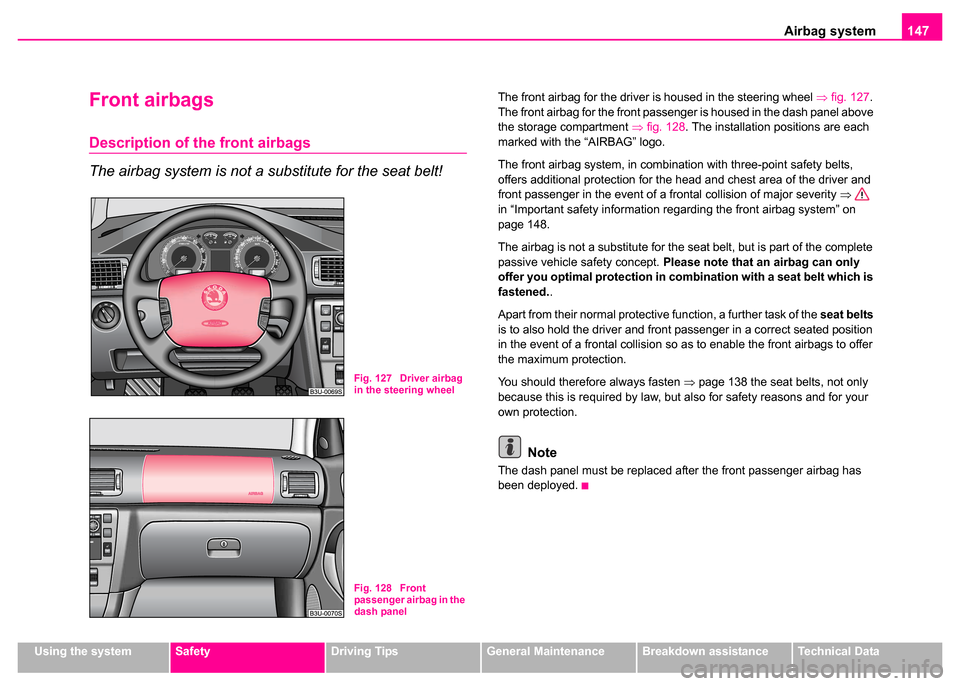
The front airbag for the driver is housed in the steering wheel ⇒fig. 127 .
The front airbag for the front passenger is housed in the dash panel above
the storage compartment ⇒fig. 128 . The installation positions are each
marked with the “AIRBAG” logo.
The front airbag system, in combination with three-point safety belts,
offers additional protection for the head and chest area of the driver and
front passenger in the event of a frontal collision of major severity ⇒
in “Important safety information regarding the front airbag system” on
page 148.
The airbag is not a substitute for the seat belt, but is part of the complete
passive vehicle safety concept. Please note that an airbag can only
offer you optimal protection in combination with a seat belt which is
fastened. .
Apart from their normal protective function, a further task of the seat belts
is to also hold the driver and front passenger in a correct seated position
in the event of a frontal collision so as to enable the front airbags to offer
the maximum protection.
You should therefore always fasten ⇒page 138 the seat belts, not only
because this is required by law, but also for safety reasons and for your
own protection.
Note
The dash panel must be replaced after the front passenger airbag has
been deployed.
Fig. 127 Driver airbag
in the steering wheel
Fig. 128 Front
passenger airbag in the
dash panel
Page 149 of 259

Airbag system
148
Function of the front airbags
Risk of injury to the head and chest area is reduced by fully
inflated airbags.
The airbag system is designed in such a way that the driver and front
passenger airbag are deployed in the event of a frontal collision of major
severity.
In certain accident situations both the front airbags as well as the head
and side airbags may be deployed together.
If the airbags are deployed, the airbags are filled with a propellant gas and
inflated in front of the driver and front passenger ⇒fig. 129 . The airbags
inflate in fractions of a second and at a high speed in order to be able to
offer that additional protection in the event of an accident. The forward
movement of the driver and of the front passenger is cushioned when they
make contact with the fully inflated airbag and the risk of injury to head and
chest is thus reduced.
The specially developed airbag allows the gas to flow out of the inflated
airbag in a controlled manner (depending on the load of the particular car occupant) in order to cushion head and chest areas. The airbag then
deflates subsequently to such an extent, after an accident, to again
provide a clear view forward.
A fine dust is produced when airbag inflated. This is perfectly normal and
is not an indication of a fire in the vehicle.
The airbag develops enormous forces when triggered, which can lead to
injuries if the sitting position or seated position is not correct
⇒ in
“Important safety information regarding the front airbag system”.
Important safety informati on regarding the front
airbag system
Correct use of the airbag system considerably reduces the
risk of injury!
Fig. 129 Inflated
airbags
Fig. 130 Safe distance
to steering wheel