Page 152 of 381

3-12
RDS Messages
ALERT!: Alert warns of national or local emergencies.
When an alert announcement comes on the current radio
station, ALERT! will appear on the display. You will
hear the announcement, even if the volume is muted or a
compact disc is playing. If the compact disc player is
being used, play will stop during the announcement.
You will not be able to turn off alert announcements.
ALERT! will not be affected by tests of the emergency
broadcast system. This feature is not supported by all
RDS stations.
INFO (Information): If the current station has a
message, INFO will appear on the display. Press this
button to see the message. The message may display
the artist and song title, call in phone numbers, etc.
If the whole message is not displayed, parts of it will
appear every three seconds. To scroll through the
message at your own speed, press the INFO button
repeatedly. A new group of words will appear on the
display with each press. Once the complete message
has been displayed, INFO will disappear from the
display until another new message is received. The old
message can be displayed by pressing the INFO button
until a new message is received or a different station is
tuned to.TRAF (Traffic): Press this button to seek to a station
that broadcasts traffic announcements. TRAF will
appear on the display. If no station is found, NO TRAF
will appear on the display.
When a traffic announcement comes on the current
station or on a related network station, you will hear it,
even if the volume is muted or a compact disc is
playing. If the compact disc player is being used, play
will stop during the announcement.
Radio Messages
CALIBRATE: Your audio system has been calibrated
for your vehicle from the factory. If CALIBRATE
appears on the display, it means that your radio has not
been configured properly for your vehicle and must be
returned to the dealership for service.
Page 157 of 381

3-17
Setting the Tone (Bass/Treble)
AUDIO: Press the AUDIO knob until BASS, MID or
TREB appears on the display. Turn the knob to increase
or to decrease. If a station is weak or noisy, you may
want to decrease the treble.
To adjust bass, midrange or treble to the middle
position, select BASS, MID or TREB and press and
hold the AUDIO knob. The radio will produce one beep
and adjust the display level to zero.
To adjust all tone and speaker controls to the middle
position, press and hold the AUDIO knob when no tone
or speaker control is displayed. The radio will produce
one beep and CENTERED will appear on the display.
AUTO EQ (Automatic Equalization): Press this
button to choose between bass, midrange and treble
equalization settings.
To return to the manual mode (CUSTOM), press the
AUTO EQ button until CUSTOM appears on the
display. Then you will be able to manually adjust the
bass, midrange and treble using the AUDIO knob.Adjusting the Speakers (Balance/Fade)
AUDIO: To adjust the balance between the right and the
left speakers, press the AUDIO knob until BAL appears
on the display. Turn the knob to move the sound toward
the left or the right speakers.
To adjust the fade between the front and the rear
speakers, press and hold the AUDIO knob until FAD
appears on the display. Turn the knob to move the sound
toward the front or the rear speakers.
To adjust the balance and fade to the middle position,
select balance or fade and press and hold the AUDIO
knob. The radio will beep once and will adjust the
display level to the middle position.
To adjust all tone and speaker controls to the middle
position, press and hold the AUDIO knob when tone
or speaker controls are not displayed. The radio will
produce one beep and CENTERED will appear on
the display.
Page 158 of 381

3-18
Using RDS
Your audio system is equipped with a Radio Data
System (RDS). RDS features are available for use only
on FM stations that broadcast RDS information. Using
this system, the radio can do the following:
�Seek to stations broadcasting the selected type of
programming
�receive announcements concerning local and
national emergencies,
�display messages from radio stations, and
�seek to stations with traffic announcements.
This system relies upon receiving specific information
from these stations and will only work when the
information is available. In rare cases, a radio station
may broadcast incorrect information that will cause the
radio features to work improperly. If this happens,
contact the radio station.
While you are tuned to an RDS station, the station name
or call letters will appear on the display instead of the
frequency. RDS stations may also provide the time of
day, a program type (PTY) for current programming and
the name of the program being broadcast.Finding a PTY Station
P
-TYPE (Program Type Button): Press this button
to turn on and off program type (PTY) select mode.
PTY and the light next to the button will turn on.
The last selected PTY will appear on the display for
five seconds.
P
-TYPE (Program Type Knob): Turn the P-TYPE
knob to select the PTY you want to listen to.
To use the PTY interrupt feature, press and hold the
P
-TYPE button until you hear a beep on the PTY you
want to interrupt with. When you are listening to a
compact disc, the last selected RDS station will interrupt
play if that selected program type format is broadcast.
�
SEEK SCAN �: Press an arrow to find radio
stations for the PTY you want to listen to. The last PTY
selected will be used for seek or scan modes. If a station
with the selected PTY is not found, NONE FOUND will
appear on the display.
If both P
-TYPE and TRAF are on, the radio will
search for stations with the selected PTY and traffic
announcements.
Page 167 of 381

3-27 Tips About Your Audio System
Hearing damage from loud noise is almost undetectable
until it is too late. Your hearing can adapt to higher
volumes of sound. Sound that seems normal can be loud
and harmful to your hearing. Take precautions by
adjusting the volume control on your radio to a safe
sound level before your hearing adapts to it.
To help avoid hearing loss or damage do the following:
�Adjust the volume control to the lowest setting.
�Increase volume slowly until you hear comfortably
and clearly.NOTICE:
Before you add any sound equipment to your
vehicle
-- like a tape player, CB radio, mobile
telephone or two
-way radio -- be sure you can
add what you want. If you can, it's very
important to do it properly. Added sound
equipment may interfere with the operation of
your vehicle's engine, Delphi Electronics radio or
other systems, and even damage them. Your
vehicle's systems may interfere with the
operation of sound equipment that has been
added improperly.
So, before adding sound equipment, check with
your dealership and be sure to check federal
rules covering mobile radio and telephone units.
Page 199 of 381
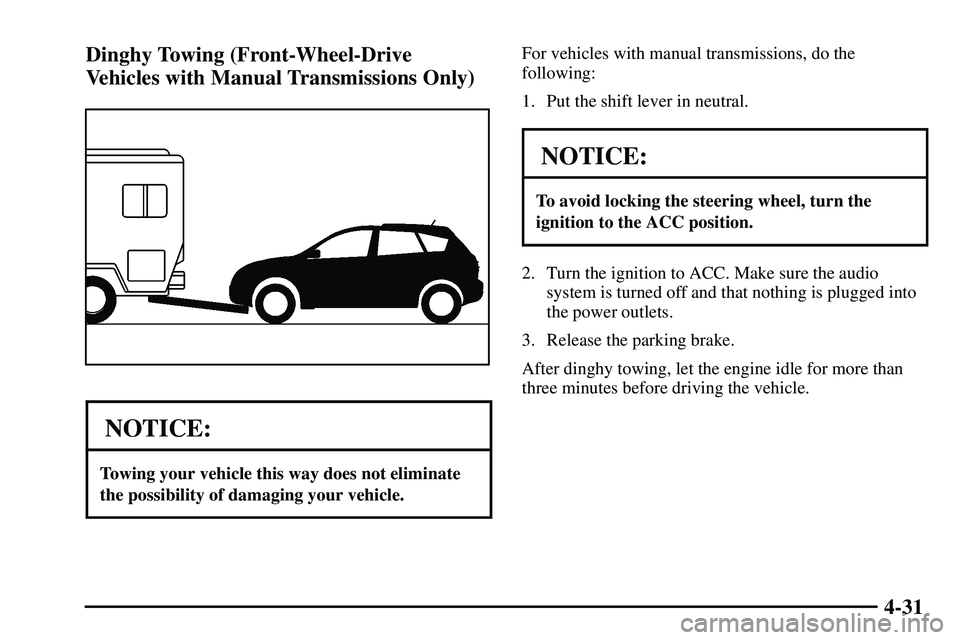
4-31 Dinghy Towing (Front-Wheel-Drive
Vehicles with Manual Transmissions Only)
NOTICE:
Towing your vehicle this way does not eliminate
the possibility of damaging your vehicle.
For vehicles with manual transmissions, do the
following:
1. Put the shift lever in neutral.
NOTICE:
To avoid locking the steering wheel, turn the
ignition to the ACC position.
2. Turn the ignition to ACC. Make sure the audio
system is turned off and that nothing is plugged into
the power outlets.
3. Release the parking brake.
After dinghy towing, let the engine idle for more than
three minutes before driving the vehicle.
Page 318 of 381

6-73
Fuse Usage
TAIL Front Parking Lamps, Taillamps,
License Plate Lamps, Instrument
Panel Lights, Engine Control
System
OBD On
-Board Diagnostic System
WIPER Windshield Wipers
AM2 Charging System, Air Bag System,
Starter System, Engine Control
STOP Stop Lamps, CHMSL, Engine
Control System, Anti
-lock Brakes,
Cruise Control
DOOR Power Door Locks, Liftglass Lock
AM1 Cigarette Lighter, Gauge,
ECU
-IG, Wiper, Rear Wiper,
Washer Fuses
ECU
-IG Cruise Control, Anti-Lock Brakes,
Theft Deterrent System,
Automatic Transaxle Control
System, Electric Cooling FanFuse Usage
RR WIPER Rear Window Wiper, Rear
Window Defogger
A/C Air Conditioning
INV Power Outlets
P/POINT Power Outlets
ECU
-B Daytime Running Lamps
CIG Cigarette Lighter, Power Rearview
Mirrors, Power Outlets, Audio
System, Automatic Transaxle
Control System
GAUGE Gauges and Meters, Back
-Up
Lamps, Charging System, Power
Door Locks, Power Windows,
Sunroof, Air Conditioning,
Cruise Control
WASHER Windshield Washers
*1 Engine Control System
Page 319 of 381
6-74
Engine Compartment Fuse Block
This engine compartment fuse block is located in the
engine compartment on the driver's side of the vehicle
near the air cleaner. See ªEngine Compartment
Overviewº in the Index for more information on
location.Fuse/Relay Usage
HEAD MAIN Right Headlamp,
Left Headlamp Fuses
ALT
-S Charging System
EFI Electronic Fuel Injection System
HAZARD Turn Signal Lamps,
Emergency Flasher
HORN Horn
DOME Interior Lights, Gauges and
Meters, Audio System, Remote
Keyless Entry System
MAIN Starter System, AM2 Fuse
AMP Audio Amplifiers
MAYDAY Not Used