Page 81 of 184

12-05-2003
���������
���
� ��,
The menu 99�������&� �2���� 99
provides access to the following functions:
– changing of the route calculation criteria,
– voice synthesis adjustment of guidance messages,
– description of the information relating to the navigation CD-Rom,
– management of the addresses stored in the directory.
�������&��2����
The last criterion used is displayed. Select a criterion from the list, then validate by pressing the dial. When the criterion of your choice has been selected, select the
8�<8
function then confirm by pressing thedial.
��?� ���$��)&�����&� %��)& � &� Select the type of voice 8'��&8or
86&'��&8 , after inserting the configu-
ration CD-Rom. Adjust the volume of the voice synthesis by turning the dial, thenvalidate by pressing the dial.
��&7 the volume can also be
adjusted during a message, using the audio/telephone button or thesteering wheel control. ����$&'&����6��)&����&����% This function enables you to rename
an address stored in the directory. Select the description corresponding to the stored address to be changed. Select the
8�&��'&8 function, then
confirm by pressing the dial. Select the 8�<8function, then con-
firm by pressing the dial to record the changes made.
���22��$1�& �'��$�$������&
– "Stop guidance" During guidance, select this function then validate.
– "Resume guidance" In the absence of guidance, select this function then validate to activateguidance to the last destination programmed.
��&7 after re-starting the engine, a
screen appears enabling you to resume guidance activated before
the ignition was switched off.
*���������������&���
Page 82 of 184

12-05-2003
The contextual menu associated with
the 8
���$������ +� �������&8 applica-
tion appears as a superimposed dis-
play, when this is the application cur-
rently in use in the main screen window. This menu is limited to the following functions:
– changing of the initial route (entering of a diversion),
– switching to "Selection - Movement on map" mode*,
– storing of the current location (postal address if available or, if it is not, the GPS co-ordinates),
– changing of the route calculation criteria,
– stopping or resuming of guidance (displaying of the message whichchanges depending on the previousstatus).
�&�&�������& �����)&�8��28�22��������C The map guidance can be displayed in two ways:
– full screen map**,
– reduced size map on the right-hand side and zoom image of the junction on the left-hand side.
To switch from one to the other,press the dial for more than two seconds. The 8��28� application has two ope-
rating modes: – 8�&�&������ +� ���&'&��� ��� '�28 mode,
– 8�&)���&� 6����5��$� ��� '�28mode.
A 8D��'8 function enables you to
enlarge the map, in accordance withthe eleven preset levels relating tothe following scales:
– 100 m/cm, 200 m/cm, 500 m/cm,
– 1 km/cm, 2 km/cm, 5 km/cm,
– 10 km/cm, 20 km/cm, 50 km/cm,
– 100 km/cm, 200 km/cm. This is achieved by turning the dial.
���������
���
� �
�.
8
���$������+��������&8�
����&E�����'&��
8�&�&������+����&'&������'�28'��& This mode permits:
– selection of any point on the map
to obtain guidance towards it or to obtain information about it (postal
address if available or, if it is not,GPS co-ordinates),
– lateral movement on the map by means of the four directionalarrows, representing the four cardi-nal points (North, East, South,
West),
– zooming in on the map in accor- dance with the eleven preset levels,
– displaying of the 8��28�contextual
menu.
Page 83 of 184

12-05-2003
The contextual menu associated with
the 8
���$������ +� �������&8 applica-
tion appears as a superimposed dis-
play, when this is the application cur-
rently in use in the main screen window. This menu is limited to the following functions:
– changing of the initial route (entering of a diversion),
– switching to "Selection - Movement on map" mode*,
– storing of the current location (postal address if available or, if it is not, the GPS co-ordinates),
– changing of the route calculation criteria,
– stopping or resuming of guidance (displaying of the message whichchanges depending on the previousstatus).
�&�&�������& �����)&�8��28�22��������C The map guidance can be displayed in two ways:
– full screen map**,
– reduced size map on the right-hand side and zoom image of the junction on the left-hand side.
To switch from one to the other,press the dial for more than two seconds. The 8��28� application has two ope-
rating modes: – 8�&�&������ +� ���&'&��� ��� '�28 mode,
– 8�&)���&� 6����5��$� ��� '�28mode.
A 8D��'8 function enables you to
enlarge the map, in accordance withthe eleven preset levels relating tothe following scales:
– 100 m/cm, 200 m/cm, 500 m/cm,
– 1 km/cm, 2 km/cm, 5 km/cm,
– 10 km/cm, 20 km/cm, 50 km/cm,
– 100 km/cm, 200 km/cm. This is achieved by turning the dial.
���������
���
� �
�.
8
���$������+��������&8�
����&E�����'&��
8�&�&������+����&'&������'�28'��& This mode permits:
– selection of any point on the map
to obtain guidance towards it or to obtain information about it (postal
address if available or, if it is not,GPS co-ordinates),
– lateral movement on the map by means of the four directionalarrows, representing the four cardi-nal points (North, East, South,
West),
– zooming in on the map in accor- dance with the eleven preset levels,
– displaying of the 8��28�contextual
menu.
Page 84 of 184
12-05-2003
���������
���
� ��0
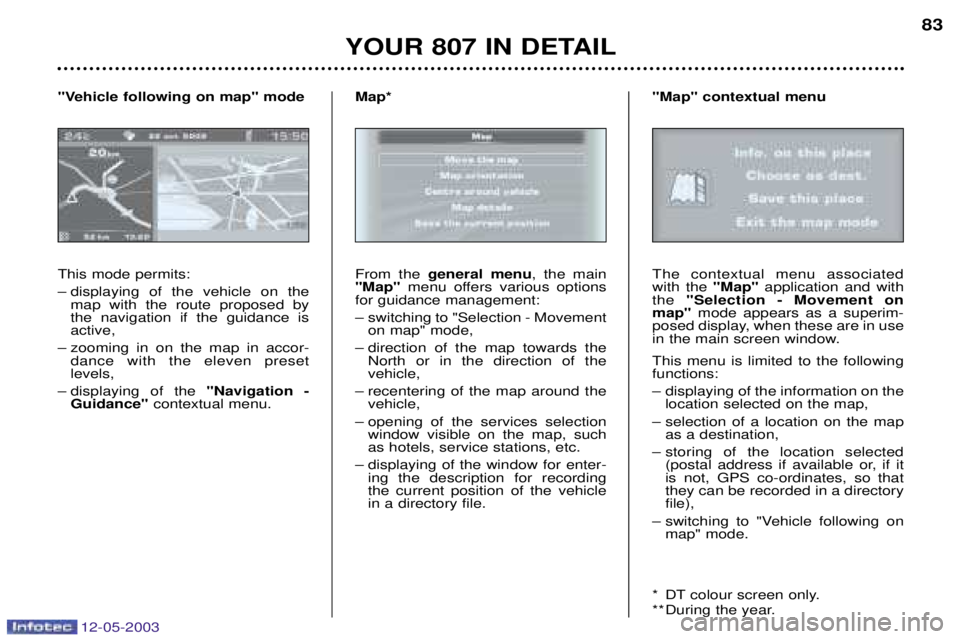
This mode permits:
– displaying of the vehicle on the map with the route proposed by the navigation if the guidance isactive,
– zooming in on the map in accor- dance with the eleven preset levels,
– displaying of the 8
���$������ +
�������&8� contextual menu.
8�&)���&�6����5��$����'�28�'��&
From the
$&�&���� '&�� , the main
8��28 menu offers various options
for guidance management:
– switching to "Selection - Movement on map" mode,
– direction of the map towards the North or in the direction of the vehicle,
– recentering of the map around the vehicle,
– opening of the services selection window visible on the map, suchas hotels, service stations, etc.
– displaying of the window for enter- ing the description for recordingthe current position of the vehiclein a directory file.
��2CThe contextual menu associated with the
8��28application and with
the 8�&�&������ +� ���&'&��� ��
'�28 mode appears as a superim-
posed display, when these are in use
in the main screen window. This menu is limited to the following functions:
– displaying of the information on the location selected on the map,
– selection of a location on the map as a destination,
– storing of the location selected (postal address if available or, if it is not, GPS co-ordinates, so thatthey can be recorded in a directoryfile),
– switching to "Vehicle following on map" mode.
* DT colour screen only.
** During the year.
8��28�����&E�����'&��
Page 170 of 184

12-05-2003
��������� �
�������
��
��� �� ��� �� ������
�����������
������������ �!�"�#��$�%�������
&�����������!'%���'�� Less than a minute after switching
off the ignition, operate the wipersstalk to position the wiper bladesalong the windscreen uprights(maintenance position).
�����������("'��� �!�"�#��$� � Lift the wiper arm, then disconnectthe windscreen-wash pipe.
� Unclip the blade and remove it.
� Fit the new blade.
� Reconnect the windscreen-washpipe and push back the wiper arm.
�'� "��)"�� ���� ��$%�"���� �!�"%
�'�����"��'"&���!'%���'�*�% �����'�
���� ������'�� ��$� '!�"���� ���
�!�"%�%���+,
�������������"��"� �!�"�#��$� � Lift the wiper arm, then unclip the blade and remove it.
� Fit the new blade and push backthe wiper arm. ��� ��- �����
. ���� After the engine has stopped, with the key in the accessories position,
certain functions (windscreen wiper,electric windows, courtesy lights,audio equipment etc.) can only beused for thirty minutes, to prevent
discharging the battery.
Once the thirty minutes are over, the message
/��'�'&0� &'$�� ����1�/
appears on the multifunction displayand the active functions are put on
standby.
A flat battery will prevent the engine from starting.