2003 PEUGEOT 607 lock
[x] Cancel search: lockPage 26 of 183
10-02-2003
INSTRUMENTS AND CONTROLS
30
INDICATOR LIGHTS
With the key in the accessories position (1st notch): the battery charge warning light illuminates on the instrument panel disp lay.
With the ignition on (2nd notch): the following three warning lights illuminate on the sides of the instrument panel:
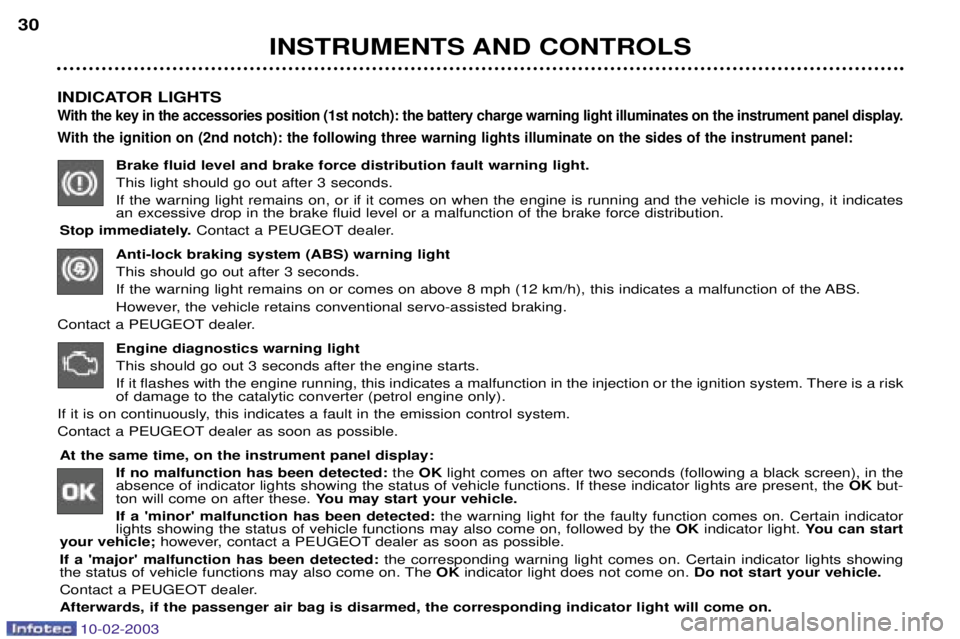
Brake fluid level and brake force distribution fault warning light. This light should go out after 3 seconds.If the warning light remains on, or if it comes on when the engine is running and the vehicle is moving, it indicates an excessive drop in the brake fluid level or a malfunction of the brake force distribution.
Stop immediately. Contact a PEUGEOT dealer.
Anti-lock braking system (ABS) warning light This should go out after 3 seconds.
If the warning light remains on or comes on above 8 mph (12 km/h), this indicates a malfunction of the ABS.
However, the vehicle retains conventional servo-assisted braking.
Contact a PEUGEOT dealer.
Engine diagnostics warning lightThis should go out 3 seconds after the engine starts.
If it flashes with the engine running, this indicates a malfunction in the injection or the ignition system. There is a risk of damage to the catalytic converter (petrol engine only).
If it is on continuously, this indicates a fault in the emission control system.
Contact a PEUGEOT dealer as soon as possible.
At the same time, on the instrument panel display:
If no malfunction has been detected: the OK light comes on after two seconds (following a black screen), in the
absence of indicator lights showing the status of vehicle functions. If these indicator lights are present, the OKbut-
ton will come on after these. You may start your vehicle.
If a 'minor' malfunction has been detected: the warning light for the faulty function comes on. Certain indicator
lights showing the status of vehicle functions may also come on, followed by the OKindicator light. You can start
your vehicle; however, contact a PEUGEOT dealer as soon as possible.
If a 'major' malfunction has been detected: the corresponding warning light comes on. Certain indicator lights showing
the status of vehicle functions may also come on. The OKindicator light does not come on. Do not start your vehicle.
Contact a PEUGEOT dealer. Afterwards, if the passenger air bag is disarmed, the corresponding indicator light will come on.
Page 32 of 183
10-02-2003
INSTRUMENTS AND CONTROLS
36
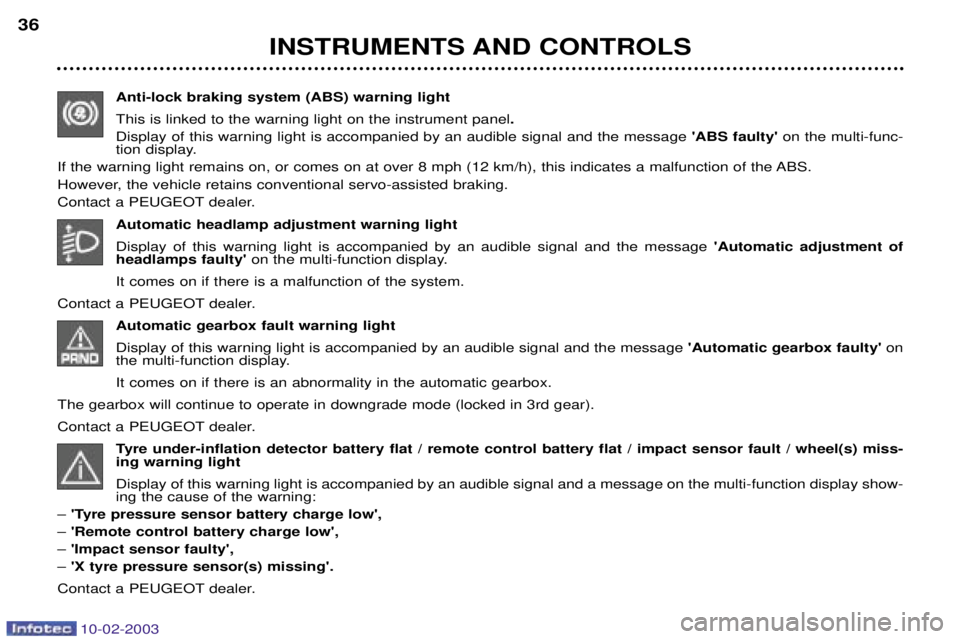
Anti-lock braking system (ABS) warning light This is linked to the warning light on the instrument panel .
Display of this warning light is accompanied by an audible signal and the message 'ABS faulty' on the multi-func-
tion display.
If the warning light remains on, or comes on at over 8 mph (12 km/h), this indicates a malfunction of the ABS.
However, the vehicle retains conventional servo-assisted braking.
Contact a PEUGEOT dealer.
Automatic headlamp adjustment warning light Display of this warning light is accompanied by an audible signal and the message 'Automatic adjustment of
headlamps faulty' on the multi-function display.
It comes on if there is a malfunction of the system.
Contact a PEUGEOT dealer. Automatic gearbox fault warning light Display of this warning light is accompanied by an audible signal and the message 'Automatic gearbox faulty'on
the multi-function display. It comes on if there is an abnormality in the automatic gearbox.
The gearbox will continue to operate in downgrade mode (locked in 3rd gear).
Contact a PEUGEOT dealer. Tyre under-inflation detector battery flat / remote control battery flat / impact sensor fault / wheel(s) miss- ing warning light Display of this warning light is accompanied by an audible signal and a message on the multi-function display show- ing the cause of the warning:
Ð 'Tyre pressure sensor battery charge low',
Ð 'Remote control battery charge low',
Ð 'Impact sensor faulty',
Ð 'X tyre pressure sensor(s) missing'.
Contact a PEUGEOT dealer.
Page 39 of 183
10-02-2003
INSTRUMENTS AND CONTROLS43
Setting the parameters From the
'general menu' , the
'Display configuration' menu
allows you to access the following parameters:
Ð setting the video brightness and display,
Ð setting the date and time,
Ð choosing the language in which information is heard and displayed (German, Spanish, French, Eng-lish, Italian, Dutch), setting the for-
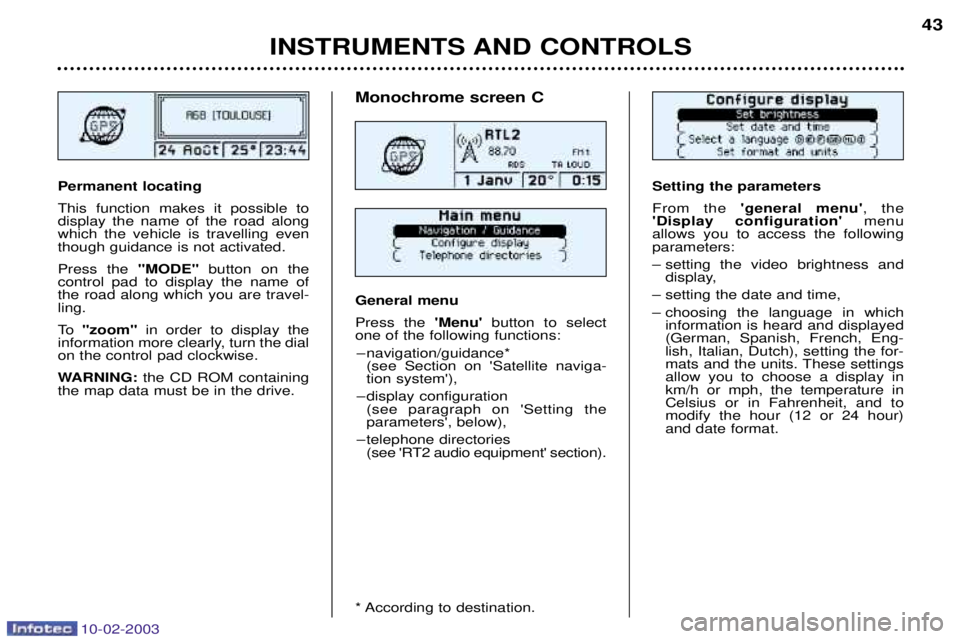
mats and the units. These settingsallow you to choose a display inkm/h or mph, the temperature inCelsius or in Fahrenheit, and tomodify the hour (12 or 24 hour)and date format.Permanent locating This function makes it possible to display the name of the road alongwhich the vehicle is travelling eventhough guidance is not activated. Press the "MODE"button on the
control pad to display the name of the road along which you are travel-ling.
To "zoom" in order to display the
information more clearly, turn the dial on the control pad clockwise.
WARNING: the CD ROM containing
the map data must be in the drive.
Monochrome screen C General menu Press the 'Menu' button to select
one of the following functions:
Ð navigation/guidance* (see Section on 'Satellite naviga- tion system'),
Ð display configuration (see paragraph on 'Setting theparameters', below),
Ð telephone directories (see 'RT2 audio equipment' section).
* According to destination.
Page 41 of 183
10-02-2003
INSTRUMENTS AND CONTROLS43
Setting the parameters From the
'general menu' , the
'Display configuration' menu
allows you to access the following parameters:
Ð setting the video brightness and display,
Ð setting the date and time,
Ð choosing the language in which information is heard and displayed (German, Spanish, French, Eng-lish, Italian, Dutch), setting the for-
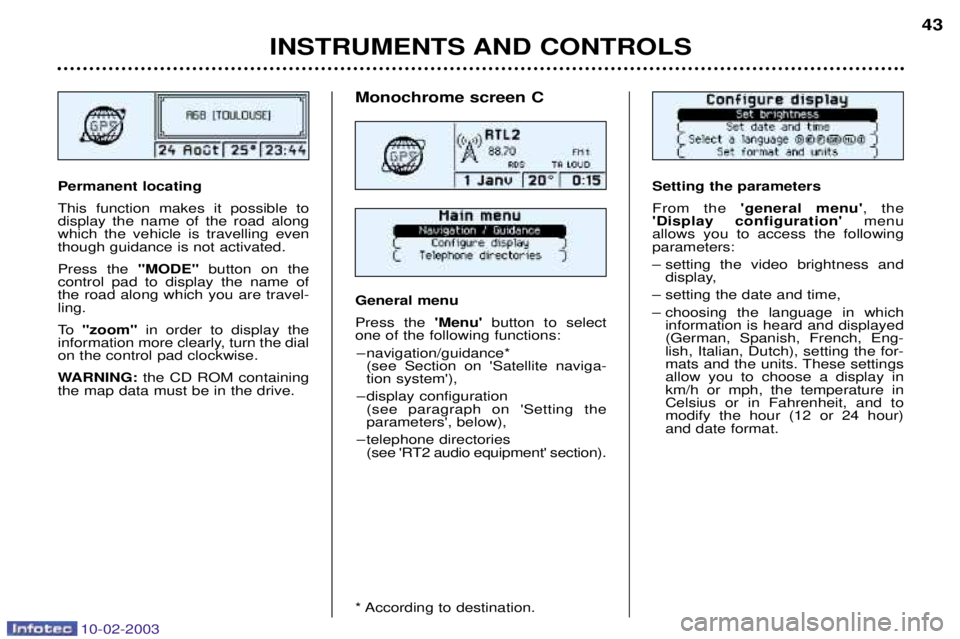
mats and the units. These settingsallow you to choose a display inkm/h or mph, the temperature inCelsius or in Fahrenheit, and tomodify the hour (12 or 24 hour)and date format.Permanent locating This function makes it possible to display the name of the road alongwhich the vehicle is travelling eventhough guidance is not activated. Press the "MODE"button on the
control pad to display the name of the road along which you are travel-ling.
To "zoom" in order to display the
information more clearly, turn the dial on the control pad clockwise.
WARNING: the CD ROM containing
the map data must be in the drive.
Monochrome screen C General menu Press the 'Menu' button to select
one of the following functions:
Ð navigation/guidance* (see Section on 'Satellite naviga- tion system'),
Ð display configuration (see paragraph on 'Setting theparameters', below),
Ð telephone directories (see 'RT2 audio equipment' section).
* According to destination.
Page 44 of 183
10-02-2003
Setting the image frame
This function allows the image to be cen- tralised on the screen.
Select the 'Vertical frame' function, then confirm:
- turn the dial clockwise to go up thescreen,
- turn the dial anti-clockwise to go down the screen,
- confirm, to finish setting the vertical frame.
Select the 'Horizontal frame' function, then confirm:
- turn the dial clockwise to go to the right,
- turn the dial anti-clockwise to go to the left,
- confirm, to finish setting the horizontal frame.
Record the changes.
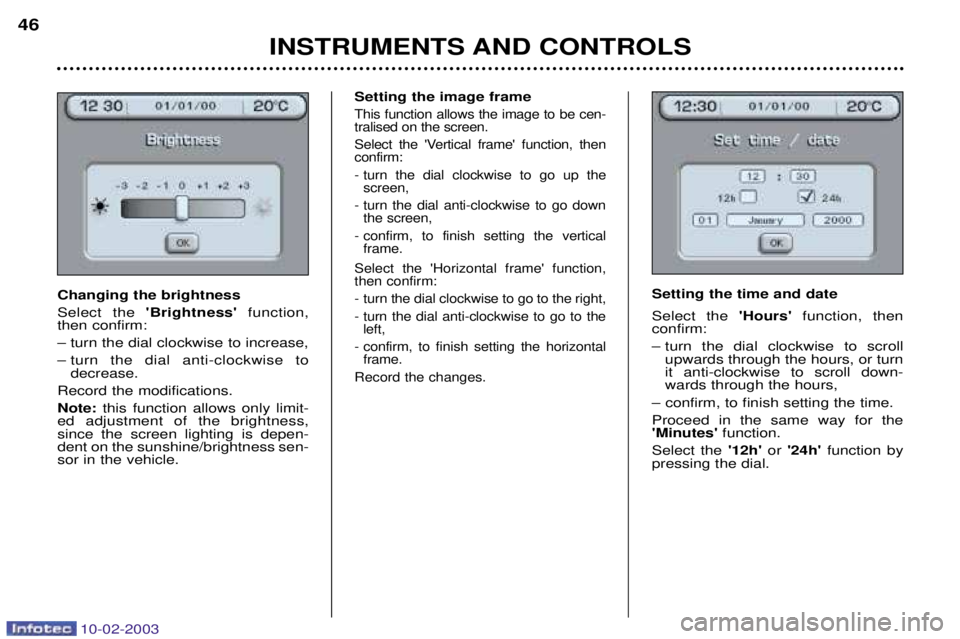
Setting the time and date Select the 'Hours'function, then
confirm:
Ð turn the dial clockwise to scroll upwards through the hours, or turn it anti-clockwise to scroll down-wards through the hours,
Ð confirm, to finish setting the time. Proceed in the same way for the 'Minutes' function.
Select the '12h'or '24h' function by
pressing the dial.
INSTRUMENTS AND CONTROLS
46
Changing the brightness Select the
'Brightness' function,
then confirm:Ð turn the dial clockwise to increase,
Ð turn the dial anti-clockwise to decrease.
Record the modifications.Note: this function allows only limit-
ed adjustment of the brightness, since the screen lighting is depen-dent on the sunshine/brightness sen-sor in the vehicle.
Page 45 of 183

10-02-2003
Videos
Video sockets may be used what-
ever the position of the key. It isimpossible to use the video whendriving above 20 mph (30 km/h).
You have three cinch (RCA) points, located in the glove box, for connect-
ing a camcorder, a DVD drive, etc.: Ð a video socket (yellow),
Ð two audio system sockets (red +white) for stereophonic sound.
The video connection is compatible
with PAL, SECAM and NTSC. Open the glove box and connect the equipment. Switch on the equipment.
To set the video, press the 'MENU'
button to access the general menu,
then select the 'Video'symbol and
confirm.
INSTRUMENTS AND CONTROLS 47
Select the 'Day' function, then
confirm:
Ð turn the dial clockwise to scroll for- wards through the days, or turn it
anti-clockwise to scroll backwards through the days,
Ð confirm, to finish setting the day.
Proceed in the same way for the'Month' and 'Year' functions.
Record the changes. Changing the units Select the units required, then con- firm and record the changes.
Page 46 of 183
10-02-2003
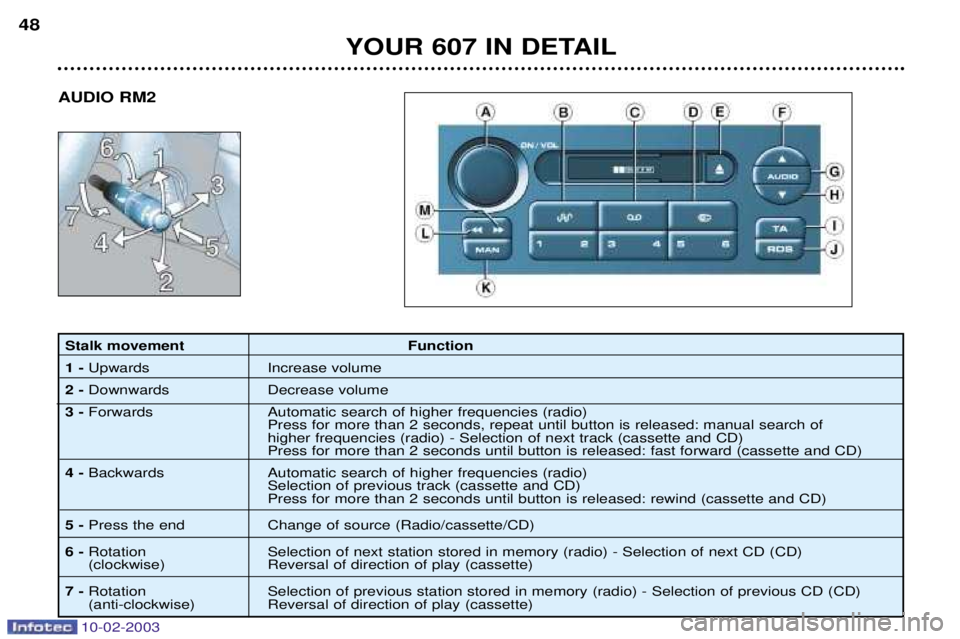
Stalk movement Function 1 - Upwards Increase volume
2 - Downwards Decrease volume
3 - Forwards Automatic search of higher frequencies (radio)
Press for more than 2 seconds, repeat until button is released: manual search of higher frequencies (radio) - Selection of next track (cassette and CD) Press for more than 2 seconds until button is released: fast forward (cassette and CD)
4 - Backwards Automatic search of higher frequencies (radio)
Selection of previous track (cassette and CD) Press for more than 2 seconds until button is released: rewind (cassette and CD)
5 - Press the end Change of source (Radio/cassette/CD)
6 - Rotation Selection of next station stored in memory (radio) - Selection of next CD (CD)
(clockwise) Reversal of direction of play (cassette)
7 - Rotation Selection of previous station stored in memory (radio) - Selection of previous CD (CD)
(anti-clockwise) Reversal of direction of play (cassette)
YOUR 607 IN DETAIL
48
AUDIO RM2
Page 59 of 183
10-02-2003
50
Stalk movementFunction
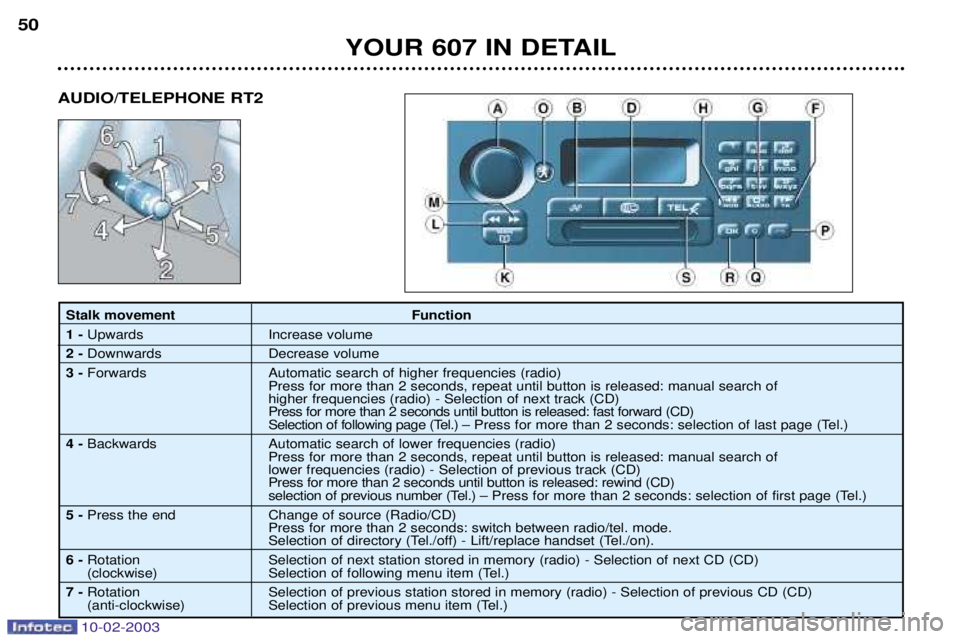
1 - Upwards Increase volume
2 - Downwards Decrease volume
3 - Forwards Automatic search of higher frequencies (radio)
Press for more than 2 seconds, repeat until button is released: manual search of higher frequencies (radio) - Selection of next track (CD) Press for more than 2 seconds until button is released: fast forward (CD)
Selection of following page (Tel.) Ð Press for more than 2 seconds: selection of last page (Tel.)
4 - Backwards Automatic search of lower frequencies (radio)
Press for more than 2 seconds, repeat until button is released: manual search oflower frequencies (radio) - Selection of previous track (CD) Press for more than 2 seconds until button is released: rewind (CD)
selection of previous number (Tel.) Ð Press for more than 2 seconds: selection of first page (Tel.)
5 - Press the end Change of source (Radio/CD)
Press for more than 2 seconds: switch between radio/tel. mode.
Selection of directory (Tel./off) - Lift/replace handset (Tel./on).
6 - Rotation Selection of next station stored in memory (radio) - Selection of next CD (CD)
(clockwise) Selection of following menu item (Tel.)
7 - Rotation Selection of previous station stored in memory (radio) - Selection of previous CD (CD)
(anti-clockwise) Selection of previous menu item (Tel.)
YOUR 607 IN DETAIL
AUDIO/TELEPHONE RT2