2003 Oldsmobile Bravada CD player
[x] Cancel search: CD playerPage 193 of 410

Playing a Disc
To play a disc, gently insert the disc with the label side
up into the loading slot. The DVD player will continue
loading the disc and the player will automatically start.
If a disc is already in the player, press the play/pause
button on the face of the player or on the remote control.
Some DVDs will not allow you
to fast forward or skip
the copyright or previews. Some DVDs will begin playing
after the previews have finished. If the DVD does not
begin playing, refer
to the on-screen instructions.
Stopping and Resume Playback
To stop a disc, press and release the stop/eject button
on the DVD player or the stop button on the remote.
To resume playback, press the play/pause button on the
DVD player or the remote. As long
as the disc has
not been ejected and the stop button has not been
pressed twice on the remote control, the movie should
resume play from where it was last stopped. If the
disc has been ejected or
if the stop button on the remote
has been pressed twice, the disc will resume play at
the beginning.
Parental Control Button: This button is located on the
front of the DVD console which is mounted vertically
above the driver’s right shoulder. Press this button while
a DVD is playing to freeze the video and mute the
audio
to the headphones. It will also disable all other
button operations from the remote and DVD player. The driver will
then be able to gain the attention of the rear
seat passengers. Press this button again
to restore
normal play of the DVD.
Ejecting a Disc
Press the stop/eject button on the DVD player once to
stop and a second time
to eject the disc.
If
a disc is ejected from the player, but not removed, the
DVD player will reload the disc after approximately
10 to 20 seconds.
DVD Messages
The following errors may be displayed:
8
8
Disc Format Error: This message will be displayed
if a disc is inserted upside down, if the disc is not
able to be read or
if the disc format is not
compatible.
Disc Play Error: This message will be displayed if
the mechanism can not play the disc. Severely
scratched discs
will cause this error.
Region Code Error: This message will be
displayed for all non Region
1 discs (DVDs sold
outside of North America).
Load/Eject Error: This message will be displayed if
the disc is not properly lined up in the mechanism.
Disc Not Present: This message will be displayed
if the PLAY, EJECT or DVD AUX buttons are
pressed and no disc is in the player.
3-80
Page 194 of 410

Remote Control
To use the remote control, aim it at the small square
window
to the left of the disc slot and press the desired
button. Direct sunlight or very bright light may affect
the ability of the entertainment system to receive signals
from the remote control. Be sure the remote’s batteries
are not discharged, as this will also affect the function
of the remote control. Objects blocking the line
of sight
may also affect the function of the remote control.
Remote Control Buttons
Notice: Do not store the remote control in heat or
direct sunlight. This could damage the remote
control and would not be covered by your warranty.
Keep the remote control stored in a cool, dry
place.
6 PWR (Power): Press this button to turn the DVD
player on or off.
,/I1 PLAY/PAUSE: Press this button to play a disc.
Press this button while a disc is playing
to pause. Press
it again to continue playing.
3-81
Page 195 of 410

STOP: Press this button to stop playing, reversing
or fast forwarding the DVD.
A EJECT/LOAD: Press this button to eject a DVD
while it is playing. If the disc has been ejected and not
removed from the player, pressing this button will
load the disc. The stop/eject button on the DVD player
will also load the disc
if the disc is ejected and not
removed.
a REW (Rewind): Press this button to reverse the
DVD at
5x speed. To stop reversing, press this
button again. This button may not work when the DVD
is playing the copyright or the previews.
FWD (Fast Forward): Press this button to fast
forward the DVD at
5x speed. To stop fast forwarding,
press this button again. This button may not work
when the DVD is playing the copyright
or the previews.
PREV (Previous): Press this button to return to
the start of the current chapter. Press this button again
to return to the previous chapter. This button may
not work when the DVD is playing the copyright or the
previews.
bb! NEXT: Press this button to jump to the beginning
of the next chapter. This button may not work when
the DVD is playing the copyright or the previews.
MENU: Press this button to view the media menu. The
media menu is different on every disc. Use the up
and down and the right and the left arrow buttons
to
move the cursor around the media menu. After making
your selection, press the ENTER button. Some discs
may contain a short skit leading up
to the media menu.
+cI WIRED VOLUME: Press the plus or the minus
symbol
to increase or to decrease the volume of
the wired headphones.
You can press repeatedly or
press and hold the plus or the minus symbol
to increase
or
to decrease the volume in large amounts.
a SIZE/ANGLE: This button controls the screen
ratio of the video display. Press and release this button
to stretch a 4:3 picture to fit the wide aspect ratio 16.9
screen.
Press and release this button
to choose different angles
of the same scene. Press and hold this button again
to change angles. This feature is not available on
all DVD discs.
DISP/S-TITLE (Display Subtitle) CHAP TRK (Chapter
Track):
Press and release this button to display the
title, chapter and elapsed time of the current video
segment or the track and time
if a CD is being played.
Press and hold this button
to see the DVDs subtitle
language. Press and release this button again
to change
it. This feature is not available on all DVD discs.
3-82
Page 196 of 410

CQMP/AUDIO (Compression) CQMP: Press and
release this button
to display the current compression
displayed on the screen. Press this button again
to
select the next compression state. Three compression
states are available inciuding minimum, standard
and
off. The compression feature only functions on AC3
(Dolby@ Digital Surround) encoded DVD video discs.
Press and hold this button
to see if the DVD playing has
optional audio tracks, such as different languages or
commentaries. Press and release to change selections.
INPUT/TITLE DVD AUX (Auxiliary): Press and
release this button to switch between the auxiliary input
device and the DVD player.
Press and hold this button to see a display of the DVD’s
titles. Press and release
to change the titles available.
6-h RTN (Return): When a DVD menu is active
and this button is pressed, the selected option will be
disabled. This button could have different functions with
different discs.
SCREEN BRIGHTNESS: Press the plus or the
minus symbol
to increase or to decrease the brightness
of the screen. This button can also be found on the
video screen.
-:q- LIGHT: Press this button to illuminate the keypad
for about eight seconds.
Setup Menu
To access the setup menu, ensure a DVD is in the
player and the video is in stop mode. Press the menu
key. Once the menu is activated, use the UP, DOWN, RIGHT,
LEFT, and Enter buttons to navigate the screen.
The setup menu allows the use
to select default
preferences for Menu Language, Subtitle Language,
Audio Language, TV Aspect, TV Mode, and Dynamic
Range Compression.
Not all DVDs support all the feature defaults in the
setup menus. In the event a particular feature is
not supported, defaults will be provided by the DVD
media.
Exit the setup menu by pressing the RETURN button on
the remote control. If you make changes
to the system
setup defaults, the disc will resume play from the
beginning and not where it previously left off.
Battery Replacement
To change the batteries, do the following:
1. Unclip the battery door located on the back of the
2. Replace the two AAA batteries in the compartment.
3. Close the battery door securely.
remote control.
Make sure that they are installed correctly.
If the remote control is to be stored for a long period of
time, remove the batteries and keep them in a cool,
dry place.
3-83
Page 198 of 410

Problem
The remote does
not work.
I can not hear anything
when
I lower the volume.
How do
I get subtitles on
or
off?
Recommended Action
Point the remote directly
at the player, but not the
screen.
The batteries could be
dead or put in wrong.
If the power button on the
player is flashing, the
parental control
is on,
which disables the
remote.
Quickly press and release
the COMP/AUDIO button
on the remote. This tells
you the current default
setting. Press and release
the COMP/AUDIO button again to choose another
setting.
Press and hold the
DISP/S-TITLE buttons on
the remote to
go to the
DVDs main menu. Then
follow the prompts.
Problem Recommended Action
After stopping the player, I Press the STOP button on
push PLAY 6ut
sometimes the DVD starts
where
I left off and
sometimes at the
beginning.
.-
The DVD is playing but
there is no picture or
sound.
The auxiliary medium
(video game, camcorder,
etc.) is running but there
is no picture or sound.
The audio or video skips
I Or Jumps.
the remote to resume
where the DVD left
off.
Press the STOP button
twice to start the DVD at
the beginning.
If the power is
off and the
DVD is still
in the player,
press and release the
PLAY button.
Press the INPUTTTITLE
button on the remote to
get to auxiliary input.
The auxiliary medium’s
cords could be plugged
into the wrong jack.
The DVD could be dirtv or
‘I
scratched. Try cleaning
the DVD.
3-85
Page 199 of 410

Problem
When I return to the DVD
from the system menu,
sometimes it plays from
the beginning and
sometimes from where it
left
off.
The fast forward, fast reverse, previous and
next functions do not
work.
Recommended Action
If the STOP button was
pressed once, it resumes
play from where it left
off.
If the STOP button was
pressed twice, it will start
at the beginning of the
DVD.
However,
if a change was
made to the menu, the
DVD will start from the
beginning, even
if the
STOP button was only
pressed once.
Some commands that do
one thing for DVDs will
not always work or
perform the same function
for audio, CDs or games.
- Problem
My disc is stuck in the
player. The EJECT/LOAD
button does not work.
Recommended Action
Press the EJECT/LOAD
button on the remote, or
the STOP/EJECT button
on the DVD player.
Turn the power
off, then
on again.
Do not attempt
to forcibly
remove the disc from the
player.
I lost the remote and/or
Pour some isopropyl or
What
is the best way
to
assistance.
the
headphones. See
your dealer for
clean the screen?
rubbing alcohol on
a clean
Sometimes the wireless
This could be caused by
headphone audio cuts out interference from cell
or buzzes for a moment
towers or by using your
then it comes back.
cell Dhone in the vehicle.
cloth and
wipe.
3-86
Page 202 of 410
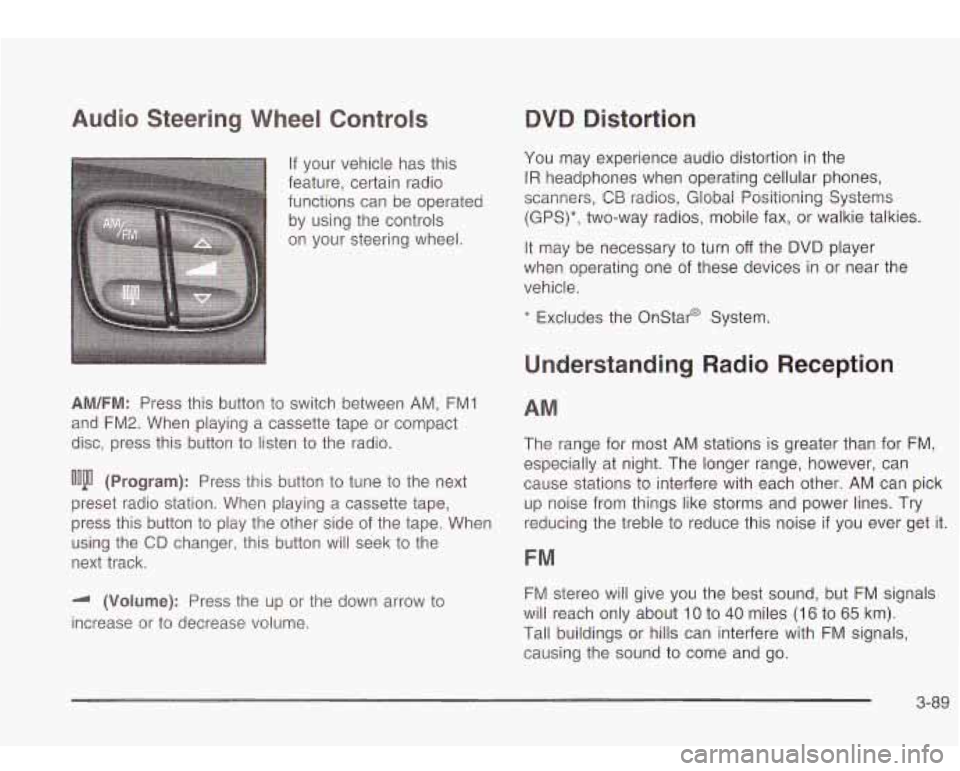
Audio Steering Wheel Controls
If your vehicle has this
feature, certain radio
functions can be operated
by using the controls
on your steering wheel.
AM/FM: Press this button to switch between AM, FMI
and FM2. When playing a cassette tape or compact
disc, press this button
to listen to the radio.
ooju (Program): Press this button to tune to the next
preset radio station. When playing a cassette tape,
press this button
to play the other side of the tape. When
using the
CD changer, this button will seek to the
next track.
-I (Volume): Press the up or the down arrow to
increase or to decrease volume.
QVQ Distortion
You may experience audio distortion in the
IR headphones when operating cellular phones,
scanners,
CB radios, Global Positioning Systems
(GPS)*, two-way radios, mobile fax, or walkie talkies.
It may be necessary to turn
off the DVD player
when operating one of these devices in or near the
vehicle.
* Excludes the Onstar@ System.
Understanding Radio Reception
AM
The range for most AM stations is greater than for FM,
especially at night. The longer range, however, can
cause stations
to interfere with each other. AM can pick
up noise from things like storms and power lines. Try
reducing the treble
to reduce this noise if you ever get it.
FM
FM stereo will give you the best sound, but FM signals
will reach only about
10 to 40 miles (16 to 65 km).
Tall buildings or hills can interfere with FM signals,
causing the sound to come and go.
3-89
Page 203 of 410

Care of Your Cassette Tape Player
A tape player that is not cleaned regularly can cause
reduced sound quality, ruined cassettes or a damaged
mechanism. Cassette tapes should be stored in their
cases away from contaminants, direct sunlight and
extreme heat.
If they aren’t, they may not operate
properly or may cause failure of the tape player.
Your tape player should be cleaned regularly after every
50 hours of use. Your radio may display CLEAN
PLAYR
to indicate that you have used your tape player
for
50 hours without resetting the tape clean timer. If
this message appears on the display, your cassette tape
player needs
to be cleaned. It will still play tapes, but
you should clean it as soon as possible to prevent
damage
to your tapes and player. If you notice a
reduction in sound quality, try a known good cassette to
see
if the tape or the tape player is at fault. If this
other cassette has no improvement in sound quality,
clean the tape player.
For best results, use a scrubbing action, non-abrasive
cleaning cassette with pads which scrub the tape
head as the hubs of the cleaner cassette turn. The
recommended cleaning cassette is available through
your dealership.
The cut tape detection feature of your cassette tape
player may identify the cleaning cassette as a damaged
tape,
in error. To prevent the cleaning cassette from
being ejected, use the following steps.
I. Turn the ignition on.
2. Turn the radio off.
3. Press and hold the TP CD button for five seconds.
4. Insert the scrubbing action cleaning cassette.
5. Eject the cleaning cassette after the manufacturer’s
recommended cleaning time.
You may also choose a non-scrubbing action, wet-type
cleaner which uses a cassette with a fabric belt
to
clean the tape head. This type of cleaning cassette will
not eject on its own. A non-scrubbing action cleaner
may not clean as thoroughly as the scrubbing type
cleaner. The use
of a non-scrubbing action, dry-type
cleaning cassette is not recommended.
After you clean the player, press and hold the eject
button for five seconds to reset the CLEAN PLAYR
indicator. The radio will display CLEANED
to show the
indicator was reset.
Cassettes are subject
to wear and the sound quality
may degrade over time. Always make sure the cassette
tape
is in good condition before you have your tape
player serviced.
3-90