2003 NISSAN ALMERA N16 ECU
[x] Cancel search: ECUPage 815 of 3189
![NISSAN ALMERA N16 2003 Electronic Repair Manual TROUBLE DIAGNOSIS FOR INTERMITTENT INCIDENT
EC-485
[QG (WITHOUT EURO-OBD)]
C
D
E
F
G
H
I
J
K
L
MA
EC
TROUBLE DIAGNOSIS FOR INTERMITTENT INCIDENTPFP:00006
DescriptionEBS00KF7
Intermittent incidents (I/](/manual-img/5/57350/w960_57350-814.png "NISSAN ALMERA N16 2003 Electronic Repair Manual TROUBLE DIAGNOSIS FOR INTERMITTENT INCIDENT
EC-485
[QG (WITHOUT EURO-OBD)]
C
D
E
F
G
H
I
J
K
L
MA
EC
TROUBLE DIAGNOSIS FOR INTERMITTENT INCIDENTPFP:00006
DescriptionEBS00KF7
Intermittent incidents (I/")
TROUBLE DIAGNOSIS FOR INTERMITTENT INCIDENT
EC-485
[QG (WITHOUT EURO-OBD)]
C
D
E
F
G
H
I
J
K
L
MA
EC
TROUBLE DIAGNOSIS FOR INTERMITTENT INCIDENTPFP:00006
DescriptionEBS00KF7
Intermittent incidents (I/I) may occur. In many cases, the malfunction resolves itself (the part or circuit function
returns to normal without intervention). It is important to realize that the symptoms described in the customer's
complaint often do not recur on (1st trip) DTC visits. Realize also that the most frequent cause of I/I occur-
rences is poor electrical connections. Because of this, the conditions under which the incident occurred may
not be clear. Therefore, circuit checks made as part of the standard diagnostic procedure may not indicate the
specific malfunctioning area.
Common I/I Report Situations
Diagnostic ProcedureEBS00KF8
1.INSPECTION START
Erase (1st trip) DTCs. Refer to EC-430, "
HOW TO ERASE EMISSION-RELATED DIAGNOSTIC INFORMA-
TION" .
>> GO TO 2.
2.CHECK GROUND TERMINALS
Check ground terminals for corroding or loose connection.
Refer to GI-23, “Incident Simulation Tests”.
OK or NG
OK >> GO TO 3.
NG >> Repair or replace.
3.SEARCH FOR ELECTRICAL INCIDENT
Perform GI-23, “Incident Simulation Tests”.
OK or NG
OK >>INSPECTION END
NG >> Repair or replace.
STEP in Work Flow Situation
II The CONSULT-II is used. The SELF-DIAG RESULTS screen shows time data other than “0” or “[1t]”.
III The symptom described by the customer does not recur.
IV (1st trip) DTC does not appear during the DTC Confirmation Procedure.
VI The Diagnostic Procedure for PXXXX does not indicate the malfunctioning area.
Page 905 of 3189
![NISSAN ALMERA N16 2003 Electronic Repair Manual DTC P1121 ELECTRIC THROTTLE CONTROL ACTUATOR
EC-575
[QG (WITHOUT EURO-OBD)]
C
D
E
F
G
H
I
J
K
L
MA
EC
DTC P1121 ELECTRIC THROTTLE CONTROL ACTUATORPFP:16119
Component DescriptionEBS00KIB
Electric Throt](/manual-img/5/57350/w960_57350-904.png "NISSAN ALMERA N16 2003 Electronic Repair Manual DTC P1121 ELECTRIC THROTTLE CONTROL ACTUATOR
EC-575
[QG (WITHOUT EURO-OBD)]
C
D
E
F
G
H
I
J
K
L
MA
EC
DTC P1121 ELECTRIC THROTTLE CONTROL ACTUATORPFP:16119
Component DescriptionEBS00KIB
Electric Throt")
DTC P1121 ELECTRIC THROTTLE CONTROL ACTUATOR
EC-575
[QG (WITHOUT EURO-OBD)]
C
D
E
F
G
H
I
J
K
L
MA
EC
DTC P1121 ELECTRIC THROTTLE CONTROL ACTUATORPFP:16119
Component DescriptionEBS00KIB
Electric Throttle Control Actuator consists of throttle control motor, throttle position sensor, etc.
The throttle control motor is operated by the ECM and it opens and closes the throttle valve.
The throttle position sensor detects the throttle valve position, and the opening and closing speed of the throt-
tle valve and feeds the voltage signals to the ECM. The ECM judges the current opening angle of the throttle
valve from these signals and the ECM controls the throttle control motor to make the throttle valve opening
angle properly in response to driving condition.
On Board Diagnosis LogicEBS00KIC
This self-diagnosis has the one trip detection logic.
FAIL-SAFE MODE
When the malfunction A or B is detected in the two consecutive trips, the ECM enters fail-safe mode and MI
lights up.
When the malfunction C is detected even in the 1st trip, the ECM enters fail-safe mode and the MI lights up.
DTC Confirmation ProcedureEBS00KID
NOTE:
●Perform “PROCEDURE FOR MALFUNCTION A AND B” first. If the 1st trip DTC cannot be con-
firmed, perform “PROCEDURE FOR MALFUNCTION C”.
If there is no malfunction on “PROCEDURE FOR MALFUNCTION A AND B”, perform “PROCE-
DURE FOR MALFUNCTION C”.
●If “DTC Confirmation Procedure” has been previously conducted, always turn ignition switch “OFF” and
wait at least 10 seconds before conducting the next test.
PROCEDURE FOR MALFUNCTION A AND B
With CONSULT-II
1. Turn ignition witch “ON” and wait at least 1 second.
2. Select “DATA MONITOR” mode with CONSULT-II.
3. Shift selector lever to “D” position (A/T), “1st” position (M/T) and
wait at least 2 seconds.
4. Turn ignition switch “OFF”, wait at least 10 seconds, and then
turn “ON”.
5. If 1st trip DTC is detected, go to EC-576, "
Diagnostic Procedure"
.
DTC No. Trouble diagnosis name DTC detecting condition Possible cause
P1121
11 2 1Electric throttle control
actuatorA)Electric throttle control actuator does not function
properly due to the return spring malfunction.
●Electric throttle control actuator B)Throttle valve opening angle in fail-safe mode is
not in specified range.
C)ECM detect the throttle valve is stuck open.
This self-diagnosis has the one trip detection
logic.
Detected items Engine operating condition in fail-safe mode
Malfunction AThe ECM controls the electric throttle actuator by regulating the throttle opening around the idle position.
The engine speed will not rise more than 2,000 rpm.
Malfunction B ECM controls the electric throttle control actuator by regulating the throttle opening to 20 degrees or less.
Malfunction CWhile the vehicle is driving, it slows down gradually by fuel cut. After the vehicle stops, the engine stalls.
The engine can restart in “N” or “P” position, and engine speed will not exceed 1,000 rpm or more.
SEF058Y
Page 1085 of 3189
JEF369Y
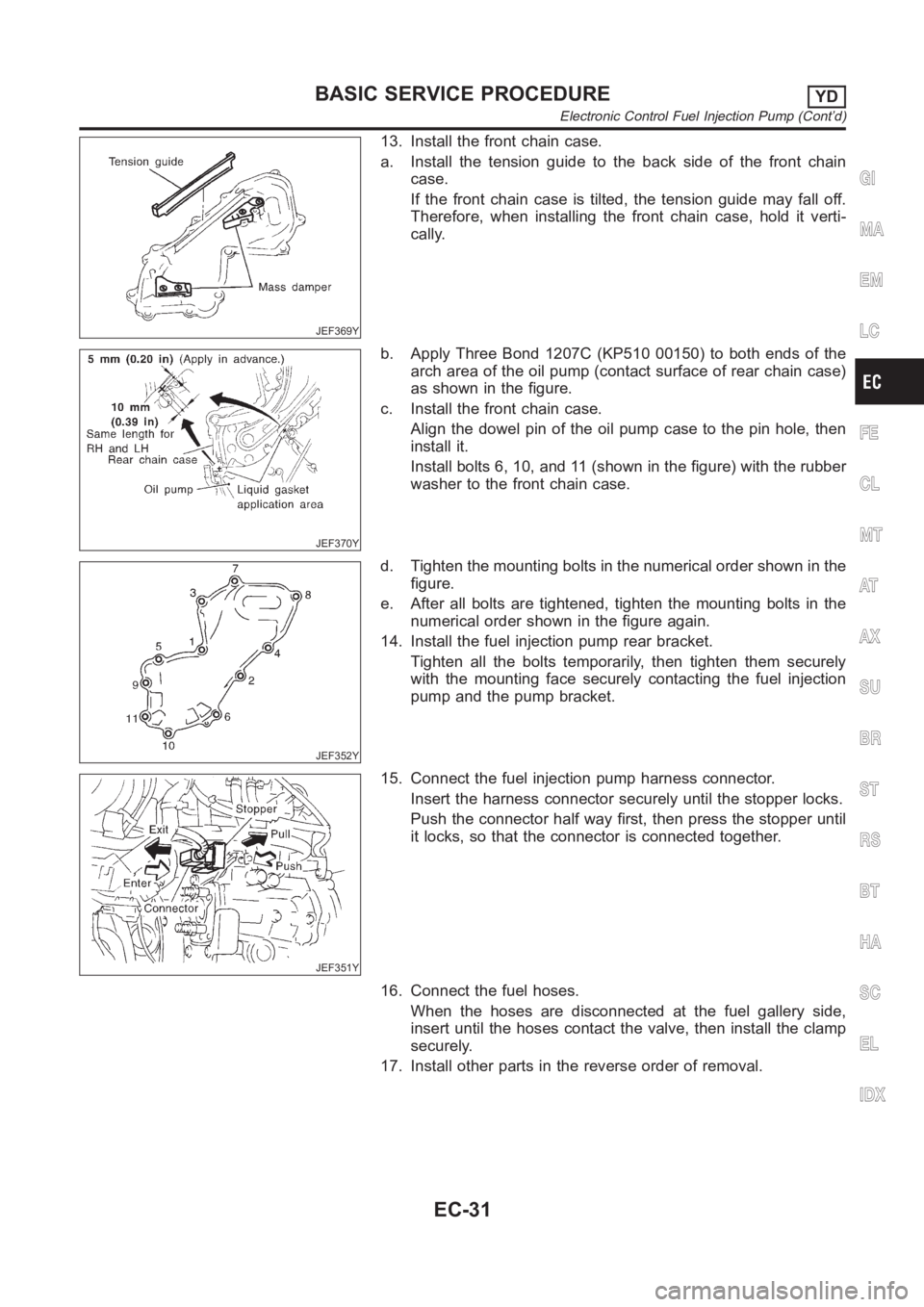
13. Install the front chain case.
a. Install the tension guide to the back side of the front chain
case.
If the front chain case is tilted, the tension guide may fall off.
Therefore, when installing the front chain case, hold it verti-
cally.
JEF370Y
b. Apply Three Bond 1207C (KP510 00150) to both ends of the
arch area of the oil pump (contact surface of rear chain case)
as shown in the figure.
c. Install the front chain case.
Align the dowel pin of the oil pump case to the pin hole, then
install it.
Install bolts 6, 10, and 11 (shown in the figure) with the rubber
washer to the front chain case.
JEF352Y
d. Tighten the mounting bolts in the numerical order shown in the
figure.
e. After all bolts are tightened, tighten the mounting bolts in the
numerical order shown in the figure again.
14. Install the fuel injection pump rear bracket.
Tighten all the bolts temporarily, then tighten them securely
with the mounting face securely contacting the fuel injection
pump and the pump bracket.
JEF351Y
15. Connect the fuel injection pump harness connector.
Insert the harness connector securely until the stopper locks.
Push the connector half way first, then press the stopper until
it locks, so that the connector is connected together.
16. Connect the fuel hoses.
When the hoses are disconnected at the fuel gallery side,
insert until the hoses contact the valve, then install the clamp
securely.
17. Install other parts in the reverse order of removal.
GI
MA
EM
LC
FE
CL
MT
AT
AX
SU
BR
ST
RS
BT
HA
SC
EL
IDX
BASIC SERVICE PROCEDUREYD
Electronic Control Fuel Injection Pump (Cont’d)
EC-31
Page 1092 of 3189
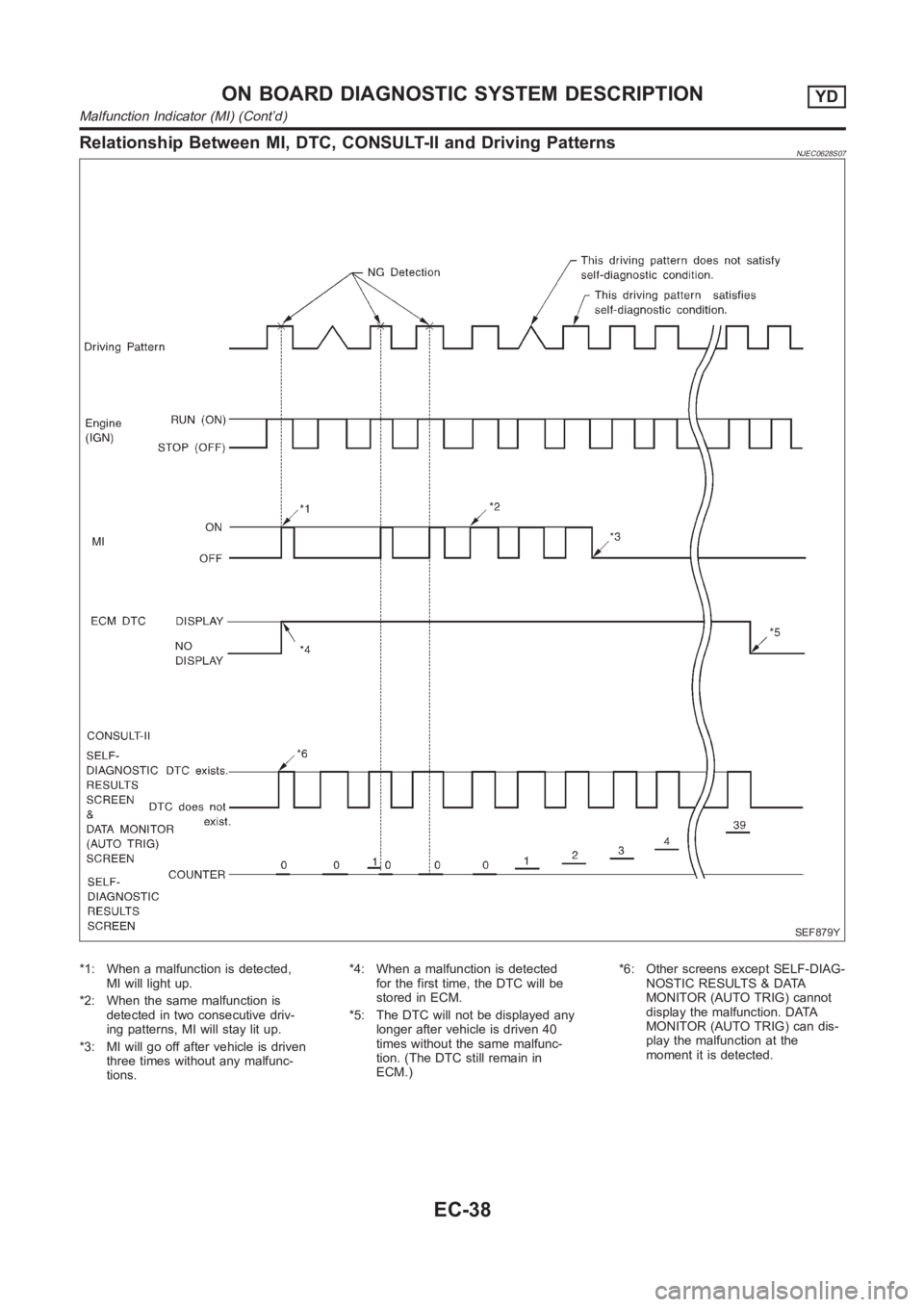
Relationship Between MI, DTC, CONSULT-II and Driving PatternsNJEC0628S07
SEF879Y
*1: When a malfunction is detected,
MI will light up.
*2: When the same malfunction is
detected in two consecutive driv-
ing patterns, MI will stay lit up.
*3: MI will go off after vehicle is driven
three times without any malfunc-
tions.*4: When a malfunction is detected
for the first time, the DTC will be
stored in ECM.
*5: The DTC will not be displayed any
longer after vehicle is driven 40
times without the same malfunc-
tion. (The DTC still remain in
ECM.)*6: Other screens except SELF-DIAG-
NOSTIC RESULTS & DATA
MONITOR (AUTO TRIG) cannot
display the malfunction. DATA
MONITOR (AUTO TRIG) can dis-
play the malfunction at the
moment it is detected.
ON BOARD DIAGNOSTIC SYSTEM DESCRIPTIONYD
Malfunction Indicator (MI) (Cont’d)
EC-38
Page 1125 of 3189
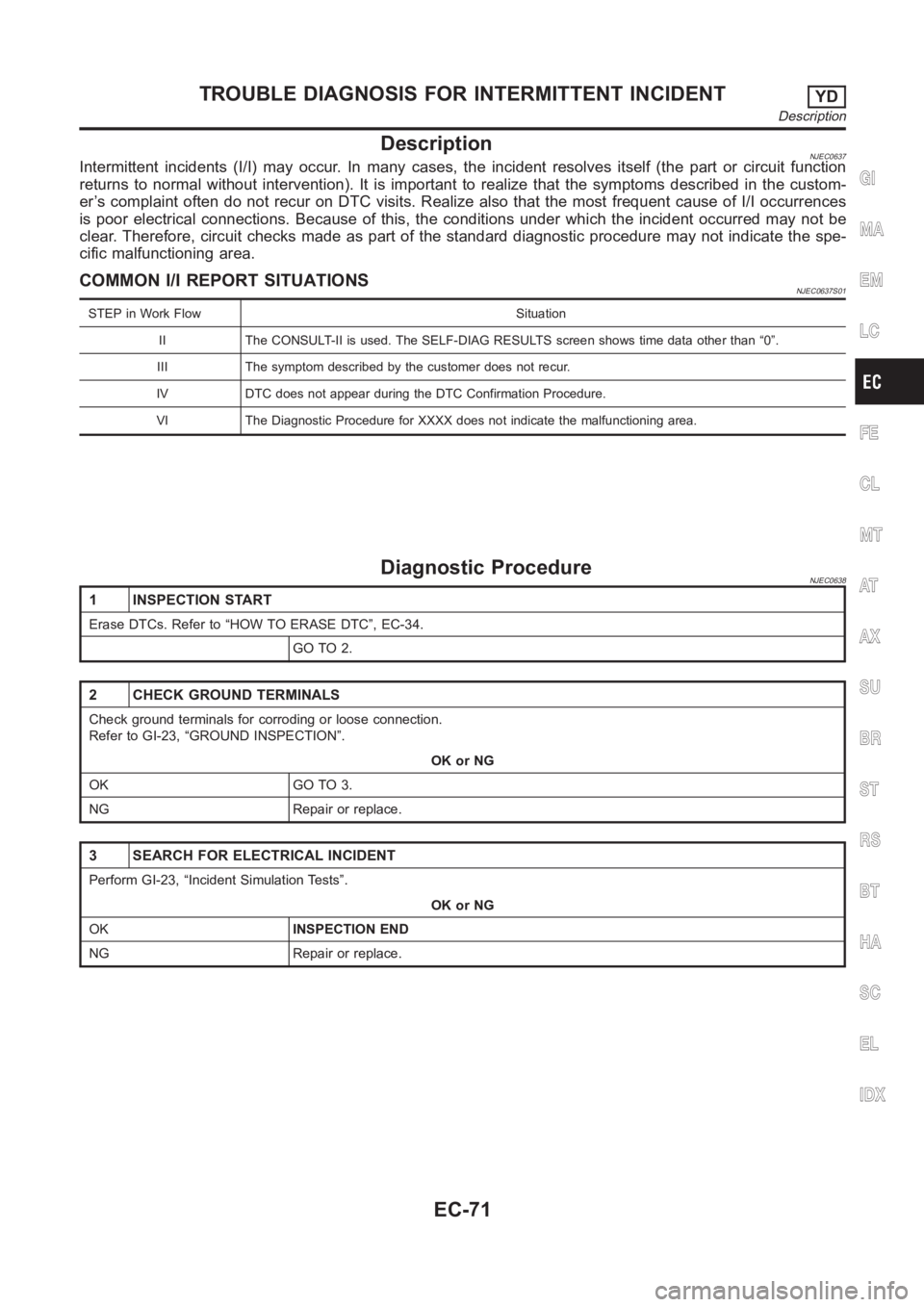
DescriptionNJEC0637Intermittent incidents (I/I) may occur. In many cases, the incident resolves itself (the part or circuit function
returns to normal without intervention). It is important to realize that the symptoms described in the custom-
er’s complaint often do not recur on DTC visits. Realize also that the most frequent cause of I/I occurrences
is poor electrical connections. Because of this, the conditions under which the incident occurred may not be
clear. Therefore, circuit checks made as part of the standard diagnostic procedure may not indicate the spe-
cific malfunctioning area.
COMMON I/I REPORT SITUATIONSNJEC0637S01
STEP in Work Flow Situation
II The CONSULT-II is used. The SELF-DIAG RESULTS screen shows time data other than “0”.
III The symptom described by the customer does not recur.
IV DTC does not appear during the DTC Confirmation Procedure.
VI The Diagnostic Procedure for XXXX does not indicate the malfunctioningarea.
Diagnostic ProcedureNJEC0638
1 INSPECTION START
Erase DTCs. Refer to “HOW TO ERASE DTC”, EC-34.
GO TO 2.
2 CHECK GROUND TERMINALS
Check ground terminals for corroding or loose connection.
Refer to GI-23, “GROUND INSPECTION”.
OK or NG
OK GO TO 3.
NG Repair or replace.
3 SEARCH FOR ELECTRICAL INCIDENT
Perform GI-23, “Incident Simulation Tests”.
OK or NG
OKINSPECTION END
NG Repair or replace.
GI
MA
EM
LC
FE
CL
MT
AT
AX
SU
BR
ST
RS
BT
HA
SC
EL
IDX
TROUBLE DIAGNOSIS FOR INTERMITTENT INCIDENTYD
Description
EC-71
Page 1271 of 3189
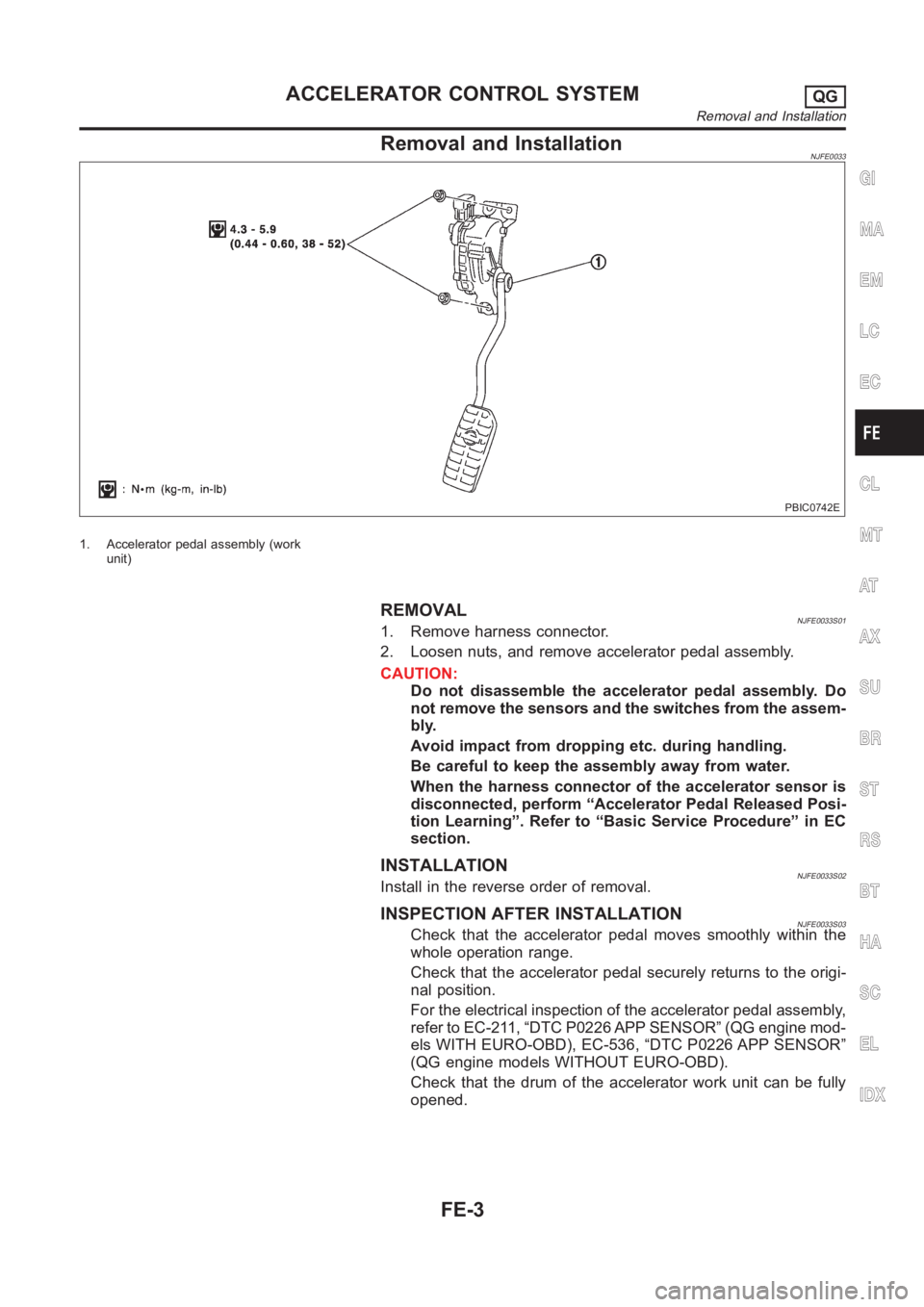
Removal and InstallationNJFE0033
PBIC0742E
1. Accelerator pedal assembly (work
unit)
REMOVALNJFE0033S011. Remove harness connector.
2. Loosen nuts, and remove accelerator pedal assembly.
CAUTION:
Do not disassemble the accelerator pedal assembly. Do
not remove the sensors and the switches from the assem-
bly.
Avoid impact from dropping etc. during handling.
Be careful to keep the assembly away from water.
When the harness connector of the accelerator sensor is
disconnected, perform “Accelerator Pedal Released Posi-
tion Learning”. Refer to “Basic Service Procedure” in EC
section.
INSTALLATIONNJFE0033S02Install in the reverse order of removal.
INSPECTION AFTER INSTALLATIONNJFE0033S03Check that the accelerator pedal moves smoothly within the
whole operation range.
Check that the accelerator pedal securely returns to the origi-
nal position.
For the electrical inspection of the accelerator pedal assembly,
refer to EC-211, “DTC P0226 APP SENSOR” (QG engine mod-
els WITH EURO-OBD), EC-536, “DTC P0226 APP SENSOR”
(QG engine models WITHOUT EURO-OBD).
Check that the drum of the accelerator work unit can be fully
opened.
GI
MA
EM
LC
EC
CL
MT
AT
AX
SU
BR
ST
RS
BT
HA
SC
EL
IDX
ACCELERATOR CONTROL SYSTEMQG
Removal and Installation
FE-3
Page 1272 of 3189
SMA803A
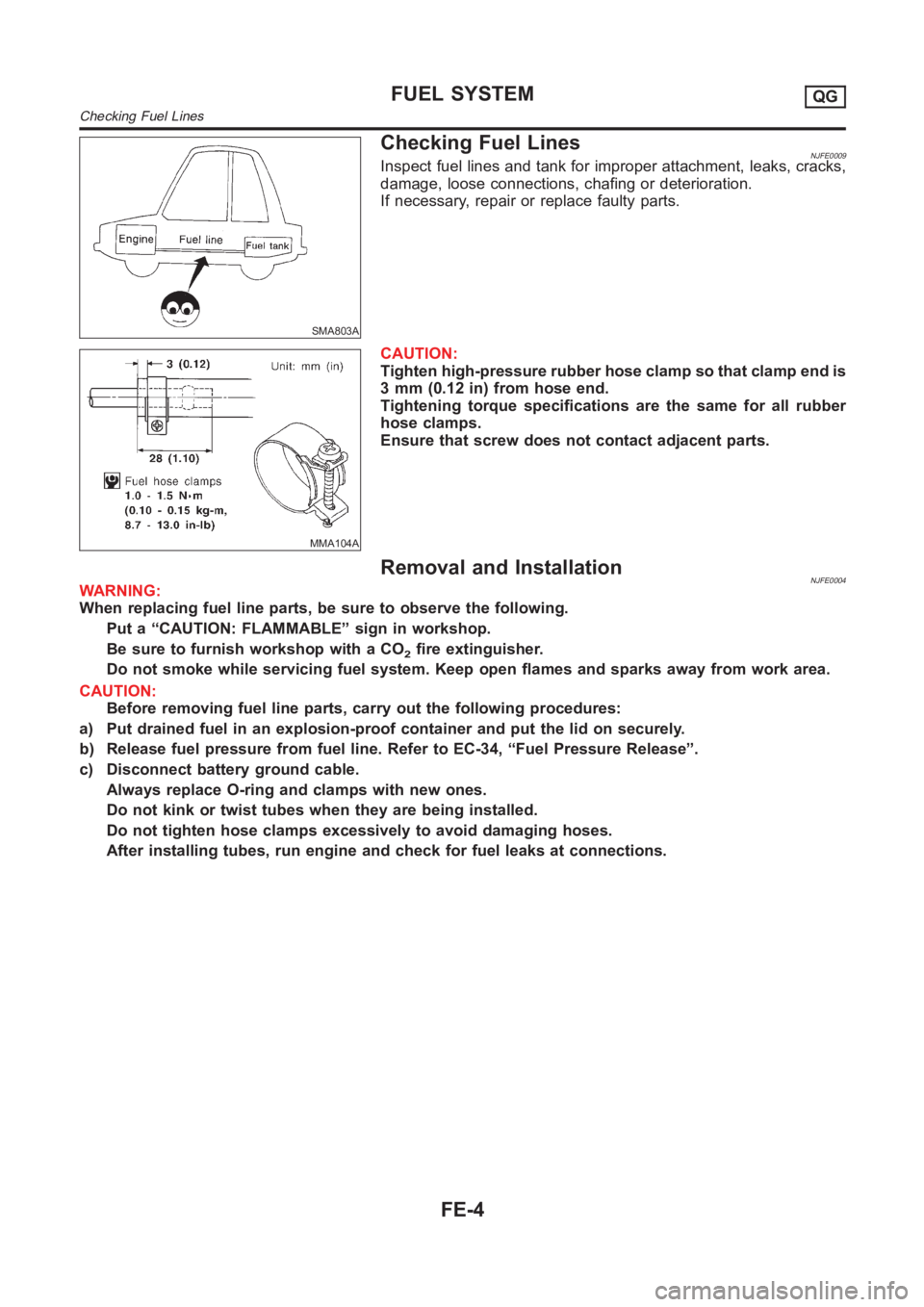
Checking Fuel LinesNJFE0009Inspect fuel lines and tank for improper attachment, leaks, cracks,
damage, loose connections, chafing or deterioration.
If necessary, repair or replace faulty parts.
MMA104A
CAUTION:
Tighten high-pressure rubber hose clamp so that clamp end is
3 mm (0.12 in) from hose end.
Tightening torque specifications are the same for all rubber
hose clamps.
Ensure that screw does not contact adjacent parts.
Removal and InstallationNJFE0004WARNING:
When replacing fuel line parts, be sure to observe the following.
Put a “CAUTION: FLAMMABLE” sign in workshop.
Be sure to furnish workshop with a CO
2fire extinguisher.
Do not smoke while servicing fuel system. Keep open flames and sparks away from work area.
CAUTION:
Before removing fuel line parts, carry out the following procedures:
a) Put drained fuel in an explosion-proof container and put the lid on securely.
b) Release fuel pressure from fuel line. Refer to EC-34, “Fuel Pressure Release”.
c) Disconnect battery ground cable.
Always replace O-ring and clamps with new ones.
Do not kink or twist tubes when they are being installed.
Do not tighten hose clamps excessively to avoid damaging hoses.
After installing tubes, run engine and check for fuel leaks at connections.
FUEL SYSTEMQG
Checking Fuel Lines
FE-4
Page 1282 of 3189
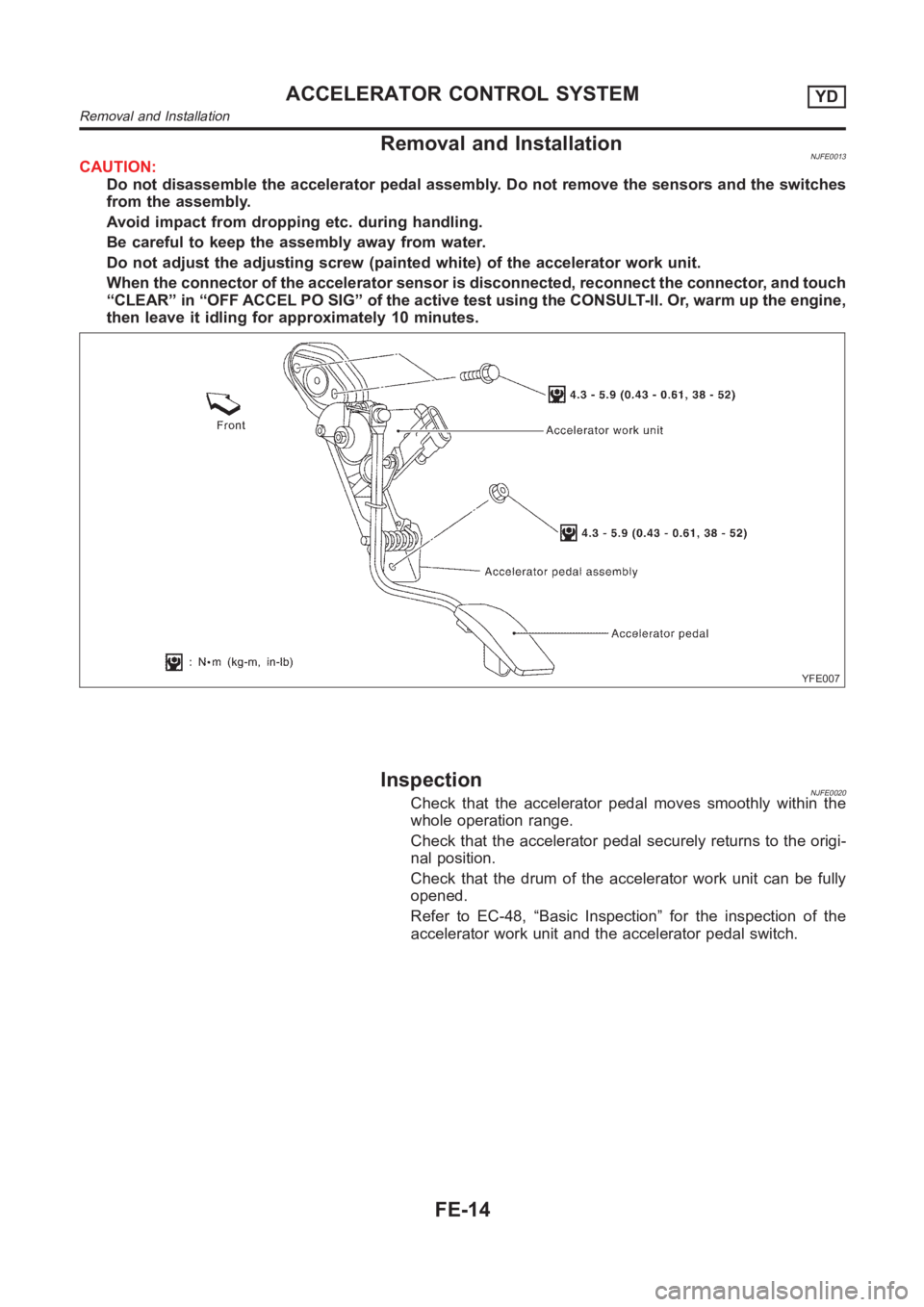
Removal and InstallationNJFE0013CAUTION:
Do not disassemble the accelerator pedal assembly. Do not remove the sensors and the switches
from the assembly.
Avoid impact from dropping etc. during handling.
Be careful to keep the assembly away from water.
Do not adjust the adjusting screw (painted white) of the accelerator work unit.
When the connector of the accelerator sensor is disconnected, reconnect the connector, and touch
“CLEAR” in “OFF ACCEL PO SIG” of the active test using the CONSULT-II. Or, warm up the engine,
then leave it idling for approximately 10 minutes.
YFE007
InspectionNJFE0020Check that the accelerator pedal moves smoothly within the
whole operation range.
Check that the accelerator pedal securely returns to the origi-
nal position.
Check that the drum of the accelerator work unit can be fully
opened.
Refer to EC-48, “Basic Inspection” for the inspection of the
accelerator work unit and the accelerator pedal switch.
ACCELERATOR CONTROL SYSTEMYD
Removal and Installation
FE-14