2003 NISSAN ALMERA N16 Engine Control
[x] Cancel search: Engine ControlPage 1082 of 3189
JEF360Y
JEF361Y
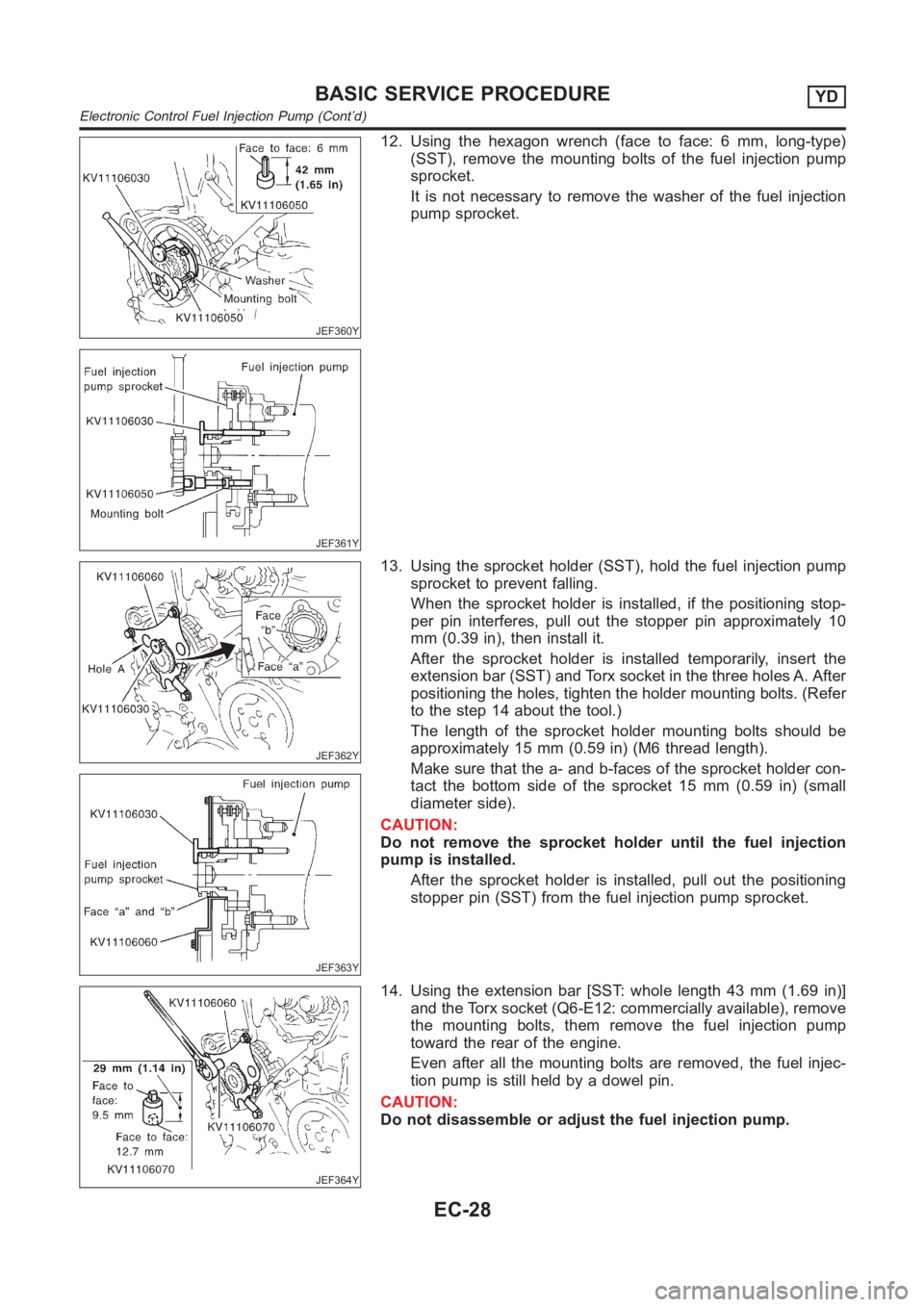
12. Using the hexagon wrench (face to face: 6 mm, long-type)
(SST), remove the mounting bolts of the fuel injection pump
sprocket.
It is not necessary to remove the washer of the fuel injection
pump sprocket.
JEF362Y
JEF363Y
13. Using the sprocket holder (SST), hold the fuel injection pump
sprocket to prevent falling.
When the sprocket holder is installed, if the positioning stop-
per pin interferes, pull out the stopper pin approximately 10
mm (0.39 in), then install it.
After the sprocket holder is installed temporarily, insert the
extension bar (SST) and Torx socket in the three holes A. After
positioning the holes, tighten the holder mounting bolts. (Refer
to the step 14 about the tool.)
The length of the sprocket holder mounting bolts should be
approximately 15 mm (0.59 in) (M6 thread length).
Make sure that the a- and b-faces of the sprocket holder con-
tact the bottom side of the sprocket 15 mm (0.59 in) (small
diameter side).
CAUTION:
Do not remove the sprocket holder until the fuel injection
pump is installed.
After the sprocket holder is installed, pull out the positioning
stopper pin (SST) from the fuel injection pump sprocket.
JEF364Y
14. Using the extension bar [SST: whole length 43 mm (1.69 in)]
and the Torx socket (Q6-E12: commercially available), remove
the mounting bolts, them remove the fuel injection pump
toward the rear of the engine.
Even after all the mounting bolts are removed, the fuel injec-
tion pump is still held by a dowel pin.
CAUTION:
Do not disassemble or adjust the fuel injection pump.
BASIC SERVICE PROCEDUREYD
Electronic Control Fuel Injection Pump (Cont’d)
EC-28
Page 1083 of 3189
JEF365Y
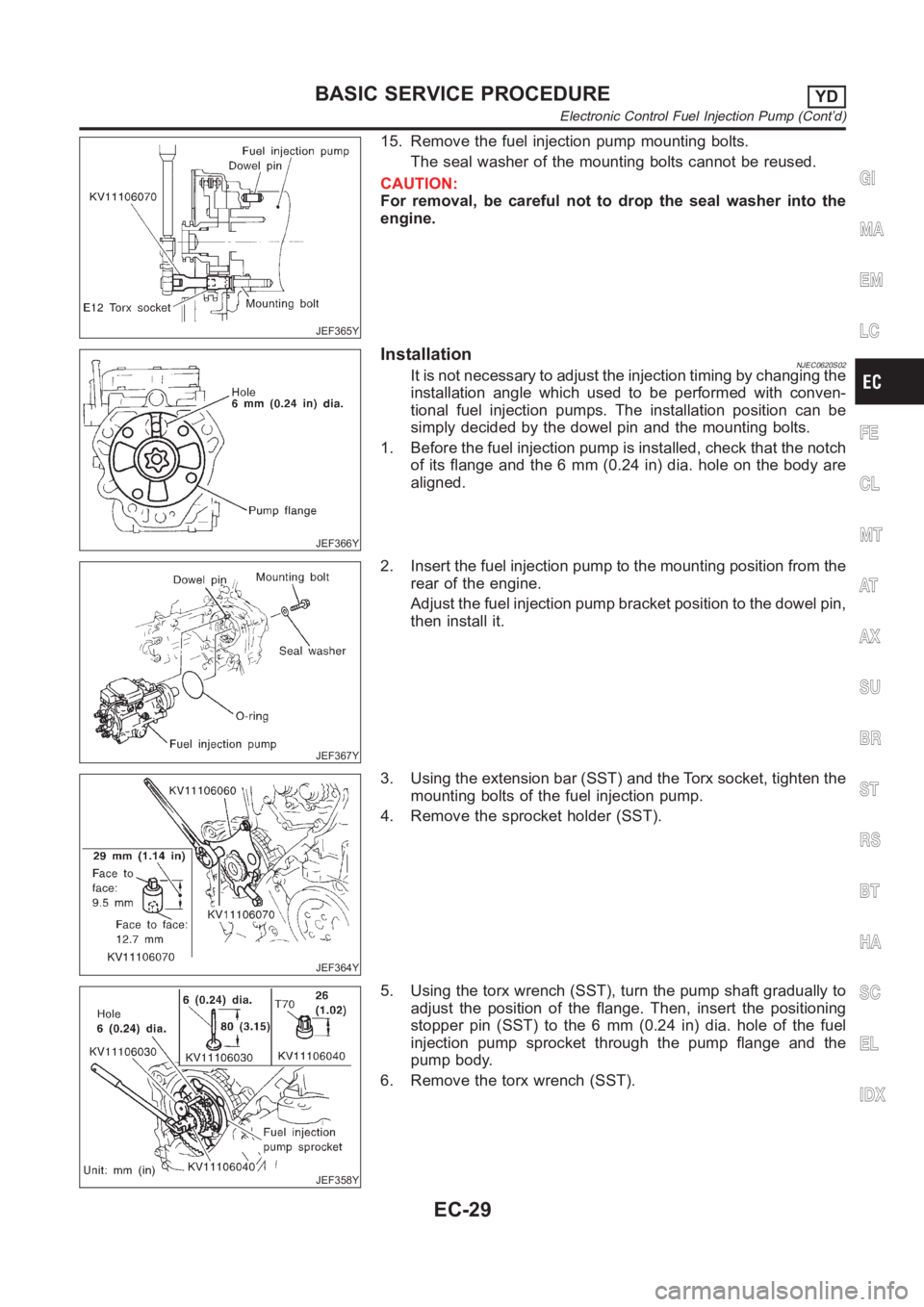
15. Remove the fuel injection pump mounting bolts.
The seal washer of the mounting bolts cannot be reused.
CAUTION:
For removal, be careful not to drop the seal washer into the
engine.
JEF366Y
InstallationNJEC0620S02It is not necessary to adjust the injection timing by changing the
installation angle which used to be performed with conven-
tional fuel injection pumps. The installation position can be
simply decided by the dowel pin and the mounting bolts.
1. Before the fuel injection pump is installed, check that the notch
of its flange and the 6 mm (0.24 in) dia. hole on the body are
aligned.
JEF367Y
2. Insert the fuel injection pump to the mounting position from the
rear of the engine.
Adjust the fuel injection pump bracket position to the dowel pin,
then install it.
JEF364Y
3. Using the extension bar (SST) and the Torx socket, tighten the
mounting bolts of the fuel injection pump.
4. Remove the sprocket holder (SST).
JEF358Y
5. Using the torx wrench (SST), turn the pump shaft gradually to
adjust the position of the flange. Then, insert the positioning
stopper pin (SST) to the 6 mm (0.24 in) dia. hole of the fuel
injection pump sprocket through the pump flange and the
pump body.
6. Remove the torx wrench (SST).
GI
MA
EM
LC
FE
CL
MT
AT
AX
SU
BR
ST
RS
BT
HA
SC
EL
IDX
BASIC SERVICE PROCEDUREYD
Electronic Control Fuel Injection Pump (Cont’d)
EC-29
Page 1084 of 3189
JEF360Y
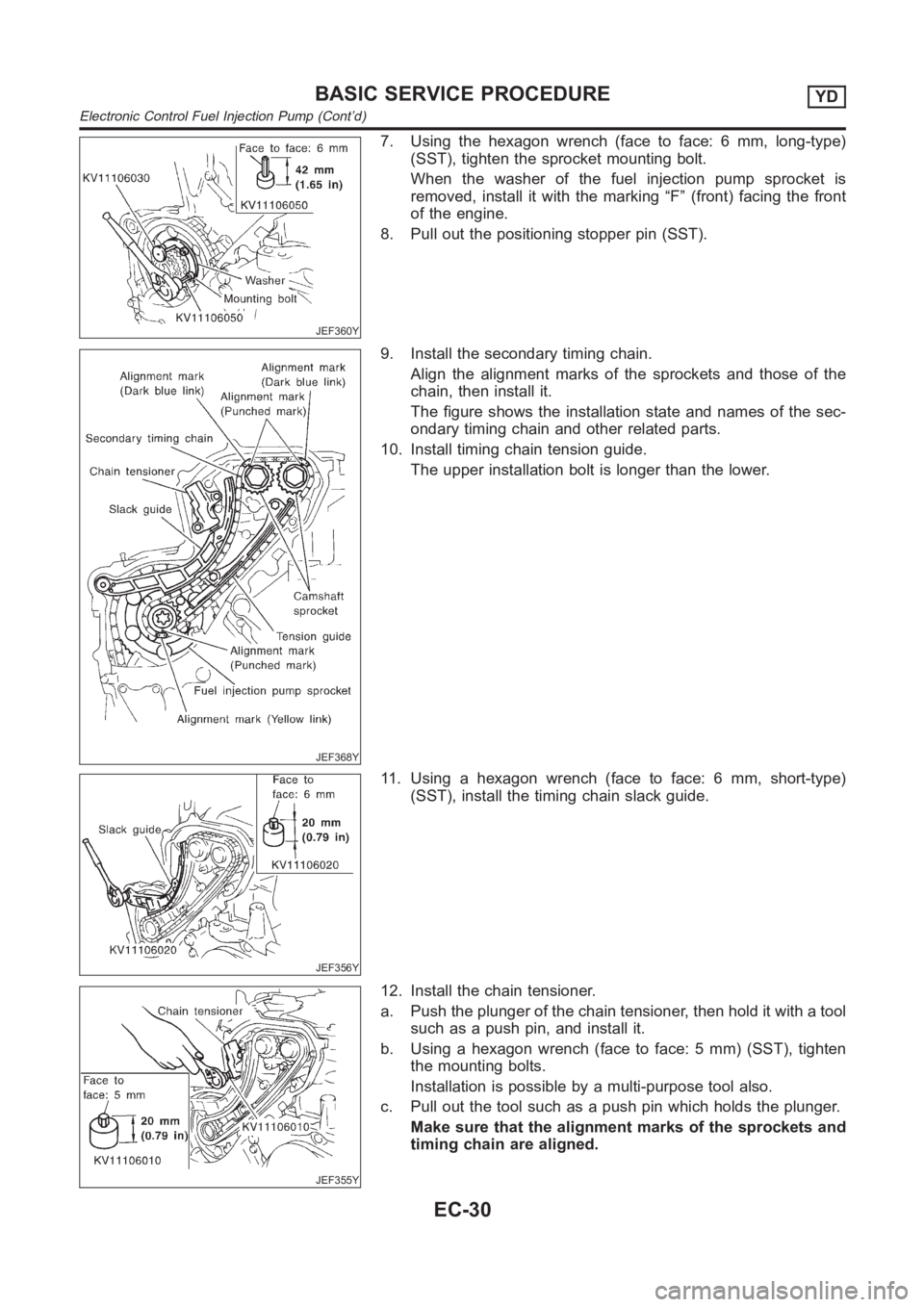
7. Using the hexagon wrench (face to face: 6 mm, long-type)
(SST), tighten the sprocket mounting bolt.
When the washer of the fuel injection pump sprocket is
removed, install it with the marking “F” (front) facing the front
of the engine.
8. Pull out the positioning stopper pin (SST).
JEF368Y
9. Install the secondary timing chain.
Align the alignment marks of the sprockets and those of the
chain, then install it.
The figure shows the installation state and names of the sec-
ondary timing chain and other related parts.
10. Install timing chain tension guide.
The upper installation bolt is longer than the lower.
JEF356Y
11. Using a hexagon wrench (face to face: 6 mm, short-type)
(SST), install the timing chain slack guide.
JEF355Y
12. Install the chain tensioner.
a. Push the plunger of the chain tensioner, then hold it with a tool
such as a push pin, and install it.
b. Using a hexagon wrench (face to face: 5 mm) (SST), tighten
the mounting bolts.
Installation is possible by a multi-purpose tool also.
c. Pull out the tool such as a push pin which holds the plunger.
Make sure that the alignment marks of the sprockets and
timing chain are aligned.
BASIC SERVICE PROCEDUREYD
Electronic Control Fuel Injection Pump (Cont’d)
EC-30
Page 1094 of 3189
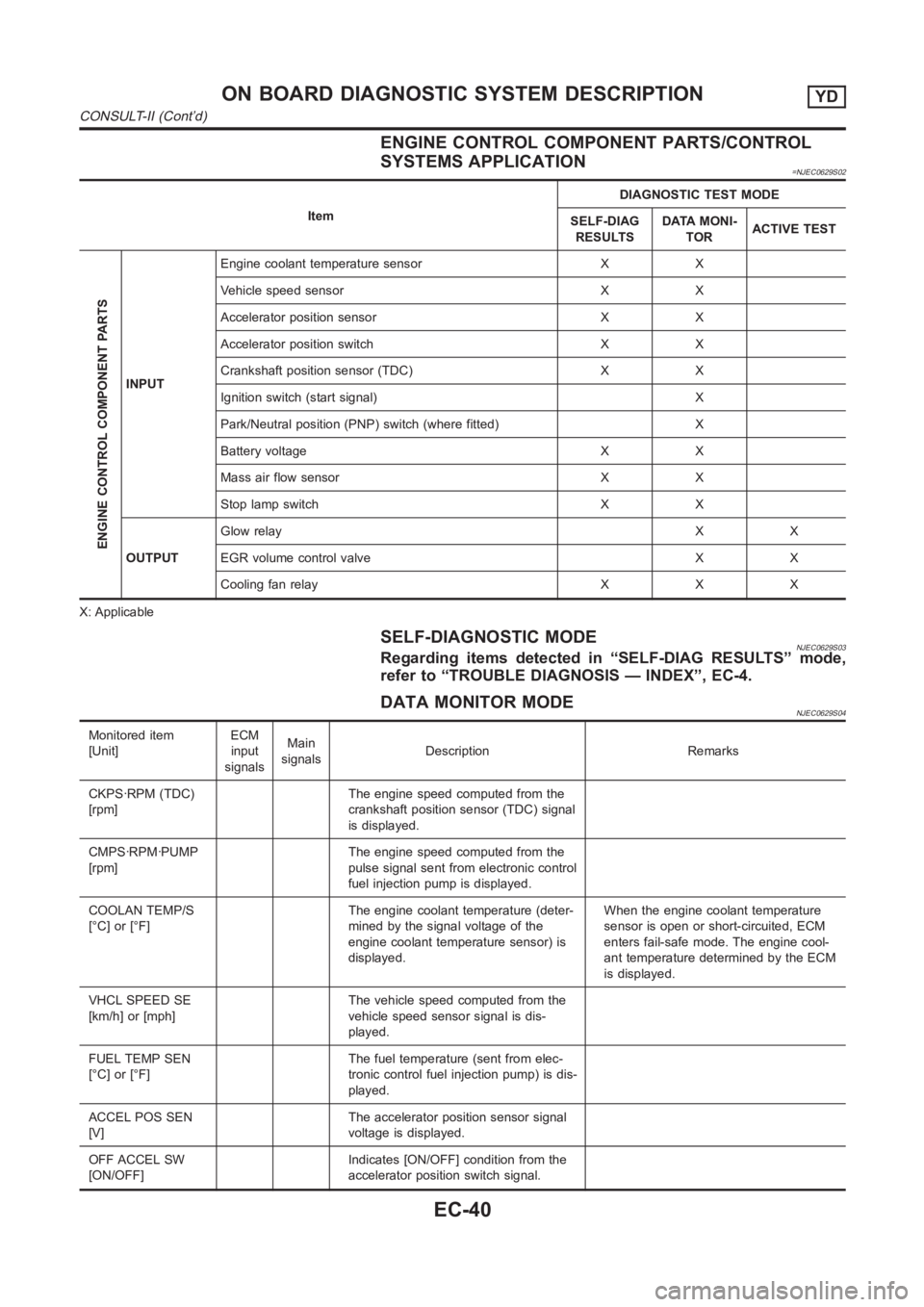
ENGINE CONTROL COMPONENT PARTS/CONTROL
SYSTEMS APPLICATION
=NJEC0629S02
ItemDIAGNOSTIC TEST MODE
SELF-DIAG
RESULTSDATA MONI-
TORACTIVE TEST
ENGINE CONTROL COMPONENT PARTS
INPUTEngine coolant temperature sensor X X
Vehicle speed sensor X X
Accelerator position sensor X X
Accelerator position switch X X
Crankshaft position sensor (TDC) X X
Ignition switch (start signal) X
Park/Neutral position (PNP) switch (where fitted) X
Battery voltage X X
Mass air flow sensor X X
Stop lamp switch X X
OUTPUTGlow relayXX
EGR volume control valve X X
Cooling fan relay X X X
X: Applicable
SELF-DIAGNOSTIC MODENJEC0629S03Regarding items detected in “SELF-DIAG RESULTS” mode,
refer to “TROUBLE DIAGNOSIS — INDEX”, EC-4.
DATA MONITOR MODENJEC0629S04
Monitored item
[Unit]ECM
input
signalsMain
signalsDescription Remarks
CKPS·RPM (TDC)
[rpm]The engine speed computed from the
crankshaft position sensor (TDC) signal
is displayed.
CMPS·RPM·PUMP
[rpm]The engine speed computed from the
pulse signal sent from electronic control
fuel injection pump is displayed.
COOLAN TEMP/S
[°C] or [°F]The engine coolant temperature (deter-
mined by the signal voltage of the
engine coolant temperature sensor) is
displayed.When the engine coolant temperature
sensor is open or short-circuited, ECM
enters fail-safe mode. The engine cool-
ant temperature determined by the ECM
is displayed.
VHCL SPEED SE
[km/h] or [mph]The vehicle speed computed from the
vehicle speed sensor signal is dis-
played.
FUEL TEMP SEN
[°C] or [°F]The fuel temperature (sent from elec-
tronic control fuel injection pump) is dis-
played.
ACCEL POS SEN
[V]The accelerator position sensor signal
voltage is displayed.
OFF ACCEL SW
[ON/OFF]Indicates [ON/OFF] condition from the
accelerator position switch signal.
ON BOARD DIAGNOSTIC SYSTEM DESCRIPTIONYD
CONSULT-II (Cont’d)
EC-40
Page 1095 of 3189
![NISSAN ALMERA N16 2003 Electronic Repair Manual Monitored item
[Unit]ECM
input
signalsMain
signalsDescription Remarks
SPILL/V [°CA] The control position of spill valve (sent
from electronic control fuel injection
pump) is displayed.
BATTERY VOLT [](/manual-img/5/57350/w960_57350-1094.png "NISSAN ALMERA N16 2003 Electronic Repair Manual Monitored item
[Unit]ECM
input
signalsMain
signalsDescription Remarks
SPILL/V [°CA] The control position of spill valve (sent
from electronic control fuel injection
pump) is displayed.
BATTERY VOLT [")
Monitored item
[Unit]ECM
input
signalsMain
signalsDescription Remarks
SPILL/V [°CA] The control position of spill valve (sent
from electronic control fuel injection
pump) is displayed.
BATTERY VOLT [V] The power supply voltage of ECM is
displayed.
P/N POSI SW*1
[ON/OFF] (where
fitted)Indicates [ON/OFF] condition from the
park/neutral position switch signal.
START SIGNAL
[ON/OFF]Indicates [ON/OFF] condition from the
starter signal.After starting the engine, [OFF] is dis-
played regardless of the starter signal.
BRAKE SW
[ON/OFF]Indicates [ON/OFF] condition from the
stop lamp switch signal.
BRAKE SW2
[ON/OFF]Indicates [ON/OFF] condition from the
brake pedal position switch signal.
IGN SW
[ON/OFF]Indicates [ON/OFF] condition from igni-
tion switch signal.
MAS AIR/FL SE [V] The signal voltage of the mass air flow
sensor is displayed.When the engine is stopped, a certain
value is indicated.
INT/A VOLUME [mg/] The intake air volume computed from
the mass air flow sensor signal is dis-
played.
F/CUT SIGNAL
[ON/OFF]The [ON/OFF] condition from decelera-
tion fuel cut signal (sent from electronic
control fuel injection pump) is displayed.
O F F ···F u e l i s c u t o ff .
O N ···F u e l i s n o t c u t o ff .
GLOW RLY
[ON/OFF]The glow relay control condition (deter-
mined by ECM according to the input
signal) is displayed.
COOLING FAN
[LOW/HI/OFF]Indicates the control condition of the
cooling fans (determined by ECM
according to the input signal).
LOW ... Operates at low speed.
HI ... Operates at high speed.
OFF ... Stopped.
BARO SEN [kPa] The barometric pressure (determined by
the signal voltage from the barometric
pressure sensor built into the ECM) is
displayed.
EGR VOL CON/V
[step]Indicates the EGR volume control value
computed by the ECM according to the
input signals.
The opening becomes larger as the
value increases.
*1: On models not equipped with park/neutral position (PNP) switch, “OFF”is always displayed regardless of gear shift position.
NOTE:
Any monitored item that does not match the vehicle being diagnosed is deleted from the display automatically.
GI
MA
EM
LC
FE
CL
MT
AT
AX
SU
BR
ST
RS
BT
HA
SC
EL
IDX
ON BOARD DIAGNOSTIC SYSTEM DESCRIPTIONYD
CONSULT-II (Cont’d)
EC-41
Page 1096 of 3189
ACTIVE TEST MODENJEC0629S05
TEST ITEM CONDITION JUDGEMENT CHECK ITEM (REMEDY)
COOLING FANIgnition switch: ON
Operate the cooling fan at
“LOW”, “HI” speed and turn
“OFF” using CONSULT-II.Cooling fan moves at “LOW”, “HI”
speed and stops.Harness and connector
Cooling fan motor
Cooling fan relay
EGR VOL
CONT/VIgnition switch: ON
Change EGR volume control
valve opening step using CON-
SULT-II.EGR volume control valve makes
an operating sound.Harness and connector
EGR volume control valve
GLOW RLYIgnition switch: ON (Engine
stopped)
Turn the glow relay “ON” and
“OFF” using CONSULT-II and
listen to operating sound.Glow relay makes the operating
sound.Harness and connector
Glow relay
SEF373Y
SEF707X
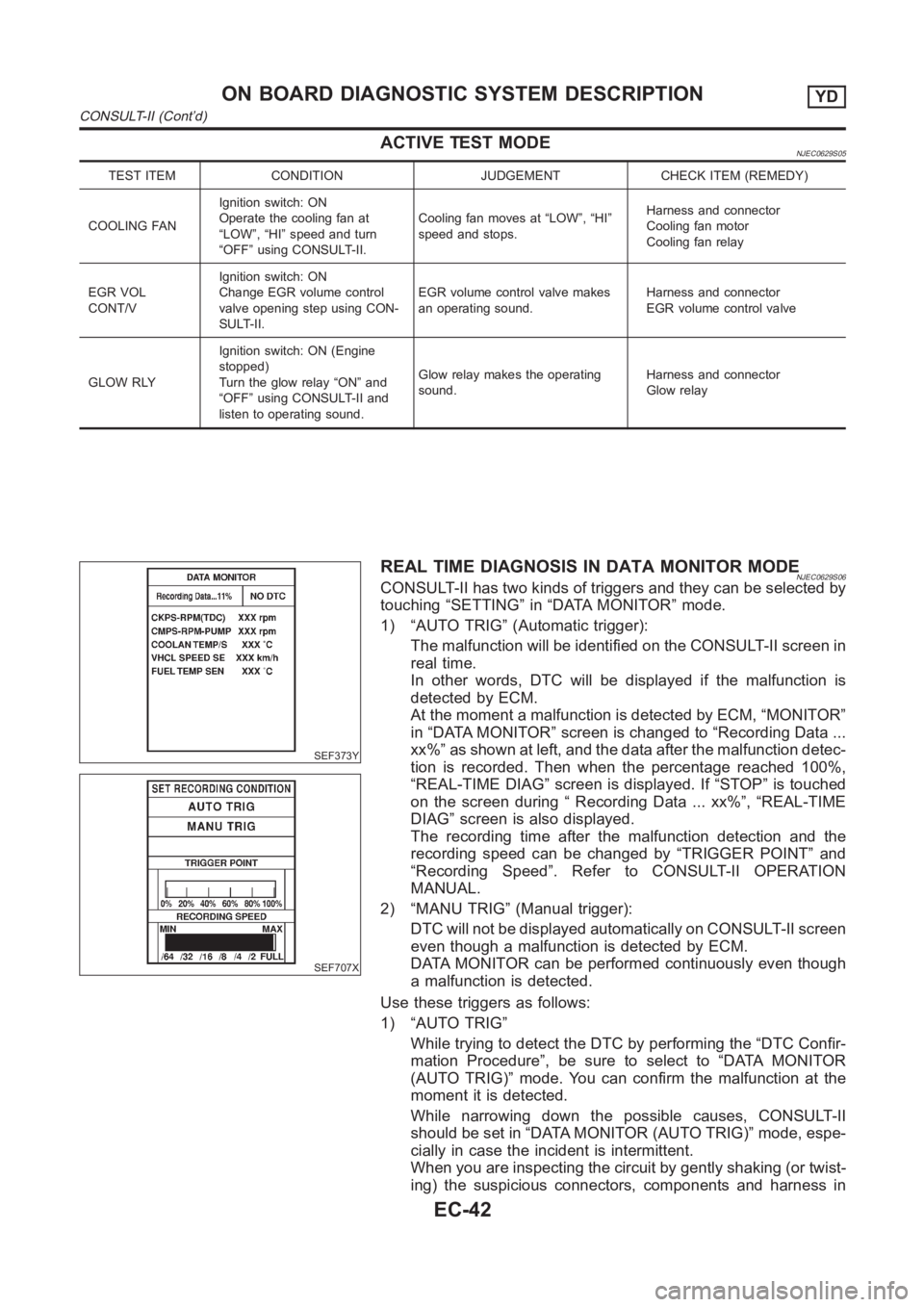
REAL TIME DIAGNOSIS IN DATA MONITOR MODENJEC0629S06CONSULT-II has two kinds of triggers and they can be selected by
touching “SETTING” in “DATA MONITOR” mode.
1) “AUTO TRIG” (Automatic trigger):
The malfunction will be identified on the CONSULT-II screen in
real time.
In other words, DTC will be displayed if the malfunction is
detected by ECM.
At the moment a malfunction is detected by ECM, “MONITOR”
in “DATA MONITOR” screen is changed to “Recording Data ...
xx%” as shown at left, and the data after the malfunction detec-
tion is recorded. Then when the percentage reached 100%,
“REAL-TIME DIAG” screen is displayed. If “STOP” is touched
on the screen during “ Recording Data ... xx%”, “REAL-TIME
DIAG” screen is also displayed.
The recording time after the malfunction detection and the
recording speed can be changed by “TRIGGER POINT” and
“Recording Speed”. Refer to CONSULT-II OPERATION
MANUAL.
2) “MANU TRIG” (Manual trigger):
DTC will not be displayed automatically on CONSULT-II screen
even though a malfunction is detected by ECM.
DATA MONITOR can be performed continuously even though
a malfunction is detected.
Use these triggers as follows:
1) “AUTO TRIG”
While trying to detect the DTC by performing the “DTC Confir-
mation Procedure”, be sure to select to “DATA MONITOR
(AUTO TRIG)” mode. You can confirm the malfunction at the
moment it is detected.
While narrowing down the possible causes, CONSULT-II
should be set in “DATA MONITOR (AUTO TRIG)” mode, espe-
cially in case the incident is intermittent.
When you are inspecting the circuit by gently shaking (or twist-
ing) the suspicious connectors, components and harness in
ON BOARD DIAGNOSTIC SYSTEM DESCRIPTIONYD
CONSULT-II (Cont’d)
EC-42
Page 1098 of 3189
SEF858S
Introduction
SEF233G
SEF234G
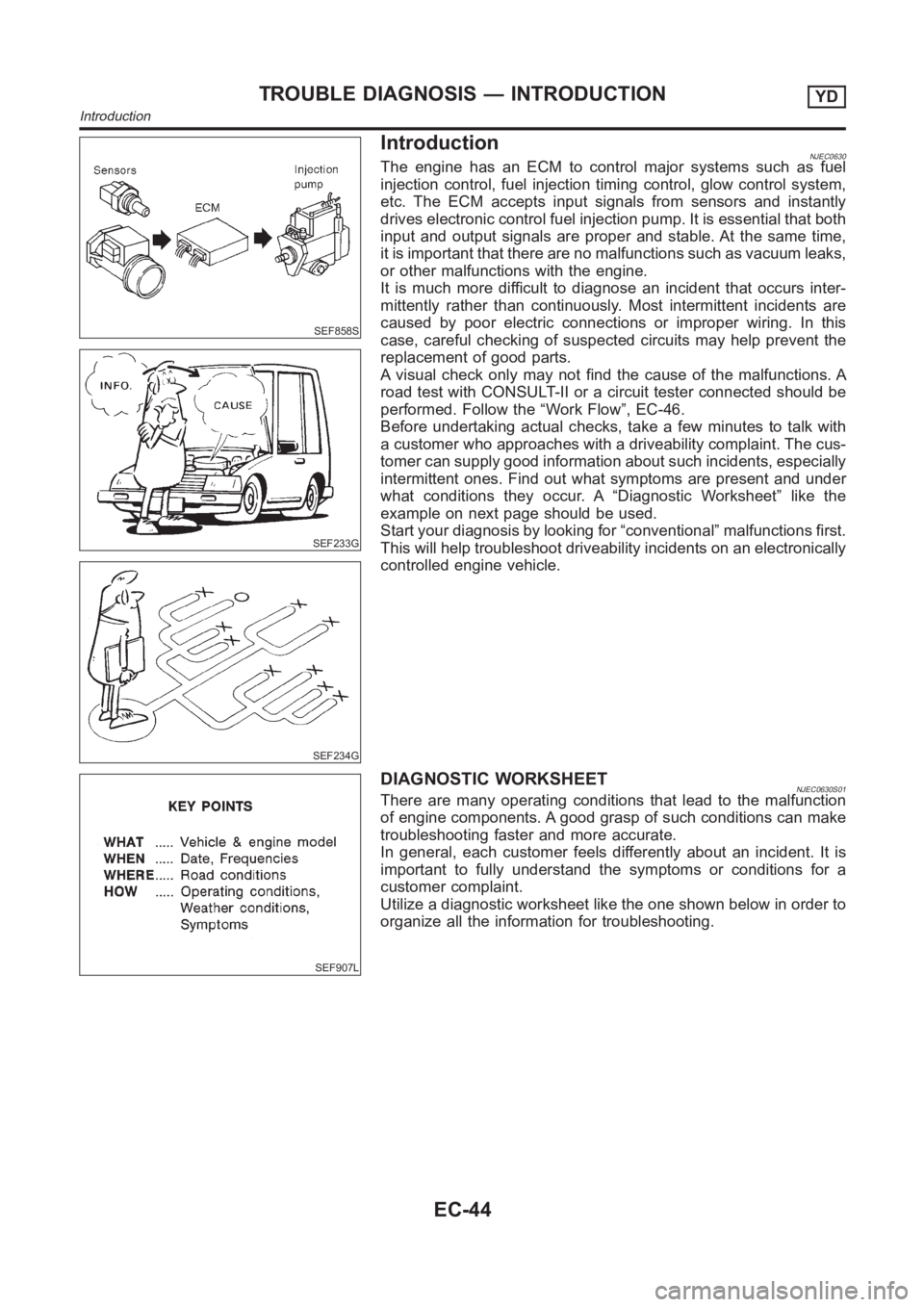
NJEC0630The engine has an ECM to control major systems such as fuel
injection control, fuel injection timing control, glow control system,
etc. The ECM accepts input signals from sensors and instantly
drives electronic control fuel injection pump. It is essential that both
input and output signals are proper and stable. At the same time,
it is important that there are no malfunctions such as vacuum leaks,
or other malfunctions with the engine.
It is much more difficult to diagnose an incident that occurs inter-
mittently rather than continuously. Most intermittent incidents are
caused by poor electric connections or improper wiring. In this
case, careful checking of suspected circuits may help prevent the
replacement of good parts.
A visual check only may not find the cause of the malfunctions. A
road test with CONSULT-II or a circuit tester connected should be
performed. Follow the “Work Flow”, EC-46.
Before undertaking actual checks, take a few minutes to talk with
a customer who approaches with a driveability complaint. The cus-
tomer can supply good information about such incidents, especially
intermittent ones. Find out what symptoms are present and under
what conditions they occur. A “Diagnostic Worksheet” like the
example on next page should be used.
Start your diagnosis by looking for “conventional” malfunctions first.
This will help troubleshoot driveability incidents on an electronically
controlled engine vehicle.
SEF907L
DIAGNOSTIC WORKSHEETNJEC0630S01There are many operating conditions that lead to the malfunction
of engine components. A good grasp of such conditions can make
troubleshooting faster and more accurate.
In general, each customer feels differently about an incident. It is
important to fully understand the symptoms or conditions for a
customer complaint.
Utilize a diagnostic worksheet like the one shown below in order to
organize all the information for troubleshooting.
TROUBLE DIAGNOSIS — INTRODUCTIONYD
Introduction
EC-44
Page 1106 of 3189
13 CHECK IDLE SPEED AGAIN
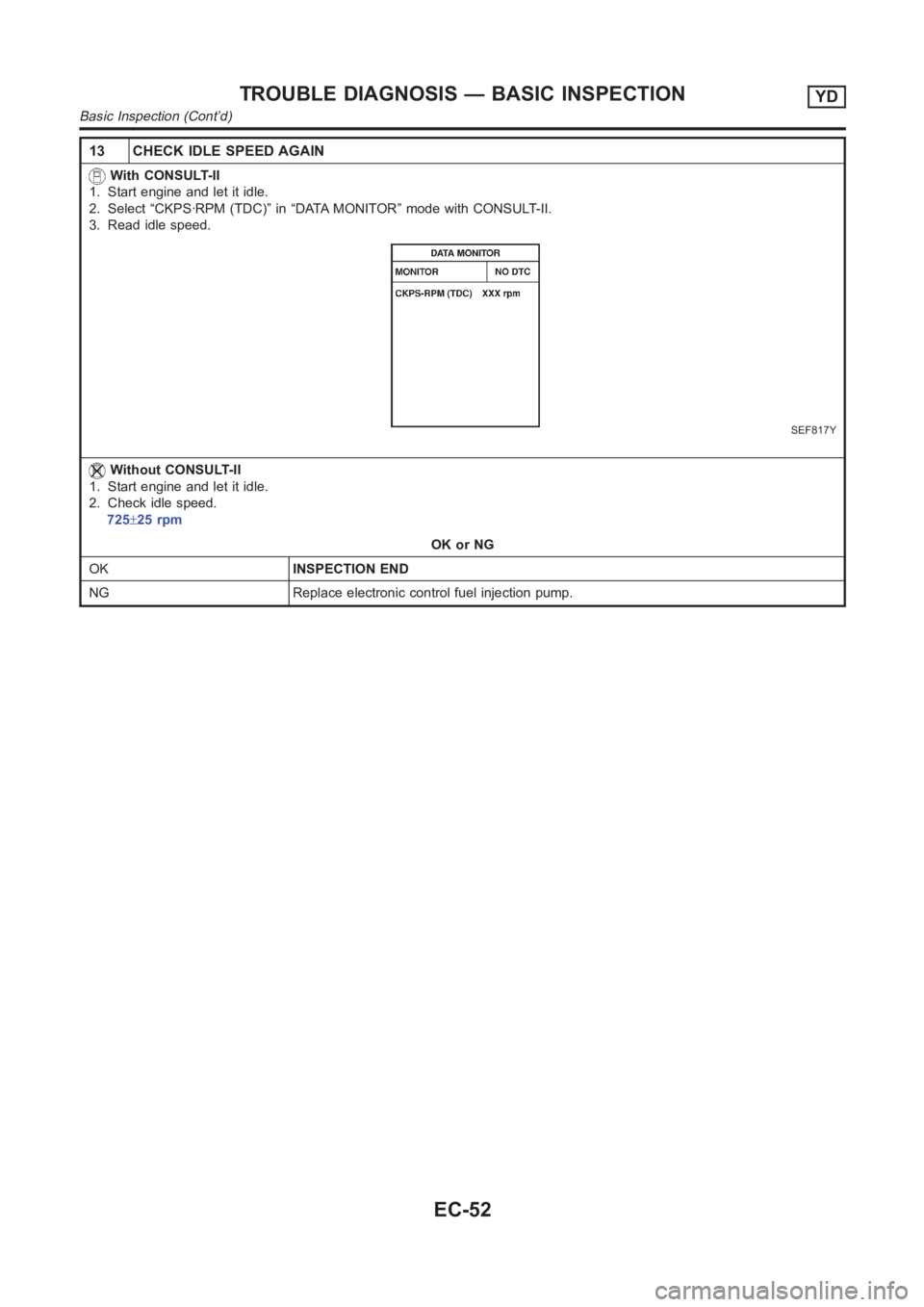
With CONSULT-II
1. Start engine and let it idle.
2. Select “CKPS·RPM (TDC)” in “DATA MONITOR” mode with CONSULT-II.
3. Read idle speed.
SEF817Y
Without CONSULT-II
1. Start engine and let it idle.
2. Check idle speed.
725±25 rpm
OK or NG
OKINSPECTION END
NG Replace electronic control fuel injection pump.
TROUBLE DIAGNOSIS — BASIC INSPECTIONYD
Basic Inspection (Cont’d)
EC-52