Page 5 of 227
Table of
Contents
Seats, restraints and supplemental air bag systemsInstruments and controlsPre-driving checks and adjustmentsHeater, air conditioner and audio systemsStarting and drivingIn case of emergencyAppearance and careMaintenance and do-it-yourselfTechnical and consumer informationIndex
Z
02.9.13/Z33-D/V5.0
X
Page 41 of 227

1. Headlight and turn signal switch (P.2-21)
2. Instrument brightness control switch
(P.2-23)
3. Driver supplemental air bag (P.1-6)/Horn
(P.2-24)
4. Meters/gauges (P.2-3)5. Cruise control main/set switch (P.5-15)
6. Trip computer mode/setting switch (P.2-8)
7. Windshield wiper/washer switch (P.2-19)
8. Center ventilator (P.4-2)
9. Cup holder (P.2-30)
10. Passenger supplemental air bag (P.1-6)11. Side ventilator (P.4-2)
12. VDC (Vehicle dynamic control) OFF switch
(P.2-26) or TCS (Traction control system)
OFF switch (P.2-26)
13. Fuel filler lid opener switch (P.3-10)
14. Hood lock release handle (P.3-8)
15. Fuse box (P.8-23)
16. Tilting steering wheel lock lever (P.3-12)
17. Ignition switch/steering lock (P.5-5)
18. Navigation system* or Instrument pocket
(P.2-29)
19. Rear window and outside mirror (if so
equipped) defroster switch (P.2-21)
20. Heater/air conditioner control (P.4-3)
21. Audio system (P.4-6)/Clock (P.2-27)
22. Heated seat switch (P.2-25)
23. Hazard warning flasher switch (P.2-24)
24. Ashtray (P.2-28) or Tray (P.2-30)
See the page indicated in parentheses for
operating details.
*: Refer to the separate Navigation System
Owner's Manual.
SIC1943
INSTRUMENT PANEL2-2
Instruments and controls
Z
02.9.13/Z33-D/V5.0
X
Page 67 of 227
draw. Do not use double adapters or
more than one electrical accessory.
IUse this power outlet with the engine
running. (If the engine is stopped,
this could result in a discharged bat-
tery.)
IAvoid using when the air conditioner,
headlights or rear window defroster
is on.
IBefore inserting or disconnecting a
plug, be sure to turn off the power
switch of electrical accessory being
used or the ACC power of the vehicle.
IPush the plug in as far as it will go. If
good contact is not made, the plug
may overheat or the internal tem-
perature fuse may blow.
IWhen not in use, be sure to close the
cap. Do not allow water to contact
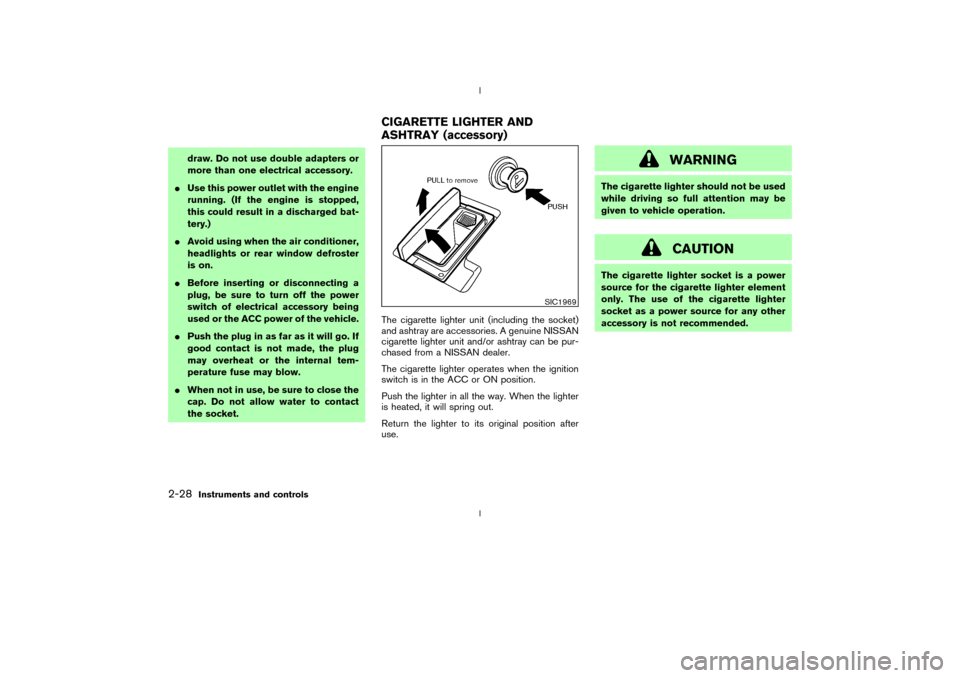
the socket.The cigarette lighter unit (including the socket)
and ashtray are accessories. A genuine NISSAN
cigarette lighter unit and/or ashtray can be pur-
chased from a NISSAN dealer.
The cigarette lighter operates when the ignition
switch is in the ACC or ON position.
Push the lighter in all the way. When the lighter
is heated, it will spring out.
Return the lighter to its original position after
use.
WARNING
The cigarette lighter should not be used
while driving so full attention may be
given to vehicle operation.
CAUTION
The cigarette lighter socket is a power
source for the cigarette lighter element
only. The use of the cigarette lighter
socket as a power source for any other
accessory is not recommended.
SIC1969
CIGARETTE LIGHTER AND
ASHTRAY (accessory)
2-28
Instruments and controls
Z
02.9.13/Z33-D/V5.0
X
Page 98 of 227

4 Heater, air conditioner and audio systemsVentilators ................................................................................ 4-2
Center ................................................................................. 4-2
Side ..................................................................................... 4-2
Heater and air conditioner (Automatic) ............................ 4-3
Automatic operation ........................................................ 4-4
Manual operation .............................................................. 4-4
Operating tips ................................................................... 4-5
Servicing air conditioner ...................................................... 4-6
Audio system........................................................................... 4-6FM radio reception .......................................................... 4-7
AM radio reception .......................................................... 4-7
Audio operation precautions ......................................... 4-7
FM-AM radio with compact disc (CD) player .......... 4-9
FM-AM radio with cassette player and compact disc
(CD) changer .................................................................. 4-13
CD care and cleaning .................................................. 4-19
Antenna ............................................................................ 4-19
Car phone or CB radio .................................................... 4-19
Z
02.9.13/Z33-D/V5.0
X
Page 99 of 227
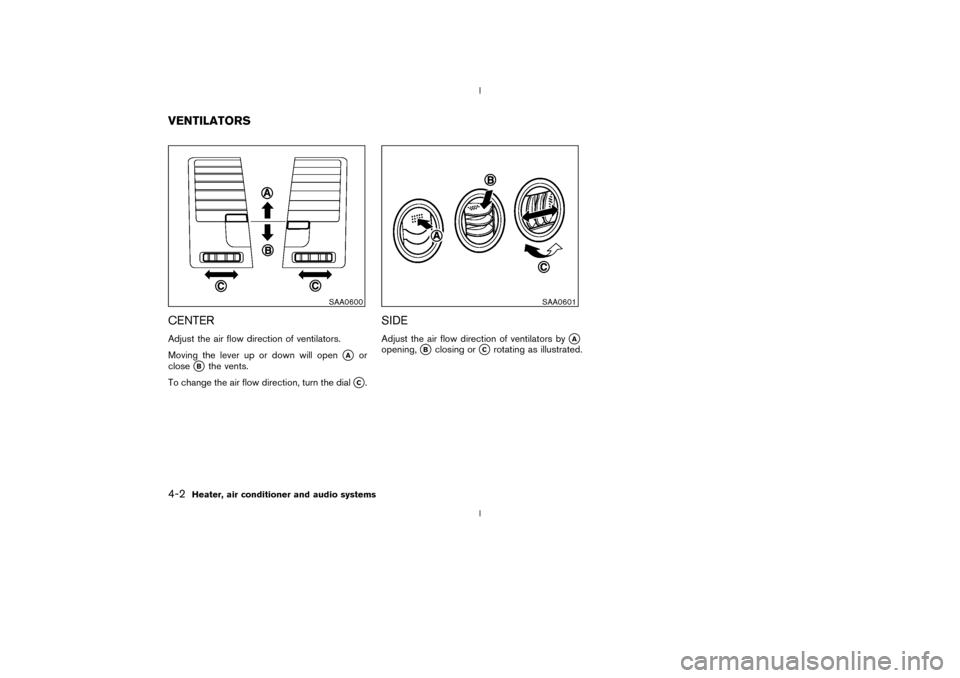
CENTERAdjust the air flow direction of ventilators.
Moving the lever up or down will open
qA
or
close
qB
the vents.
To change the air flow direction, turn the dial
qC.
SIDEAdjust the air flow direction of ventilators by
qA
opening,
qB
closing or
qC
rotating as illustrated.
SAA0600
SAA0601
VENTILATORS4-2
Heater, air conditioner and audio systems
Z
02.9.13/Z33-D/V5.0
X
Page 100 of 227
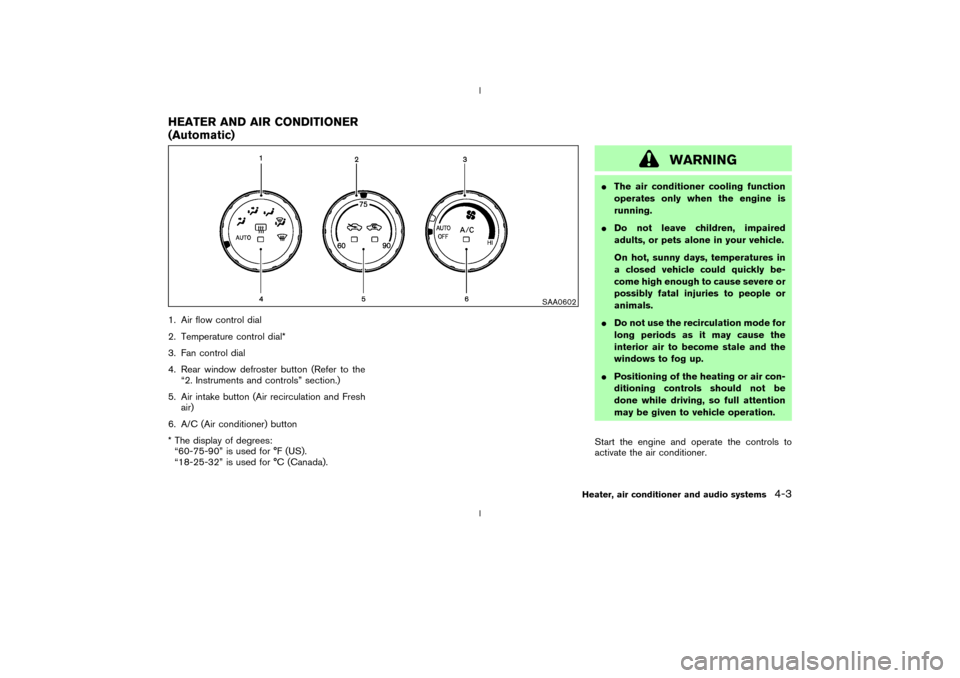
1. Air flow control dial
2. Temperature control dial*
3. Fan control dial
4. Rear window defroster button (Refer to the
ª2. Instruments and controlsº section.)
5. Air intake button (Air recirculation and Fresh
air)
6. A/C (Air conditioner) button
* The display of degrees:
ª60-75-90º is used for ÉF (US).
ª18-25-32º is used for ÉC (Canada).
WARNING
IThe air conditioner cooling function
operates only when the engine is
running.
IDo not leave children, impaired
adults, or pets alone in your vehicle.
On hot, sunny days, temperatures in
a closed vehicle could quickly be-
come high enough to cause severe or
possibly fatal injuries to people or
animals.
IDo not use the recirculation mode for
long periods as it may cause the
interior air to become stale and the
windows to fog up.
IPositioning of the heating or air con-
ditioning controls should not be
done while driving, so full attention
may be given to vehicle operation.
Start the engine and operate the controls to
activate the air conditioner.
SAA0602
HEATER AND AIR CONDITIONER
(Automatic)
Heater, air conditioner and audio systems
4-3
Z
02.9.13/Z33-D/V5.0
X
Page 101 of 227

AUTOMATIC OPERATION
Cooling and/or dehumidified heating
(AUTO)This mode may be normally used all year round
as the system automatically works to keep a
constant temperature. Air flow distribution and
fan speed are also controlled automatically.
1. Turn the fan control dial and air flow control
dial to the AUTO position.
2. Turn the temperature control dial to set the
desired temperature.
IAdjust the temperature to about 75ÉF (24ÉC)
for normal operation.
IThe temperature of the passenger compart-
ment will be maintained automatically. Air
flow distribution and fan speed are also con-
trolled automatically.Heating (AUTO; A/C off)The air conditioner does not activate. When you
need to heat only, use this mode.
1. Turn the fan control dial and air flow control
dial to the AUTO position.
2. Push the A/C button to turn off the air
conditioner. (The A/C button indicator light
will turn off.)3. Turn the temperature control dial to set the
desired temperature.
IThe temperature of the passenger compart-
ment will be maintained automatically. Air
flow distribution and fan speed are also con-
trolled automatically.
IDo not set the temperature lower than the
outside air temperature. Otherwise the sys-
tem may not work properly.
INot recommended if windows fog up.
Dehumidified defrosting or defogging1. Turn the fan control dial to the desired posi-
tion.
2. Turn the air flow control dial to the DEF
position.
3. Turn the temperature control dial to set the
desired temperature.
ITo quickly remove ice from the outside of the
windows, turn the fan control dial to the
maximum position.
IAs soon as possible after the windshield is
clean, turn the air flow control dial to the
AUTO position to return to the auto mode.
IWhen the air flow control dial is turned to theor
position, the air conditioner
will automatically be turned on at outsidetemperatures above 23ÉF (þ5ÉC) to defog
the windshield, and the air recirculate mode
will automatically be turned off.
Outside air is drawn into the passenger
compartment to improve the defogging per-
formance.
MANUAL OPERATION
Fan speed controlTurn the fan control dial
to manually con-
trol the fan speed.
Turn the dial to the AUTO position to return to
automatic control of the fan speed.
Air recirculation/Fresh airEach time the air intake button is pushed, the
indicator light on the button will alternate
(Air recirculation) and
(Fresh air).
When the
indicator light is on, the interior
air is recirculated. (When the air recirculation
mode is selected with the A/C indicator off while
the fan control dial is in the AUTO position, the
air conditioner will turn on.)
When theindicator light is on, the outside
air is drawn into the passenger compartment.
IWhen the air intake button is pushed for
longer than 1.5 seconds, both indicator lights
4-4
Heater, air conditioner and audio systems
Z
02.9.13/Z33-D/V5.0
X
Page 102 of 227

(
and
) will flash twice, and then
the intake air will be controlled automatically.
During this AUTO mode, the indicator light of
the currently selected mode illuminates.
IWhen the air flow control dial is in the
or
position, the air recirculation
mode does not activate.
Air flow controlTurning the air flow control dial selects the air
outlet to:
: Air flows from center and side ventila-
tors.: Air flows from center and side ventila-
tors and foot outlets.: Air flows mainly from foot outlets.: Air flows from defroster and foot out-
lets.: Air flows mainly from defroster outlets.
To turn the system offTurn the fan control dial to the OFF position.OPERATING TIPSWhen the engine coolant temperature and out-
side air temperature are low, the air flow from the
foot outlets may not operate for a maximum of150 seconds. However, this is not a malfunction.
After the coolant temperature warms up, the air
flow from the foot outlets will operate normally.
Sensor
qA
on the instrument panel helps main-
tain a constant temperature; do not put anything
on or around this sensor.
SAA0603
Heater, air conditioner and audio systems
4-5
Z
02.9.13/Z33-D/V5.0
X