Page 76 of 416
76 Safety and SecurityDriving safety systems
Driving safety systemsIn this section you will find information on
the following driving safety systems:�
ABS (A
ntilock B
rake S
ystem)
�
BAS (B
rake A
ssist S
ystem)
�
ESP (E
lectronic S
tability P
rogram)
�
4MATIC (Four Wheel Electronic Trac-
tion System)
ABS
The ABS regulates the brake pressure so
that the wheels do not lock during braking.
This allows you to maintain the ability to
steer your vehicle.
The ABS is functional above a speed of ap-
proximately 5 mph (8 km/h) independent
of road surface conditions.
At the instant one of the wheels is about to
lock up, a slight pulsation can be felt in the
brake pedal, indicating that the ABS is in
the regulating mode. Keep firm and steady
pressure on the brake pedal while experi-
encing the pulsation.
iIn winter operation, the maximum ef-
fectiveness of the ABS, ESP and the
4MATIC is only achieved with winter
tires (M + S tires) or snow chains as re-
quired.
Warning!
G
The following factors increase the risk of ac-
cidents:�
Excessive speed, especially in turns
�
Wet and slippery road surfaces
�
Following another vehicle too closely
The ABS, BAS, ESP, and 4MATIC cannot re-
duce this risk.
Always adjust your driving style to the pre-
vailing road and weather conditions.
Warning!
G
Do not pump the brake pedal. Use firm,
steady brake pedal pressure instead. Pump-
ing the brake pedal defeats the purpose of
the ABS and significantly reduces braking
effectiveness.
Page 78 of 416
78 Safety and SecurityDriving safety systemsBAS
The Brake Assist System (BAS) operates in
emergency situations. If you apply the
brakes very quickly, the BAS automatically
provides full brake boost, thereby poten-
tially reducing the braking distance. Apply
continuous full braking pressure until the
emergency braking situation is over. The
ABS will prevent the wheels from locking.
When you release the brake pedal, the
brakes function again as normal. The BAS
is then deactivated.
For more information see “Practical hints”
(�page 289).
ESP
The Electronic Stability Program (ESP)
monitors the vehicle's traction (force of
adhesive friction between the tires and the
road surface) and handling.
The ESP recognizes when a wheel is spin-
ning or if the vehicle starts to skid. By ap-
plying brakes to the appropriate wheel and
by limiting engine output, the ESP works to
stabilize the vehicle. The ESP is especially
useful while driving off and on wet or slip-
pery road surfaces.
The ESP warning lamp
v
in the instru-
ment cluster flashes when the ESP is en-
gaged.
The ESP warning lamp
v
in the instru-
ment cluster lights up when you turn the
SmartKey in the starter switch to
position2 or press the KEYLESS-GO* (if so
equipped) start/stop button twice. It goes
out when the engine is running.
Warning!
G
The BAS cannot prevent the natural laws of
physics from acting on the vehicle, nor can
it increase braking efficiency beyond that af-
forded by the condition of the vehicle brakes
and tires or the traction. The BAS cannot
prevent accidents, including those resulting
from excessive speed in turns, following an-
other vehicle too closely, or hydroplaning.
Only a safe, attentive, and skillful driver can
prevent accidents. The capabilities of a BAS
equipped vehicle must never be exploited in
a reckless or dangerous manner which
could jeopardize the user’s safety or the
safety of others.
Page 83 of 416
83 Safety and Security
Anti-theft systems
Arming the alarm system
The alarm system is armed after locking
the vehicle with the SmartKey or KEY-
LESS-GO*. The turn signal lamps blink
three times to indicate that the alarm sys-
tem is activated. The indicator lamp in the
central locking switch (
�page 25) will
blink after approximately 10 seconds
when the alarm system is completely
armed.Disarming the alarm system
The alarm system is disarmed when you
unlock your vehicle with the SmartKey or
KEYLESS-GO*. The turn signal lamps blink
once to indicate that the alarm system is
deactivatedCanceling the alarm
To cancel the alarm:
With the SmartKey
�
Insert the SmartKey in the starter
switch.
or
�
Press the
Œ
or
‹
button.
With KEYLESS-GO*
�
Grasp the outside door handle.
or
�
Press the KEYLESS-GO* start/stop
button.
iIf the alarm stays on for more than
20 seconds, an emergency call is initi-
ated automatically by the Tele Aid sys-
tem provided that Tele Aid service was
subscribed to and properly activated,
and that necessary cellular service and
GPS coverage are available.
iIf the turn signal lamps do not blink
three times, a door or the hood may not
be closed properly.
Close the respective element and lock
the vehicle again.
Page 84 of 416
84 Safety and SecurityAnti-theft systemsTow-away alarm
Once the tow-away alarm is armed, a visual
and audible alarm will be triggered when
someone attempts to raise the vehicle.
Arming tow-away alarm
When you lock your vehicle, the tow-away
alarm is automatically armed after about
30 seconds.
When you unlock your vehicle, the
tow-away protection disarms automatical-
ly.Disarming tow-away alarm
To prevent triggering the tow-away alarm
feature, switch off the tow-away alarm be-
fore towing the vehicle, or when parking on
a surface subject to movement, such as a
ferry or auto train.
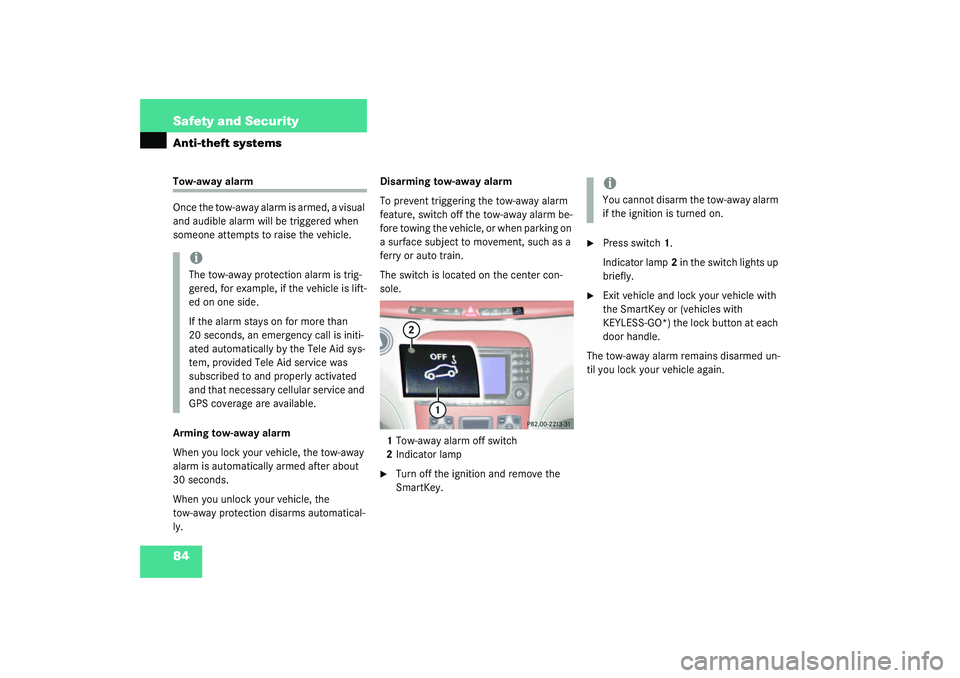
The switch is located on the center con-
sole.
1Tow-away alarm off switch
2Indicator lamp
�
Turn off the ignition and remove the
SmartKey.
�
Press switch1.
Indicator lamp2 in the switch lights up
briefly.
�
Exit vehicle and lock your vehicle with
the SmartKey or (vehicles with
KEYLESS-GO*) the lock button at each
door handle.
The tow-away alarm remains disarmed un-
til you lock your vehicle again.
iThe tow-away protection alarm is trig-
gered, for example, if the vehicle is lift-
ed on one side.
If the alarm stays on for more than
20 seconds, an emergency call is initi-
ated automatically by the Tele Aid sys-
tem, provided Tele Aid service was
subscribed to and properly activated
and that necessary cellular service and
GPS coverage are available.
iYou cannot disarm the tow-away alarm
if the ignition is turned on.
Page 85 of 416
85 Controls in detail
Locking and unlocking
Seats
Memory function
Lighting
Instrument cluster
Control system
Automatic transmission
Good visibility
Automatic climate control
Power windows
Sliding/pop-up roof
Driving systems
Loading
Useful features
Page 86 of 416
86 Controls in detailLocking and unlockingIn the “Controls in detail” section you will
find detailed information on how to oper-
ate the equipment installed on your vehi-
cle. If you are already familiar with the
basic functions of your vehicle, this section
will be of particular interest to you.
To quickly familiarize yourself with the ba-
sic functions of the vehicle, see “Getting
started” (
�page 29). The corresponding
page numbers are given at the beginning of
each segment.
For information on locking and unlocking,
refer to the Getting started section on
(
�page 30) and (
�page 50).
Locking and unlockingSmartKey
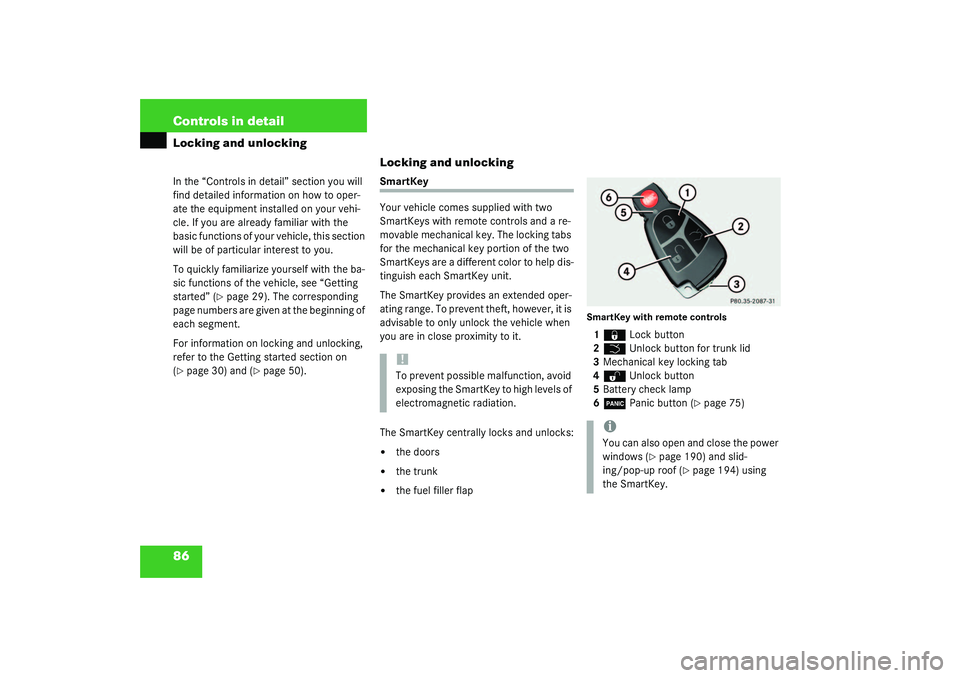
Your vehicle comes supplied with two
SmartKeys with remote controls and a re-
movable mechanical key. The locking tabs
for the mechanical key portion of the two
SmartKeys are a different color to help dis-
tinguish each SmartKey unit.
The SmartKey provides an extended oper-
ating range. To prevent theft, however, it is
advisable to only unlock the vehicle when
you are in close proximity to it.
The SmartKey centrally locks and unlocks:�
the doors
�
the trunk
�
the fuel filler flap
SmartKey with remote controls1‹
Lock button
2
Š
Unlock button for trunk lid
3Mechanical key locking tab
4
Œ
Unlock button
5Battery check lamp
6
Â
Panic button (
�page 75)
!To prevent possible malfunction, avoid
exposing the SmartKey to high levels of
electromagnetic radiation.
iYou can also open and close the power
windows (
�page 190) and slid-
ing/pop-up roof (
�page 194) using
the SmartKey.
Page 87 of 416
87 Controls in detail
Locking and unlocking
Factory setting
Global unlocking�
Press button
Œ
.
All turn signal lamps blink once. The
locking knobs in the doors move up.
The anti-theft alarm system is switched
off. If it is dark, the locator lighting
switches on.
The vehicle will lock again automatically
within approximately 40 seconds of un-
locking if:
�
neither door nor trunk is opened
�
the SmartKey is not inserted in the
starter switch
�
the central locking switch is not acti-
vatedGlobal locking
�
Press button
‹
.
All turn signal lamps blink three times.
The locking knobs in the doors move
down.
The anti-theft alarm system is activat-
ed.Selective setting
If you frequently travel alone, you may wish
to reprogram the SmartKey so that
pressing
Œ
only unlocks the driver’s
door and the fuel filler flap.
�
Press and hold buttons
Œ
and
‹
simultaneously for about five seconds
until battery check lamp5 blinks twice.
The SmartKey will then function as fol-
lows:
Unlocking driver’s door and fuel filler
flap
�
Press button
Œ
once.
Global unlocking
�
Press button
Œ
twice.
Global locking
�
Press button
‹
.
Page 88 of 416
88 Controls in detailLocking and unlockingRestoring to factory setting�
Press and hold buttons
Œ
and
‹
simultaneously for about six seconds
until battery check lamp5 blinks twice.Checking the batteries
�
Press button
‹
or
Œ
.
Battery check lamp5 lights up briefly
to indicate that the SmartKey batteries
are in order.
Warning!
G
When leaving the vehicle, always remove the
SmartKey from the starter switch, take the
KEYLESS-GO* card (if so equipped) with you
and lock the vehicle. Do not leave children
unattended in the vehicle, or with access to
an unlocked vehicle. It is possible for chil-
dren to open a locked door from the inside,
which could result in an accident and/or se-
rious injury.
!If you can no longer lock or unlock the
vehicle with the SmartKey, then either
the batteries in the SmartKey are dis-
charged or the SmartKey is malfunc-
tioning.�
Check the batteries in the
SmartKey and replace them if nec-
essary (
�page 328).
or
�
Use the mechanical key to unlock
the doors (
�page 326) and trunk
(
�page 327) as required. Lock the
vehicle using the mechanical key
(�page 327).
If the SmartKey is malfunctioning, con-
tact an authorized Mercedes-Benz Cen-
ter.
!If battery check lamp5 does not light
up briefly during check, the SmartKey
batteries are discharged.
Replace the batteries (
�page 328).
You can obtain the required batteries
at any authorized Mercedes-Benz Cen-
ter.