Page 73 of 321
73 Safety and Security
Driving and safety systems
BAS
The Brake Assist System (BAS) operates in
emergency situations. If you apply the
brakes very quickly, the BAS automatically
provides full brake boost, thereby poten-
tially reducing braking distance. Apply con-
tinuous full braking pressure until the
emergency braking situation is over. The
ABS will prevent the wheels from locking.
When you release the brake pedal the
brakes function again as normal. The BAS
is then deactivated.
The
¿
warning lamp in the instrument
cluster (�page 25) lights up when you
turn the key to position2. It goes out when
the engine is running.
More information can be found in the
“Practical hints” section (
�page 225).
4-ETS
The 4-Electronic Traction System (4-ETS)
improves vehicle’s ability to utilize avail-
able traction, especially under slippery
road conditions. The brakes are applied to
the spinning wheel and power is trans-
ferred to the wheel(s) with traction.
The traction control engages at vehicle
speeds up to approximately 24 mph
(40 km / h), and switches off at 50 mph
(80 km / h).
The
{
warning lamp in the instrument
cluster (�page 25) lights up when you
turn the key to position2. It goes out when
the engine is running.
The 4-ETS/ESP warning lamp
v
, locat-
ed in the speedometer dial, starts to flash
at any vehicle speed, as soon as the tires
lose traction and the wheels begin to spin.
Warning!
G
The BAS cannot prevent the natural laws of
physics from acting on the vehicle, nor can
it increase braking efficiency beyond that af-
forded by the condition of the vehicle brakes
and tires or the traction afforded. The BAS
cannot prevent accidents, including those
resulting from excessive speed in turns, fol-
lowing another vehicle too closely, or aqua-
planing. Only a safe, attentive, and skillful
driver can prevent accidents. The capabili-
ties of a BAS equipped vehicle must never
be exploited in a reckless or dangerous
manner which could jeopardize the user’s
safety or the safety of others.
Page 83 of 321
83 Controls in detail
Locking and unlocking
Seats
Memory function*
Lighting
Instrument cluster
Automatic transmission
Transmission control – LOW RANGE mode
Good visibility
Automatic climate control
Power windows
Sliding/pop-up roof*
Loading
Driving systems
Useful features
Page 93 of 321
93 Controls in detail
Seats
Rear seats
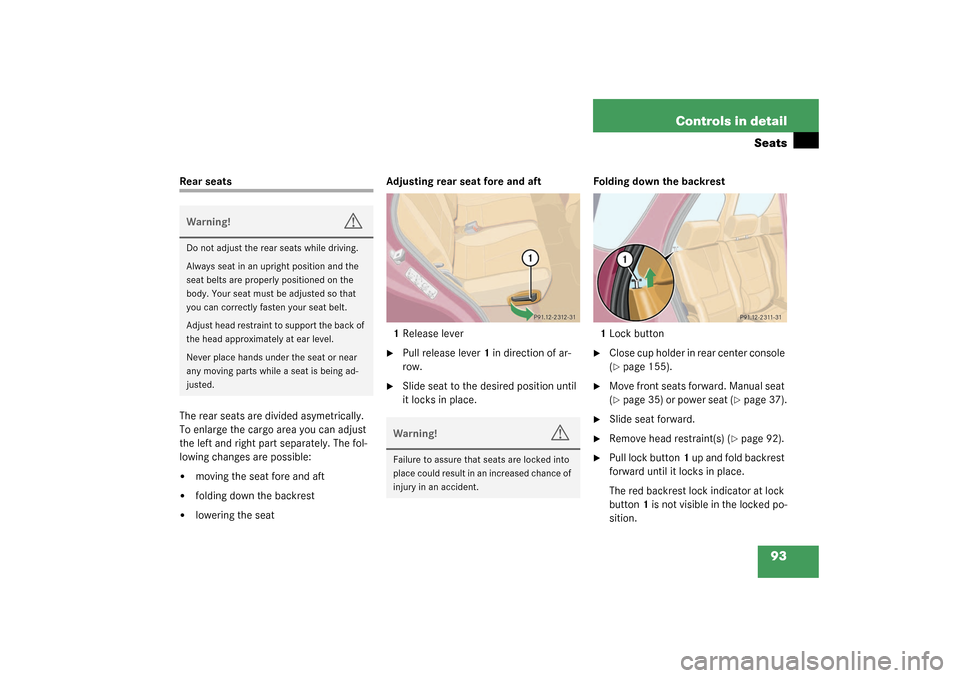
The rear seats are divided asymetrically.
To enlarge the cargo area you can adjust
the left and right part separately. The fol-
lowing changes are possible:�
moving the seat fore and aft
�
folding down the backrest
�
lowering the seatAdjusting rear seat fore and aft
1Release lever
�
Pull release lever1 in direction of ar-
row.
�
Slide seat to the desired position until
it locks in place.Folding down the backrest
1Lock button
�
Close cup holder in rear center console
(�page 155).
�
Move front seats forward. Manual seat
(�page 35) or power seat (
�page 37).
�
Slide seat forward.
�
Remove head restraint(s) (
�page 92).
�
Pull lock button1 up and fold backrest
forward until it locks in place.
The red backrest lock indicator at lock
button1 is not visible in the locked po-
sition.
Warning!
G
Do not adjust the rear seats while driving.
Always seat in an upright position and the
seat belts are properly positioned on the
body. Your seat must be adjusted so that
you can correctly fasten your seat belt.
Adjust head restraint to support the back of
the head approximately at ear level.
Never place hands under the seat or near
any moving parts while a seat is being ad-
justed.
Warning!
G
Failure to assure that seats are locked into
place could result in an increased chance of
injury in an accident.
Page 94 of 321

94 Controls in detailSeatsFolding up the backrest�
Pull lock button1 up and unfold back-
rest until it locks in place.
Make sure that the seat belt is not
caught in the seat.
�
Check for secure locking by pulling and
pushing on the backrest.
The red backrest lock indicator at lock
button1 is not visible in the locked po-
sition.
�
Install head restraint (
�page 92).
�
Slide seat rearward to desired position
(�page 93).
�
Adjust front seats to desired position.
Manual seats (
�page 35) and power
seats (
�page 37). Lowering the rear seat
1Release button
2Lever
3Release lever
�
Close cup holder in rear center console
(�page 155).
�
Move front seats forward. Manual seat
(�page 35) or power seat (
�page 37).
�
Press and hold release button1 to un-
lock lever2.
�
Pull lever2 in direction of arrow.
�
Pull release lever3 and push down rear
seat until it locks in place.
�
Fold down the backrest (
�page 93).
�
Adjust front seats to desired position.
Manual seats (
�page 35) and power
seats (
�page 37).
Folding up the rear seat
�
Move front seats forward. Manual seat
(�page 35) or power seat (
�page 37).
�
Pull release lever3 and raise rear seat
until it locks in place.Warning!
G
Failure to assure that seats are locked into
place could result in an increased chance of
injury in an accident.
Page 95 of 321
95 Controls in detail
Seats
Easy entry/exit feature*
The easy entry/exit feature allows access
to the third row seats*. The right cargo
floor plate must be removed (
�page 144).
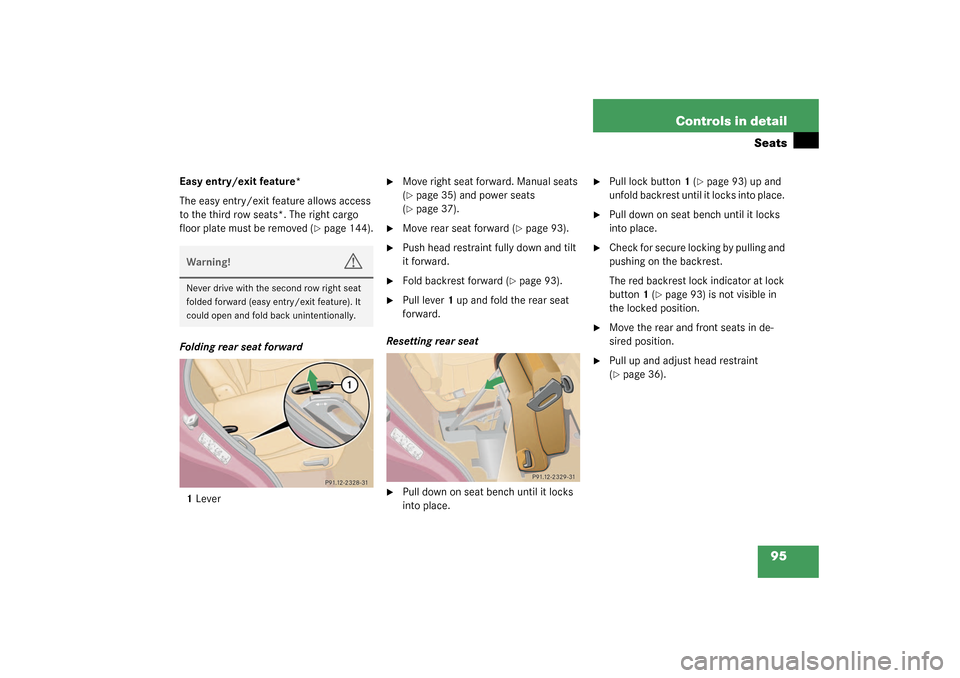
Folding rear seat forward
1Lever
�
Move right seat forward. Manual seats
(�page 35) and power seats
(�page 37).
�
Move rear seat forward (
�page 93).
�
Push head restraint fully down and tilt
it forward.
�
Fold backrest forward (
�page 93).
�
Pull lever1 up and fold the rear seat
forward.
Resetting rear seat
�
Pull down on seat bench until it locks
into place.
�
Pull lock button1 (
�page 93) up and
unfold backrest until it locks into place.
�
Pull down on seat bench until it locks
into place.
�
Check for secure locking by pulling and
pushing on the backrest.
The red backrest lock indicator at lock
button1 (
�page 93) is not visible in
the locked position.
�
Move the rear and front seats in de-
sired position.
�
Pull up and adjust head restraint
(�page 36).
Warning!
G
Never drive with the second row right seat
folded forward (easy entry/exit feature). It
could open and fold back unintentionally.
Page 100 of 321
100 Controls in detailMemory function*Storing positions in memory�
Adjust the seat (
�page 36) and exteri-
or rear view mirrors (�page 38) to the
desired position.
�
Push memory button2.
�
Release memory button and press one
of the position buttons1 within three
seconds.
All the settings are stored at the select-
ed position.
Recalling positions from memory�
Press and hold one of the position
buttons1 until seat and rear view mir-
rors have fully moved to the stored po-
sitions.Exterior rear view mirror parking posi-
tion (passenger side)
For easier parking, you can adjust the pas-
senger exterior rear view mirror so that you
can see the right rear wheel as soon as you
engage reverse gearR.
!Do not operate the power seats using
the memory button if the seat backrest
is in an excessively reclined position.
Doing so could cause damage to front
or rear seats.iReleasing the button immediately
stops movement to the stored posi-
tions.
Page 115 of 321
115 Controls in detail
Automatic transmission
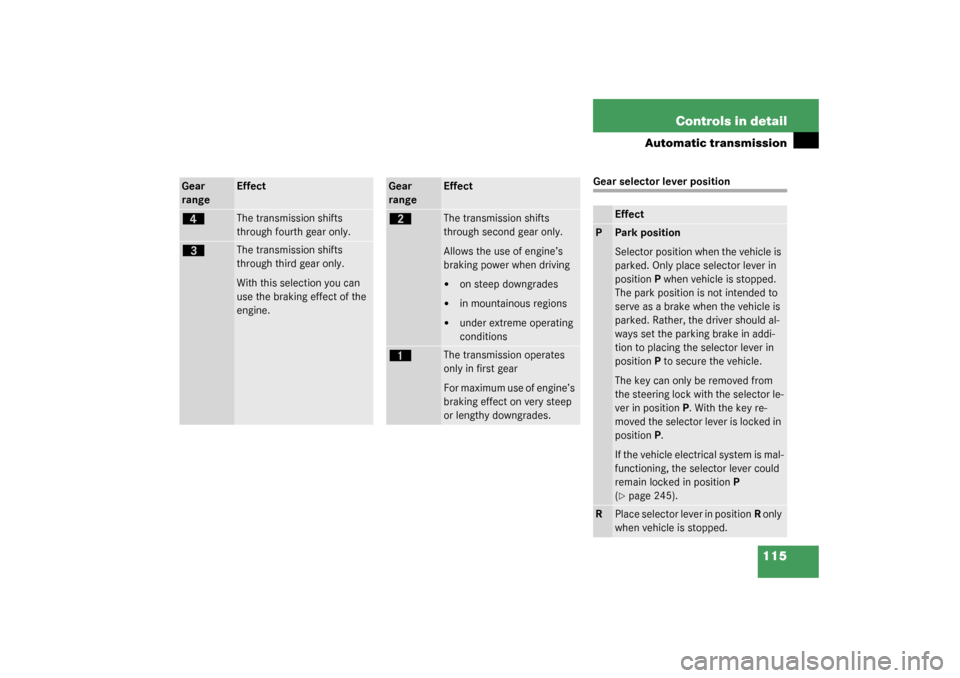
Gear selector lever position
Gear
range
Effect
é
The transmission shifts
through fourth gear only.
è
The transmission shifts
through third gear only.
With this selection you can
use the braking effect of the
engine.
Gear
range
Effect
ç
The transmission shifts
through second gear only.
Allows the use of engine’s
braking power when driving�
on steep downgrades
�
in mountainous regions
�
under extreme operating
conditions
æ
The transmission operates
only in first gear
For maximum use of engine’s
braking effect on very steep
or lengthy downgrades.
Effect
P
Park position
Selector position when the vehicle is
parked. Only place selector lever in
positionP when vehicle is stopped.
The park position is not intended to
serve as a brake when the vehicle is
parked. Rather, the driver should al-
ways set the parking brake in addi-
tion to placing the selector lever in
positionP to secure the vehicle.
The key can only be removed from
the steering lock with the selector le-
ver in positionP. With the key re-
moved the selector lever is locked in
positionP.
If the vehicle electrical system is mal-
functioning, the selector lever could
remain locked in positionP
(�page 245).
R
Place selector lever in positionR only
when vehicle is stopped.
Page 116 of 321
116 Controls in detailAutomatic transmission
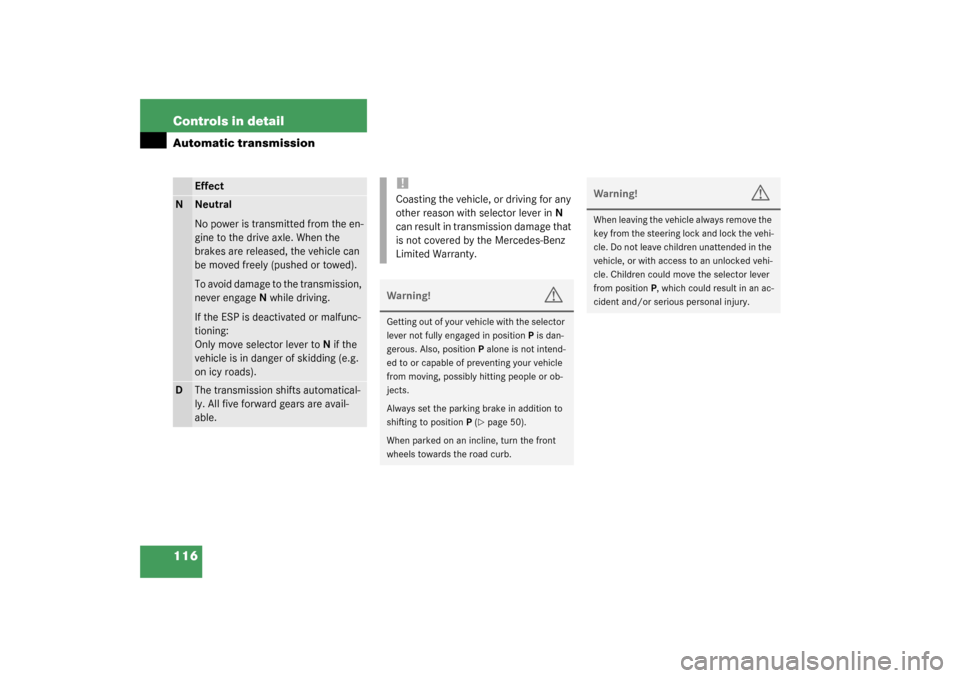
Effect
N
Neutral
No power is transmitted from the en-
gine to the drive axle. When the
brakes are released, the vehicle can
be moved freely (pushed or towed).
To avoid damage to the transmission,
never engageN while driving.
If the ESP is deactivated or malfunc-
tioning:
Only move selector lever toN if the
vehicle is in danger of skidding (e.g.
on icy roads).
D
The transmission shifts automatical-
ly. All five forward gears are avail-
able.
!Coasting the vehicle, or driving for any
other reason with selector lever inN
can result in transmission damage that
is not covered by the Mercedes-Benz
Limited Warranty.Warning!
G
Getting out of your vehicle with the selector
lever not fully engaged in positionP is dan-
gerous. Also, positionP alone is not intend-
ed to or capable of preventing your vehicle
from moving, possibly hitting people or ob-
jects.
Always set the parking brake in addition to
shifting to positionP (
�page 50).
When parked on an incline, turn the front
wheels towards the road curb.
Warning!
G
When leaving the vehicle always remove the
key from the steering lock and lock the vehi-
cle. Do not leave children unattended in the
vehicle, or with access to an unlocked vehi-
cle. Children could move the selector lever
from positionP, which could result in an ac-
cident and/or serious personal injury.